


 محول الفيديو النهائي
 مسجل الشاشة
 إصلاح الفيديو
الهائل لتحويل ميني DV إلى AVI متاح على نظامي التشغيل Windows و Mac OS
الغاية الأساسية من ملفات DV هي احتواء فيديو رقمي مُسجَّل بكاميرات الفيديو أو كاميرات التصوير الرقمية التي طرحتها شركتا باناسونيك وسوني في أواخر عام 1995. أصبح هذا الكودك وتنسيق الأشرطة مشهورَين لدورهما في الانتقال من الإنتاج التماثلي إلى الإنتاج الرقمي. لكن في الوقت الحالي لا يمكنك تشغيل ملف DV على مشغّل الوسائط الافتراضي لديك أو حتى مشاركته على الإنترنت بسهولة. لذلك إذا أردت تشغيل هذا الملف، عليك التفكير في تحويله إلى تنسيق مدعوم وقابل للتشغيل على نطاق واسع مثل AVI. إضافة إلى ذلك، التفاصيل التالية ستساعدك على فهم تنسيق DV وتحويل ملفات DV إلى AVI وتشغيلها على مشغّل وسائط إذا كنت لا ترغب في تحويلها.

الجزء 1. معركة التنسيقات: DV VS AVI
يتشابه ملف DV و AVI تقريبًا حيث يمكن أن يحتوي هذان التنسيقان على فيديو وصوت. ومع ذلك ، فإن الغرض منها وكيفية تخزينها لملف الوسائط بعيدان عن بعضهما البعض. في هذه الحالة ، دعنا نحدد الاختلافات بين DV و AVI من خلال مقارنة قدراتهم الثلاثة الفريدة.
مدى توافق التنسيق
يحظى تنسيق AVI بدعم أوسع وهو واحد من أكثر التنسيقات توافقًا لتشغيل الفيديو وتحريره. يمكن لهذا التنسيق احتواء تشغيل فيديو بطريقة متزامنة للصوت والصورة. في المقابل، ملف DV غير مدعوم من قبل العديد من برامج تحرير الفيديو ومشغّلات الوسائط على كلٍّ من الكمبيوتر الشخصي والماك. لهذا السبب يُعَد هذا من أهم الدوافع لاستخدام محوّل mini DV إلى AVI.
الضغط المدعوم
AVI هو تنسيق ملف غير ضياع لتخزين ملفات الوسائط بشكل قوي ومتقدم. ومع ذلك ، فإن هذا التنسيق سوف يستهلك الكثير من مساحة تخزين القرص الصلب لأنه غير مضغوط. بينما يستخدم DV ضغط الفقد للفيديو الخاص به ، لكن ملف الصوت غير مضغوط. السبب وراء فقدان التنسيق هو أنه يستخدم DCT كأساس للإطار بإطار المستخدم لضغط الفيديو.
جودة الصوت
يدعم ملف DV الصوتي بين متوسط وأفضل جودة صوت لأنه يستخدم عينات صوت PCM تصل إلى 48 كيلو هرتز بطول 20 بت للكلمة. يستخدم AVI جهاز PCM غير مضغوط وجودة الصوت ممتازة. ومع ذلك ، قد يكون من الأفضل إذا كنت تستخدم DV كجهاز تشفير لتحقيق ضغط DV-AVI.
الآن وقد فهمنا ماهية هذه التنسيقات ، فقد حان الوقت الآن لتحويل DV إلى AVI على جهاز Mac أو جهاز الكمبيوتر الخاص بك من خلال قراءة البرنامج التعليمي المقدم أدناه.
الجزء 2. أفضل أداة تحويل هائلة لتحويل DV إلى AVI على نظامي Mac و Windows
FVC Video Converter Ultimate
هل تواجه صعوبة في اختيار محوّل ينتج مخرجات ممتازة؟ إذا كان الأمر كذلك فنحن نود أن نوصيك باستخدام FVC Video Converter Ultimate. لقد أصبح هذا البرنامج أحد أكثر الخيارات شيوعًا لدى المستخدمين الذين يغيّرون صيغ الملفات بشكل متكرر. كما أن كلمة Ultimate ليست مجرد اسم، بل تنعكس أيضًا في الأداء الذي يقدّمه. وبوجه عام، هذا البرنامج خيار مثالي لكل من يحتاج إلى مساعدة في مشكلة تحويل الصيغ. قبل أن ننتقل إلى الخطوات، دعنا أولًا نتعرّف على المزايا التي ستحصل عليها عند تنزيل هذا البرنامج.

محول الفيديو النهائي
30000+ التنزيلات- قم بتحويل ملف فيديو DV الخاص بك إلى أكثر من 200 تنسيق متاح.
- يدعم جميع أنظمة التشغيل مثل الكمبيوتر الشخصي و Mac.
- يتضمن صندوق الأدوات الخاص به ميزات متقدمة مثل إنشاء ملفات GIF وتعديل مقاطع الفيديو والدمج والمزيد.
- واجهة سهلة الاستخدام للجميع.
- وهو يدعم تحويل أسرع بمقدار 30 مرة مقارنة بالمحولات الأخرى عبر الإنترنت أو دون الاتصال بالإنترنت.
تحميل مجانيلنظام Windows 7 أو أحدثتنزيل آمن
تحميل مجانيلنظام MacOS 10.7 أو أحدثتنزيل آمن
لذلك بدون مزيد من اللغط ، دعنا ننتقل إلى البرنامج التعليمي أدناه ، ودعنا نحول DV إلى AVI دون فقدان جودة الفيديو.
خطوات تحويل DV إلى AVI باستخدام FVC Video Converter Ultimate:
الخطوة 1. اضغط زر التنزيل الموجود في الأسفل، ثم اختر نظام التشغيل الذي تستخدمه حاليًا. ثبّت البرنامج على القرص لديك ثم انقر على Start Now للمتابعة إلى الخطوة التالية.
تحميل مجانيلنظام Windows 7 أو أحدثتنزيل آمن
تحميل مجانيلنظام MacOS 10.7 أو أحدثتنزيل آمن
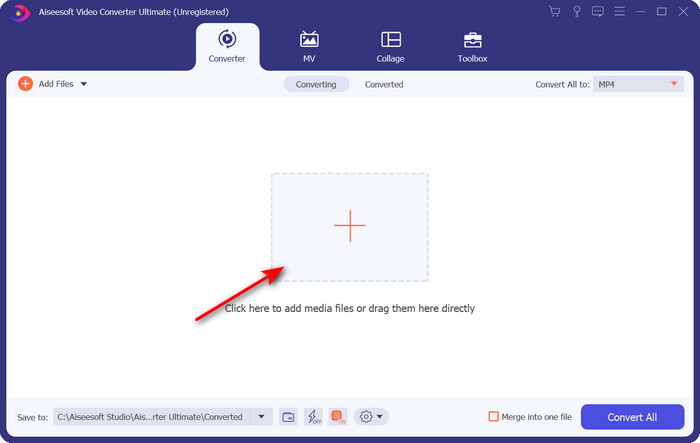
الخطوة 2. افتح البرنامج واضغط زر + الموجود في وسط واجهة الأداة. ستظهر لك نافذة مجلد؛ لرفع ملف .dv انقر على Open.
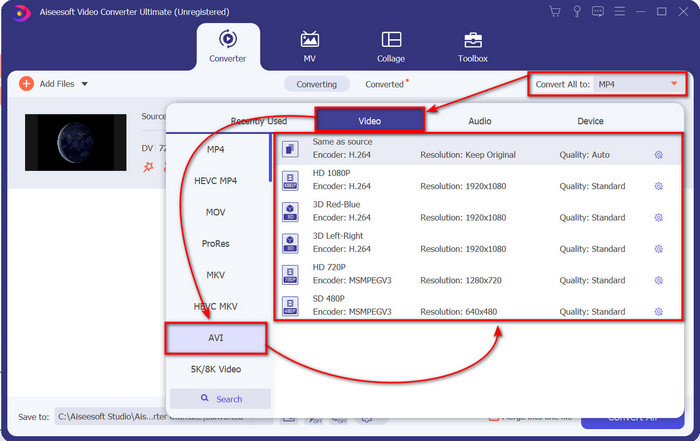
الخطوة 3. لتحويل ملف .dv إلى .avi، اضغط زر القائمة المنسدلة ثم ابحث عن تنسيق AVI.
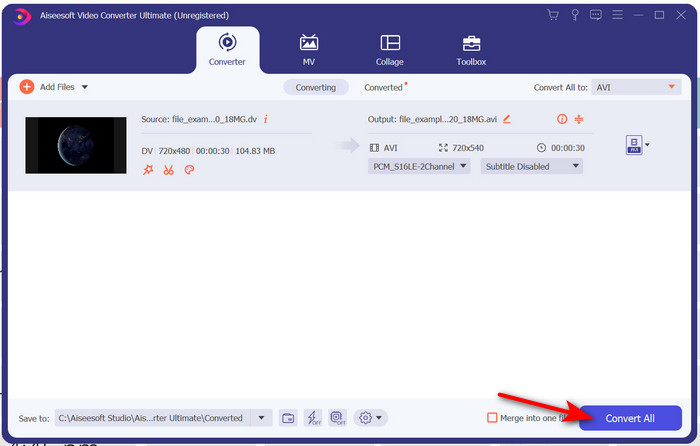
الخطوة 4. بعد اختيار التنسيق، حان الوقت الآن لتحويل DV إلى AVI عبر الضغط على Convert All.
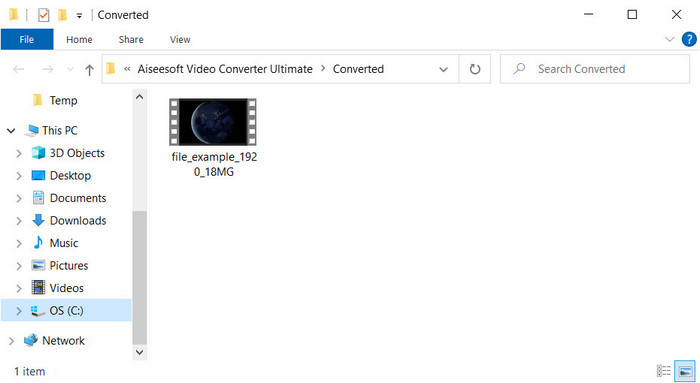
الخطوة 5. يستغرق تحويل الملف أقل من دقيقة، لذا لن تحتاج لانتظار طويل. ستظهر نافذة مجلد أخرى تحتوي على الملفات بعد تحويلها.
الجزء 3: قم بتشغيل ملفات DV الخاصة بك باستخدام مشغل فيديو DV المتوفر على أجهزة الكمبيوتر الشخصية وأجهزة Mac
لاعب بلو راي
لا تريد تحويل mini DV إلى AVI؟ إذن جرّب استخدام مشغّل الوسائط الذي يدعم هذا النوع من التنسيقات، وهو Blu-ray Player. يدعم هذا المشغّل أكثر من 300 تنسيق وكودك لتشغيل الفيديو على سطح المكتب دون أي عناء. كما يحتوي مشغّل الوسائط هذا على أحدث الميزات التي ينبغي أن يوفّرها أي مشغّل لتحسين تجربة المشاهدة لديك. يمكنك أيضًا استخدام قرص CD أو DVD أو Blu-ray لتشغيل الفيديو على الكمبيوتر، فهو باختصار مشغّل وسائط محمول يناسب الجميع. لذلك، إذا كنت لا تريد الدخول في متاعب تحويل ملف .dv، فاتبع الخطوات التالية لتشغيل الفيديو.
خطوات تشغيل ملف DV بمساعدة Blu-ray Player:
الخطوة 1. لتنزيل مشغّل الوسائط هذا، انقر الزر أدناه، ثم ثبّت المشغّل وقم بتشغيله.
تنزيل مجانيلنظام Windows 7 أو الأحدثتنزيل آمن
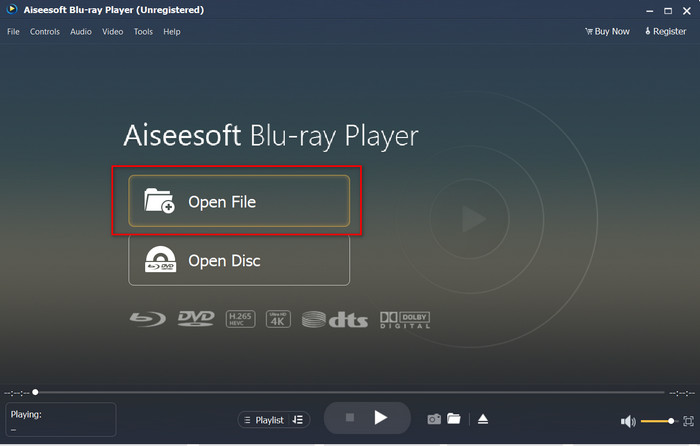
الخطوة 2. انقر على Open File ثم حدِّد ملف .dv من مجلدك واضغط على Open.
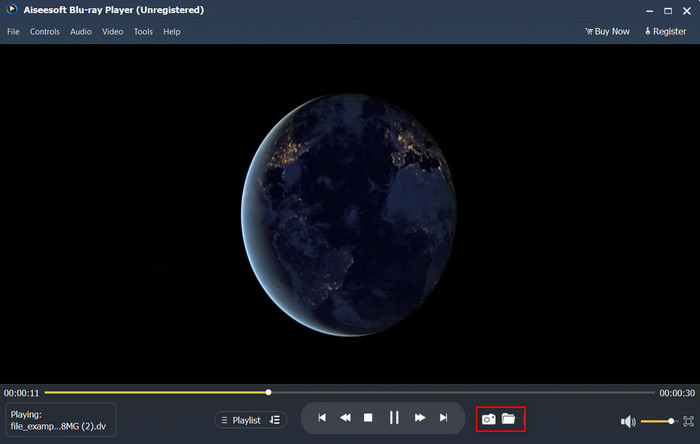
الخطوة 3. سيتم تشغيل ملف DV تلقائيًا على سطح مكتبك. بالإضافة إلى ذلك، انقر زر الكاميرا إذا أردت التقاط صورة شاشة لما تشاهده. وإذا أردت العثور على لقطات الشاشة التي التقطتها، انقر زر المجلد.
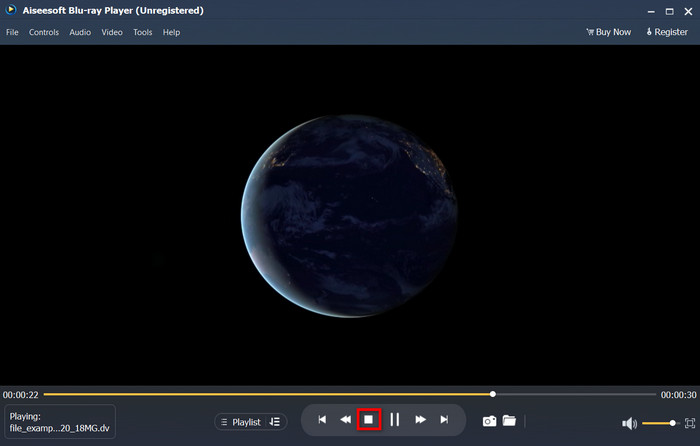
الخطوة 4. إذا رغبت في إيقاف مشاهدة ملف .dv، فانقر زر المكعّب.
الخطوة 5. لمشاهدة ملف آخر بتنسيق مختلف، كرّر الخطوتين 2 و3 ثم استمتع بمشاهدة الفيديو عالي الجودة.
ذات صلة:
الجزء 4. أسئلة وأجوبة حول تحويل DV إلى AVI
هل يؤدي تحويل ملفات DV إلى فقدان جودتها؟
يجب ألا يقلل تحويل أي تنسيق إلى إصدار جديد من جودة تنسيق الفيديو الأصلي. ومع ذلك ، فإن بعض المحولات لا تدعم تحويل جودة الفيديو 1080 أو 4K لأن الأمر سيستغرق بعض الوقت. لذلك ، إذا كنت لا تريد أن تفقد الجودة ، فاستخدم FVC Video Converter Ultimate. لا تتوقع شيئًا أقل من ذلك لأن هذا البرنامج لن يمس جودتك وسيوفر لك خيارًا لجعلها أعلى أو الاحتفاظ بها.
هل يمكنني تشغيل .dv على VLC؟
بالنسبة لليوم ، لا يدعم VLC تشغيل أي ملف .dv ؛ ومع ذلك ، إذا قمت بضغط AVI واستخدمت DV-AVI بدلاً من ذلك ، يمكنك تشغيل الفيديو على VLC.
ما التنسيق هو أفضل بديل لـ DV؟
إذا كنت تريد معرفة أفضل بديل لملف DV ، فحاول استخدام ملف MP4. يُعرف هذا التنسيق بالتنسيق متعدد الوظائف لأنه متوافق مع جميع أجهزة الكمبيوتر المكتبية والأجهزة إذا كانوا يرغبون في تشغيل الفيديو أو تحريره. لكن جودة MP4 و DV تختلف كثيرًا عن بعضها البعض إذا قمنا بمقارنتها. ومع ذلك ، فإن التوافق الحكيم MP4 هو أفضل تنسيق وسائط يمكنك استخدامه كبديل.
خاتمة
خلاصة القول، لقد عرضنا محوّلًا واحدًا فقط من DV إلى AVI لأنه البرنامج الوحيد الذي يقدّم أداءً مميّزًا في تحويل هذا النوع من الملفات. وأثناء متابعة قراءة المقال، اكتشفنا طريقة أخرى لتشغيل ملف .dv عبر استخدام مشغّل DV هذا. وبذلك قدّمنا أداتين للقيام بالمهمة، سواء أردت تشغيل ملف .dv أو تحويله. فإذا اخترت استخدام FVC Video Converter Ultimate فانتظر جودة مخرجات مذهلة في وقت قصير. أما إذا قرّرت تشغيل ملف DV مباشرة، فينبغي أن يكون خيارك الأول هو Blu-ray Player.
-
 أفضل 5 خيارات لتحويل MPEG إلى تنسيق AVI [متصل وغير متصل]
 هل تجد صعوبة في البحث عن محول MPEG؟ ثم حاول قراءة هذه المقالة بينما نتعلم كيفية تغيير تنسيق MPEG إلى AVI بخطوات مفصلة.
-
 4 محولات مذهلة لتحويل مجاني من WMV إلى AVI على الإنترنت [2021]
 هل تبحث عن محول من WMV إلى AVI؟ وإذا كان الأمر كذلك ، فحاول قراءة هذه المقالة أثناء قيامنا بفحص جميع الأدوات التي يمكننا العثور عليها على الويب لمساعدتك في هذه المهمة المذكورة.
-
 4 أحدث محولات عبر الإنترنت وغير متصل لتحويل F4V إلى تنسيق AVI
 لا & #039 ؛ هل لديك أي فكرة عن المحول الذي يجب أن تستخدمه لتحويل F4V إلى AVI أو أي تنسيق فيديو آخر؟ ثم اقرأ هذه المقالة عندما نتعلم كيفية التحويل باستخدام الأداة المتاحة.
