


 محول الفيديو النهائي
 مسجل الشاشة
 إصلاح الفيديو
دليل تفصيلي يجب مراعاته عند تحويل M2TS إلى FLV [دون اتصال بالإنترنت]
تُعد ملفات الوسائط مثل VOB وWMV وMOV جميعها أمثلة على M2TS. ما هو M2TS بالضبط؟ في الواقع، M2TS هو اختصار لـ MPEG-2 Transparent Stream. يمكن تخزين مقاطع الفيديو عالية الدقة على أقراص Blu-ray وبتنسيق AVCHD وغيرها داخل حاوية الملفات هذه. أما FLV فهو ملف ذو الامتداد .flv وهو اختصار لـ Flash Video. يشير امتداد ملف FLV إلى ملف فيديو أو صوت يتم نقله عبر الإنترنت باستخدام مشغّل Adobe Flash Player أو Adobe Air. قد يكون هذان النوعان من ملفات الفيديو غير مألوفين لديك، ولكن لكي تتمكّن من تحويل M2TS إلى FLV، تحتاج أولًا إلى معرفة استخدام كلٍّ من هذين التنسيقين وجميع الخيارات التي ينبغي مراعاتها أثناء التحويل. هيّئ نفسك وتنبّه لكل معلومة ستقرؤها.

الجزء 1. كيفية تحويل M2TS إلى FLV على نظامي التشغيل Windows و Mac
باستخدام Video Converter Ultimate ، يعد تحويل M2TS إلى FLV على كل من Windows و Mac أمرًا سهلاً. تعد MP4 / MOV / M4V / FLV / M4K / MTS / M2TS / ASF / MP3 / VOB / AAC مجرد عدد قليل من تنسيقات الفيديو والصوت الشائعة التي يدعمها هذا البرنامج القوي. يمكن تحويل مقاطع الفيديو عالية الدقة إلى تنسيقات شائعة مثل FLV في غضون ثوانٍ مع الحفاظ على جودتها الأصلية. يحتوي على ميزة تحويل الدُفعات التي تسمح لك بتحويل العديد من الملفات دون فقدان الجودة. بافتراض أنك قد تعرفت بالفعل على البرنامج ، يمكنك الآن معرفة جميع الخطوات اللازمة للتحويل بنجاح:
الخطوة 1: أولًا، انقر زر تنزيل مجاني أدناه لتنزيل البرنامج على جهاز الكمبيوتر لديك. ثم بعد الانتهاء من التنزيل، ثبّته على جهازك، وستظهر نافذة منبثقة على شاشتك تخبرك بأن البرنامج جاهز للاستخدام. انقر ابدأ الآن لتشغيل البرنامج.
تحميل مجانيلنظام Windows 7 أو أحدثتنزيل آمن
تحميل مجانيلنظام MacOS 10.7 أو أحدثتنزيل آمن
الخطوة 2: ثانيًا، بعد تشغيل البرنامج، سينقلك إلى الواجهة الرئيسية، وهي قائمة المحوِّل.
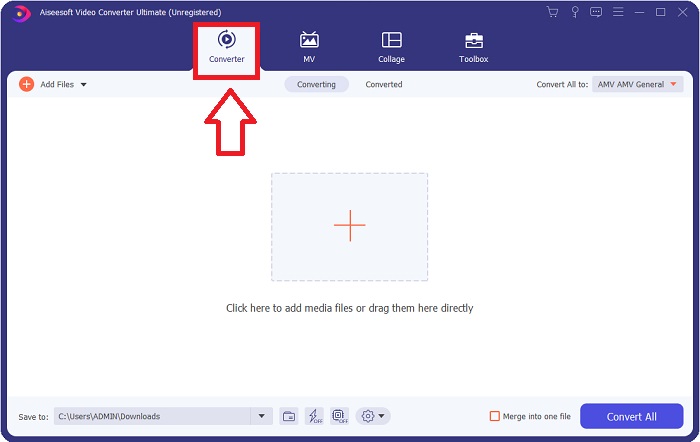
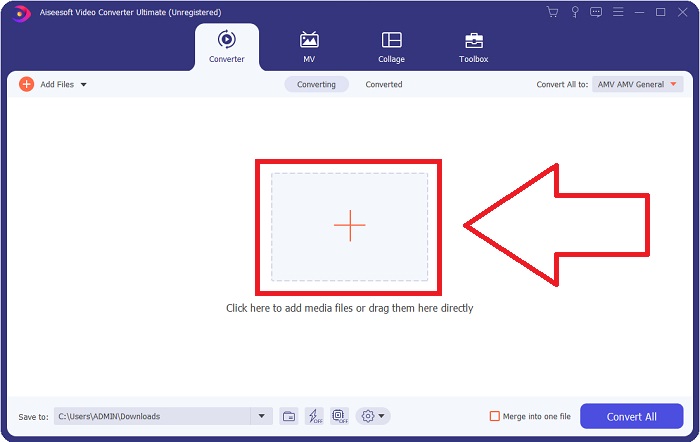
الخطوة 3: لتحميل ملف، انقر على أيقونة + في منتصف الواجهة، أو يمكنك سحب ملف فيديو من جهاز الكمبيوتر وإفلاته هناك.
الخطوة 4: بعد تحميل ملف M2TS إلى أداة التحويل، انتقل إلى قائمة تحويل الكل في الزاوية العلوية اليمنى من النافذة وانقر عليها. ستظهر نافذة جديدة تعرض جميع التنسيقات المختلفة التي يدعمها البرنامج، ثم اختر تنسيق فيديو FLV من قائمة فئة الفيديو.
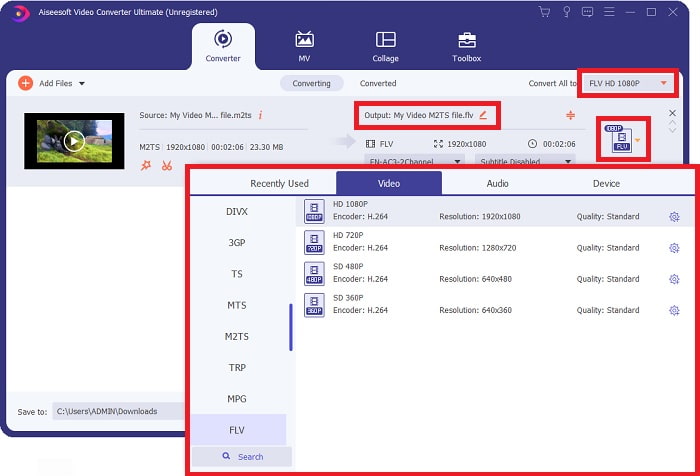
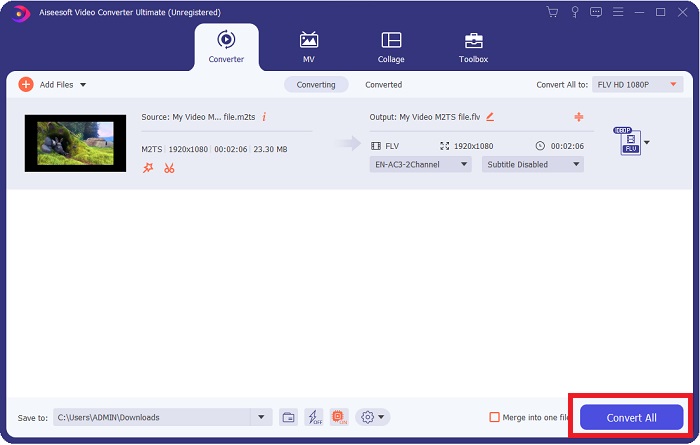
الخطوة 5: إذا كنت لا تزال غير قادر على تحديد الجودة المناسبة لأن الجودة التي تبحث عنها غير متوفرة ضمن الخيارات، يمكنك النقر على أيقونة الترس وتغيير جميع الإعدادات مثل معدل البت والدقة ومعدل الإطار وغير ذلك. عندما تصبح راضيًا عن جميع التغييرات، يمكنك الآن النقر على تحويل الكل لبدء تحويل ملف الفيديو.
الجزء 2. طرق أخرى مجانية وفعالة لتحويل M2TS إلى FLV عبر الإنترنت
يُعد محول الفيديو المجاني عبر الإنترنت أداة إلكترونية مناسبة لتحويل تنسيقات الفيديو مثل FLV وMP4 وMOV وMKV وMTS وASF وVOB وغيرها، وبسرعة أعلى من العديد من منصات التحويل الأخرى. وعلى الرغم من قِصر عملية التحويل، فإن هذه الأداة عبر الإنترنت تُصدِّر ملف فيديو دون أي مشاكل في الجودة. ومن دون إطالة، لننتقل الآن إلى جميع الخطوات التي تحتاج إلى اتباعها:
الخطوة 1: انقر على هذا الرابط للانتقال إلى الموقع الرئيسي لأداة محول الفيديو المجاني عبر الإنترنت.
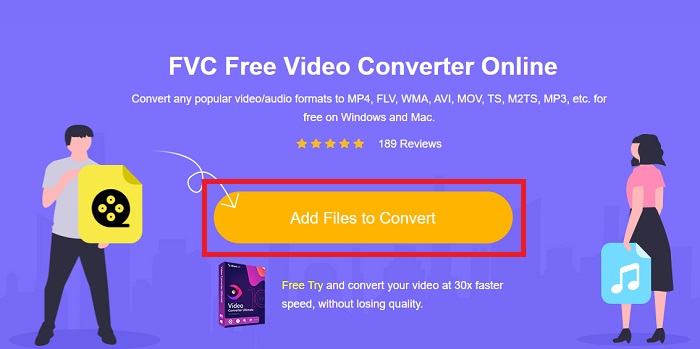
الخطوة 2: ثم انقر زر إضافة ملفات للتحويل لتحميل ملف الفيديو M2TS الذي تريد تحويله إلى تنسيق فيديو FLV.
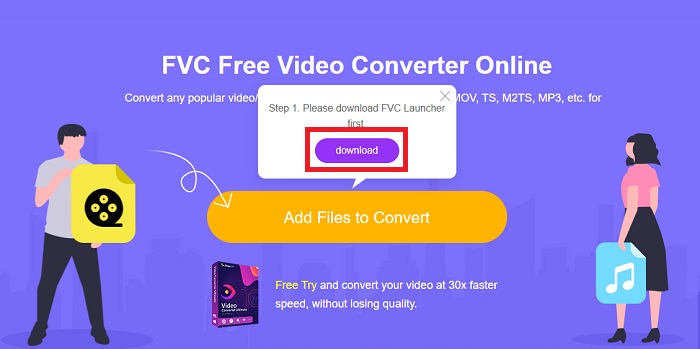
الخطوة 3: بعد تحميل الملف، سترى نافذة منبثقة أعلى الشاشة تطلب الإذن بتنزيل المشغِّل (اللانشر) اللازم لاستخدام الأداة عبر الإنترنت. انقر المشغِّل الذي تم تنزيله لتثبيته على جهاز الكمبيوتر وابدأ التحويل.
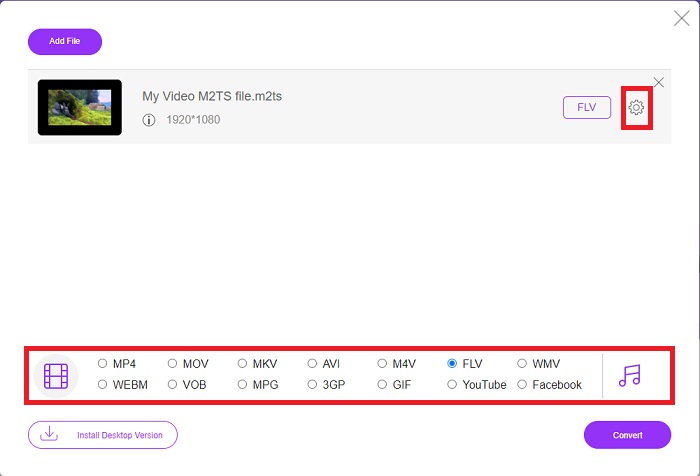
الخطوة 4: اختر تنسيق الفيديو FLV من بين مجموعة التنسيقات أسفل الواجهة. كما يمكنك تعديل جودة مخرجات الفيديو من خلال النقر على أيقونة الترس بجوار تنسيق الفيديو الذي اخترته. ستظهر نافذة أخرى تحتوي على إعدادات معدل البت والدقة ومعدل الإطار. ابدأ بتعديلها، وبمجرد الانتهاء انقر موافق ثم تابع عملية التحويل.
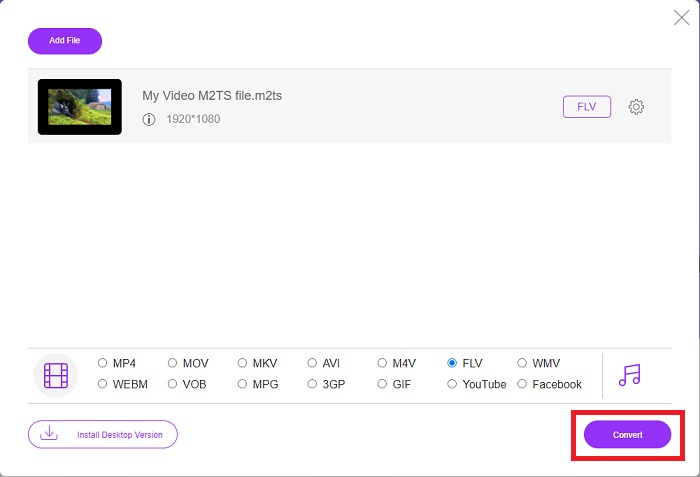
الخطوة 5: يمكنك الآن تحويل الملف بالنقر على زر تحويل في أسفل يمين النافذة.
الجزء 3. مقارنة بين M2TS و FLV
يتم استخدام تنسيق حاوية الفيديو M2TS لتخزين مقاطع الفيديو عالية الدقة على أقراص Blu-ray و AVCHD ومحركات الأقراص الثابتة والأجهزة الأخرى التي تدعم تدفق نقل MPEG-2. Blu-ray Disc Audio-Video (BDAV) هو الاسم الذي يطلق على هذا التنسيق نظرًا لاستخدامه على نطاق واسع في أقراص Blu-ray. من أجل تقليل حجم البيانات. بدلاً من استخدام تدفقات نقل CBR ، تُستخدم تدفقات نقل VBR (معدل ثابت) بسبب محتوى الصوت والفيديو عالي الجودة الموجود في ملفات M2TS ؛ VideoStudio Pro هو تطبيق ممتاز لتحرير ملفات M2TS.
| امتداد الملف | M2TS | FLV |
| نوع الملف | Blu-ray Disc Audio-Video MPEG-2 Transport Stream | ملف فلاش فيديو |
| طورت بواسطة | جمعية قرص بلو راي | نظام أدوبي |
| الايجابيات | ملف فيديو Blu-ray BDAV عالي الوضوح مستند إلى تدفق نقل MPEG-2 ؛ تستخدم لتخزين بيانات الفيديو على أقراص Blu-ray ؛ يدعم دقة 720p / 1080i. | تنسيق فيديو شائع ، يتم استخدامه بواسطة عشرات الآلاف من مواقع الويب ، ويقدم مجموعة واسعة من الميزات الإضافية ، وينتج أحجام ملفات أصغر من معظم تنسيقات الفيديو الأخرى. ملفات FLV ممتازة لتقديم فيديو عالي الجودة بمعدل سريع. |
| سلبيات | لا يمكن أن يحتوي ملف m2ts على فصول. يتم الاحتفاظ بها في مكان آخر في بنية مجلد Bluray. | من الضروري أن يكون لديك مكونات فلاش إضافية مثبتة لتشغيل ملفات فلاش على الإنترنت. |
| تفتح البرامج تنسيق الفيديو | ◆ ALLPlayer ◆ MPlayer ◆ مشغل الميديا VLC ◆ بوت بلاير | ◆ مشغل الميديا VLC ◆ برنامج Adobe Flash Player |
الجزء 4. أسئلة وأجوبة حول تحويل M2TS إلى FLV
كيف أقوم بتشغيل ملف M2TS؟
يمكن لـ Windows Media Player و SMPlayer و 5KPlayer و Splash و File Viewer Plus تشغيل ملفات M2TS. تتوافق بعض مشغلات M2TS مع مجموعة متنوعة من أنظمة التشغيل. يمكن لمشغل وسائط VideoLAN VLC ، على سبيل المثال ، تشغيل ملفات M2TS على أنظمة التشغيل Windows و Mac و Linux.
هل تنسيق FLV هو تنسيق تسجيل مناسب؟
يستخدم Adobe Flash Player تنسيق ملف FLV. وهو أحد أشهر تنسيقات الفيديو وأكثرها مرونة، ويدعم جميع منصات الفيديو والمتصفحات تقريبًا. تستفيد منصات بث الفيديو عبر الإنترنت مثل YouTube من استخدام تنسيق FLV. كما يسهل تنزيلها بفضل صغر حجم ملفاتها. انقر هنا للتعرّف على مزيد من مسجِّلات FLV المتاحة.
هل لا يزال FLV مستخدمًا؟
تعد مقاطع الفيديو وإعلانات البانر والرسوم المتحركة والبث المباشر كلها خيارات. لقد مضى وقت طويل على أفلام الفلاش ، وهم يستخدمون المقاطع على الإنترنت. ومع ذلك ، على الرغم من أن تنسيق FLV في طريقه للخروج ، إلا أنه يظل معيارًا لمستخدمي الإنترنت في جميع أنحاء العالم.
خاتمة
لاختتام المناقشة ، نعتقد جميعًا أنه لا يوجد نوع من المحولات المتاحة لتحويل M2TS إلى FLV. ومع ذلك ، ستصحبك هذه المقالة بعد كل شيء من خلال تقديم أفضل محولين تحتاج إلى التفكير في استخدامهما ، Free Video Converter Online أو Video Converter Ultimate. لا يمكنك طلب هذين المحولين لأنه يوفر لك جميع الأدوات والميزات الاحترافية الممكنة التي يمكن أن تساعدك من تحويل ملف إلى تحويل ملف إلى مظهر أفضل.
-
 2 أسهل الطرق لتحويل ملفات WMV إلى FLV على جهاز الكمبيوتر / جهاز Mac
 كيف يمكنك تحويل WMV إلى FLV؟ أولاً ، تحتاج إلى قراءة توصياتنا والعثور على طريقتك المفضلة ، ثم اتباع دليلنا للقيام بالمهمة بسرعة.
-
 3 حلول حول كيفية تحويل FLV إلى PSP بلا خسارة
 كيف يتم تحويل FLV إلى PSP؟ هنا سوف تحصل على دليل خطوة بخطوة لتحويل مقاطع فيديو Flash إلى تنسيقات PSP المدعومة (WMV ، MP4 ، AVI ، FLV ، إلخ) على نظامي التشغيل Windows و Mac.
-
 طريقتان لتحويل صوت FLV إلى WMA [مجانًا وعلى الإنترنت]
 هل تريد استخراج صوت WMA من فيديو FLV؟ فيما يلي مستخرجان صوتيان مجانيان من WMA لتحويل FLV (Flash Video) إلى WMA (Windows Media Audio) بسرعة تحويل سريعة على نظامي التشغيل Mac OS X و Windows 10/8/7.
