


 محول الفيديو النهائي
 مسجل الشاشة
 إصلاح الفيديو
2 موصى به من محولات MXF إلى WMV المتاحة على الإنترنت وغير متصل
Many users ask how to convert MXF to WMV because they want to stream the video online. Unlike MXF files, WMV is more likely to distribute video content and store it on HD DVD or Blu-ray. Instead of reading a million articles about the MXF converter, why don't you continue reading this first? To know how to convert your MXF files without quality with the help of the two options below.

الجزء 1. مقدمة موجزة عن MXF و WMV
قبل أن نواصل تحويل MXF إلى WMV ، دعنا نلقي نظرة خاطفة على هذين التنسيقين ونعرف سبب تحويل التنسيق.
تنسيق تبادل المواد ، المعروف باسم MXF ، هو تنسيق وسائط يحتوي على شريط فيديو بديل. لكن بدلاً من ذلك ، على شريط ، يتم الآن رقمنتها. يعمل هذا التنسيق بشكل أفضل من خلال تضمين البيانات الوصفية والرمز الزمني حول تفاصيل الفيديو والصوت. يتم استخدامه بشكل شائع لنقل الإعلانات على محطات التلفزيون أو أرشفة برامج البث التلفزيوني.
بينما يحتوي ملف WMV أو Windows Media Video على تشابه مع تنسيق ASF لأنه يلتف على تدفق البتات لملف الوسائط. هذا التنسيق هو بلا شك أصغر من MXF لأنه يستخدم ضغطًا بدون فقد لضغط حجم الملف. ومع ذلك ، لن تتأثر جودة ذلك. علاوة على ذلك ، تم تصنيع WMV في البداية للبث عبر الإنترنت ، ولكن مع الإصدار الجديد ، WMV9 ، تم تكييفه مع أقراص HD DVD وأقراص Blu-ray.
تحتاج إلى تحويل ملف MXF الخاص بك لأنه من الأسهل بكثير تشغيل مقاطع الفيديو بتنسيق WMV ، خاصة على Windows ، منه على MXF. للتوزيع عبر الإنترنت ، يعد WMV أفضل من ملف MXF. ولكن إذا كنت تريد الحصول على رمز زمني وسجل بيانات وصفية ، فستوفر لك MXF هذا الخيار.
الجزء 2. تحويل MXF إلى WMV باستخدام برنامج Amazingly Ultimate Converter على نظامي التشغيل Windows و Mac
FVC Video Converter Ultimate provides the best conversion process on your MXF to WMV with lossless quality. Other than that, you can encode the MXF to AVI, MOV, MKV, MP4, or more without degrading the quality of the raw MXF file. This tool is more than a converter because you can do many amazing things here, like editing, etc. Also, it is compatible with all of the desktop programs like Windows and Mac with the same features. So now, do you want to know how to use this phenomenal converter? If so, you must copy the steps below and learn how to convert.
Steps on How to Convert MXF to WMV with the FVC Video Converter Ultimate:
Step 1. First and foremost, you must download the software on your desktop by clicking the download button. Follow the installation promptly and launch it.
تحميل مجانيلنظام Windows 7 أو أحدثتنزيل آمن
تحميل مجانيلنظام MacOS 10.7 أو أحدثتنزيل آمن
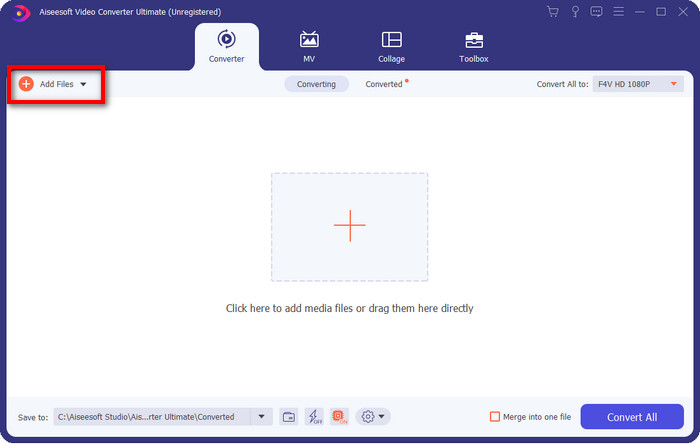
Step 2. Upload the file by hitting the Add Files; on the folder, pick the MXF file you want to convert and press Open.
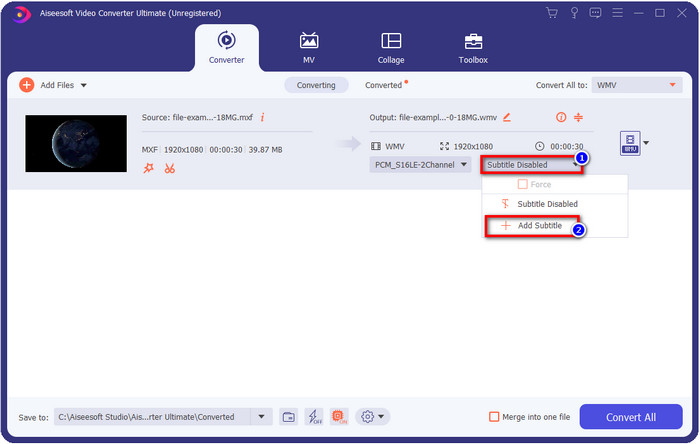
Do you want to add subtitles to your video? If so, click the drop-down button and press Add Subtitle. Find the subtitle file on your desktop folder and press Open.
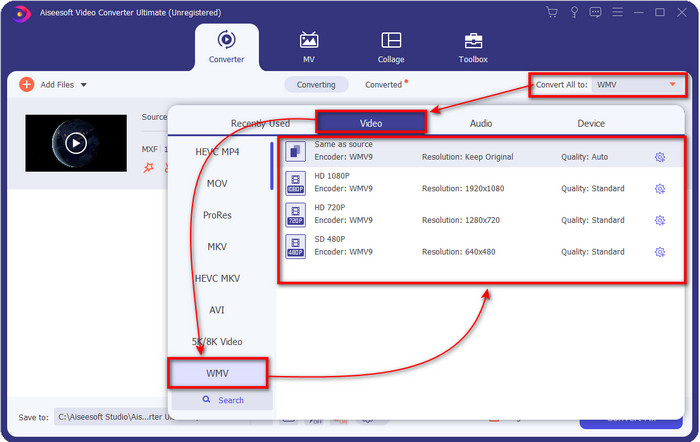
Step 3. Let's change the format into WMV by clicking the Convert All to.
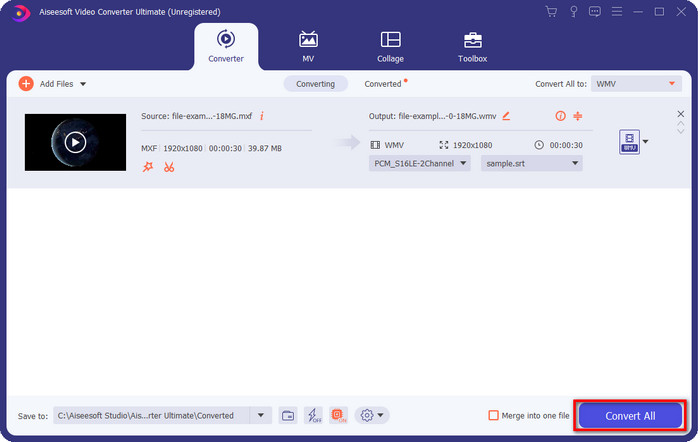
Step 4. After all the steps, it is now time to convert the file into WMV by clicking the Convert All.
الايجابيات
- وهو يدعم تنسيقًا كبيرًا لتحويل MXF إلى WMV و FLV و MKV و AVI و MOV والمزيد.
- متوفر في جميع أنظمة التشغيل للتنزيل على Windows و Mac.
- وهو يدعم ميزات التحرير الفريدة لجعل الفيديو الخاص بك فريدًا وجذابًا أكثر من غيره.
- جرب عملية التحويل الأسرع والأسرع مع FVC Video Converter Ultimate.
سلبيات
- مطلوب شراء البرنامج.
- قم بتنزيل البرنامج على سطح المكتب قبل أن تتمكن من استخدامه.
الجزء 3. الأسرع والأسهل لتحويل MXF إلى WMV من خلال الخدمة عبر الإنترنت
FVC Free Online Video Converter is a top-notch video converter you can easily access on the web. You can upload an average amount of formats here like MP4, MOV, MKV, FLV, AVI, and other video formats. Unlike other video converters online, there are no limitations on how many or how big the file size you want to convert. However, you can't perform the batch conversion here because it is unsupported. Let's apply the following steps below to convert MXF to WMV.
Steps on How to Convert MXF to WMV with the FVC Free Video Converter Online:
Step 1. Click this link to open the main domain of the website.
Step 2. Press the Add Files to Convert to open the folder where you locate your MXF file. Click the file and press Open.
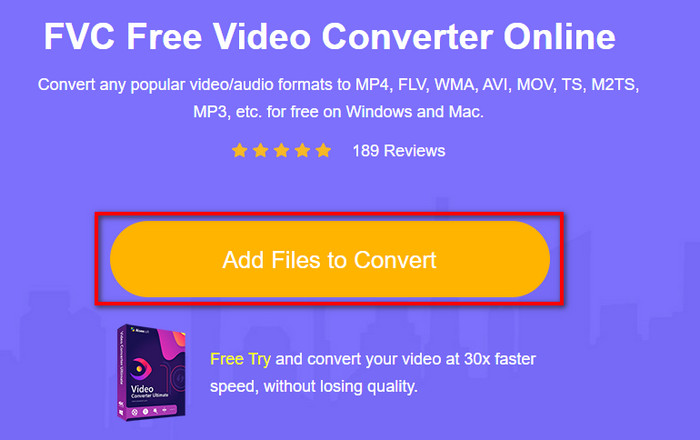
Step 3. Choose the format you want to convert under the setlist on the new web UI or click WMV.
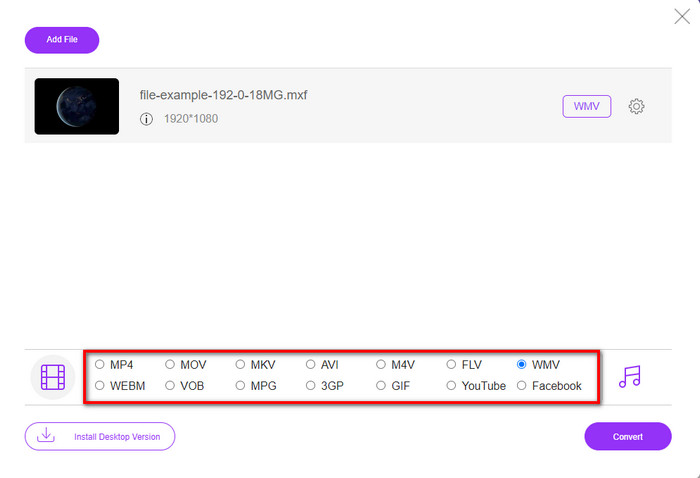
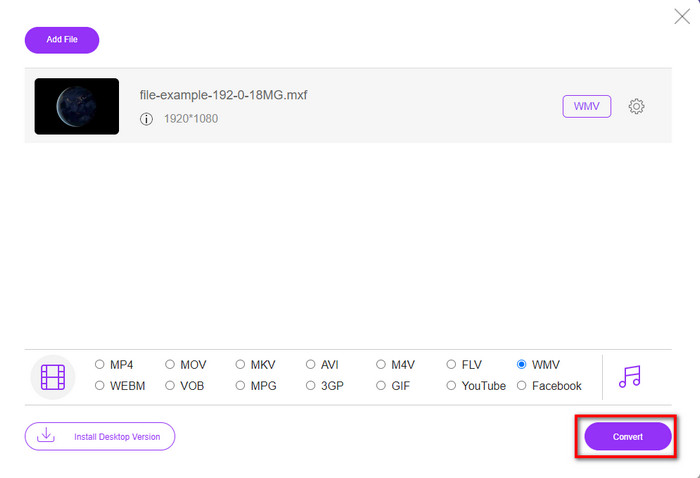
Step 4. Start converting the format by clicking Convert, and the process will begin.
الايجابيات
- إنها واحدة من أكثر الطرق أمانًا لتحويل MXF إلى تنسيقات WMV و AVI و MOV و MP4 وغيرها من التنسيقات الشهيرة.
- يمكنك الوصول إليه من متصفحك المفضل في أي وقت وفي أي مكان.
- مجاني وخفيف الوزن.
سلبيات
- ستحتاج إلى اتصال بالإنترنت لاستخدامه.
- لا يدعم التحويل السريع والدُفعي
الجزء 4. أسئلة وأجوبة حول تحويل MXF إلى WMV
لماذا ملفات MXF كبيرة جدًا؟
One of the reasons why MXF files are large is the metadata it contains that adds size to the file. But you can compress the file to make it smaller in size by reading this article and learning how to compress MXF files.
هل يستغرق تحويل ملفات MXF وقتًا طويلاً؟
It depends on the converter you are using. For example, if you are currently using a web tool, it will depend on your internet. Using an MXF converter online takes a lot more time than using a desktop converter you can download on your PC or Mac. So, if you want to experience a lightning-fast conversion, you must use the FVC Video Converter Ultimate.
هل تنسيقات MOV و MXF متطابقة؟
If we were to talk about what they contain, MXF and MOV have almost the same element they contain. For example, video, audio, and metadata, but MXF provides much more detailed information about the file than MOV, especially metadata and time-code. However, MOV is much easier to use than the MXF. In many cases, many users ask if they can convert their MXF to MOV. So, if you are one of them, you must click this link and read the full details about the MXF to MOV converters.
خاتمة
To end the discussion, it is now easier for us to know the converters, whether web-based or desktop, to convert MXF to WMV. Since both of the converters provide phenomenal output to you, but if you want to have a more professional result, you must go with the FVC Video Converter Ultimate. There is no doubt that this tool will help you with all of your converting problems. And if you ever need to reverse a video, merge, enhance, and more, this is your only solution to all said problems.
-
 4 طرق مجانية لتحويل كاميرا الفيديو MXF إلى MP4 للتشغيل العالمي
 هذا المنشور هو الدليل التفصيلي لتحويل MXF إلى MP4 على الكمبيوتر. يمكنك الحصول على 4 محولات مجانية من MXF إلى MP4 لتحويل كاميرا الفيديو MXF إلى MP4 بخطوات بسيطة.
-
 4 محولات من أعلى MXF لتحويل MXF إلى AVI [مجاني ومدفوع]
 ما هو ملف MXF؟ كيفية تحويل MXF إلى AVI؟ هذه هي الأسئلة القليلة التي نجيب عليها. لذا ، إذا كان لديك نفس السؤال ، فاقرأ هذا المقال.
-
 كيفية تحويل MXF إلى FLV باستخدام طرق مختلفة [مثبت]
 هل حاولت تحويل MXF إلى FLV على بعض المحولات الغريبة المتاحة عبر الإنترنت. ومع ذلك ، لا يمكنك الحصول على الجودة التي تريدها على الفيديو الخاص بك؟ نوصيك بقراءة هذه المقالة لمعرفة المزيد عن التحويل من MXF إلى FLV.
