


 محول الفيديو النهائي
 مسجل الشاشة
 إصلاح الفيديو
[مراجعة كاملة] 5 أحدث أدوات تقطيع MP3 متوفرة على نظام التشغيل Windows / Mac / عبر الإنترنت
غالبًا ما نرغب في اقتطاع جزء من الصوت الذي نستمع إليه وتعيينه كنغمة رنين، لإبراز الجزء المهم أو حذف التفاصيل غير الضرورية من المقطع. ورغم توفّر عدد كبير من أدوات القص على مختلف المنصّات، فإن بعضها لا يمكن الوثوق به. لذلك، سنعرض لك اليوم أدوات القص التي وجدناها في السوق ويمكنك الاعتماد عليها، لأننا جرّبنا كل هذه الأدوات بأنفسنا للتأكد من خلوّها من البرمجيات الخبيثة وموثوقيتها. قبل أن نختارها، اتّبعنا معايير صارمة وعالية المستوى من أجل المستخدمين الذين يحتاجون إلى أداة قص يمكن الاعتماد عليها. ولتجعل تصفحك على الإنترنت بأقصى سرعة وفاعلية، قدّمنا لك أدناه خمسة برامج قص MP3 جاهزة للقيام بمهمة قص أي صيغة صوتية.

الجزء 1. 2 برامج قطع MP3 غير المتصلة بنظامي التشغيل Windows و Mac
1. Video Converter Ultimate - Best MP3 Cutter [موصى به بشدة]
أفضل أداة لقص ملفات MP3 في هذه القائمة هي Video Converter Ultimate، والتي تتيح للمستخدمين قص أي ملف صوتي بسهولة تامة. بمساعدة هذه الأداة الاحترافية، يمكنك تقليم الصوت لإزالة الأجزاء غير المرغوبة، بل ويمكنك أيضًا دمج عدّة مقاطع صوتية مقصوصة في ملف واحد، ورفع مستوى الصوت إذا شعرت أن شدّة الصوت منخفضة بعض الشيء. علاوة على ذلك، يوفّر هذا البرنامج سرعة معالجة فائقة مع الحفاظ في الوقت نفسه على الجودة الأصلية للصوت.
على عكس أي أدوات قطع ، تدعم هذه الأداة مجموعة واسعة من التنسيقات ، ليس فقط MP3 ولكن أيضًا FLAC و M4R و M4A و OGG و MKA و WAV و WMA والمزيد ، وبالفعل يتم دعم ملفك الصوتي هنا ليتم قصه. ربما لا تعرف كيفية قص ملفك الصوتي واستخدامه لتلبية احتياجاتك الآن. اليوم هو يومك المحظوظ لأننا سنعلمك كيفية استخدام قاطع MP3 وصانع النغمات مجانًا باتباع البرنامج التعليمي أدناه.
الخطوة 1. قم بتنزيل أداة قص الصوت على جهاز الكمبيوتر من خلال النقر فوق زر التنزيل أدناه. اختر ما إذا كنت تستخدم نظام Windows أو Mac، ثم ثبّت البرنامج مباشرة وشغّله. تذكّر أنه من الأفضل أن تتعرّف على واجهة الأداة أولًا حتى يكون من السهل عليك متابعة الخطوات التالية.
تحميل مجانيلنظام Windows 7 أو أحدثتنزيل آمن
تحميل مجانيلنظام MacOS 10.7 أو أحدثتنزيل آمن
الخطوة 2. اسحب ملف الصوت الذي تريد قصّه إلى واجهة البرنامج، أو يمكنك النقر فوق Add Files وتحديد ملف الصوت من مجلّد الكمبيوتر الذي سيظهر، ثم اضغط على Open للانتقال إلى الخطوة التالية.
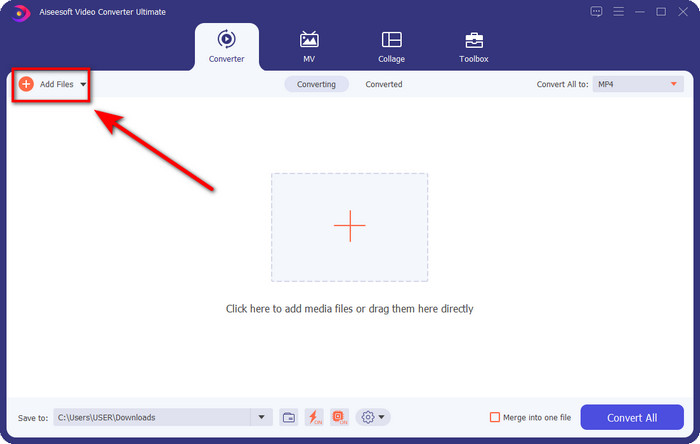
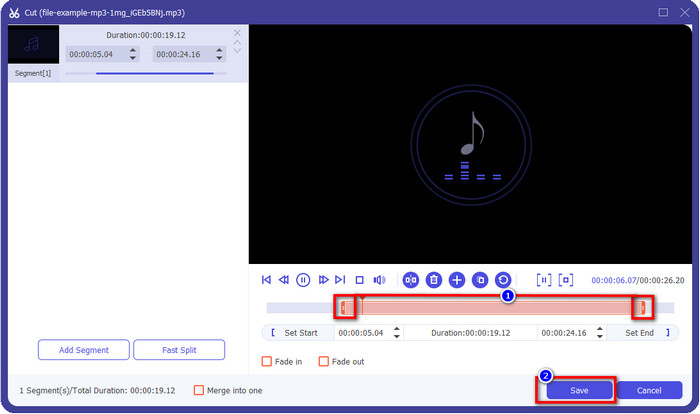
الخطوة 3. بعد إدراج ملف الصوت، حان الوقت الآن للنقر فوق زر المقص. اسحب مؤشري Play In وPlay Out لتحديد الطول الذي تريده من المقطع الصوتي. تذكّر أن الجزء المظلّل بين مؤشري Play In وPlay Out هو الجزء الوحيد الذي سيُحتفظ به. بعد ذلك اضغط على Save لقص الصوت.
اختياري. هل تحتاج إلى تعزيز مستوى الصوت؟ إذا كان الأمر كذلك، انقر فوق زر العصا السحرية، ثم اضبط منزلق مستوى الصوت برفعه إلى الأعلى، واضغط على OK للحفظ.
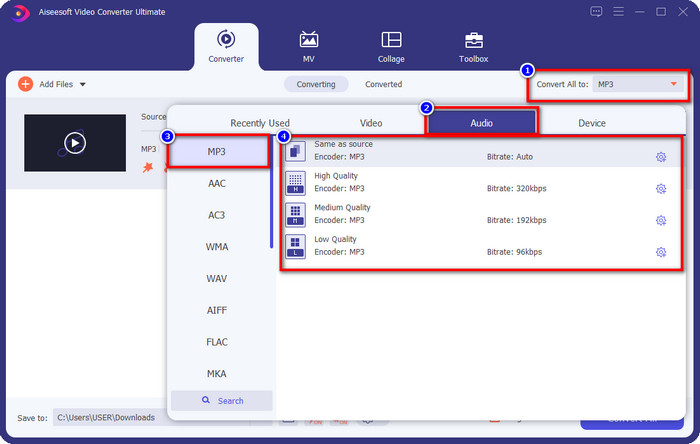
الخطوة 4. انتقل إلى Convert All to, Audio واضبط الصيغة على MP3. مع أنك لا تقوم بالتحويل فعليًا، تأكّد من أن الاسم الظاهر تحت Convert All to هو MP3 وليس صيغة أخرى لتجنّب تغيير تنسيق الملف إلى صيغة مختلفة.
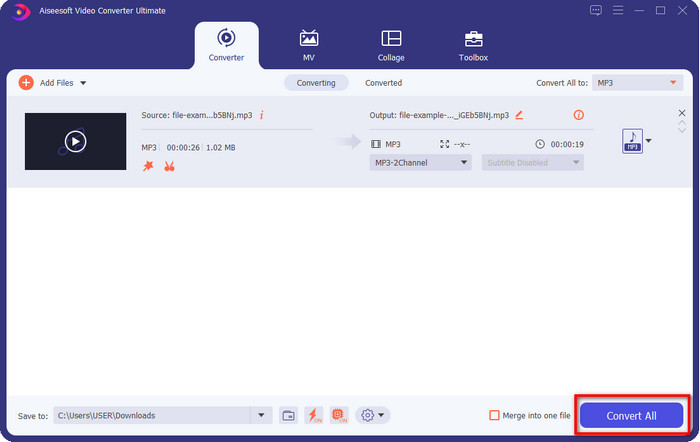
الخطوة 5. من خلال النقر على Convert All سيبدأ حفظ المقطع الصوتي بعد قصّه. الآن أصبحت تملك ملفًا صوتيًا مقصوصًا باستخدام أفضل أداة مجانية لقص MP3 بهذه السهولة.
الايجابيات
- يمكنه قطع الصوت بأسرع ما يمكن ومعالجته في أقل من ثانية.
- الميزات المتقدمة متاحة لتحسين قوة الصوت.
- يدعم جميع أنظمة التشغيل مثل Windows أو Mac.
- يمكن دمج ملفات صوتية متعددة مع دمج الصوت لهذه الأداة.
سلبيات
- مطلوب شراء الأداة.
2. الجرأة
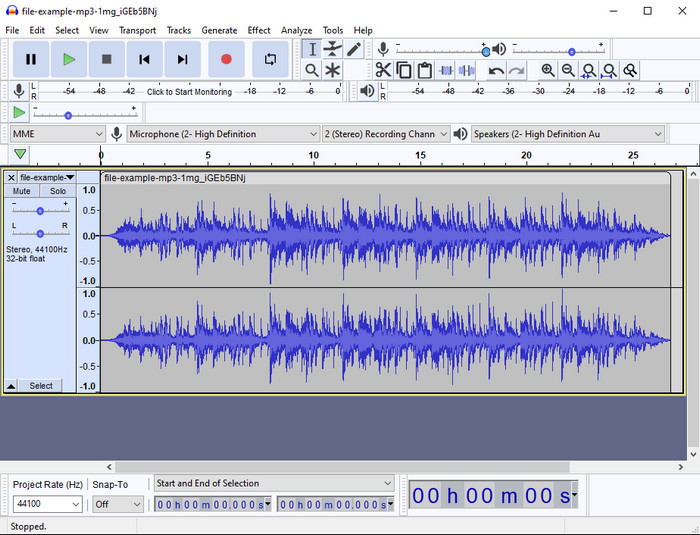
قدّم برنامج Audacity على مدى السنوات الماضية مزايا تحرير احترافية للصوت. هذا التطبيق مجاني التحميل، ويتيح للمستخدمين إجراء مزج لعدّة مسارات صوتية. وهو معروف على نطاق واسع بين صنّاع البودكاست لاستخدامه في تسجيل وتحرير حلقات البودكاست بسهولة. ومع ذلك، فإن بعض ميزاته صعبة الفهم، خصوصًا إذا لم تكن معتادًا على استخدام برامج متخصّصة من هذا النوع.
على الرغم من أنه لا يزال بإمكانك تعلم كيفية استخدامه ، إلا أن الأمر سيستغرق وقتًا لاستخدام الإمكانات الكاملة لقص الصوت MP3 هذا ، ولقطع الصوت ، من العدل أن نقول إنه يتم قطعه على الفور وبدون عناء إذا كنت في حاجة إليه.
الايجابيات
- يمكن تنزيله مجانًا في جميع البرامج مثل Windows و Mac.
- تتوفر برامج تحرير الصوت المتقدمة والاحترافية لجعل الأصوات الصوتية رائعة.
- إنه الأفضل لتسجيل البودكاست والمزيد.
سلبيات
- يوفر العديد من المنافسين واجهة مستخدم سهلة الاستخدام.
- ليس الخيار الأفضل للمبتدئين للحصول على نتيجة فورية للقطع وأغراض التحرير الأخرى.
- تظهر بعض التقارير أنه يتم جمع بياناتك إذا كنت تستخدم هذه الأداة ، ولكن لا يوجد دليل قوي حتى الآن.
الجزء 2. 3 أدوات قص MP3 يمكن الوصول إليها عبر الإنترنت على الويب
1. mp3cut.net
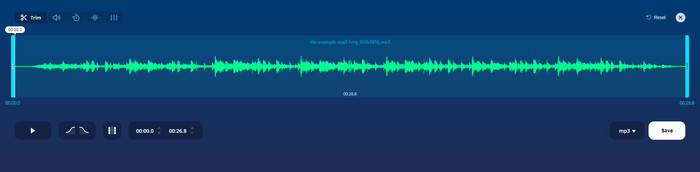
يمكنك استخدام mp3cut.net إذا كنت بحاجة إلى قاطع MP3 عبر الإنترنت للوظيفة. بعد تحميل الملف في هذا القاطع عبر الإنترنت ، يمكنك الآن إزالة الصوت الذي تريد رسمه على ملف الصوت الخاص بك. علاوة على ذلك ، تحتوي الأداة أيضًا على بعض ميزات التحرير الطفيفة لتغيير سرعة ودرجة الصوت إذا كنت بحاجة إلى ذلك.
على الرغم من أنها تتمتع بهذا النوع من القدرة ، إلا أن الأداة تتعطل معظم الوقت ولا يمكنها تشغيل الصوت للاستماع إذا قمت بقصه بشكل صحيح. لذا ، لاستخدامه مرة أخرى ، سوف تحتاج إلى تحديث متصفحك وتكرار التعديل الذي قمت به مرة أخرى.
الايجابيات
- سهل الاستخدام ويمكن الوصول إليه عبر الإنترنت.
- في النقطة ، ميزات لمساعدتك على قطع الصوت.
- تتوفر ميزات التحرير الأساسية.
سلبيات
- لديها إعلانات على واجهة الويب.
- في بعض الأحيان يتعطل ويحتاج إلى إعادة تحميله مرة أخرى لاستخدامه.
2. audiotrimmer.com
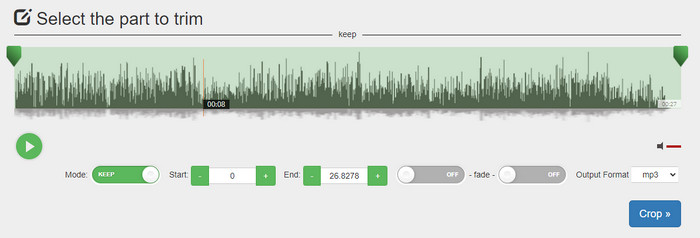
أداة قص MP3 مجانية أخرى على الإنترنت هي audiotrimmer.com. توفّر هذه الأداة مزايا قص بسيطة وسهلة الفهم، وجميع وظائفها مباشرة وواضحة. من خلالها يمكنك اختيار ما إذا كنت تريد الاحتفاظ بجزء من الصوت أو حذفه. كما تحتوي على تأثير التلاشي التدريجي (Fade in) والتلاشي للخارج (Fade out) مثل الأدوات الأخرى المذكورة هنا. لكن عندما جرّبنا تأثير التلاشي إلى الداخل والخارج لم يعمل، ولم يُضَف أي تأثير إلى ملفنا الصوتي. ومع ذلك، إذا كنت تريد قصًا بسيطًا وسريعًا، فهذه أداة ويب تستحق التجربة.
الايجابيات
- مجاني ومتاح في جميع المتصفحات للوصول إليه.
- سهل الاستخدام لقص الصوت.
- لها تأثيرات تتلاشى وتخرج.
سلبيات
- التلاشي والخروج لا يعملان بشكل جيد.
- هناك العديد من الإعلانات المزعجة إذا قمت بالوصول إليها. لذا احرص على عدم النقر فوقها.
3. Clideo

إحدى أفضل أدوات قص ودمج ملفات MP3 المتاحة على الإنترنت هي Clideo. يفضّل معظم المستخدمين هذه الأداة ويستمتعون باستخدامها بسبب قدراتها التحريرية المتعدّدة. بالإضافة إلى ذلك، يمكنك أيضًا إضافة تأثير التلاشي إلى الداخل والخارج على ملفك الصوتي إذا احتجت إلى ذلك. لكن بعد التصدير والاستماع إلى النتيجة، لم نجد أن تأثير التلاشي قد أضيف فعليًا إلى ملفنا الصوتي. كما واجهنا مشكلة بسيطة مع هذه الأداة تتعلّق برفع الملفات وتنزيلها؛ فعلى عكس الأداة الأولى المذكورة، يستغرق رفع الملفات الصوتية إلى أداة القص فيها وقتًا أطول، وأحيانًا يفشل رفع الملف الصوتي لأسباب غير معروفة.
على الرغم من أننا نواجه بعض المشكلات ، إلا أنه لا يزال أفضل أداة قطع على الإنترنت ، كما أنه آمن للاستخدام.
الايجابيات
- أفضل القاطع على الإنترنت.
- واجهة مستخدم احترافية.
- سهل الاستخدام.
سلبيات
- ستستغرق عملية التحميل والتنزيل الكثير من وقتك.
- يعمل التلاشي والخروج ولكن ليس جيدًا.
الجزء 3. أسئلة وأجوبة حول قواطع MP3
ما هو أفضل أداة تشذيب MP3 على Mac؟
يتوفر FVC Video Converter Ultimate أيضًا على نظام Mac. لذا، إذا احتجت إلى قص الصوت على جهاز Mac، فالأفضل أن تقوم بتنزيل هذه الأداة الاحترافية للتعامل مع ملفك الصوتي بالشكل المناسب. لا يقتصر دور هذه الأداة على قص الصوت بكفاءة عالية، بل يمكنك من خلالها تحسين جودة الصوت عن طريق تعزيزه. علاوة على ذلك، إذا احتجت إلى المساعدة في التحويل أو الدمج أو مزامنة الصوت، وغيرها من العمليات، فالأداة الشاملة ستكون خير عون لك. وإذا رغبت في معرفة المزيد عن هذه الأداة، فمن الأفضل أن تقرأ التفاصيل الموضّحة أعلاه.
هل تقليم الصوت يقلل من حجمه؟
يقل حجم ملف الصوت بعد قصه. عندما قارنا ملف الصوت الأصلي بالملف المقطوع ، رأينا بعض التغييرات في الارتفاع. لذلك ، فهذا يعني أنه كلما كان الملف الصوتي أقصر ، كلما كان حجمه أصغر ، ولكن إذا كان ملف الصوت الخاص بك طويلًا جدًا ، فتوقع أن يكون الحجم مهمًا أيضًا.
هل يمكنني استخدام Audacity لدمج أصوات متعددة؟
نعم، يمكنك ذلك؛ إذ يدعم Audacity دمج عدّة مسارات صوتية في ملف واحد. إلا أن الأمر قد يكون صعبًا، خاصة إذا لم يكن بحوزتك شرح أو دليل مناسب تتبعه. لذلك، إذا احتجت إلى دمج الصوت عبر Audacity، يمكنك النقر على هذا الرابط والتعلّم منه.
خاتمة
لقد اجتازت أدوات قص MP3 المعروضة هنا المعايير التي وضعناها مسبقًا لنقدّم لك أفضل أدوات القص الممكنة. يوضّح هذا المقال مدى أهمية اختيار أداة القص المناسبة والملائمة لاحتياجاتك. وعلى الرغم من أن جميع أدوات القص المذكورة هنا تقوم تقريبًا بالوظيفة نفسها، فإن FVC Video Converter Ultimate يوفّر كفاءة أعلى في قص الصوت. ووفقًا لبحثنا، فقد تجاوزت هذه الأداة جميع المعايير التي حددناها. لذا، إذا أردت امتلاك أداة قص من المستوى الأعلى بين يديك، فهذه هي أفضل خيار مقارنة ببقية الأدوات المتاحة في السوق. هل يبدو الأمر جيدًا لدرجة يصعب تصديقها؟ إذن من الأفضل أن تقوم بتنزيل الأداة وتجربتها بنفسك.
-
 كيفية قص ودمج الأغاني عبر الإنترنت - أفضل 4 طرق يجب أن تعرفها
 عندما تريد قص الأغاني ودمجها عبر الإنترنت لإنشاء مقطوعة موسيقية ، يمكنك معرفة المزيد حول أفضل 4 أدوات عبر الإنترنت لقص الأغاني ودمج الملفات من المقالة.
-
 اكتشف أفضل أداة تشذيب MP4 مع الإجراء والمعلومات
 هل تريد معرفة كيفية قص مقاطع الفيديو مثل مدوني الفيديو الذين تشاهدهم؟ ثم تابع قراءة هذا المنشور لمعرفة أدوات قص MP4 التي يمكنك استخدامها.
-
 تنزيل مشغل MP3 - أفضل 10 مشغلات موسيقى MP3 مجانية لعام 2025
 ما هو أفضل مشغل موسيقى MP3؟ كيف أضع الموسيقى على مشغل MP3؟ كيف يمكن تنزيل مشغل موسيقى MP3؟ يمنحك هذا المنشور مراجعة تفصيلية لأفضل 10 مشغلات MP3 مجانية لأجهزة الكمبيوتر التي تعمل بنظام Windows و Mac.
