


 محول الفيديو النهائي
 مسجل الشاشة
 إصلاح الفيديو
 تنزيل آمن
كيفية الانضمام إلى ملفات MOV (كويك تايم) مجانًا
بعد جمع العديد من مواد فيديو MOV ، قد ترغب في ترتيب المواد وضمها في ملف واحد كامل. ومع ذلك ، بالنسبة للمبتدئين أو منتجي الفيديو الهواة ، قد يكون استخدام أداة تقنية مثل Adobe Premiere Pro معقدًا للغاية. ربما ستقضي أيامًا أو حتى شهورًا لدراسة كيفية تشغيل البرنامج.
في الواقع، إذا كان كل ما تريده هو دمج مقاطع فيديو، يمكنك استخدام أداة بسيطة وفعّالة لضمّ الفيديوهات لحل مشكلتك، والتي لا تستغرق سوى بضع دقائق لـدمج ملفَّي MOV أو أكثر معًا.
باتباع الخطوات التالية، يمكنك بسهولة دمج ملفات MOV على كلٍّ من أجهزة Mac وWindows. لذا، واصل القراءة وجرّب هذه الطرق بنفسك.

الجزء 1. كيفية دمج مقاطع فيديو MOV في QuickTime
يُعَدّ MOV، المعروف أيضًا باسم تنسيق ملف كويك تايم (QuickTime File Format – QTFF)، حاوية فيديو رقمية تستخدم ترميز MPEG-4. طرحته شركة Apple عام 1998 لدعم مشغّل QuickTime. لذلك، إذا كان لديك جهاز Mac، يمكنك في الواقع استخدام مشغّل QuickTime بكل سهولة لضم ملفات mov.
من المثير للدهشة أن QuickTime ليس فقط مشغل وسائط ، ولكنه أيضًا محرر فيديو يمكنك من دمج مقاطع فيديو منفصلة ، وتحرير مقاطع الفيديو ، وحتى تسجيل الصوت أو الفيديو على جهاز Mac الخاص بك. علاوة على ذلك ، فهو سهل الاستخدام ويحافظ على الجودة الأصلية لمقاطع الفيديو.
فيما يلي خطوات كيفية الانضمام إلى مقاطع الفيديو في QuickTime.
الخطوة 1. اعثر على مقاطع الفيديو التي تريد دمجها وافتح واحدًا منها بواسطة QuickTime Player. (يمكنك نقلها أولًا إلى مجلد واحد أو إلى سطح المكتب لتسهيل العملية.)
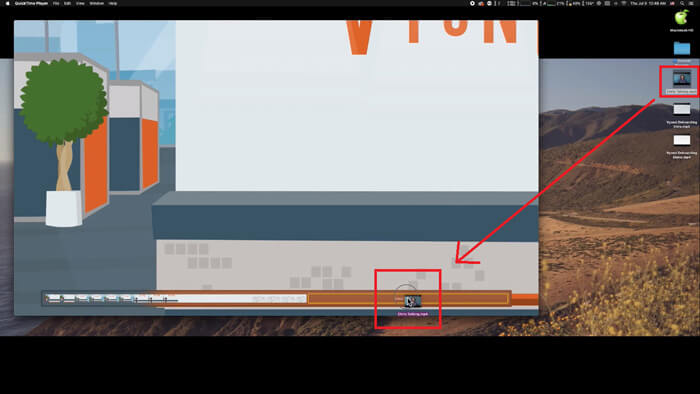
الخطوة 2. بعد فتح الملف، ستظهر نافذة المشغّل على الشاشة. الآن اسحب مقطع الفيديو الآخر إلى QuickTime Player. يمكنك سحب المقطع ووضعه في الترتيب الصحيح. عند إفلات زرّ الفأرة، سيظهر زر تم بجانب مقاطع الفيديو. انقر عليه.
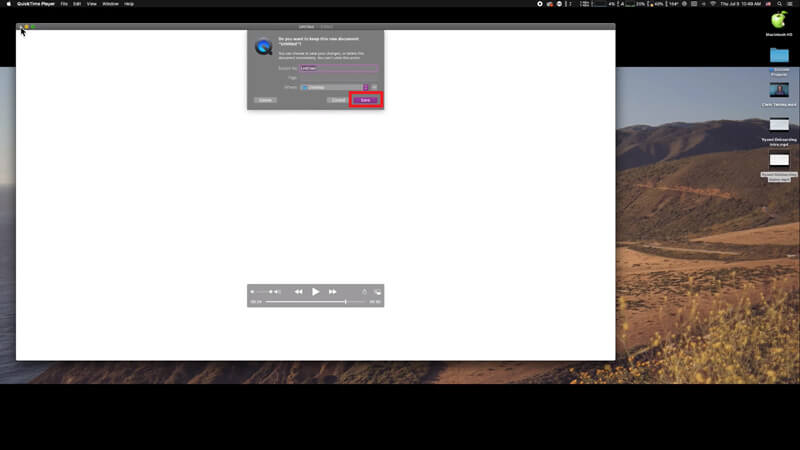
الخطوة 3. اخرج من QuickTime، وستظهر لك فورًا رسالة تطلب منك حفظ الفيديو المدموج. فقط أدخل اسمًا جديدًا وحدّد موقع الحفظ قبل النقر على زر حفظ.
الجزء 2. كيفية دمج ملفات MOV على الإنترنت ومجاني
مع ذلك، لا يمكن لـ QuickTime مساعدتك في دمج ملفات فيديو مختلفة من صيغ متعددة، مثل MP4 وMOV وAVI وWMV وFLV وغيرها في ملف MOV واحد. في هذه الحالة، تحتاج إلى استخدام أداة دمج فيديو أكثر احترافية تدعم صيغ فيديو متعددة.
إذًا، إليك FVC Free Online Video Merger، أفضل أداة مجانية لضمّ الفيديوهات. باستخدام هذه الأداة، يمكنك رفع عدد غير محدود من مقاطع الفيديو دون قيود. وبالإضافة إلى MOV، يمكنك تصدير صيغ فيديو شائعة أخرى، مما يجعل مشاركة الفيديو على منصات البث مثل YouTube أمرًا في غاية السهولة.
بدلاً من تثبيت برنامج جاد ومكلف على جهاز الكمبيوتر الخاص بك ، يمكنك الانضمام إلى أي مقاطع فيديو لإنتاج فيديو واحد مذهل عبر الإنترنت باستخدام أداة دمج الفيديو سهلة الاستخدام ، والتي تتيح لك أيضًا إنشاء فيديو بدون علامة مائية. بغض النظر عن النظام الذي تستخدمه ، Windows أو Mac أو Linux ، يمكن أن يعمل بشكل جيد. كل ما تحتاجه هو متصفح وشبكة مستقرة.
ستوجهك الخطوات التالية حول كيفية تشغيل أداة دمج الفيديو هذه.
الخطوة 1. انقر على الرابط أعلاه لفتح موقع FVC Free Online Video Merger في متصفحك.
الخطوة 2. انقر أولًا على زر Upload Videos to Merge في الشريط الإعلاني. بعد ذلك عليك اتباع التعليمات الظاهرة على الشاشة لتحميل وتثبيت أداة التشغيل (Launcher) على جهازك.
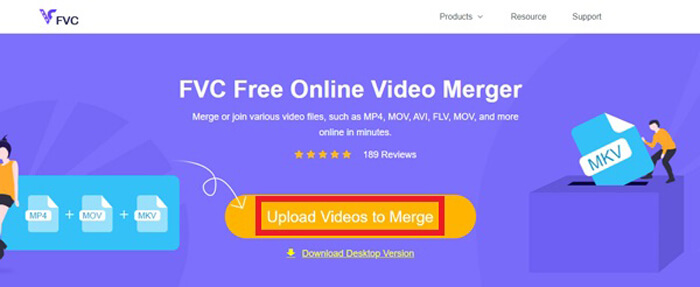
الخطوة 3. ما إن تنتهي عملية التثبيت، ستظهر نافذة منبثقة على الفور. يمكنك الآن اختيار جميع ملفات MOV التي تريد دمجها وإضافتها إلى أداة الدمج.
الخطوة 4. بعد رفع الملفات، يُرجى التحقق من أن ترتيب المقاطع صحيح. ثم غيّر الدقة (Resolution) حسب حاجتك، واضبط الصيغة (Format) إلى MOV أو أي صيغة أخرى تريدها.
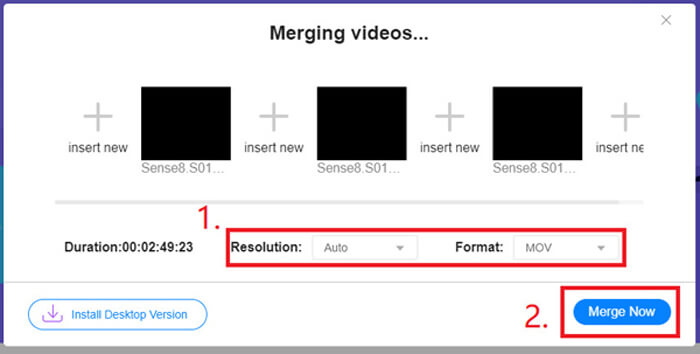
الخطوة 5. انقر على Merge Now لبدء عملية الدمج.
الجزء 3. كيفية دمج ملفات MOV في نظام التشغيل Windows 10
إذا لم يكن لديك جهاز Mac ولكنك تمتلك جهاز كمبيوتر يعمل بنظام Windows 10 ، فيمكنك تجربة الخطوات التالية للانضمام إلى ملفات MOV.
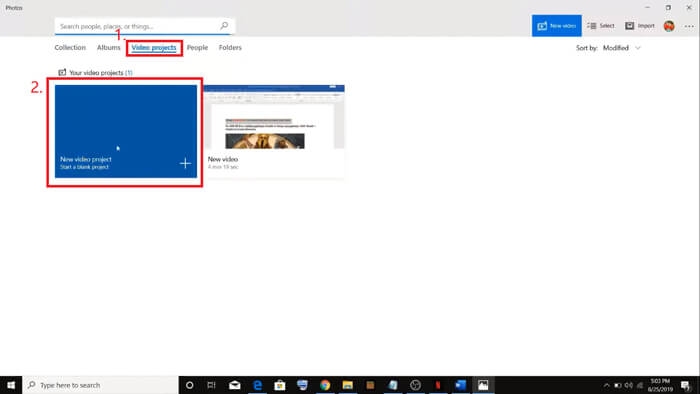
الخطوة 1. افتح تطبيق الصور (Photos) على جهاز الكمبيوتر (PC) الخاص بك. يمكنك العثور عليه عبر البحث عنه في شريط البحث (Search). ثم اختر تبويب مشروعات الفيديو (Video projects) في الأعلى، وانقر على مشروع فيديو جديد (New video project). قم بتسمية مشروع الفيديو.
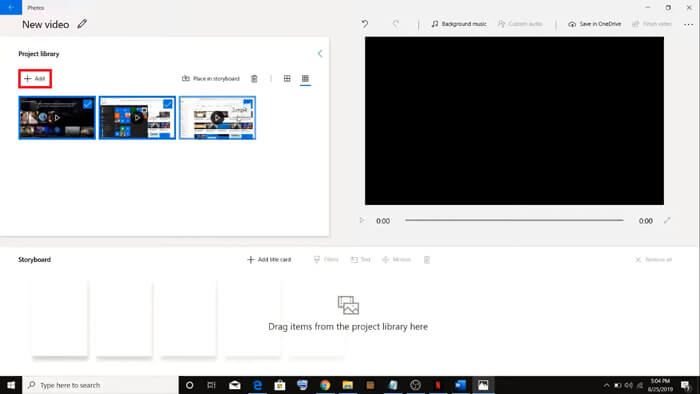
الخطوة 2. انقر على زر إضافة (Add) في الزاوية العلوية اليسرى واختر جميع الفيديوهات التي تريد تحويلها من جهاز الكمبيوتر.
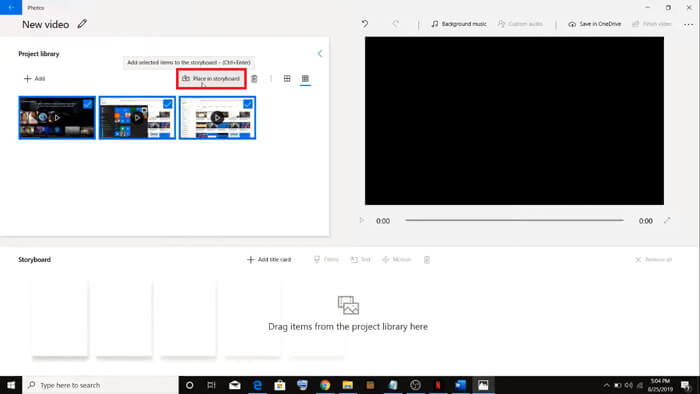
الخطوة 3. بعد ذلك، انقر على زر Place in storyboard لدمج جميع ملفات MOV الخاصة بك.
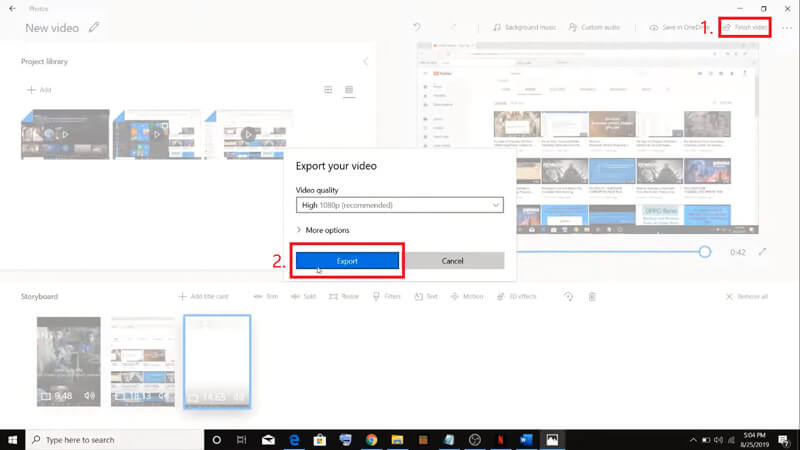
الخطوة 4. بعد ضبط ترتيب المقاطع، انقر على Finish video في الزاوية العلوية اليمنى. ثم قم بتصدير الفيديو المدموج إلى جهازك.
الجزء 4. أسئلة وأجوبة حول دمج وسائل التحقق
1. هل يمكنني استخدام برنامج QuickTime Player على نظام Windows؟
على الرغم من أن Apple لم تَعُد تدعم QuickTime لنظام Windows، فإنه لا يزال بإمكانك العثور على حزمة تثبيت QuickTime على الإنترنت. لكن يجب أن تنتبه إلى أنك لن تتمكن من استخدامه إلا لتشغيل الفيديوهات فحسب، وبالتالي فهو في الأساس مشغّل عادي لن يقدّم لك فائدة كبيرة في الدمج.
إذا كنت مستخدم Windows وترغب في دمج ملفات MOV، فيمكنك ببساطة استخدام الأداة القوية FVC Free Online Video Merger.
2. أيهما أفضل لموقع YouTube أم MOV أم MP4؟
بعد إعداد فيديو رائع عن طريق دمج جميع موادك المصوّرة، قد ترغب في رفعه على YouTube أو Facebook أو Instagram أو منصات أخرى. في هذه الحالة، ستكون صيغة MP4 خيارًا أفضل، لأنها أصغر حجمًا وأسهل في المشاركة عبر الإنترنت.
ربما تودّ معرفة المزيد عن الاختلافات بين MOV وMP4.
3. هل يستطيع مشغل QuickTime تصدير فيديو MP4؟
نعم ولا في الوقت نفسه. ذلك لأن QuickTime نفسه لا يتيح للمستخدمين تصدير ملفات MP4. ولكن إذا دفعت ثمن الترقية إلى QuickTime Pro، فيمكنك عندها دمج ملفات MOV والحصول تلقائيًا على ملف MP4 محوَّل. إذا كنت لا تريد دفع أي مبلغ وما زلت ترغب في تحويل MOV إلى MP4 على جهاز Mac، يمكنك تجربة محوِّل إلكتروني مجاني يُدعى FVC Free Online Video Converter، وهو متوافق مع كلٍّ من Mac وWindows.
خاتمة
إذًا، هذه هي الطرق التي يمكنك الاستعانة بها عندما تحتاج إلى دمج ملفات MOV في ملف واحد. إذا كنت تستخدم جهاز Mac، يمكنك استخدام البرنامج المدمج في النظام، QuickTime Player، مباشرة للحصول على ملف MOV المدموج. يمكن لمستخدمي Windows 10 تجربة تطبيق الصور (Photos). أما على أجهزة Windows الأخرى، فيمكن للمستخدمين اختيار FVC Free Online Video Merger والاستمتاع بتجربة رائعة في دمج الفيديوهات دون قيود، ودون إعلانات، ودون فيروسات.
إذا أعجبك هذا المنشور ووجدته عمليًا ، فيمكنك مشاركته مع أصدقائك. ولا تتردد في ترك تعليقك. الآن حان دورك لتجربة الطرق ودمج ملفاتك.
-
 كيفية تحويل QuickTime إلى MP4 على Windows / Mac / Online / iOS / Android
 اقرأ واحصل على 4 طرق لتحويل QuickTime إلى مقاطع فيديو MP4 مجانًا على هاتفك أو جهاز الكمبيوتر. يمكنك تغيير تنسيق الملف من MOV إلى MP4 على Windows / Mac / iPhone / Android / عبر الإنترنت بسهولة.
-
 أفضل 4 طرق لتحرير تحويل MP4 إلى MOV
 كيفية تحويل MP4 إلى MOV على نظام Mac؟ هل هناك أي طريقة مجانية لتحويل MP4 إلى MOV دون فقدان الجودة؟ يشارك هذا المنشور 4 طرق بسيطة لمساعدتك في تحويل الفيديو من MP4 إلى MOV على أجهزة Mac و Windows PC وعلى الإنترنت.
-
 كيفية تحويل M2TS إلى MOV على Windows / Mac (متصل / غير متصل)
 هل تحتاج إلى تحويل M2TS إلى MOV لتشغيل ملفات الفيديو على عدد من المشغلات والمنصات؟ ستساعدك هذه المقالة في العثور على أفضل طريقة عبر الإنترنت / دون اتصال لتحويل M2TS إلى MOV على نظامي التشغيل Windows / Mac.
