


 محول الفيديو النهائي
 مسجل الشاشة
 إصلاح الفيديو
 تنزيل آمن
ضغط مقاطع الفيديو بتنسيق MP4 بسهولة لإرسالها عبر البريد الإلكتروني بخمس طرق [2025]
قد يكون إرسال ملفات الفيديو عبر البريد الإلكتروني مُرهقًا أحيانًا بسبب بعض القيود على حجم الملف. عادةً، لا يتحمل البريد الإلكتروني سوى ملف بحجم 25 ميجابايت لكل مرفق. سيتم تحويل أي مرفق يتجاوز هذا الحجم إلى رابط على Google Drive. لذا، إذا كنت تبحث عن حل لهذه المشكلة، فأنت في المكان المناسب.
في هذه المقالة، تعرّف على خمس طرق سهلة لـضغط الفيديو من أجل البريد الإلكتروني. بهذه الطريقة، لن تواجه أي تعثرات عند إرسال ملفات الفيديو عبر البريد الإلكتروني. إذن، عمّ تنتظر؟ لنبدأ!

الجزء 1. ضغط ملف فيلم لإرساله عبر البريد الإلكتروني باستخدام ضاغط الفيديو
يمكن ضغط ملف فيلم لإرساله عبر البريد الإلكتروني بسهولة باستخدام أدوات ضغط فيديو مناسبة ومخصصة. تتوفر العديد من أدوات ضغط الفيديو، كل منها يوفر مستويات مختلفة من الضغط، والحفاظ على الجودة، وسهولة الاستخدام. توفر بعض الأدوات ملفات تعريف مُعدّة مسبقًا لضغط مُلائم للبريد الإلكتروني، بينما تتيح أدوات أخرى تعديلات يدوية لموازنة الحجم والجودة. فيما يلي ثلاث طرق يمكنك تجربتها لضغط ملف فيلم لإرساله عبر البريد الإلكتروني:
أفضل طريقة لضغط الفيديو للبريد الإلكتروني
أفضل طريقة لضغط الفيديو للبريد الإلكتروني هي استخدام أداة FVC المختارة Video Converter Ultimate. هذه أداة تحويل فيديو متكاملة تحتوي على صندوق أدوات يمكنك أن تجد فيه وظيفة ضغط الفيديو. عند ضغط فيديو بهذه الأداة، يمكنك معالجته بسهولة. تتميز هذه الأداة بواجهة سهلة الاستخدام، ولا يحتاج المستخدم إلا إلى 2–3 خطوات فقط لضغط الفيديوهات. للتعرّف أكثر إلى هذه الأداة، اطّلع على ميزاتها أدناه:
الميزة الرئيسية:
• ضغط أحجام ملفات الفيديو للبريد الإلكتروني مع الحفاظ على الجودة العالية.
• ضمان توافق الفيديو مع أي منصة بريد إلكتروني عن طريق تحويل التنسيقات.
• استخدم ملفات تعريف بريد إلكتروني مُعدة مسبقًا أو اضبط إعدادات الضغط يدويًا.
• يمكنه ضغط ملفات فيديو متعددة دفعة واحدة.
الآن بعد أن تعرفت على ما اختاره FVC، والذي يستطيع Video Converter Ultimate القيام به، دعنا ننتقل إلى كيفية استخدامه.
الخطوة 1. أولًا، عليك تثبيت الأداة وتحميلها على جهاز الكمبيوتر لديك.
تنزيل مجانيلنظام Windows 7 أو أحدثتنزيل آمن
تنزيل مجانيلنظام MacOS 10.7 أو أحدثتنزيل آمن
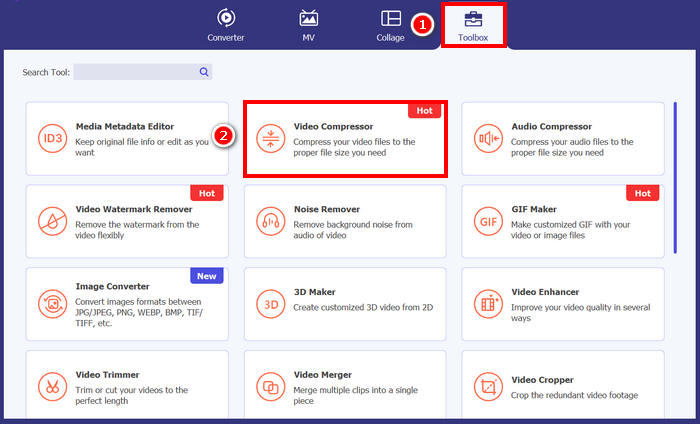
الخطوة 2. افتح الأداة، ثم انتقل إلى Toolbox واضغط على Video Compressor. بعد ذلك، انقر فقط على زر Red Plus لإضافة الفيديو الذي تريد ضغطه.
الخطوة 3. بعد ذلك، لضغط حجم ملف الفيديو، يمكنك ضمن خيار Size ببساطة تحريك Slider لضبط حجم ملف الفيديو، أو إدخاله يدويًا في Box. بعد الانتهاء، انقر على زر Compress.
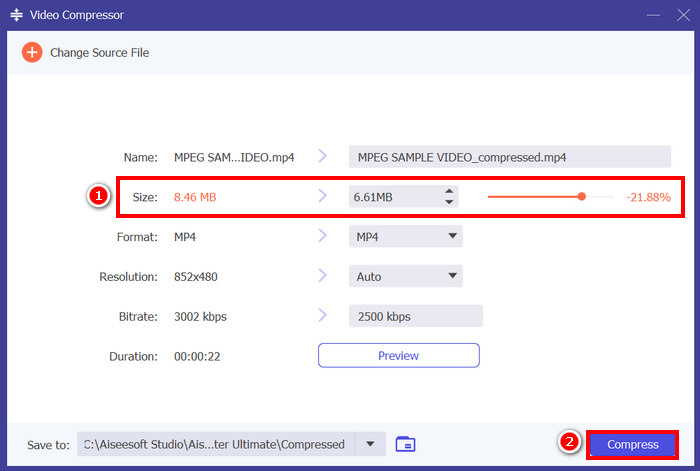
ملاحظة: إذا رغبت في تحسين الفيديو أكثر أثناء ضغطه، يمكنك أيضًا تخصيص دقته، ومعدل البت (bitrate)، وغير ذلك.
اختارت FVC برنامج Video Converter Ultimate، وهو من أفضل الأدوات لضغط الفيديو للبريد الإلكتروني. يتميز بالسرعة وسهولة الاستخدام، ويحافظ على جودة الفيديو. كما يوفر ميزات إضافية مثل ضغط الملفات دفعةً واحدة وتحويل الصيغ، مما يجعله حلاً متعدد الاستخدامات للتعامل مع ملفات الفيديو.
ضغط الفيديو للبريد الإلكتروني [مجانًا]
إذا كنت تبحث عن طريقة مجانية لضغط الفيديو لإرساله عبر البريد الإلكتروني، يمكنك استخدام برنامج VLC Media Player. هذه الأداة ليست مجرد مشغل وسائط يُشغّل ويُبثّ ملفات متعددة، بل يُمكن استخدامها أيضًا لضغط الفيديوهات. للقيام بذلك، اتبع الخطوات التالية:
الخطوة 1. أولًا، افتح مشغّل الوسائط VLC، أو إن لم يكن لديك، قم بتحميله وتثبيته.
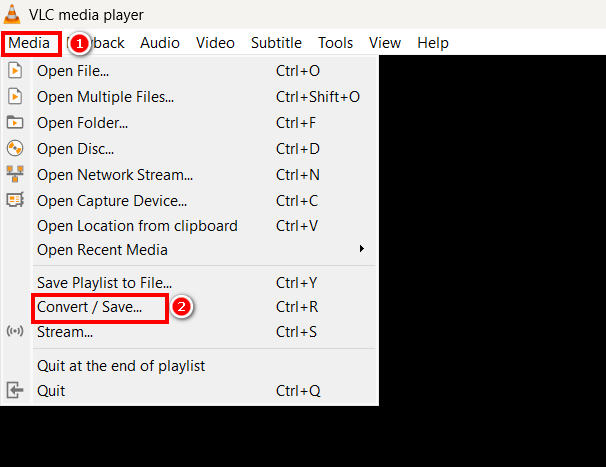
الخطوة 2. بعد ذلك، انتقل إلى علامة تبويب Media واختر Convert/Save في الأسفل.
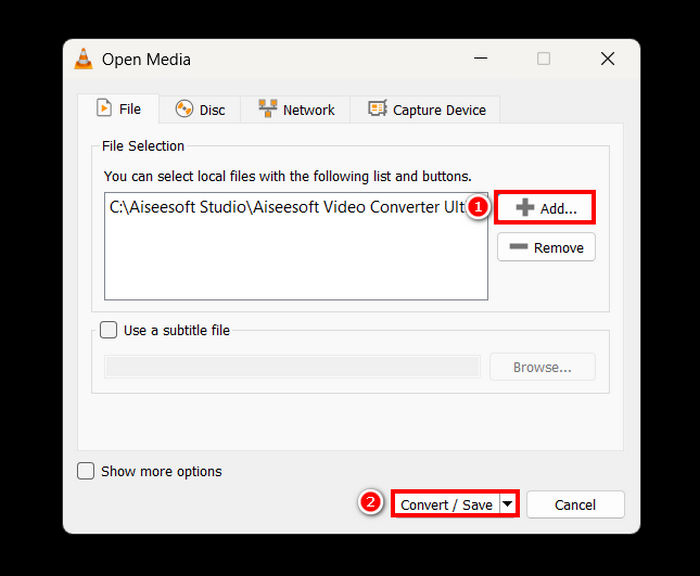
الخطوة 3. الآن، انقر على زر Add لاستيراد الفيديو الذي تريد ضغطه من أجل البريد الإلكتروني، ثم اضغط على زر Convert/Save.
الخطوة 4. الآن، في النافذة الجديدة، اختر خيار Edit Selected Profile، ومن هناك، انتقل إلى علامة تبويب Video Codec وقم بتغيير دقة الفيديو، ومعدل البت، ومعدل الإطارات.
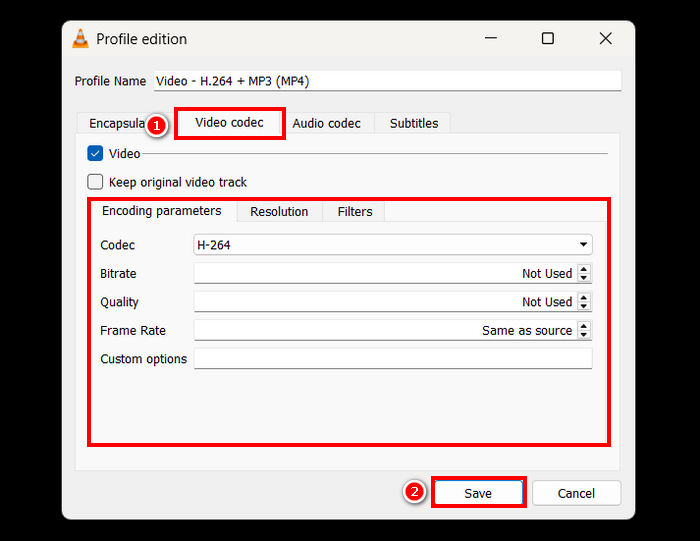
الخطوة 5. بعد إتمام كل شيء، احفظ الإعدادات واضغط على زر Start لبدء ضغط الفيديو.
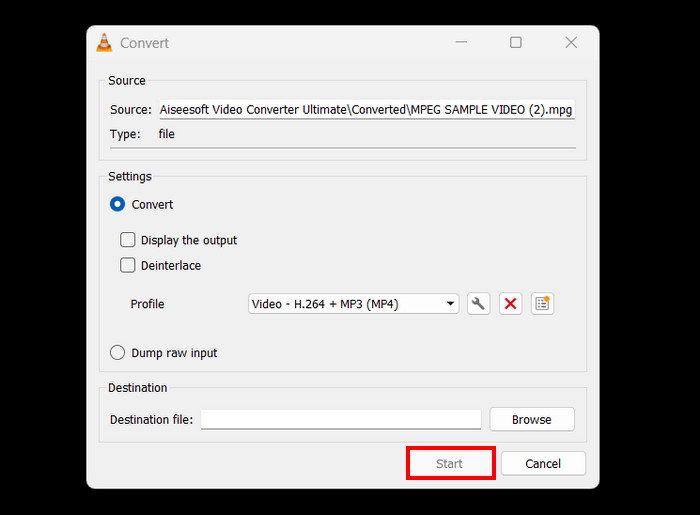
القيود: مقارنةً بأداة ضغط فيديو مخصصة، فإن ضغط الفيديو في VLC ليس مباشرًا ولا يوفّر إعدادات مسبقة مهيأة للبريد الإلكتروني. بل يتطلّب تخصيصًا يدويًا، وهو ما قد يكون مربكًا وغير مناسب لمن يحتاجون إلى حل سريع ومباشر.
كيفية تكثيف مقطع فيديو لإرساله عبر البريد الإلكتروني عبر الإنترنت
إذا كنت تريد طريقة عبر الإنترنت، يمكنك استخدام ضاغط الفيديو من FreeConvert. هذه أداة ضغط فيديو تعتمد على الويب تسمح للمستخدمين بضغط الفيديو من أجل البريد الإلكتروني. الاختلاف بين استخدام هذه الأداة واستخدام برنامج مثبّت هو أنها لا تحتاج إلى تثبيت تطبيق، وهو ما قد يكون مريحًا للبعض. ومع ذلك، لهذه الأداة قيود متعلقة بحجم الفيديو الذي يمكنك ضغطه. لاستخدام هذه الأداة، اتبع الخطوات التالية:
الخطوة 1. انتقل إلى الموقع الرسمي لـ FreeConvert. فقط ابحث عن FreeConvert Video Compressor في متصفّح الإنترنت لديك.
الخطوة 2. بعد ذلك، لاستيراد الفيديو الذي تريد ضغطه من أجل البريد الإلكتروني، انقر على زر Choose Files.
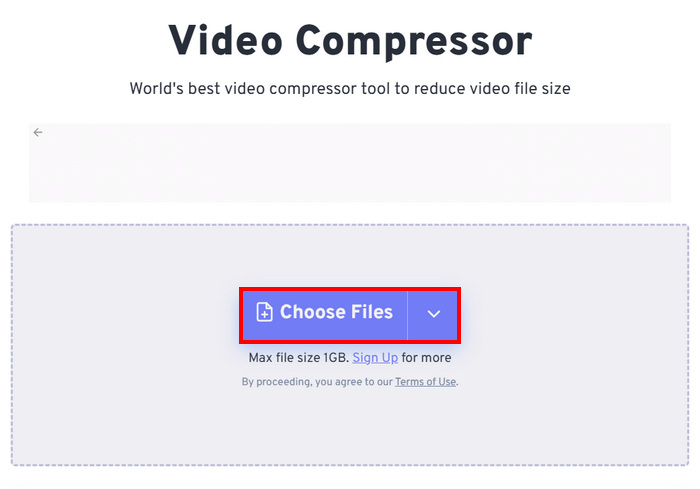
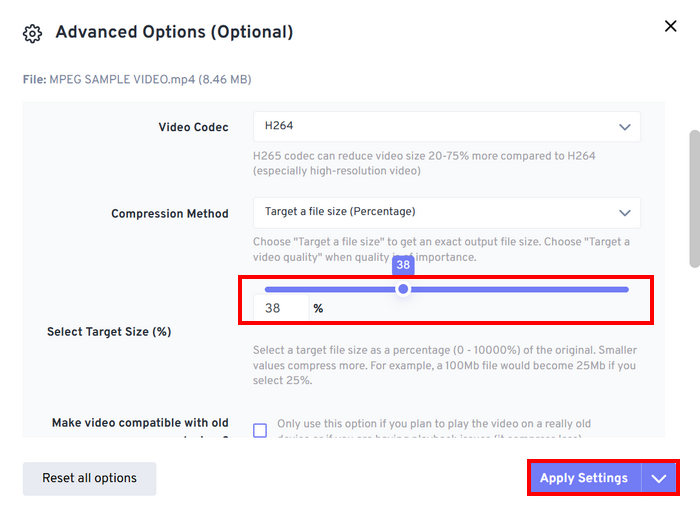
الخطوة 3. الآن، انتقل إلى الإعدادات المتقدمة، والممثَّلة بأيقونة Gear، ومن هناك يمكنك ضبط حجم الفيديو. فقط حرّك Slider إلى اليسار لتقليل حجم الفيديو. وأخيرًا، لبدء ضغط الفيديو، انقر على زر Apply Settings button.
الخطوة 4. أخيرًا، انقر على زر Compress Now لبدء ضغط الفيديو من أجل البريد الإلكتروني.
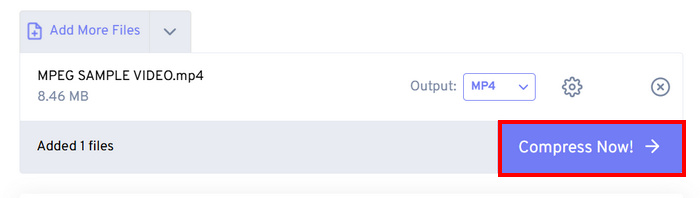
القيود: يمكن للمستخدمين ضغط ملفات فيديو بحجم يصل إلى 1 غيغابايت فقط؛ وأي حجم يتجاوز ذلك يتطلب الاشتراك في الخطط المدفوعة. إضافة إلى ذلك، وبما أنها أداة ضغط فيديو على الويب، فإن سرعة عملية الضغط قد تختلف تبعًا لجودة اتصال الإنترنت لدى المستخدم.
الجزء الثاني: كيفية تصغير حجم الفيديو للبريد الإلكتروني باستخدام ملف فيديو مضغوط
هناك طريقة أخرى لتصغير حجم الفيديو بسهولة للبريد الإلكتروني، وهي إنشاء ملف ZIP. هذه الطريقة فعالة لتقليل حجم الملف قليلاً وتجميع عدة فيديوهات في ملف واحد. كما أنها سهلة التنفيذ، إلا أنها ليست بنفس فعالية استخدام أدوات ضغط الفيديو المخصصة. للقيام بذلك، اتبع الخطوات التالية:
الخطوة 1. أولًا، في مكتبتك (Library)، حدّد موقع الفيديو الذي تريد ضغطه من أجل البريد الإلكتروني.
الخطوة 2. بعد ذلك، انقر بزر الفأرة الأيمن عليه واختر خيار Compress to، ومن هناك اختر ZIP File.
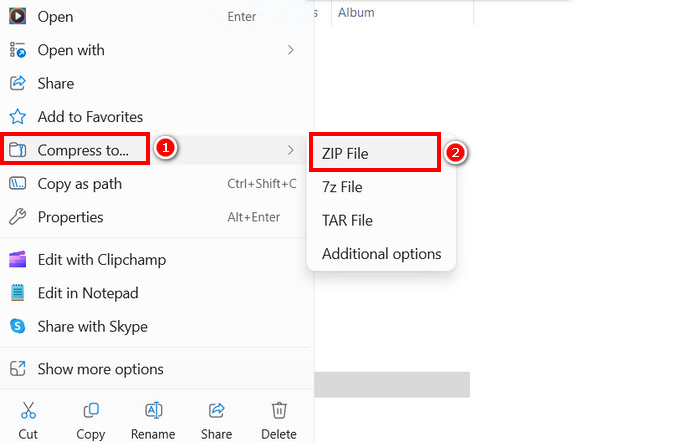
القيود: مع أن إنشاء ملف ZIP طريقة سريعة لضغط الفيديو من أجل البريد الإلكتروني، فإنه لا يقلّل حجم الملف بشكل ملحوظ مقارنة بأدوات ضغط الفيديو التي تضبط معدل البت، أو الدقة، أو التنسيق لتحقيق ضغط أفضل. إذا كان ملف ZIP لا يزال كبيرًا، فإن استخدام أداة ضغط فيديو مخصصة هو الحل الأنسب.
الجزء 3. كيفية تصغير حجم الفيديو لإرساله عبر البريد الإلكتروني عبر جوجل درايف
يستحيل على جوجل درايف ضغط الفيديو مباشرةً كما تفعل برامج ضغط الفيديو المخصصة. مع ذلك، عند تنزيل الفيديو المُحمّل على القرص، يُحفظ في ملف ZIP. بهذا، يُقلّص حجم الفيديو قليلاً للتخزين والنقل.
ملاحظة: تعني هذه الطريقة تقليلًا بسيطًا للحجم وقد لا تكون كافية للملفات الكبيرة.
لتصغير حجم الفيديو من أجل البريد الإلكتروني عبر Google Drive:
الخطوة 1. على Google Drive لديك، يمكنك أولًا رفع الفيديوهات التي تريد تقليل حجمها.
الخطوة 2. بعد ذلك، انقر بزر الفأرة الأيمن على الفيديوهات التي تريد تقليل أحجامها.
الخطوة 3. بعد تنزيلها، سيتم حفظ ملفات الفيديو هذه في ملف ZIP.
القيود: كما ذُكر، لا يمتلك Google Drive قدرة مباشرة على ضغط الفيديو من أجل البريد الإلكتروني. علاوة على ذلك، فإن تنزيله كملف ZIP ما زال ليس حلًا فعالًا بما يكفي.
الجزء 4. الأسئلة الشائعة حول ضغط الفيديو للبريد الإلكتروني
ما هي أفضل طريقة لضغط مقطع فيديو للبريد الإلكتروني؟
أفضل طريقة لضغط فيديو من أجل البريد الإلكتروني هي استخدام أداة ضغط فيديو مخصصة مثل FVC Video Converter Ultimate. هذه أداة لتحويل الفيديو صُمّمت لضغط ملفات فيديو متنوعة، مما يسمح للمستخدمين بالتعامل بسهولة مع أحجام الفيديو الكبيرة عند إرسالها عبر البريد الإلكتروني.
لماذا لا يمكنني إرسال ملف فيديو كبير عبر البريد الإلكتروني؟
من المهم ملاحظة أن معظم خدمات البريد الإلكتروني، بما فيها Gmail، تضع حدًا أقصى لحجم الملف المرفق يبلغ 25 ميجابايت. لهذا السبب، يختار المرسلون الذين لديهم ملفات أكبر من المطلوب ضغط مقاطع الفيديو أولًا. وهذا هو السبب الرئيسي لضرورة ضغط مقاطع الفيديو للبريد الإلكتروني.
هل ضغط الفيديو يقلل من جودته؟
نعم، ضغط الفيديو لإرساله عبر البريد الإلكتروني قد يُقلل من جودته قليلاً، لأنك ببساطة تُقلل الدقة ومعدل البت ومعلمات الترميز الأخرى لتصغير حجم الملف. مع ذلك، توجد برامج ضغط فيديو متطورة، مثل FVC Pick Video Converter، تُمكّنك من التحكم في الدقة ومعدل البت والتنسيق لتقليل فقدان الجودة.
هل يمكنني ضغط مقطع فيديو لإرساله بالبريد الإلكتروني عبر الإنترنت؟
نعم. يمكنك استخدام أدوات عبر الإنترنت، مثل أداة ضغط الفيديو من FreeConvert، لضغط الفيديوهات دون الحاجة لتثبيت أي برنامج. مع ذلك، قد يكون للإصدارات المجانية حدود لحجم الملفات.
كيف أرسل مقطع فيديو كبيرًا إذا لم يكن الضغط كافيًا؟
إذا لم يكن الضغط كافيًا، ففكر في تحميل الفيديو إلى Google Drive أو OneDrive أو Dropbox ومشاركة الرابط عبر البريد الإلكتروني بدلاً من إرفاق الملف.
خاتمة
مع كل القيود المفروضة على حجم ملفات الفيديو في خدمات البريد الإلكتروني المختلفة، تصبح القدرة على ضغط هذه الملفات ضرورة. لذا، إن كنت في الموقف نفسه وتجد صعوبة في العثور على أداة يمكنها ضغط الفيديو من أجل البريد الإلكتروني، فجرّب جميع الطرق الواردة في هذه المقالة واختر الأنسب لك.
ابدأ بضغط مقاطع الفيديو الخاصة بك اليوم وأرسلها دون أي متاعب!
-
 كيفية ضغط فيديو GoPro من 4K إلى 1080p (مجاني وعلى الإنترنت)
 عند استخدام كاميرا GoPro لتصوير مقطع فيديو ، عادةً ما يكون حجم ملف فيديو اللقطة كبيرًا للغاية ، مما يصعب مشاركته مع الآخرين. لذلك ، سيوضح لك هذا المنشور كيفية ضغط فيديو GoPro.
-
 2 طرق لضغط الفيديو ليوتيوب
 مقاطع فيديو YouTube كبيرة وبطيئة التحميل؟ ما عليك سوى ضغط حجم ملف الفيديو إلى حجم أصغر لـ YouTube بطريقتين عبر الإنترنت وعلى الكمبيوتر.
-
 Adobe Premiere ضغط الفيديو: الأشياء التي تحتاج إلى أخذها في الاعتبار
 تحتوي هذه المقالة على أفضل وأنسب الطرق لضغط ملف GIF Premiere. تعرف على الحل والبدائل المختلفة لبرنامج Adobe Premiere Compress.
