


 محول الفيديو النهائي
 مسجل الشاشة
 إصلاح الفيديو
 تنزيل آمن
كيفية إزالة Viva Video Watermark على مقاطع الفيديو بسهولة وفعالية
Viva Video هو تطبيق لتحرير الفيديو وصنع الفيديو ، يمكنك تنزيله على أجهزتك المحمولة لإنشاء فيديو رائع لا يمكنك تحقيقه باستخدام محرر الفيديو الآخر. باستخدام هذا ، يمكنك استخدام نسخته المجانية أو تحرير الفيديو المتميز لصالحك. وبالتالي ، يواجه المستخدمون مشكلات في استخدام الإصدار المجاني لأنه يترك علامة مائية ، وميزات التحرير الأخرى ليست مثل الإصدار المحترف. يمكن أن تعيق العلامة المائية المضمنة في الفيديو الصورة المرئية ، ومن الأفضل إزالتها.
ومع ذلك، يمكنك استخدام بعض الأدوات لإزالة العلامة المائية التي يمكنك العثور عليها في متجر PlayStore وApp Store، لكن ما هي الأفضل؟ تابع قراءة هذا المقال، إذ سنقدّم الأداة التي يمكنك استخدامها لإزالة العلامة المائية مع شرح كيفية إزالة علامة Viva Video المائية من الفيديو الخاص بك.

الجزء 1. كيفية إزالة العلامة المائية لفيديو Viva باستخدام أفضل تطبيقات إزالة العلامات المائية
Video Eraser - إزالة العلامة المائية / الشعار من الفيديو [Android]
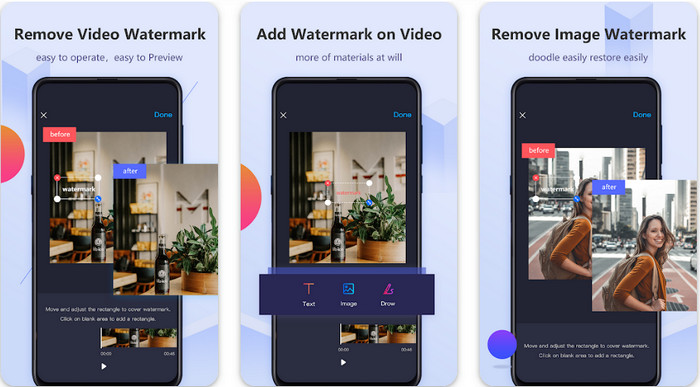
تُعد أداة Video Eraser - Remove Watermark/Logo from Video أداة قوية لإزالة العلامات المائية، يمكنك تحميلها على جهاز الأندرويد الخاص بك لإزالة العلامة المائية المضمَّنة في الفيديو. يمكن لهذا التطبيق أن يزيل أي نوع من العلامات المائية في الفيديو، مثل الشعار، والنص، والأختام، وغيرها. كما يمكنك الاستفادة منه إذا كنت ترغب في إضافة علامة مائية مخصّصة، أو قص الفيديو، أو تقطيعه، أو عكسه، أو ضغطه، أو تغيير سرعة الفيديو. وعلى الرغم من ميزاته الغنية، يمكنك تحميل هذه الأداة مجانًا. لذلك، لإزالة علامة Viva Video المائية على جهاز الأندرويد، يمكنك اتباع الخطوات أدناه.
الخطوة 1. أولًا، قم بتحميل التطبيق على جهاز الأندرويد من خلال الذهاب إلى متجر PlayStore، ثم انقر على تنزيل (Download).
الخطوة 2. افتح أداة إزالة العلامة المائية، ثم انقر على Remove Watermark from Video، واسمح للأداة بالوصول إلى ملفات الفيديو لديك، ثم ارفع الفيديو الذي يحتوي على العلامة المائية.
الخطوة 3. ضع المستطيل فوق العلامة المائية لتغطيتها.
الخطوة 4. اضغط على Done لحفظ الفيديو بدون العلامة المائية.
ذات صلة:
Video Eraser - Retouch Removal [iOS]
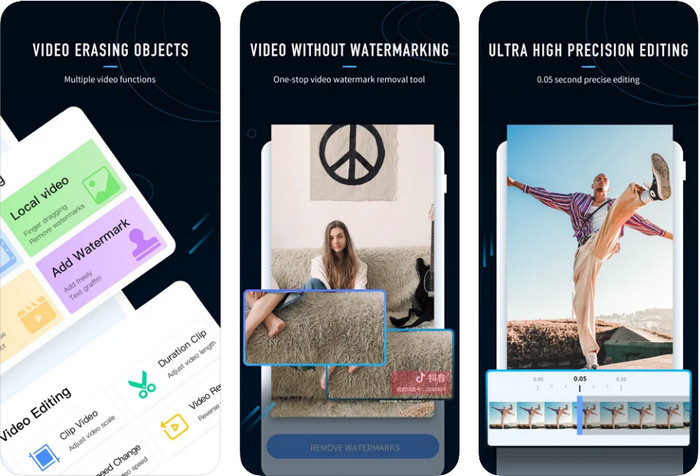
لنظام iOS، يمكنك تحميل تطبيق Video Eraser- Retouch Removal من متجر App Store. فهو من بين أدوات إزالة علامة Viva Video المائية التي يمكنك تنزيلها مجانًا، والتي تتيح لك التخلّص من العلامة الموجودة على الفيديو بفاعلية. ومثل أداة إزالة العلامة المائية على الأندرويد التي قدّمناها هنا، فهو يدعم أيضًا مزايا تحرير أخرى يمكنك استخدامها، مثل تحسين دقة الفيديو، إضافة علامة مائية، القص، التقطيع، الضغط، والقلب. كل ذلك متوفر هنا. وعلى الرغم من تشابه ميزاته مع تطبيق الأندرويد، فإن وظائفه تختلف، وقبل أن تتمكن من استخدام هذه الأداة لإزالة العلامة المائية، ستحتاج إلى شرائها. يمكنك اتباع الخطوات التالية لتتعلم كيفية إزالة العلامة المائية من فيديو Viva Video الذي قمت بتصديره؛ فقط اتبع الخطوات الموضَّحة أدناه.
الخطوة 1. قم بتحميل التطبيق من App Store، ثم افتحه بعد الانتهاء من التنزيل.
الخطوة 2. بعد فتح البرنامج، انقر على Local Video/GIF لرفع الفيديو الذي يحتوي على علامة مائية. تأكد من السماح للتطبيق بالوصول إلى الصور (Photos) الخاصة بك.
الخطوة 3. اضغط على الجزء من الفيديو الذي يحتوي على العلامة المائية؛ بعدها سيظهر شكل مستطيل على الشاشة.
الخطوة 4. اضغط على Eliminate Watermark لتصدير الفيديو وحفظه بدون إزعاج العلامة المائية.
الجزء 2. كيفية إزالة Viva Video Watermark على نظامي التشغيل Windows و Mac [Ultimate Software]
بصفتك مستخدمًا لنظامي Windows وMac، ستحتاج إلى برنامج فعّال لإزالة العلامة المائية من الفيديو بكفاءة دون ترك أي آثار. يمكن لبرنامج FVC Video Converter Ultimate أن يعلّمك كيفية إزالة علامة Viva Video المائية مجانًا مع الحصول على نتيجة احترافية في النهاية. وكما هو الحال مع تطبيقات إزالة العلامة المائية التي يمكنك تنزيلها على الأندرويد وiOS، فإن هذه الأداة تدعم أيضًا مزيدًا من الميزات والوظائف التي يمكنك الاستفادة منها. هذه الأداة توفّر أكثر مما يقدّمه تطبيقَا إزالة العلامة المائية الذين ذكرناهما.
ما الذي يجعل هذه الأداة رائعة؟ تعد ميزات الإزالة التي تدعمها هذه الأداة أفضل من مزيلات العلامات المائية الأخرى التي يمكنك استخدامها على الفيديو الخاص بك. لذلك ، إذا كنت تستخدم هذا ، يمكنك الاستمتاع بمشاهدة الفيديو بدون العلامة المائية بعد إزالته هنا. هل تحتاج إلى برنامج تعليمي حول كيفية استخدام هذا؟ ستتيح لك التفاصيل التالية معرفة كيفية استخدام هذه الأداة بسهولة مثل 1-2-3.
الخطوة 1. لتحميل البرنامج الاحترافي، يمكنك النقر على زر التنزيل أدناه، ثم تثبيت البرنامج على جهازك. اتبع إعداد WinRAR، ثم انقر على Start Now.
تحميل مجانيلنظام Windows 7 أو أحدثتنزيل آمن
تحميل مجانيلنظام MacOS 10.7 أو أحدثتنزيل آمن
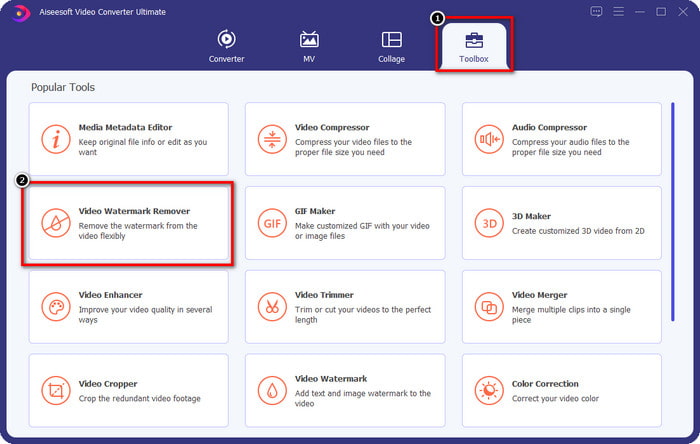
الخطوة 2. انتقل إلى Toolbox، ثم انقر على Video Watermark Remover لبدء استخدام أداة إزالة العلامة المائية الفعّالة هذه.
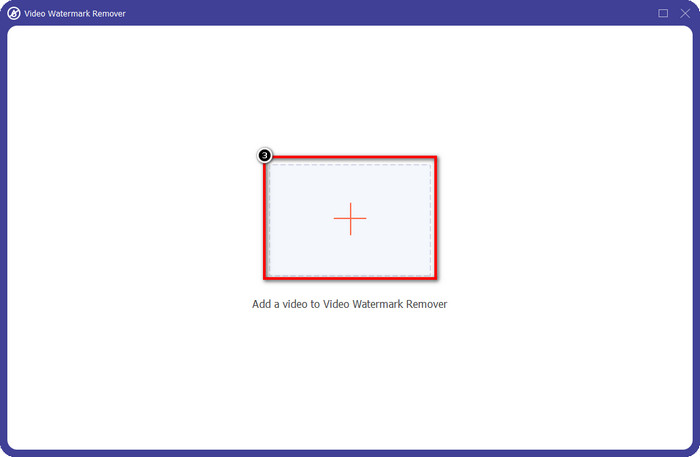
الخطوة 3. يمكنك رفع فيديو Viva Video الذي يحتوي على علامة مائية والمحفوظ على سطح المكتب بالنقر على أيقونة +. حدد ملف الفيديو من المجلد الذي سيظهر على الشاشة، ثم انقر على Open لرفعه بنجاح.
الخطوة 4. انقر على Add Watermark Removing Area لبدء استخدام وظيفة إزالة العلامة المائية.
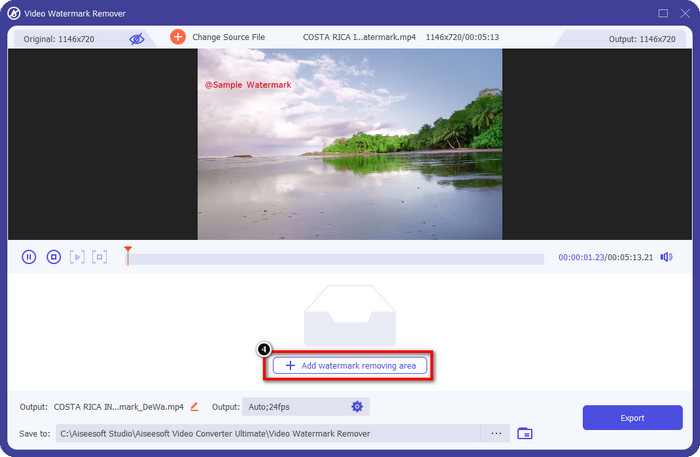
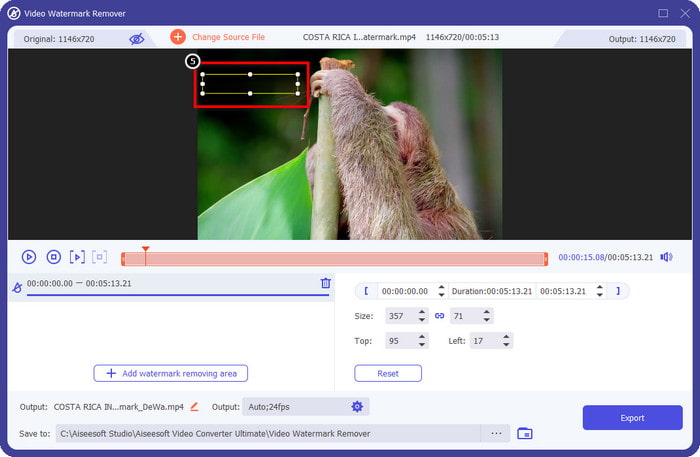
الخطوة 5. اسحب وضع الشكل المستطيل فوق العلامة المائية في الفيديو، وغطِّها بالكامل. من المهم تغطيتها بالكامل، لأنه إن لم تفعل، سيبقى أثر من العلامة المائية، ويمكنك تغيير حجم الشكل وفقًا لاحتياجك.
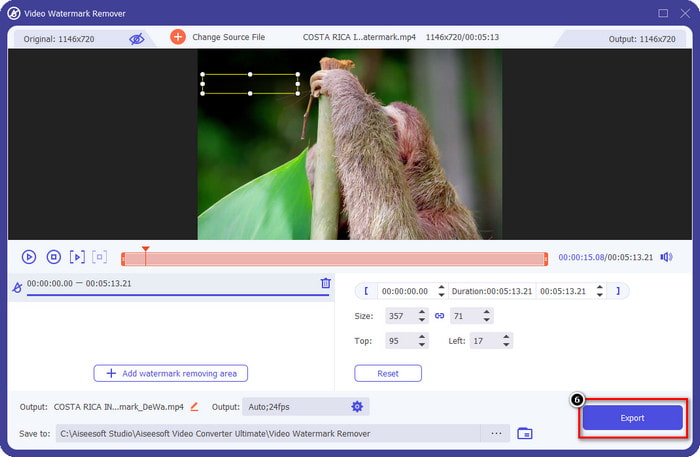
الخطوة 6. بعد ذلك، انقر على Export لحفظ الفيديو بدون العلامة المائية. سهل؟ هذا بالضبط ما صُمِّمت من أجله هذه الأداة الاحترافية؛ سهلة الاستخدام لكنها فعّالة في كل شيء.
الجزء 3. الأسئلة الشائعة حول كيفية إزالة العلامة المائية لفيديو Viva
هل يمكنني تنزيل Viva Video بدون علامة مائية؟
نعم ، يمكنك شراء النسخة الاحترافية من هذه الأداة حتى لا تترك علامة مائية على الفيديو عند تصدير الفيديو الذي تقوم بتحريره هنا. أيضًا ، بعد شراء الإصدار المحترف من هذه الأداة ، ستستخدم الميزة المميزة الأخرى التي توفرها هذه الأداة والتي لا تتوفر مجانًا.
هل يحتوي Viva Video على إصدار سطح مكتب؟
يمكنك فقط تنزيل إصدار Viva Video على Android و iOS. لذلك ، إذا كنت ترغب في تنزيل إصدار سطح المكتب ، فلن تجد أيًا منه ، ولكن يمكنك البحث عن أفضل البدائل لتحرير الفيديو مثل ما يقدمه Viva Video.
هل يحتوي Viva Video على برامج تجسس؟
في عام 2017 ، أكدت التقارير المتعلقة بهذا التطبيق لاحقًا أنه يحتوي على برامج ضارة. لذلك ، قام الأشخاص الذين قاموا بتنزيل هذا البرنامج بحذف هذا التطبيق بقوة على أجهزتهم لتجنب المزيد من العواقب.
خاتمة
باستخدام مزيل العلامة المائية Viva Video لهذه المقالة ، يمكنك إزالة العلامة المائية التي يقوم Viva Video بتضمينها في الفيديو المصدر. يمكنك محاولة استخدام التطبيقات المذكورة أعلاه واتباع التعليمات التي نقوم بتضمينها حول كيفية إزالة العلامة المائية. ولكن بالنسبة لمستخدمي Windows و Mac الذين لديهم علامة Viva Video المائية ، فمن الأفضل استخدام البرنامج النهائي لإزالة العلامة المائية بسرعة وفعالية والحصول على نتيجة احترافية. ماذا تنتظر؟ انقر فوق زر التنزيل لإزالة العلامة المائية النهائية على جهازك الآن ، واستخدمها باتباع الخطوات المذكورة أعلاه.
-
 كيفية إزالة علامة Lomotif المائية باستخدام هذه الأدوات الرائعة
 هل تريد معرفة كيفية إزالة العلامة المائية Lomotif من الفيديو الخاص بك؟ اقرأ هذه المقالة للتعرف على أكثر الطرق تميزًا لإزالتها عبر الإنترنت وغير متصل.
-
 كيفية إزالة السياح من الصور باستخدام مزيلات العلامات المائية
 كيف تحذف السائحين من الصور؟ إذا كنت ترغب في معرفة كيفية إزالة الأشياء غير المرغوب فيها من صورتك ، فستساعدك هذه الأدوات. اقرأ هذه المقالة لمعرفة المزيد.
-
 123rf Watermark Removers - مراجعة شاملة للأدوات النهائية
 إذا كنت تريد معرفة أكثر مزيلات العلامة المائية 123rf تميزًا ، فاقرأ هذه المقالة جيدًا. توفر هذه المقالة مراجعة متعمقة للأدوات.
