


 محول الفيديو النهائي
 مسجل الشاشة
 إصلاح الفيديو
 تنزيل آمن
أفضل الحيل حول كيفية إزالة نص Snapchat من لقطة الشاشة
Do you want to know how to remove Snapchat text from the screenshot? You are in the right place. This post will give you the easiest methods you can do to remove Snapchat text from your photos and videos. These methods are straightforward to follow, perfect, and suitable for non-professional users. If you are interested in these easy methods, you must stop what you are doing right now and focus on reading this informative article.

الجزء 1: كيفية إزالة نص Snapchat والتعليقات التوضيحية من الصور
The best thing you must do to remove a Snapchat text from a photo is to use a watermark remover. This way, you can remove any elements from your photos, such as texts, logos, watermarks, etc. If you are looking for an excellent and reliable tool, then you can use the FVC Free Watermark Remover. It can help you delete Snapchat text from pictures online instantly. You can understand this application easily with a friendly user interface, detailed guide, and simple buttons.
علاوة على ذلك ، يدعم FVC Free Watermark Remover تنسيقات ملفات الإدخال والإخراج الشائعة الاستخدام ، مثل PNG و JPG و JPEG و BMP والمزيد. بالإضافة إلى ذلك ، تتوفر هذه الأداة على أنظمة التشغيل Windows 7،8،10،11 و macOS 10.7 أعلاه. أخيرًا ، يعد هذا التطبيق بضمان خصوصية كل مستخدم ، لذلك لا داعي للقلق بشأن صورك أو معلوماتك. إذا كنت تريد إزالة نص Snapchat من صورك ، فاتبع الدليل البسيط أدناه.
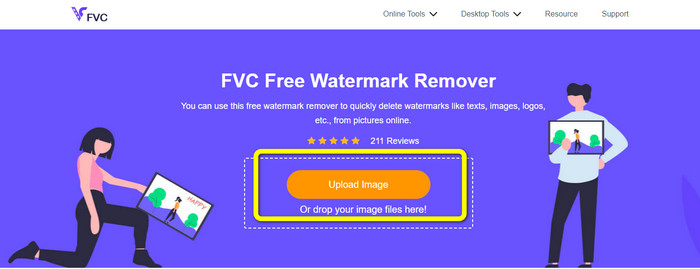
Step 1: You must go to the FVC Free Watermark Remover Website. Click the Upload Image button and add your photo with a Snapchat text you want to remove.
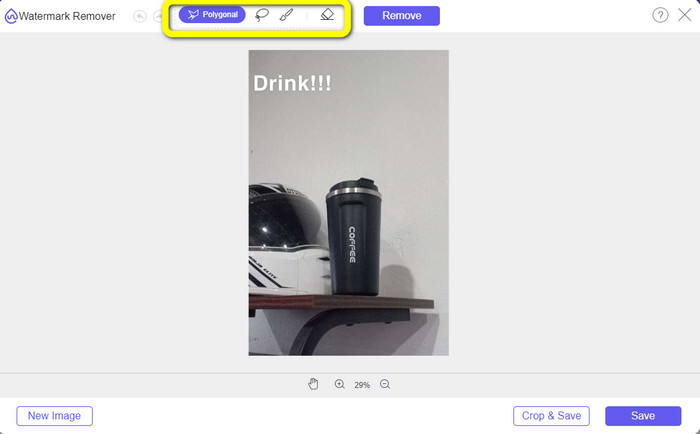
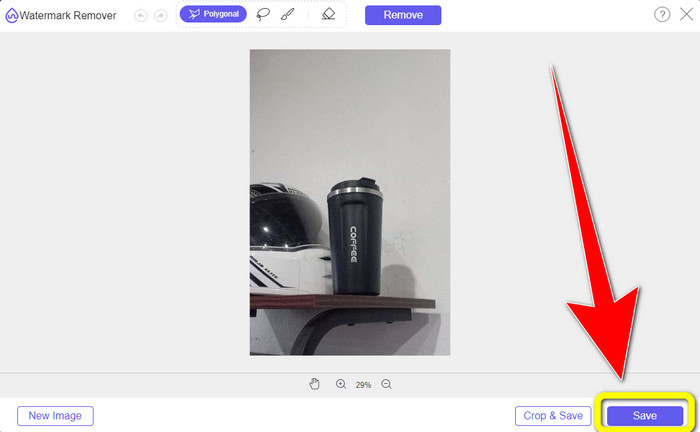
Step 2: After you attach your photo, you can use the watermark remover options: the polygonal tools, the lasso tool, and the brush tool.
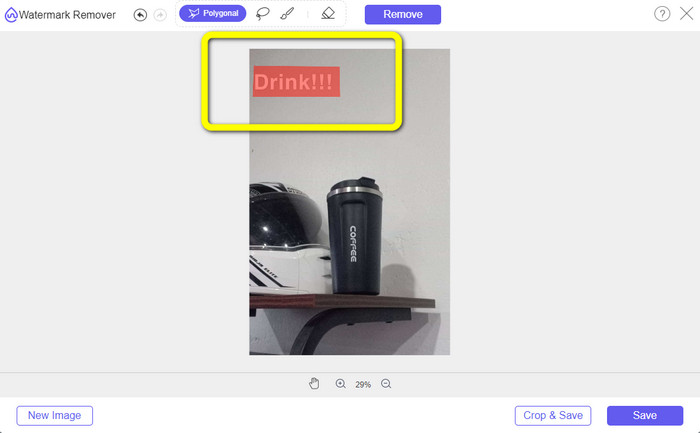
Step 3: Using these tools, you can highlight the text you want to remove.
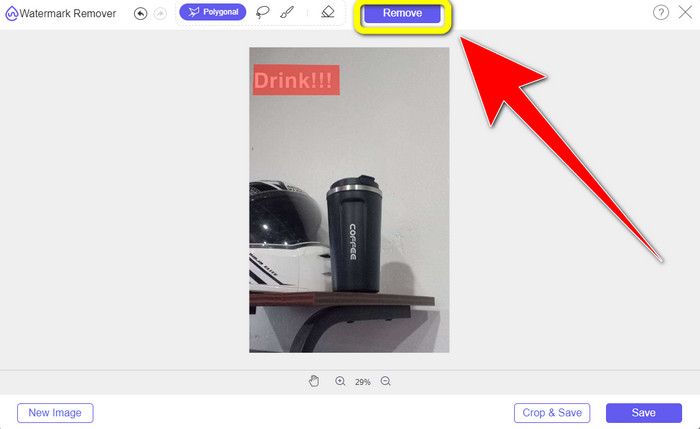
Step 4: When you are done highlighting the text from your photo, you can click the Remove button to eliminate the text from your photo. After that, wait for the removal process.
Step 5: After removing the text from your photo, you can now click the Save button to download your photo without text.
الجزء 2: كيفية إزالة نص Snapchat من الفيديو
After removing a Snapchat text from your photo, we can also help you to learn how to remove a Snapchat text from your video. In this part, the best application you must use is the Video Converter Ultimate. This application can help remove unnecessary objects from your videos, such as text, watermarks, logos, etc. You can also use it to remove the text in two easy ways: using the video watermark remover tool and using the video cropper tool. If the Snapchat text is on the corner or edge of your video, then you can use the video cropper tool. And if the text is in the middle part of the video, then you can use the video watermark remover tool.
علاوة على ذلك ، يحتوي هذا التطبيق على العديد من أدوات التحرير التي يمكنك الاستمتاع بها ، مثل مُحسِّن الفيديو ، وضاغط الفيديو ، وعكس الفيديو ، وإضافة وإزالة العلامة المائية ، ومقطع الفيديو ، والقصاص ، والدوار ، وصانع GIF ، والمزيد. كما أنه يدعم العديد من تنسيقات ملفات الفيديو ، مثل MP4 ، و FLV ، و MKV ، و MOV ، وما إلى ذلك أيضًا ، يمكنك أيضًا استخدام هذا التطبيق على Mac و Windows ، وهو مناسب للمستخدمين. إذا كنت ترغب في إزالة نص Snapchat من مقاطع الفيديو الخاصة بك باستخدام طريقتين سهلتين ، فيجب عليك اتباع الخطوات البسيطة أدناه.
استخدام وظيفة Video Watermark Remover
Step 1: Download the Video Converter Ultimate on your Windows or Mac computer. Run the application after the installation process.
تحميل مجانيلنظام Windows 7 أو أحدثتنزيل آمن
تحميل مجانيلنظام MacOS 10.7 أو أحدثتنزيل آمن
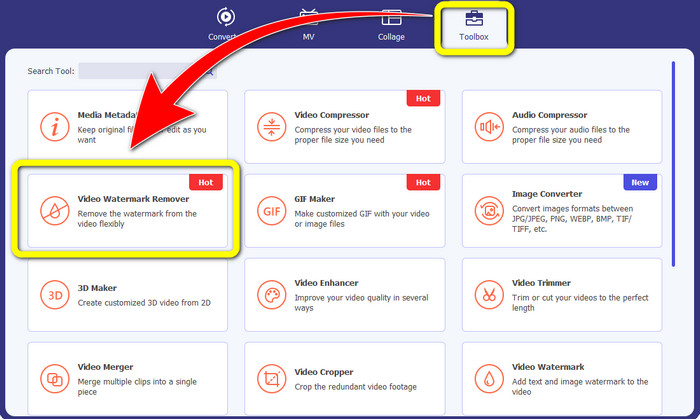
Step 2: After that, there are four options on the upper part of the interface. Click the Toolbox panel and select the Video Watermark Remover tool.
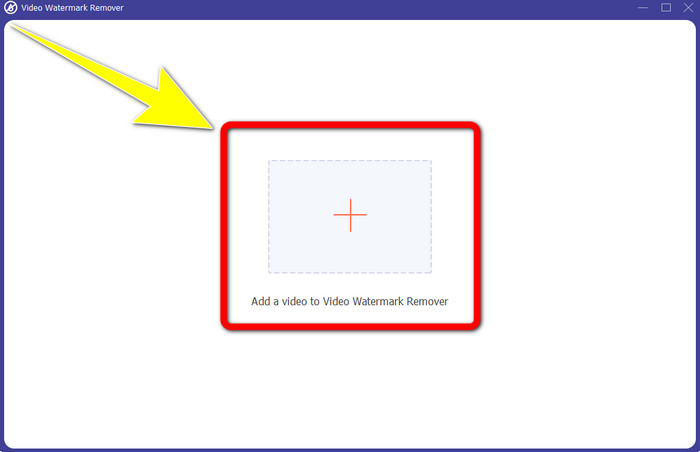
Step 3: After that, another window will pop up on your screen. Click the + icon and insert your video with Snapchat text..
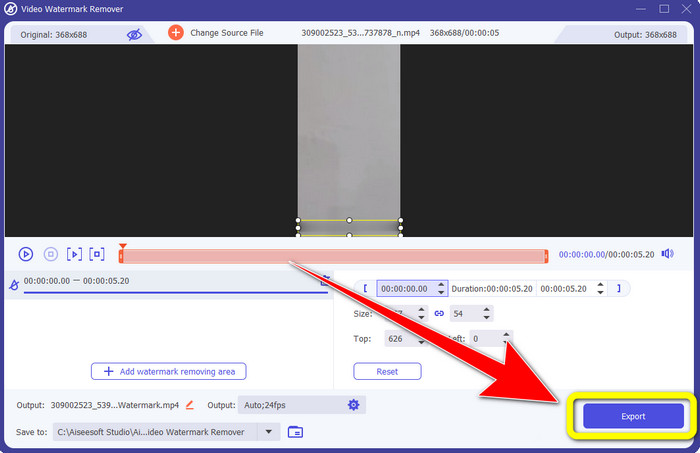
Step 4: When you are done inserting your video, click the Add Watermark Removing Area function. A mini box will appear on your video, then drag it to cover the Snapchat text.
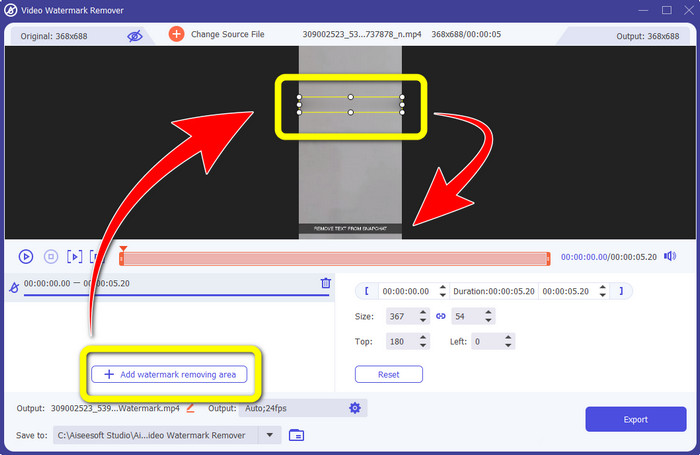
Step 5: After dragging the mini box into the Snapchat text, you can see that the text is already gone. Click the Export button to save your video entirely.
استخدام وظيفة Video Cropper
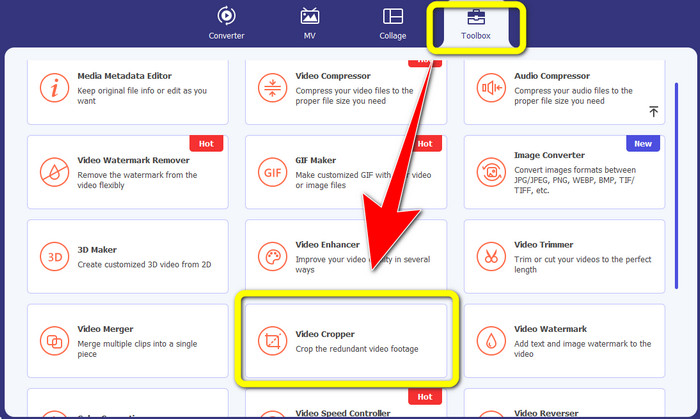
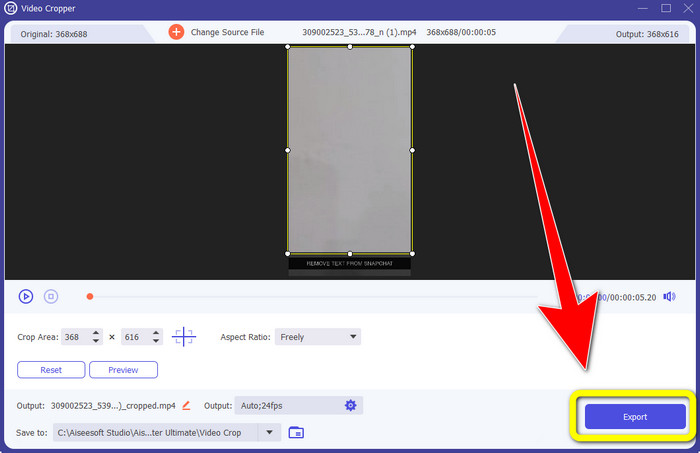
Step 1: Launch the Video Converter Ultimate on your computer. Select the Toolbox panel and go to the Video Cropper tool.
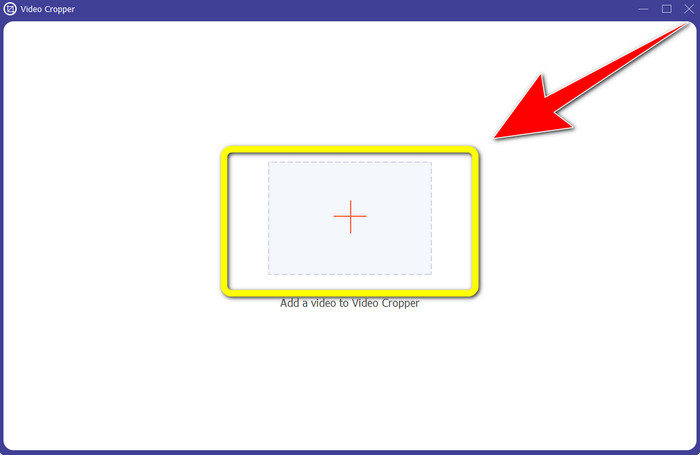
Step 2: After clicking the Video Cropper tool, expect another interface to appear on your screen. Click the + button to import your video with a Snapchat text you want to remove.
Step 3: In this part, you can crop your video to remove the Snapchat text by using your mouse to drag the border line. You can cut the edges of your video.
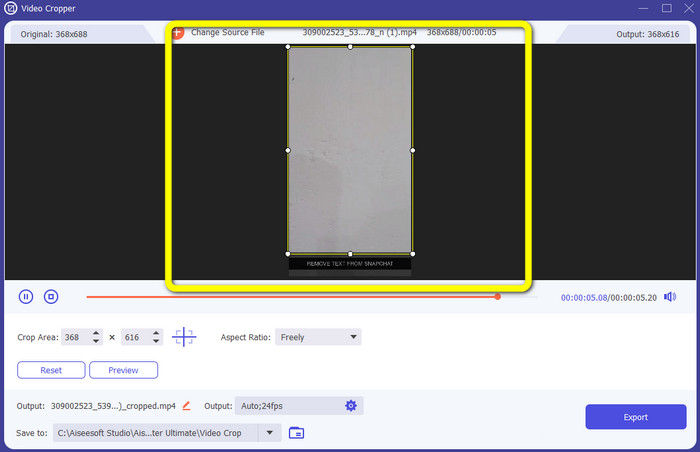
Step 4: You can already click the Export button to save your video without a Snapchat text for your last and final step.
الجزء 3: الأسئلة الشائعة حول إزالة نص Snapchat من الصور ومقاطع الفيديو
هل يمكنني أيضًا إزالة نص Snapchat من الصور باستخدام هاتفي؟
نعم تستطيع. يمكنك استخدام العديد من التطبيقات مع مزيل العلامات المائية ، مثل PicLab و Photo Retouch-Object Removal و Airbrush والمزيد.
هل يمكنني إزالة نص Snapchat من صورتي دون فقدان جودة صورتي؟
If you don’t want to lose the quality of your photo after removing the Snapchat text, then you must use the FVC Free Watermark Remover. After the removal process, you can still get the original quality of your images.
كيف يمكنني إيقاف تعليق Snapchat؟
يتم تحميل التسميات التوضيحية على Snapchat يدويًا بواسطة الناشر ، مما يسمح بتحسين دقة التسمية التوضيحية. يمكن استخدام تبديل الفقاعة التفسيرية في الجزء السفلي من الشاشة لتشغيل أو إيقاف تشغيل التسميات التوضيحية.
ما هو أفضل تطبيق مع مزيل العلامة المائية يمكنني استخدامه لسطح المكتب؟
If you are looking for an application, you can use the Video Converter Ultimate. This application lets you remove watermarks from your videos effortlessly. In addition, it has many features you can enjoy.
ما هي العلامة المائية في الصورة أو الفيديو؟
العلامات المائية هي التوقيعات والشعارات والنصوص التي يمكنك رؤيتها في الصورة أو الفيديو. إنه يخبر الأشخاص الآخرين فقط من هو المالك الفعلي للصور أو مقاطع الفيديو. العلامة المائية هي واحدة من أفضل الطرق لتأمين الصورة والترويج لبعض اسم المنتج.
خاتمة
As you can see, the best way to remove the Snapchat text from your photos and videos is to use an excellent application with a watermark remover. This article shows you how to remove Snapchat text from photos by utilizing the FVC Free Watermark Remover. Also, it shows how to remove Snapchat text from videos using the Video Converter Ultimate, which has two remarkable ways, such as using a video watermark remover tool and a video cropper tool.
-
 كيفية إزالة الشعار من الفيديو باستخدام Windows Movie Maker
 إذا كنت تريد التعرف على كيفية إزالة الشعارات من مقاطع الفيديو باستخدام Windows Movie Maker والطرق البديلة الأخرى ، فاقرأ هذه المقالة. لدينا طرق سهلة لك.
-
 كيفية إزالة شعار VideoScribe من الفيديو بسهولة
 لا داعي للقلق بشأن إزالة شعار VideoScribe من مقاطع الفيديو الخاصة بك بعد الآن. ستعطي هذه المقالة طرقًا خالية من المتاعب. اقرأ هذا المنشور لمعرفة المزيد
-
 أسرع طريقة لإزالة الشعار من الفيديو في Adobe Premiere Pro
 جرب هذه الطرق السهلة والأسرع لإزالة الشعارات من مقطع فيديو في Adobe Premiere Pro. ستقدم لك هذه المقالة أفضل الطرق التي يمكنك من خلالها تجربة استخدام جهازك.
