


 محول الفيديو النهائي
 مسجل الشاشة
 إصلاح الفيديو
 تنزيل آمن
قم بتغيير حجم الفيديو لـ Instagram لتعزيز المشاركة والتواجد على Instagram
هل سئمت وتعبت من مقاطع الفيديو التي تم اقتصاصها بشكل محرج في موجز Instagram الخاص بك؟ حان الوقت لتكثيف لعبة المحتوى الخاصة بك وجعل مقاطع الفيديو الخاصة بك تبرز! مع ظهور محتوى الفيديو ، أصبح ضمان تحسين صورك المرئية بشكل مثالي لـ Instagram أكثر أهمية من أي وقت مضى. لكن لا تقلق. ليس عليك أن تكون محررًا محترفًا لقص مقاطع الفيديو الخاصة بك مثل المحترفين.
في هذا الدليل، سنأخذك عبر كل ما تحتاج إلى معرفته من أجل قص مقاطع الفيديو الخاصة بك لتناسب إنستغرام وفقًا للمواصفات المطلوبة، لإنشاء محتوى رائع يجذب انتباه متابعيك. لنبدأ!

الجزء 1. معيار نسبة العرض إلى الارتفاع للفيديو على Instagram
معيار نسبة العرض إلى الارتفاع لفيديو Instagram هو 1: 1 ، مما يعني أن عرض الفيديو وارتفاعه يجب أن يكونا متساويين. نسبة العرض إلى الارتفاع هذه هي الإعداد الافتراضي لمقاطع فيديو Instagram وهي التنسيق الأكثر استخدامًا على النظام الأساسي. ومع ذلك ، يدعم Instagram أيضًا نسب العرض إلى الارتفاع الأخرى ، بما في ذلك 4: 5 و 16: 9 و 9:16.
تسمح نسب العرض إلى الارتفاع هذه بمزيد من المرونة عند إنشاء مقاطع الفيديو ، ولكن من المهم ملاحظة أن بعض النسب قد تؤدي إلى اقتصاص مقاطع الفيديو الخاصة بك أو تغيير حجمها بطرق يمكن أن تؤثر سلبًا على جودتها. وبالتالي ، قد تكون هذه أفضل إجابة ممكنة لأولئك الذين لديهم أسئلة مثل ، "لماذا يقوم Instagram بقص الفيديو الخاص بي؟" باتباع معيار نسبة العرض إلى الارتفاع لفيديو Instagram ، يمكنك التأكد من أن مقاطع الفيديو الخاصة بك تبدو مصقولة واحترافية ومُحسّنة للعرض على النظام الأساسي.
الجزء 2. تغيير حجم الفيديو لـ Instagram Offline
يُعَدّ FVC Video Converter Ultimate خيارًا ممتازًا لقص مقاطع الفيديو الخاصة بك لإنستغرام. فهو يقدّم مجموعة من الميزات والأدوات التي تجعل من السهل إنشاء محتوى مدهش مُحسَّن للمنصّة. ومن أبرز ميزاته دعمه لعدة نِسَب عرض إلى ارتفاع، بما في ذلك 1:1، وهي النسبة القياسية على إنستغرام.
هذا يعني أنه يمكنك قص مقاطع الفيديو الخاصة بك بشكل مثالي لـ Instagram دون القلق بشأن أي خسارة في الجودة أو الدقة. هذه الأداة هي تطبيق رائع لاقتصاص مقاطع الفيديو لـ Instagram ، خاصة بالنسبة للمشاركات والبكرات والقصص. علاوة على ذلك ، يمكنك الاستفادة من نسب العرض إلى الارتفاع الأخرى مثل 16: 9 و 4: 3 و 21: 9 وغير ذلك الكثير. اتبع هذه الخطوات البسيطة لمعرفة كيفية اقتصاص مقاطع الفيديو لـ Instagram:
الخطوة 1. الحصول على البرنامج وتثبيته
أولًا، قم بتنزيل التطبيق على جهاز الكمبيوتر الخاص بك من خلال النقر على زر Free Download المناسب لنظام تشغيل جهازك. بعد ذلك، ثبّت البرنامج ثم شغّله بعد انتهاء عملية التثبيت.
تنزيل مجانيلنظام Windows 7 أو أحدثتنزيل آمن
تنزيل مجانيلنظام MacOS 10.7 أو أحدثتنزيل آمن
الخطوة 2. الدخول إلى صندوق الأدوات وأداة قص الفيديو
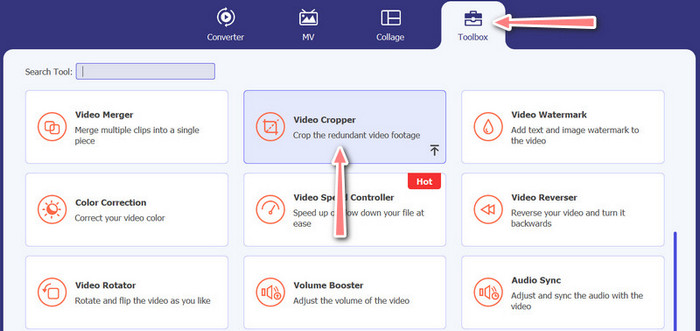
الآن، انتقل إلى صندوق أدوات البرنامج بالنقر على تبويب Toolbox. ستظهر لك في هذه اللوحة مجموعة من الخيارات. بعدها، اختر خيار Video Cropper.
الخطوة 3. استيراد فيديو لقصّه
أضف الفيديو الذي تريد قصّه عن طريق النقر على زر علامة Plus من منطقة الرفع في خيار Video Cropper. بعد ذلك، ستنتقل إلى لوحة أخرى حيث يمكنك قص الفيديو الذي تم رفعه.
الخطوة 4. قص الفيديو
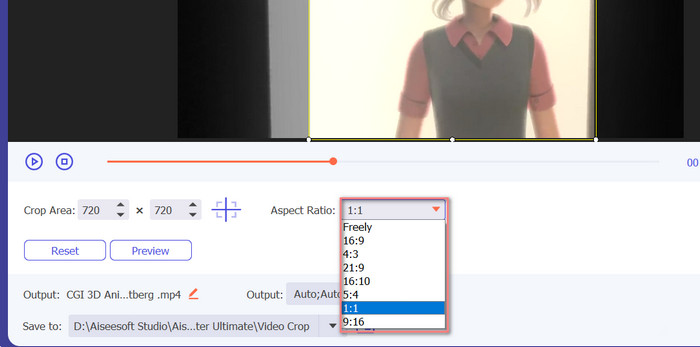
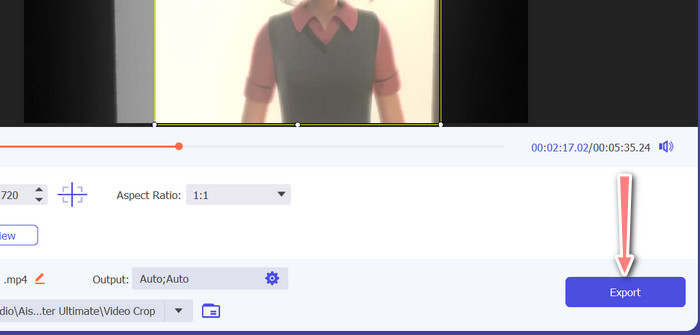
اختر نسبة العرض إلى الارتفاع التي تريد استخدامها للفيديو. بالنسبة إلى إنستغرام، فإن النِّسَب القياسية هي 1:1 (مربّع) و4:5 (عمودي). يمكنك اختيار النسبة المطلوبة بالنقر على قائمة الاختيار المنسدلة الموجودة أسفل معاينة الفيديو. ولـتصدير الفيديو، انقر على زر Export في الزاوية السفلية اليمنى من الواجهة. بعد ذلك يمكنك مشاركته مع متابعيك أو نشره على حسابك في إنستغرام.
الجزء 3. قص الفيديو لـ Instagram Online
Kapwing هو محرر فيديو شهير على الإنترنت مثالي لأي شخص يريد اقتصاص مقاطع الفيديو الخاصة به بسرعة وسهولة على Instagram دون الحاجة إلى التعامل مع البرامج المعقدة. ناهيك عن أن Kapwing مصمم ليكون سهل الاستخدام ، لذلك حتى إذا لم تكن محرر فيديو متمرسًا ، فلا يزال بإمكانك استخدام النظام الأساسي لإنشاء محتوى عالي الجودة. فيما يلي خطوات كيفية استخدام Kapwing لاقتصاص الفيديو على Instagram مجانًا:
الخطوة 1. انتقل إلى موقع Kapwing واضغط على زر Start Editing.
الخطوة 2. قم برفع الفيديو الذي تريد قصّه عن طريق سحبه وإفلاته في محرر Kapwing أو بالنقر على زر Upload واختيار الملف من جهاز الكمبيوتر.
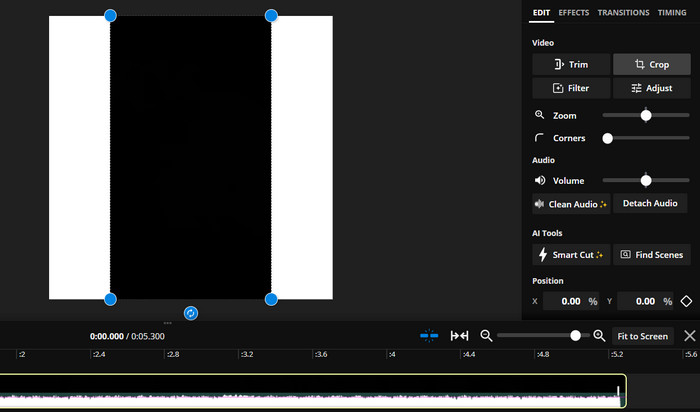
الخطوة 3. انقر على أداة Crop من القائمة الموجودة على اليمين. بعد ذلك، اختر نسبة العرض إلى الارتفاع التي تريد قص الفيديو إليها عن طريق تحديد أحد الخيارات الجاهزة أو إنشاء نسبة مخصّصة. استخدم المقابض في نافذة معاينة الفيديو لقصّه إلى الحجم المطلوب. لاحظ أنه يمكنك أيضًا استخدام هذه الطريقة لقص الفيديوهات لمنشورات إنستغرام.
الجزء 4. قص مقاطع الفيديو لـ Instagram على Android
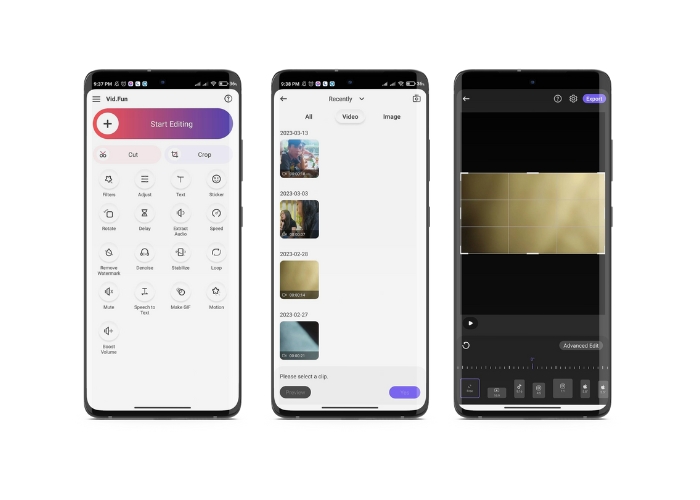
يتيح لك Vid.fun قص مقاطع الفيديو إلى الحجم المثالي لإنستغرام، سواء كنت تستخدم هاتفًا ذكيًا أو جهازًا لوحيًا. التطبيق مليء بالميزات التي تساعدك على إنشاء مقاطع فيديو عالية الجودة، بما في ذلك أداة قص قوية تسهّل قص الفيديو في بضع نقرات فقط. بالإضافة إلى ذلك، يقدّم مجموعة من نِسَب العرض إلى الارتفاع للاختيار من بينها، لتضمن أن تظهر مقاطعك بأفضل شكل على إنستغرام. فيما يلي دليل لقص مقاطع الفيديو لريلز إنستغرام باستخدام هذا التطبيق على جهاز أندرويد الخاص بك.
الخطوة 1. قم بتنزيل Vid.fun وتثبيته من متجر Google Play. بعد ذلك مباشرة، شغّل التطبيق. اضغط على أيقونة Crop الموجودة في الشاشة الرئيسية.
الخطوة 2. أضف ملفًا من الوسائط باختياره من معرض جهازك. ثم اختر نسبة العرض إلى الارتفاع التي تريدها من القائمة أسفل الشاشة. بدلاً من ذلك، يمكنك استخدام المقابض في معاينة الفيديو لضبط القص وتموضع الفيديو كما تريد.
الخطوة 3. عاين الفيديو بعد قصّه للتأكد من أنه يبدو كما ترغب. عندما تكون راضيًا عن القص، اضغط على زر Export الموجود في الزاوية العلوية اليمنى.
قراءة إضافية:
دليل عملي – طريقتان لدمج مقاطع الفيديو لإنستغرام
طرق مختلفة لنشر صور GIF على إنستغرام [أدوات عبر الويب وبرامج سطح المكتب]
الجزء 5. أسئلة وأجوبة حول تغيير حجم مقاطع الفيديو لـ Instagram
ماذا يحدث إذا لم يتطابق الفيديو الخاص بي مع نسبة العرض إلى الارتفاع المطلوبة لـ Instagram؟
إذا كان مقطع الفيديو الخاص بك لا يتطابق مع نسبة العرض إلى الارتفاع المطلوبة لـ Instagram ، فسيظهر إما بأشرطة سوداء على الجانبين أو أعلى وأسفل ، أو سيتم اقتصاصه تلقائيًا ليناسب الإطار.
هل يمكنني قص مقطع فيديو تم تحميله بالفعل على Instagram؟
لا ، لا يمكنك قص مقطع فيديو تم تحميله بالفعل على Instagram. ستحتاج إلى اقتصاص الفيديو قبل تحميله على Instagram.
هل يمكنني قص مقطع فيديو دون فقدان الجودة؟
نعم، يمكنك قص الفيديو دون فقدان الجودة ما دمت لا تُفرِط في القص. فقص جزء كبير من الفيديو سيؤدي إلى انخفاض الجودة لأنه يقلّل من دقة الفيديو.
خاتمة
يُعَدّ قص الفيديو لستوري أو منشورات أو ريلز إنستغرام أمرًا ضروريًا لضمان ظهور الفيديو بشكل ممتاز وملاءم لنسبة العرض إلى الارتفاع المطلوبة. باستخدام الأدوات المناسبة مثل FVC Video Converter Ultimate أو Kapwing أو Vid.fun، يمكنك بسهولة قص الفيديوهات لإنستغرام إلى نسبة العرض إلى الارتفاع الصحيحة.
-
 كيفية إضافة وإنشاء فلتر Instagram قبل نشر الصورة &
 ما هي الفلاتر على انستجرام؟ كيف يتم تطبيقه؟ كيف تصنع واحدة؟ سيكون لهذه الأسئلة إجابات مباشرة في هذا المنشور ، لذا اقرأها.
-
 أفضل التقنيات حول كيفية تسريع الفيديو على Instagram مثل المحترفين
 هل تريد تحميل فيديو تسريع على Instagram؟ في هذه الحالة ، ستوفر هذه المقالة أفضل التقنيات التي يمكنك استخدامها لتسريع مقاطع الفيديو بسهولة.
-
 قم بتغيير حجم الصور لـ Instagram على سطح المكتب أو iPhone أو Android
 إذا كنت ترغب في تغيير حجم صورك لـ Instagram ، فسنعرض لك الخطوات الخاصة بكيفية القيام بذلك. اقرأ لمعرفة خطوات تغيير حجم الصور لـ Instagram.
