


 محول الفيديو النهائي
 مسجل الشاشة
 إصلاح الفيديو
 تنزيل آمن
تحويل MP3 إلى OGG لتحقيق أحجام ملفات أصغر وجودة صوت رائعة
في السنوات القليلة الماضية ، أصبح تحويل MP3 إلى OGG أكثر شيوعًا بسبب الفوائد التي يوفرها. على الرغم من أن ملفات MP3 تحظى بشعبية كبيرة ، إلا أنه غالبًا ما يتم التضحية بجودة الصوت لتصغير حجم الملفات. هذا يعني أنه يتم فقد التفاصيل والحدة. من ناحية أخرى ، تتمتع ملفات OGG بجودة صوت أفضل وأحجام ملفات أصغر. وهذا يجعلها خيارًا رائعًا للأشخاص الذين يرغبون في تحقيق أقصى استفادة من مكتبة الموسيقى الخاصة بهم.
هناك حاجة إلى محول من MP3 إلى OGG لتحويل ملفات MP3 إلى OGG. يمكن للمستخدمين بسهولة تغيير ملفات MP3 الخاصة بهم إلى تنسيق OGG باستخدام المحول، مما يمنحهم جودة صوت أفضل دون الاضطرار إلى تقليل حجم الملف. في هذا العصر من البث الصوتي عالي الجودة، يحتاج أي محب للموسيقى يرغب في تحسين تجربة الاستماع لديه إلى محول من MP3 إلى OGG.

الجزء 1. أفضل طريقة لتحويل MP3 إلى OGG
يُعد FVC Video Converter Ultimate أداة برمجية متعددة الاستخدامات تسمح للمستخدمين بتحويل ملفات الفيديو والصوت إلى صيغ متنوعة. ومن بين قدراته العديدة، يُعد FVC محولًا ممتازًا من MP3 إلى OGG، حيث يمكّن المستخدمين من تحويل موسيقاهم من تنسيق MP3 إلى OGG بسهولة وبضع نقرات فقط.
علاوة على ذلك ، فإنه يسمح للمستخدمين بضبط جودة الإخراج لتحقيق التوازن المثالي بين جودة الصوت وحجم الملف ، مما يضمن أن تكون الموسيقى الخاصة بهم رائعة بغض النظر عن مكان تشغيلها. سواء كنت من عشاق الموسيقى أو كنت تبحث ببساطة عن تحسين مجموعتك الصوتية ، فإن FVC Video Converter Ultimate هو خيار ممتاز لجميع احتياجات التحويل الخاصة بك. جربه اليوم واختبر الاختلاف في جودة الصوت بنفسك.
الخطوة 1. الحصول على التطبيق وإضافة ملفات MP3
قم بتنزيل وتثبيت FVC Free Video Converter من الموقع الرسمي. شغِّل البرنامج ثم انقر على زر علامة الزائد لاستيراد ملف MP3 الذي تريد تحويله.
تنزيل مجانيلنظام Windows 7 أو أحدثتنزيل آمن
تنزيل مجانيلنظام MacOS 10.7 أو أحدثتنزيل آمن
الخطوة 2. اختر OGG كصيغة إخراج
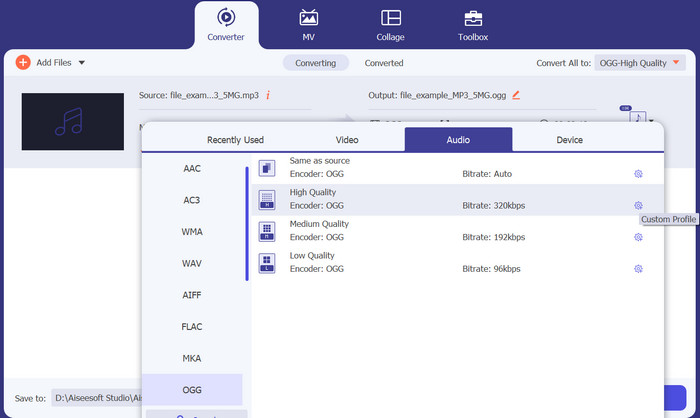
اختر OGG كصيغة الإخراج عن طريق النقر على قائمة Profile المنسدلة واختيار OGG من قائمة الصيغ المتاحة. إذا لزم الأمر، يمكنك أيضًا ضبط إعدادات الإخراج بالنقر على زر Settings. سيسمح لك ذلك بتخصيص معلمات مثل معدل البت، ومعدل العيّنة، والقنوات.
الخطوة 3. تحديد وجهة الإخراج
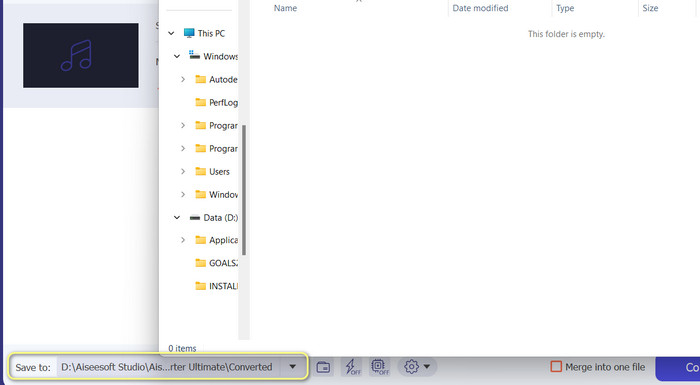
اختر مجلد الإخراج الذي تريد حفظ الملف المحوَّل فيه من خلال النقر على زر Browse بجوار حقل Output Folder.
الخطوة 4. تحويل ملفات MP3 إلى OGG
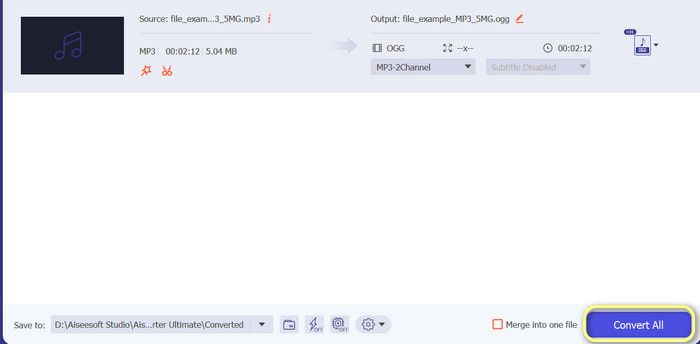
بعد أن تصبح راضيًا عن إعداداتك، اضغط على زر Convert All لبدء عملية التحويل. سيبدأ FVC Free Video Converter في تحويل ملف MP3 الخاص بك إلى تنسيق OGG. سيُظهر لك شريط التقدم مدى تقدم عملية التحويل، ويمكنك أيضًا رؤية الوقت المتبقي التقريبي.
الايجابيات
- تخصيص إعدادات إخراج الصوت.
- سرعة التحويل السريع.
- يقدم العديد من المرافق لتلبية الاحتياجات المختلفة.
سلبيات
- يتم تقديم ميزات محدودة للمستخدمين المجانيين.
- قد يتطلب بعض موارد الكمبيوتر الأعلى لتسريع الأجهزة.
الجزء 2. كيفية تحويل MP3 إلى OGG باستخدام محول صوت مجاني
يعد 123apps Online Audio Converter أداة قوية تجعل من السهل تغيير MP3 إلى OGG عبر الإنترنت. من خلال واجهته سهلة الاستخدام ، يمكن للمستخدمين إضافة ملفات MP3 بسرعة واختيار تحويلها إلى تنسيق OGG. يتيح المحول أيضًا للمستخدمين تغيير إعدادات الإخراج ، مثل معدل البت ومعدل العينة ، للحصول على جودة ملفات OGG التي يريدونها. عملية التحويل سريعة وسهلة ، ويمكن للمستخدمين الحصول على ملفاتهم التي تم تغييرها مباشرة من موقع الويب. علاوة على ذلك ، يعمل محول الصوت عبر الإنترنت مع الكثير من ملفات الصوت المختلفة ، مما يجعله أداة مفيدة للأشخاص الذين يحتاجون إلى تحويل الصوت بطرق مختلفة. في غضون ذلك ، اتبع الإرشادات أدناه لمعرفة كيفية تغيير MP3 إلى OGG مباشرة من موقع الويب.
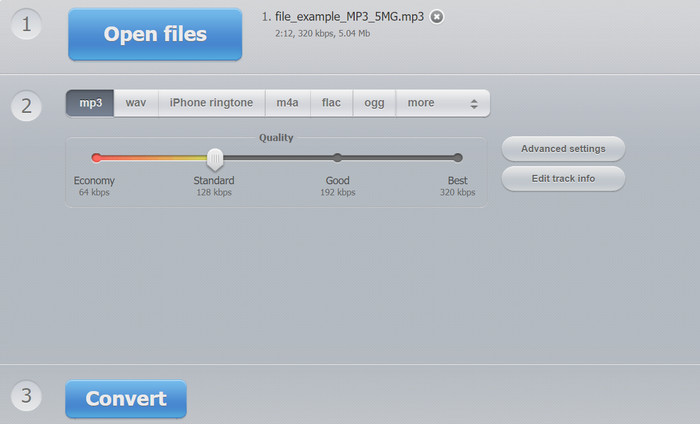
الخطوة 1. افتح متصفح الويب لديك وانتقل إلى موقع Online Audio Converter من 123apps. انقر على زر Open files لاختيار ملف MP3 الذي تريد تحويله.
الخطوة 2. اختر OGG كصيغة إخراج من القائمة المنسدلة. اختياريًا، يمكنك تخصيص إعدادات الإخراج مثل معدل البت، ومعدل العيّنة، والقناة. هذه الخطوة اختيارية ولكنها قد تكون مفيدة إذا كنت ترغب في التحكم في جودة ملف الإخراج.
الخطوة 3. انقر على زر Convert لبدء عملية التحويل. قد يستغرق هذا بضع لحظات، اعتمادًا على حجم ملفك وسرعة اتصالك بالإنترنت. وأخيرًا، انقر على زر Download لحفظ ملف OGG على جهاز الكمبيوتر الخاص بك.
الايجابيات
- يدعم تحويل الدُفعات.
- لا يوجد حد لحجم ملف الرفع.
سلبيات
- يعرض الموقع الإعلانات.
- هناك حاجة دائمًا إلى اتصال بالإنترنت.
الجزء 3. كيفية تحويل MP3 إلى OGG مع الجرأة
يوجد أيضًا محول Audacity MP3 إلى OGG. نعم ، لقد سمعتها بشكل صحيح. هذا البرنامج هو برنامج تحرير صوتي مفتوح المصدر يوفر القدرة على تحويل الملفات من MP3 إلى OGG. بالإضافة إلى التحويل ، توفر Audacity أيضًا مجموعة من أدوات التحرير والتأثيرات التي تسمح للمستخدمين بتعديل وتحسين ملفات الصوت الخاصة بهم ، مما يجعلها أداة متعددة الاستخدامات لمهام تحرير الصوت وتحويله.
علاوة على ذلك ، يتوفر Audacity لأنظمة تشغيل Windows و macOS و Linux ، مما يسهل الوصول إليه. بفضل ميزاته المتقدمة وسهولة استخدامه ، يعد Audacity خيارًا ممتازًا لأي شخص يتطلع إلى تحويل ملفات MP3 الخاصة به إلى تنسيق OGG. تعرف على كيفية عمل هذا البرنامج من خلال إلقاء نظرة على الدليل أدناه.
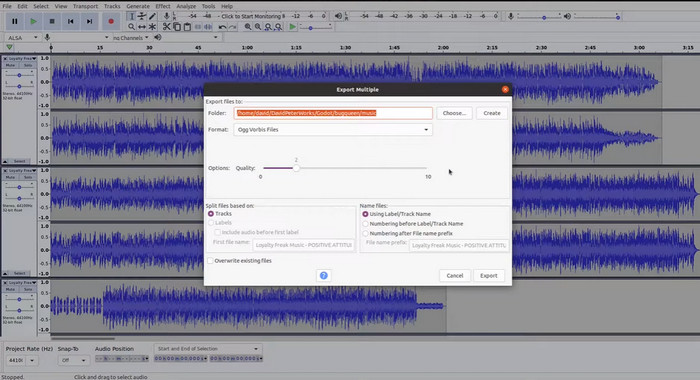
الخطوة 1. قم بتنزيل برنامج Audacity وتثبيته على جهاز الكمبيوتر الخاص بك. افتح Audacity ثم افتح ملف MP3 الذي تريد تغييره. يمكنك القيام بذلك بالضغط على File ثم Open، ثم العثور على ملف MP3 على جهازك والنقر عليه.
الخطوة 2. انقر على File ثم Export بعد فتح ملف MP3 في Audacity. اختر OGG Vorbis Files كنوع الملف في مربع حوار Export Audio.
الخطوة 3. عن طريق تحريك شريط تمرير Quality، يمكنك ضبط ملف OGG على مستوى الجودة الذي تريده. إعدادات الجودة الأعلى ستجعل حجم الملف أكبر، بينما الإعدادات الأقل ستجعل حجم الملف أصغر ولكنها قد تؤثر سلبًا في جودة الموسيقى.
الخطوة 4. انقر على Save لحفظ ملف OGG في أي مكان تختاره على جهاز الكمبيوتر الخاص بك. انقر على OK لإنهاء تغيير التنسيق.
الايجابيات
- يمكنه تحويل دفعة MP3 إلى OGG.
- يمكن تثبيته على أنظمة تشغيل Windows و macOS و Linux.
سلبيات
- مجتمع الدعم المخصص لا يدعم البرنامج.
- لا يوجد تصدير مباشر لملفات MP3.
قراءة إضافية:
أفضل الأدوات التي يمكنك استخدامها للتحويل الدفعي من MP3 إلى ملفات M4R
أفضل طريقتين مجانيتين لتعديل بيانات تعريف ملفات OGG يجدر بك تجربتهما
الجزء 4. كيفية تحويل MP3 إلى OGG باستخدام FFmpeg
يعد FFMPEG خيارًا رائعًا للمستخدمين الذين يحتاجون إلى تحويل ملفات MP3 إلى تنسيق OGG ويتطلبون درجة عالية من التحكم والمرونة في عملية التحويل. يمكنه التعامل مع مجموعة كبيرة من تنسيقات الصوت والفيديو ، كما أنه يدعم مجموعة متنوعة من برامج الترميز والإعدادات التي يمكن استخدامها لضبط تنسيق الإخراج لتلبية متطلبات محددة. بالإضافة إلى ذلك ، نظرًا لأن FFMPEG عبارة عن أداة سطر أوامر ، يمكن الوصول إليها على مجموعة واسعة من أنظمة التشغيل ، بما في ذلك Windows و macOS و Linux ، وتحويل MP3 إلى OGG. اتبع الخطوات الخاصة بتحويل FFmpeg من MP3 إلى تعليمات OGG أدناه.
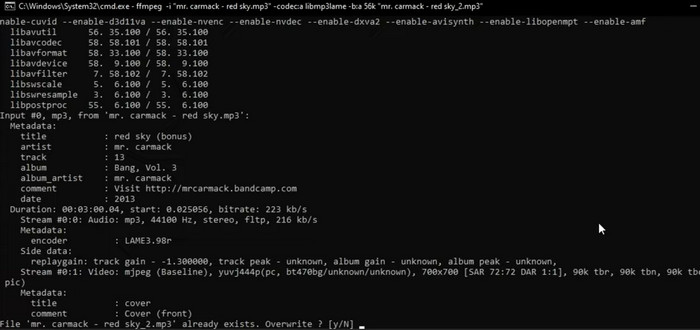
الخطوة 1. افتح الطرفية (Terminal) أو سطر الأوامر على جهاز الكمبيوتر الخاص بك. اعثر على المكان الذي يُخزَّن فيه ملف MP3 الذي تريد تحويله.
الخطوة 2. اكتب ffmpeg -i input.mp3 output.ogg، حيث إن input.mp3 هو اسم ملف MP3 الخاص بك، وoutput.ogg هو الاسم الذي تريد إعطاءه لملف OGG. للبدء في تنفيذ الأمر، اضغط على Enter.
الخطوة 3. انتظر حتى ينتهي FFMPEG من عملية التحويل. عند اكتمال التحويل، يجب أن ترى رسالة تُفيد بأن العملية تمت بنجاح. الآن، سيتم حفظ ملف OGG الجديد في نفس المجلد الذي يوجد فيه ملف MP3 الأصلي.
الايجابيات
- يمنح المستخدمين درجة عالية من المرونة والتحكم.
- يقوم بتحويل الملفات بسرعة وكفاءة.
- التوافق عبر الأنظمة الأساسية.
سلبيات
- معظم المستخدمين غير مرتاحين لاستخدام أدوات سطر الأوامر.
- قد يستغرق الأمر بعض الوقت لتتعلم كيفية استخدامها بفعالية.
الجزء 5. كيفية تحويل MP3 إلى OGG باستخدام VLC Media Player
يعد مشغل وسائط VLC أداة وسائط متعددة قوية تستخدم على نطاق واسع لتشغيل أنواع مختلفة من ملفات الوسائط. ومع ذلك ، قد لا يعرف العديد من المستخدمين أن هذا البرنامج يمكن أن يعمل أيضًا كمحول فعال من MP3 إلى OGG. باستخدام أداة التحويل المدمجة ، يمكن لمشغل وسائط VLC تحويل ملفات MP3 بسرعة وسهولة إلى تنسيق OGG ، مما يسمح للمستخدمين بالاستمتاع بموسيقاهم المفضلة في مجموعة متنوعة من التنسيقات. سواء كنت تبحث عن تحويل ملف واحد أو مجموعة من الملفات ، فإن مشغل وسائط VLC يوفر حلاً بسيطًا وسهل الاستخدام لجميع احتياجات تحويل الصوت. تعرف على كيفية تحويل MP3 إلى OGG باستخدام الخطوات التالية:
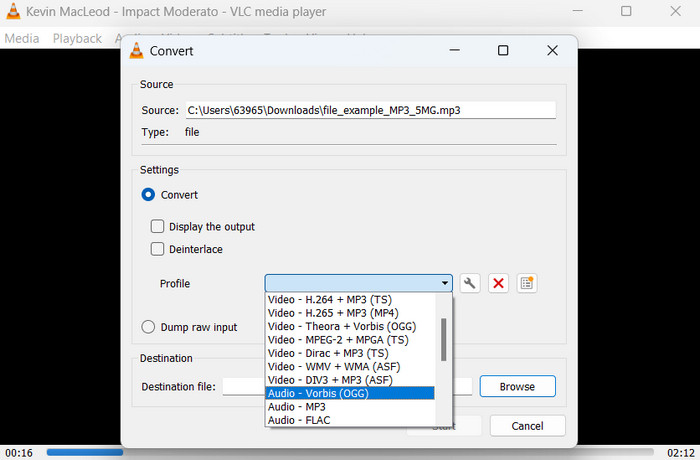
الخطوة 1. لتشغيل مقطع فيديو، افتح VLC واختر Media من شريط قائمة المشغّل. ستظهر لك في القائمة المنسدلة خيار Convert /Save؛ اختره.
الخطوة 2. في منطقة File Selection، اختر ملف MP3 الذي تريد تحويله بالنقر على زر Add. عندما تكون مستعدًا لتحويل الملف أو حفظه، حان الوقت للضغط على زر Convert / Save.
الخطوة 3. انقر على قائمة Profile المنسدلة واختر Audio - Vorbis (OGG) كملف التعريف (البروفايل) المرغوب.
الخطوة 4. لتحديد موقع واسم جديدين للملف المحوَّل، انقر على زر 'Browse' الموجود إلى يمين قسم Destination file. يمكن بدء عملية التحويل بالنقر على زر Start في أسفل النافذة.
الايجابيات
- وهو يدعم تنسيقات متعددة.
- بسيط وسهل الاستخدام.
سلبيات
- خيارات التحرير محدودة.
- احتمال فقدان جودة الصوت.
الجزء 6. أسئلة وأجوبة حول MP3 إلى OGG
هل هناك اختلاف في جودة الصوت بين ملفات MP3 و OGG؟
نعم ، هناك اختلاف في جودة الصوت بين ملفات MP3 و OGG. تميل ملفات OGG إلى الحصول على جودة صوت أفضل نظرًا لخوارزمية ضغطها الأفضل ، ولكن قد لا يتعرف المستمع العادي على الاختلاف في جودة الصوت.
كم من الوقت يستغرق تحويل ملف MP3 إلى OGG؟
يعتمد الوقت الذي يستغرقه تحويل ملف MP3 إلى OGG على حجم الملف وسرعة جهاز الكمبيوتر الخاص بك. عادةً ما يستغرق تحويل ملف واحد بضع دقائق ، ولكن هذا يمكن أن يختلف بناءً على عوامل مختلفة.
هل يمكن استخدام محولات MP3 إلى OGG على جهاز محمول؟
نعم ، هناك محولات من MP3 إلى OGG متاحة للأجهزة المحمولة أيضًا. يمكن تنزيل هذه المحولات كتطبيقات من متاجر التطبيقات المعنية لأجهزة Android و iOS.
خاتمة
إن التحويل من MP3 إلى OGG ممكن بطرق مختلفة. كل محوِّل من المحوِّلات التي تم تناولها له مجموعة من المزايا والعيوب الخاصة به. فبعضها أكثر سهولة وبساطة في الاستخدام، بينما يوفر بعضها الآخر مرونة أكبر وميزات أقوى. وفي النهاية، يعتمد اختيار المستخدم للمحوِّل الذي سيستخدمه على احتياجاته الفردية.
-
 مشغلات OGG ممتازة لنظامي التشغيل Windows و Mac يجب ألا تفوتها
 عندما تريد تشغيل الصوت المفضل لديك بتنسيق OGG ، خاصة عندما تكون مساحة التخزين أقل. يمكنك معرفة المزيد عن أفضل 5 لاعبين في OGG من هذه المقالة.
-
 تعرف على كيفية تحويل MP3 إلى تنسيق WAV
 هل تريد معرفة كيفية تحويل MP3 إلى WAV؟ حدد الأدوات التي تنتج أفضل جودة تحويل يمكنك الحصول عليها.
-
 4 أفضل الطرق لإصلاح وتحرير البيانات الوصفية MP3 على نظامي التشغيل Windows و Mac
 هل تريد معرفة أسرار تحرير البيانات الوصفية MP3 بسهولة؟ ستعلمك هذه المدونة تقنيات مختلفة باستخدام الأدوات المختلفة التي يمكنك الوصول إليها بسهولة.
