


 محول الفيديو النهائي
 مسجل الشاشة
 إصلاح الفيديو
 تنزيل آمن
M4A مقابل MP3 مراجعة متعمقة ومقارنة بين تنسيقات الصوت
بسبب انتشار الموسيقى الرقمية ، أصبح اختيار تنسيق الصوت المناسب أكثر أهمية من أي وقت مضى. بينما يتم استخدام M4A و MP3 على نطاق واسع ، هناك فروق مهمة بين الاثنين. في حين أن MP3 هو المعيار الفعلي لملفات الموسيقى ، يتم استخدام M4A بشكل متكرر للحصول على جودة صوت فائقة.
في مقارنة M4A مقابل MP3 سنستعرض الجوانب الدقيقة بين تنسيقي الملفات الصوتية M4A وMP3 لمساعدتك على اتخاذ قرار مستنير. سنقدّم أيضًا تحليلًا شاملًا لأوجه الاختلاف والتشابه بين نوعي الملفين من حيث جودة الصوت، والتوافق، وحجم الملف، وغير ذلك. إذا كنت من عشاق الموسيقى أو موسيقيًا محترفًا، فستودّ متابعة القراءة لاكتشاف أيّ التنسيقات هو الأنسب لك.

الجزء 1. M4A مقابل MP3
فيما يلي جدول بسيط يقارن بين هذه التنسيقات في جوانب مهمة مختلفة لاتخاذ قرار مستنير. تحقق من الجدول أدناه.
| M4A | MP3 | |
| جودة الصوت | عالي | حسن |
| حجم الملف | كبير | صغير |
| التوافق | محدود | متوافق على نطاق واسع |
| البيانات الوصفية | أيد | محدود |
| حماية DRM | نعم | لا |
| الاستخدامات الشعبية | الموسيقى والكتب الصوتية والبودكاست | الموسيقى والبودكاست ونغمات الرنين |
الجزء 2. M4A و MP3 مقدمة
يكفي مع معركة MP3 مقابل M4A. دعنا نتوقف لبعض الوقت ونتعرف على المزيد حول هذه التنسيقات من خلال مقدمة موجزة لكل منها.
مقدمة عن M4A
تنسيق الصوت الرقمي الخاص بشركة Apple هو MPEG-4 Audio (أو M4A للاختصار). إنه تنسيق صوتي رائع للموسيقى والكتب الصوتية والبودكاست لأنه يمكن أن يستوعب العديد من معدلات البت ومعدلات العينات. يمكن فتح ملفات M4A في iTunes و QuickTime ومشغلات الوسائط الأخرى ، مما يجعلها مثالية لأجهزة Apple.
مقدمة عن MP3
MP3 ، الذي يرمز إلى "MPEG-1 Audio Layer 3" ، هو تنسيق صوت رقمي أصبح معيارًا للصوت المضغوط نظرًا لاعتماده على نطاق واسع وضغط معدل البت المنخفض. تعد ملفات MP3 رائعة للموسيقى والبودكاست ونغمات الرنين نظرًا لحجمها الصغير مقارنة بتنسيقات الصوت الأخرى. يمكن تشغيلها على العديد من الأجهزة المختلفة وتنزيلها بسرعة وسهولة من الإنترنت. من ناحية أخرى ، غالبًا ما تكون جودة صوت ملفات MP3 أقل من التنسيقات البديلة مثل M4A.
الجزء 3. هل M4A أفضل من MP3؟
M4A و MP3 لهما نقاط قوة وضعف مختلفة. تشتهر M4A بجودة صوتها الفائقة ويفضلها عشاق الموسيقى والمحترفون. من ناحية أخرى ، يحتوي MP3 على حجم ملف أصغر وهو متوافق على نطاق واسع مع مختلف الأجهزة ومشغلات الوسائط.
يعتمد الاختيار بين M4A و MP3 على ما هو أكثر أهمية بالنسبة لك: جودة صوت عالية أو حجم ملف أصغر وتوافق.
الجزء 4. الفرق بين MP3 و M4A
تنسيقات الموسيقى الرقمية الشهيرة MP3 و M4A لها ميزات مميزة. فيما يلي شرح مفصل للتمييز بين MP3 و M4A:
جودة الصوت: يشتهر تنسيق M4A بجودة صوت متفوقة مقارنةً بتنسيق MP3. يستخدم M4A خوارزمية ضغط أفضل ويدعم نطاقًا أوسع من معدلات البت ومعدلات أخذ العينات. كما يدعم M4A الضغط غير الفاقد، مما يحافظ على الجودة الأصلية للصوت، في حين يعتمد MP3 على ضغط فاقد يقلل من حجم الملف ولكنه يقلل أيضًا من جودة الصوت.
حجم الملف: تكون ملفات MP3 أصغر حجمًا مقارنةً بملفات M4A. ويرجع ذلك إلى أن MP3 يستخدم خوارزمية ضغط أكثر كفاءة تقلل حجم الملف دون التأثير بشكل ملحوظ على جودة الصوت. أما M4A، فيستخدم من جهة أخرى خوارزمية ضغط أقل كفاءة تؤدي إلى أحجام ملفات أكبر ولكن بجودة صوت أفضل.
التوافق: يُعدّ MP3 إلى حدٍّ كبير المعيار الصناعي للصوتيات الرقمية، وهو متوافق مع مجموعة واسعة من الأجهزة ومشغلات الوسائط، بما في ذلك الهواتف الذكية والأجهزة اللوحية وأجهزة الكمبيوتر. بينما يتمتع M4A بتوافقية أقل انتشارًا ويُستخدم بالدرجة الأولى على أجهزة وبرمجيات آبل، مثل iTunes وQuickTime.
البيانات الوصفية (Metadata): يدعم M4A نطاقًا أوسع من البيانات الوصفية مقارنةً بـ MP3. وهذا يعني أن ملفات M4A يمكنها تخزين مزيد من المعلومات حول الصوت، مثل صورة الألبوم وكلمات الأغاني ومعلومات المسار.
حماية إدارة الحقوق الرقمية (DRM): يدعم M4A نظام حماية إدارة الحقوق الرقمية DRM، الذي يتيح لأصحاب الحقوق التحكم في استخدام وتوزيع ملفاتهم الصوتية. أما MP3، من جهة أخرى، فلا يدعم حماية DRM.
الجزء 5. كيفية تحويل M4A إلى MP3 أو MP3 إلى M4A
أكثر من مقارنة ومراجعة هذين التنسيقين الصوتيين ، من المهم أيضًا معرفة كيفية التحويل من M4A إلى MP3 أو العكس. فيما يلي بعض البرامج التي يمكنك استخدامها:
سواء كنت متصلًا بالإنترنت أو غير متصل، يُعد Video Converter Ultimate أداة ممتازة يمكنك استخدامها للتحويل بين M4A وMP3. تأتي هذه الأداة مع الكثير من الميزات التي يمكنك الاستفادة منها. فهي تتيح إمكانية تحويل ملفات متعددة على شكل دفعات، ما يعني أنه بإمكانك تحويل مجموعة كاملة من ملفات الموسيقى. وما يلفت الانتباه أنّها تمنحك إمكانية الوصول إلى إعدادات المخرجات لملفاتك الصوتية. اكتشف كيفية عمل هذه الأداة من خلال الاطلاع على الخطوات التالية.
الخطوة 1. ابدأ عملية التنزيل بالنقر على أحد أزرار التنزيل المجاني ثم اتّبع التعليمات الظاهرة على الشاشة. بعد ذلك، شغّل التطبيق وتعرّف إلى واجهته البسيطة.
تنزيل مجانيلنظام Windows 7 أو أحدثتنزيل آمن
تنزيل مجانيلنظام MacOS 10.7 أو أحدثتنزيل آمن
الخطوة 2. انقر زر إضافة في الشاشة الرئيسية، ثم ابحث عن الملف الصوتي الذي تريد تحويله. ستظهر معاينة للملف الذي تم رفعه على واجهة المستخدم بعد وقت قصير من التحميل. يمكنك تحويل عدة ملفات M4A دفعة واحدة إلى MP3 عن طريق رفع مجلد كامل.
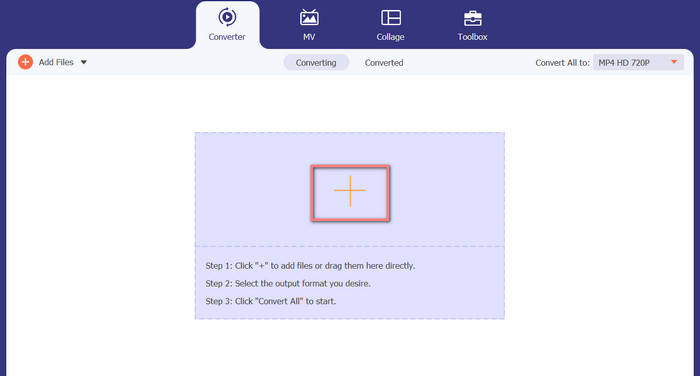
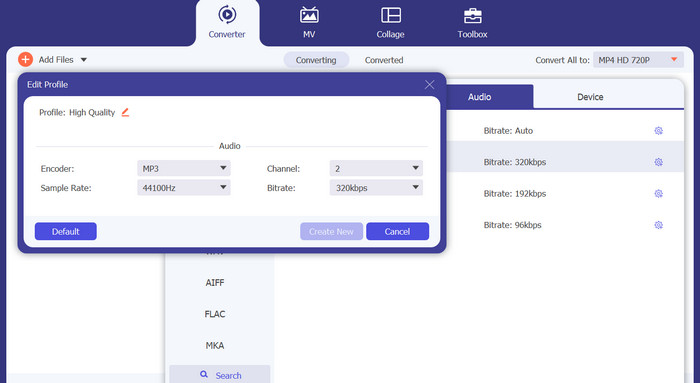
الخطوة 3. لتغيير تنسيق الإخراج في الأداة، انتقل إلى تبويب الصوت في قائمة الملف الشخصي (Profile) الموجودة في أعلى يمين الأداة. يمكنك تحويل ملف M4A إلى ملف MP3 والعكس صحيح.
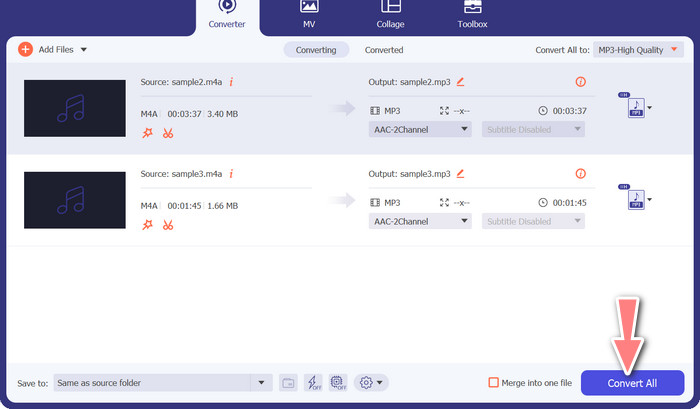
الخطوة 4. اختر الموقع المرغوب في أسفل الشاشة. لبدء عملية التحويل، انقر على تحويل الكل.
محول الفيديو المجاني عبر الإنترنت (عبر الإنترنت)
لا توجد مساحة لعرض برنامج آخر على جهازك؟ الخبر السار هو أن استخدام محوّل عبر الإنترنت يجنّبك الحاجة إلى تثبيت أي برامج. يتيح لك أداة الويب Free Video Converter Online التحويل مباشرة من المتصفح. كما يدعم مجموعة واسعة من أنواع ملفات الصوت والفيديو. بالإضافة إلى ذلك، يدعم هذا التطبيق على الويب التحويل على شكل دفعات، كما يتيح للمستخدم تعديل إعدادات ملف الصوت النهائي. تعرّف على كيفية تحويل MP3 إلى M4A عبر الإنترنت.
الخطوة 1. أولًا، افتح متصفح الويب المفضل لديك وانتقل إلى موقع Free Video Converter Online.
الخطوة 2. انقر على خيار إضافة ملفات للتحويل ثم انتقل إلى ملف M4A الذي تريد تحويله واختره.
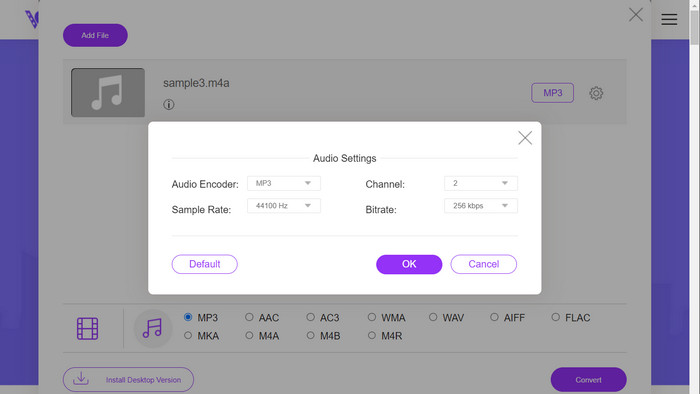
الخطوة 3. اختر MP3 كنوع ملف الإخراج من قائمة تنسيقات الصوت. كما يمكن تعديل معدل البت أو جودة الإخراج لملف MP3.
الخطوة 4. لبدء عملية التحويل، انقر زر تحويل. هذه هي طريقة تغيير تنسيق M4A إلى MP3 عبر الويب.
قراءة إضافية:
إرشادات حول كيفية تحويل M4A إلى WAV [على الكمبيوتر الشخصي وماك]
أفضل الأدوات التي يمكنك استخدامها للتحويل الدفعي من MP3 إلى ملفات M4R
الجزء 6. أسئلة وأجوبة حول M4A و MP3
ما هو MP3 مقابل M4A من حيث البيانات الوصفية؟
يدعم M4A نطاقًا أوسع من البيانات الوصفية من MP3 ، مما يعني أن ملفات M4A يمكنها تخزين المزيد من المعلومات حول الصوت.
هل يمكنني تحرير ملفات MP3 أو M4A؟
يمكنك تحرير ملفات MP3 و M4A باستخدام العديد من برامج تحرير الصوت.
أيهما أفضل للبودكاست ، MP3 أم M4A؟
يعد MP3 أفضل للبودكاست نظرًا لصغر حجمه وتوافقه الأوسع.
خاتمة
يمكن أن يساعدك فهم مقارنة MP3 مقابل M4A في اختيار أفضل تنسيق للصوت الرقمي. سواء كنت تبثّ الموسيقى أو تنتجها، فإن اختيار التنسيق المناسب أمر بالغ الأهمية لضمان أفضل جودة صوت ممكنة وأعلى درجة من التوافق.
-
 MP3 مقابل MP4: ما الفرق بين MP3 و MP4
 MP3 أم MP4 ، أيهما أفضل؟ ما الفرق بين MP3 و MP4؟ ستقارن هذه المقالة MP3 مع MP4 من جميع الجوانب التي يمكنك تصويرها.
-
 M4A Player - أفضل 5 مشغلات M4A لأجهزة Android والكمبيوتر
 كيف تلعب ملفات M4A على هاتف Android؟ أي لاعب يمكنه لعب M4A؟ يشارك هذا المنشور أفضل 5 مشغلات M4A مجانية لأجهزة Android و Mac و PC.
-
 4 أفضل الطرق لإصلاح وتحرير البيانات الوصفية MP3 على نظامي التشغيل Windows و Mac
 هل تريد معرفة أسرار تحرير البيانات الوصفية MP3 بسهولة؟ ستعلمك هذه المدونة تقنيات مختلفة باستخدام الأدوات المختلفة التي يمكنك الوصول إليها بسهولة.
