


 مسجل الشاشة
 إصلاح الفيديو
 تنزيل آمن
كيفية إزالة الخلفية من صور GIF باستخدام البرامج الفعالة
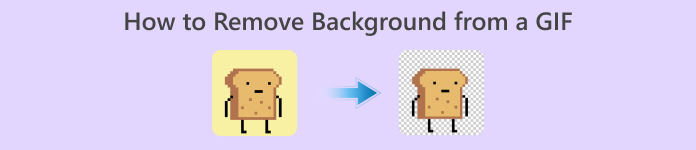
GIF هو اختصار لعبارة Graphics Interchange Format ويُستخدم على نطاق واسع في الاتصالات عبر الإنترنت، مثل مراسلة شخص ما أو حتى التعليق على منشور. قد يكون إزالة الخلفية من ملفات GIF أو الصور أمرًا صعبًا ما لم يكن لديك برامج مصممة خصيصًا لمثل هذه المهمة! ونظرًا لشعبيته، أصبح عدد متزايد من المستخدمين مهتمين بكيفية تعديل وإنشاء صور GIF خاصة بهم. لحسن الحظ، جمعنا برامج إلكترونية موثوقة وسهلة الاستخدام يمكن أن تساعد المستخدمين على إزالة الخلفية من ملفات GIF.
موصى به: مزيل الخلفية المجاني FVC
أداة FVC Free Background Remover هي أداة مفيدة عندما يتعلق الأمر بإزالة الخلفية من صورك. فهي تستخدم تقنية الذكاء الاصطناعي لتحديد الشخص داخل الصورة والتعرّف عليه بدقة. إضافة إلى ذلك، الأداة متاحة على نظامي Windows وMac. بشكل عام، هي أداة مريحة وموثوقة يمكنك استخدامها في أي وقت ومن أي مكان.
الخطوة 1. رفع الصورة/ملف GIF
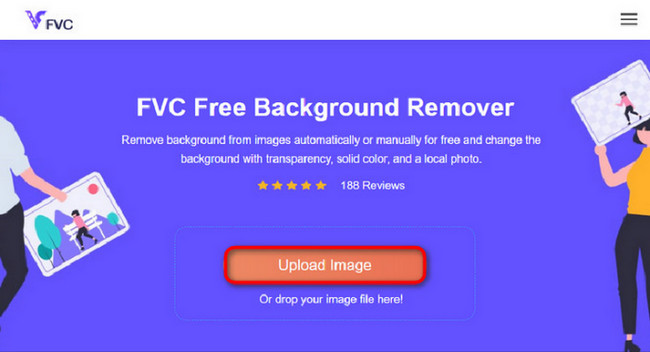
تتمثل الخطوة الأولى في فتح المتصفح على جهاز الكمبيوتر لديك. عند فتح البرنامج عبر الإنترنت، ستجد أمامك خيارًا لرفع صورتك. انقر على Upload Image لإضافة ملف GIF الذي ترغب في إزالة الخلفية منه.
الخطوة 2. تحرير الصورة
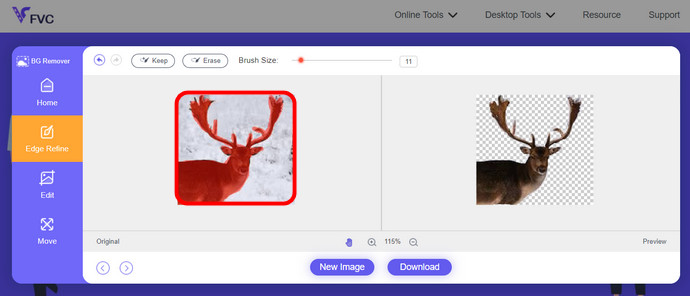
بعد التحميل، يُسمح لك الآن بإزالة أي تمييزات غير دقيقة تمت إزالتها من التعرف على الذكاء الاصطناعي. فقط انقر واسحب الماوس الخاص بك، وقم بذلك حسب رغبتك.
الخطوة 3. تنزيل الصورة المعدَّلة
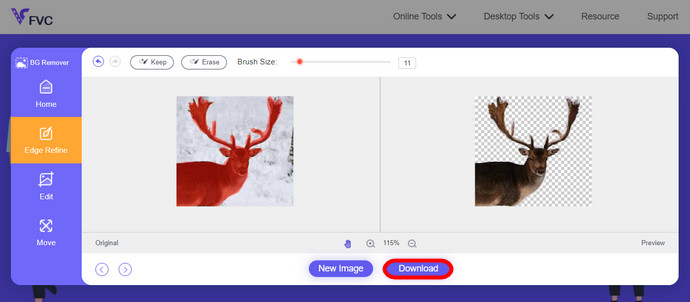
وأخيرًا، انقر على زر Download. وبذلك تكون قد نجحت في إزالة الخلفية من صورتك.
الجزء 1. قم بإزالة خلفية GIF باستخدام EZGIF.com
هذا البرنامج عبر الإنترنت عبارة عن برنامج لتحرير وتحويل الصور/gif. يمكنه تحرير وتحويل تنسيقات GIF وPNG وWEBP وIMG والعديد من التنسيقات الأخرى. هنا، يمكنك تحرير ملف GIF الخاص بك باستخدام برنامج التحرير الذي يأتي مع البرنامج.
الخطوة 1. الدخول إلى الموقع
لاستخدام هذه الأداة عبر الإنترنت، افتح المتصفح وأدخل الرابط. ستظهر لك مباشرةً خيارات وفقًا لاحتياجاتك. يتيح لك هذا الموقع إمكانية إزالة الخلفية من ملف GIF الخاص بك. انقر على Effects للبدء.
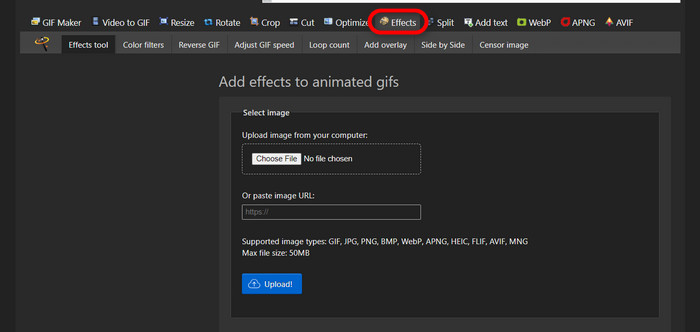
الخطوة 2. اختيار ورفع صورة/ملف GIF
الآن، اختر الملف الذي تريد رفعه. انقر على Choose Files، ثم ابحث عنه في المجلد المحدد لديك، واضغط على Upload لرفع الملف الذي اخترته.
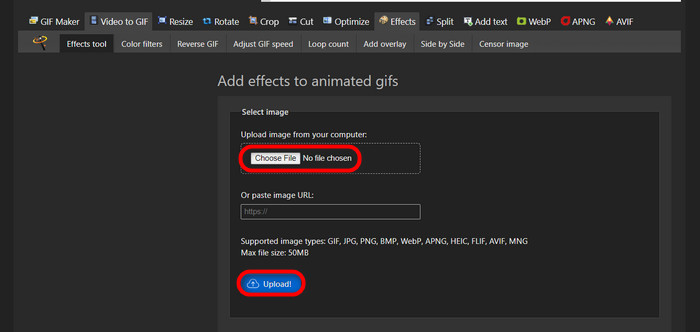
الخطوة 3. تحرير الصورة
بعد الرفع، تكون قد اقتربت من عملية إزالة الخلفية من ملف GIF أو جعل خلفية ملف GIF سوداء. الآن، انقر على grayscale لجعل الخلفية داكنة.
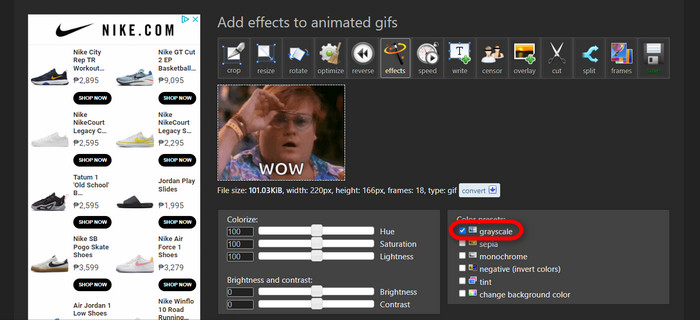
الخطوة 4. معاينة وتحويل الصورة/ملف GIF
بعد إضافة التأثير وتغيير الحجم وقص ملف GIF الجديد، انقر على Apply Selected، وستظهر لك معاينة لملف GIF المعدَّل. بعدها، انقر على زر convert لتنزيل ملفك.
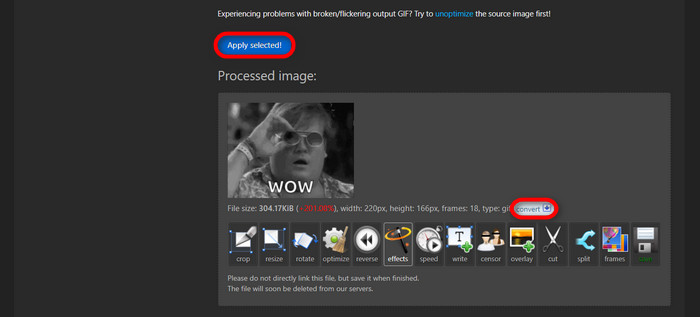
الجزء 2. إنشاء صورة GIF بدون أي خلفية في Remove.bg
تم تصميم هذا الموقع أيضًا لإزالة أي خلفية من أي صورة. يمنحك هنا خيار الاستمرار في تعديل صورة الخلفية التي تمت إزالتها تلقائيًا. إنه مدعوم بذكاء اصطناعي ماهر يمكنه التعرف على الموضوع الرئيسي وإزالة خلفيته دون أي عيب.
الخطوة 1. رفع الصورة/ملف GIF
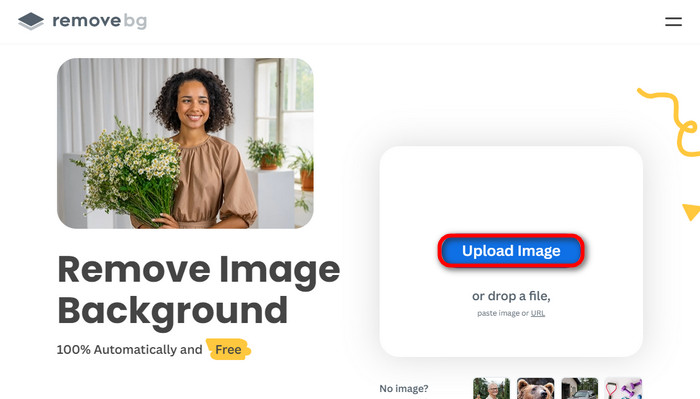
لنبدأ برفع الصورة. افتح البرنامج عبر الإنترنت في متصفحك عندما تكون على الصفحة. ثم انقر على Upload Image.
الخطوة 2. مراجعة وتحرير الصورة
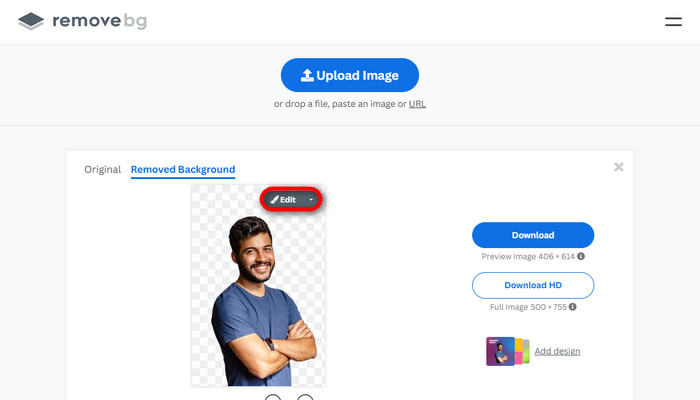
بمجرد رفع الصورة، يجب أن تكون خلفية صورتك قد أزيلت تلقائيًا، لكنك لا تزال قادرًا على تعديل الصورة. يمكنك رؤية الصورة الأصلية بالنقر على زر Original بجوار زر Removed Background. يمكن للمستخدمين وضع خلفية سوداء لصورتهم بكل سلاسة باستخدام هذا البرنامج.
الخطوة 3. تنزيل الصورة المعدَّلة
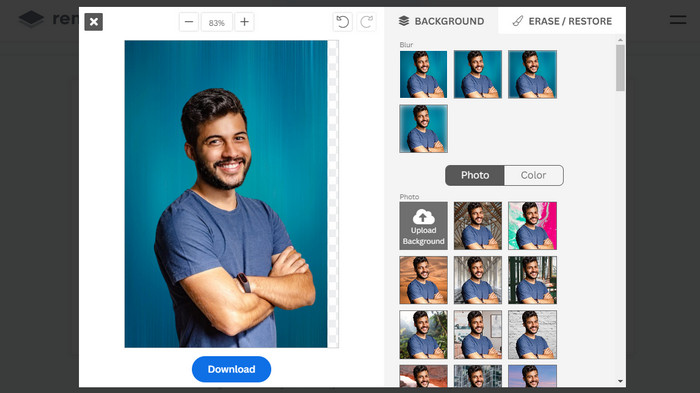
في هذه المرحلة، تكون قد انتهيت من التحرير ويمكنك الآن تنزيل صورتك. فقط انقر على زر Download أسفل الصورة.
الجزء 3. استخدم GIFMagic في إزالة خلفية GIF
في GIFMagic، المؤثرات الخاصة، إضافة النص، الرسوم المتحركة، وغيرها الكثير! كل هذا ممكن باستخدام هذا البرنامج عبر الإنترنت. من السهل التعامل مع ملفات GIF عندما يتعلق الأمر بالتحرير في هذا البرنامج!
الخطوة 1. رفع الصورة/ملف GIF
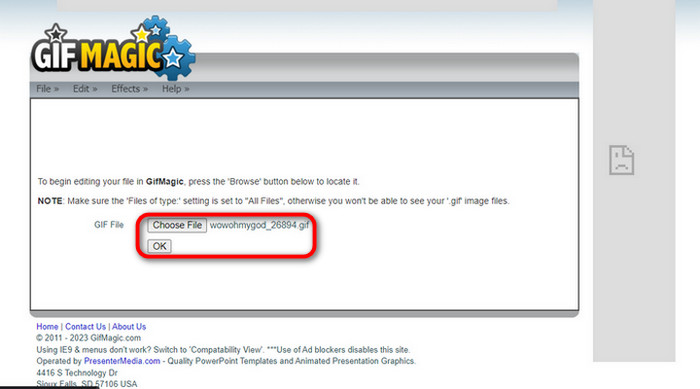
بعد تسجيل الدخول، يتيح لك الموقع رفع الملف الذي اخترته إلى البرنامج. يمكنك رفع ملفات .gif أو .img، وهي مفيدة للمستخدمين الآخرين. لاختيار الملف، انقر على Upload، وبعد اختيارك للملف، انقر على زر OK.
الخطوة 2. تحرير الصورة
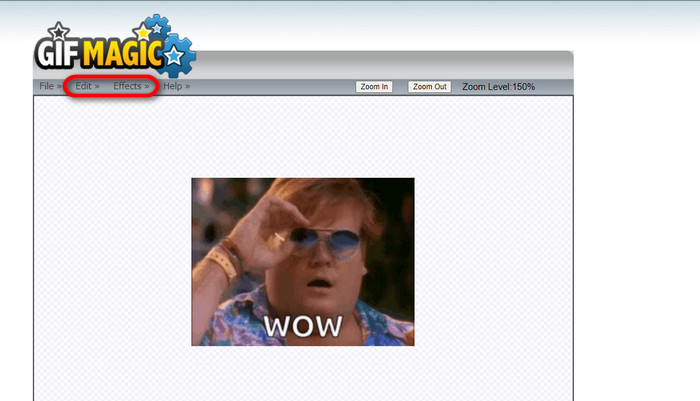
بمجرد دخولك إلى الصفحة، سترى زري Edit وEffects بجوار زر File. يمكن تعديل ملفك في هذا القسم، لذا قم بما تريد واستمتع بعملية التحرير.
الخطوة 3. تنزيل ملف GIF المعدَّل
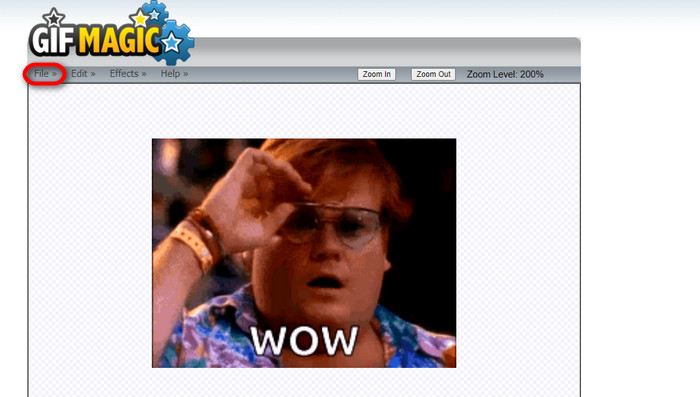
بعد أن تجعل خلفية ملف GIF شفافة، ما عليك سوى النقر على زر File ثم النقر على Save. ها هو! تم الحفظ والتنزيل.
الجزء 4. جعل خلفية GIF شفافة باستخدام LunaPic
LunaPic هي أداة مجانية عبر الإنترنت قادرة على إزالة صور GIF الخلفية عبر الإنترنت. يمكنه تقييم وتحرير PNG وGIF وJPG وJPEG والعديد من أنواع الصور. إنه برنامج ذو أسس جيدة يستخدم للتحرير على العديد من المنصات.
الخطوة 1. رفع الصورة/ملف GIF
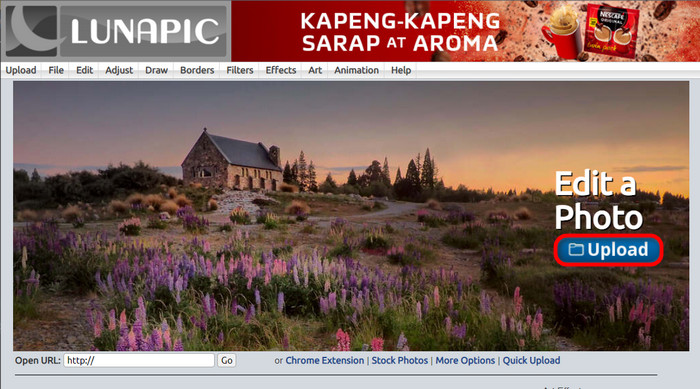
بعد الدخول إلى الموقع عبر المتصفح الافتراضي لديك أو أي متصفح تختاره، قم برفع ملف .img أو .gif إلى الموقع. فقط انقر على زر Upload.
الخطوة 2. تحرير الصورة/ملف GIF
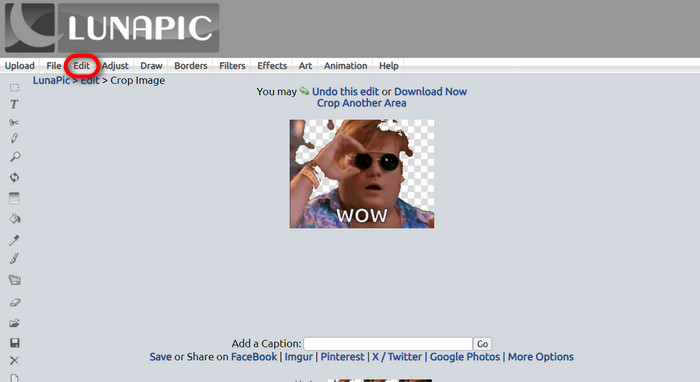
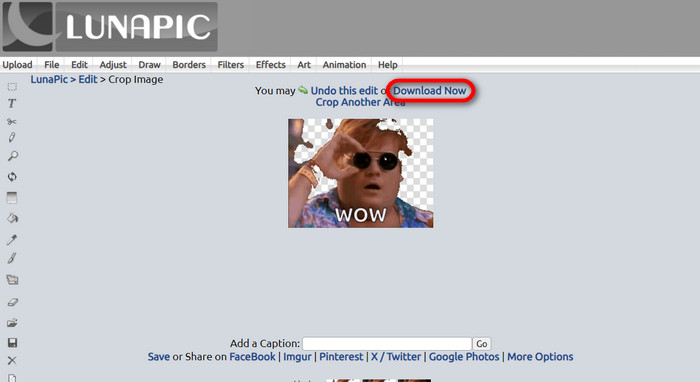
يمكنك بعد ذلك تحرير الملف وجعل خلفية ملف GIF شفافة عن طريق النقر على Edit ثم زر أداة Crop Image. ابدأ بقص خلفية الصورة.
الخطوة 3. تنزيل ملف GIF المعدَّل
بعد الانتهاء من قص الخلفية أو إذا حاولت إنشاء ملف GIF بخلفية بيضاء، يمكنك الآن النقر على زر Download now! لحفظ ملفك المعدَّل!
قراءة إضافية:
أربع طرق رائعة لإزالة العلامة المائية من ملفات GIF [أونلاين وغير متصل]
كشف أفضل الأدوات لسطح المكتب وعبر الإنترنت وعلى الهاتف المحمول

محول الفيديو النهائي
345+ التنزيلات- استمتع بمشاهدة مقاطع الفيديو الخاصة بك دون تلك العلامات المائية المزعجة التي تحجب المحتوى الخاص بك.
- قم بإنتاج مقاطع فيديو عالية الجودة وبدقة عالية لمشاهدة أفضل.
- تتيح لك إزالة أي علامة مائية من أي نوع من الفيديو.
- نوفر لك تنسيقات لا حصر لها لتحويل ملفك إليها.
تنزيل مجانيلنظام Windows 7 أو أحدثتنزيل آمن
تنزيل مجانيلنظام MacOS 10.7 أو أحدثتنزيل آمن
الجزء 5. الأسئلة الشائعة حول إزالة الخلفية
هل يمكنني تحويل صورة PNG متحركة إلى صورة GIF؟
نعم، من الممكن تحويل PNG إلى GIF. ومع ذلك، هناك عدة أنواع من البيانات التي يمكن تحويلها إلى عدة تنسيقات طالما أن لديك البرنامج المناسب.
هل يمكنني تغيير لون خلفية GIF الخاصة بي بعد إزالتها؟
بالتأكيد، هناك الكثير من البرامج التي تقدم هذا النوع من العمل. جرّب FVC Background Remover لإزالة الخلفية بسهولة.
هل يمكنني جعل خلفية GIF شفافة في الطلاء؟
لا، الطلاء ليس لديه هذا النوع من القدرة. ولكن يمكنك البحث عن برامج أخرى تقدم هذا النوع من الوظائف.
ما هي صورة GIF المتحركة ذات الشفافية؟
صورة GIF المتحركة ذات الشفافية هي صورة تعرض فقط جزءًا معينًا من الصورة بمجرد وضعها على موقع ويب معين. يمكن أن يتم عرض صور متعددة إذا تم وضعها في موقع ويب آخر.
هل يسمح GIF بالشفافية؟
نعم، ولكن ليس بالشفافية الكاملة. وهو يدعم فقط شفافية 1 بت.
خاتمة
توجد الآن أهمية كبيرة وطلب متزايد على البرامج التي يمكنها تحرير ملفات GIF، مثل تلك المذكورة أعلاه. أصبح القص والتحرير والتطبيق على طبقات مختلفة والحذف ممكنًا بمجرد عدة نقرات في الوقت الحاضر. أصبح المستخدمون يبتكرون ويفكرون في أشياء لم يسبق لأحد القيام بها، مثل إنشاء ملف GIF بخلفية بيضاء. هذا النوع من المستخدمين هو السبب في إنشاء مثل هذه البرامج القوية، مثل FVC Background Remover.
-
 اختر أفضل أداة قص صور GIF على الإنترنت وغير متصل لاقتصاص صور GIF [2023]
 يعد اختيار أفضل أداة اقتصاص أمرًا ضروريًا أثناء توفر هذه الميزة في أدوات إنشاء صور GIF. إذن ما هو خيارك الأفضل لاقتصاص الملفات وكيفية استخدامه؟
-
 تعرف على 4 طرق حول كيفية إنشاء صور GIF من الصور [عبر الإنترنت وغير متصل]
 هل تريد معرفة كيفية إنشاء صور GIF من مجموعة صورك؟ ثم انقر على هذا الرابط واقرأ الأمثلة التالية
-
 حلقة GIF مع أفضل صور متحركة لـ GIF Looper على نظامي التشغيل Windows و Mac
 هل تريد معرفة سر أفضل حلقة GIF وإنشاء واحدة؟ إذا كان الأمر كذلك، فأنت في المكان المناسب. تعرف على كيفية إنشاء حلقة باستخدام أفضل حلقة متاحة.
