


 محول الفيديو النهائي
 مسجل الشاشة
 إصلاح الفيديو
 تنزيل آمن
Discord Video Compressor: الأسباب والضواغط والبرامج التعليمية الإرشادية
ليس من المستغرب أن يأتي Discord بحد أقصى 8 ميجا بايت للتحميلات، خاصة إذا كنت من مستخدمي Discord المتمرسين. من الجيد أن هناك بعض الحلول التي يمكنك تنفيذها لتقليل حجم الملف. ويشمل التشذيب وتعديل الدقة ونوع الملف. ومع ذلك، يمكن أن يكون هناك الكثير من المهام للقيام بها. بطريقة ما، هناك حاجة إلى الخبرة الفنية، بدءًا من التشذيب وحتى تحرير الفيديو.
ومع ذلك، بحثنا عن برامج تعمل كـضواغط فيديو لديسكورد. تضمن هذه الأدوات تقليل حجم الملف بسرعة وسهولة دون أي عناء. بمعنى أنك تحتاج فقط إلى ترك الأداة تقوم بالمهمة نيابةً عنك. ومن دون إطالة، تابع القراءة أدناه وتعرّف على أفضل برامج الضغط للرفع على ديسكورد.
الجزء 1. لماذا أحتاج إلى ضغط مقاطع الفيديو من أجل Discord
Discord عبارة عن شبكة من الخوادم التي لا يمكن للمستخدمين الوصول إليها إلا عن طريق الدعوة. يتم ترتيب هذه القنوات حسب الموضوع، مما يسمح بتكوين مجتمعات متشابهة في التفكير والتواصل معها حول موضوعات مثل ألعاب الفيديو والنوادي والجماهير. الشيء الرائع في هذا النظام الأساسي هو أنه يمكن للمستخدمين مشاركة مقاطع الفيديو ليشاهدها الآخرون.
لكن القلق الرئيسي هو الحد الأقصى لحجم ملف الفيديو لـ Discord. بشكل عام، يقتصر التطبيق على 8 ميغابايت لتحميلات الفيديو. وينطبق هذا على مستخدمي الحساب المجاني، مما يعني أنه غير مسموح بتحميل حجم أكبر من 8 ميجابايت. إحدى طرق تجاوز هذا القيد هي الاشتراك في حساباتهم المدفوعة - Classic أو Nitro. ومع ذلك، لا يتعين عليك الذهاب إلى هذا الحد نظرًا لوجود الكثير من الطرق البديلة لضغط وتقليل حجم ملف مقاطع الفيديو الخاصة بك. لقد قرأتها بشكل صحيح: قم بإعطاء المهمة لبرنامج ضغط مقاطع الفيديو لـ Discord.
الجزء 2. أفضل 3 ضواغط فيديو للديسكورد
1. برنامج ضغط الفيديو FVC عبر الإنترنت
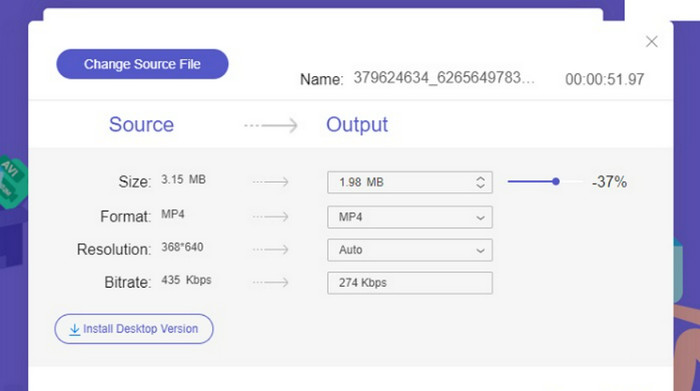
أول ما في القائمة هو FVC ضاغط الفيديو أونلاين، والذي يضغط الملفات بشكل ممتاز حتى أقل من 8 ميجابايت. من خلال هذا البرنامج، يمكنك تلبية متطلبات الحجم. ما يميز هذا البرنامج أنه يمكّن المستخدمين من رفع أي صيغة فيديو من جهاز الكمبيوتر. لا حاجة للقلق بشأن توافق الصيغ، لأنه متوافق مع جميع صيغ الفيديو. إلى جانب ذلك، يمكنك أن تتوقع أن ملفاتك الناتجة لن تحتوي على علامات مائية. وفوق كل ذلك، الأداة مجانية تمامًا ولا تتضمن أي رسوم خفية. ما تراه هو ما تحصل عليه دون الحاجة للاشتراك في حساب مدفوع. في الواقع، لا تحتاج حتى للتسجيل لاستخدام أداة تصغير فيديو ديسكورد هذه.
متطلبات النظام: ذاكرة عشوائية 1 جيجابايت، معالج Intel Pentium 4 أو أحدث، دقة شاشة 1024 × 1280، متصفح واتصال بالإنترنت.
الايجابيات
- يقيم ملفات الفيديو تحت 8 ميغابايت.
- اختر تنسيقات الإخراج المختلفة.
- تحرير معدل البت والقرار.
- يعمل على متصفح الويب.
سلبيات
- يعتمد الأداء الجيد بشكل كبير على الاتصال الجيد بالإنترنت.
2. محول الفيديو النهائي
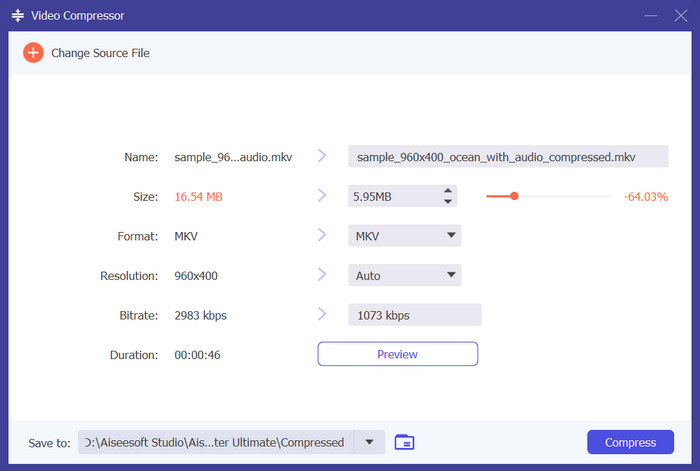
برامج سطح المكتب مثل Video Converter Ultimate تعد أدوات مثالية، خاصةً عندما لا يتوفر اتصال بالإنترنت. إلى جانب ذلك، فهي تقدم مزيدًا من الميزات مقارنةً بالبرامج الأونلاين أو المعتمدة على الويب. هذا البرنامج مفيد في تغيير الدقة والصيغة ومعدل البت، وهي العوامل المحددة لحجم ملف الفيديو. لذلك فإن تعديل هذه الخصائص سيؤثر بشكل كبير في حجم ملف الفيديو. ناهيك عن أن أداة تقليل حجم الفيديو هذه لديسكورد تأتي مع شريط تمرير للوصول بسهولة إلى حجم الملف المطلوب. كما يمكنك كتابته مباشرة في حقل الحجم داخل التطبيق للحصول على الحجم نفسه الذي تريده.
تنزيل مجانيلنظام Windows 7 أو أحدثتنزيل آمن
تنزيل مجانيلنظام MacOS 10.7 أو أحدثتنزيل آمن
متطلبات النظام: ذاكرة عشوائية 1 جيجابايت أو أكثر، Windows 11/10/8.1/7، أو Mac OS X 10.12 أو أعلى، معالج Intel/AMD بسرعة 1 جيجاهرتز أو أعلى، معالج Intel متعدد النوى ورقاقة Apple M1، مساحة خالية 120 ميجابايت أو أكثر.
الايجابيات
- عمليات الضغط والتحويل السريعة.
- معالجة ملفات متعددة دفعة واحدة.
- اكتب حجم الملف بالضبط.
- ودية لكل من المبتدئين والمحترفين.
سلبيات
- الحساب المجاني يستمر لمدة 30 يومًا فقط.
3. موفي
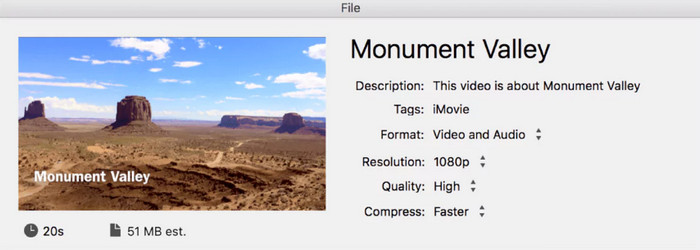
iMovie هو برنامجك المفضل إذا كنت تستخدم جهاز كمبيوتر يعمل بنظام Mac. نعم، بالنسبة لأولئك الذين يستخدمون Apple ولا يريدون مغادرة نظام Apple البيئي، فهذا البرنامج مناسب لك. إنه أحد التطبيقات المثبتة مسبقًا على جهازك، مما يمنحك العديد من الفوائد لإجراء تغييرات على مقاطع الفيديو الخاصة بك. وبالمثل، يمكّنك ضاغط MP4 الخاص بـ Discord من تعديل خصائص مقاطع الفيديو الخاصة بك، مثل التنسيق والدقة والجودة ومستوى الضغط. علاوة على ذلك، فإنه يعرض حجم الملف المقدر الناتج وفقًا للتفضيل.
متطلبات النظام: macOS 10.15.6 أو أحدث، معالج مبني على Intel، ذاكرة عشوائية لا تقل عن 4 جيجابايت، بطاقة رسومات تدعم Metal، شاشة بدقة 800 × 1280، اتصال بالإنترنت لبعض ميزات iMovie.
الايجابيات
- تحرير العديد من الخصائص التي تشكل حجم ملف الفيديو.
- يعرض الوقت المقدر الذي سيستغرقه الضغط.
سلبيات
- إنه متاح فقط لمستخدمي Mac.
الجزء 3. كيفية ضغط مقاطع الفيديو للخلاف
هذه المرة، دعونا نستكشف الدليل التفصيلي حول كيفية ضغط الفيديو لـ Discord باستخدام Video Converter Ultimate كأداة لهذا البرنامج التعليمي.
الخطوة 1. تثبيت التطبيق
أولاً، قم بالحصول على البرنامج باستخدام أزرار التنزيل المجاني أدناه. يمكنك النقر على أحد ملفات التثبيت المرتبطة بنظام التشغيل الذي يعمل به جهاز الكمبيوتر لديك.
تنزيل مجانيلنظام Windows 7 أو أحدثتنزيل آمن
تنزيل مجانيلنظام MacOS 10.7 أو أحدثتنزيل آمن
الخطوة 2. الوصول إلى ضاغط الفيديو
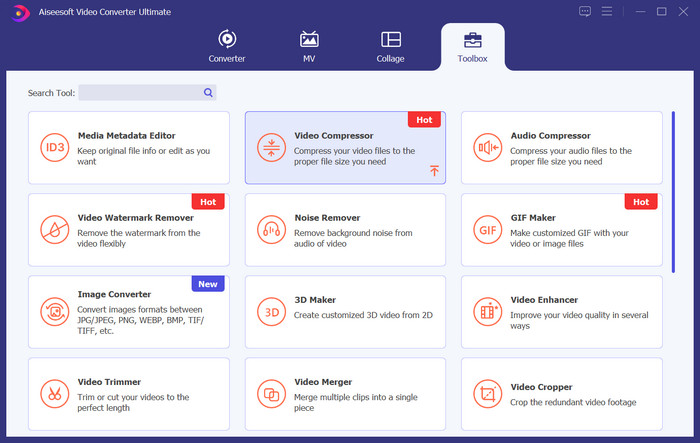
بعد ذلك، شغّل التطبيق وانتقل مباشرة إلى تبويب الأدوات. من هنا ستُستقبَل فورًا بالعديد من الأدوات التي يوفرها البرنامج. انقر على خيار ضاغط الفيديو.
الخطوة 3. رفع ملف فيديو
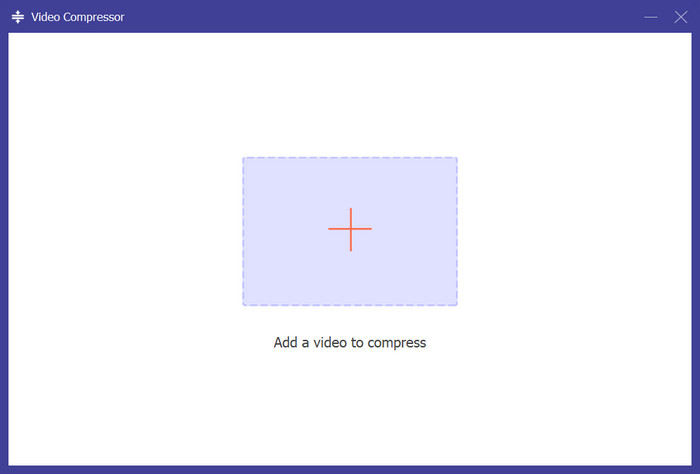
يمكن للأداة أن تعمل كضاغط MP4 لديسكورد لأنها تقبل ملفات MP4 وصيغًا أخرى. للرفع، اضغط على زر علامة الزائد واختر الفيديو الذي تستهدف رفعه قريبًا إلى ديسكورد.
الخطوة 4. ضغط الفيديو لديسكورد
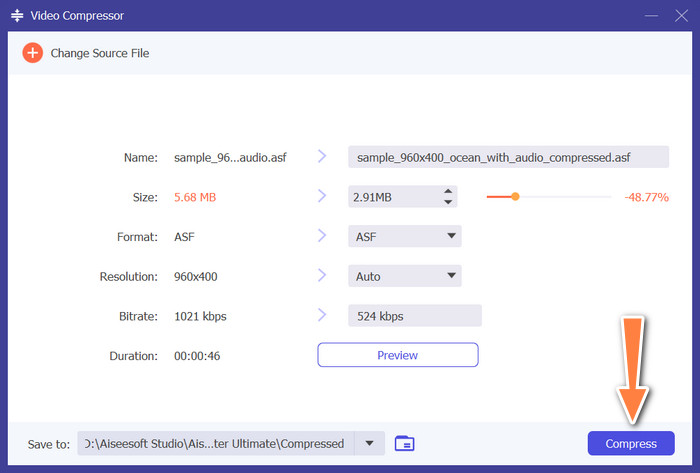
بعد الرفع، ستظهر مقاطع الفيديو مباشرة مع خصائصها المقابلة. والجميل أن كل خاصية قابلة للتحرير. يمكنك الضغط بتحريك شريط التمرير يمينًا ويسارًا أو بكتابة حجم الملف الدقيق في الحقل. أو تعديل الصيغة والدقة ومعدل البت وغيرها. أخيرًا، انقر على زر ضغط لبدء العملية.
قراءة إضافية:
كيفية ضغط فيديو GoPro من 4K إلى 1080p (مجاني وأونلاين)
الجزء 4. الأسئلة الشائعة حول ضواغط الفيديو للديسكورد
كيف يمكنني تقليل جودة الفيديو في Discord؟
يقوم Discord تلقائيًا بضغط مقاطع الفيديو عند إرسالها. لتقليل جودة الفيديو بشكل أكبر، ستحتاج إلى تحرير الفيديو باستخدام برنامج تحرير الفيديو قبل تحميله على Discord.
كيف أرسل فيديو أكبر من 8 ميجا بايت على Discord؟
يحتوي Discord على حد أقصى لحجم الملف يبلغ 8 ميجابايت للمستخدمين المجانيين. لإرسال مقاطع فيديو كبيرة الحجم، ستحتاج إما إلى الترقية إلى Discord Nitro، الذي يسمح بتحميل ملفات أكبر، أو استخدام خدمات مشاركة الملفات الخارجية وإرسال الرابط إلى الفيديو.
كيف أقوم بتصغير ملفات MP4 لـ Discord؟
يمكنك استخدام برامج ضغط الفيديو أو الأدوات عبر الإنترنت لتقليل حجم ملفات MP4 قبل تحميلها على Discord. تشمل الخيارات الشائعة HandBrake أو Adobe Media Encoder أو المحولات عبر الإنترنت مثل Clipchamp أو CloudConvert. اضبط الإعدادات لخفض معدل البت أو الدقة للفيديو لجعله أصغر مع الحفاظ على الجودة المقبولة.
هل يسمح Discord Nitro بأحجام ملفات فيديو غير محدودة؟
لا، بينما يسمح Discord Nitro بتحميل ملفات أكبر، لا يزال هناك حد. اعتبارًا من آخر تحديث لمعلوماتي، كان الحد الأقصى 100 ميجابايت لـ Nitro Classic و200 ميجابايت لـ Nitro. قم بزيارة موقع Discord الرسمي لمعرفة أحدث حدود Nitro.
ما هو أفضل تنسيق فيديو لـ Discord للحفاظ على الجودة؟
يوصي Discord باستخدام تنسيق MP4 مع برنامج ترميز الفيديو H.264 وترميز الصوت AAC للحصول على أفضل توافق وجودة. ومع ذلك، تذكر أن Discord سيظل يطبق الضغط.
خاتمة
كانت هذه هي ضواغط فيديو ديسكورد المتاحة التي يمكنك استخدامها. الأدوات الثلاث المذكورة أعلاه يمكنها ضغط الفيديوهات أونلاين أو أوفلاين. بعد أن تعرّفت على هذه البرامج، يمكنك البدء في تقليل حجم ملفات الفيديو التي ترغب في رفعها إلى ديسكورد. وبذلك لن يعيقك حد حجم الملف، وستتمكن من الاستمتاع برفع ومشاركة فيديوهاتك على هذه المنصة.
-
 برنامج تعليمي لضغط مقطع فيديو للبريد الإلكتروني على iPhone / Android / Online
 لا يمكنك إرسال مقطع فيديو عبر البريد الإلكتروني كبير جدًا؟ إذا كانت لديك هذه المشكلة ، فيمكنك الحصول على طرق عملية لضغط الفيديو لإرساله عبر البريد الإلكتروني هنا. ستوضح لك هذه المقالة كيفية تقليص ملفات الفيديو الكبيرة مجانًا بالتفصيل.
-
 كيفية تحرير ضغط الفيديو على Facebook من GBs إلى MBs
 إذا تم منعك من تحميل مقطع فيديو كبير على Facebook ، فلا تقلق. ما عليك سوى ضغط حجم الفيديو الكبير من جيجا بايت إلى ميغا بايت باستخدام ضاغط الفيديو المجاني.
-
 كيفية ضغط الفيديو لـ Vimeo قبل التحميل (مجاني وعلى الإنترنت)
 يوضح لك هذا المنشور كيفية ضغط ملف الفيديو الخاص بك لتحميله على Vimeo، بالإضافة إلى الإرشادات اللازمة لضغط الفيديو والصوت.
