


 محول الفيديو النهائي
 مسجل الشاشة
 إصلاح الفيديو
 تنزيل آمن
كيفية تعديل سطوع الفيديو على جهاز الكمبيوتر، وiPhone، وعلى الإنترنت
هل التقطت مقطع فيديو ولم تكن راضياً عن النتيجة بسبب سوء الإضاءة؟ تؤثر إضاءة الفيديو في تجربة مشاهدتنا له، لذلك من الضروري إيجاد التوازن المثالي بين عتمة و سطوع الفيديو. إذا كان لديك مقطع فيديو وتود تعديل مستوى السطوع لأسباب معيّنة، فيمكننا مساعدتك. في هذا الدليل، قدّمنا لك عدة طرق يمكنك اتباعها. تعلّم كيف تغيّر سطوع الفيديو بسهولة وبطريقة احترافية.

الجزء 1. أفضل طريقة لضبط سطوع الفيديو
Video Converter Ultimate هو حل مرن لتحويل وتحرير الفيديو لأجهزة Windows وMac. إضافةً إلى وظيفته الأساسية وهي تحويل ملفات الوسائط، يتضمن Video Converter Ultimate مجموعة أدوات مدمجة (Toolbox). ويضم أكثر من عشر أدوات لتحرير الفيديو، من ضمنها ميزة تصحيح الألوان (Color Correction). تتيح لك ميزة تصحيح الألوان تعديل سطوع الفيديو وتباينه وتشبع الألوان ودرجة اللون (Hue) للوصول إلى النتيجة التي ترغب بها. بعد تعديل تأثيرات الفيديو المطلوبة، يمكنك ضبط إعدادات الفيديو قبل حفظه. يمكنك حفظ الفيديو بصيغة جديدة مثل MP4 وMOV وWMV وAVI وMKV وGIF. ولضمان بقاء جودة الفيديو عالية، يوفّر خيار حفظ الفيديو بدقة 4K.
الخطوة 1. تنزيل الأداة على الكمبيوتر
ابدأ بالحصول على نسخة تنزيل مجاني من Video Converter Ultimate. بعد إتمام عملية التثبيت، شغّل البرنامج على جهاز الكمبيوتر.
تنزيل مجانيلنظام Windows 7 أو أحدثتنزيل آمن
تنزيل مجانيلنظام MacOS 10.7 أو أحدثتنزيل آمن
الخطوة 2. الانتقال إلى تبويب مجموعة الأدوات
اختر خيار Toolbox من شريط القوائم العلوي في الواجهة الرئيسية للأداة. من هناك، ابحث عن أداة Color Correction واخترها.
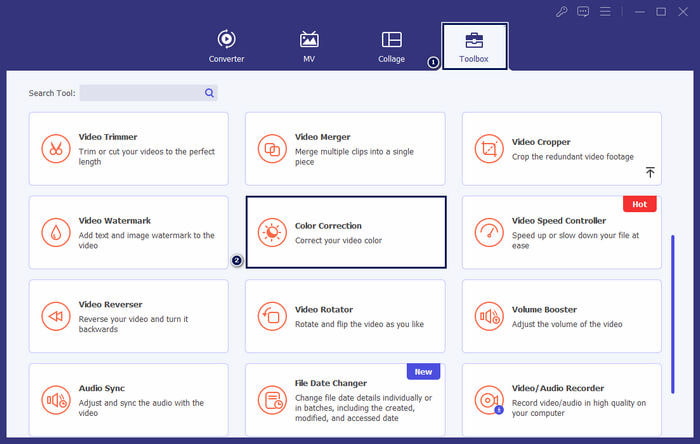
الخطوة 3. إضافة الفيديو
في النافذة التي تظهر، انقر على زر + لإضافة الفيديو الذي تريد تعديل سطوعه.
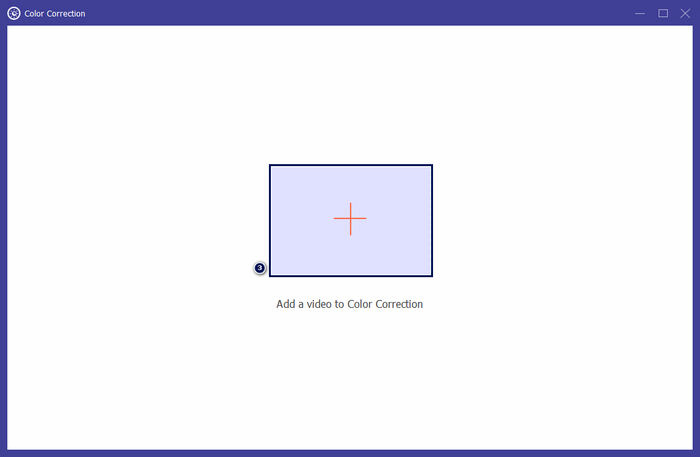
الخطوة 4. ضبط سطوع الفيديو
حرّك شريط التمرير في قسم Brightness حتى تصل إلى التأثير المطلوب. ويمكنك اختيارياً تعديل تأثيرات أخرى مثل Contrast وSaturation وHue. عند الانتهاء، انقر على Export لحفظ إنجازك.
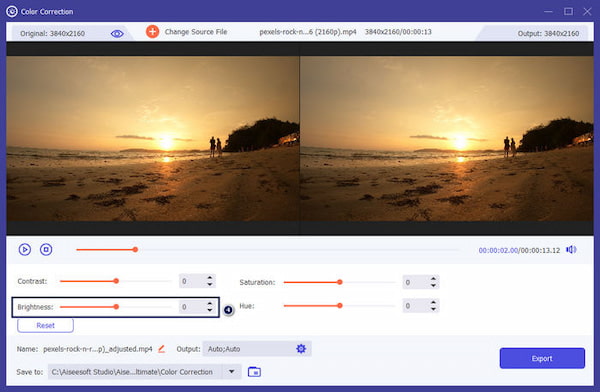
يعد Video Converter Ultimate حلاً قابلاً للتطبيق للمستخدمين الذين يبحثون عن حل مباشر لضبط سطوع الفيديو. إنه برنامج متكامل يحتوي على كل ما تحتاجه لتحريرك. سيوفر لك استكشاف الأداة المزيد من الخيارات لاحتياجات التحرير الخاصة بك.
الجزء 2. ضبط سطوع الفيديو عبر الإنترنت
Kapwing هي أداة لتحرير الفيديو تعتمد على المتصفح وتتيح للمستخدمين أداء مهام تحرير الفيديو المختلفة. يسمح لك بضبط سطوع الفيديو عبر الإنترنت وتأثيرات الفيديو الأخرى دون تنزيل البرنامج. يوفر Kapwing العديد من الأدوات والميزات لتلبية احتياجات التحرير الخاصة بك، بما في ذلك التشذيب والاقتصاص وإضافة النص وما إلى ذلك.
الخطوة 1. انتقل إلى الموقع الرسمي لـ Kapwing باستخدام أحد المتصفحات.
الخطوة 2. انقر على Add Media لإضافة الفيديو الذي ترغب في تعديل سطوعه.
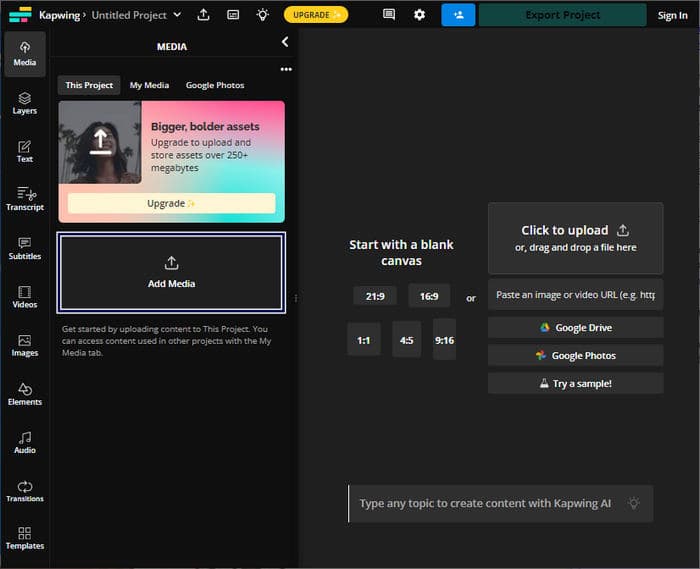
الخطوة 3. اسحب الفيديو الذي تم رفعه إلى المخطط الزمني (timeline) ثم انقر على الفيديو لإظهار الأدوات.
الخطوة 4. في اللوحة الموجودة على الجهة اليمنى، عدّل شريط تمرير Brightness.
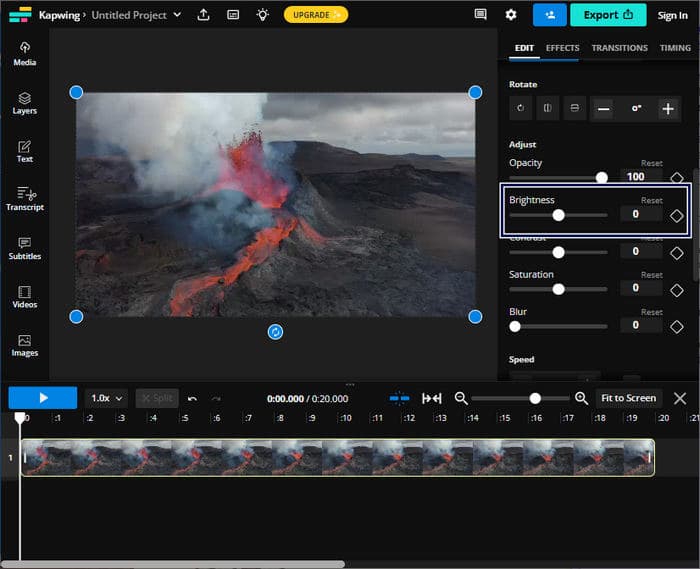
الخطوة 5. بعد ضبط سطوع الفيديو، انقر على Export Project لحفظ الملف.
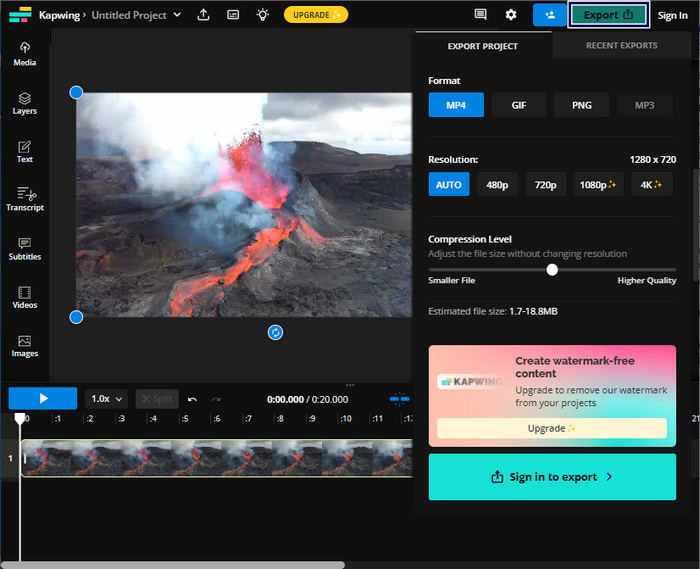
يعد Kapwing الخيار الأفضل لضبط سطوع الفيديو دون تنزيل البرامج على جهاز الكمبيوتر الخاص بك. لا يتطلب من المستخدمين إجراء أي تنزيلات نظرًا لأنه منصة عبر الإنترنت. ومع ذلك، فهو لا يسمح لك باستخدام الميزات المتقدمة باستخدام الإصدار المجاني.
الجزء 3. ضبط سطوع الفيديو على iPhone
يعد تطبيق الصور خيارًا مناسبًا لضبط سطوع الفيديو على iPhone. فهو يسمح لك بإجراء تعديلات أساسية على الفيديو دون الحاجة إلى تطبيقات الطرف الثالث. تعد هذه الأداة المدمجة مفيدة لإجراء تعديلات سريعة لتحسين الإضاءة أو تعتيمها في مقاطع الفيديو الخاصة بك. بعد التحرير، سيظل الفيديو المعدل داخل مكتبة الصور، مما يتيح سهولة الوصول إليه ومشاركته.
الخطوة 1. ابحث عن تطبيق «الصور» (Photos) على iPhone وافتحه.
الخطوة 2. انتقل إلى الفيديو الذي تريد تعديله واضغط عليه.
الخطوة 3. في الزاوية العلوية اليمنى، اضغط على زر Edit.
الخطوة 4. اضغط على زر Adjust وابحث عن خيار Brightness.
الخطوة 5. حرّك شريط الإعدادات حتى تحصل على مستوى الإضاءة المطلوب.
الخطوة 6. بعد الانتهاء من ضبط السطوع، اضغط على Done.
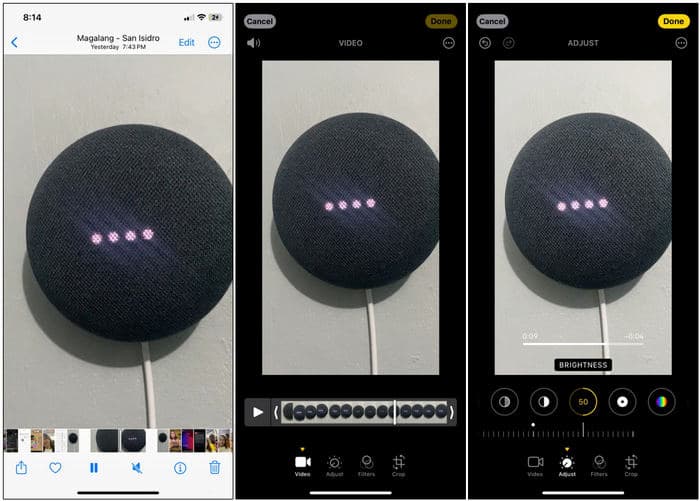
يعد تطبيق الصور على iPhone خيارًا مناسبًا لإجراء تعديلات أساسية على سطوع الفيديو. ومع ذلك، إذا كنت بحاجة إلى ميزات تحرير فيديو متقدمة، فقد تحتاج إلى استخدام تطبيق تحرير فيديو تابع لجهة خارجية.
الجزء 4. ضبط سطوع الفيديو باستخدام Premiere Pro
Premiere Pro عبارة عن منصة لتحرير الفيديو توفر أدوات متقدمة لتحرير الفيديو وتصحيح الألوان والتأثيرات المرئية. عندما تقوم بضبط سطوع الفيديو في Premiere Pro، فإنه يسمح لك بالتحكم في التعرض وتحسين مظهر اللقطات وتصحيح مشكلات الإضاءة. فهو يوفر تحكمًا دقيقًا في السطوع وعناصر الفيديو الأخرى.
الخطوة 1. شغّل Premiere Pro واستورد الفيديو الذي تريد تعديله. في لوحة Project، اختر New Sequence From Clip لإنشاء تسلسل يتطابق مع إعدادات المقطع.
الخطوة 2. في لوحة Effects، ابحث عن Lumetri Color. اسحب تأثير Lumetri Color إلى مقطع الفيديو في لوحة Timeline.
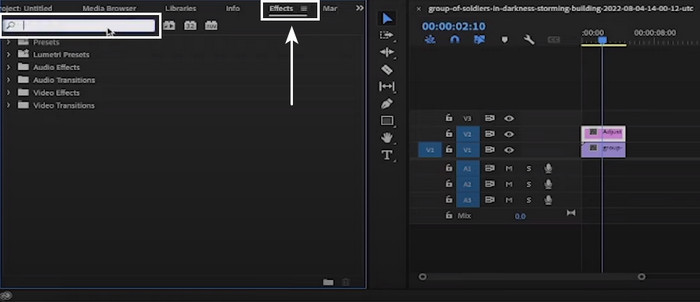
الخطوة 3. في لوحة Effects Control، انقر على السهم بجوار Basic Correction لتوسيع الخيارات. استخدم شريط تمرير Exposure لزيادة أو تقليل سطوع الفيديو.
الخطوة 4. عند الانتهاء من التعديلات، قم بتصدير الفيديو عبر الذهاب إلى قائمة File ثم اختيار Export يتبعها Media وضبط إعدادات التصدير.
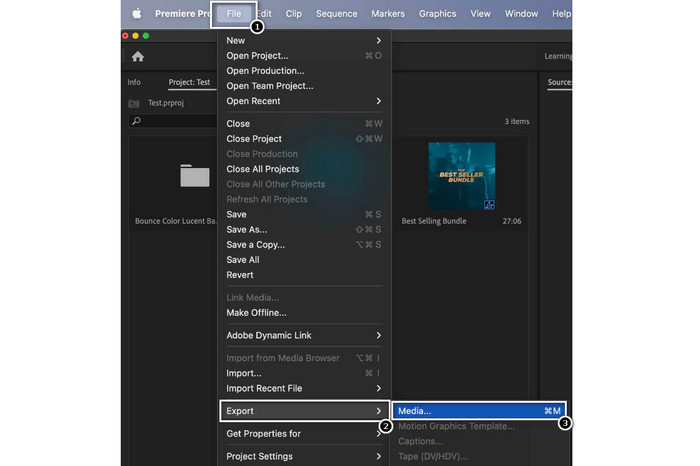
يعد Premiere Pro أداة بارزة لضبط سطوع الفيديو ويقدم العديد من أدوات التحرير الاحترافية. يرجى ملاحظة أن Premiere Pro يمكن أن يكون معقدًا بالنسبة للمبتدئين، وقد يستغرق الأمر بعض الوقت للتعرف عليه.
قراءة إضافية:
أفضل 3 طرق لتلوين الفيديو (إصدار لجميع المنصات)
كيفية تغيير درجة لون الفيديو؟ استكشاف الإمكانات الإبداعية
الجزء 5. الأسئلة الشائعة حول كيفية ضبط سطوع الفيديو
كيفية تغيير السطوع والتباين للفيديو في After Effects؟
في Adobe After Effects، يمكنك ضبط سطوع الفيديو وتباينه عن طريق تطبيق تأثير السطوع والتباين على طبقة الفيديو الخاصة بك. يتيح لك هذا التأثير التحكم في معلمات السطوع والتباين لتحقيق المظهر المطلوب للفيديو الخاص بك.
كيف يمكنني تحسين مقطع فيديو داكن على جهاز iPhone الخاص بي؟
يمكنك استخدام تطبيق الصور لتحسين مقطع فيديو داكن على جهاز iPhone الخاص بك. افتح مقطع الفيديو في تطبيق الصور، ثم اضغط على "تحرير"، ثم حدد أيقونة الضوء. يمكنك تخصيص التعرض والإبرازات والظلال من هناك لتفتيح الفيديو.
لماذا يكون الفيديو أغمق من الصور؟
غالبًا ما تظهر مقاطع الفيديو أكثر قتامة من الصور الفوتوغرافية بسبب الاختلافات في كيفية التقاطها ومعالجتها. تحتوي مقاطع الفيديو على معدل إطارات أقل ووقت تعرض أطول لكل إطار مقارنة بالصور. يمكن أن يؤدي ذلك إلى التقاط ضوء أقل في كل إطار، مما يؤدي إلى لقطات أكثر قتامة.
خاتمة
ها قد انتهينا! أصبح بإمكانك الآن ضبط سطوع الفيديو بسهولة باستخدام الأدوات والتقنيات المذكورة. أصبحت مهيّأً لتحسين الجودة البصرية لمقاطع الفيديو لديك، وكذلك تصحيح مشكلات التعريض الضوئي، والتعبير عن الحالة المزاجية أو الرسالة التي تريد إيصالها بفعالية. سواءً كنت تستخدم برامج احترافية للتحكم الدقيق، أو تطبيقات هاتفية لإجراء تعديلات سريعة، أو منصات تحرير عبر الإنترنت لسهولة الاستخدام، فإن تعديل سطوع الفيديو يظل خطوة أساسية في عملية إنتاج الفيديو.
-
 حلول فعالة لتفتيح الفيديو في أقل من دقيقة
 لم تعد تواجه صعوبة في التعامل مع مقاطع الفيديو المظلمة من خلال تعلم كيفية جعل مقاطع الفيديو الداكنة مرئية باستخدام أفضل البرامج لتفتيح مقاطع الفيديو. واصل القراءة.
-
 ما الذي يكمن وراء لوحة تصحيح ألوان الفيديو؟ دليل Ulitmate
 اكتشف أسرار تصحيح ألوان الفيديو! يكشف هذا الدليل عن الأدوات والعمليات والتقنيات المستخدمة في لوحات تصحيح ألوان الفيديو.
-
 مرشح الفيديو: قم بتحسين الفيديو الخاص بك باستخدام عوامل التصفية والتأثيرات على سطح المكتب
 ما هي أفضل مرشحات الفيديو؟ كيفية إضافة مرشحات الفيديو؟ كل أسئلتك ستجد إجاباتها في هذه التدوينة. ماذا تنتظر؟ فوق هذا.
