


 محول الفيديو النهائي
 مسجل الشاشة
 إصلاح الفيديو
 تنزيل آمن
ضغط MPEG-4 | كيفية جعل ملفات MPEG-4 أصغر دون فقدان الجودة
هل سبق لك أن حاولت إرسال ملف MPEG-4 كبير إلى الآخرين؟ ربما احتجت إلى أداة ضغط ملفات لتقليل حجم الملفات. إذا لم تكن لديك خبرة في ضغط الملفات، فقد ترغب في معرفة أي أداة ضغط فيديو تناسب احتياجاتك على أفضل نحو. تابع القراءة لتتعرف على كيفية ضغط ملفات MPEG-4 دون فقدان الجودة.

الجزء 1. أفضل طريقة لضغط ملفات MPEG-4 عبر الإنترنت مجانًا
من الضروري معرفة أن هناك حدودًا لأحجام ملفات MPEG-4. إذا كانت ملفاتك كبيرة جدًا ، فمن الصعب إرسالها عبر البريد الإلكتروني بدون ضغط. إن تقليل حجم هذا الملف إلى الحد الأدنى من الحجم ، دون الإضرار بالضرورة بجودته ، يصبح ذا أهمية متزايدة في حياتنا اليومية. لحسن الحظ ، هناك مجموعة من الأدوات المتاحة عبر الإنترنت لضغط تنسيقات ملفات الفيديو المختلفة.
نود هنا أن نوصي باستخدام Free Video Compressor لمساعدتك على تقليل حجم ملفات MPEG-4 الكبيرة دون الإضرار بالجودة. يمكن القول إنه أسهل وأسرع حل متاح حاليًا لضغط ملفات MPEG-4. تعمل الأداة عبر الإنترنت بشكل مثالي مع كل ملفات MPEG-4. كما يُسمح للمستخدمين بحفظ الملفات المضغوطة بأي صيغة، بما في ذلك MOV وAVI وVOB وغيرها. فيما يلي 4 خطوات بسيطة للاستفادة من هذا الضاغط فائق السرعة للفيديو.
الخطوة 1. انتقل إلى موقع ضاغط الفيديو عبر الإنترنت
سيوصلك الرابط أدناه إلى المكان الصحيح:
انتقل إلى موقع ضاغط الفيديو عبر الإنترنت
الخطوة 2. قم برفع ملفاتك
انقر على زر Add Files to Compress. إذا كنت تستخدم هذه الأداة لأول مرة، فستحتاج أولاً إلى تثبيت المشغّل الخاص بها. بعد ذلك، ابحث عن ملف فيديو MPEG-4 واضغط على Open في النافذة التي ستظهر.

الخطوة 3. حدد خصائص الضغط
الآن ، تحتاج إلى تكوين إعدادات الضغط ، مثل الحجم والتنسيق والدقة ومعدل البت. على سبيل المثال ، يمكنك خفض دقة ملفات MPEG-4 لتصغير حجم الملف.

الخطوة 4. أخيرًا، انقر على Compress لبدء عملية الضغط. بعد اكتمالها، سيتم تنزيل الملف المُصغَّر إلى جهاز الكمبيوتر الخاص بك تلقائيًا وبدون علامة مائية.

إلى جانب ضغط ملفات MPEG-4، تتيح لك هذه الأداة أيضًا ضغط ملفات MXF، وتصغير حجم ملفات WebM، وتقليل حجم ملفات الفيديو الشائعة الأخرى بسهولة.
الجزء 2. كيفية تصغير حجم ملفات MPEG-4 باستخدام MP4Compress
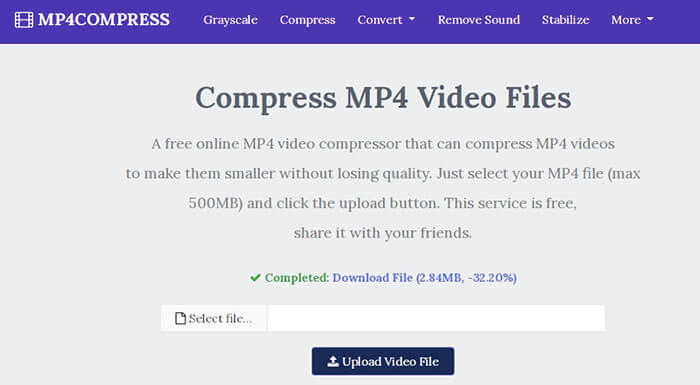
يمكنك أيضًا التحقق من MP4Compress - أداة بسيطة وفعالة لضغط ملفات MPEG-4. MP4Compress هي أداة مجانية عبر الإنترنت تتيح لك ضغط ملفات MPEG-4 مباشرة من متصفح الويب الخاص بك.
الخطوة 1. قم بزيارة موقعه الرسمي عن طريق إدخال العنوان https://www.mp4compress.com.
انقر على زر Select File... لاختيار ملف MPEG-4 ثم انقر على Upload Video File لبدء رفع الملف.
الخطوة 2. بمجرد رفع الملف بنجاح، سيقوم هذا الموقع بضغطه. أما سرعة الضغط فتعتمد على سرعة اتصالك بالإنترنت.
الخطوة 3. بعد انتهاء عملية الضغط، سترى رابط Download File ومن ثم يمكنك حفظ الملف المُصغَّر على جهاز الكمبيوتر الخاص بك.
الجزء 3. الأسئلة الشائعة حول ضغط ملف MPEG-4
ما هو ملف MPEG-4؟
MPEG-4 هو تنسيق حاوية وسائط رقمية تم تحديده بواسطة Moving Picture Experts Group (MPEG). وهو يدعم عدة أنواع مختلفة من برامج ترميز الفيديو والصوت وقد يحتوي أيضًا على كائنات ثلاثية الأبعاد ونقوش متحركة ونص وأنواع أخرى من الوسائط. مع تطوير MPEG-4 ، يتم تقسيمه إلى عدة أجزاء (يغطي كل جزء جانبًا معينًا من المواصفات الكاملة) بما في ذلك الجزء 2 من MPEG-4 (مثل برنامج ترميز الفيديو XviD) ، الجزء 3 من MPEG-4 (مثل برنامج ترميز الصوت AAC) و MPEG-4 الجزء 10 (برنامج ترميز الفيديو H.264) و MPEG-4 الجزء 14 (حاوية وسائط MP4) وغيرها.
ما هو ضاغط الفيديو؟
ضاغط الفيديو هو أداة تساعدك على تقليص حجم ملفات الفيديو الخاصة بك. يعتمد معدل الضغط على برنامج ترميز الفيديو ومعدل البت. نظرًا لأن تنسيقات الفيديو المختلفة قد تستخدم برامج ترميز مختلفة ، يمكنك اختيار تغيير تنسيق الملف لتقليل حجم الملف.
كيف تضغط ملف MPEG-4 على ماك؟
تعمل الخدمات عبر الإنترنت الموضحة أعلاه على أي نظام تشغيل ، لذا يمكنك استخدام أحدها لتقليل حجم ملف MPEG-4 على جهاز Mac الخاص بك.
خاتمة
غطت هذه المقالة أداتين رئيسيتين فعالتين على الإنترنت لمساعدتك في إنجاز ضغط MPEG-4. أنت الآن تعرف كيفية ضغط ملف MPEG-4 إلى حجم أصغر عبر الإنترنت مجانًا. اذهب واختبر الأدوات للعثور على الأداة التي تناسب احتياجاتك بشكل أفضل.
-
 كيفية ضغط ملفات فيديو AVCHD مجانًا على نظامي التشغيل Windows و Mac
 اقرأ واحصل على طريقتين سهلتين لضغط ملفات فيديو AVCHD. يمكنك استخدام ضواغط الفيديو عبر الإنترنت وغير المتصلة لتقليل حجم فيديو AVCHD مجانًا على جهاز الكمبيوتر الخاص بك.
-
 طريقتان سريعتان لتقليص ملفات OGV الكبيرة [مجانًا وعلى الإنترنت]
 لا يمكن إرسال ملفات OGV كبيرة للآخرين؟ حسنًا ، ستقدم لك هذه المقالة طريقتين سهلتين لمساعدتك على ضغط ملفات OGV بسهولة.
-
 100% طرق مجانية لضغط حجم ملف M4V من جيجابايت إلى ميغا بايت
 إذا كنت تبحث عن طريقة بسيطة لتقليل حجم ملف M4V ، فيجب أن تأتي وتقرأ هذه المقالة. هنا سوف نشارك أسهل طريقة لضغط ملفات M4V معك.
