


 محول الفيديو النهائي
 مسجل الشاشة
 إصلاح الفيديو
كيفية تحويل RAR إلى MP4: قم بفك ضغط ملفات RAR وتغييرها إلى MP4 بشكل صحيح
إذا كنت من محبي التقنية، فأنت تعلم أن ملفات RAR وMP4 شائعة في الروتين اليومي. في الأساس، ملفات RAR تشبه الحزم المضغوطة التي يمكنها احتواء كل أنواع المحتويات – فيديوهات، صور، وغير ذلك. ومع ذلك، هل تساءلت يومًا عن تحويل ملف RAR إلى MP4 لمزيد من التوافق؟ هذا سؤال يظهر عندما تحصل على أفلام من الإنترنت مرفقة بامتداد RAR أو عندما تتلقى فيديوهات مضغوطة في ملف RAR عبر البريد الإلكتروني، أليس كذلك؟ إذن، لتحويلها إلى MP4، عليك أولًا بفك الضغط عن ملف الـ RAR ثم تحويل تلك الفيديوهات إلى صيغة MP4. لذلك، تابع قراءة هذه المقالة لتتعرف على طريقتين بسيطتين، عبر وضعية عدم الاتصال بالإنترنت وعبر الإنترنت، لإتمام عملية تحويل RAR إلى MP4.

الجزء 1. تحويل RAR إلى MP4 عبر الإنترنت باستخدام ezyZip
البدء بالمحول الموصى به عبر الإنترنت والذي يمكنه التعامل مع ملفات RAR بكفاءة. Ezyzip هو حليفك المفضل عندما تكون في حاجة إلى تحويلات الملفات. إنه الخيار الأفضل عبر الإنترنت لاستخراج ملفات MP4 من أرشيف RAR بطريقة خالية من المتاعب. لن تحتاج إلى إحداث فوضى في جهاز الكمبيوتر الخاص بك باستخدام برنامج محول MP4 الإضافي. وذلك لأن ezyZip يعمل مباشرة في متصفحك، مما يوفر عليك عناء التثبيت. علاوة على ذلك، لا تقتصر هذه الأداة فقط على تحويل ملف RAR إلى MP4 عبر الإنترنت مجانًا لأنها تدعم مجموعة متنوعة من خيارات استخراج الملفات وتحويلها أيضًا.
ما يميز ezyZip عن بقية برامج التحويل عبر الإنترنت هو أسلوبه الفريد. فهو يحافظ على ملفاتك آمنة وسليمة من خلال معالجة كل شيء محليًا داخل متصفحك. وهذا يعني عدم الحاجة إلى التحميل أو التنزيل الممل إلى خوادم خارجية، مما يؤدي إلى تحويلات سريعة للغاية. ومن اللافت للنظر أنك قد تنسى قيود الحجم عند استخدام ezyZip لأن هذه الأداة لا تفرض أي حدود. وهذا يعني أيضًا أن خصوصيتك تظل كما هي نظرًا لأن ملفاتك لا تترك متصفحك أبدًا! الآن، لن ندع هذه الشريحة تمر دون أن نعلمك عملية ezyZip لتحويل ملفاتك من RAR إلى MP4. وبالتالي، يتم إعطاء الدليل أدناه.
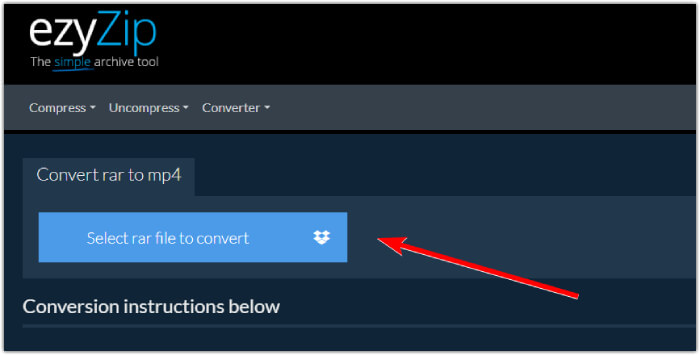
الخطوة 1. انتقل إلى الموقع الرسمي لأداة التحويل واستورد ملف RAR الخاص بك من خلال النقر على زر اختيار ملف RAR للتحويل.
الخطوة 2. عندما يتم تحميل الملفات، ستقوم الأداة تلقائيًا بتحويلها لك من داخل أرشيف RAR. الآن انقر على زر حفظ لحفظ كل ملف MP4 في وجهة الملفات التي تريدها.
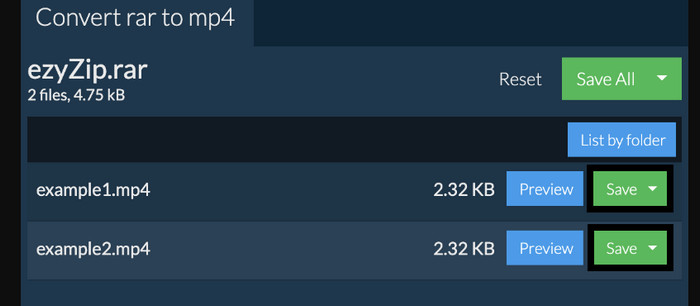
الخطوة 3. إذا صادف وكان زر حفظ معطَّلًا، فيجب أن تعلم أن المتصفح الذي تستخدمه غير مدعوم من أداة التحويل. وإلا، فعند حفظ الملفات بنجاح، سيُمنح لك خيار عرض الملفات المحوَّلة.
الجزء 2. تحويل RAR إلى MP4 دون اتصال بالإنترنت باستخدام WinRAR
هناك طرق رائعة غير متصلة بالإنترنت لتحويل RAR إلى MP4 باستخدام WinRAR. WinRAR هو برنامج شائع مصمم خصيصًا لمستخدمي Windows. إنه برنامج يقدم مجموعة من الميزات المفيدة لإدارة الملفات المضغوطة. علاوة على ذلك، يعمل هذا البرنامج على تبسيط عملية فك ضغط أو فك ضغط ملفات RAR لاستخراجها والوصول إليها. علاوة على ذلك، يستمر WinRAR لأنه يوفر أيضًا القدرة على تحويل ملفات RAR إلى تنسيقات فيديو مختلفة مثل MP4 أو M4V. تثبت هذه الوظيفة أنها لا تقدر بثمن بالنسبة للمستخدمين الذين يحتاجون إلى العمل مع محتوى الوسائط المتعددة المخزن في أرشيفات RAR. وبالتالي، إذا كنت تريد معرفة كيفية فك ضغط ملفات RAR وتغييرها إلى MP4 باستخدام WinRar، فاستمر في القراءة للحصول على الإرشادات خطوة بخطوة أدناه.
الخطوة 1. أولًا، قم بتنزيل برنامج خبير RAR الشهير على جهاز الكمبيوتر المكتبي لديك. استخدم مصدرًا موثوقًا عند تنزيله. ثم بعد التثبيت، شغِّله مباشرة لبدء عملية التحويل.
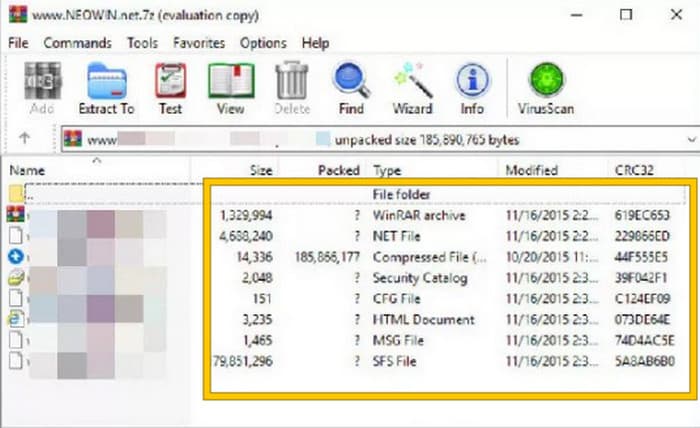
الخطوة 2. بمجرد تشغيل البرنامج، يمكنك فورًا فتح أو رفع ملف RAR الذي تريد تحويله إلى MP4. ستعرف ما إذا كان الملف قد تم تحميله أم لا، لأنه سيظهر في وسط واجهة البرنامج.
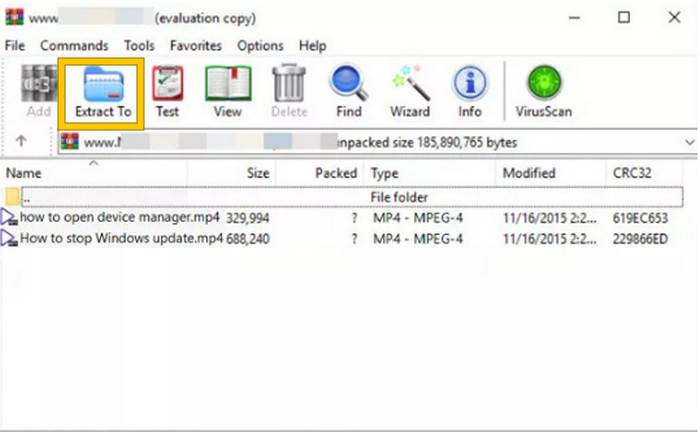
الخطوة 3. أخيرًا، لبدء عملية التحويل أو فك الضغط، انقر على زر استخراج إلى في قائمة التبويبات. عند الانتهاء، يمكنك فتح الملفات المحوَّلة مباشرة من الواجهة.
الجزء 3. نصيحة إضافية: أفضل طريقة لتحويل أي صوت/فيديو إلى MP4 عبر الإنترنت
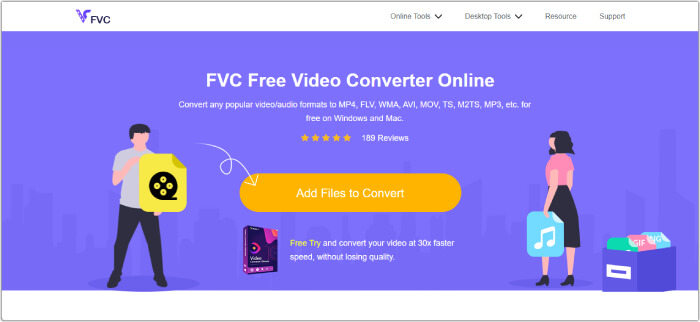
اسمح لنا أن نقدم لك نصيحة إضافية، حيث يمكنك تحويل أي ملف فيديو أو صوت إلى MP4 بأفضل وأسرع طريقة! تَعرَّف على أداة FVC محوِّل الفيديو المجاني عبر الإنترنت، وهي أداة تحويل تجعل تغيير صيغ الفيديوهات والملفات الصوتية إلى صيغ مختلفة مثل MP4 أمرًا سهلًا للغاية ومجانيًا تمامًا. بالإضافة إلى ذلك، يمكنك تحويل الفيديوهات عالية الدقة بسرعة إلى صيغ شائعة مع الحفاظ على جودتها أو حدتها الأصلية. علاوة على ذلك، ستعجبك أيضًا سرعته الفائقة، إذ يتيح لك تحويل ملفات متعددة في وقت قصير للغاية!
هناك المزيد! يتيح لك محول الفيديو المجاني FVC عبر الإنترنت أيضًا تعديل مقاطع الفيديو والصوت بما يناسب قلبك. وذلك لأن هذا المحول يسمح لك بضبط أشياء مثل الدقة ومعدل الإطارات ومعدل البت وحتى إعدادات الصوت مثل مستوى الصوت ومعدل البت وفقًا لإعداداتك المفضلة. وهذا يعني أنه يمكنك تخصيص الوسائط الخاصة بك بالطريقة التي تريدها وتصديرها بسهولة. وبالتالي، إذا كنت تتساءل عن كيفية تحويل ملفات الفيديو أو الصوت إلى MP4 عبر الإنترنت، فاتبع الخطوات البسيطة الموضحة أدناه.
الخطوة 1. ابدأ العملية بزيارة الموقع الرسمي لأداة FVC محوِّل الفيديو المجاني عبر الإنترنت. عند الوصول إلى هناك، انقر على زر إضافة ملفات للتحويل للحصول على المشغِّل ورفع الملف الأولي.
الخطوة 2. بمجرد رفع الملف، يمكنك إضافة المزيد من ملفات الوسائط بالنقر على زر إضافة ملف في مساحة العمل الرئيسية. ثم عيِّنها على صيغة MP4 من خلال النقر على الملفات ثم اختيار صيغة MP4 في الأسفل.
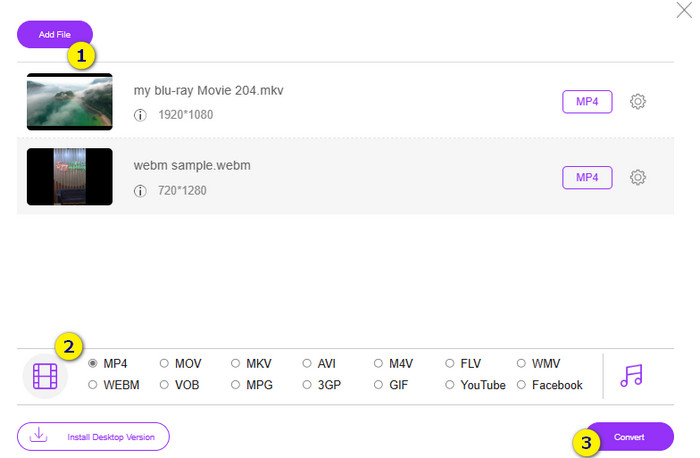
الخطوة 3. بعد ذلك، حان وقت بدء عملية التحويل السريعة والدفعي بالنقر على زر تحويل في الأسفل.
قراءة إضافية:
أفضل محرِّر MP4 لنظامي ويندوز وماك في عام 2025
الجزء 4. الأسئلة الشائعة حول تحويل RAR وMP4
ما هو ملف RAR؟
يتم ضغط ملفات RAR بتنسيق ملف أرشيف. يسمح لك بتخزين ملفات متعددة في حاوية واحدة مع تقليل حجمها الإجمالي.
كيف أقوم بتحويل RAR إلى MP4 على نظام Mac؟
لتحويل RAR إلى MP4 على جهاز ماك، يمكنك استخدام برنامج لاستخراج الملفات مثل Unarchiver لفك محتويات أرشيف RAR. بعد ذلك، يمكن تحويل أي ملفات فيديو متوافقة ضمن المحتويات المستخرجة إلى صيغة MP4 باستخدام محوِّل قوي. للقيام بذلك، يمكنك استخدام FVC Video Converter Ultimate.
هل يمكن أن يحتوي ملف RAR على مقاطع فيديو؟
يشبه ملف RAR مجلدًا مضغوطًا يمكنه الاحتفاظ بأي نوع من الملفات. لذا، نعم، يمكن أن يحتوي ملف RAR على مقاطع فيديو.
خاتمة
هذه المقالة مثالية لمهمة تحويلك من RAR إلى MP4 لأنها تزوّدك بأفضل الطرق للقيام بذلك على جهازك. ولحسن الحظ، هناك أفضل محوِّل فيديو وصوت عبر الإنترنت يجعلك تعمل باحتراف!
-
 طرق ضغط الفيديو عبر الإنترنت لتقليل حجم ملف الفيديو
 إذا كنت تبحث عن أدوات ضغط الفيديو عبر الإنترنت، فلا تجد المزيد لأننا قمنا بتغطيتك! فيما يلي بعض الأدوات الأكثر ملاءمة التي يمكنك استخدامها.
-
 كيفية ضغط فيديو MP4 إلى حجم أصغر
 هل فيديو MP4 كبير جدًا بحيث لا يمكن تحميله؟ تريد تصغير حجم الفيديو؟ فيما يلي 3 طرق فعالة لضغط ملف MP4 إلى حجم أصغر بلا حدود.
-
 كيفية ضغط مقاطع الفيديو مجانًا / جرب هذه الضواغط السبعة للفيديو عبر الإنترنت
 اقرأ واحصل على 7 طرق لضغط مقاطع الفيديو مجانًا على جهاز الكمبيوتر أو الهاتف. يمكنك تقليل مقاطع الفيديو الكبيرة إلى أحجام ملفات صغيرة للبريد الإلكتروني و Twitter و Instagram و YouTube و WhatsApp والمزيد بسهولة.
