


 محول الفيديو النهائي
 مسجل الشاشة
 إصلاح الفيديو
 تنزيل آمن
3 أفضل الطرق لتحويل H.264 إلى MP4 بسهولة [2024]
هل تواجه صعوبة في تشغيل مقاطع الفيديو بتنسيق H.264 بسبب مشكلات عدم التوافق؟ حسنًا، لست وحدك. يواجه العديد من المستخدمين نفس المشكلة ويختارون تحويل الملف إلى تنسيق مدعوم على نطاق واسع من قبل أجهزة مختلفة مثل MP4.
إذن، إذا كنت واحدًا منهم وتبحث عن طرق لتحويل هذا الملف للحصول على تجربة تشغيل سلسة على جهازك، فستزوّدك هذه المقالة بأفضل الطرق لتحويل H.264 إلى MP4 بسهولة. هل أنت مستعد لجعل فيديوهاتك متوافقة مع جميع الأجهزة؟ لنبدأ!

الجزء 1: هل H.264 هو نفسه MP4
يعد كل من H.264 وMP4 تنسيقين للفيديو، لكنهما يخدمان غرضين مختلفين. H.264، المعروف أيضًا باسم AVC (ترميز الفيديو المتقدم)، هو معيار ضغط فيديو يستخدم عادةً لتسجيل وضغط وتوزيع محتوى الفيديو عالي الدقة. من ناحية أخرى، يعد MP4 (MPEG-4 الجزء 14) تنسيق حاوية يمكنه تخزين أنواع مختلفة من البيانات، بما في ذلك الفيديو والصوت والترجمات والصور الثابتة.
في حين يشير H.264 على وجه التحديد إلى تقنية ضغط الفيديو، فإن MP4 يشمل نطاقًا أوسع من محتوى الوسائط المتعددة. وبعبارات أبسط، يشبه H.264 طريقة الترميز المستخدمة لضغط بيانات الفيديو، بينما يشبه MP4 الحاوية التي تحمل الفيديو المضغوط إلى جانب مكونات الوسائط المتعددة الأخرى.
الجزء 2: طريقة سريعة وسهلة لتحويل H.264 إلى MP4
أسرع وأسهل طريقة لتحويل H.264 إلى MP4 هي باستخدام برنامج سطح المكتب FVC Video Converter Ultimate. تم تصميم هذه الأداة للتعامل مع مختلف ملفات الفيديو والصوت مثل MP4 وMKV وMOV وAVI وFLV وWMV وWEBM وM4V وTS وMXF وMPG و3GP وVOB وغيرها. وبذلك، سيكون لديك مجموعة واسعة من الخيارات لاختيار الصيغة التي تريد تحويل ملف H.264 إليها. علاوة على ذلك، يوفّر البرنامج ملفًا شخصيًا مخصصًا يمكنك استخدامه لتحرير إعدادات الإخراج مثل ترميز الفيديو، الدقة، معدل الإطارات، معدل البت، وغير ذلك. وأخيرًا، يمكنك ضمان عملية تحويل سريعة وجودة إخراج دون فقدان، إذ يدعم حتى دقة 4K بسرعة تحويل تصل إلى 30 مرة مقارنة بأدوات التحويل الأخرى.
الخطوة 1. أولًا، قم بتنزيل أداة البرنامج وثبّتها على جهاز الكمبيوتر لديك.
تحميل مجانيلنظام Windows 7 أو أحدثتنزيل آمن
تحميل مجانيلنظام MacOS 10.7 أو أحدثتنزيل آمن
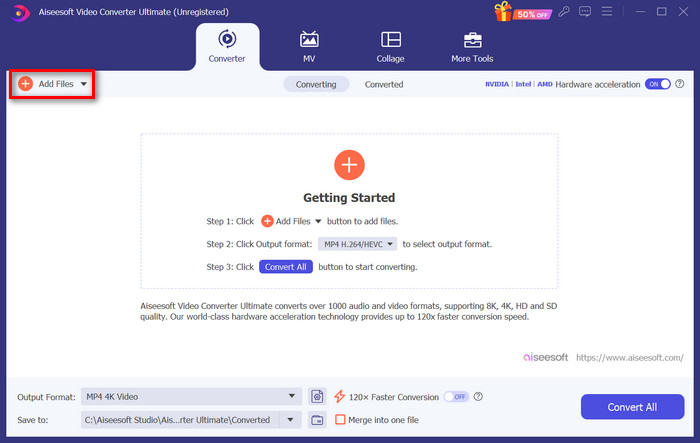
الخطوة 2. في علامة تبويب المحوّل، انقر على زر Add Files واستورد ملفات H.264 الخاصة بك.
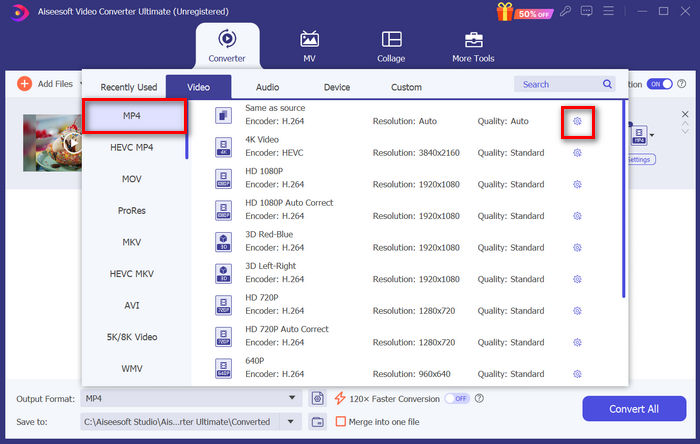
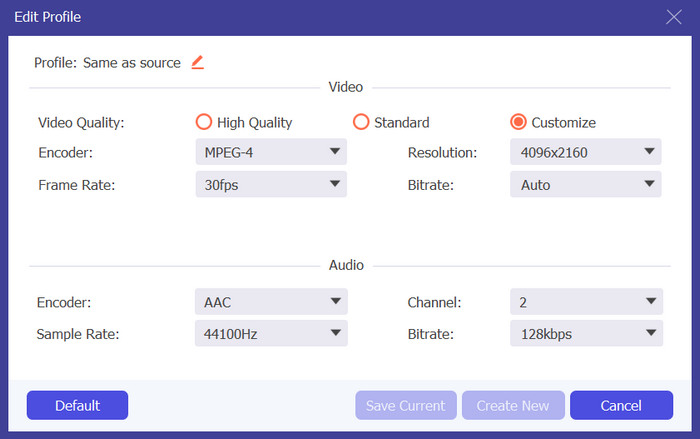
الخطوة 3. بمجرد استيراد ملف فيديو H.264، اختر MP4 من بين قائمة الصيغ بالنقر على زر Output format. وفي الوقت نفسه، إذا كنت تريد تخصيص الملف الشخصي المخصص، انتقل إلى مربع حوار الإعدادات. من هناك، يمكنك تعديل ترميز الفيديو، والجودة، واسم الملف، وما إلى ذلك. عند الانتهاء، انقر فقط على زر Create New لحفظ الإعدادات.
الخطوة 4. بعد الانتهاء، انقر فقط على زر Convert All.
باستخدام FVC Video Converter Ultimate، يمكن إنجاز تحويل H.264 إلى MP4 بسرعة دون استهلاك الكثير من وقتك وجهدك. علاوة على ذلك، يمكنك تحويل صيغ أخرى مثل H.265 وAVCHD إلى MP4. وبالإضافة إلى ذلك، يمكنك التأكد من الحفاظ على جودة عالية للإخراج طوال عملية التحويل.
الخطوة 1. أولًا، تحتاج إلى الحصول على ملفات FFmpeg التنفيذية على جهاز الكمبيوتر الخاص بك.
الجزء 3: تحويل H.264 إلى MP4 باستخدام FFmpeg
FFmpeg هي أداة سطر أوامر تُستخدم لإدارة ملفات الوسائط المتعددة، وتوفر إمكانيات تتراوح من التشغيل إلى التحويل والتحرير. وبفضل ميزاتها المتعددة، تتيح هذه الأداة للمستخدمين تحويل تنسيق H.264 إلى تنسيق MP4 بكفاءة، مما يوفر حلاً ملائمًا لأولئك الذين يشعرون بالراحة مع واجهات سطر الأوامر.
الخطوة 2. بعد ذلك، افتح نافذة سطر الأوامر في المجلد الذي توجد به الملفات التنفيذية. ستظهر لك نافذة طرفية (Terminal).
الخطوة 3. بعد ذلك، أضف ملف H.264 الذي تريد تحويله إلى MP4.
الخطوة 4. أخيرًا، أدخل الأمر التالي: ./ffmpeg.exe -i inputfilename.mkv outputfilename.mp4 ثم اضغط على Enter.
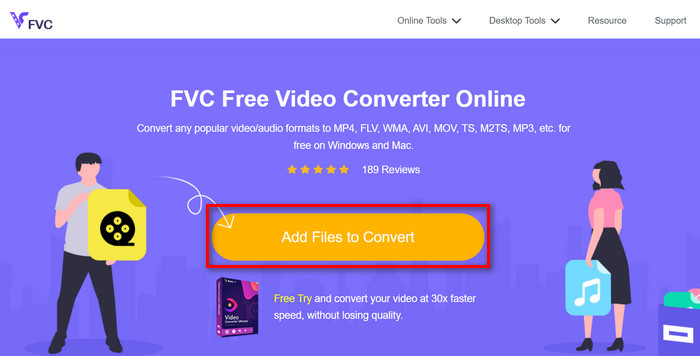
إذا كنت تبحث عن أداة لتحويل H.264 إلى MP4 عبر الإنترنت، فأفضل أداة يمكنك استخدامها هي FVC Free Video Converter Online. تتيح لك هذه الأداة طريقة سريعة وبديهية للغاية لتحويل ملفات H.264 إلى الصيغة التي تريدها، إذ لا يُطلب منك سوى استيراد الملف واختيار الصيغة المفضلة، ودع الباقي للأداة لتنجز المهمة بسلاسة.
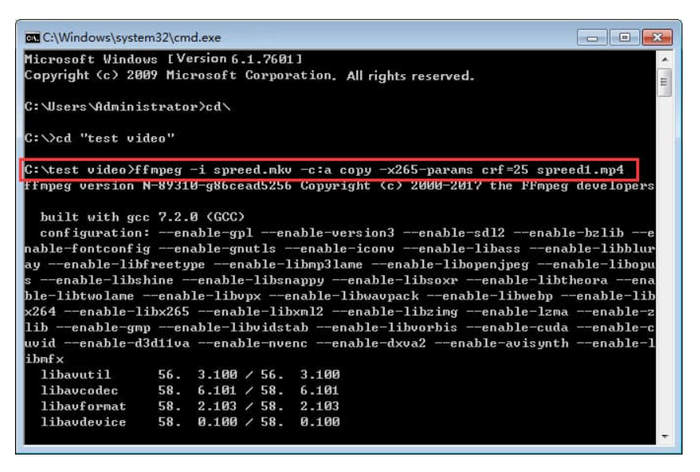
إذا كنت على دراية بأسطر الأوامر، فقد يعمل FFmpeg بشكل أفضل من جانبك عند تحويل H.264 إلى MP4. ومع ذلك، إذا لم تكن على دراية بها، فستجد صعوبة في التنقل عبر هذه الأداة، وهو أحد أوجه القصور فيها عندما يتعلق الأمر بسهولة الاستخدام للمستخدمين الجدد.
الجزء 4: تحويل H.264 إلى MP4 عبر الإنترنت
الخطوة 1. أولًا، تحتاج إلى استيراد ملف H.264 الذي تريد تحويله بالنقر على زر Add Files to Convert.
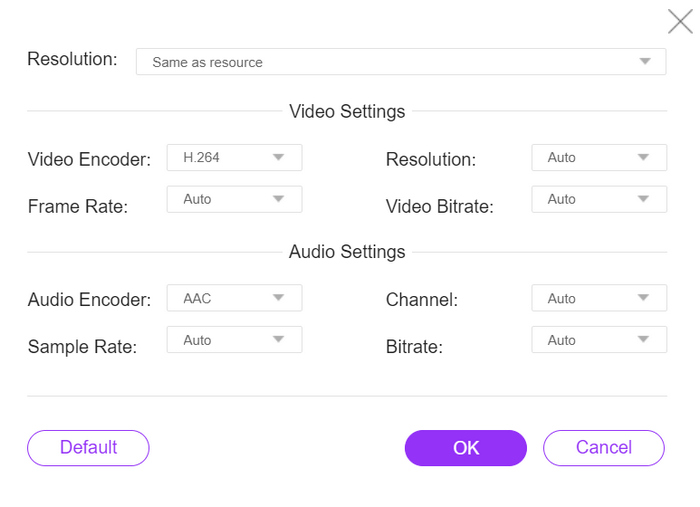
الخطوة 2. الآن، بالنسبة لصيغة الإخراج، اختر MP4. أيضًا، إذا كنت تريد ضبط الدقة وترميزات الفيديو ومعدل البت وغيرها يدويًا، فما عليك سوى النقر على أيقونة الترس بجانب صيغة الإخراج. عند الانتهاء، انقر على زر OK.
هذا كل شيء! الآن أصبحت تمتلك جميع الأدوات والطرق لتحويل H.264 إلى MP4 دون عناء. سواء كنت تفضّل برنامج سطح مكتب، أو أداة سطر أوامر، أو محوّلًا عبر الإنترنت، فالاختيار يعود إليك. ابدأ اليوم وضمن توافق فيديوهاتك مع أي جهاز!.
الخطوة 3. أخيرًا، لبدء عملية التحويل، ما عليك سوى النقر على زر Convert.
لا داعي للقلق بشأن جودة إخراج ملف H.264 المحول، حيث تدعم هذه الأداة دقة فيديو تصل إلى 1080 بكسل. علاوة على ذلك، لن تستغرق سرعة التحويل وقتًا طويلاً حيث إنها أسرع بمقدار 30 مرة مقارنة بأدوات التحويل الأخرى.
الجزء 5. الأسئلة الشائعة حول تحويل H.264 إلى MP4
H264 مقابل mp4، أيهما أفضل؟
عندما يتعلق الأمر بالتوافق، يبدو أن تنسيق MP4 رائع، نظرًا لأن الأشخاص غالبًا ما يختارون تحويل تنسيق H.264 إلى تنسيق MP4 لتحسين دعم الأجهزة وتجربة التشغيل. ومع ذلك، يتمتع كلا التنسيقين بنقاط قوة ويخدمان أغراضًا مختلفة بفعالية.
هل يمكنني الاحتفاظ بالجودة الأصلية لفيديو H.264 عند التحويل إلى MP4؟
نعم، يمكنك الاحتفاظ بالجودة الأصلية لفيديو H.264 عند التحويل إلى MP4، وخاصةً إذا كنت تستخدم أداة تحويل موثوقة مثل FVC Video Converter Ultimate أو FFmpeg. توفر هذه الأدوات خيارات لضبط الإعدادات مثل الدقة ومعدل البت وترميز الصوت لضمان جودة عالية للإخراج.
ما هي مشغلات الفيديو المتوافقة مع تنسيق H.264؟
تتمتع العديد من مشغلات الفيديو بالقدرة على تشغيل تنسيق H.264، بما في ذلك VLC Media Player، وWindows Media Player، وQuickTime Player.
خاتمة
التقييم: 4.9 / 5 (استنادًا إلى 333 صوتًا)
-
 أفضل محول MPG إلى MP4 مجاني في عام 2024 (مراجعة متعمقة)
 لماذا تحتاج إلى تغيير MPG إلى MP4؟ احصل على الإجابة في هذا المنشور وتعرف على محول MPG عالي المستوى إلى MP4 في السوق.
-
 الصوت إلى MP4: تحويل أي ملف صوتي إلى تنسيق MP4
 قم بتحويل الأغاني والبودكاست والتسجيلات المفضلة لديك إلى تنسيق MP4 للحصول على مزيج فريد من الصوت والمرئيات. اكتشف كيفية تحويل WMA إلى MP4 أو صوت آخر إلى تنسيق فيديو.
-
 أفضل 5 برامج تحويل FLV إلى MP4 مجانية ومدفوعة (تقييم 2024)
 تابع هذا المنشور وتعرف على التحديثات المتعلقة بملفات FLV وMP4. بالإضافة إلى ذلك، قمنا برعاية محول FLV الأكثر موثوقية إلى MP4.
