


 محول الفيديو النهائي
 مسجل الشاشة
 إصلاح الفيديو
 تنزيل آمن
4 طرق فعالة: كيفية تقليل حجم ملف الصور على iPhone
عادةً، نحتاج مع هواتف iPhone إلى رفع الصور مباشرة على بعض المواقع أو إرسالها عبر البريد الإلكتروني أو منصات أخرى. ومع ذلك، تكون الصور الملتقطة بالـ iPhone غالبًا ذات حجم ملفات كبير بسبب الجودة العالية التي توفرها الكاميرات المتقدمة في الهاتف. ولـتقليل حجم ملف الصور على جهاز iPhone دون التضحية كثيرًا بالجودة، إليك أربع طرق فعّالة يجب أن تطّلع عليها. واصل القراءة لتتعرف عليها جميعًا!

الجزء 1. تقليل حجم ملف الصور على iPhone في إعدادات الكاميرا
أبسط وأسرع طريقة لتقليل حجم ملف الصور على iPhone هي من خلال تطبيق الإعدادات. بهذه الطريقة، يمكنك اختيار التنسيق لجميع الصور التي تلتقطها بكاميرا iPhone. المشكلة في أجهزة iPhone أنها تكون عادةً مضبوطة على التنسيق الأكثر توافقًا، ما يؤدي إلى حفظ الصور بأحجام كبيرة. لكن إذا كنت تريد توفير مساحة التخزين، فيجب عليك ضبط إعدادات تنسيق الكاميرا على 'كفاءة عالية' وإلغاء تنسيق HEIC. هذا النوع من إعدادات الكاميرا لن يقلل من جودة الصور، لكنه سيوفّر لك الكثير من المساحة على جهازك.
إليك كيفية تقليل حجم الملف في إعدادات الكاميرا:
الخطوة 1. على جهاز iPhone، انتقل إلى الإعدادات، وابحث عن الكاميرا، ثم اختر “التنسيقات”.
الخطوة 2. في أعلى الشاشة، اختر كفاءة عالية (High Efficiency). يتيح لك هذا التنسيق الحصول على أصغر حجم ممكن للصورة دون تقليل الجودة.
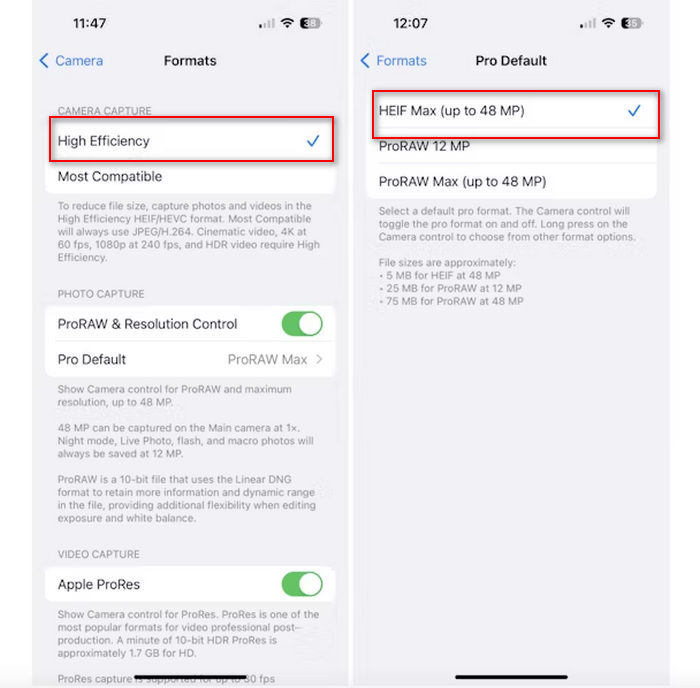
الخطوة 3. لتقليل حجم ملفات الصور أكثر، اضغط على Pro Default واختر HEIF Max up to 48 MP. سيُحدِّد هذا حجم الصورة بحوالي 5 ميجابايت تقريبًا.
قد يكون تقليل حجم الملف على جهاز iPhone عن طريق تغيير إعدادات الكاميرا طريقة جيدة لضغط الصور. ومع ذلك، قد يستغرق الأمر بعض الوقت عندما تريد تغيير إعدادات الكاميرا عندما تريد أيضًا التقاط صور عالية الجودة قد يكون حجم ملفها كبيرًا.
الجزء 2. ضغط الصور على iPhone عن طريق القص
يعد الاقتصاص طريقة فعالة لتقليل حجم الصورة على iPhone لأنه يزيل الأجزاء غير الضرورية من الصورة، وبالتالي يقلل من الحجم الإجمالي للملف. عندما تقوم بقص صورة، فإنك تقوم في الأساس بقص أجزاء من الصورة لا تحتاج إليها، وهو ما لا يركز فقط على العناصر المهمة في الصورة ولكنه يقلل أيضًا من كمية البيانات التي يحتوي عليها الملف. يمكن أن يكون هذا مفيدًا بشكل خاص لتوفير مساحة التخزين على جهاز iPhone الخاص بك وتسهيل مشاركة الصور على منصات مختلفة.
إليك كيفية ضغط الصور على جهاز iPhone الخاص بك عن طريق اقتصاصها:
الخطوة 1. افتح الصورة التي تريد تقليل حجم ملفها في تطبيق الصور (Photos) ثم اضغط على تعديل (Edit).
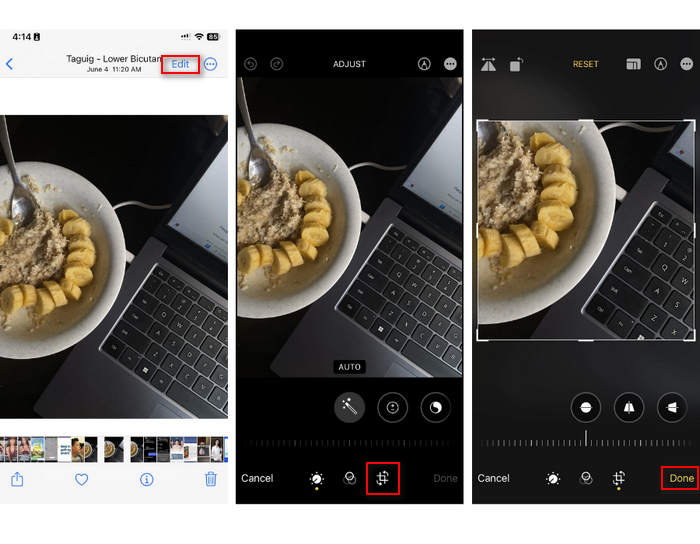
الخطوة 2. الآن، اضغط على زر القص (Crop) في الأسفل وقم بقص الأجزاء غير المرغوب فيها من الصورة.
الخطوة 3. عدِّل منطقة القص كما تريد، ثم اضغط على تم (Done).
على الرغم من أن هذا قد يقلل من حجم ملف الصور على iPhone، إلا أن هذه الطريقة لن تكون قابلة للتطبيق دائمًا في جميع الأوقات، لذا يوصى باستخدام أدوات أخرى لضغط الصور على iPhone إلى جانب هذا.
الجزء 3. تقليل حجم ملف الصور على iPhone عبر تطبيق الوسائط الاجتماعية
يتيح WhatsApp للمستخدمين تقليل حجم ملفات الصور على أجهزة iPhone. فهو يوفر خيارًا لضغط الصورة إلى حجم أصغر قبل إرسالها، مما يساعد على توفير مساحة التخزين ويسهِّل مشاركة الصور.
إليك كيفية ضغط الصور على جهاز iPhone الخاص بك باستخدام WhatsApp:
الخطوة 1. افتح محادثة نصية في تطبيق WhatsApp على هاتفك.
الخطوة 2. بعد ذلك، اضغط على أيقونة الصور واختر الصورة التي تريد إرسالها.
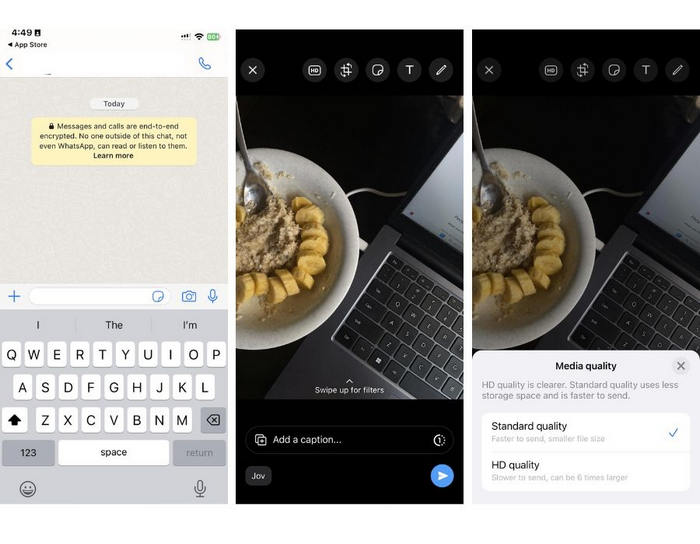
الخطوة 3. بعد ذلك، اضغط على HD لضبط حجم الملف من خلال اختيار إرسال الصورة بجودة قياسية (Standard).
الخطوة 4. اضغط على السهم لإرسال رسالتك ثم قم بتنزيل الصورة.
يوصى بشدة بهذه الطريقة لمن قاموا بتثبيت تطبيق WhatsApp على هواتف iPhone الخاصة بهم. ورغم أنها طريقة رائعة لتقليل حجم ملف الصور على iPhone، إلا أنها ستؤثر بشكل كبير على جودة الصورة.
الجزء 4. ضغط الصور على iPhone باستخدام أداة عبر الإنترنت
في المقابل، إذا كنت تبحث عن طريقة مباشرة وسهلة لتقليل حجم ملفات الصور على iPhone، فأفضل أداة يمكنك استخدامها هي FVC Free Image Compressor. كل ما عليك فعله هو الدخول إلى هذه الأداة عبر الإنترنت، ورفع الصورة التي تريد ضغطها ثم الانتهاء. بالإضافة إلى ذلك، تتيح لك هذه الأداة ضغط عدة صور مباشرة من جهاز iPhone لديك، مع تقليص حجمها بشكل كبير دون فقدان ملحوظ في الجودة مقارنة بالطرق الأخرى المذكورة أعلاه.
إليك كيفية ضغط الصور على جهاز iPhone الخاص بك باستخدام FVC Free Image Compressor:
الخطوة 1. على متصفح Safari، ابحث عن FVC Free Image Compressor.
الخطوة 2. اضغط على زر Upload Images لاستيراد الصور التي تريد تقليل حجم ملفاتها.
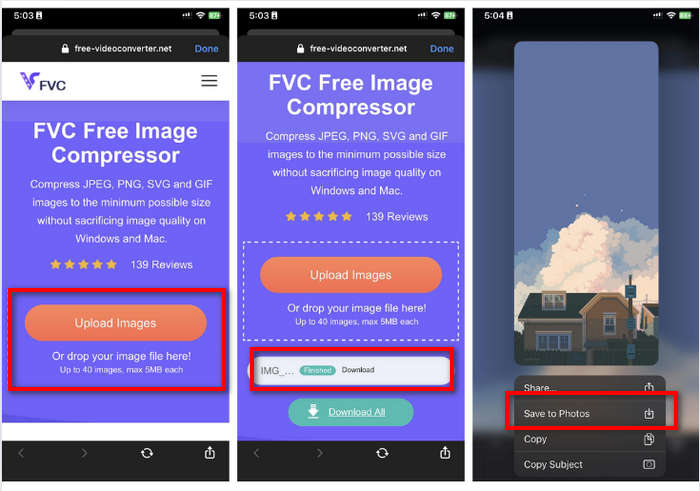
الخطوة 3. بعد ذلك، ستقوم الأداة تلقائيًا بضغط صورك. اضغط على زر Download، ثم اضغط مطولًا على الصورة المضغوطة واختر خيار Save to Photos.
باستخدام برنامج FVC Free Image Compressor، يمكن تقليل حجم ملف الصور على iPhone بسرعة كبيرة دون فقدان الكثير من جودته. علاوة على ذلك، فإن سهولة الوصول إليه وواجهته سهلة الاستخدام تجعله أداة مفضلة لمستخدمي iPhone لضغط صورهم.
الجزء 5. الأسئلة الشائعة حول تقليل حجم ملف الصور على iPhone
كيف يمكنني تقليل حجم ملف JPEG دون فقدان الدقة؟
من أجل تقليل حجم ملف JPEG دون فقدان الدقة، يمكنك استخدام أداة FVC Free Image Compressor. تتيح لك هذه الأداة عبر الإنترنت ضغط صورك مع الحفاظ على جودتها. ما عليك سوى تحميل ملف الصورة أو استيراده إلى الأداة، وسوف تقوم تلقائيًا بضغطه لك. يمكنك بعد ذلك تنزيل الصورة المضغوطة مرة أخرى على جهاز iPhone الخاص بك.
كيف يمكنني رؤية حجم ملف الصور على iPhone؟
يمكنك رؤية حجم ملف الصور في تطبيق الملفات على جهاز iPhone. إذا لم تكن صورتك موجودة في تطبيق الملفات، فيتعين عليك تحميلها إلى iCloud أولاً. بمجرد أن تكون الصورة موجودة في iCloud، يمكنك عرض حجم ملفها من خلال الوصول إليها عبر تطبيق الملفات.
ما نوع الصورة التي يتم التقاطها بواسطة iPhone؟
عادةً ما تحفظ أجهزة iPhone الصور بتنسيق HEIC أو تنسيق High-Efficiency Image Coding افتراضيًا. يوفر تنسيق HEIC ضغطًا أفضل من تنسيق JPEG مع الحفاظ على الجودة العالية. يمكنك تغيير هذا الإعداد في قسم الكاميرا في تطبيق الإعدادات ضمن التنسيقات.
خاتمة
نظرًا لأن أجهزة iPhone تنتج ملفات صور كبيرة عند التصوير، فقد يكون من الصعب مشاركتها ورفعها. لذلك، تعلُّم كيفية تقليل حجم ملفات الصور على iPhone خطوة ممتازة إذا كنت تريد تهيئة صورك لاستخدامها بسلاسة في كل مكان. الآن يتوقف الأمر عليك في اختيار الطريقة الأنسب لضغط صورك. ماذا تنتظر؟ ابدأ بضغط صورك على جهاز iPhone الآن!
-
 كيفية تغيير حجم الصورة – Adobe Resize Image [عبر الإنترنت وخارجه]
 إذا كنت تبحث عن Adobe لتغيير حجم الصورة ، فلدينا الحل المناسب لك. شاهد هذا المنشور جيدًا لمعرفة كيفية تغيير حجم الصور باستخدام Adobe على جهاز الكمبيوتر الخاص بك.
-
 أدوات برنامج تغيير حجم GIF الإبداعية متاحة بسهولة
 يمكن أن يكون تغيير حجم صور GIF مهمة مؤلمة. استخدم البرامج المناسبة لتغيير حجم صور GIF الخاصة بك وإنجاز عملك بشكل لا تشوبه شائبة. تحقق من هذه المقالة لمزيد من المعلومات.
-
 3 طرق لتغيير حجم الصورة لتويتر دون فقدان الجودة
 لتغيير حجم الصورة لتويتر ، ستحتاج إلى تغيير حجم الصورة في يدك. لايوجد واحد؟ ثم اختر من القائمة.
