


 محول الفيديو النهائي
 مسجل الشاشة
 إصلاح الفيديو
 تنزيل آمن
3 طرق سهلة لضغط الصور للبريد الإلكتروني [دليل]
البريد الإلكتروني هو منصة رائعة لإرسال الرسائل مع مرفقات الصور والملفات الأخرى المطلوبة. ومع ذلك، يواجه بعض المستخدمين صعوبة في إرسال صور بملفات كبيرة حيث يؤدي ذلك إلى بطء أوقات التحميل أو فشل التسليم أو تجاوز حدود حجم المرفقات التي يفرضها مزودو البريد الإلكتروني. لتجنب هذه المشكلات، يعد تغيير حجم الصور قبل إرسالها أمرًا ضروريًا.
مع وضع ذلك في الاعتبار، سنشرح لك في هذه المقالة 3 طرق عن كيفية ضغط الصور من أجل إرسالها عبر البريد الإلكتروني، لضمان أن تكون مرفقات الصور سهلة الإرسال والاستقبال دون التأثير على جودتها.

الجزء 1. فوائد ضغط الصور للبريد الإلكتروني
بشكل عام، يوفر ضغط الصور العديد من الفوائد، بما في ذلك استخدامها في البريد الإلكتروني. فيما يلي بعض الأشياء التي يمكنك الاستمتاع بها عند تغيير حجم الصور لإرسالها عبر البريد الإلكتروني:
• بما أن ضغط الصورة يعني تغيير حجمها إلى حجم أصغر، يمكنك بسهولة إرسال عدة صور كمرفقات في بريد إلكتروني واحد مقارنة بالصور غير المضغوطة.
• في كثير من الأحيان، يفرض مزوِّدو خدمة البريد الإلكتروني حدودًا على حجم المرفقات التي يمكنك إرسالها. من خلال ضغط الصور قبل إرسالها بالبريد الإلكتروني، يمكنك البقاء ضمن هذه الحدود، مما يضمن تسليم رسالتك دون أي مشكلات. يكون هذا مفيدًا عند إرسال رسائل إلى عدة مستلمين أو عند إرفاق أنواع أخرى من الملفات مع صورك.
• عندما تُضغط الصور، فهذا يعني ببساطة أنها ستشغل مساحة أقل، مما يتيح لك الاستفادة بشكل أفضل من حصة التخزين في بريدك الإلكتروني.
• يمكن أن تُعلَّم المرفقات كبيرة الحجم أحيانًا من قِبل خوادم البريد الإلكتروني على أنها مشبوهة، مما يؤدي إلى فشل في التسليم أو وسم الرسائل كبريد عشوائي (سبام). ضغط الصور قبل إرسالها بالبريد الإلكتروني يساعد على تجنب هذه المشكلات، ويضمن وصول مرفقاتك إلى مستلميها المقصودين دون أي عوائق.
• في بعض الحالات التي يستخدم فيها الأشخاص هواتفهم المحمولة للتحقق من البريد الإلكتروني، تكون الصور المضغوطة أسهل في التنزيل والعرض على الأجهزة المحمولة مقارنة بالصور غير المضغوطة.
الجزء 2. ضغط الصور لإرسالها عبر البريد الإلكتروني عن طريق تحويل تنسيق الصورة
إذا كنت تريد ضغط الصور لإرسالها عبر البريد الإلكتروني، فإن الطريقة الأولى التي يمكنك تجربتها هي استخدام أداة تحويل الصور. باستخدام هذه الأداة، سيتم تحويل صورتك إلى التنسيق الذي تريده، كما تعمل عملية التحويل أيضًا على تحسين صورتك إلى الحجم المرغوب فيه والأكثر قابلية للإدارة.
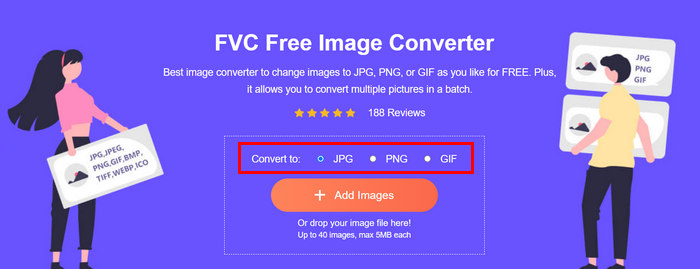
يُعد FVC Free Image Converter أداة تحويل مجانية تمكِّن المستخدمين من تحويل صورهم إلى صيغ ملفات صور مختلفة مثل JPG وPNG وGIF. لذلك، إذا كنت ترسل عبر البريد الإلكتروني ملف صورة بصيغة تحتفظ ببيانات أكثر وتزيد من حجم الملف، فيمكنك بالتأكيد الاستفادة من هذه الأداة. إضافة إلى ذلك، فهي مثالية عندما تريد إرسال عدة ملفات كبيرة، إذ يمكنها تحويل ما يصل إلى 40 صورة دفعة واحدة. إليك كيفية استخدام هذه الأداة في ضغط الصور من أجل البريد الإلكتروني:
الخطوة 1. أولًا، ابحث في متصفحك عن FVC Free Image Converter حتى تتمكن من الوصول إلى الأداة الإلكترونية.
الخطوة 2. بعد ذلك، اختر صيغة الملف الناتج التي تفضِّلها من خيار Convert to. ثم انقر على زر Add Images لاستيراد الصور التي تريد تحويلها.
الخطوة 3. بعد الانتهاء، انقر على زر Download All.
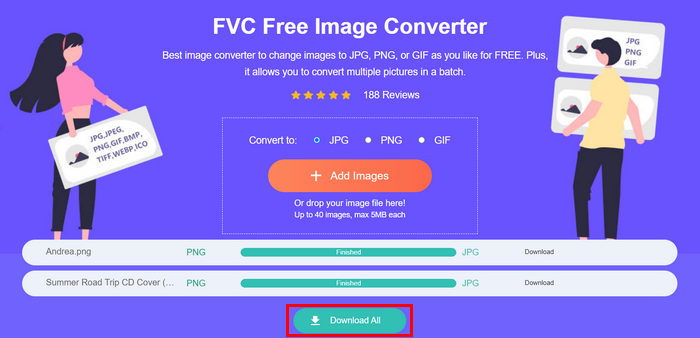 باستخدام أداة تحويل الصور المجانية FVC، يمكنك ضمان ضغط صورك المحولة وتقليل حجمها، وهو أمر مثالي لاستخدام البريد الإلكتروني.
 الجزء 3. تصغير حجم الصور لإرسالها عبر البريد الإلكتروني باستخدام أداة الضغط عبر الإنترنت
يُعد FVC Free Image Compressor أداة ضغط مجانية على الإنترنت تُبسِّط عملية ضغط الصور من أجل البريد الإلكتروني. كل ما على المستخدمين فعله هو رفع ملفات الصور أو استيرادها وترك الأداة تقوم بضغطها تلقائيًا. وإذا كنت تقلق بشأن فقدان الجودة، فإن هذه الأداة تستخدم أفضل تقنيات التحسين وخوارزميات الضغط المتقدمة. وهذا سيضمن الحفاظ على جودة صورتك عند ضغطها لإرسالها عبر البريد الإلكتروني.
بالإضافة إلى ذلك، إذا كان عليك ضغط صورة دفعة واحدة، تتيح لك هذه الأداة ضغط 40 صورة في وقت واحد. وأخيرًا، تدعم العديد من تنسيقات الصور الشائعة مثل JPEG وPNG وSVG وصور GIF المتحركة.
الخطوة 1. من خلال متصفحك، ادخل إلى موقعهم الرسمي.
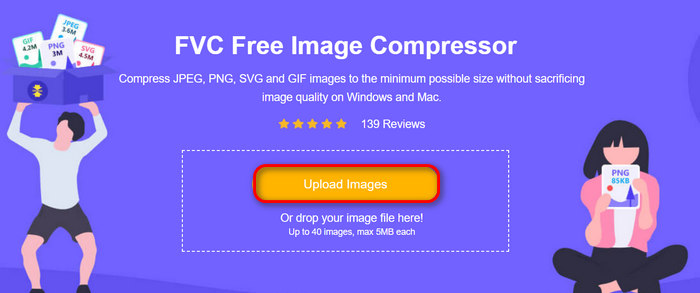
الخطوة 2. بعد ذلك، انقر على Upload Images لاستيراد الصور التي تريد ضغطها لاستخدامها على الويب. يرجى ملاحظة أن هذه الأداة ستقوم تلقائيًا بضغط صورك بمجرد تحديدها والنقر على فتح (Open).
الخطوة 3. بعد ضغط صورك، يمكنك معاينتها من خلال مراجعة حجمها الجديد بعد الضغط. وأخيرًا، انقر على Download All لحفظ صورك.
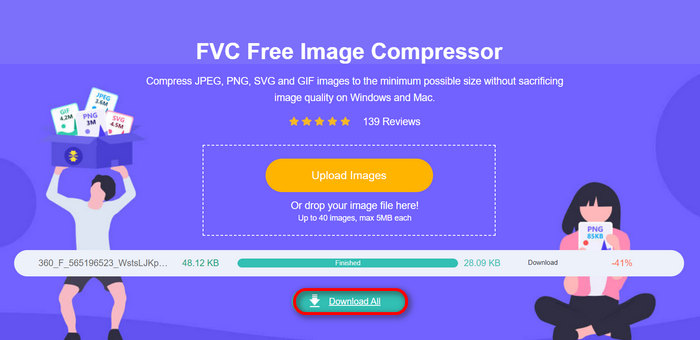
يمكن أن تساعدك هذه الطريقة حقًا في ضغط الصور للبريد الإلكتروني دون تحمل خطوات معقدة ورسوم اشتراك. علاوة على ذلك، فإن واجهتها سهلة الاستخدام والبديهية تجعلها أداة مثالية لأي مستوى من المستخدمين. لذا، إذا كنت تريد تحسين صورك لاستخدام البريد الإلكتروني، فجرّب هذه الطريقة الآن.
الجزء 4. تغيير حجم الصور المرسلة عبر البريد الإلكتروني إلى حجم محدد
إذا كنت تريد تغيير حجم الصور لإرسالها عبر البريد الإلكتروني إلى حجم محدد، فيمكنك تجربة أداة IMGonline. تتيح لك أداة ضغط الصور هذه تغيير حجم صورتك إلى الحجم الذي تختاره. وإليك كيفية القيام بذلك:
الخطوة 1. على موقعهم الإلكتروني، انقر على زر Choose File لإضافة الصورة التي تريد ضغطها.

الخطوة 2. بعد ذلك، اضبط إعدادات ضغط ملف JPEG. أدخِل الحجم الذي تريده بالكيلوبايت (KB) أو الميغابايت (MB) وفقًا لاختيارك.

الخطوة 3. في قائمة Size Reducing in Megapixel، اختر مقدار الضغط الذي تريده للصورة أو كيف تريد تحديد مستوى ضغطها.
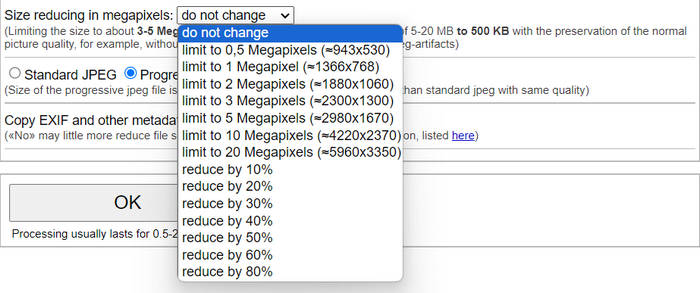
الخطوة 4. بعد ذلك، اختر بين Standard JPG أو Progressive JPG.

الخطوة 5. بعد الانتهاء، اضغط فقط على زر OK.
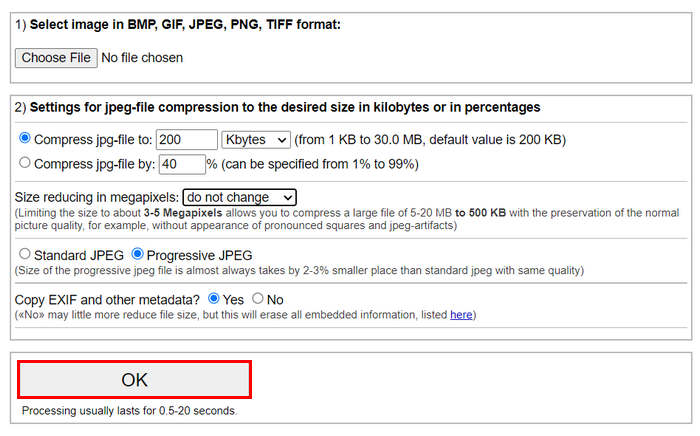
عندما يتعلق الأمر بالاختيار بين JPG القياسي وJPG التدريجي، ضع في اعتبارك أن حجم ملف jpeg التدريجي يكون دائمًا أصغر بمقدار 2-3% من jpeg القياسي بنفس الجودة.
الجزء 5. الأسئلة الشائعة حول ضغط الصور للبريد الإلكتروني
ما هو الحجم الذي يجب أن أغيره في صوري لإرسالها بالبريد الإلكتروني؟
عندما يتعلق الأمر بالحجم المثالي لإرسال الصور عبر البريد الإلكتروني، فبالرغم من عدم وجود قيود، إلا أنه من المستحسن عمومًا تغيير حجم الصور إلى 1024 × 768 بكسل كحد أقصى. كما أن الحفاظ على حجم الصورة أقل من 1 ميجا بايت يساعد في تجنب المشكلات المتعلقة بحدود المرفقات ويجعل من السهل على المستلمين تنزيل الصور وعرضها.
كيفية ضغط الصور لـGmail؟
يمكن ضغط الصور لاستخدامها في جيميل (Gmail) بعدة طرق. ومن أسهل هذه الطرق استعمال أدوات الضغط على الإنترنت مثل أداة FVC المجانية لضغط الصور. لاستخدامها، ما عليك سوى رفع ملفات الصور، وستقوم الأداة بضغطها تلقائيًا.
ما هو نوع الصورة الأفضل للبريد الإلكتروني؟
أفضل أنواع الصور للاستخدام في البريد الإلكتروني هي JPEG وPNG. يُستخدم JPEG على نطاق واسع نظرًا لمعدل الضغط الجيد والتوازن بين حجم الملف والجودة، مما يجعله مثاليًا للصور الفوتوغرافية والصور ذات الألوان الكثيرة. أما PNG فيُفضَّل للصور التي تتطلب شفافية أو التي تحتوي على نصوص أو شعارات أو رسومات ذات حواف حادة، لأنه يحافظ على جودة أعلى لهذه العناصر، مع أن حجم الملف يمكن أن يكون أكبر مقارنة بـ JPEG.
خاتمة
من المهم جدًّا معرفة كيفية ضغط الصور من أجل البريد الإلكتروني لتجنّب بطء وقت الرفع، وفشل الإرسال، وحدود حجم المرفقات. باتباع الطرق التي تم شرحها بشكل مفصل في هذه المقالة، يمكنك التأكد من أن مرفقات الصور لديك ستكون سهلة الإدارة وسريعة في الإرسال والاستقبال.
ماذا تنتظر؟ ابدأ في تحسين مرفقات البريد الإلكتروني الخاص بك اليوم بهذه الطرق الثلاث السهلة.
-
 الصور المضغوطة بشكل مفرط: إليك كيفية إصلاحها بسهولة
 هل تتساءل عما يجب فعله عندما يتم ضغط صورتك بشكل مفرط؟ اقرأ هذه المقالة وتعرف على سبب حدوث مشكلة الصورة هذه وتعرف على طريقتين لإصلاحها.
-
 تغيير حجم الصورة إلى 100 كيلوبايت: 3 طرق رائعة للضغط الفعال
 هل تبحث عن أداة تساعدك على تغيير حجم الصورة إلى 100 كيلوبايت؟ اقرأ هذه المقالة وتعرف على 3 طرق لتقليص حجم صورك إلى حجم الملف المطلوب.
-
 كيفية ضغط الصور في Word [Windows وMac]
 هل تتساءل كيف يمكنك الاستفادة من برنامج Word لضغط الصور؟ سيعلمك هذا الدليل طرقًا لضغط الصور في Word لتحقيق ضغط سلس.
