


 محول الفيديو النهائي
 مسجل الشاشة
 إصلاح الفيديو
 تنزيل آمن
محول DVD إلى H.264: 3 طرق لتحويل DVD بسرعة
اليوم، تُقلّص منصات البث عبر الإنترنت تدريجيًا الطلب على أقراص DVD واستخدامها. ورغم أن البعض لا يزال يفضل استخدامها، إلا أن معظم الناس يفضلون المرونة والراحة عند مشاهدة الفيديوهات أو الأفلام.
إذا كنت لا تريد أن تشعر بأنك متخلف عن الركب وتريد الحفاظ على مجموعات أقراص DVD الخاصة بك، فإن أفضل ما يمكنك فعله هو تحويلها إلى صيغ رقمية. فالأقراص DVD ليست مدعومة بالكامل من قِبل معظم الأجهزة ومشغلات الوسائط حاليًا، ولكن عند نسخها إلى صيغ رقمية شائعة، يمكنك الاستفادة من مرونتها وسهولة استخدامها. في هذه المقالة، ستتعرّف على ثلاث طرق يمكنك من خلالها بسهولة تحويل أقراص DVD إلى H.264. ولا تفوّت أيضًا فرصة فهم سبب الحاجة إلى تحويل أقراص DVD إلى هذه الصيغة. هل أنت مستعد لتحويل أقراص الـDVD الخاصة بك؟ واصل القراءة أدناه لمعرفة المزيد.

الجزء الأول. لماذا تحويل أقراص DVD إلى H.264؟
هناك أسباب عديدة تدفعك لتحويل أقراص DVD إلى H.264، وأبرزها الحفاظ على محتوى القرص وحفظه بصيغة رقمية. ومع ذلك، هناك أسباب أخرى غالبًا ما يغفل عنها البعض، أو لا يدركونها بعد. فيما يلي الأسباب التي تدفعك لتحويل أقراص DVD إلى H.264:
التوافق بين الأجهزة
يعد H.264 أحد ترميزات الفيديو الأكثر دعمًا على نطاق واسع اليوم؛ وبالتالي، عندما تقوم بتحويل قرص DVD الخاص بك إلى هذا التنسيق، فلن تشعر الآن بالقيود على الأجهزة ومشغلات الوسائط المختلفة عند مشاهدة محتوى الوسائط على قرص DVD الخاص بك.
حجم ملف أصغر مع جودة عالية
مقارنةً بتنسيق DVD الأصلي، يوفر H.264 معدل ضغط أفضل. بفضل هذا، يُقلل حجم ملفات DVD دون التأثير بشكل كبير على جودة الفيديو. يتيح لك هذا تخزين المزيد من الأفلام أو مقاطع الفيديو دون استهلاك مساحة تخزين كبيرة.
البث والتخزين السحابي
مقاطع الفيديو المُرمَّزة بتقنية H.264 مثالية للتخزين السحابي والبث المباشر. هذا يُتيح لك الوصول إلى مجموعة الوسائط الخاصة بك في أي وقت ومن أي مكان.
التحرير والتخصيص
بمجرد تحويل الفيديو إلى صيغة H.264، يُمكن تحريره بسهولة باستخدام برامج تحرير الفيديو، مما يُتيح حذف الأجزاء غير المرغوب فيها، وإضافة ترجمات، وتحسين جودة الفيديو. هذه المرونة غير مُتاحة في صيغة DVD الأصلية.
لا حاجة لمحرك أقراص DVD
لم تعد أجهزة الكمبيوتر المحمولة الحديثة، وبعض أجهزة الكمبيوتر المكتبية، مزودة بمحركات أقراص DVD مدمجة. يُغني تحويل أقراص DVD إلى H.264 عن استخدام مشغلات أقراص DVD خارجية، مما يُسهّل مشاهدة أفلامك أو مسلسلاتك المفضلة على أي جهاز.
الجزء الثاني: أفضل طريقة لتحويل أقراص DVD إلى H.264
أفضل طريقة لتحويل أقراص DVD إلى H.264 هي استخدام برنامج AnyMP4 DVD Ripper. يتميز هذا البرنامج بمجموعة شاملة من الميزات التي تتيح للمستخدمين نسخ جميع أفلام DVD بسهولة وفعالية، بما في ذلك أقراص DVD وملفات ISO والمجلدات، وتحويلها إلى صيغ الإخراج المفضلة لديهم. يدعم هذا البرنامج جميع صيغ الإخراج تقريبًا، بما في ذلك H.264 وMP4 وMKV وMOV وAVI وFLV وWMV وWEBM وM4V وTS وMXF وMPG و3GP وVOB، وغيرها. بالإضافة إلى ذلك، يتميز البرنامج بواجهة مستخدم بسيطة وسهلة الاستخدام. يمكن لأي مستخدم، حتى المبتدئين، استخدام البرنامج بسهولة لتلبية احتياجاتهم من تحويل أقراص DVD.
إليك كيفية تحويل DVD إلى H.264 باستخدام برنامج AnyMP4 DVD Ripper الذي اختاره FVC:
الخطوة 1. أولاً، تحتاج إلى تنزيل الأداة وتثبيتها على جهازك، سواء كان يعمل بنظام Windows أو macOS.
تنزيل مجانيلنظام Windows 7 أو الأحدثتنزيل آمن
ملاحظة: قبل الانتقال إلى الخطوة التالية، يجب إدخال قرص الـ DVD في مشغّل الـ DVD في جهاز الكمبيوتر والانتظار لبضع دقائق حتى يتم اكتشافه.
الخطوة 2. الآن، شغّل الأداة وانقر على أيقونة البدء، على شكل علامة + في الوسط، لتحميل القرص.
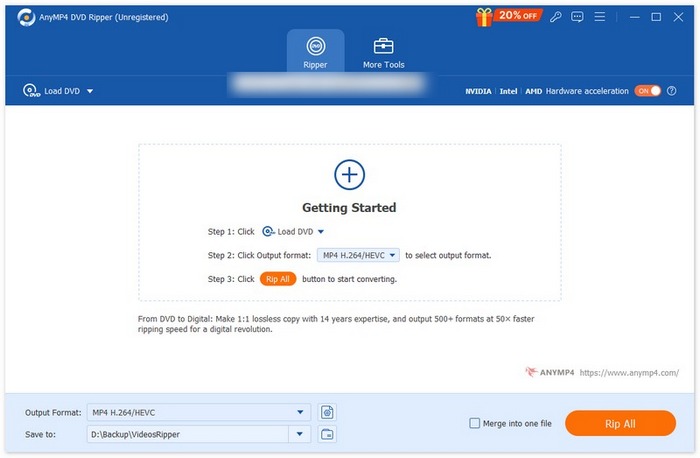
الخطوة 3. بعد ذلك، انقر على صيغة الإخراج في الأسفل واختر صيغة H.264 من علامة تبويب الفيديو Video. عند الانتهاء، انقر ببساطة على زر Rip All لبدء نسخ قرص الـDVD.
أفضل ما يميز برنامج AnyMP4 DVD Ripper، الذي اختاره FVC، هو أن تحويل DVD إلى H.264 مباشر ولا يتطلب أي خطوات إضافية. كما أن تقنية التشفير المستخدمة فيه فائقة الجودة، حيث تضمن نسخ جميع أقراص DVD بنفس الجودة أو حتى بجودة أفضل.
الجزء 3. تحويل أقراص DVD إلى H.264 [مجانًا]
إذا كنت تتساءل الآن عن وجود أقراص DVD مجانية لتحويل H.264، فأنت محق! قد لا تكون أدوات التحويل المجانية هذه مخصصة لتحويل الفيديو، على عكس برنامج Video Converter Ultimate الذي اخترته FVC. مع ذلك، هذه الأدوات قادرة أيضًا على تحويل أقراص DVD إلى H.264.
مشغل الميديا VLC
يُعرف VLC كمشغّل وسائط ويُستخدم غالبًا لهذا الغرض. ومع ذلك، فإن غالبية مستخدميه لا يعلمون أن هذا المشغل قادر أيضًا على تحويل أقراص DVD إلى H.264. في الواقع، يدعم VLC صيغ إخراج فيديو مثل MP4 وMKV وAVI وغيرها، مما يجعله أداة متعددة الاستخدامات لأغراض نسخ أقراص DVD.
إليك كيفية تحويل DVD إلى H.264 باستخدام مشغّل الوسائط VLC:
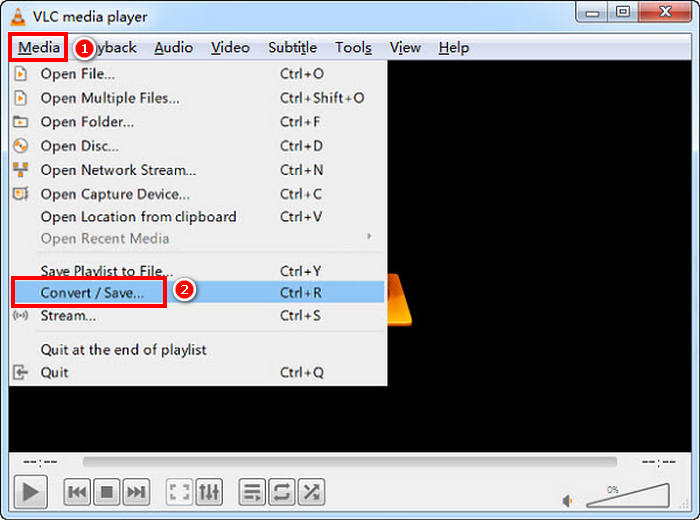
الخطوة 1. على جهاز الكمبيوتر لديك، أدخل قرص الـDVD في محرك الأقراص. بعد ذلك، افتح VLC، ومن قائمة Media اختر Convert/Save.
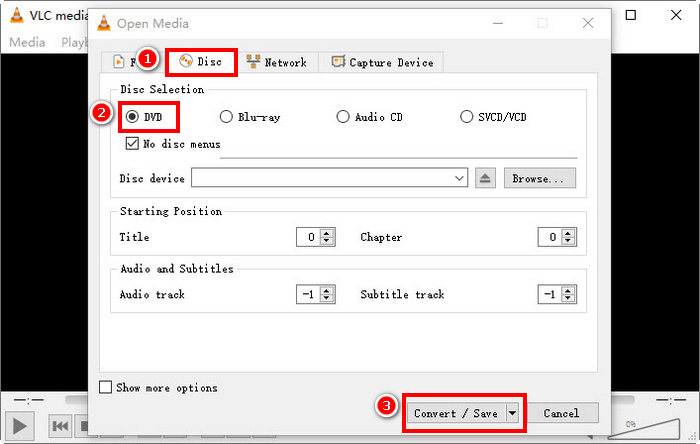
الخطوة 2. الآن، في نافذة Open Media، حدد علامة تبويب Disc، وانقر على DVD لتحميله، ثم انقر على زر Convert/Save.
الخطوة 3. في نافذة Convert، انتقل إلى قسم Profile واختر H.264 + MP4 كصيغة إخراج.
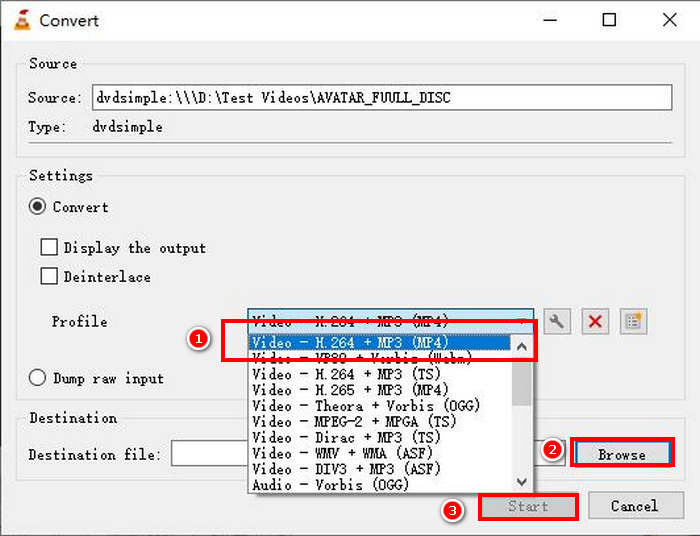
الخطوة 4. انقر على Browse لاختيار مجلد الحفظ وتسمية الملف.
الخطوة 5. أخيرًا، انقر على زر Start لبدء عملية النسخ.
ملاحظة: لا يستطيع VLC نسخ أقراص DVD المحمية ضد النسخ بشكل افتراضي. إذا واجهت مشكلات مع أقراص DVD المشفّرة، فقد تحتاج إلى تثبيت libdvdcss.
فرملة اليد
أداة أخرى لتحويل الفيديو يمكنك استخدامها لتحويل DVD إلى H.264 هي HandBrake. تشتهر هذه الأداة بكونها مجانية ومفتوحة المصدر. وبالإضافة إلى H.264، يمكن للمستخدمين نسخ أقراص DVD الخاصة بهم إلى صيغ إخراج مثل MP4 وMKV.
إليك كيفية تحويل DVD إلى H.264 باستخدام HandBrake:
الخطوة 1. أولًا، قم بتنزيل وتثبيت HandBrake على جهاز الكمبيوتر لديك.
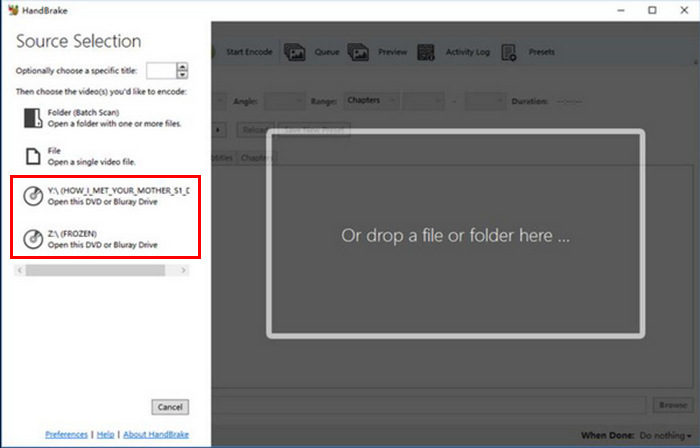
الخطوة 2. بعد ذلك، أدخل قرص الـ DVD في مشغّل أقراص الـ DVD، ثم اختر قرص الـ DVD ضمن Source Selection. ستبدأ الأداة بعد ذلك في فحص عناوين فيلم الـ DVD.
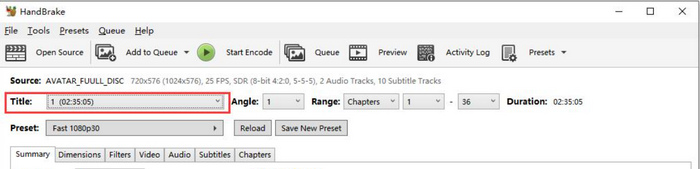
الخطوة 3. بعد فتح قرص الـDVD، اختر العنوان الذي تريد نسخه من قائمة العناوين المنسدلة (Title).
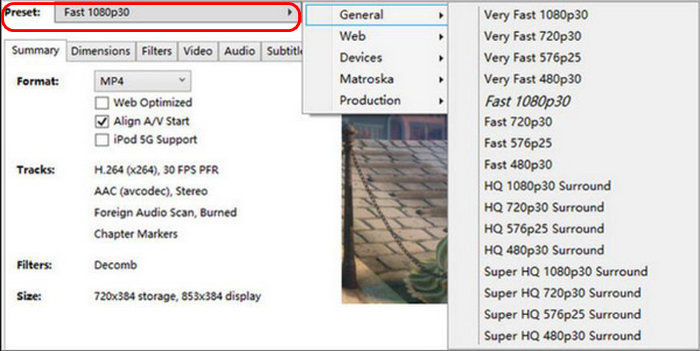
الخطوة 4. بعد ذلك، تحتاج إلى تحديد جودة ملف الإخراج. ما عليك سوى النقر على زر Preset وتخصيص الإعدادات. أسفل ذلك ستجد خيار Format. انقر عليه واختر MP4 كصيغة إخراج.
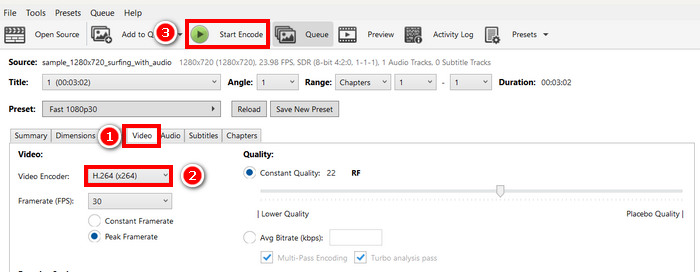
الخطوة 5. بعد ذلك، انتقل إلى Video tab، وفي خيار Video Encoder، انقر عليه واختر H.264. وأخيرًا، انقر على زر Start Encode أعلى النافذة لبدء نسخ قرص الـDVD إلى H.264.
الجزء 4. الأسئلة الشائعة حول تحويل أقراص DVD إلى H.264
هل يدعم DVD تنسيق H.264؟
لا، أقراص DVD لا تدعم تنسيق H.264. مع ذلك، إذا كنت ترغب في تخزين مقاطع فيديو بتنسيق H.264، فعليك نسخ قرص DVD وتحويله إلى H.264 باستخدام أداة تحويل فيديو مثل Video Converter Ultimate وHandBrake وVLC.
لماذا يجب علي تحويل قرص DVD إلى H.264؟
يوفر H.264 ضغطًا وجودة أفضل من MPEG-2. فهو يُقلل حجم الملف مع الحفاظ على وضوح الفيديو، مما يجعله مثاليًا للتخزين الرقمي والبث المباشر.
ما هو الفرق بين H.264 و H.265؟
H.265 أو HEVC أحدث وأكثر كفاءة، ويوفر ضغطًا أفضل من H.264. مع ذلك، يتطلب H.265 قوة معالجة أكبر، وقد لا يكون مدعومًا على جميع الأجهزة.
خاتمة
إن تحويل DVD إلى H.264 ليس بالأمر المرهق عند القيام به باستخدام أداة تحويل الفيديو المناسبة. لذلك، اختر الطريقة التي تناسب احتياجاتك وإمكاناتك، ثم اتبع الخطوات بعناية. إذا كنت لا تطيق الانتظار للحفاظ على أقراص الـDVD الخاصة بك وتحويلها، فابدأ التحويل الآن!
-
 4 طرق لنسخ أقراص DVD إلى جهاز MacBook [دليل المبتدئين]
 إذا كنت تتساءل عن كيفية نسخ قرص DVD إلى جهاز MacBook، فتابع قراءة هذا المقال واتبع الإرشادات التي نقدمها لك من خلال 4 طرق بسيطة يمكنك تجربتها بسهولة بنفسك.
-
 تخزين أقراص DVD بنفسك: 6 أفكار حول كيفية إنشاء مساحة تخزين لأقراص DVD
 هل تبحث عن أفكار لإنشاء مساحة تخزين لأقراص DVD بنفسك؟ اقرأ هذه المقالة لضمان وجود أقراص DVD في مكان آمن وسهل الوصول إليه عند الحاجة.
-
 أفضل 5 محولات VHS إلى DVD لنظامي التشغيل Windows وmacOS
 هل لديك كومة من أشرطة VHS في المنزل وتبحث عن طرق لحفظها؟ في هذه المقالة، تعرّف على 5 أدوات تساعدك على تحويل VHS إلى DVD بسهولة.
