


 محول الفيديو النهائي
 مسجل الشاشة
 إصلاح الفيديو
 تنزيل آمن
كيفية تحويل ملفات فيديو FLV إلى تنسيق 3GP مجانًا
ستوضح لك هذه المقالة أفضل الطرق لـتحويل ملفات FLV إلى 3GP. وفقًا للاستطلاعات، هناك عدد هائل من صيغ ملفات الفيديو في السوق، وقد قام المطوّرون بإصدارها لأغراض مختلفة. على سبيل المثال، صيغة FLV، وهي اختصار لـ Flash Video، تُستخدم لتخزين المحتوى المرئي وتشغيله في مشغّل Adobe Flash عبر الإنترنت.
3GP ، من ناحية أخرى ، هو تنسيق الوسائط المتعددة الذي تم إنشاؤه بواسطة مشروع شراكة الجيل الثالث لتوفير عرض النطاق الترددي واستخدام البيانات على الأجهزة المحمولة. بعبارة أخرى ، من الأفضل تحويل FLV إلى 3GP ومشاهدة مقاطع الفيديو على الهاتف.

الجزء 1: أفضل طريقة لتحويل FLV إلى 3GP على سطح المكتب
FVC Free FLV Converter هو محوّل فيديو قوي. وكما يشير اسمه، فإنه يمكّنك من تحويل ملفات FLV إلى 3GP مجانًا تمامًا. إضافة إلى ذلك، يوفّر لك عددًا كبيرًا من الوظائف المفيدة، مثل تعديل الفيديو والصوت. والأهم من ذلك أن واجهته السهلة الاستخدام تساعدك في العثور بسرعة على ما تحتاجه.
الميزات الرئيسية لأفضل محول FLV مجاني
- 1. تحويل مقاطع فيديو FLV إلى أي تنسيقات وسائط متعددة ، مثل 3GP.
- 2. الدفعة تتعامل مع ملفات فيديو متعددة في نفس الوقت.
- 3. تحويل ملفات FLV للعب على الأجهزة المحمولة.
تنزيل مجانيلنظام Windows 7 أو الأحدثتنزيل آمن
كيفية تحويل FLV إلى 3GP مجانًا
ابدأ تشغيل أفضل محوّل FLV مجاني بعد تثبيته على جهازك. فهو متوافق مع أنظمة Windows 10/8/7 وMac OS X. انقر زر Add File(s) لفتح مربع حوار اختيار الملفات. حدّد ملفات FLV التي تريد تحويلها ثم انقر Open. بعدها ستظهر مقاطع الفيديو في منطقة المكتبة.

الخطوة 2: ضبط صيغة الإخراج
انقر وافتح قائمة Profile format المنسدلة في الأسفل، وستظهر لك نافذة ملفات التعريف. أدخل 3GP في مربع Search Profile ثم اضغط مفتاح Enter على لوحة المفاتيح. بعد ذلك اختر صيغة الإخراج. إذا كنت ترغب في تشغيل المقاطع على جهازك المحمول، فاختر الشركة المصنِّعة ثم حدّد الطراز المناسب مباشرة.

الخطوة 3: تحويل FLV إلى 3GP
عيّن مجلدًا محددًا لحفظ ملف الإخراج من خلال الضغط على زر Open Folder في الأسفل. وأخيرًا، انقر زر Convert لبدء عملية تحويل FLV إلى 3GP. بعد بضع دقائق ستجد ملفات 3GP على قرصك الصلب.

الجزء 2: كيفية تحويل FLV إلى 3GP عبر الإنترنت
تُعد تطبيقات تحويل الفيديو على الويب طريقة شائعة أخرى لتحويل FLV إلى 3GP مجانًا. لكن معظمها يعاني من عيوب مختلفة، مثل حدّ حجم الملف، أو وضع علامة مائية، أو مشكلات أمان وغير ذلك. لحسن الحظ، يمكن لـFVC Free Online Video Converter مساعدتك في حل هذه المشكلات. فهو مجاني تمامًا ولا يفرض أي قيود، كما أن جودة الإخراج ممتازة.
الخطوة 1: زر موقع https://www.free-videoconverter.net/free-online-video-converter/ في متصفّح الويب، ثم انقر زر Add Files to Convert للحصول على المشغّل. لن يستهلك أي مساحة تُذكر على جهازك.
قم بتنزيل إصدار سطح المكتب لتحويل الملفات دفعة واحدة.
الخطوة 2: انقر قائمة Add File وقم برفع ملفات FLV التي ترغب في تحويلها. يتيح لك تطبيق الويب تحويل عدة مقاطع فيديو دفعةً واحدة.
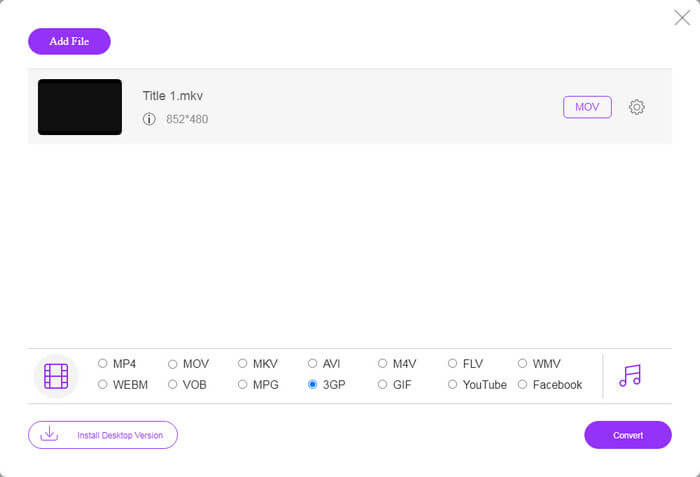
الخطوة 3: انتقل إلى الأسفل واختر 3GP في قسم ملف التعريف (Profile). انقر زر Convert لبدء تحويل FLV إلى 3GP عبر الإنترنت. إذا كان اتصالك بالإنترنت سريعًا، فستُنجز العملية خلال ثوانٍ قليلة. بعد ذلك نزّل ملفات 3GP إلى قرصك الصلب.
لا تفوت:
الجزء 3: كيفية تحويل FLV إلى 3GP باستخدام VLC
في بعض الأحيان ، تكون البرامج المجانية قوية مثل البرامج الاحترافية. VLC ، على سبيل المثال ، هو مشغل وسائط مفتوح المصدر مشهور. إنه قادر على تحويل FLV إلى 3GP على أنظمة Windows و Mac و Linux مجانًا. بالطبع ، المصاريف واضحة ، مثل صعوبة الاستخدام. لذلك ، نشارك الخطوات أدناه:
الخطوة 1: شغّل برنامج تحويل FLV إلى 3GP المجاني على جهاز الكمبيوتر لديك. يجب تثبيته أولاً، ويوفّر الموقع الرسمي مُثبّتًا آمنًا.
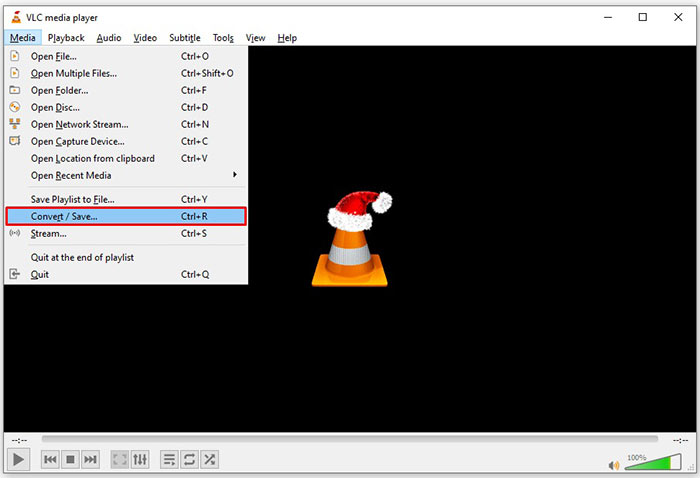
الخطوة 2: توجّه إلى قائمة Media في الشريط العلوي واختر Convert/Save. عندها ستظهر لك نافذة الوسائط المفتوحة.
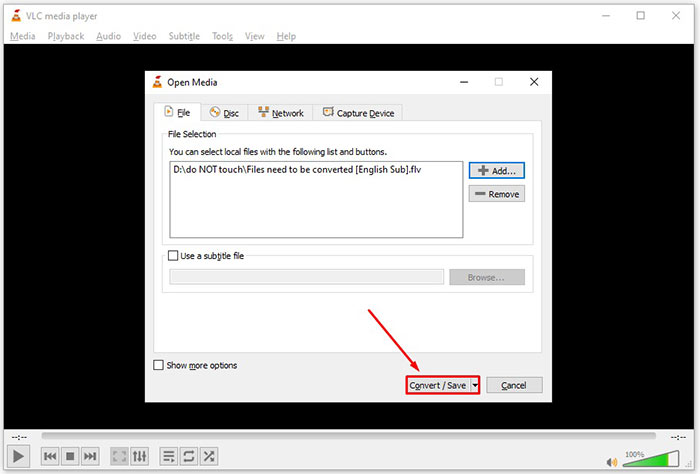
الخطوة 3: انقر زر Add، ثم ابحث عن ملف FLV الذي تحتاج إلى تحويله وحدّده، وانقر Open. اضغط زر Convert/Save للانتقال إلى النافذة التالية.
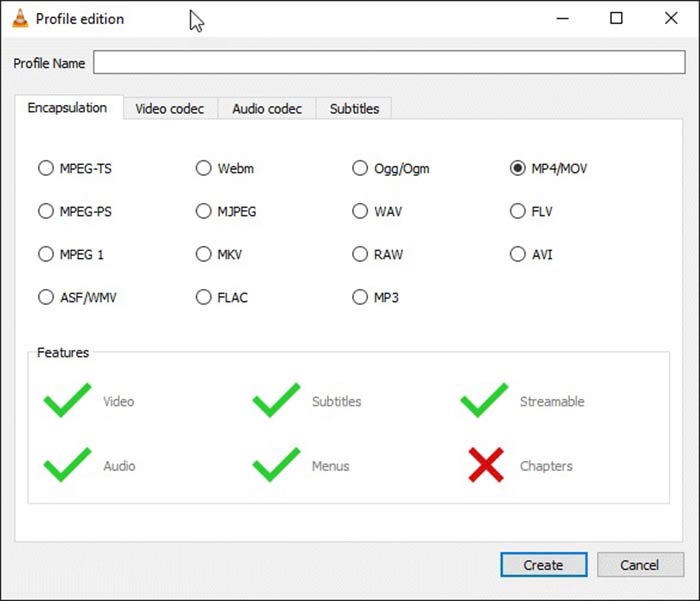
الخطوة 4: افتح القائمة المنسدلة بجوار Profile واختر 3GP أو صيغة فيديو قريبة. إذا أردت تغيير برنامج ترميز الفيديو أو معلمات أخرى، فانقر زر Profile Edit بجوار القائمة المنسدلة وأضف إعداد 3GP.
الخطوة 5: انقر زر Browse واختر مجلدًا معيّنًا لحفظ ملف 3GP الناتج في قسم Destination.
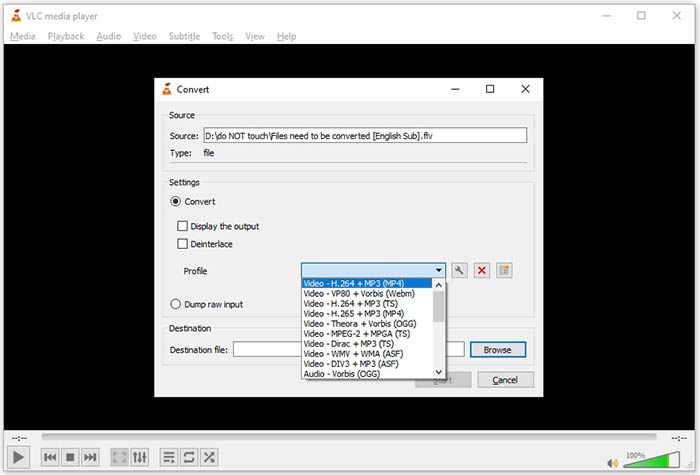
الخطوة 6: بمجرد النقر على زر Start سيبدأ برنامج VLC في تحويل FLV إلى 3GP.
يستغرق التحويل بعض الوقت لأن VLC يقوم بالمهمة عن طريق تسجيل الفيديو الأصلي. هذا يعني أن العملية تستغرق ما دامت مدة فيديو FLV الخاص بك.
FLV مقابل 3GP
استخدم Adobe Flash Player تنسيق FLV لتقديم محتوى فيديو مثل الأفلام والبرامج التلفزيونية. في الوقت الحاضر ، لم تعد Adobe تطور المشغل وتوصي المستخدمين بإلغاء تثبيته لأسباب أمنية. ومع ذلك ، لا يزال بإمكانك استخدام تنسيق FLV في العديد من البرامج بخلاف Adobe / Macromedia.
أنتج مشروع شراكة الجيل الثالث (3GPP) تنسيق 3GP / 3GPP كتنسيق حاوية وسائط متعددة. يعتمد في الواقع على تنسيق ملف وسائط ISO. غالبًا ما نستخدمه لحفظ تدفقات الفيديو / الصوت التي يتم نقلها بين هواتف 3G المحمولة وعبر الإنترنت.
الجزء 4: أسئلة وأجوبة حول تحويل FLV إلى 3GP
هل سيؤدي تحويل FLV إلى 3GP إلى إتلاف جودة الفيديو؟
بشكل عام ، سوف تفقد جودة تحويل الفيديو. ومع ذلك ، فإن برنامج محول الفيديو القوي قادر على حل هذه المشكلة وتحسين جودة الفيديو باستخدام التكنولوجيا المتقدمة.
كم من الوقت يستغرق تحويل فيديو FLV؟
يتم تحديده من خلال عدة عوامل ، مثل طول الفيديو وبرنامج تحويل الفيديو الذي تستخدمه وأداء أجهزتك والمزيد. إذا كنت تستخدم محول فيديو ويب ، فإن اتصالك بالإنترنت يعد عنصرًا أساسيًا.
لماذا لا يتم تشغيل FLV على جهاز iPhone الخاص بي؟
يدعم iPhone MOV ، وهو جزء من MP4 و ASF و AVI. لذلك ، لا يمكنك فتح FLV على iPhone مباشرة. ومع ذلك ، هناك طرق لمشاهدة FLV على الأجهزة المحمولة. إذا تمت استضافة ملف FLV بواسطة خدمات الإنترنت ، مثل Google Drive ، فسيكون مشغل الوسائط المدمج متاحًا. بالإضافة إلى ذلك ، يمكنك استخدام مشغل وسائط آخر ، مثل VLC.
خاتمة
أخبرك هذا الدليل بثلاث طرق مجانية لتحويل ملفات فيديو FLV إلى تنسيق 3GP على الكمبيوتر أو عبر الإنترنت. إذا كنت تستعد لمشاهدة مقاطع فيديو FLV على الأجهزة المحمولة ، فمن الأفضل تحويلها إلى 3GP أو غيرها من تنسيقات الفيديو الملائمة للجوال باستخدام FVC Free FLV Converter. إنه ليس سهل الاستخدام فحسب ، بل إنه قادر أيضًا على حماية جودة الفيديو الخاص بك. المزيد من الأسئلة؟ الرجاء ترك رسالة أدناه.
-
 كيفية تحويل ملفات فيديو FLV إلى MP4 دون دفع بنس واحد
 يشارك هذا الدليل أربع طرق مجانية لتحويل ملفات فيديو FLV إلى تنسيق MP4 على أنظمة التشغيل Windows 10/8/7 / XP و Mac OS X ، حتى تتمكن من الاستمتاع بمقاطع الفيديو على أي جهاز.
-
 كيفية تحويل مقاطع فيديو FLV إلى ملفات صوتية MP3 على سطح المكتب وعلى الإنترنت
 كيفية تحويل ملف FLV إلى ملف MP3؟ كل ما عليك فعله هو قراءة هذه المقالة بعناية ، والعثور على طريقتك المفضلة واتباع دليلنا خطوة بخطوة للحصول على ما تريد.
-
 أفضل 3 طرق لتحويل FLV إلى MOV
 كيفية تحويل FLV إلى MOV؟ كيف أقوم بتحويل FLV إلى MOV على نظام Mac؟ هل هناك أي طريقة مجانية لتحويل FLV إلى MOV عبر الإنترنت؟ يشارك هذا المنشور 3 محولات FLV إلى MOV لتغيير ملفات FLV إلى MOV.

