


 محول الفيديو النهائي
 مسجل الشاشة
 إصلاح الفيديو
 تنزيل آمن
طريقتان بسيطتان لتحويل MTS إلى MP3 مجانًا
للاحتياجات المختلفة ، تريد استخراج مقطع صوتي من الفيديو. على سبيل المثال ، قد ترغب في تحويل الفيديو إلى MP3 لتقليل حجم الملف. في بعض الحالات ، كل ما تحتاجه هو موسيقى خلفية لفيلم ، ويمكنك اختيار استخراج الصوت منه.

MTS is high-definition video format which supports 720p and 1080i HD. It is the file extension of AVCHD (Advanced Video Coding High Definition). When you get a MTS file, you can’t directly play it with your media player, video editor or portable iOS/Android devices. So it’s quite necessary to convert MTS to MP3 or MP4 for better playback or editing. Here in this post, we will show you how to free convert MTS to MP3.
الجزء 1. كيفية تحويل MTS إلى MP3 مجانًا دون فقد الجودة
هناك الكثير من أدوات تحويل MTS إلى MP3 المتوفرة على الإنترنت والتي يمكن أن تساعدك على استخراج صوت MP3 من فيديو MTS أو M2TS. ولكن قد تلاحظ أن العديد منهم ، وخاصةً بعض البرامج المجانية ، من المرجح أن ينتجوا ملف MP3 منخفض الجودة.
Considering that, here at the first part, we like to recommend the best free MTS to MP3 converting software, Free Video Converter for you. It has the capability to convert AVHCD file to MP3 while keeping the exactly original audio quality. Now you can free download it and take the following guide to extract MP3 audio track from your MTS/M2TS video.
Free DownloadFor Windows 7 or laterSecure Download
Free DownloadFor MacOS 10.7 or laterSecure Download
Step 1. First, you should install this free MTS to MP3 converter on your computer start by double-clicking the download button above. When you enter the main interface, click Add File(s) to import the MTS file you want to convert.
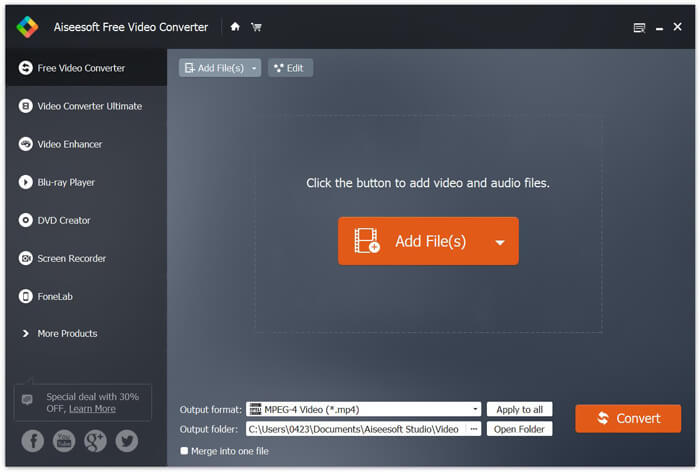
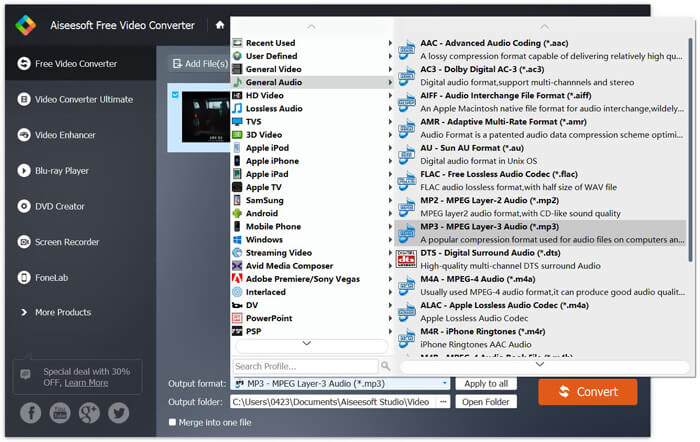
Step 2. Click Output format and then choose MP3 as output format. During this step, you can also pick a right file folder for the converted MP3 audio. Then you can click the Convert button to start converting your AVHCD file to MP3.
من خلال اعتماد تقنية التسريع المتقدمة ، يمكن أن يمنحك سرعة تحويل MTS إلى MP3 سريعة حقًا. والأهم من ذلك ، أن هذا التحويل المجاني من MTS إلى MP3 يضمن لك عدم فقدان جودة الصوت أثناء التحويل. إنه مصمم أيضًا بوظائف التحرير لمساعدتك في تحرير ملف صوت الفيديو وضبط تأثيرات الإخراج.
الجزء 2. كيفية تحويل MTS إلى MP3 مجانًا باستخدام المحول عبر الإنترنت
If you have a small-size AVHCD file and want to extract MP3 audio track from it, you can turn to a free online converter. As we mentioned above, there are many online converting tools can help you convert MTS to MP3. In case you don’t know which one you should use, here we introduce you with one popular online MTS to MP3 converter, FVC Free Online Video Converter.
يعد FVC Free Online Video Converter أحد أكثر أدوات تحويل الفيديو والصوت شيوعًا والتي يمكن أن تساعدك على تحويل MTS إلى MP3 مجانًا بسهولة. إلى جانب تحويل ملف AVCHD ، فإنه يسمح لك أيضًا بإجراء تحويلات أخرى لملفات الوسائط. ستوضح لك الخطوات التالية كيفية تحويل MTS إلى MP3 عبر الإنترنت باستخدام محول الفيديو عبر الإنترنت.
Step 1. Open your browser and go to the official site of FVC Free Online Video Converter. It provides a special MTS to MP3 converting page, https://www.free-videoconverter.net/free-online-video-converter/. You can navigate to here for the conversion.
Step 2. Find and click the Add Files to Convert button to download and install the launcher. After activating the launcher, upload the MTS file you want to convert.

Step 3. Make sure the output format is MP3 and then click the Convert button to start extracting MP3 audio from your AVCHD file. Then, the program will automatically start the MTS to MP3 converting.

After reading this page, you can get 2 simple and free ways to convert MTS to MP3. If you want to convert a large-size AVCHD file to MP3 without any sound quality loss, you can rely on the Free Video Converter. Or you can use the FVC Free Online Video Converter to deal with a small MTS/M2TS video less than 100MB. Leave us a message if you still have any questions.
-
 كيفية تحويل WMV إلى MP3 على سطح المكتب وعلى الإنترنت
 يمكنك العثور على أي برنامج محول فيديو مجاني من FVC studio. يتم دعم أي تنسيق فيديو / صوت ، بما في ذلك MP4 ، MOV ، TS ، AVI ، WMV ، FLAC ، MP3 ، إلخ.
-
 4 أفضل الطرق لتحويل M4A إلى MP3 دون فقدان جودة الصوت
 لا يمكنك تشغيل M4A وتحتاج إلى تحويله إلى MP3؟ هل هناك أي طريقة مجانية لتحويل M4A إلى MP3 عبر الإنترنت؟ يشارك هذا المنشور 4 طرق مجانية لمساعدتك في تحويل M4A إلى MP3 باستخدام iTunes ومحولات الصوت عبر الإنترنت والاحترافية.
-
 كيفية تحويل ملفات M2TS إلى MP3 مجانًا
 هل يمكن تحويل ملف M2TS إلى MP3؟ في هذا المنشور ، قمنا بإدراج أفضل 6 طرق مجانية وعبر الإنترنت لمساعدتك على تحويل M2TS إلى MP3 و AAC و AIFF والمزيد من تنسيقات الصوت.
