


 محول الفيديو النهائي
 مسجل الشاشة
 إصلاح الفيديو
 تنزيل آمن
كيفية دمج ملفات فيديو MPEG في طريقة واحدة - طريقتان نهائيتان يجب أن تعرفهما
How to join MPEG files? You just downloaded an old TV series in the MPEG format, such as 8 short episodes and each of them has a redundant opening and ending. How to merge these MPEG files into one like a movie? Whether you simply need to combine the videos into one, or merge the MPEG files with advanced features, here are 2 efficient methods you should never miss.

الجزء 1: كيفية دمج ملفات MPEG عبر الإنترنت مجانًا
FVC Free Online Video Merger is a free online MPEG combiner that enables you to merge MPEG, MP4, AVI, and more video files without size limitations. It allows you to combine multiple MPEG files to impressive videos with no watermark added. Moreover, the uploaded files will be deleted within 24 hours to protect your privacy.
Step 1: Go to the FVC Free Online Video Merger with any web browser. Click the Upload Videos to Merge button in the middle webpage to get the installer. After that, you can click the button again to upload the MPEG files you want to combine into the online program.

Step 2: When you get into the Merging videos interface, you can arrange the sequence of the MPEG videos you want to merge. It enables you to manage the position of the video, delete the file, or add more MPEG files by clicking the insert new button in the proper place.
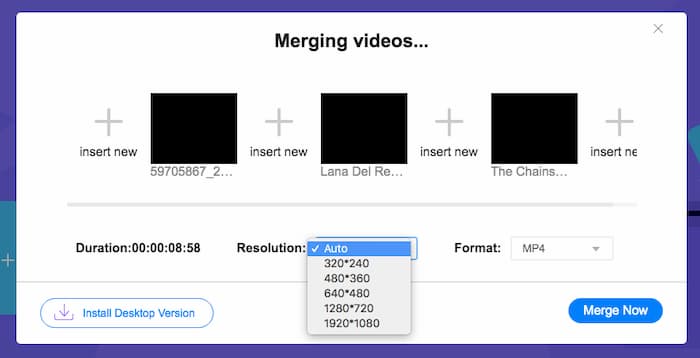
Step 3: After that, you can decide the resolution and format of the output video. You can combine the MPEG files into an MP4 file before clicking the Merge now button to start the process. It enables you to get the desired video within a short period.

أداة دمج الفيديو عبر الإنترنت سهلة الاستخدام. ومع ذلك ، إذا كنت ترغب في قطع الفتحات والنهايات الزائدة عن الحاجة للحلقات ، فلن يساعدك ذلك أكثر. تحتاج إلى استخدام دمج MPEG أكثر قوة.
قراءة إضافية:
الجزء 2: الطريقة متعددة الاستخدامات لدمج مقاطع فيديو MPEG
Aiseesoft Video Converter Ultimate is a professional MPEG joiner that enables you to combine the desired parts of MPEG files into one movie. It enables you to trim the desired part of the MPEG files, adjust the video quality, customize the watermark, or even make a movie with different themes.
- 1. اجمع ملفات MPEG في MPEG و MP4 وأكثر من 300 تنسيق فيديو.
- 2. قم بتعديل دقة الفيديو ، أو حتى تحسين جودة الفيديو لدمج الملفات.
- 3. قم بقص الأجزاء المرغوبة من ملفات MPEG ودمجها في فيديو واحد.
- 4. أضف تأثيرات وعوامل تصفية وخصص العلامات المائية في مقاطع فيديو MPEG.
تحميل مجانيلنظام Windows 7 أو أحدثتنزيل آمن
تحميل مجانيلنظام MacOS 10.7 أو أحدثتنزيل آمن
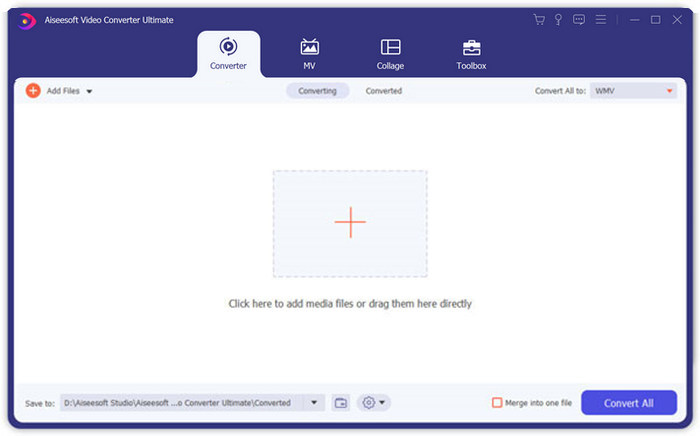
Step 1: Launch the Aiseesoft Video Converter Ultimate on your computer. Go to the Converter menu and click the big “+” button in the middle of the main interface to add the MPEG files you want to merge. Click the Add Files button to import all the files you want to combine.
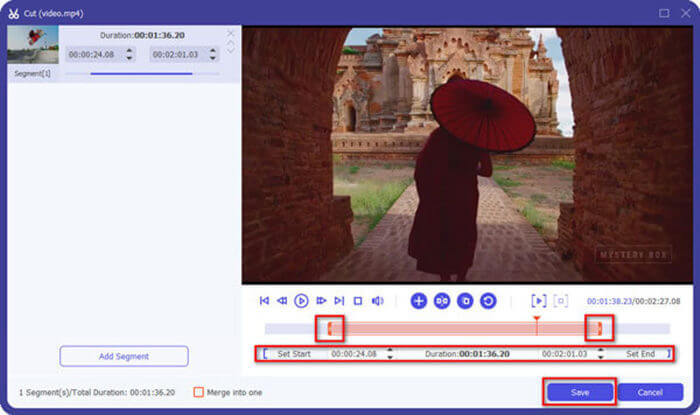
Step 2: For the MPEG clips that need to be trimmed, click the Cut button next to the video. You can set up the start and end points to delete the openings and endings of your MPEG videos. After that, you can click the Save button at the bottom to save the file.
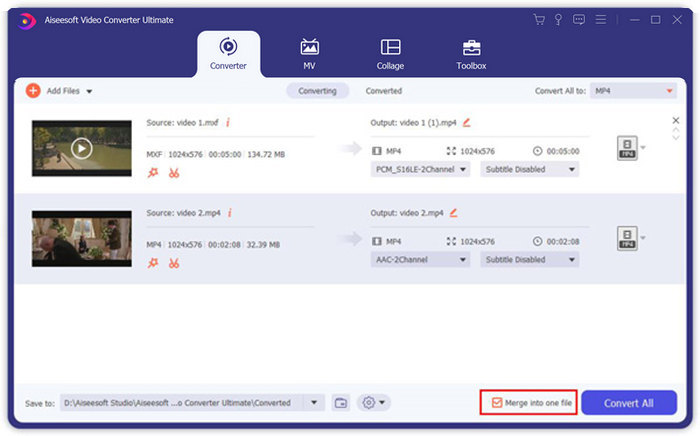
Step 3: After that, you can drag the trimmed video into the program. Adjust the sequence of the MPEG videos. When everything is ready, you need to check the Merge into one file box beside the Convert All. Click the Convert All button to start merging the MPEG files.
الجزء 3: الأسئلة الشائعة حول ضم ملفات MPEG
كيف تدمج ملفات MPEG بأفضل جودة؟
عندما تريد دمج ملفات MPEG بجودة مماثلة ، يمكنك اختيار المعلمات مثل مقاطع الفيديو الأصلية. ولكن إذا كانت ملفات MPEG مختلفة في جودة الفيديو ، فيجب عليك ترقية بعض ملفات MPEG بجودة منخفضة مسبقًا باستخدام أداة دمج الفيديو الاحترافية.
هل يمكنني دمج ملفات MPEG مع هاتف iPhone أو Android؟
نعم. قبل تنزيل تطبيقات دمج الفيديو للانضمام إلى ملفات MPEG ، يجب التأكد من أن التطبيق متوافق مع MPEG أو مقاطع الفيديو الأخرى التي تريد دمجها. Adobe Premiere Clip و Viva Video و Splice Video هي البرامج الموصى بها التي يمكنك أخذها في الاعتبار.
ما هو تنسيق ملف MPEG؟
MPEG هو تنسيق ملف فيديو يستخدم ضغط ملف MPEG-1 أو MPEG-2. إنه تنسيق شائع للأفلام التي يتم توزيعها على الإنترنت يجعل البث والتنزيل أسرع بكثير من تنسيقات الفيديو الشائعة الأخرى.
خاتمة
تقدم هذه المقالة طريقتين فعالتين لدمج ملفات فيديو MPEG ، خاصة عندما تحتاج إلى قص أجزاء إضافية. يعد FVC Free Online Video Merger طريقة سهلة لدمج ملفات MPEG عبر الإنترنت ، ولكن لا يمكنك تحرير مقاطع الفيديو. وبالتالي ، إذا كنت ترغب في قص مقاطع فيديو MPEG وتحريرها ، فيجب أن يكون Aiseesoft Video Converter Ultimate هو الحل النهائي.
-
 أفضل 6 برامج دمج فيديو MP4 لدمج مقاطع فيديو MP4 مجانًا
 هناك العديد من أدوات دمج MP4 المتاحة لتوصيل مقاطع MP4 مختلفة. في هذه المقالة ، اخترنا بعض أدوات دمج MP4 المجانية لنظامي التشغيل Windows 10/8/7 و Mac.
-
 كيفية دمج ملفات M4V؟ فيما يلي الحلان الأسرع
 إذا كنت تبحث عن حل لدمج ملفات فيديو M4V في ملف واحد ، فلا تفوت هذا المقطع أبدًا. هنا سنتحدث عن أفضل طريقتين لدمج ملفات الفيديو M4V.
-
 كيفية دمج مقاطع فيديو 3GP من الهاتف المحمول في ملف واحد
 عندما تريد دمج بعض مقاطع فيديو 3GP من جهاز BlackBerry في فيديو واحد ، يمكنك معرفة المزيد حول طريقتين فعالتين لدمج ملفات 3GP من المقالة.
