


 محول الفيديو النهائي
 مسجل الشاشة
 إصلاح الفيديو
أفضل محول MPG إلى GIF لتحويل MPG إلى GIF [بدون تكلفة وإصدار متميز]
أفضل طريقة للتعبير عن مشاعرك لأحبائك هي إرسال رسالة ذات مغزى. لكن هل تريد أن تعرف ما هو الأفضل بكثير للتعبير عنه بطريقة مختلفة؟ يمكنك استخدام GIF. تُعرف أيضًا باسم تنسيق تبادل الرسومات ، وهي الصور التي ترسلها ولكن تتم ترقيتها. يتم إنشاء هذه الصور المتحركة للتعبير ببساطة عن مشاعرك تجاه شخص ما بشكل مباشر أو غير مباشر. هل تعلم أن معظم تطبيقات المراسلة تدعم GIF بالإضافة إلى برنامج المراسلة المدمج لدينا؟ لكن في بعض الإصدارات القديمة من الهاتف ، لا يوفر هذا التنسيق. على الرغم من أن GIF ممتع ، إلا أنه لن يمنحك كل الوقت العاطفة التي تريد التعبير عنها.
إذَن، أنت هنا لتعرف ما هي أفضل طريقة لتغيير صيغة ملفك من MPG إلى GIF. أليس من المثير أن تُنشئ ملف الـ GIF الخاص بك؟ بدلًا من الاستمرار في البحث عما يجب أن تستخدمه، لِمَ لا تحاول إنشاء GIF خاص بك مع إضافة لمستك الشخصية إليه؟ أفضل طريقة لمعرفة كيف تفعل ذلك هي قراءة هذه المقالة، لأنها توفّر معلومات كافية وخطوات وأدوات لإنجاز المهمة. لذا، ومن دون إطالة، دعنا ننتقل إلى التفاصيل المهمة في هذه المقالة. واصل القراءة للتعرّف أكثر على قائمة المحوّلات هذه.

الجزء 1. 4 أفضل أداة لتحويل MPG إلى تنسيق GIF على جهاز الكمبيوتر الشخصي أو جهاز Mac
1. FVC Video Converter Ultimate
إذا كنت تريد مشاركة رسالة فكاهية من دون كتابة الكثير من التفاصيل، فسيساعدك هذا البرنامج. يتيح لك هذا البرنامج تحويل mpg إلى gif متحرك، كما تم تطويره بواسطة FVC. يتيح لك FVC Video Converter Ultimate تحويل أي نوع من الصيغ إلى صيغة قابلة للتشغيل كما تحب. قد تتساءل لماذا اخترت هذا البرنامج، وهل هناك شيء مميّز فيه؟ نعم، هذا البرنامج متعدّد الاستخدامات؛ يمكن أن يكون أداة النسخ الموثوقة لديك، وصانع MV، وأداة لإنشاء الكولاج وغير ذلك الكثير. وهذا يعني ببساطة أن هذا البرنامج يمكنه القيام بأكثر مما يقدّمه أي برنامج آخر. وميزة أخرى مذهلة هي سرعة التحويل الفائقة، حيث يمكنك تحويل الفيديو في وقت قصير جدًا بفضل هذه الأداة. لمعرفة كيفية استخدام هذا البرنامج عليك اتباع هذه الخطوات بعناية لتحصل على تحويل ناجح بجودة الصيغة التي تريدها.
الخطوة 1. ثبّت البرنامج على جهاز الكمبيوتر أو الـ Mac لديك. اتبع الإرشادات بعد التثبيت ثم انقر على إنهاء (Finish) لبدء تشغيل البرنامج.
تحميل مجانيلنظام Windows 7 أو أحدثتنزيل آمن
تحميل مجانيلنظام MacOS 10.7 أو أحدثتنزيل آمن
الخطوة 2. بعد انتهاء عملية التثبيت بأكملها، ستظهر لك واجهة صغيرة كهذه على شاشتك.
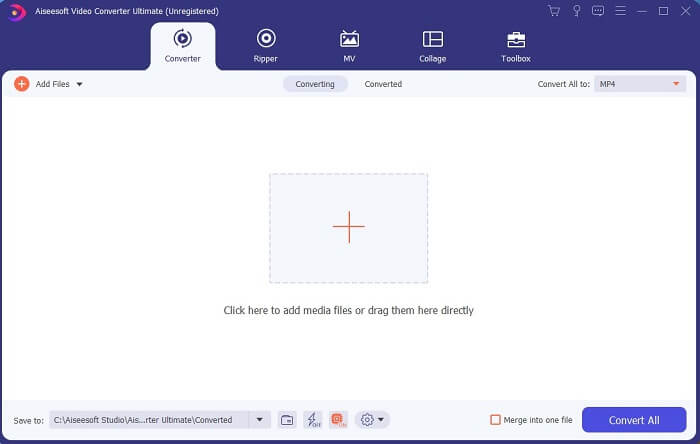
الخطوة 3. انقر على علامة الزائد لإضافة الملف ثم انقر على فتح (Open) لبدء التحويل، أو يمكنك ببساطة سحب وإفلات ملف الفيديو داخل البرنامج. عدد مقاطع الفيديو لن يكون مهمًا على الإطلاق.
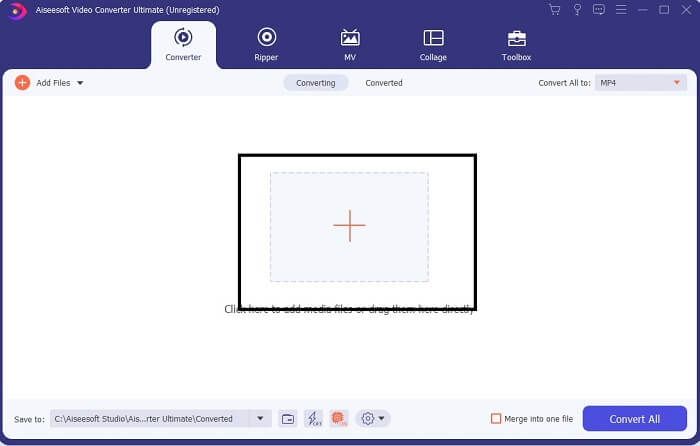
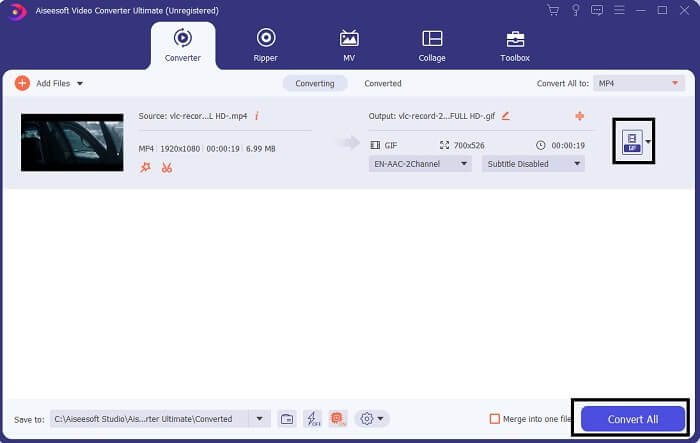
الخطوة 4. انقر على زر القائمة المنسدلة في أعلى يمين الواجهة، ثم مرّر لأسفل واختر صيغة GIF. اختر الدقة التي تريدها؛ يمكن أن تكون كبيرة أو متوسطة أو صغيرة. إذا كان كل شيء جاهزًا، انقر على Convert All لبدء عملية التحويل.
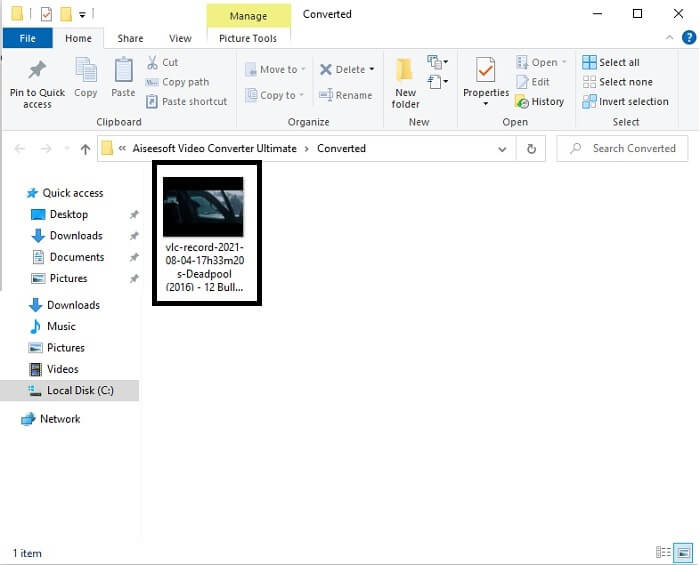
الخطوة 5. بعد انتهاء التحويل، ستنبثق لك نافذة مدير الملفات تُظهر لك النتيجة النهائية، ويمكنك الآن الاستمتاع بصيغة GIF الخاصة بك. كما يمكنك أيضًا تحويل ملف .gif إلى .mpg باتّباع الخطوات نفسها مع تغيير الصيغة في النهاية.
2. FVC Free Online Video Converter
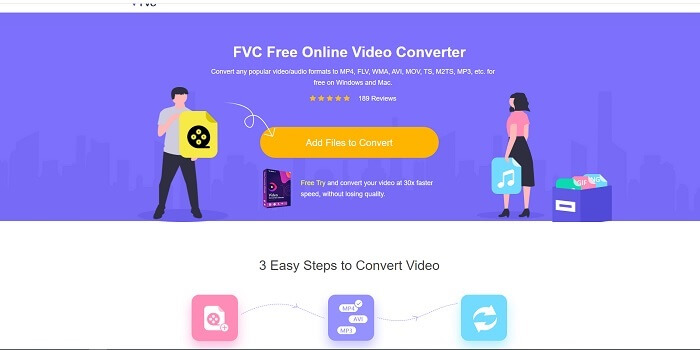
ربما تفكر ، ماذا لو لم يكن لديك المال فهل يمكنني الاستمرار في تجربة نفس التحويل مثل التحويل الأول؟ الجواب هو نعم كبيرة الدهون. تقدم FVC دائمًا أفضل تجربة لعملائها الذين ليس لديهم أموال وأيضًا لأولئك الذين يرغبون في تجربة أداتهم. على الرغم من أن هذه الأداة تقوم فقط بالتحويل البسيط ، لذا لا تتوقع الكثير مما يمكن أن يوفره الإصدار المتميز. ولا يمكنه تحويل تنسيقات الفيديو والصوت المتعددة بطريقة أسرع.
لكن عملية التحويل التي يوفّرها هذا البرنامج أفضل بكثير من كثير من المحوّلات المدفوعة أو المجانية. إليك FVC Free Online Video Converter الذي وُجد لينقذك. كما يشير اسمه، فهو أداة مجانية عبر الإنترنت تتيح لك التحويل إلى أقصى مستوى. وعلى عكس العديد من المحوّلات الأخرى، لا يحتوي هذا البرنامج على إعلانات أو برمجيات خبيثة، ولا يتطلّب تسجيلًا أو تسجيل دخول أو إدخال معلوماتك الشخصية قبل استخدامه. إذا كنت تبحث عن محوّل بسيط، فهذا هو الخيار المناسب لك. اتّبع هذه الخطوات لتعرف كيف يعمل هذا البرنامج كمحوّل.
الخطوة 1. انتقل إلى الموقع الرسمي بالنقر على هذا الرابط.
الخطوة 2. يجب أن تبدو صفحة الويب بهذا الشكل، ثم انقر على Add Files to Convert لتشغيل هذه الأداة عبر الإنترنت.
قم بتنزيل إصدار سطح المكتب لتحويل الملفات دفعة واحدة.
الخطوة 3. اختر الفيديو الذي تريد تحويله. بعد تحديد الفيديو، اختر صيغة ملف GIF. ولمزيد من المعلومات، يمكنك اختيار صيغ فيديو وصوت أخرى أيضًا، ويمكنك الاطلاع عليها لاحقًا إذا رغبت.
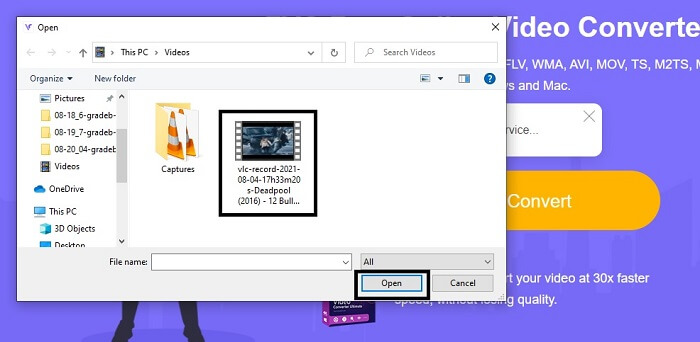
الخطوة 4. اختر المكان الذي تريد حفظ النتيجة النهائية فيه. ثم إذا كان كل شيء جاهزًا، انقر على Convert لبدء التحويل. سيستغرق ذلك بضع ثوانٍ فقط حتى يكتمل التحويل.
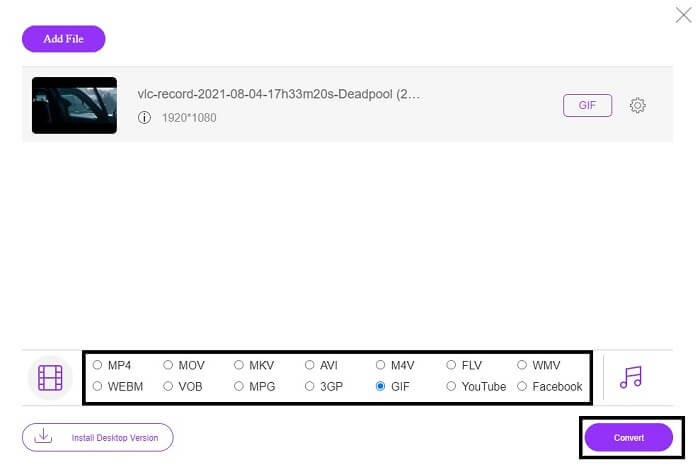
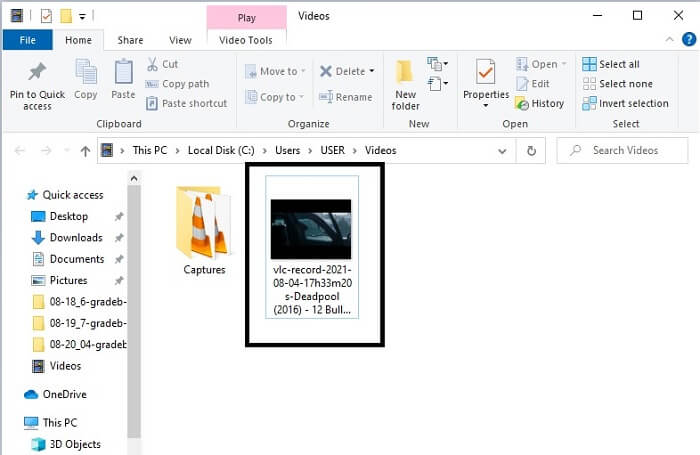
الخطوة 5. للتحقق من نجاح عملية التحويل، يمكنك العثور على ملف GIF المحوّل في مدير الملفات أو مستكشف الملفات لديك. انقر عليه واستمتع به.
3. مشغل الميديا VLC
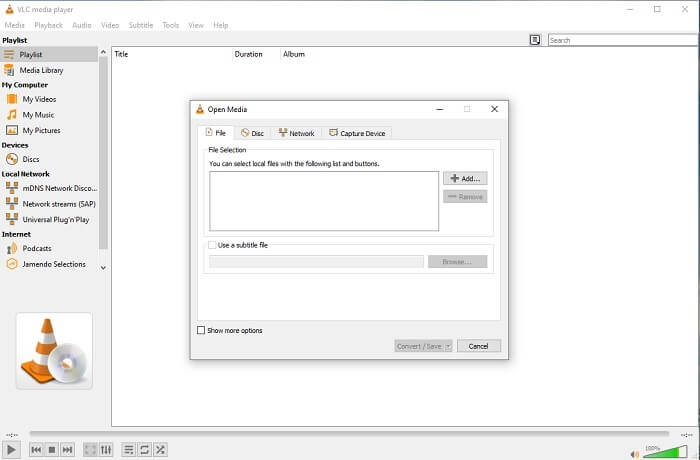
يُعرف هذا البرنامج بكونه أحد أقوى مشغّلات الوسائط. لكن هل كنت تعلم أن مشغّل VLC يمكنه أيضًا تحويل MPG إلى GIF؟ إلا أن الصيغ التي يدعمها في التحويل محدودة ومقتصرة على الصيغ الشائعة فقط. ورغم شهرته كأفضل مشغّل وسائط، فإن ميزة التحويل فيه ليست الخيار الأفضل لك. لذلك، إذا كنت تريد محوّلًا أفضل، فعليك اختيار الأداة الإلكترونية المذكورة أعلاه بدلًا من هذا البرنامج. أما إذا كان هدفك هو مشاهدة الفيديو، فعندها يجب أن يكون VLC Media Player هو خيارك، لأن الأداة الأخرى لا توفّر مشغّل فيديو كون هدفها الأساسي هو التحويل.
4. زمزم
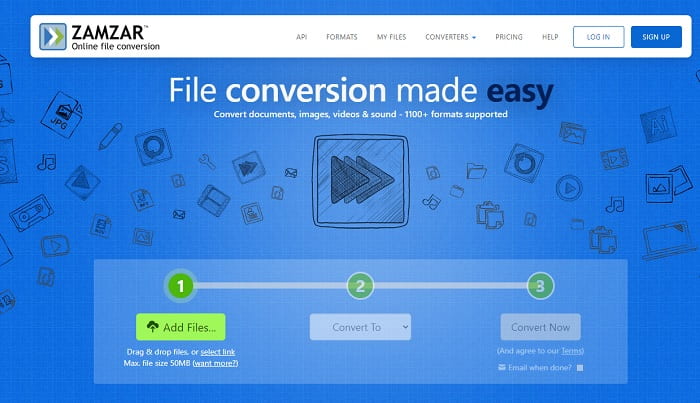
أداة أخرى على الإنترنت توفر تحويلًا رائعًا هي Zamzar. مثل أي محول آخر عبر الإنترنت ، فإنهم يشتركون في نفس الواجهة ، كما أنه يوفر إرشادات فورية حول كيفية تحويلها. لكن عملية التحويل والتنزيل مختلفة. على الرغم من الإصدار المجاني ، يمكنك فقط تحويل حجم ملف يصل إلى 50 ميغابايت كحد أقصى. لأنه بعد تحويل الفيديو ، يجب أن تنتقل إلى مرحلة تنزيله. إنه يمثل الكثير من المتاعب لأولئك الذين يتركون تحويلهم وينتظرون فقط تشغيل المنتج.
الجزء 2. مخطط المقارنة
| أداة / ميزات | FVC Video Converter Ultimate | FVC Free Online Converter | مشغل وسائط VLC | زمزم |
| محول |  | | | |
| أداة التحرير | |  | | |
| محول قوي | | | | |
| التسجيل مطلوب | | | | |
| المنصات | تطبيق قائم على سطح المكتب | تطبيق قائم على الويب | تطبيق قائم على سطح المكتب | تطبيق قائم على الويب |
| نطاق السعر | $25.00 1 شهر / 1 جهاز كمبيوتر $55.20 شراء لمرة واحدة لجهاز كمبيوتر واحد $119.00 مدى الحياة 5 أجهزة كمبيوتر | إنها أداة مجانية على الإنترنت | إنها أداة مجانية على الإنترنت | أداة مجانية على الإنترنت لكنه يوفر أيضًا قسطًا شهريًا. للأساسيات: $9 للمحترفين: $16 للأعمال: $25 |
MPG مقابل GIF
تم إعداد MPG بواسطة مجموعة Moving Picture Experts Group (MPEG) ، وهو تنسيق فيديو رقمي شائع لتخزين معلومات الفيديو والصوت والبيانات الوصفية. إنه مفيد جدًا عند إنشاء أفلام لمشاركتها على الإنترنت. عادةً ما تحتوي تلك الملفات في MPG على ضغط فيديو / صوت MPEG-1 أو MPEG-2.
GIF هو تنسيق صور شائع لرسومات الويب. إلى جانب حفظ الصور الصغيرة والصور التي تحتوي على نص ، يمكن أن تحتوي GIF أيضًا على الرسوم المتحركة الأساسية وتعرضها على مواقع الويب. إنه تنسيق غير ضياع ، وضغط GIF لا يقلل من وضوح الصورة.
الجزء 3. أسئلة وأجوبة حول MPG إلى GIF
هل هناك طريقة لاستخدام Photoshop وتحويل الفيديو إلى GIF؟
نعم، يمكنك تحويل MPG إلى GIF باستخدام Photoshop. وليس فقط صيغة MPG، بل يمكنك أيضًا اختيار صيغ أخرى وتحويلها إلى GIF. ومن ميزاته الخاصة أنك تستطيع تحسين ملف GIF ليبدو أفضل. انقر هنا لمعرفة كيفية تحويل MP4 إلى GIF.
ما هي أفضل أداة لتسجيل الشاشة لتسجيل صور GIF؟
أفضل أداة لتسجيل الشاشة يمكنك استخدامها لهذه المهمة هي FVC Screen Recorder. هذه الأداة ليست مخصّصة لتسجيل الفيديو فقط، بل تحتوي أيضًا على مسجّل صوت مدمج ومسجّل للألعاب للحصول على تجربة تسجيل ألعاب بجودة أفضل بكثير. لكن هذه الأداة تتطلّب دفعًا قبل استخدامها. لا تقلق، لأن هناك أداة إلكترونية يمكنها القيام بعملية التسجيل مجانًا.
لماذا تم إنشاء GIF؟
تم إنشاء صيغة GIF لعرض الصور مع توفير مساحة التخزين. مبتكر صيغة GIF هو ستيف ويلهَيت، عالم حاسوب أمريكي، بمساعدة شركة CompuServe العملاقة في مجال التقنية في أواخر عام 1987. انقر هنا لمعرفة المزيد من المعلومات عن صور GIF.
خاتمة
أخيرًا ، الآن بعد أن عرفت كيفية إنشاء صورة GIF على نفسك ، من الأفضل تجربتها والاستمتاع بها. فقط باستخدام هذه الأداة السهلة ، يمكنك إحداث فرق. بدلاً من البحث عبر الويب ، أنت الآن صانع GIF معتمد. كذلك ، يمكنك الآن التعبير عن مشاعرك بطريقتك الخاصة بلمستك الشخصية وخبراتك التي تم تطويرها فقط من خلال قراءة هذا المقال. آمل أن تتمكن من الاستمتاع بحياة صورة GIF أفضل تنشئها وتشاركها مع العالم بأفضل صورة GIF.
-
 [الدليل] كيفية تحويل مقاطع فيديو M4V إلى صور GIF متحركة على نظامي التشغيل Windows / Mac
 إذا كنت ترغب في إنشاء ملفات GIF متحركة من مقاطع فيديو M4V المفضلة لديك ، فيمكنك التعرف على طريقتين سهلتين وفعاليتين لتحويل مقاطع فيديو M4V إلى ملفات GIF بإعدادات مخصصة.
-
 WebM إلى GIF - 3 محولات مجانية من WebM إلى GIF لإنشاء صور GIF خاصة بك
 هل WebM ملف GIF؟ كيف تحول الفيديو إلى GIF؟ هل هناك أي محول مجاني من WebM إلى GIF؟ يشارك هذا المنشور 3 طرق مجانية لمساعدتك في تحويل WebM إلى GIF.
-
 كيفية تحويل مقاطع فيديو MKV إلى صور GIF متحركة بدون Photoshop / FFmpeg
 بعد تنزيل أفلام MKV ومشاهدتها على جهاز الكمبيوتر الخاص بك ، قد ترغب في مشاركة بعض اللحظات الرائعة مع الأصدقاء أو على الإنترنت كملفات GIF. في هذه المقالة ، يمكنك التعرف على أسهل طريقتين لتحويل MKV إلى GIF.

