


 محول الفيديو النهائي
 مسجل الشاشة
 إصلاح الفيديو
أفضل 6 برامج عكسية يمكنك استخدامها لعكس الفيديو على نظامي التشغيل Windows و Mac
يمكن أن يؤدي عكس مقطع فيديو إلى إنشاء رسالة جديدة تجعل جمهوره يفكر أو يدهش. تم استخدام تأثير الفيديو هذا لجعل الفيديو ممتعًا وتقديم رسالة بطريقة مختلفة. تم تحميل الكثير من مقاطع الفيديو الموسيقية مثل Breezeblock by the Aljt في فيديو عكسي على YouTube. لذا ، لمعرفة المزيد حول كيفية عكس مقاطع الفيديو ، اتبع هذا الدليل. حيث أنه يساعدك على القيام بعكس الفيديو بشكل أسهل من أي وقت مضى.

الجزء 1. أعلى 1 & 2 برنامج غير متصل بالإنترنت وتعلم كيفية عكس مقطع فيديو على نظامي التشغيل Windows و Mac
أعلى الصفحة 1. محول الفيديو النهائي
هناك الكثير من برامج تحرير الفيديو التي تحاول السيطرة على الساحة، لكن المُحوِّل المذهل ما زال هو الخيار الأفضل. لقد تم استخدام Video Converter Ultimate بالفعل وساعد ملايين المستخدمين في حل مشكلاتهم مثل كيفية عكس الفيديو. يتيح لك هذا البرنامج إجراء التحرير بنفسك ولكن بلمسة احترافية. حتى إن لم تكن لديك خبرة في التحرير فهذا البرنامج هو الأنسب لك، وحتى إن كنت ذا خبرة. إضافة إلى ذلك، كثير من برامج التحرير لا تملك المزايا المتقدمة نفسها التي يوفرها لك هذا البرنامج. لذا إن كنت ترغب في معرفة المزيد عن هذا البرنامج فلننتقل إلى الخطوات التالية ونتبعها بدقة.
الخطوة 1. حمِّل البرنامج أولاً على القرص الصلب لديك، ثم ثبِّته واتبع عملية الإعداد.
تحميل مجانيلنظام Windows 7 أو أحدثتنزيل آمن
تحميل مجانيلنظام MacOS 10.7 أو أحدثتنزيل آمن
الخطوة 2. بعد ذلك شغّل الأداة، ومن قسم Toolbox ابحث عن Video Reverser.
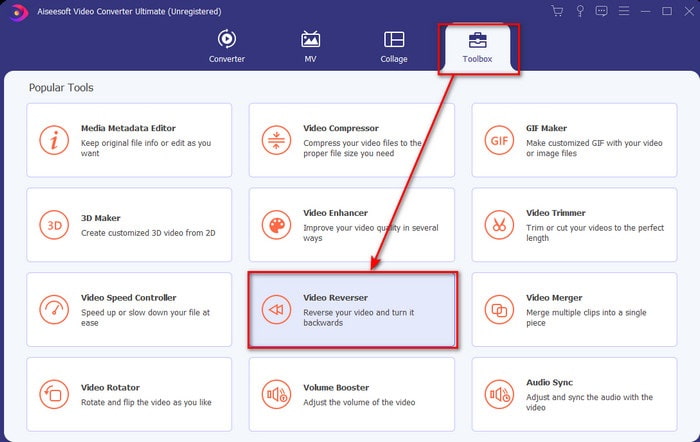
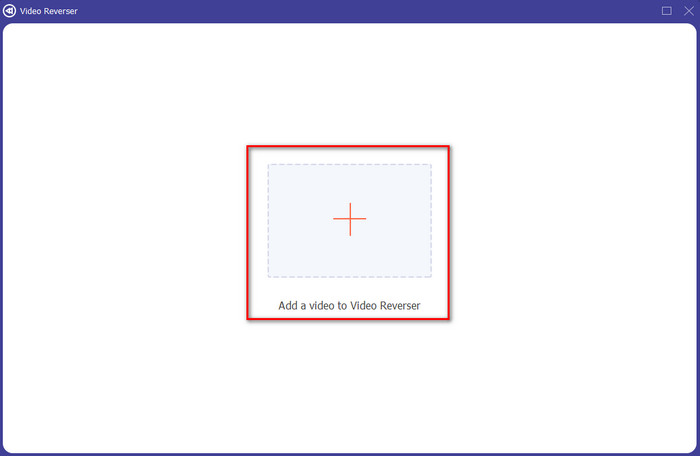
الخطوة 3. انقر على علامة + واختر من المجلد الفيديو الذي تريد عكسه. ثم انقر على open للانتقال إلى الخطوة التالية.
الخطوة 4. بعد ذلك عدِّل طول الفيديو عن طريق تحريك نقاط بداية ونهاية التشغيل (playback in and out). لتنزيل الفيديو المعكوس انقر على Export.
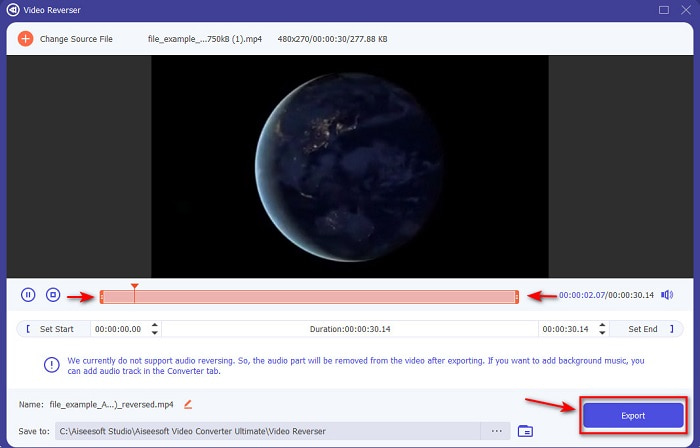
الخطوة 5. انتظر بضع ثوانٍ حتى ينتهي التصدير، وبعد الانتهاء يمكنك إعادة مشاهدة الفيديو بالنقر على الملف المعكوس في المجلد، واستمتع بالفيديو المعكوس بلا أي تأخير الذي يقدمه لك برنامج Ultimate Converter Ultimate.
الايجابيات
- يمكن تنفيذ الإخراج النهائي الاحترافي بسهولة إذا كنت تستخدم هذه الأداة.
- يحتوي على الكثير من الميزات الرائعة لجعل الفيديو الخاص بك استثنائيًا.
- يمكن إجراء عكس غير محدود في هذه الأداة.
سلبيات
- يجب تنزيله أولاً قبل أن تتمكن من استخدامه.
- إنها ليست مجانية ولكن الأمر يستحق ذلك إذا اشتريت هذه الأداة الاحترافية الهائلة.
ذات صلة:
أعلى الصفحة 2. صانع فيديو سهل
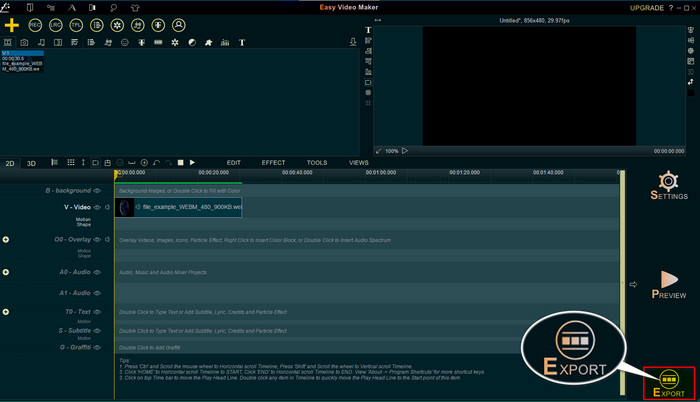
يُعَدّ Easy Video Maker أداة مفيدة يمكنك استخدامها لإجراء مستوى متوسط من تحرير الفيديو الذي قد تحتاجه. كما يمكنك استخدام هذه الأداة لتحسين المظهر البصري للفيديو لأنها تدعم الانتقالات، والمؤثرات، والدمج وغير ذلك. ومع ذلك، تبدو واجهة الأداة وكأنها من تسعينيات القرن الماضي، فهي قديمة جداً في الشكل. كما أن الأداة صعبة الاستخدام في إنشاء الفيديو وتحريره، لكن أداءها ممتاز. أما صيغة الإخراج التي يدعمها هذا البرنامج فهي MP4. لذا إن كنت تريد استخدام هذه الأداة فاتبع الخطوات أدناه.
الخطوة 1. حمِّل النسخة الرسمية من Easy Video Maker من الإنترنت.
الخطوة 2. بعد ذلك شغِّل الأداة، وانقر على زر add ثم Import/ Add Video. ثم اسحب (Drag) الملف إلى Timeline وانقر بزر الفأرة الأيمن (right click) على الفيديو. انقر على Reverse Playback لعكس الفيديو.
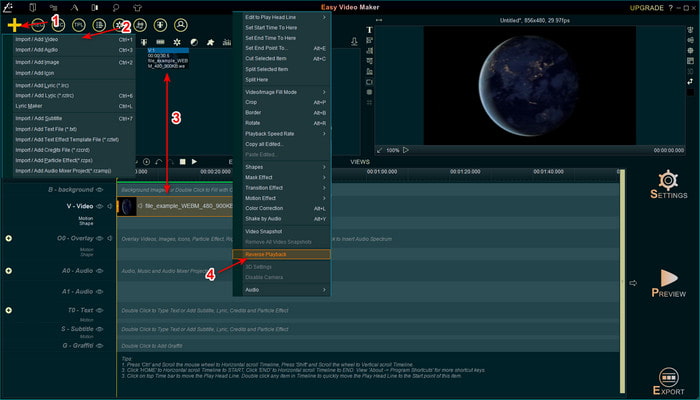
الخطوة 3. اضغط على Export لحفظ الملف على جهازك.
الايجابيات
- الأداة مجانية للتنزيل.
- وهو يدعم تحرير المستوى المتوسط الذي ستحتاجه.
- سوف يستغرق تعلم كيفية استخدام هذا بعض الوقت ولكنك ستعتاد عليه.
سلبيات
- يتم تحميل الأداة لفترة أطول بكثير من المتوقع وتبدو واجهة الأداة قديمة جدًا. لا يشعر الرجعية ولكنه قديم حرفيا.
- لا يمكنك تصدير أكثر من 5 دقائق من الفيديو إلى نسخته المجانية.
الجزء 2. أفضل 3 و 4 أداة عبر الإنترنت لعكس الفيديو
أعلى 3. Ezgif
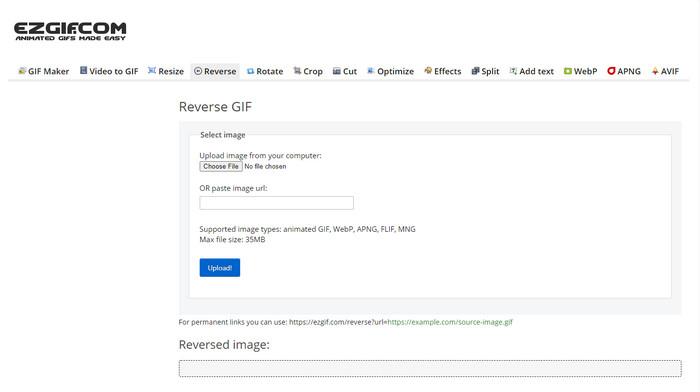
يحتوي موقع Ezgif على ميزة يمكنك استخدامها من أجل عكس المقاطع مجاناً عبر الإنترنت. كما يتضمّن مزايا تحرير أخرى مثل إنشاء ملفات GIF، وتغيير الحجم، والقص، والتحسين وغير ذلك. ولكن إن حاولت رفع ملف حجمه أكبر من 35 ميغابايت في الأداة على الويب، فتوقَّع أن الأداة لن تسمح بعكسه لأنه كبير جداً على المعالجة. لذلك إن كنت تنوي عكس فيديو طويل فهذه الأداة ليست الخيار الأفضل لأنها محدودة. لكن أداء أداة العكس فيه ممتاز لعكس المقاطع القصيرة مجاناً.
الايجابيات
- لا حاجة لتنزيله على سطح المكتب الخاص بك.
- مرنة وفعالة.
- سهل الاستخدام.
سلبيات
- إنه يحد من إمكانية الرجوع للخلف إلى 35 ميجابايت فقط وهو صغير جدًا لاستخدامه.
- يستغرق تنزيل الملف العكسي إلى محرك الأقراص وقتًا أطول بكثير مما هو متوقع.
أعلى 4. Clideo
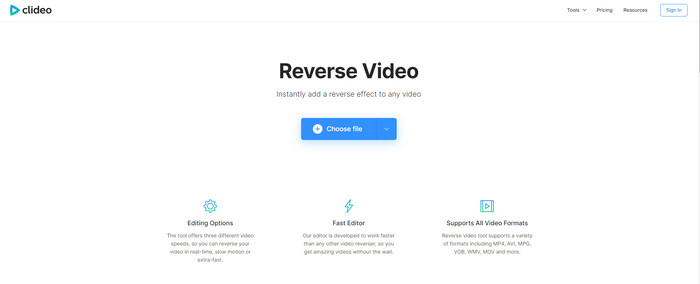
أداة أخرى على الإنترنت يمكنك استخدامها من أجل إرجاع الفيديو للخلف هي Clideo. المظهر البصري للأداة بسيط جداً لكنه رائع. الشكل العام للأداة أنظف من Ezgif ويبدو أكثر احترافية. لكن كما يُقال، لا تنخدع بالمظهر؛ فعملية رفع الملف هنا بطيئة للغاية، خصوصاً إن كان حجم الملف أكبر من 40 ميغابايت. لذلك تأكد من أن لديك الكثير من الوقت والصبر لمجرد انتظار رفع الملف أولاً. ومع ذلك فهي تدعم العديد من مزايا التحرير التي يمكنك استخدامها لتحسين الفيديو مجاناً.
الايجابيات
- مجاني للاستخدام من قبل أي شخص لديه اتصال بالإنترنت.
- واجهة مستخدم الويب رائعة بشكل عام.
- تتوفر ميزات التحرير المذهلة.
سلبيات
- سيستغرق تحميل وتنزيل الفيديو للانعكاس وقتًا طويلاً أكثر من المتوقع.
- يتم تضمين علامة مائية ضخمة بعد تصدير الفيديو العكسي.
الجزء 3. أفضل 5 و 6 تطبيقات لعكس الفيديو على iPhone / Android
أعلى 5. عكس الفيديو: تشغيل للخلف 4+
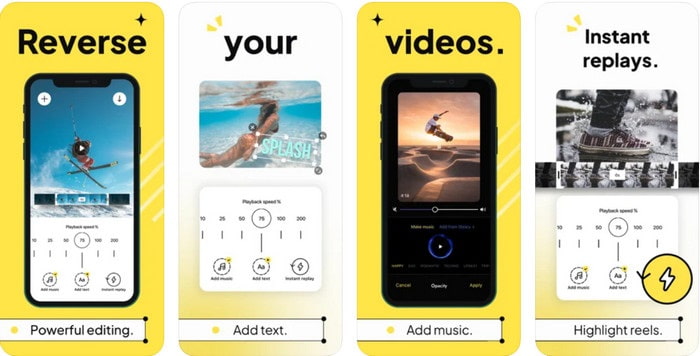
تطبيق Reverse Video: Play Backwards 4+ متاح فقط لمستخدمي iOS، ويُستخدم لتحرير الفيديو المعكوس. واجهة هذا التطبيق بسيطة وسهلة الفهم، كما يمكنك إضافة نص وموسيقى كخلفية. ورغم أن تحميل التطبيق مجاني، تشير الكثير من التقييمات إلى أن هذا التطبيق يُعتَبَر خداعاً ماليّاً. كما ذكر بعض المستخدمين أنهم يُجبرون على وضع تقييم 5 نجوم للتطبيق حتى يتمكنوا من الوصول إلى مزاياه. ومع ذلك إن أردت تجربته بنفسك فلا تتوقع الكثير، لأن هذا التطبيق ليس الخيار الأفضل للعكس.
الايجابيات
- لقد حققت بالفعل 4.5 نجوم في التصنيف.
- يعد عكس الفيديو هنا جيدًا للاستخدام.
سلبيات
- معظم المراجعات هنا لا تتحدث عن التطبيق. ومعظمهم متكرر يتحدث عن الهراء.
- يستغرق الأمر وقتًا طويلاً لتحميل ملف واحد فقط.
- جودة الفيديو التي يتم تصديرها مجانًا سيئة.
أعلى 6. عكس الفيلم FX - فيديو سحري
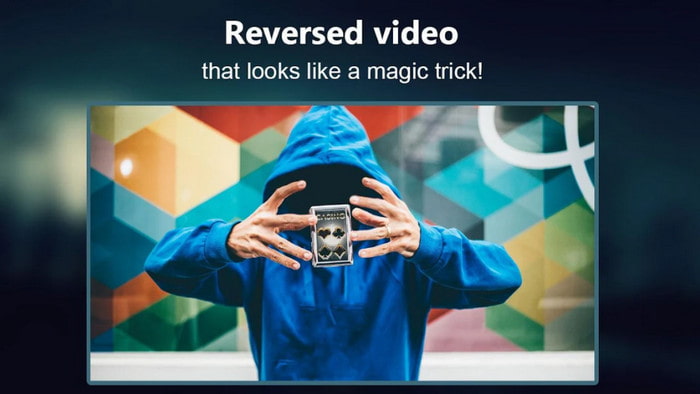
يمكنك عكس الفيلم بمساعدة هذا التطبيق على أندرويد الذي يمكنك تحميله من متجر Play، وهو Reverse Movie FX - magic video. وقد استُخدم بالفعل من قِبَل الكثير من المستخدمين الذين يحبون عمل أفلام معكوسة، كما أنه يدعم التكرار (loop) والموسيقى الخلفية. ورغم أن الأداة تبدو مثالية، فإن جودة الفيديو في ملف الإخراج تصبح أقل؛ فبشكل عام إن عكست فيديو بدقة 1080 فانتظِر الحصول على 720 أو أقل. كما يحتوي التطبيق على إعلانات، لذا كن حذراً لأن بعضها يظهر فجأة. ومع ذلك، فإن عملية العكس هنا سهلة وأفضل من تطبيق Reverse Video: Play Backwards 4+.
الايجابيات
- من الرائع إنشاء مقطع عكسي أو فيلم أو فيديو على هاتفك.
- واجهة مستخدم سهلة الفهم.
- 4.5 نجوم في مراجعات التطبيق.
سلبيات
- يحتوي التطبيق على الكثير من الإعلانات المنبثقة من العدم.
- لا تزال الأخطاء الطفيفة والكبيرة موجودة في التطبيق. على سبيل المثال ، إذا حاولت عكس مقطع فيديو أحيانًا تظهر رسالة خطأ.
الجزء 4. أسئلة وأجوبة حول عكس الفيديو
ما هو الفرق بين العكس والعكس؟
اقلب التركيز على تحويل شيء ما إلى جانب مختلف أو موضع آخر ؛ يمكن أن يكون مقلوبًا أو مقلوبًا. على سبيل المثال ، إذا قلبت الرقم 12 ، فستكون النتيجة 21. بينما يكون الانعكاس من اتجاه واحد يعود إلى الاتجاه الأصلي. على سبيل المثال ، إذا كانت الساعة في الاتجاه المعاكس ، فسيتم عدها إلى 12 و 11 و 10 و 9 و 8 و 7 و 6 وما إلى ذلك.
هل يمكن استخدام تأثير إرجاع الفيديو كتحولات؟
نعم ، بدلاً من استخدام انتقال متحرك قديم جيد ، لماذا لا تحاول استكشاف فن إرجاع الفيديو. فقط عن طريق إضافة العكس يمكن أن يكون فعالًا جدًا خاصة إذا لم تكن خبيرًا في تحرير الفيديو. وفقط باستخدام هذا كوسيلة انتقالية ، يمكنك إنشاء مقطع فيديو رائع يمكن أن يجعل الآخرين مندهشين ، حتى أنت. ثم أضف الموسيقى في الخلفية كلغة أخيرة لجعلها أكثر روعة.
هل يمكنني مشاهدة مقطع فيديو في الاتجاه المعاكس على VLC؟
نعم ، يمكنك بالفعل مشاهدة المقاطع العكسية أو الأفلام أو أي نوع من الفيديو على VLC. ولكن إذا لم تكن مسبقة الصنع أو ينبغي أن نقول أنها ليست معكوسة بالفعل عند تشغيلها هناك. ثم من المحزن أن نقول إنه لا يدعم تشغيل مقاطع الفيديو في الاتجاه المعاكس. لذلك ، قبل تشغيله على VLC ، قم بعكسه بمساعدة الأداة الموجودة في القائمة.
خاتمة
نتيجة لصبرك في قراءة واتباع الخطوات في هذا المقال بعناية حول كيفية عكس الفيديو أصبحت الآن تملك المعرفة والقدرة على إجراء العكس بنفسك. لذا ينبغي لك الآن اختيار أفضل برنامج عكس لتحصل على أفضل تأثير يجعل فيديوهاتك مميزة. وقبل كل شيء، فإن أفضل أداة عكس في هذه القائمة ليست سوى البرنامج المذهل Video Converter Ultimate. لذا فهذا هو الوقت المناسب لتحميله وتجربته والقيام بتأثير العكس بنفسك باستخدامه.
تحميل مجانيلنظام Windows 7 أو أحدثتنزيل آمن
تحميل مجانيلنظام MacOS 10.7 أو أحدثتنزيل آمن
-
 كيفية الانضمام إلى مقاطع فيديو VOB من أقراص DVD على Windows و Mac
 كيفية الانضمام إلى مقاطع فيديو VOB من DVD على نظامي التشغيل Windows و Mac؟ فيما يلي طريقتان فعالتان لدمج ملفات VOB المستخرجة ودمجها مباشرة من قرص DVD.
-
 6 أفضل عمليات دمج AVI: كيفية الانضمام إلى ملفات فيديو AVI على نظامي التشغيل Windows و Mac
 عندما تريد الانضمام إلى مقاطع فيديو AVI لقرص DVD ، يمكنك التعرف على ميزات أفضل 6 أدوات ربط AVI بما في ذلك أدوات مجانية عبر الإنترنت ، بالإضافة إلى برامج سطح المكتب من المقالة.
-
 [الدليل] طريقتان نهائيتان للانضمام إلى مقاطع فيديو MXF من Sony X70
 إذا كنت قد التقطت بعض مقاطع فيديو MXF من Sony X70 ، فما أفضل الطرق للانضمام إلى ملفات MXF؟ فيما يلي طريقتان فعالتان لدمج مقاطع الفيديو بجودة عالية.
