


 محول الفيديو النهائي
 مسجل الشاشة
 إصلاح الفيديو
 تنزيل آمن
كيفية ضغط ملفات الصوت WAV دون فقدان أي جودة
عندما يرغب الناس في حفظ ملفات الموسيقى بصيغة عالية الجودة، غالبًا ما يختارون WAV كتنسيق للصوت. ومع ذلك، كقاعدة عامة، كلما ارتفعت الجودة، ازداد حجم مساحة التخزين التي يشغلها الملف. بالمقارنة مع MP3، يمكن لملفات WAV أن توفر صوتًا عالي الجودة، لكن حجم الملف سيكون أكبر. لذلك، إذا كنت تريد مشاركة ملف WAV مع أصدقائك أو رفعه إلى أحد برامج التواصل الاجتماعي، فمن الأفضل تقليل حجمه أولًا. سنعرّفك على ثلاثة أدوات مختلفة لـضغط ملفات WAV. كما سنعرض لك مزاياها وعيوبها وطريقة استخدامها بالتفصيل. تابع القراءة لمعرفة المزيد.

الجزء 1. أفضل طريقة لضغط ملف WAV
سنبدأ بالتوصية بأداة تحرير صوت وفيديو كاملة المزايا، وهي Video Converter Ultimate المختارة بعناية من FVC. فهي مزودة بأدوات تحليل متطورة يمكنها البدء في معالجة ملفاتك بمجرد رفعها. إذا كنت تبحث عن أداة تتيح لك ضبط نسبة ضغط صوت WAV بحرية، فستكون أفضل مساعد لك. يمكنك حتى تعديل طول الصوت، وضبط القناة الصوتية، وتغيير مستوى الصوت قبل تصدير الملف. بعد فتح أداة ضغط الصوت المدمجة فيها، ستظهر نافذة جديدة تمامًا. هناك يمكنك رؤية الكثير من الإعدادات للاختيار من بينها. توفر هذه الأداة مستوىً عاليًا من التخصيص وتسمح لك بالتحكم الدقيق في معلمات الصوت. إذا وجدت أن حجم ملف WAV ما يزال كبيرًا جدًا، فيمكنك استخدام المحوّل الذي توفره FVC لتحويل الصوت إلى تنسيق أسهل في التوزيع، مثل MP3.
تحميل مجانيلنظام Windows 7 أو أحدثتنزيل آمن
تحميل مجانيلنظام MacOS 10.7 أو أحدثتنزيل آمن
هنا سوف نعلمك كيفية ضغط ملفات WAV باستخدام FVC Video Converter Ultimate.
الخطوة 1. قم بتنزيل وتثبيت FVC Video Converter Ultimate على جهاز الكمبيوتر الخاص بك.
الخطوة 2. ادخل إلى الواجهة الرئيسية لهذا البرنامج، ثم اختر Toolbox > Audio Compressor.
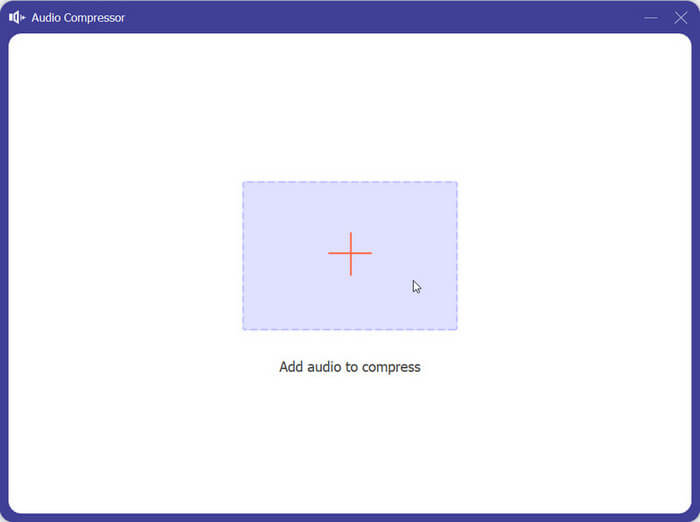
الخطوة 3. بعد الدخول إلى نافذة Audio Compressor، انقر فوق زر الجمع الكبير (+) لرفع ملف WAV الهدف.
الخطوة 4. يمكنك ضبط حجم الملف بعد الضغط عن طريق تغيير قيمة Size. بعد التعديل، يمكنك رؤية النسبة المئوية من حجم الملف التي تم ضغطها.
يُسمح لك أيضًا بتعيين اسم الملف، والتنسيق، وقناة الصوت، ومعدل العينة، ومعدل البت للصوت الخاص بك هنا.
الخطوة 5. للتحقق من الصوت الناتج، انقر فوق Preview. إذا كنت راضيًا عن النتيجة، انقر فوق Compress.
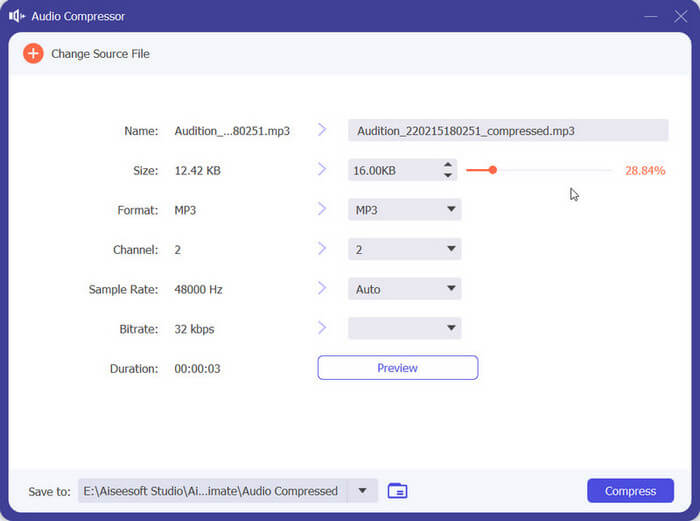
حاليًا، يمكنه ضغط ملفات صوت WAV حتى 50% من حجم ملف المصدر. سرعة الضغط سريعة جدًا لدرجة أننا لا نحتاج إلى الانتظار لتصدير الملف المضغوط. لا يوجد أي فقدان للجودة تقريبًا. ومع ذلك، لدينا 5 فرص مجانية فقط، وإذا أردنا المزيد، فيجب أن ندفع.
الجزء 2. ضغط ملف WAV عبر الإنترنت
تقدم برامج سطح المكتب ميزات تحرير أكثر ولكنها تتطلب منك تنزيلها وتثبيتها على جهاز الكمبيوتر الخاص بك. وهذا أيضًا يشغل بعض ذاكرة جهاز الكمبيوتر الخاص بك ويستغرق بعض الوقت لبدء تشغيل البرنامج. إذا كنت تريد تجربة ضغط أسرع لملفات الصوت WAV، فجرب الأدوات عبر الإنترنت. من بين العديد من المنتجات المتاحة، نوصيك بتجربة FreeConvert WAV Compressor، وهو ضاغط بحجم حر مع واجهة سهلة الاستخدام للغاية. كل ما عليك فعله هو الانتقال إلى موقعه الرسمي، وستجد على الفور زر الهدف. حتى إذا لم تستخدمه من قبل، فستتمكن من البدء في أي وقت من الأوقات.
هنا سوف نعلمك كيفية تقليل حجم ملف WAV باستخدام FreeConvert WAV Compressor.
الخطوة 1. افتح أداة FreeConvert WAV Compressor باستخدام متصفحك.
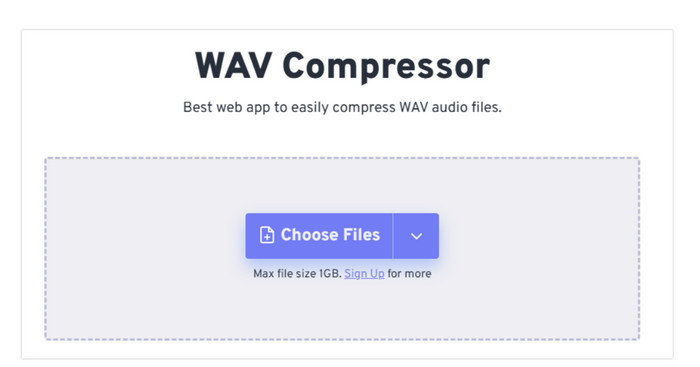
الخطوة 2. انقر فوق Choose Files لرفع الملف الصوتي الذي تريد ضغطه.
.
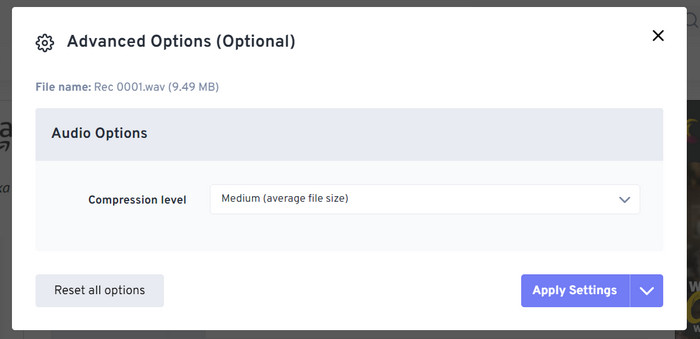
الخطوة 3. لضبط مستوى الضغط، انقر فوق Advanced settings (optional). يمكنك الاختيار بين Low وMedium وStrong. ثم اختر Apply Settings.
الخطوة 4. أخيرًا، انقر فوق Compress Now. سيعمل البرنامج على ضغط ملف WAV الخاص بك عبر الإنترنت.
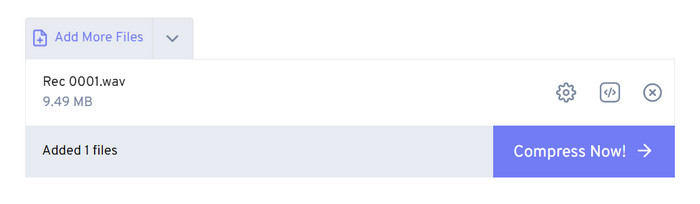
بعد محاولاتنا، وجدنا أنه يعمل بكفاءة عالية، ولا تختلف جودة الصوت في ملف الإخراج كثيرًا عن ملف المصدر. ومع ذلك، هناك ثلاثة معدلات ضغط فقط يمكنك اختيارها، ولا يمكنك تصور نسبة الضغط وحجم الملف المضغوط. حاليًا، يمكن للمستخدمين استخدامه فقط لضغط الملفات التي يصل حجمها إلى 1 جيجابايت.
الجزء 3. ضغط ملف WAV في Audacity
بالإضافة إلى برامج المعالجة متعددة الوسائط الشاملة، هناك العديد من الأدوات المصممة خصيصًا للصوت فقط. هذه الأدوات تُظهر قدرًا أكبر من الاحترافية والدقة في جانب تحرير الموسيقى. إذا استخدمت أداة احترافية لتصغير حجم ملف WAV، فقد تُحافَظ جودة الصوت إلى أقصى حد. وباعتبارها واحدة من أفضل هذه الأدوات، تظل Audacity متفوقة طوال العام. يمكن للمستخدمين استخدامها لإتمام عملية شاملة من تسجيل الصوت وتعديله. تشمل عمليات التحرير التي يمكنها إنجازها تعديل طول الموسيقى، وضغط حجم الملف، وتحويل تنسيق الصوت، وإضافة المؤثرات الصوتية الخاصة. كل ذلك بمنتهى السهولة بالنسبة لها.
بعد ذلك، سنرشدك إلى ضغط ملفات WAV باستخدام Audacity.
الخطوة 1. قم بتنزيل Audacity وتثبيته على جهازك.
الخطوة 2. افتحه، ثم اضغط على File > Open.
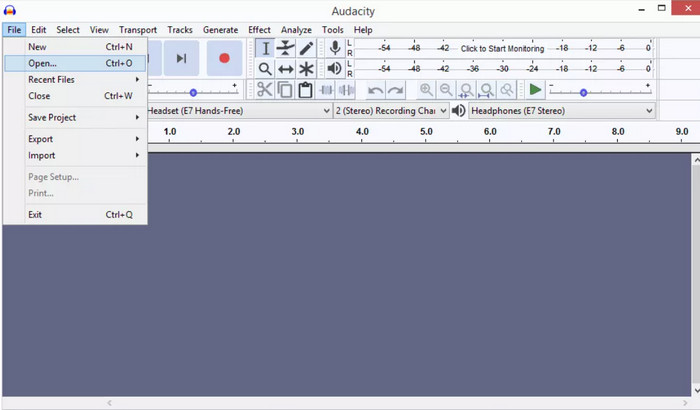
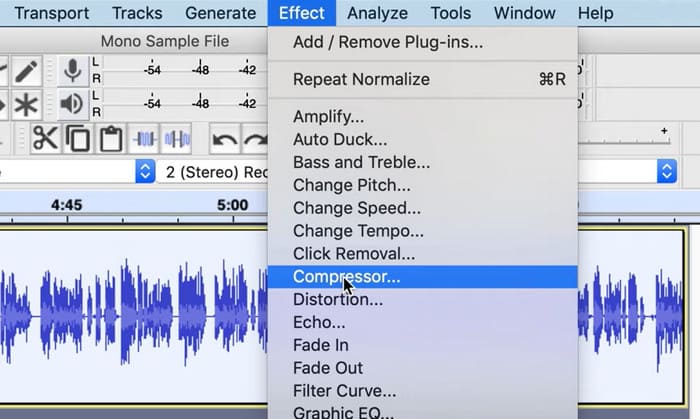
الخطوة 3. ارفع الملف الذي تريد ضغطه ثم اضغط Ctrl + A على لوحة المفاتيح لتحديد المسار الصوتي. بعد ذلك انقر فوق Effect > Compressor.
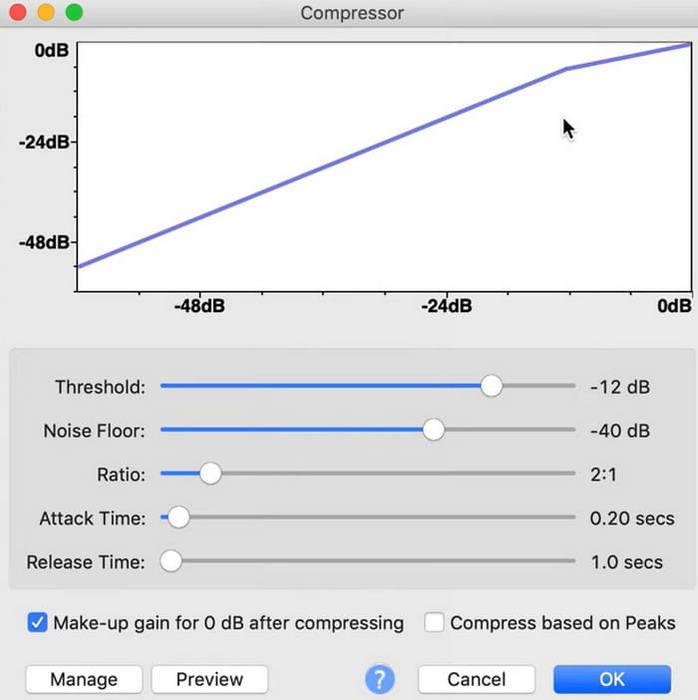
الخطوة 4. يمكنك الآن تغيير إعدادات ملف WAV، بما في ذلك العتبة (Threshold)، أرضية الضوضاء (Noise Floor)، النسبة (Ratio)، زمن الهجوم (Attack)، وزمن التحرير (Release Time).
الخطوة 5. أخيرًا، انقر فوق File مرة أخرى واختر Export.
يتيح لك ضغط ملفات WAV مجانًا ودون قيود على حجم الملف. يمكنك التحكم بدقة في معدل الضغط وتصدير المنتج النهائي بمجرد تطبيق الإعدادات. واجهته معقدة للغاية، وسيجد المستخدمون عديمو الخبرة صعوبة في العثور على الميزات التي يحتاجون إليها. سيستغرق الأمر بعض الوقت لتعلم كيفية استخدامه بمهارة.
الجزء 4. الأسئلة الشائعة حول ضغط ملفات WAV
لماذا ملف WAV الخاص بي كبير جدًا؟
عادةً ما تكون ملفات WAV ملفات صوتية غير مضغوطة تخزّن بيانات الصوت بصيغة خام دون أي فقدان في الجودة. كما أن ملفات WAV غالبًا ما تكون ذات عمق بت ومعدل عيّنة أعلى من صيغ الصوت المضغوطة. إذا كنت بحاجة إلى تقليل حجم ملف WAV، فيمكنك التفكير في ضغطه أو تحويل WAV إلى MP3.
هل يؤدي ضغط ملف WAV إلى تقليل الجودة؟
عند ضغط ملف WAV إلى تنسيق صوتي به فقدان للبيانات مثل MP3 أو AAC أو OGG، يؤدي ذلك عادةً إلى انخفاض جودة الصوت. ومع ذلك، فإن اختيار أداة ضغط جيدة يمكن أن يعوض عن هذه المشكلة إلى حد ما. من المهم مراعاة التوازن بين حجم الملف وجودة الصوت.
هل يمكنك قص ملف WAV في Windows Media Player؟
لا يحتوي Windows Media Player على إمكانيات مدمجة للتحرير المباشر أو قص ملفات الصوت مثل ملفات WAV. لقص ملف WAV في Windows، يمكنك استخدام تطبيقات برمجية أخرى توفر ميزات تحرير الصوت، مثل FVC Video Converter Ultimate وAudacity.
خاتمة
تم إعداد هذه المقالة لمساعدتك على حل مشكلة ضغط ملفات WAV. لقد قدّمنا لك ثلاث أدوات للاختيار من بينها. إذا كنت تريد الاستمتاع بخدمة تحرير صوتية أكثر شمولًا، فاستخدم Video Converter Ultimate الذي اختارته FVC. إذا كنت لا تريد تنزيل برامج إضافية على جهاز الكمبيوتر، يمكنك التفكير في استخدام FreeConvert WAV Compressor. وإذا كنت تريد أكثر برامج معالجة الصوت احترافية لضغط ملفاتك، فإن Audacity سيلبي احتياجاتك.
-
 WAV Player - أفضل 5 تطبيقات WAV Player لأجهزة Android و iPhone و PC و Mac
 كيف تلعب ملفات WAV على هاتف Android؟ أي لاعب يمكنه لعب WAV؟ يشارك هذا المنشور أفضل 5 مشغلات WAV مجانية لأجهزة Android و iPhone و Mac والكمبيوتر الشخصي.
-
 برنامج تعليمي متعمق لضغط الصوت في عام 2024 (خطوة بخطوة)
 هل تحتاج إلى ضغط الصوت ولكنك بحاجة إلى مساعدة في معرفة من أين تبدأ؟ في هذه التدوينة، سنقدم أفضل الخيارات لتقليل حجم ملف مساراتك.
-
 ضواغط الصوت الفعالة للمستخدمين غير المتصلين بالإنترنت والمستخدمين عبر الإنترنت
 هل لديك بعض المشاكل مع الملفات الصوتية الكبيرة؟ هناك العديد من ضواغط الملفات الصوتية المتاحة للمستخدمين المتصلين وغير المتصلين بالإنترنت. التحقق منها هنا.
