


 محول الفيديو النهائي
 مسجل الشاشة
 إصلاح الفيديو
 تنزيل آمن
4 طرق لإخفاء الموسيقى في برنامج Audacity: الدليل الشامل للمبتدئين
Audacity هي أداة رائعة مفتوحة المصدر لتحرير الصوت، خاصة إذا كنت من مستخدمي Windows أو macOS أو Linux. تتيح هذه الأداة للمستخدمين اللعب بالصوت من خلال تحريره وإضافة تأثيرات وغير ذلك الكثير. إحدى أفضل ميزات هذه الأداة هي قدرتها على تلاشي الموسيقى، حيث يمكن للمستخدمين تلاشي الصوت بثلاث طرق مختلفة.
إذن، إذا كنت ممن يشعرون بالفضول حيال هذا وتتساءل عن كيفية تخفيف الصوت تدريجيًا عند انتهاء الموسيقى في برنامج Audacity، ففكِّر في قراءة هذه المقالة كاملة. هذا الدليل الشامل سيعلّمك ثلاث طرق مختلفة للتلاشي (الدخول والخروج) وطريقة بديلة واحدة لمساعدتك في العثور على الأسلوب الأنسب لك لتحسين الصوت لديك.

الجزء 1. ما هي تأثيرات التلاشي والاختفاء في Audacity
هناك ثلاث طرق مختلفة لتلاشي الصوت في Audacity، وهي التلاشي الخطي، والتلاشي في الاستوديو، والتلاشي المتقاطع. تقدم كل من هذه الطرق خصائص مميزة وتناسب سيناريوهات تحرير الصوت المختلفة.
تلاشي خطي
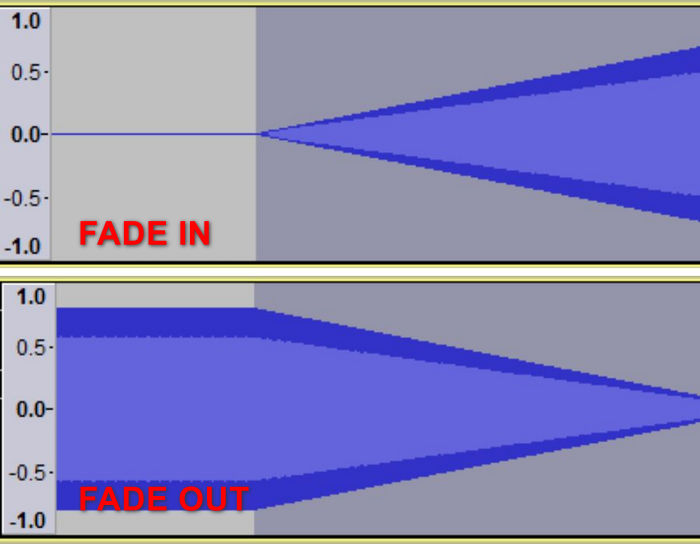
تعمل طريقة التلاشي الخطي على تحويل الصوت من الصمت المطلق إلى مستوى الصوت الأصلي أو من مستوى الصوت الأصلي إلى الصمت المطلق. وعند عرضه في وضع عرض الموجة الخطية، يظهر هذا التلاشي كخط مستقيم، مما يشير إلى سرعة تلاشي ثابتة على طول الطول المحدد.
تلاشي استوديو للخروج
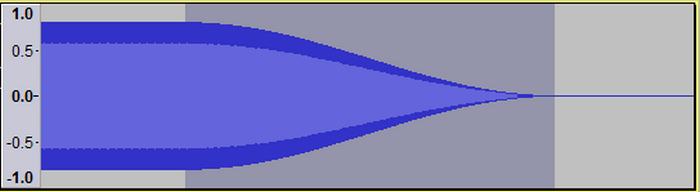
ينتج التلاشي التدريجي في الاستوديو تلاشيًا موسيقيًا سلسًا من مستوى الصوت الأصلي إلى الصمت باستخدام منحنى على شكل حرف S. تعمل هذه الطريقة على تلاشي الترددات الأعلى بشكل أسرع قليلاً من الترددات المنخفضة، مما يمنح الصوت تأثيرًا طبيعيًا متراجعًا، كما لو كان يتحرك في المسافة.
تلاشي متقاطع
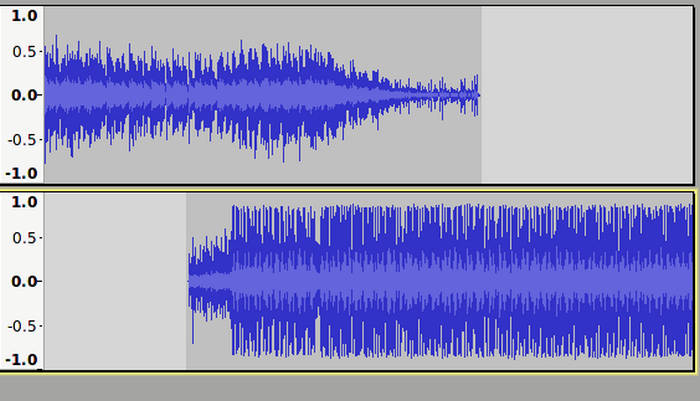
يؤدي التلاشي المتبادل إلى إنشاء انتقال سلس بين قسمين صوتيين من خلال تداخلهما. يتلاشى أحد القسمين بينما يتلاشى الآخر، مما يؤدي إلى مزج سلس دون حدوث تغييرات مفاجئة.
الجزء 2. التلاشي التدريجي للصوت في برنامج Audacity
قد تنشأ الحاجة إلى إضافة أو خفض الصوت في سيناريوهات مختلفة، وقد تكون هناك حاجة إلى طرق مختلفة لتحقيق التأثير المطلوب. سواء كنت تهدف إلى انتقال سلس، أو تلاشي بجودة احترافية، أو تعديل بسيط لمستوى الصوت، فإن Audacity يوفر تقنيات متعددة لتلبية احتياجاتك المحددة. فيما يلي ثلاث طرق مختلفة لإضافة أو خفض الصوت في Audacity.
التلاشي الخطي
الخطوة 1. أولًا، تحتاج إلى النقر على المقطع الصوتي الذي تريد عمل تلاشي دخول أو خروج له.
الخطوة 2. انتقل إلى قائمة Effect واختر Fading (التلاشي).
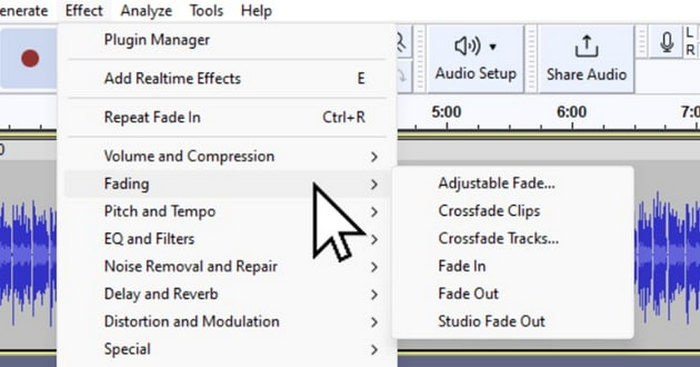
الخطوة 3. لعمل تلاشي دخول للصوت، اختر Fade In من بين خيارات التلاشي.
الخطوة 4. وفي المقابل، إذا أردت عمل تلاشي خروج للصوت، فاختر Fade Out.
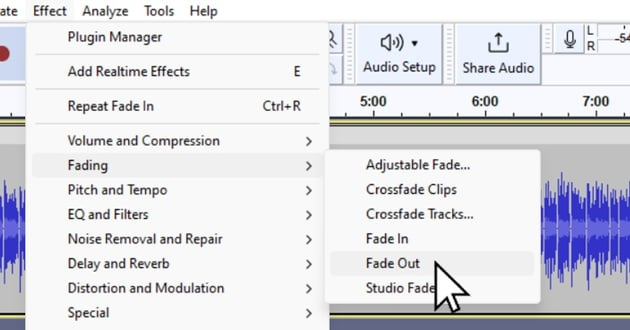
تُستخدم هذه الطريقة في اختيارات الصوت القصيرة، عادةً أقل من ثانية، مما يوفر دخولاً سلسًا للأصوات. للحصول على تأثير موسيقي أكثر، قم بتطبيق التلاشي الخطي عدة مرات على نفس الاختيار لتقريب التلاشي الأسّي، وللاختيارات الأطول، حتى عشر ثوانٍ، مما يؤدي إلى تقليل تدريجي ومتساوي للصمت.
التلاشي المتبادل
الخطوة 1. أولًا، تحتاج إلى محاذاة المسارين الصوتيين معًا.
الخطوة 2. بعد ذلك، استخدم أداة التحديد لاختيار المنطقة المراد تطبيق التلاشي المتقاطع عليها، ثم انقر على Effect واختر Crossfade Tracks. سيؤدي هذا تلقائيًا إلى تخفيض صوت المسار العلوي تدريجيًا (تلاشي خروج) مع رفع صوت المسار السفلي تدريجيًا (تلاشي دخول) في الجزء المتداخل.
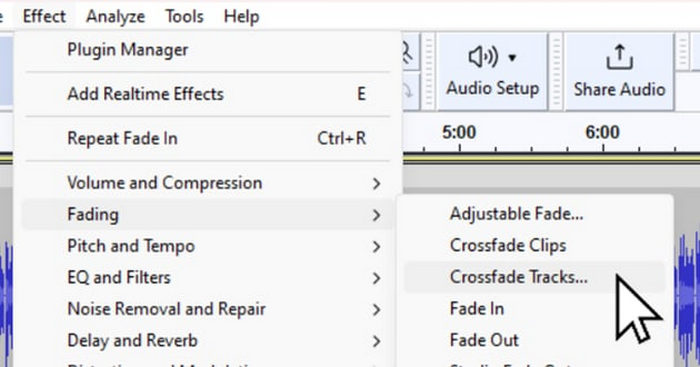
تعتبر هذه الطريقة مثالية لدمج مسارات صوتية مختلفة في مشروع ما، مما يضمن تجربة استماع سلسة ومتواصلة.
استوديو التلاشي
الخطوة 1. تمامًا كما في التلاشي الخطي، انقر على المقطع الصوتي الذي تريد عمل تلاشي خروج له.
الخطوة 2. أخيرًا، انتقل إلى قائمة Effect واختر Studio Fade Out لتطبيق التأثير.
تُستخدم هذه الطريقة عادةً بواسطة استوديوهات التسجيل الاحترافية لمسارات الأقراص المضغوطة وأسطوانات LP، مما يوفر نهاية مصقولة وطبيعية للمسار.
الجزء 3. تلاشي الصوت باستخدام بديل Audacity
إذا كنت تبحث عن أداة بديلة لأنك تجد ميزة التلاشي في Audacity معقّدة إلى حدٍّ ما وتحتاج إلى نظام تشغيل قوي، فإن برنامج Video Converter Ultimate الذي اختاره FVC هو الخيار الأفضل. فهذا المحوّل الشامل للفيديو والصوت يمتلك واجهة سهلة الاستخدام وبديهية للغاية، مما يجعل عملية عمل تلاشي دخول أو خروج للصوت بسيطة وفعّالة للمستخدمين. كما أن هذه الأداة تدعم نطاقًا واسعًا من صيغ الصوت، مما يجعل مشكلات التوافق أقل إزعاجًا.
إليك كيفية استخدام هذا البديل لبرنامج Audacity لتلاشي الصوت:
الخطوة 1. على جهاز الكمبيوتر لديك، ثبّت برنامج Video Converter Ultimate.
تحميل مجانيلنظام Windows 7 أو أحدثتنزيل آمن
تحميل مجانيلنظام MacOS 10.7 أو أحدثتنزيل آمن
الخطوة 2. بعد ذلك، لاستيراد الملف الصوتي الذي تريد تعديله، انقر على زر Add Files.
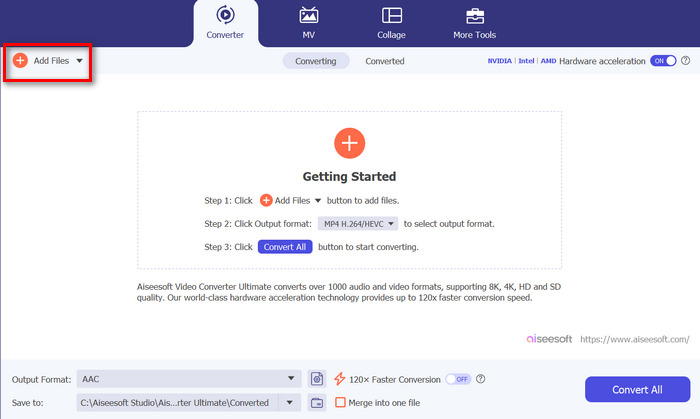
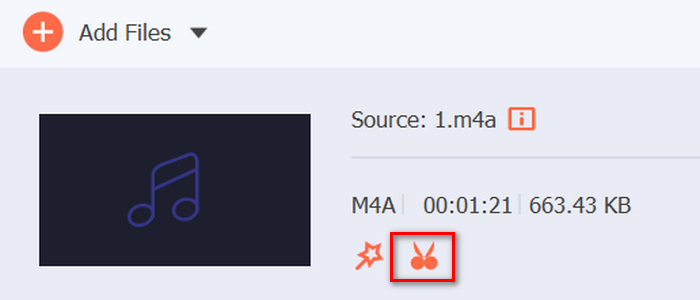
الخطوة 3. الآن انقر على زر Cut، وهذا سينقلك إلى نافذة أخرى حيث يمكنك ضبط تلاشي الدخول وتلاشي الخروج لملفك الصوتي.
الخطوة 4. انقر في مربعات خيارات Fade In وFade Out وحدِّد مدة كل تأثير وفقًا لتفضيلاتك.
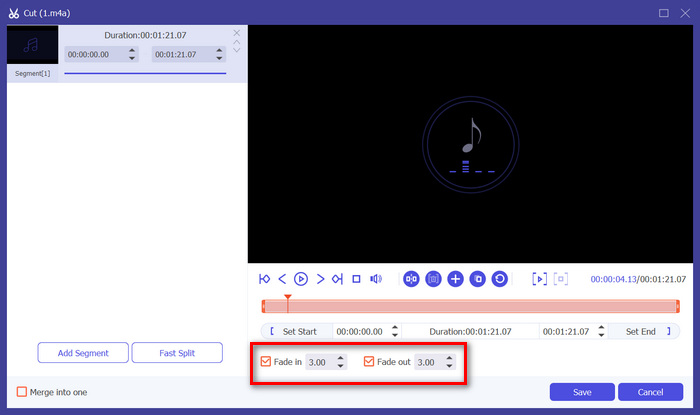
الخطوة 5. بعد الانتهاء، يمكنك معاينة الصوت بتشغيله للتحقق مما إذا كانت التغييرات التي أجريتها دقيقة وصحيحة.
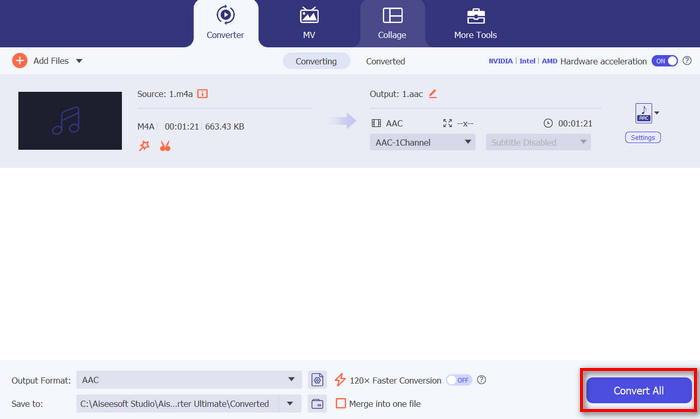
الخطوة 6. أخيرًا، انقر على زر Save. سيعيدك هذا إلى الواجهة الرئيسية، حيث ستنقر على زر Convert All لتصدير الملف الصوتي.
ما يجعل برنامج Video Converter Ultimate الذي تم اختياره من قبل FVC أفضل بديل لبرنامج Audacity لتلاشي الصوت أو تلاشيه هو سهولة استخدامه وكفاءته. فهو يسمح للمستخدمين بتحقيق انتقالات صوتية سلسة واحترافية بسرعة دون تعقيد البرامج الأكثر تقدمًا. وهذا يجعله خيارًا موثوقًا وسهل الاستخدام لأي شخص يتطلع إلى تحسين عملية تحرير الصوت. علاوة على ذلك، قبل التصدير، يمكنك حتى تحسين ملف الصوت الباهت باستخدام ميزات التحرير الخاصة به مثل الضغط والقص وتسريع الصوت والمزيد.
الجزء 4. الأسئلة الشائعة حول الموسيقى الباهتة في Audacity
كيفية التلاشي بين المقاطع في Audacity؟
للتلاشي بين المقاطع في Audacity، استخدم ميزة Crossfade (التلاشي المتبادل). قم بمحاذاة المسارين اللذين تريد تطبيق التلاشي المتبادل عليهما، ثم حدد المنطقة المتداخلة باستخدام أداة التحديد، ثم انتقل إلى قائمة Effect (التأثير) واختر Crossfade Tracks (التلاشي المتبادل للمسارات). سيؤدي هذا إلى انتقال الصوت بسلاسة من مسار إلى آخر، مع تلاشي المسار العلوي مع التلاشي في المسار السفلي.
ماذا يعني crossfade في Audacity؟
في برنامج Audacity، يشير التلاشي المتقاطع (Crossfade) إلى انتقال سلس بين مقطعين صوتيين. يقوم هذا التأثير بتداخل المقطعين بحيث يتلاشى أحد المسارات تدريجيًا للخروج بينما يتلاشى الآخر تدريجيًا للدخول. تُعد هذه التقنية مثالية لإنشاء انتقالات ناعمة دون تغيّرات مفاجئة، وتُستخدم كثيرًا في مزج الموسيقى وإنتاج البودكاست.
ما هو أفضل مستوى صوت لبرنامج Audacity؟
يعتمد مستوى الصوت الأنسب لمشروعك في Audacity على السياق والاستخدام المقصود. عمومًا، استهدف مستوى ذروة يتراوح بين -1 dB و-3 dB لتجنّب التشويه مع الحفاظ على وضوح الصوت. وإذا وجدت يومًا أن مستوى الصوت غير مُرضٍ، فيمكنك استخدام Audacity من أجل زيادة مستوى الصوت.
خاتمة
تعلّم كيفية عمل تلاشي خروج للصوت في Audacity مهارة قيّمة فعلًا، خصوصًا إذا كنت تحب تحرير الملفات الصوتية. لديك الآن الخلفية اللازمة لاختيار طريقة التلاشي دخولًا أو خروجًا التي ستستخدمها عند رغبتك في إضافة مؤثرات التلاشي إلى صوتك. بالإضافة إلى ذلك، لمن يبحثون عن بديل لبرنامج Audacity، يوفّر Video Converter Ultimate الذي اختاره FVC واجهة بديهية وسهلة الاستخدام لتحقيق تأثيرات تلاشي صوت عالية الجودة. هل أنت مستعد لتطوير مهاراتك في تحرير الصوت؟ جرّب تطبيق تقنيات التلاشي هذه في Audacity أو Video Converter Ultimate اليوم!
-
 أفضل 10 ضواغط GIF لمستخدمي سطح المكتب وعلى الإنترنت
 في هذه التدوينة، ستتعرف على أفضل ضواغط GIF لمساعدتك في حل مشكلتك مع ملفات GIF الكبيرة. التحقق منها والحصول على أفضل الأفكار.
-
 أفضل 5 تطبيقات مسجلة صوتية على Android وiOS [تم التحديث في عام 2024]
 ألا تعرف ما هو تطبيق مسجل الصوت الذي يجب أن تستخدمه؟ إذا كان الأمر كذلك ، فستساعدك هذه المقالة في اختيار التطبيق الذي سيساعدك في مهمة التسجيل الصوتي.
-
 أدوات تحويل رائعة من MP4 إلى MP3 يجب أن تفكر في استخدامها
 أطلق العنان لقوة تعدد استخدامات الصوت من خلال محولات MP4 إلى MP3 ذات التصنيف الأعلى. جرب التحويل السلس وجودة الصوت الاستثنائية والمعالجة بسرعة البرق.
