


 محول الفيديو النهائي
 مسجل الشاشة
 إصلاح الفيديو
 تنزيل آمن
كيفية تعيين أغنية Spotify كنغمة رنين لك - دليل كامل الخطوات
تقدّم Spotify مكتبة ضخمة من الموسيقى والبودكاست وأنواع المحتوى الصوتي الأخرى للمستخدمين حول العالم. تتوفر ملايين الأغاني ليستمع إليها الناس عند الطلب. إذا كنت تريد أيضًا تعيين الموسيقى الجميلة التي توفرها كنغمة رنين لهاتفك الذكي، فيجب أولاً تنزيل ملف الصوت الذي اخترته إلى جهازك. الجميل في الأمر أن هذه العملية ليست معقدة. في هذه المقالة، سنقسّم العملية الكاملة لـكيفية جعل أغنية من Spotify نغمة رنين لهاتفك إلى ثلاث مراحل ونحلّل كل مرحلة بالتفصيل من أجلك. عند تجهيز نغماتك، قد تحتاج إلى قص جزء من الملف الصوتي. ومع وضع ذلك في الاعتبار، سنوصي لك أيضًا بأحد أكثر أدوات تحرير الصوت والفيديو احترافية. كما سنجيب عن بعض الأسئلة الشائعة حول إعداد نغمات الرنين.

الجزء 1. تنزيل أغنية Spotify كنغمة رنين
هل يمكنك استخدام Spotify لنغمات الرنين؟ الإجابة هي نعم بالطبع. ما تحتاج إلى معرفته قبل المتابعة رسميًا هو أنه لا يمكنك حاليًا تنزيل الموسيقى مباشرة إلى جهازك عبر Spotify وتعيينها كنغمات رنين لك. لذلك، نحتاج إلى مساعدة بعض الأدوات. وفقًا لاستطلاعنا، يعد Spotify Downloader خيارًا جيدًا جدًا. كل ما عليك فعله هو فتح موقعه الرسمي في متصفحك، ونسخ الرابط إلى الموسيقى المفضلة لديك، ولصقه في القسم المقابل. وبالتالي، ستتمكن من تنزيل الملف مباشرة على جهاز الكمبيوتر الخاص بك. إذا واجهتك أي مشاكل معه، فسنشرح الخطوات في القسم التالي.
إليك ما عليك فعله لتنزيل أغاني Spotify كنغمات رنين باستخدام Spotify Downloader.
الخطوة 1. ادخل إلى الموقع الرسمي لـ Spotify Downloader باستخدام متصفّحك.
الخطوة 2. افتح تطبيق Spotify على هاتفك. ثم ابحث عن المقطع الصوتي الذي تريد تنزيله.
الخطوة 3. انقر على أيقونة النقاط الثلاث، ثم اختر مشاركة > نسخ الرابط.
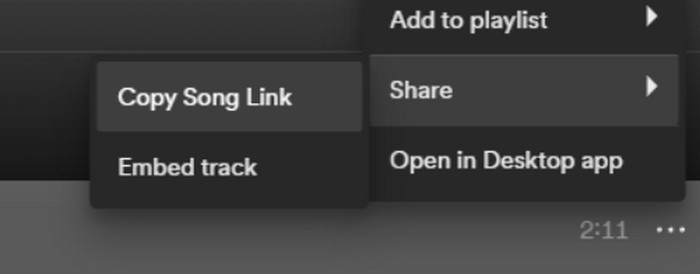
الخطوة 4. الآن يمكنك الانتقال إلى صفحة Spotify Downloader. الصق الرابط الذي نسخته ثم اضغط على إرسال.
الخطوة 5. عند انتهاء العملية، انقر على تنزيل.

الجزء 2. اجعل أغنية Spotify نغمة رنين لك
بعد تنزيل الموسيقى المفضلة لديك على جهازك، يمكنك البدء في تحريرها. يمكننا تحرير ذروة الأغنية أو الجزء المفضل لديك من الأغنية وجعل أغنية Spotify نغمة رنين لك. تجدر الإشارة إلى أن هواتف iPhone وAndroid تدعم تنسيقات صوتية مختلفة لنغمات الرنين. حاليًا، يدعم iPhone فقط نغمات الرنين بتنسيق M4R، بينما تدعم هواتف Android حاليًا تنسيقات MP3 وM4A وWAV وOGG. إذا وجدت أن تنسيق ملف الصوت الخاص بك لا يلبي المتطلبات المذكورة أعلاه، فيمكنك استخدام محول تنسيق احترافي لمساعدتك.
في هذه الحالة، نوصيك بتجربة أداة تحرير صوت شاملة الكل في واحد، وهي الأداة المختارة FVC Video Converter Ultimate، لتحقيق تحرير الأغاني في خطوة واحدة. بالإضافة إلى مهمة تحويل الصيغ الأساسية، تدعم هذه الأداة أيضًا تعديل طول الملف الصوتي، وضبط مستوى الصوت والمسار الصوتي، وإضافة تأثيرات التلاشي التدريجي في البداية والنهاية (Fade in/Fade out) إلى نغمات الرنين الخاصة بك. لن تضطر لانتظار وقت طويل تقريبًا أثناء استخدامها لمعالجة ملفاتك، فهي تساعدك على تعديل معلمات الصوت بكفاءة عالية.
تحميل مجانيلنظام Windows 7 أو أحدثتنزيل آمن
تحميل مجانيلنظام MacOS 10.7 أو أحدثتنزيل آمن
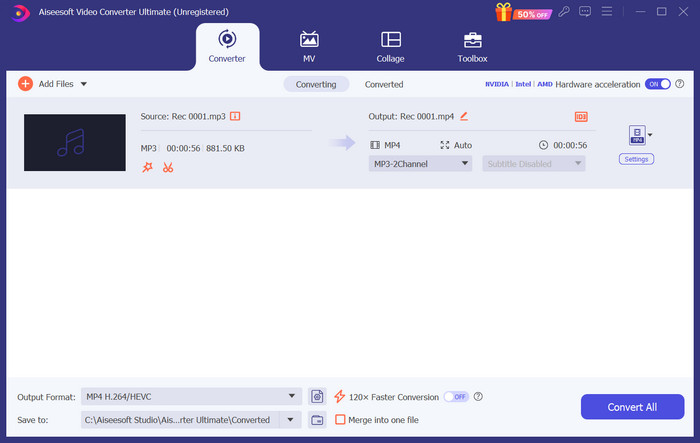
هنا سوف نعلمك كيفية إنشاء نغمة رنين من Spotify باستخدام FVC Video Converter Ultimate.
الخطوة 1. قم بتنزيل وتثبيت FVC Video Converter Ultimate على جهاز الكمبيوتر الخاص بك. تأكّد من حفظ أغنيتك المفضلة على جهازك.
الخطوة 2. افتح هذا البرنامج على سطح المكتب، ثم انقر على إضافة ملفات لتحميل أغنية Spotify إلى هذه المنصّة.
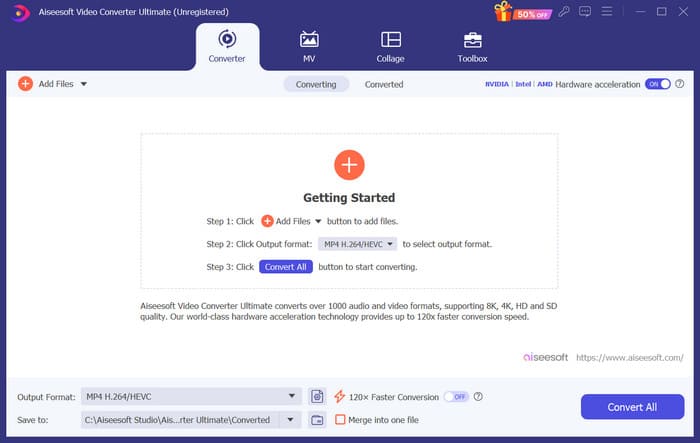
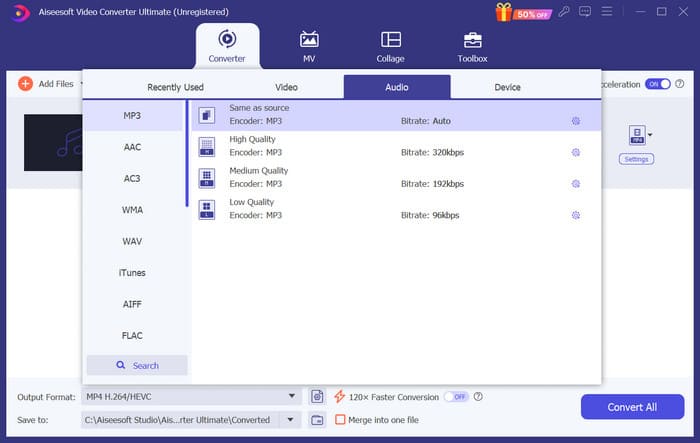
الخطوة 3. لتحويل صيغة نغمة الرنين، افتح القائمة المنسدلة بجانب صيغة الإخراج. بعد ذلك يمكنك اختيار الصيغة المستهدفة من بين جميع الخيارات المتاحة تحت قسم الصوت.
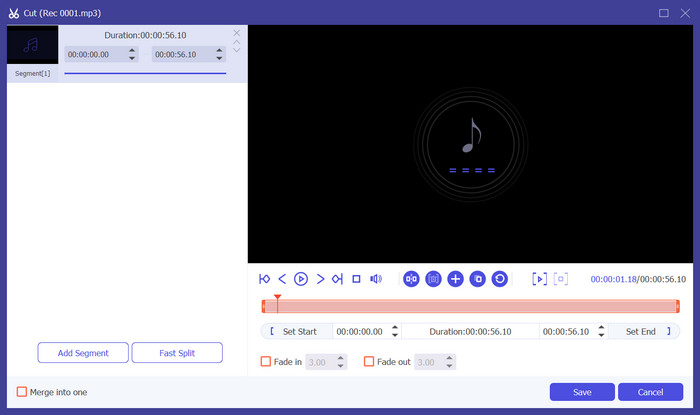
الخطوة 4. لاختيار جزء من الأغنية ليكون نغمة رنين هاتفك، انقر على قص. بعدها ستدخل إلى صفحة القص. اسحب شريط التمرير لاختيار الجزء الذي تريد الاحتفاظ به. في هذه النافذة، يمكنك أيضًا إضافة تأثير التلاشي التدريجي في البداية والنهاية إلى نغمتك.
الخطوة 5. لتغيير مستوى الصوت أو المسار الصوتي للملف، انقر على تحرير. في الصفحة الجديدة يمكنك حتى معاينة نتيجة التعديل مباشرة. للاحتفاظ بالتغييرات، انقر على موافق.
الخطوة 6. عند الانتهاء من إعداد نغمة الرنين، انقر على تحويل الكل لتصدير الملف.
الجزء 3. تعيين أغنية Spotify كنغمة رنين
الآن بعد أن أصبح لدينا نغمة الرنين الجديدة وقمنا بتعديلها إلى الطول المناسب، نحتاج إلى اتخاذ الخطوة الأخيرة: تعيين أغنية Spotify كنغمة رنين للمكالمات الواردة على هاتفك. ونظرًا لأن الأجهزة المختلفة تعمل بشكل مختلف، فسوف نرشدك في إعدادها على جهازك من هواتف iPhone وAndroid.
ذكري المظهر
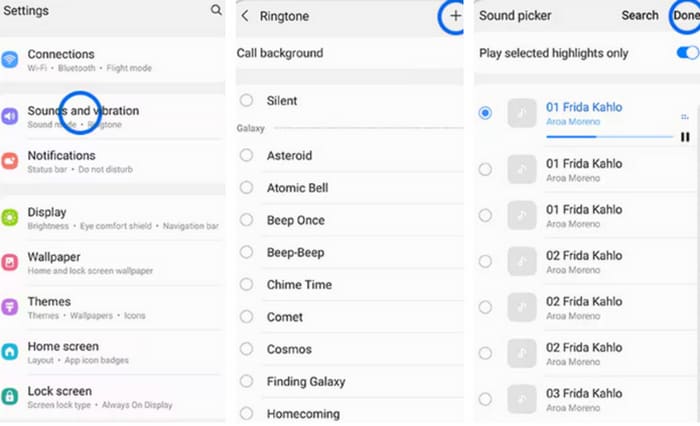
في هذا القسم، سنرشدك خلال عملية ضبط أغاني Spotify كنغمات رنين على هاتفك الذي يعمل بنظام Android. وسنستخدم هاتف Samsung كمثال. قبل أن نبدأ، يجب عليك نقل أغنية Spotify إلى هاتفك. التحويل عبر كابل USB أو Bluetooth هما طريقتان يمكن الرجوع إليهما.
الخطوة 1. انتقل إلى الإعدادات على هاتفك، ثم اختر الأصوات والاهتزاز > نغمة الهاتف > أصواتي.
الخطوة 2. انقر على إضافة، ثم اختر أغنية Spotify المعدّلة من بين جميع الملفات الموجودة على هاتفك المحمول.
الخطوة 3. لحفظ التعديل، انقر على تم. الآن تكون قد أضفت بنجاح أغنية من Spotify كنغمة رنين لهاتف Samsung الخاص بك.
ايفون
إذا كنت تريد إنشاء نغمة رنين لهاتف iPhone، فقد تحتاج إلى استخدام أدوات من جهات خارجية. الأداة الأكثر شيوعًا هي GarageBand، وسنشرح كيفية تعيين أغاني Spotify كنغمات رنين على iPhone.
الخطوة 1. قم بتنزيل وتشغيل GarageBand على هاتف iPhone الخاص بك. اختر مشروع.
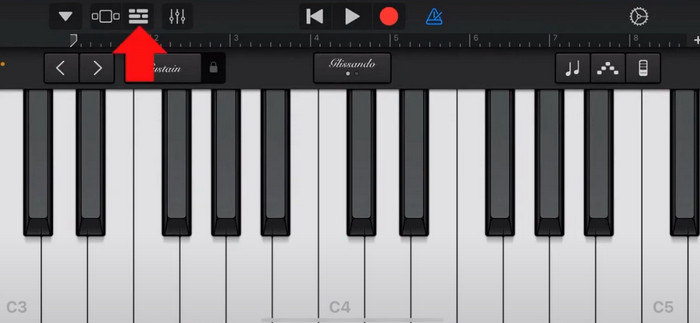
الخطوة 2. بعد ذلك اختر حلقة > ملفات. لاختيار أغنية Spotify الخاصة بك، اختر استعراض العناصر من تطبيق الملفات.
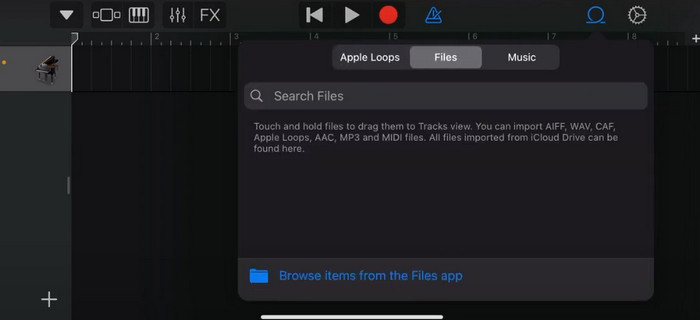
الخطوة 3. ضع ملف Spotify الذي تم قصّه على المخطط الزمني (Timeline).
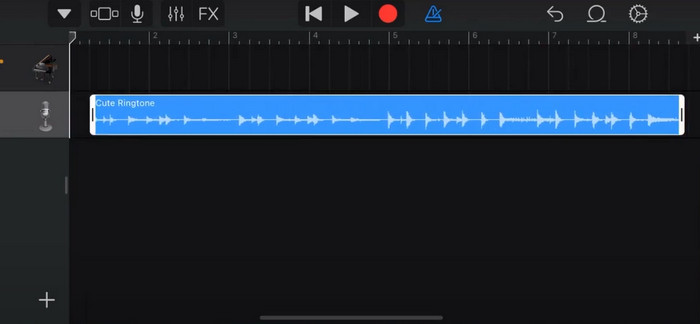
الخطوة 4. عطّل صوت «المترونوم». ثم انقر على أيقونة السهم المتجه إلى الأسفل واختر مشاريعي.
الخطوة 5. اضغط مع الاستمرار على مقطع الأغنية، ثم انقر على مشاركة.
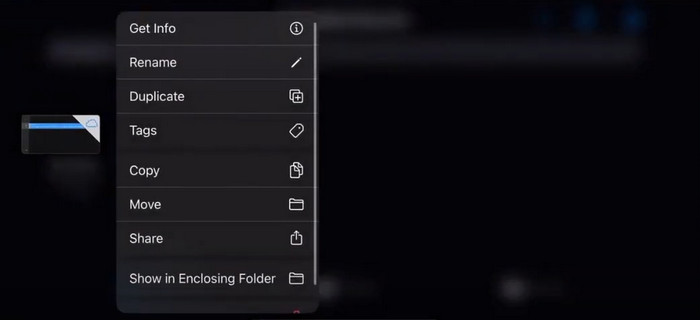
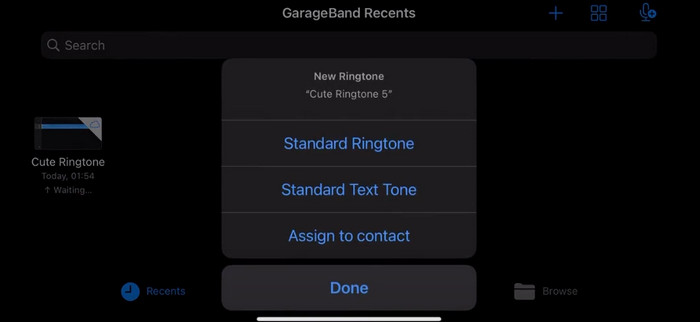
الخطوة 6. اختر نغمة رنين > تصدير. ثم اضغط استخدام الصوت كـ > نغمة رنين افتراضية.
الجزء 4. الأسئلة الشائعة حول جعل أغنية Spotify نغمة رنين لك
هل يمكنني استخدام أغنية Spotify كنغمة رنين مباشرة؟
لا يسمح Spotify للمستخدمين باستخدام أغنية مباشرة من التطبيق كنغمة رنين على جهاز محمول. ومع ذلك، هناك طرق بديلة يمكنك استخدامها لتعيين أغنية Spotify كنغمة رنين. يمكنك شراء الأغنية التي تعجبك من متجر موسيقى رقمي مثل iTunes أو Google Play Music. تتوفر أدوات خارجية تتيح لك تحويل أغاني Spotify إلى ملفات MP3.
كيف يمكنني إنشاء نغمة رنين مخصصة لجهاز iPhone الخاص بي دون الحاجة إلى iTunes؟
إذا كنت تريد إنشاء نغمة رنين مخصصة لجهاز iPhone الخاص بك دون استخدام iTunes، فيمكنك استخدام GarageBand، وهو تطبيق موسيقى متوفر على أجهزة iOS. تتيح لك هذه الطريقة تخصيص نغمة الرنين الخاصة بك باستخدام مقاطع الصوت المفضلة لديك على جهازك.
كيفية تحويل Spotify إلى نغمة رنين iPhone بدون كمبيوتر؟
إن تحويل أغنية Spotify مباشرة إلى نغمة رنين iPhone دون استخدام الكمبيوتر أمر صعب. ومع ذلك، يمكنك العثور على بعض الطرق البديلة لتحقيق نتيجة مماثلة. على سبيل المثال، يمكنك استخدام تطبيق صانع النغمات أو اختيار GarageBand.
خاتمة
فيما سبق، قدّمنا لك نظرة شاملة حول كيفية تعيين أغنية من Spotify كنغمة رنين لمكالماتك الواردة. غطّينا جميع الخطوات ووفّرنا لك أداة متطورة لتحرير الصوت، وهي Video Converter Ultimate الموصى به من FVC، لمساعدتك على تخصيص أغنيتك. وإذا رغبت، يمكن لهذه الأداة أيضًا أن تساعدك بسهولة على تحويل فيديو إلى نغمة رنين. نعتقد أنك حصلت على الإرشادات التي تحتاج إليها.
-
 أفضل تجول كيفية تحويل WAV إلى نغمة في أي وقت من الأوقات
 هل تبحث عن تحويل WAV إلى نغمة رنين دون عناء؟ أدواتنا سهلة الاستخدام تنجز المهمة! استمتع بتحويل صوت عالي الجودة في لمح البصر - بدون متاعب تقنية. جربهم اليوم!
-
 كيفية تحويل مذكرة صوتية إلى نغمة رنين على iPhone وAndroid
 إذا كنت تريد تحويل ملاحظة صوتية إلى نغمة رنين، اقرأ هذه المقالة. سواء كنت من مستخدمي iPhone أو مستخدمي Android، يمكنك العثور على حلول في محتوانا.
-
 5 برامج لقص ملفات MP3 بسهولة [تم التحديث في عام 2024]
 هل تحتاج إلى قاطع MP3 لقص الصوت؟ في هذه الحالة، اقرأ هذه المقالة لأننا نوفر الأدوات التي يمكن الاعتماد عليها لقطع الصوت بسهولة.
