


 محول الفيديو النهائي
 مسجل الشاشة
 إصلاح الفيديو
 تنزيل آمن
ما هو ملف MTS وكيفية تحويل / تشغيل ملف MTS
ستحصل على فيديو مُسجَّل بصيغة MTS إذا كنت تستخدم كاميرا فيديو من سوني أو باناسونيك. في الواقع، لن تلاحظ ذلك إلا عندما تكتشف أنك لا تستطيع تشغيل ملف MTS بواسطة مشغّل الوسائط أو الجهاز الخاص بك. وهنا يَطرح نفسه السؤال: ما هو ملف MTS؟

الآن في العديد من المجالات والمنتجات الإلكترونية ، هناك متطلبات أعلى وأعلى لجودة الصورة لموكب الفيديو. MTS هو تنسيق فيديو دفق نقل عالي الدقة يمكنه تقديم تجربة مرئية عالية الجودة.
مع ذلك، فإن MTS ليس تنسيقًا شائعًا للملفات. فالكثير من مشغّلات الوسائط الشائعة والأجهزة المحمولة بنظام iOS أو أندرويد لا يمكنها تشغيل ملف MTS مباشرة. وبناءً على ذلك، نرغب في هذا المقال في تقديم تعريف مفصّل لتنسيق MTS. إضافة إلى ذلك، سنعرض لك 3 طرق سهلة لـتحويل وتشغيل ملفات MTS.
الجزء 1. ما هو ملف MTS - MTS مقابل MP4
MTS هو الامتداد الخاص بملفات AVCHD (اختصارًا لـ Advanced Video Coding High Definition)، ويُستخدم بشكل أساسي في كاميرات الفيديو عالية الدقة من سوني وباناسونيك. تم تطويره بشكل مشترك من قِبل سوني وباناسونيك، وصُمّم خصيصًا لمقاطع الفيديو الرقمية عالية الدقة. يعتبر MTS تنسيق فيديو عالي الدقة لنقل بيانات MPEG وH.264، ويدعم بدرجة عالية دقة 720p و1080i HD. لذلك، مقارنة بالتنسيقات الأخرى، يمكن لملف MTS أن يقدّم جودة فيديو أعلى.
MTS هو امتداد ملف فيديو AVCHD على كاميرا الفيديو الرقمية. عند استيراد ملف MTS إلى جهاز الكمبيوتر الخاص بك ، سيتحول امتداد الملف تلقائيًا إلى M2TS. يستخدم MTS أيضًا على نطاق واسع في Blu-ray Disc Audio-Video (BDAV). لديها القدرة على حمل العديد من مقاطع الفيديو والصوت وغيرها من التدفقات.
يُمكن لملف MTS أن يوفّر فيديو عالي الجودة مع حجم ملف صغير نسبيًا. ولكن كما ذُكر أعلاه، لا يدعم كثير من مشغّلات الوسائط، وبرامج تحرير الفيديو، وأجهزة الكمبيوتر، والأجهزة المحمولة صيغة MTS. ويمكن أن تحصل بسهولة على خطأ في تشغيل ملف MTS بسبب عدم التوافق. لهذا السبب، هناك الكثير من الأشخاص يبحثون على الإنترنت عن مشغّل MTS، وكيفية تشغيل ملف MTS، وكيفية تحويل MTS إلى MP4، وغير ذلك.
MTS مقابل MP4
مقارنةً بـ MTS ، يمكن تشغيل MP4 بسهولة بواسطة جميع مشغلات الوسائط وأدوات وأجهزة تحرير الفيديو تقريبًا. MP4 هو تنسيق حاوية الوسائط المتعددة الأكثر شيوعًا لتخزين الفيديو. MP4 قادر أيضًا على حمل الصوت والنص.
MP4 متوافق مع Windows 10/8/7 / XP / Vista PC و Mac وبرامج التحرير ومشغلات الوسائط وأجهزة iOS / Android مثل iPhone و iPad و iPod touch وهاتف Android و Windows phone والمزيد. يمكن أن يوفر MP4 جودة فيديو عالية مع الاحتفاظ بحجم ملف مناسب. لذلك عندما تحصل على تنسيق غير مدعوم مثل MTS ، يمكنك اختيار تحويله إلى MP4 لتشغيل أفضل.
الجزء 2. كيفية تحويل MTS إلى MP4 عبر الإنترنت مجانًا
عندما تريد مشاركة فيديو MTS المسجل على YouTube أو Facebook أو منصات أخرى ، أو تريد تحريره وعرضه على جهازك ، فقد تحتاج إلى تحويل MTS إلى MP4. لحسن الحظ ، هناك الكثير من محولات الفيديو MTS بما في ذلك بعض المحولات المجانية عبر الإنترنت التي يمكن أن تساعدك في تحويل ملف MTS. هنا في هذا الجزء ، سوف نقدم لك محول فيديو مجاني على الإنترنت ، FVC Free Online Video Converter لتحويل ملف MTS الخاص بك.
الخطوة 1: أولًا، افتح المتصفّح وانتقل إلى الموقع الرسمي لأداة التحويل المجانية FVC Free Online Video Converter. يمكنك الانتقال مباشرة إلى الرابط https://www.free-videoconverter.net/free-online-video-converter/. بعد ذلك، انقر زر Add Files to Convert لتنزيل المشغِّل (Launcher) وتثبيته.
الخطوة 2: بعد تفعيل المشغّل، قم برفع ملف MTS الذي تريد تحويله إلى MP4. ثم انقر زر Convert لبدء تحويل الفيديو من MTS إلى MP4.

الجزء 3. طريقة مجانية لتحويل MTS إلى MP4 دون فقد الجودة (موصى به)
باستخدام أداة التحويل المجانية على الإنترنت المذكورة أعلاه، يمكنك إجراء عملية تحويل الفيديو من MTS إلى MP4 بسهولة. وإذا كنت تهتم أكثر بجودة ملف MP4 الناتج، فينبغي أن تجرّب برنامج Free MTS Converter. فهو يتيح لك تحويل MTS إلى MP4 دون أي فقدان في جودة الصورة أو الصوت.
تنزيل مجانيلنظام Windows 7 أو الأحدثتنزيل آمن
الخطوة 1. انقر نقرًا مزدوجًا على زر التنزيل أعلاه، ثم اتبع الإرشادات الظاهرة على الشاشة لتثبيت وتشغيل أداة التحويل المجانية من MTS إلى MP4 بسرعة على جهاز الكمبيوتر لديك.
الخطوة 2. عند الدخول إلى الواجهة الأولى لمحوّل فيديو MTS هذا، انقر Add File(s) لتحميل ملف MTS الذي تريد تحويله. خلال هذه الخطوة، يمكنك إضافة ملف واحد أو عدة ملفات حسب حاجتك.
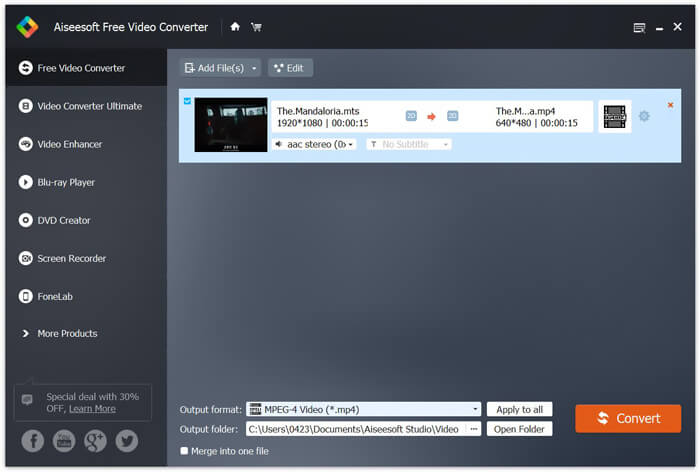
الخطوة 3. انقر Output format ثم اختر MP4 كصيغة الإخراج المستهدفة. هنا يمكنك أيضًا اختيار مجلد مناسب لحفظ الفيديو المحوّل من خلال النقر على خيار Output folder. بعد ذلك، انقر زر Convert لبدء عملية التحويل المجانية للفيديو من MTS إلى MP4.

تم تصميم Free Video Converter بأحدث التقنيات التي تضمن لك سرعة تحويل MTS / M2TS إلى MP4. علاوة على ذلك ، فإنه يوفر أيضًا بعض ميزات التحرير الأساسية لتخصيص الفيديو قبل التحويل النهائي. يجب عليك تنزيله مجانًا وتجربته.
الجزء 4. كيفية تحويل وتشغيل ملف MTS مع مشغل VLC مجانًا
إذا كان لديك VLC Media Player مثبتًا على جهاز الكمبيوتر الخاص بك ، فيمكنك الاعتماد عليه لتحويل ملف MTS مجانًا إلى MP4 و MOV و FLV والمزيد لتحسين التحميل أو التشغيل. في الواقع ، كمشغل وسائط مفتوح المصدر ، يمكّنك VLC Player من الاستمتاع مباشرة بملف MTS بتجربة بصرية رائعة. هنا في هذا الجزء ، نود أن نوضح لك كيفية تشغيل ملف MTS وتحويله على مشغل VLC.
قم بتشغيل ملف MTS باستخدام مشغل VLC
الخطوة 1. أولاً ، تحتاج إلى التأكد من أن لديك مشغل VLC على جهاز الكمبيوتر الخاص بك. ثم افتح مشغل الوسائط هذا لتشغيل ملف MTS.
الخطوة 2. انقر Media > Open File لتحميل ملف MTS الذي تريد تشغيله. بعد التحميل، سيقوم مشغّل VLC بتشغيل ملف MTS تلقائيًا.
هنا يجب أن تعلم أنه لا يمكن عرض جميع ملفات MTS بتأثيرات جيدة على مشغل VLC.
في بعض الحالات ، من المرجح أن تحصل على خطأ تشغيل MTS. يجب عليك إضافة بعض الامتدادات لجعل مشغل VLC يدعم ملف MTS الخاص بك. على سبيل المثال ، أنت بحاجة إلى مكتبة لفك تشفير AACS لتشغيل ملف MTS.
قم بتحويل ملف MTS باستخدام VLC Player
في الواقع ، عندما تحصل على خطأ تشغيل ملف MTS ، يمكنك اختيار تحويل MTS إلى تنسيق فيديو شائع مثل MP4 و MOV و FLV و AVI وما إلى ذلك. بعد ذلك ، يمكنك بسهولة مشاهدة ملف MTS على أي جهاز بكل سهولة.
الخطوة 1. افتح مشغّل VLC على جهاز الكمبيوتر الخاص بك. انقر Media > Convert/Save لفتح نافذة الوسائط المنبثقة (Open Media). هنا يمكنك النقر على Add لاستيراد ملف MTS الذي تريد تحويله.
الخطوة 2. بعد الاستيراد، انقر Convert Save لفتح نافذة التحويل (Convert). انقر Profile ثم اختر MP4 كصيغة الإخراج. في هذه الخطوة، يمكنك اختيار مجلد مناسب لحفظ الفيديو الناتج من خلال النقر على خيار Browse.
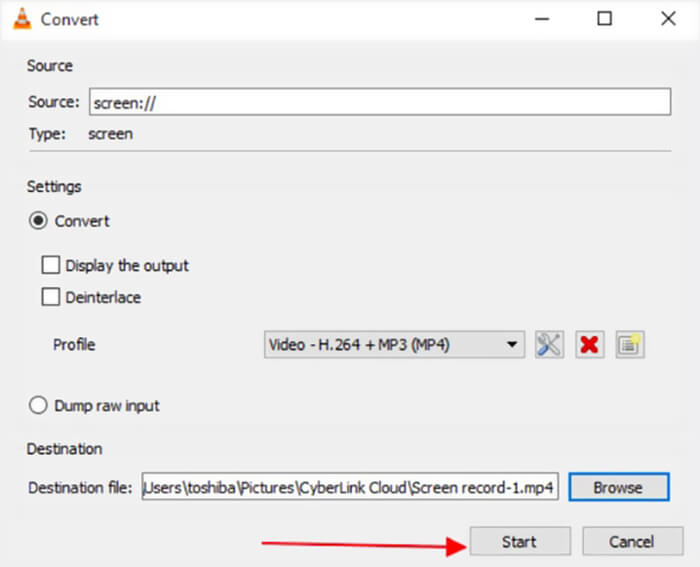
الخطوة 3. يوفّر لك مشغّل VLC بعض ميزات التحرير الأساسية. قبل تنفيذ عملية تحويل ملف MTS نهائيًا، يمكنك تخصيص تأثيرات الفيديو بحسب احتياجاتك. بعد ذلك يمكنك النقر على Start لبدء عملية التحويل المجانية لملف MTS.
بعد قراءة هذه الصفحة، يمكنك الحصول على فهم واضح حول ملف MTS. بالإضافة إلى ذلك، يمكنك تعلّم كيفية تحويل وتشغيل ملف MTS. اترك لنا رسالة إذا كانت لديك أي أسئلة أخرى حول تنسيق MTS.
-
 طريقتان بسيطتان لتحويل MTS إلى MP3 مجانًا
 هل لديك حاجة لاستخراج صوت MP3 من ملف MTS ولكن لا تعرف كيف؟ ما هو أفضل محول MTS إلى MP3؟ يشارك هذا المنشور طريقتين سهلتين لمساعدتك في تحويل MTS / M2TS إلى MP3 بجودة صوت عالية.
-
 أفضل 4 طرق مجانية لتحويل MTS إلى MOV
 لا يمكنك تشغيل ملف MTS على جهاز الكمبيوتر الخاص بك أو هاتف iPhone / Android؟ ما هو ملف MTS وكيف يتم تشغيله؟ ما هو أفضل محول فيديو MTS؟ يشارك هذا المنشور 4 طرق بسيطة ومجانية لمساعدتك على تحويل MTS إلى MOV لتشغيل أفضل.
-
 ما هو الفرق بين MTS و M2TS
 ما هو ملف MTS أو M2TS؟ ما هو الفرق بين M2TS و MTS؟ كيف يمكنني مشاهدة ملف MTS أو M2TS المسجل في كاميرا الفيديو؟ اعثر على جميع الإجابات في هذا المنشور.
