


 محول الفيديو النهائي
 مسجل الشاشة
 إصلاح الفيديو
 تنزيل آمن
FLV to WMA Converter - كيفية استخراج WMA Audio من فيديو FLV مجانًا
عندما تقوم بتنزيل ملفات فيديو Flash من موقع YouTube ، يمكنك تحويل FLV إلى WMA صوت بدون فقدان. WMA (Windows Media Audio) عبارة عن سلسلة من برامج ترميز الصوت وتنسيقات ترميز الصوت المقابلة التي طورتها Microsoft. يدعم صوت WMA الصوت متعدد القنوات وعالي الدقة. من هذه المقالة ، ستتعلم طريقتين لتحويل مقاطع فيديو FLV إلى صوت WMA على نظامي التشغيل Windows و Mac.

الجزء 1. أفضل طريقة لاستخراج صوت WMA من FLV مجانًا
FVC Free FLV Converter هو محوّل FLV إلى WMA مجاني وسهل وسريع، يدعم التحويل الدفعي لملفات FLV إلى WMA على نظامي ويندوز وماك. وفي الوقت نفسه، يمكنك تحويل مقاطع FLV إلى صيغ فيديو وصوت أخرى مثل HD MP4 وAVI وWMV وMKV و3GP وMP3 وAAC وAC3 وغيرها. وباستخدام ميزة التحرير المدمجة، يمكنك تعديل بيانات البيانات الوصفية في ملفات WMA مجانًا.

FVC Free FLV Converter
145000+ التنزيلات- قم بتحويل FLV إلى WMA على أنظمة التشغيل Windows 10/8/7 / Vista / XP و Mac OS X.
- ضغط ودمج وإضافة سمات وتحرير البيانات الأولية لملف WMA.
- أضف سمات خاصة إلى ملفات FLV الخاصة بك ، مثل العطلات والأسرة وعيد الميلاد
- تحويل الدفعة FLV إلى WMA ، MP3 ، AAC ، FLAC ، M4R ، OGG ، WAV.
تنزيل مجانيلنظام Windows 7 أو الأحدثتنزيل آمن
الخطوة 1. أضف ملف FLV
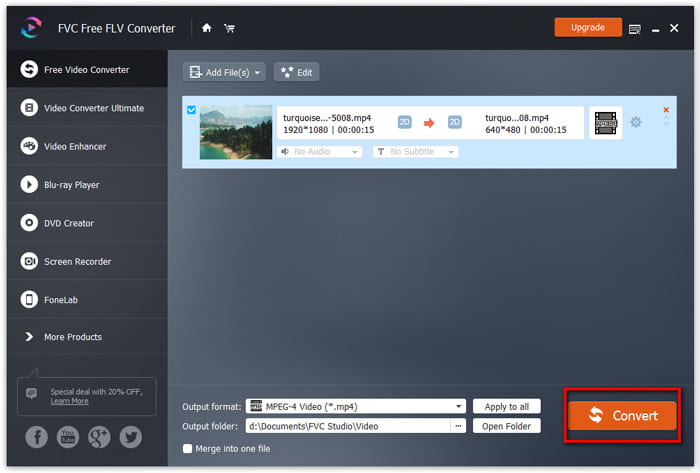
بعد تنزيل FVC Free FLV Converter مجانًا، يمكنك تثبيت البرنامج وتشغيله على جهاز الكمبيوتر. انقر على زر Add File(s) لاستيراد ملف الفيديو Flash. يمكنك أيضًا سحب المزيد من ملفات FLV وإفلاتها في البرنامج دفعة واحدة.

الخطوة الثانية. قم بتحرير ملف FLV
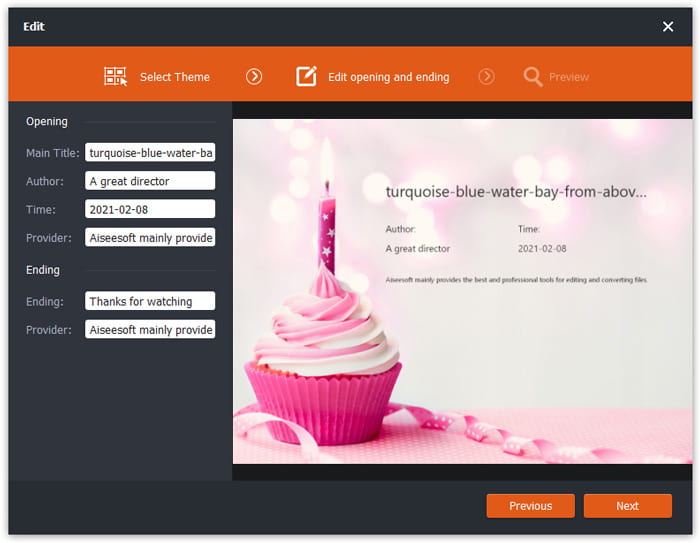
انقر على زر Edit لبدء تحرير ملف FLV الخاص بك. يمكنك اختيار سمة معيّنة، وتحرير معلومات البيانات مثل العنوان، المؤلف، ووقت الافتتاحية والنهاية.
الخطوة 3. تعيين WMA كإخراج
بعد ذلك انتقل إلى منطقة Output format واكتب WMA في مربع البحث. هنا يمكنك اختيار WMA - Windows Media Audio (*.wma) كصيغة الإخراج.

الخطوة 4. تحويل FLV إلى WMA
انتقل إلى منطقة Output folder واختر الوجهة التي سيتم حفظ ملف WMA فيها. يمكنك النقر على زر Convert لبدء تحويل FLV إلى ملف صوتي WMA مجانًا.
الجزء 2. كيفية تحويل FLV إلى WMA عبر الإنترنت مجانًا
إذا كنت لا ترغب في تنزيل أي حزمة برمجية، يمكنك تجربة FVC Free Audio Converter. إنه محوّل FLV إلى WMA قوي قائم على الويب يساعدك على تحويل أي ملف فيديو/صوت شائع إلى WMA وMP3 وAAC وFLAC وWAV وغيرها. يمكنك التعرّف بتفصيل على كيفية تحويل FLV إلى WMA باستخدام FVC Free Audio Converter.
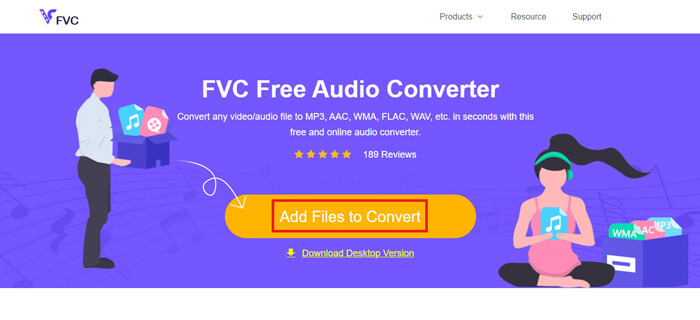
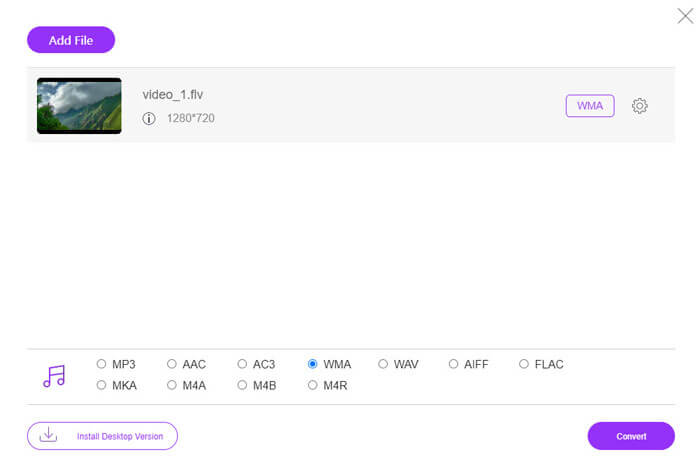
الخطوة 1. قم بزيارة الموقع الرسمي لبرنامج FVC Free Audio Converter (https://www.free-videoconverter.net/free-audio-converter/). انقر على زر Add Files to Convert لتنزيل المُطلق وتثبيته. يمكنك رفع ملفات FLV من الكمبيوتر المحلي.
الخطوة 2. ضع علامة على WMA في الأسفل واضبطها كصيغة الإخراج. إذا أردت تعديل المزيد من الإعدادات، يمكنك النقر على أيقونة الترس لضبط مُرمِّز الصوت، والقناة، ومعدل العيّنة، ومعدل البِت. انقر على زر OK لحفظ التغييرات.
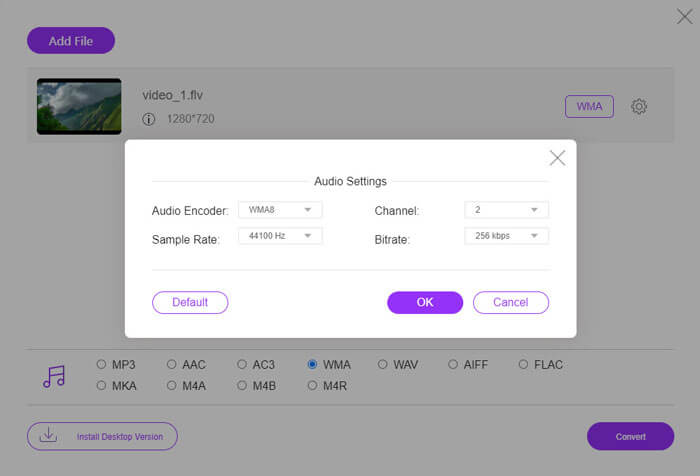
الخطوة 3. أخيرًا، يمكنك النقر على زر Convert لبدء تحويل ملف FLV إلى WMA عبر الإنترنت مجانًا.
الجزء 3. أسئلة وأجوبة حول تحويل FLV إلى WMA
ما هو ملف FLV وكيف يمكنني تشغيله؟
FLV هو تنسيق ملف فيديو فلاش تم تطويره بواسطة Adobe. يمكنه تخزين الفيديو والصوت والنص والمخطوطة والمزيد. لا يدعم كل من Windows Media Player و QuickTime FLV ، لذلك عليك استخدام مشغل وسائط تابع لجهة خارجية لفتح FLV ، مثل VLC.
ما هو تنسيق WMA المستخدم؟
WMA هو تنسيق صوتي مع فقدان البيانات تم إنشاؤه بواسطة Microsoft للتنافس مع MP3. يستخدم WMA بشكل أساسي لدفق الموسيقى عبر الإنترنت. ملف WMA بامتداد .wma هو Windows Media Audio. يمكن دعمه بشكل مثالي بواسطة Windows Media Player.
هل يوجد مشغل موسيقى WMA؟
نعم. هناك مشغلات موسيقى WMA يمكنك الاختيار من بينها، مثل FVC Free Video Player وKMPlayer وElmedia Video Player وMacgo Free Mac Media Player وVOX Music Player وVLC Media Player وGOM Media Player وfoobar2000 وAIMP وSamsung Music وغيرها.
خاتمة
في هذه المقالة ، تحدثنا بشكل أساسي عن طريقتين مجانيتين لتحويل فيديو FLV إلى WMA على Windows 10 PC و Mac. آمل أن تساعدك كل هذه الحلول في حل مشكلتك. في المرة التالية التي تقوم فيها بتنزيل مقاطع فيديو فلاش من موقع الويب ، يمكنك تجربة FVC Free FLV Converter لتحويل فيديو FLV إلى WMA ، MP3 ، AAC ، MP4 ، AVI ، VOB ، إلخ
-
 ؛ FLV to WAV - تحويل FLV إلى WAV على الإنترنت مجانًا وعلى جهاز Mac / الكمبيوتر الشخصي
 كيف أقوم بتحويل ملف FLV؟ هل يمكن لـ VLC تحويل YouTube FLV إلى WAV؟ يوضح هذا المنشور 3 طرق مجانية لتحويل FLV إلى WAV دون فقدان الجودة.
-
 2 طرق سهلة لتحويل ملفات MOV إلى FLV على نظامي التشغيل Windows / Mac
 كيفية تحويل FLV إلى MOV مجانًا؟ فيما يلي أفضل محولات الفيديو على سطح المكتب وعلى الإنترنت لتحويل ملف MOV إلى FLV في ثوانٍ دون دفع فلس واحد.
-
 كيفية تحويل WMA إلى MP3 على نظام Mac / Windows / عبر الإنترنت
 هل من الممكن تحويل WMA إلى MP3 باستخدام Windows Media Player؟ كيفية تحويل WMA إلى MP3 مجانًا؟ يشارك هذا المنشور 4 طرق بسيطة لمساعدتك في إجراء تحويل الصوت من WMA إلى MP3 على Mac و Windows PC وعلى الإنترنت.
