


 محول الفيديو النهائي
 مسجل الشاشة
 إصلاح الفيديو
كيفية تحويل MTV إلى FLV في طريقتين لا مثيل لهما

الجزء 1. كيفية تحويل MTV إلى FLV دون اتصال
يُعَدّ Video Converter Ultimate واحدًا من أفضل برامج تحويل ملفات MTV إلى FLV. يمكنك تغيير صيغة الفيديو من MTV إلى FLV ببضع نقرات فقط. يتيح لك هذا البرنامج أيضًا تحرير وضغط مقاطع فيديو MTV. يتوفر محول MTV إلى FLV هذا على كلٍّ من أجهزة Windows وMac، وهو مجاني تمامًا. يمكنك بسهولة تحويل ملفات MTV إلى صيغة FLV عبر تنزيل وتثبيت تطبيق المحول، ثم استيراد مقاطع الفيديو التي تريد تحويلها. للحصول على شرح أكثر تفصيلاً، يُرجى الرجوع إلى الدليل التالي.
الخطوة 1: لبدء تنزيل البرنامج، انقر زر تنزيل مجاني الموجود أسفل هذه الخطوة. بعد النقر، استعد لتثبيته بعد اكتمال التنزيل بقليل.
تحميل مجانيلنظام Windows 7 أو أحدثتنزيل آمن
تحميل مجانيلنظام MacOS 10.7 أو أحدثتنزيل آمن
الخطوة 2: بعد تثبيت البرنامج على جهاز الكمبيوتر، شغِّل البرنامج وستظهر نافذة على شاشتك. سيعرض لك البرنامج واجهة المحوِّل (Converter) على الشاشة، وهي جاهزة لاستيراد ملف.
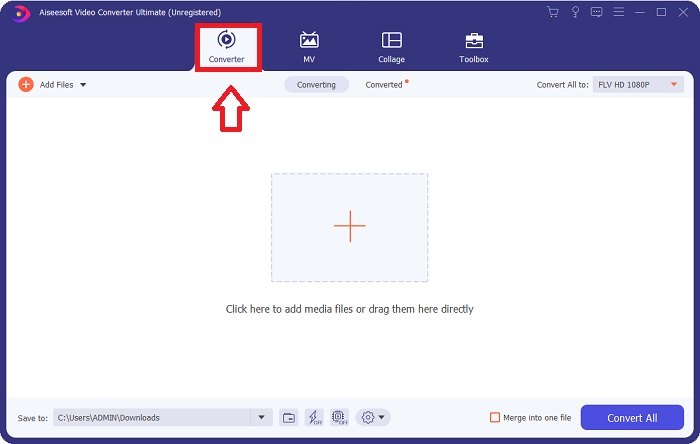
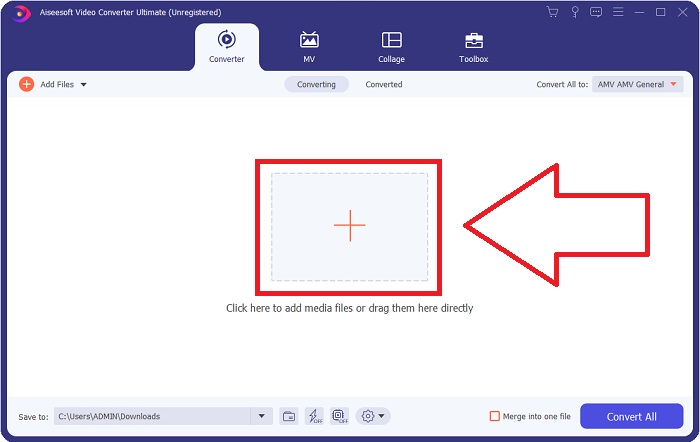
الخطوة 3: لاستيراد ملف إلى البرنامج، يجب عليك النقر على زر + في منتصف نافذة البرنامج، أو يمكنك ببساطة سحب أي ملف فيديو وإفلاته.
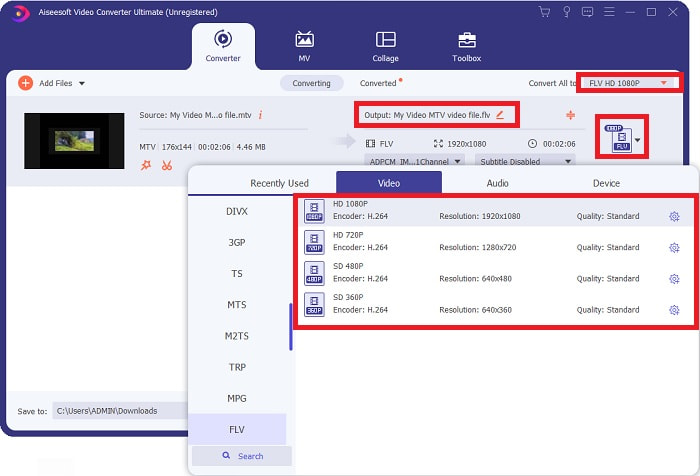
الخطوة 4: حان الوقت لاختيار صيغة الفيديو FLV، الموجودة في الزاوية اليمنى من النافذة بالقرب من مخرج الفيديو (Video Output). انقر هناك ثم ابحث عن صيغة FLV وحدِّد درجة الجودة التي تفضّلها.
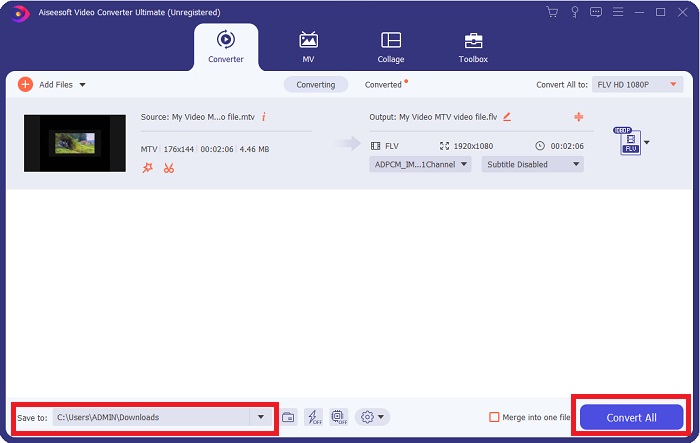
الخطوة 5: يمكنك الآن تحويل ملفك بالنقر على زر تحويل الكل (Convert All) الموجود في الزاوية اليمنى السفلية من النافذة. كما يمكنك تحديد المجلد الذي سيتم حفظ الملف المحوَّل بداخله من خلال النقر على زر القائمة المنسدلة بجوار حفظ في (Save to).
الجزء 2. كيفية تحويل MTV إلى FLV عبر الإنترنت
إليك أداة مجانية على الإنترنت يمكنك التعرّف عليها لتحويل ملفات MTV إلى FLV. إنّ Free Video Converter Online يمكنه تحويل صيغ الفيديو والصوت مثل MP4 وWMV وASF إلى صيغ مختلفة. يمكنك استعادة فيديوهاتك عالية الدقة إلى أنواع ملفات شائعة ببضع نقرات فقط مع الحفاظ على جودتها البصرية الأصلية. كما أن تحويل عدة ملفات فيديو أو صوت دفعة واحدة لا يعرّض الجودة لأي تدهور. فيما يلي الخطوات التي يجب عليك اتباعها:
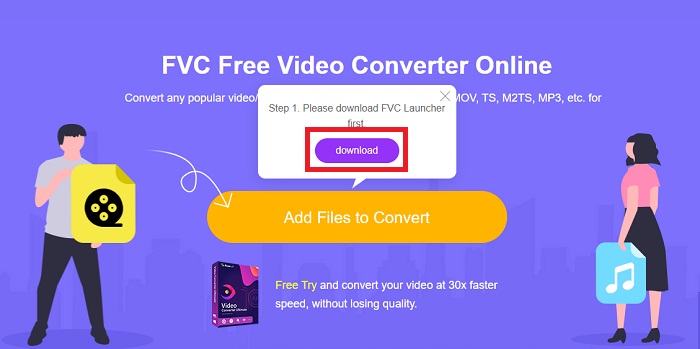
الخطوة 1: ادخل إلى الصفحة الرئيسية لأداة Free Video Converter Online عبر النقر على هذا الرابط. بعد ذلك عليك النقر على زر Add Files to Convert الظاهر على الشاشة الرئيسية لتنزيل المشغِّل (Launcher) الذي يتيح لك استخدام هذه الأداة عبر الإنترنت. بعد تنزيله، انقر الزر مرة أخرى لاستيراد الملفات من جهازك.
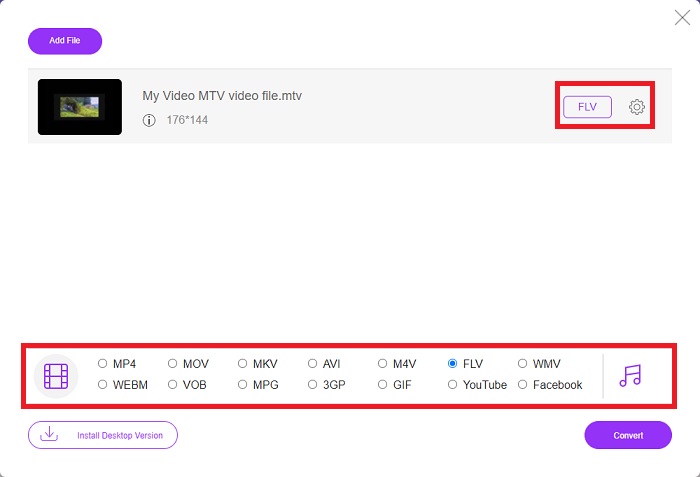
الخطوة 2: اختر صيغة الفيديو FLV من قائمة صيغ الفيديو الموجودة في الجزء السفلي من النافذة. إذا أردت معرفة جميع مواصفات ملف الإخراج، انقر على أيقونة الترس. عدِّل الإعدادات وفقًا لما تفضِّل، وبعد الانتهاء من التعديل انقر OK.
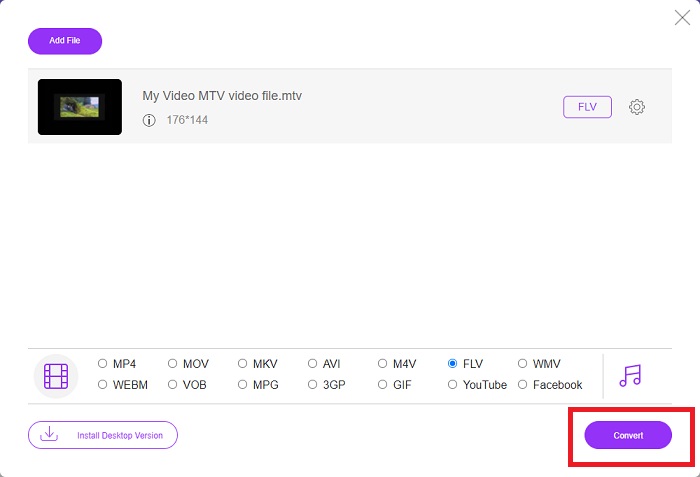
الخطوة 3: بعد أن تصبح راضيًا عن جميع الإعدادات، يمكنك تحويل صيغة فيديو MTV إلى FLV بالنقر على زر Convert.
ذات صلة:
الجزء 3. معرفة موسعة حول MTV و FLV
تستخدم بعض مشغلات الفيديو MP4 المحمولة الصينية معرفة واسعة حول ملفات الفيديو MTV و FLV بتنسيق MTV لتخزين مقاطع الفيديو. بمعدل 12 إطارًا في الثانية ، فهو يجمع بين صوت MP3 ومجموعة كبيرة من الصور. هناك بعض أوجه التشابه بين ملفات MTV وملفات AMV ، لكن التنسيق مختلف قليلاً. العديد من مشغلات MP4 الصينية الرخيصة لا تقوم بتخزين أو تشغيل مقاطع فيديو MP4. من ناحية أخرى ، يتم عرض مقاطع فيديو MTV. تعد مقاطع الفيديو منخفضة الدقة (128 × 128 بكسل) وصغيرة التنسيق هي المعايير في MTV (تبلغ الدقيقة الواحدة من الفيديو حوالي 24 ميجابايت من البيانات). لا تحتاج مشغلات الوسائط إلى مساحة تخزين كبيرة أو طاقة معالجة. لتخزين وتشغيل العديد من مقاطع فيديو MTV. على الرغم من أن تنسيق MTV يشبه تنسيق AMV ، الذي تستخدمه أيضًا مشغلات الوسائط المحمولة الصينية ، إلا أن التنسيقات تختلف بدرجة كافية بحيث لا يمكن لكل جهاز أو مشغل وسائط متوافق مع AMV تشغيل ملفات MTV.
ومع ذلك ، يمكن استخدام تنسيق فيديو Flash من Adobe Systems لمقاطع الفيديو عبر الإنترنت على YouTube و Hulu و Vevo والعديد من خدمات بث الفيديو الأخرى. باستثناء نظام التشغيل iOS ، يمكن لكل نظام تشغيل تقريبًا قراءة ملفات FLV وعرضها باستخدام Adobe Flash Player (بما في ذلك المكونات الإضافية للمتصفح) وبرامج الجهات الخارجية. يمكن لـ FLV اللعب على أجهزة iPhone و Android عبر برامج مفتوحة المصدر ومتصفحات محددة. لا يزال Flash يتسبب في حدوث مشكلات على iOS. يمكن لمستخدمي إصدار Android Jellybean استخدام ملفات FLV. يمكن فقط لبرامج مشغل FLV عرض الملفات بامتداد FLV. يمكن تسجيل شاشة فيديو FLV باستخدام برنامج التقاط وتسجيل الشاشة.
| امتداد الملف | MTV | FLV |
| نوع الملف | مشغل MP4 / MTV الصيني | ملف فلاش فيديو |
| طورت بواسطة | روبرت دبليو بيتمان | أنظمة أدوبي |
| الايجابيات | تتمثل إحدى أهم مزايا تنسيق MTV في قدرته على اللعب على معظم أجهزة الكمبيوتر حول العالم. | تنسيق FLV منتشر على الإنترنت. الآلاف من المواقع تستخدمه ؛ يوفر ميزات أكثر بكثير من امتدادات ملفات الفيديو الأخرى وينتج ملفات أصغر بكثير من معظم تنسيقات الفيديو الأخرى. تعد مقاطع فيديو FLV جيدة لعرض الجودة اللائقة والتحميل بسرعة. |
| سلبيات | نظرًا لإمكانيات تحسين الصوت الضعيفة ، فإن دقة الصورة محدودة ولا يمكنها عرض فيديو بملء الشاشة وكامل الحركة. | من الضروري أن يكون لديك مكونات فلاش إضافية مثبتة لتشغيل ملفات فلاش على الإنترنت. |
| البرامج التي تدعم / مفتوحة | ◆ مشغل الميديا VLC ◆ AVS ميديا بلاير | ◆ مشغل الميديا VLC ◆ برنامج Adobe Flash Player |
الجزء 4. أسئلة وأجوبة حول تحويل MTV إلى FLV
كيف أقوم بتحويل MTV إلى FLV على نظام Mac؟
يمكنك الاستفادة من Video Converter Ultimate المذكور أعلاه لتحويل ملفات MTV إلى FLV. أولاً ، تحتاج إلى تنزيل البرنامج على جهاز Mac الخاص بك ، ثم تشغيله بعد التثبيت. بعد ذلك ، أضف ملفاتك إلى البرنامج واختر تنسيق FLV الذي تريده. في النهاية ، انقر فوق الزر "تحويل الكل" لبدء التحويل من MTV إلى FLV.
كيف أقوم بفتح ملف MTV؟
قد لا يتم تشغيل بعض ملفات MTV في مشغل وسائط VideoLAN أو VLC عبر الأنظمة الأساسية أو مشغل الوسائط عبر الإنترنت لتقنيات الوسائط المتعددة لنظام التشغيل Windows فقط. جزء الصوت لبعض ملفات MTV ، على سبيل المثال ، يمكن تشغيله فقط باستخدام VLC. يمكن تحويل مقاطع فيديو MTV إلى AVI أو MP4 باستخدام FFmpeg أو AnyMP4 Video Converter أو AVS Video Converter من Online Media Technologies ، وجميع التطبيقات عبر الأنظمة الأساسية (Windows).
هل يمكن لـ VLC تحويل مقاطع الفيديو إلى FLV؟
قم بتشغيل مقطع فيديو باستخدام VLC Media Player. حدد خيار التحويل / الحفظ من القائمة المنسدلة في علامة التبويب الوسائط. يمكن إضافة ملفات فيديو .flv من النظام بالنقر فوق الزر "إضافة" في صفحة "فتح الوسائط".
خاتمة
بالنظر إلى جميع النقاط المذكورة في هذه المقالة، هناك محوِّلان اثنان موصى بهما ينبغي أن تفكِّر في استخدامهما، وهما Free Video Converter Online وVideo Converter Ultimate. كما ورد أعلاه، هذان البرنامجان أظهرا كامل إمكاناتهما، وهما أفضل من العديد من برامج التحويل الأخرى المتاحة على الإنترنت.
-
 [عبر الإنترنت ومجاني] 3 طرق لتحويل MTV إلى AVI بدون مشاكل
 هل سمعت يومًا عن تنسيق فيديو مثل MTV؟ نظرًا لأنك لا تعرف كل شيء عن هذا التنسيق وتريد تحويل فيديو MTV إلى AVI ، اقرأ هذه المقالة بعناية لمعرفة المزيد حول هذه المشكلة.
-
 دليل ملموس لمساعدتك في تحويل AVI إلى FLV مجانًا
 لتحويل AVI إلى FLV ، تحتاج إلى محول فيديو قوي. لحسن الحظ ، يمكنك تعلم اثنين ودليلهم خطوة بخطوة من هذه المقالة الفردية.
-
 2 أسهل الطرق لتحويل ملفات WMV إلى FLV على جهاز الكمبيوتر / جهاز Mac
 كيف يمكنك تحويل WMV إلى FLV؟ أولاً ، تحتاج إلى قراءة توصياتنا والعثور على طريقتك المفضلة ، ثم اتباع دليلنا للقيام بالمهمة بسرعة.
