


 محول الفيديو النهائي
 مسجل الشاشة
 إصلاح الفيديو
عملية التحويل دون اتصال بالإنترنت وعبر الإنترنت: أفضل طريقة لتحويل OGV إلى FLV
عند استخدام مقاطع فيديو OGV، قد يزعجك هذا التنسيق المرئي المضغوط بجودة مفقودة (lossy) لأنه يصبح ضبابيًا بعد إجراء التعديلات. ومع ذلك، ستتحسن الأمور إذا قمت أولًا بتحويل ملفات OGV إلى تنسيق FLV قبل مشاركتها عبر الإنترنت؛ فالتحدي الوحيد سيكون إيجاد برنامج تحويل فيديو سهل الاستخدام وقوي في الوقت نفسه. لحسن الحظ، لدينا أفضل أداة للاستخدام دون اتصال وبشكلٍ إلكتروني عبر الإنترنت من أجل تحويل OGV إلى FLV بسهولة. فقط اتبع الخطوات الواردة في هذه المقالة لراحتك.

الجزء 1. كيفية تحويل OGV إلى FLV بسهولة [غير متصل]
بصراحة، توجد الكثير من محوّلات الفيديو المتاحة على الإنترنت، لكن القليل منها فقط يدعم تحويل ملفات OGV. ونظرًا لأن هذا التنسيق ليس شائعًا بين معظم مستخدمي الفيديو، لا يهتم معظم المحوّلات بإدراجه ضمن التنسيقات المدعومة. ومن هنا يأتي دور برنامج Video Converter Ultimate. فهو يدعم بشكل كامل إدخال ملفات OGV ويتيح لك تحويل ملفات فيديو OGV إلى تنسيق FLV بسرعة. ومن الجدير بالذكر أيضًا أنه يستطيع تحويل مقاطع OGV الخاصة بك وتحريرها باستخدام أدوات عملية. كل ما تحتاجه موجود في Video Converter Ultimate. لذلك نعرض لك أبسط خطوات يمكنك اتباعها:
الخطوة 1: قبل أن تتمكن من استخدام البرنامج، يجب عليك تثبيته أولًا على جهاز الكمبيوتر المكتبي. يمكنك القيام بذلك من خلال النقر على أحد أزرار Free Download أدناه بحسب نظام التشغيل الذي تستخدمه. انتظر حتى يكتمل تنزيل ملف .exe أو .dmg، وبعد انتهاء التنزيل افتحه لبدء عملية التثبيت. أخيرًا، يمكنك تشغيل البرنامج فور الانتهاء من التثبيت بالنقر على Start Now.
تحميل مجانيلنظام Windows 7 أو أحدثتنزيل آمن
تحميل مجانيلنظام MacOS 10.7 أو أحدثتنزيل آمن
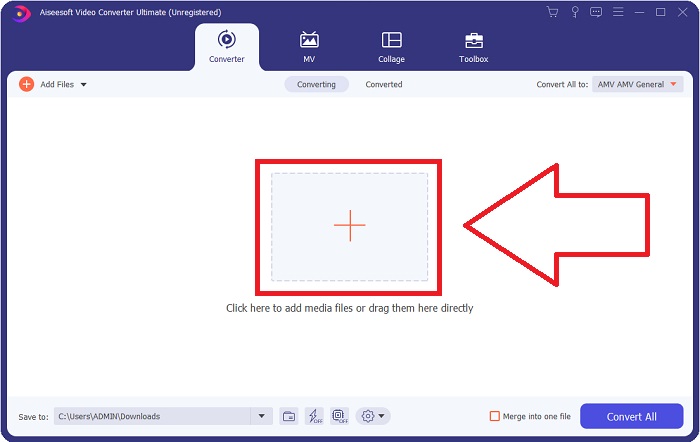
الخطوة 2: عند ظهور نافذة البرنامج المنبثقة، ستجد نفسك في واجهة تحتوي على زر + في المنتصف. لاستيراد ملف الفيديو الذي ترغب في تحويله، انقر على هذا الزر أو اسحب الملف وأسقطه مباشرة في البرنامج.
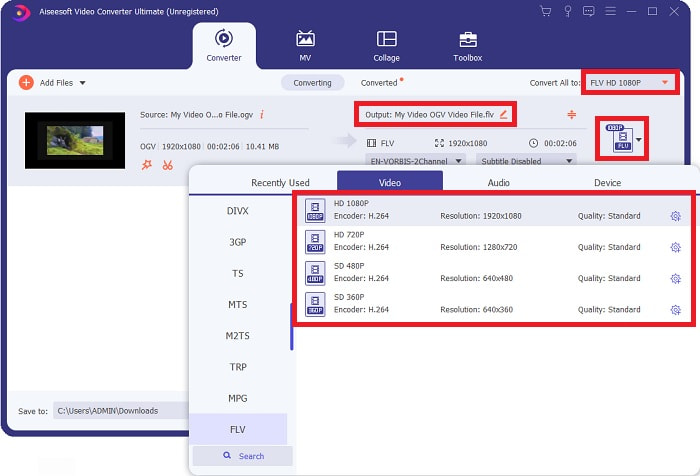
الخطوة 3: على الجهة اليمنى سيظهر لك تنسيق الملف الحالي للفيديو الخاص بك. انقر عليه، وستظهر لك جميع التنسيقات التي يمكنك الاختيار من بينها. في هذه الحالة، مرّر للأسفل واختر FLV، أو يمكنك البحث عنه في شريط البحث بالأسفل. والآن، على يمين التبويب يمكنك أيضًا اختيار جودة الفيديو التي تريدها للملف المحوّل.
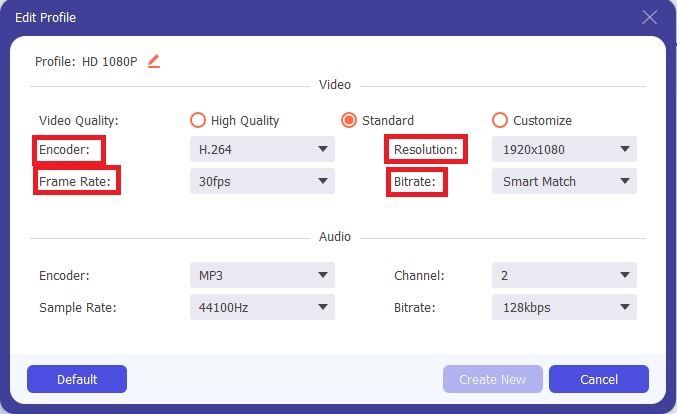
الخطوة 4: إذا كنت تبحث عن خيارات أكثر، يمكنك العثور عليها من خلال النقر على أيقونة الترس الموجودة بجوار جودة الفيديو التي اخترتها. من هناك يمكنك تعديل دقة الفيديو وخيارات أخرى مثل معدل الإطارات (frame rate) ومعدل العيّنة (sample rate) ومعدل البت (bitrate) ونوع التشفير (encoder). بعد أن تصبح راضيًا عن الإعدادات، انقر على زر Create New في الزاوية اليمنى السفلية لحفظ التغييرات.
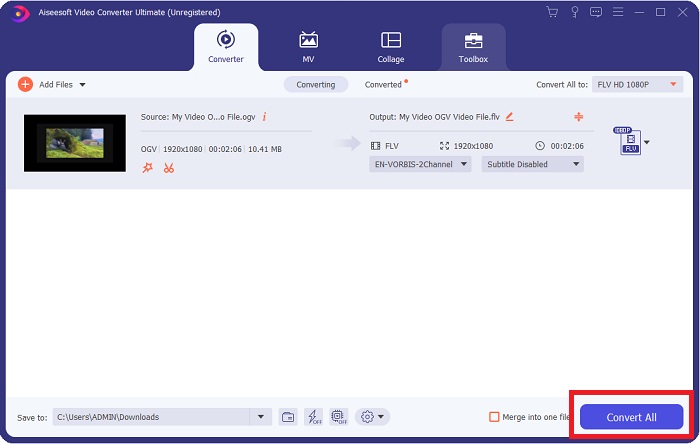
الخطوة 5: بعد الانتهاء من جميع التعديلات، يمكنك بدء عملية التحويل فعليًا بالنقر على زر Convert All في الزاوية اليمنى السفلية، ثم انتظر حتى تنتهي العملية.
الجزء 2. طريقة أخرى متاحة لتحويل OGV إلى FLV [عبر الإنترنت]
إذا كان الوقت لا يسمح وتحتاج إلى تحويل ملف OGV إلى FLV بأسرع ما يمكن، فلا داعي للقلق لأننا ما زلنا نوفر لك الحل. يمكنك استخدام النسخة الإلكترونية عبر الإنترنت من البرنامج نفسه، مع الاستمرار في الحصول على أعلى درجة من السهولة في الاستخدام من خلال عملية تحويل سلسة. أداة FVC Free Video Converter Online هي أداة ويب يمكنها بسهولة تحويل ملفات OGV إلى FLV مع توفير نفس خيارات الدقة وجودة الصوت. لاستخدامها، اتبع الخطوات التالية:
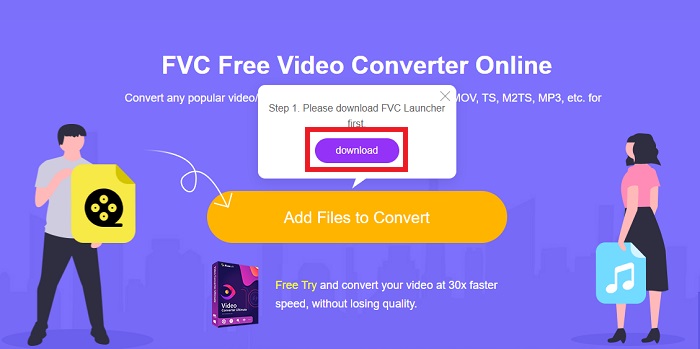
الخطوة 1: انقر على هذا الرابط، حيث سيتم توجيهك إلى أداة التحويل عبر الإنترنت. في منتصف الصفحة يوجد زر باسم Add Files to Convert. عليك النقر عليه لتنزيل المشغّل (Launcher) الذي تحتاجه لاستيراد ملف الفيديو الذي ترغب في تحويله.
الخطوة 2: بعد الانتهاء، يمكنك الآن رفع ملفك بالنقر مرة أخرى على الزر نفسه. ستظهر لك واجهة إذا تم رفع الملف بنجاح. من هناك يمكنك اختيار تنسيق FLV من بين التنسيقات الأخرى المعروضة في أسفل النافذة.
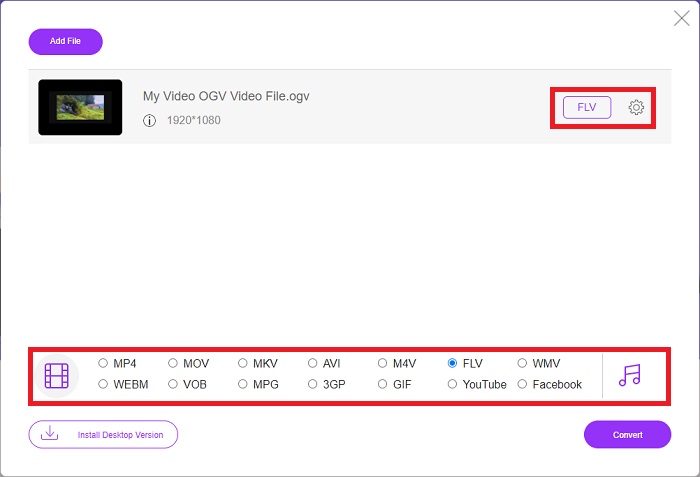
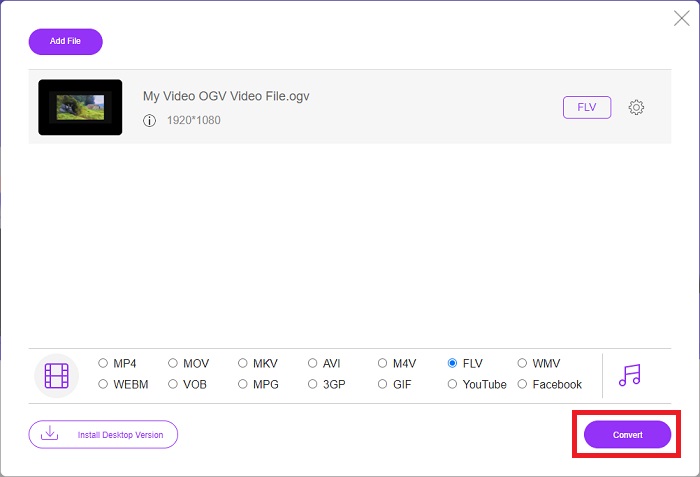
الخطوة 3: وبطريقة مشابهة، يمكنك أيضًا العثور على أيقونة الترس في أقصى اليمين، والتي يمكنك من خلالها تعديل الفيديو بشكل أعمق. عند النقر عليها، ستجد إعدادات الفيديو والصوت لتعديل برامج الترميز (encoders) والدقة ومعدل الإطارات وغير ذلك. انقر على OK ثم انقر على زر Convert في الزاوية اليمنى السفلية لبدء عملية التحويل.
الجزء 3. المعرفة الموسعة حول OGV و FLV
إذا كنت تريد معرفة المزيد عن الملفين اللذين تتم مقارنتهما ، فنحن نقدم لك هنا جميع المعلومات الضرورية التي قد ترغب في قراءتها:
غالبًا ما ترتبط طريقة ترميز الفيديو Ogg Vorbis بالملفات التي لها امتداد ملف ogv. Ogg Vorbis هو تنسيق ضغط صوتي مفتوح المصدر وغير حاصل على براءة اختراع. يُعرف تنسيق الحاوية لملفات الصوت والفيديو والمعلومات باسم Ogg ، بينما تم تسمية تقنية ضغط الصوت Vorbis باسم. تنسيق ملف OGV هو حاوية لملفات الفيديو. يمكن العثور على تدفقات الفيديو المرتبطة بواحد أو أكثر من برامج ترميز الفيديو ، مثل Theora و DivX ، في ملفات OGV. يمكن للمستخدمين تشغيل المواد المسجلة داخل ملف المحتوى على العديد من أجهزة الوسائط باستخدام هذه الملفات.
من ناحية أخرى ، فإن ملف الفيديو المخزن في تنسيق حاوية Adobe Flash Video (FLV) هو ملف FLV. يستخدمه Adobe Flash Player بشكل أساسي لتقديم محتوى فيديو عبر الإنترنت مثل الأفلام والحلقات التلفزيونية. أيضًا ، من الضروري ملاحظة أنه تنسيق مفتوح مدعوم من قبل مجموعة متنوعة من تطبيقات Adobe / Macromedia. لمقارنة أكثر تحديدًا بين الاثنين ، قمنا بعمل جدول من أجلك فقط.
| Ogg Vorbis (OGV) | فيديو Adobe Flash (FLV) | |
| امتداد الملف | .ogv | .flv |
| مطور | مؤسسة Xiph.Org | أنظمة أدوبي أدرجت |
| برامج الدعم | MPlayer Classic و VLC Media Player و Jriver Media Center و MPUI | RealPlayer و Apple QuickTime Player و Mplayer و VLC Media Player |
| مزايا | تتمتع OGG بميزة كونها خالية من براءات الاختراع ، ومعترف بها بشكل عام ، ومدعومة أصليًا من قبل معظم المتصفحات. نتيجة لذلك ، إذا كنت ترغب في تحميل فيلم على موقع الويب الخاص بك ، فإن هذا التنسيق يعد خيارًا جيدًا. | يكمن جمال برنامج Flash في أنه يمكن أن يساعد مواقع الويب التي ترغب في دمج المحتوى التفاعلي والحركة. الإجراء واضح ومباشر ، وفي النهاية قد يكون له تأثير كبير. استخدم الجميع أيضًا Flash للألعاب البدائية في بدايتها. |
| سلبيات | على الرغم من استخدامه على نطاق واسع ، فإن تنسيق فيديو OGG له بعض العيوب. Safari و Internet Explorer ، على سبيل المثال ، يدعمانه جزئيًا فقط ؛ وبالتالي ، قد لا يشاهد المستخدمون الفيديو الخاص بك بشكل صحيح في هذه المتصفحات. | العيب ، بالطبع ، هو أن تنسيق FLV أصبح غير مرغوب فيه بشكل أكبر في السنوات الأخيرة. قد يستغرق إنشاء محتوى FLV وقتًا طويلاً ويكون مكلفًا. عيب آخر هو أن مادة الفلاش لا يمكن تشغيلها على أجهزة iOS ، مما يحد بشدة من قدرتها على جذب متابعين جدد. |
الجزء 4. أسئلة وأجوبة حول تحويل OGV و FLV
هل OGG و OGV متماثلان؟
إنها مجموعة فرعية مناسبة من نوع وسائط فيديو Ogg video / Ogg بامتداد الملف. ogv. تستخدم تطبيقات Ogg الأخرى امتداد الملف. ogv مع تطبيق نوع الوسائط / ogg منذ ذلك الحين. ogx هي مجموعة شاملة من الفيديو / ogg.
هل جودة FLV أفضل من MP4؟
يُقال إن تنسيق MP4 يوفر ترميزًا رقميًا عالي الجودة لكل من الفيديو والصوت. أما رأي الجمهور حول FLV فليس واضحًا بالقدر نفسه، رغم أن مزايا وعيوب FLV نادرًا ما تركز على جودة تنسيق الملف نفسه. ومع نسب ضغط أعلى، يعاني MP4 من فقدان أقل في الجودة. هنا يمكنك الاطلاع على طرق تحويل ملفات FLV إلى MP4.
هل FLV ضياع أو ضياع مثل OGV؟
يدعم تنسيق ملف FLV الخاص ببرنامج Flash Video نسختين من برنامج ترميز مشاركة الشاشة (فيديو الشاشة) ، وهي طريقة تشفير screencast. تستند هذه التنسيقات إلى مربعات الصور النقطية وتكون ضائعة عند تقليل عمق الألوان وضغطها باستخدام Zlib.
خاتمة
بغض النظر عن مقدار الوقت الذي لديك في تحويل ملفات الفيديو الخاصة بك ، فإن كلاً من البرنامج ونظيرته عبر الإنترنت سيوفران لك الطريقة الأكثر ملاءمة لك. لذلك ، باختصار ، يعد Video Convert Ultimate و Free Video Converter هما أول ما تفكر فيه عندما يتعلق الأمر بتحويل الفيديو لتوفير الوقت في تصفح الإنترنت والعثور على الأفضل. هنا ، نقدم لك الأفضل.
-
 أفضل الطرق لتحويل VOB إلى FLV [مجاني ومتضمن عبر الإنترنت]
 هل تريد تحويل ملف VOB إلى ملف FLV؟ يمكنك إكمال المهمة بسهولة باستخدام محولات سطح المكتب أو عبر الإنترنت. اقرأ هذا الدليل وتعلم كيفية تحويل VOB إلى FLV بسهولة وسرعة.
-
 أفضل 4 تطبيقات مجانية لتحويل RMVB إلى FLV على سطح المكتب أو عبر الإنترنت
 ستخبرك هذه المقالة بأفضل برامج تحويل RMVB إلى FLV وتطبيقات الويب التي يمكنها تحويل ملفات RMVB (RealMedia Variable Bitrate) إلى فيديو FLV.
-
 كيفية ضغط ملف OGV دون فقدان الجودة
 لا يمكن إرسال ملفات OGV كبيرة للآخرين؟ حسنًا ، ستقدم لك هذه المقالة طريقتين سهلتين لمساعدتك على ضغط ملفات OGV بسهولة.
