


 محول الفيديو النهائي
 مسجل الشاشة
 إصلاح الفيديو
 تنزيل آمن
كيفية تحويل VOB إلى FLV مجانًا باستخدام حلول سطح المكتب وعبر الإنترنت في عام 2022
تُخزَّن الملفات ذات تنسيق VOB عادةً في مجلد VIDEO_TS الموجود في الجذر الخاص بقرص الـ DVD. تحتوي فيديوهات VOB على معظم البيانات المخزنة على القرص، بما في ذلك الفيديو والصوت والترجمات وقوائم DVD والمحتويات الملاحية الأخرى. ولكن إذا أردت رفع ملفات VOB إلى شبكات التواصل الاجتماعي مثل يوتيوب، فعليك تغيير تنسيق ملفات VOB إلى تنسيقات بث فيديو مدعومة مثل FLV – المعيار الشائع لبث الوسائط عبر الإنترنت. لذلك في هذا المقال، سنشرح كيفية تحويل VOB إلى FLV عبر الإنترنت أو باستخدام محوّل ملفات VOB إلى FLV مجاني لتحسين البث.

الجزء 1. كيفية تحويل VOB إلى FLV باستخدام برامج سطح المكتب المجانية
لتغيير تنسيق ملفات VOB إلى FLV بسرعة، جرّب برنامج FVC Free FLV Converter. يتيح لك هذا البرنامج المجاني تحويل ملفات الفيديو من VOB إلى FLV وMP4 وAVI وWMV وMOV والعديد من الصيغ الأخرى. بالإضافة إلى ذلك، يستطيع البرنامج تنفيذ بعض مهام تحرير الفيديو الأساسية عند الحاجة. ما عليك سوى تنزيل محوّل ملفات VOB إلى FLV واتباع الخطوات السهلة التالية.
تنزيل مجانيلنظام Windows 7 أو الأحدثتنزيل آمن
الخطوة 1. شغّل برنامج FVC Free FLV Converter
أولاً ، قم بتنزيل محول VOB إلى FLV لنظام التشغيل Windows أو Mac. بعد تنزيل ملف التثبيت ، انقر نقرًا مزدوجًا فوقه واتبع التعليمات التي تظهر على الشاشة. بعد ذلك ، قم بتشغيله على جهاز الكمبيوتر الخاص بك ، وستقوم واجهته على النحو التالي.

الخطوة 2. أضِف ملفات VOB إلى البرنامج
اضغط زر Add File(s)، ثم اختر ملفات VOB الخاصة بك وانقر على Next للمتابعة.

الخطوة 3. اختر FLV كصيغة للإخراج
بعد ذلك، اختر تنسيق الملف FLV من حقل Output format.
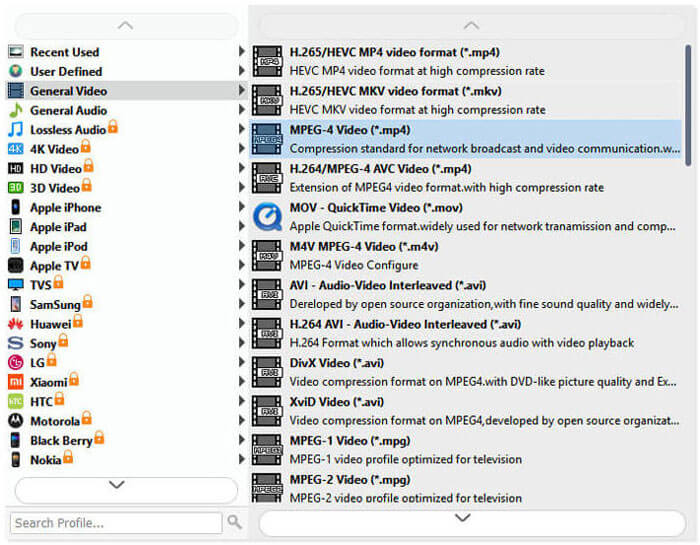
الخطوة 4. حوّل VOB إلى FLV
انقر على زر Open Folder واختر المجلد الذي ترغب في حفظ الملفات المحوّلة فيه. لبدء تحويل ملفات VOB إلى FLV، اضغط زر Convert. بعد اكتمال عملية التحويل، سيفتح المجلد الذي يحتوي على الملفات المحوّلة تلقائيًا.
الجزء 2. كيفية تحويل VOB إلى FLV عبر الإنترنت
يعد استخدام الخدمات عبر الإنترنت لتحويل VOB إلى FLV خيارًا جيدًا أيضًا. لقد اخترنا اثنين من محولات VOB إلى FLV عبر الإنترنت لتختار من بينها. كل هذه الأدوات عبر الإنترنت مجانية ويستخدمها العديد من المستخدمين بشكل متكرر. تابع القراءة لمعرفة كيفية تحويل VOB إلى FLV على جهاز الكمبيوتر الخاص بك باستخدام الأدوات عبر الإنترنت.
FVC Free Online Video Converter
يُعدّ FVC Free Online Video Converter أداة إلكترونية متكاملة تدعم أشهر صيغ الفيديو والصوت. تحويل الملفات باستخدام هذه الخدمة عبر الإنترنت آمن، حيث تُحذف ملفاتك المحوّلة من الخادم فور تنزيل النتيجة. لا يتطلّب التحويل تثبيت أي برنامج، كما أن عملية التحويل بأكملها بسيطة.
يمكنك اتباع الخطوات أدناه لتغيير ملفات VOB إلى FLV.
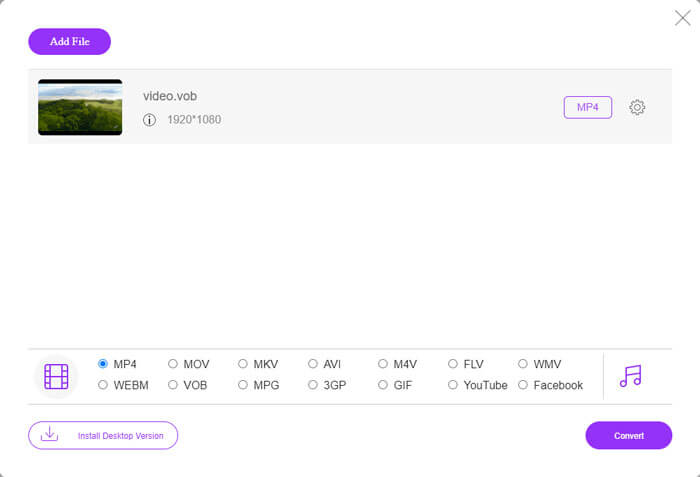
الخطوة 1. على موقع FVC Free Online Video Converter، انقر زر Add Files to Convert لإضافة ملفات VOB الخاصة بك. في المرة الأولى التي تستخدم فيها هذه الأداة، سيتعيّن عليك تنزيل وتثبيت أداة التشغيل (اللانشر) أولًا.
الخطوة 2. تأكد من تحديد FLV كصيغة للإخراج ضمن فئة الفيديو في أسفل النافذة.
الخطوة 3. اضغط زر Convert، ثم اختر مجلّد الوجهة. بعد اكتمال عملية التحويل، سيتم تنزيل الملف المحوَّل تلقائيًا، كما سيفتح المجلد الذي يحفظ الملفات المحوّلة.
تحويل ملفات
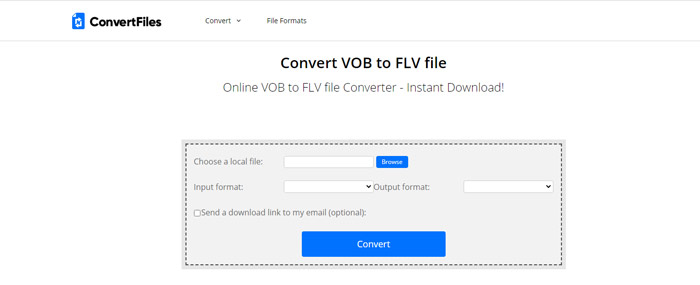
برنامج ConvertFiles هو محول ملفات VOB إلى FLV مجاني آخر على الإنترنت. يمكن لهذه الخدمة تحويل أنواع الملفات المختلفة مجانًا في غضون دقائق. يمكن لهذه الخدمة إرسال رابط التنزيل إلى الملف المحول إلى عنوان بريدك الإلكتروني إذا احتجت إلى ذلك. لا يتطلب التحويل تثبيت أي برنامج وتكون عملية التحويل بأكملها بسيطة. لكن لاحظ أن هذه الأداة عبر الإنترنت يمكنها تحويل ملفات بحجم يصل إلى 250 ميغابايت.
هذه هي الطريقة التي يمكنك بها استخدام محول VOB-to-FLV عبر الإنترنت.
الخطوة 1. انتقل إلى صفحة ConvertFiles على الويب، ثم انقر على Browse وأضِف ملفات VOB إلى البرنامج.
الخطوة 2. بعد ذلك، اختر Flash Video File (.flv) من قائمة Output format المنسدلة.
الخطوة 3. انقر على زر Convert لبدء تحويل ملفات VOB إلى FLV. عند نجاح التحويل، ستظهر لك رابط يمكنك النقر عليه للانتقال إلى صفحة التنزيل وتحميل ملفاتك المحوّلة.
الجزء 3. المقارنة بين تنسيقات VOB و FLV
| معلمة المقارنة | VOB | FLV |
| امتداد الملف | .vob | .flv |
| طورت بواسطة | منتدى DVD | أنظمة أدوبي |
| 00 ترميز الفيديو | MPEG-1 ، MPEG-2 | On2 VP6، Sorenson Spark، شاشة الفيديو، شاشة الفيديو 2، H.264 |
| أنظمة فك وتشفير الصوت | MP1 ، MP2 ، PCM ، AC-3 ، DTS | MP3 ، ADPCM ، Nellymoser ، Speex ، AAC |
| البرامج التي تفتح ملفات VOB / FLV | برنامج Windows Media PlayerVLC Media Player | مشغل الميديا VLC ، برنامج Adobe Flash Player |
الجزء 4. أسئلة وأجوبة من تحويل VOB إلى FLV
ما هو VOB؟
VOB (اختصارًا لـ Video Object) هو تنسيق حاوية في وسائط DVD-Video. يمكن أن يحتوي ملف VOB على الفيديو والصوت والترجمات وقوائم DVD مع إمكانية التنقّل بين الفصول على قرص DVD. غالبًا ما يكون تنسيق VOB مضغوطًا وفق معيار MPEG-2، ويمكن فتحه بواسطة معظم مشغّلات الوسائط تقريبًا. اطّلع على مقال أفضل 5 مشغلات VOB لأجهزة Windows 10/8/7 وMac لمعرفة المزيد عن مشغلات VOB.
ما هو FLV؟
FLV هو تنسيق حاوية صوتية‑مرئية يُستخدم لبث محتوى الفيديو الرقمي عبر الإنترنت باستخدام Adobe Flash Player 6 أو أحدث. يمكنك تشغيل ملفات FLV باستخدام Windows Media Player أو VLC أو Adobe Media Player أو Winamp أو RealPlayer أو غيرها من مشغلات FLV.
هل تحتوي ملفات VOB على صوت؟
نعم. يتضمن ملف VOB قوائم الفيديو والصوت والترجمات وقوائم DVD.
خاتمة
كما ترى ، يمكنك تحويل MP4 إلى FLV مع الاحتفاظ بالجودة العالية للفيديو الأصلي باستخدام محول ملفات VOB مجاني بسهولة. علاوة على ذلك ، يمكنك أيضًا إجراء تحويل VOB إلى FLV عبر الإنترنت. جميع محولات VOB إلى FLV المذكورة أعلاه مجانية. نأمل أن تجد حلاً مرضيًا يلبي احتياجاتك على أفضل وجه.
-
 ما هو ملف VOB وكيفية تحويل ملف VOB إلى GIF مجانًا
 هل تريد معرفة المزيد عن ملفات VOB وكيفية مشاركتها بعد نسخها من القرص المضغوط؟ أو لماذا تحتاج إلى تحويل VOB إلى GIF؟ ثم اقرأ هذه المقالة بعناية.
-
 VOB إلى MP4 - 3 طرق لتحويل ملفات VOB إلى MP4 مجانًا بكميات كبيرة
 تقدم هذه المقالة 3 محولات مجانية من VOB إلى MP4 والبرامج التعليمية ذات الصلة. يمكنك تحويل ملفات VOB إلى MP4 مجانًا على Windows / Mac / عبر الإنترنت بسهولة.
-
 كيفية ضغط ملفات VOB على الإنترنت ومجانيًا
 هل تبحث عن طرق لضغط ملفات VOB؟ تعرف على أفضل طريقة لتصغير حجم ملفات VOB في هذه المقالة.
