دليل المستخدم

حلول تحويل MTS

البدء

يساعد FVC Free MTS Converter على تحويل ملفات MTS الخاصة بك بسرعة وسهولة. يمكنك تحويل تنسيق MTS بحرية الذي تنتجه كاميرات الفيديو عالية الدقة مثل Sony و Panasonic و Cannon والمزيد إلى ملفات الفيديو والصوت الشائعة ، بما في ذلك MP4 و AVI و WMV و MOV و VOB و DivX و XviD و M4V و MP3 و AAC وما إلى ذلك.
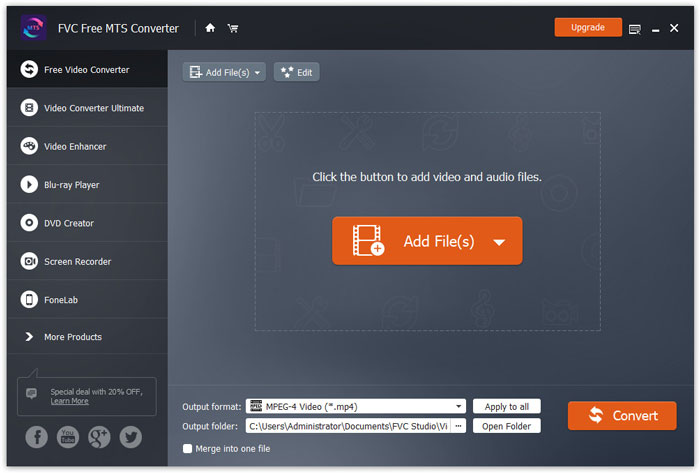
واجهه المستخدم

تحميل ملف التثبيت

Step 1. Open the Home Page on your computer and click Free Download button.

Step 2. Double-click the installation package to start installing. Follow the instructions to install FVC Free MTS Converter on your computer.

التفضيلات

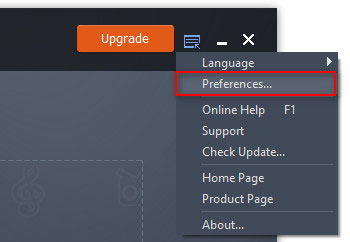
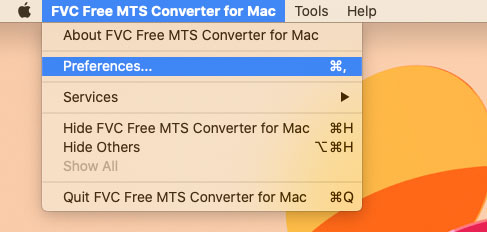
You can adjust preferences on Free MTS Converter and enjoy using it at your convenience. To edit the preferences, you can launch the software, go to Menu and select Preferences... It provides 2 sections where you can choose your preferences.

تفضيلات القائمة

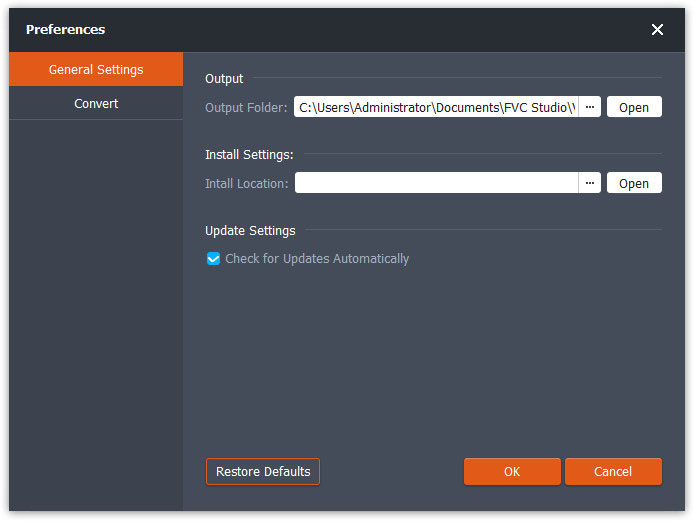
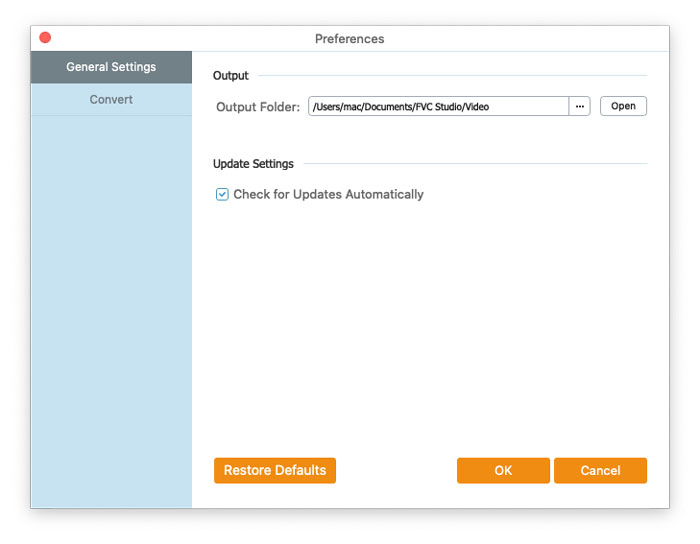
General Settings: You can adjust the output folder, installation settings, and update settings.

التفضيلات الإعدادات العامة

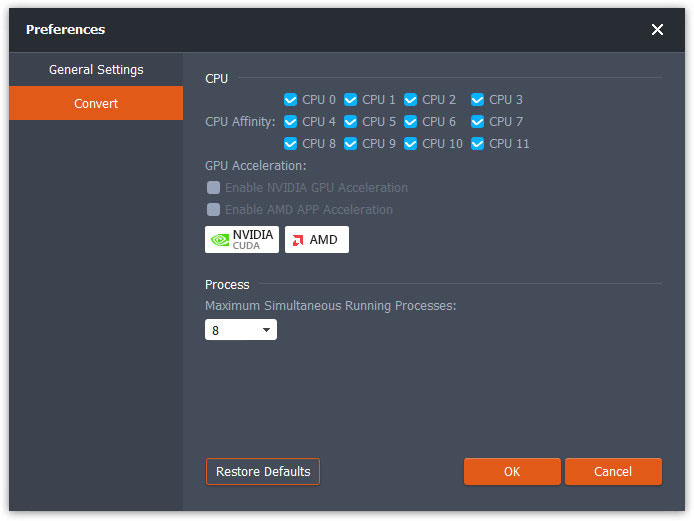
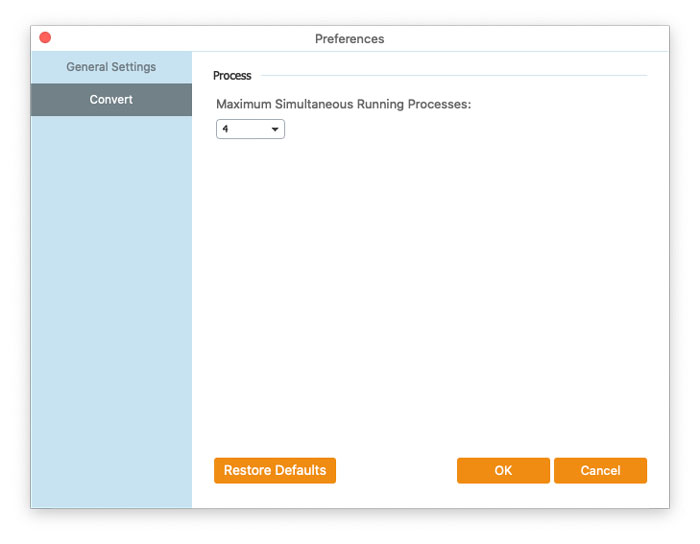
Convert: The GPU acceleration can speed up the conversion. You can select CPU affinity, and set the maximum number for the simultaneous running processes.

تفضيلات تحويل

تحويل ملفات MTS

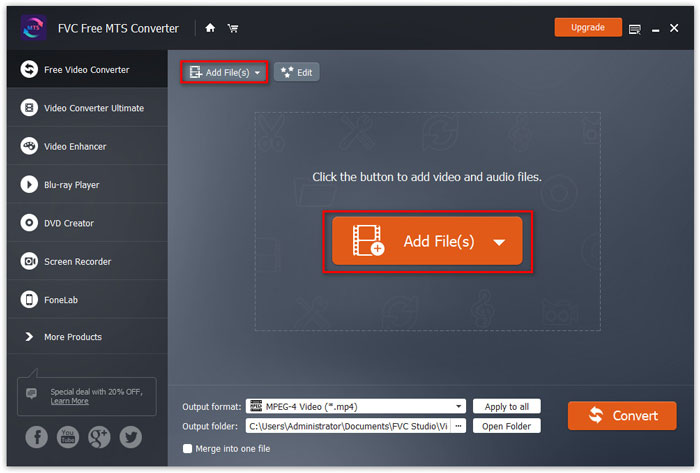
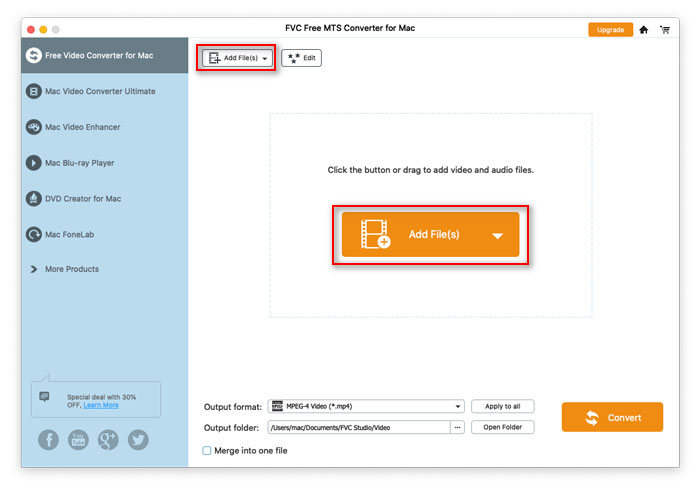
Step 1. Launch Free MTS Converter on your computer. You can add the MTS files into the program through the 3 ways.

1. Click the Add File(s) button at the top-left side to choose Add File(s) or Add Folder option.

2. Click the Add File(s) button in the middle of the interface to import one or more MTS files.

3. اسحب ملفات الفيديو وأفلتها في منطقة المستطيل في منتصف الواجهة.

أضف ملفات MTS

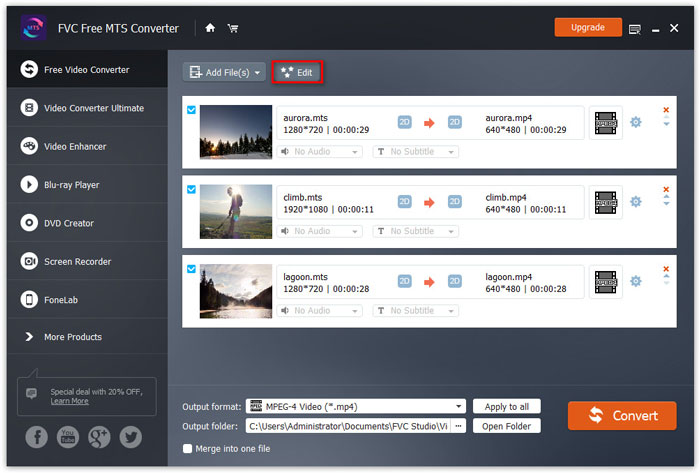
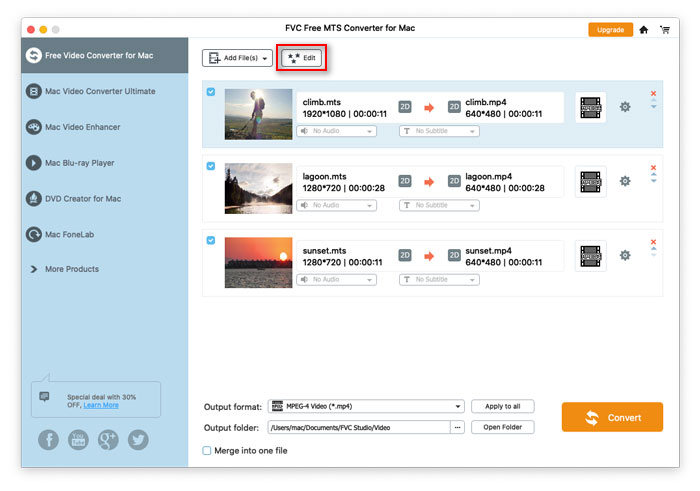
Step 2. Select the MTS file you want to edit and click the Edit button at the top to enter the editing interface.

تحرير ملفات MTS

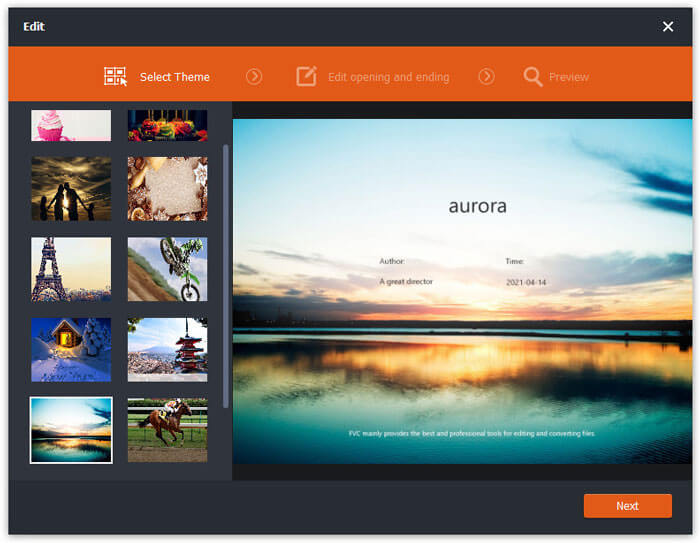
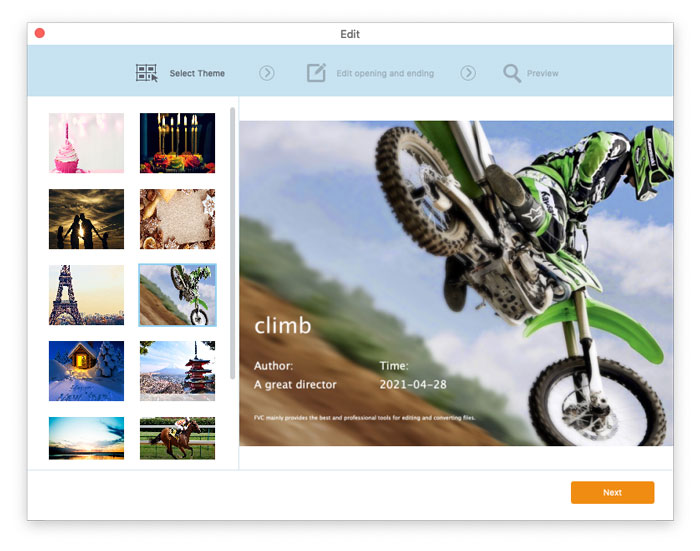
In the edit interface, you can select a theme in the Select Theme tab to customize your MTS files firstly. Click Next button to move on.

اختر نمطا

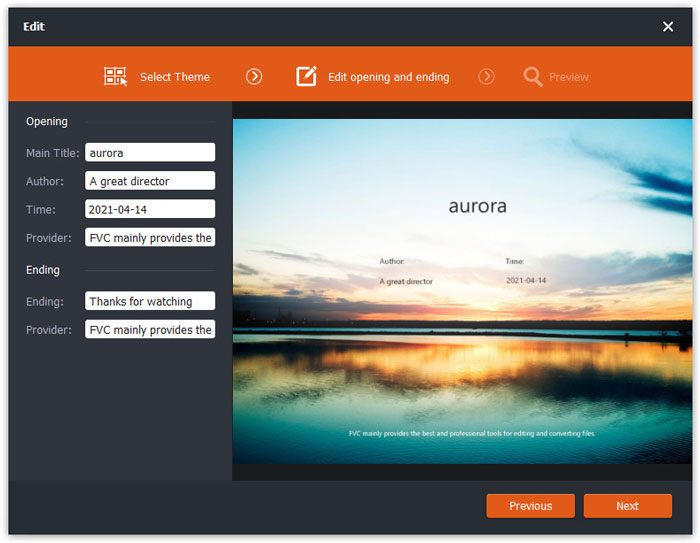
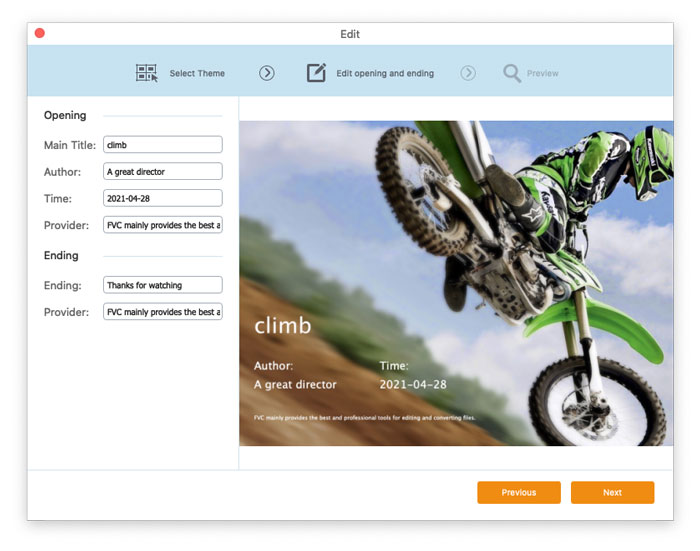
In the Edit opening and ending tab, you can adjust the info at the opening and ending, like main title, author, time, provider, etc. Click Next button to move the next step.

تحرير الافتتاح النهاية

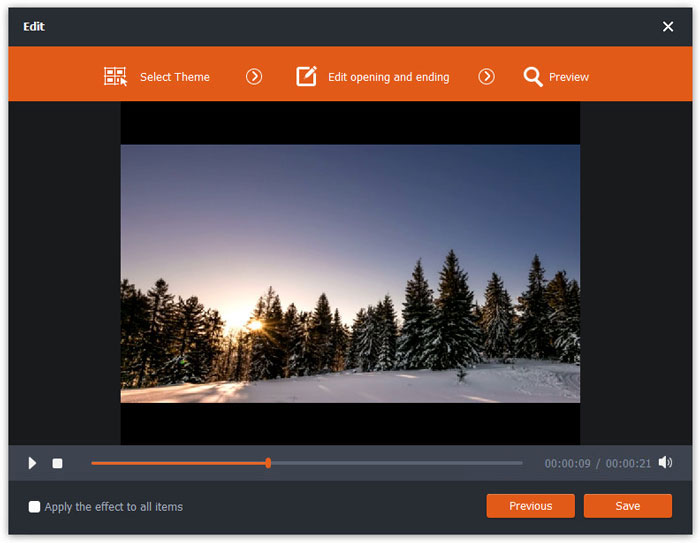
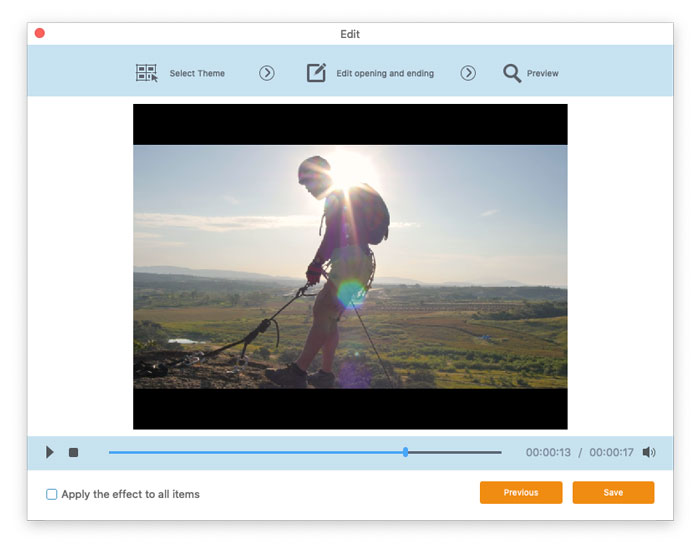
Then you will be taken to the Preview window. Here you can preview the video effects in advance. If you are not satisfied with it, click Previous to readjust the settings.

Finally, click Save button to save the video effects adjustment. If you want to apply the same effect to all the video clips, just tick Apply the effect to all items option.

معاينة تأثيرات الفيديو

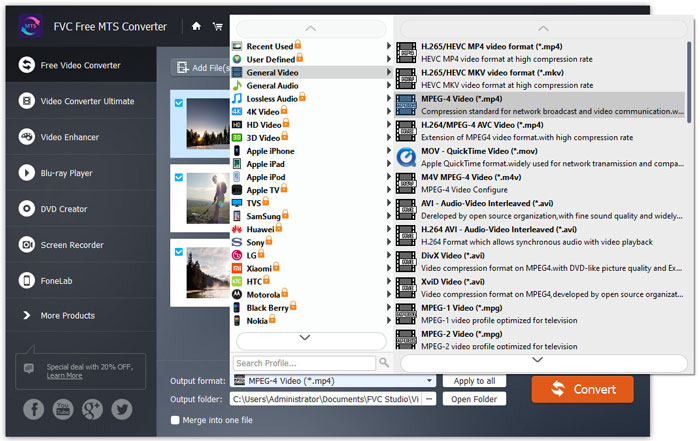
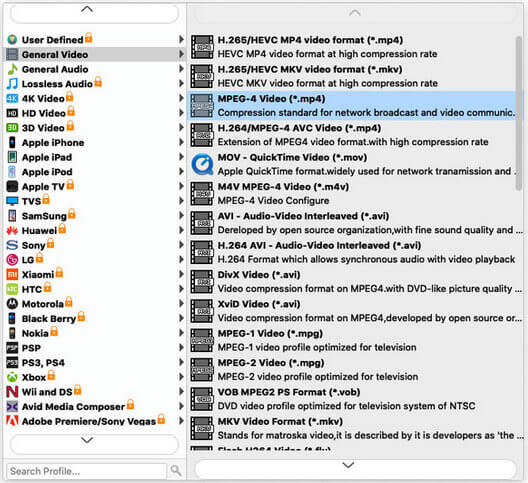
Step 3. Go to the Output format field and choose General Video category, and then select one output format you want to export.

حدد تنسيق الإخراج

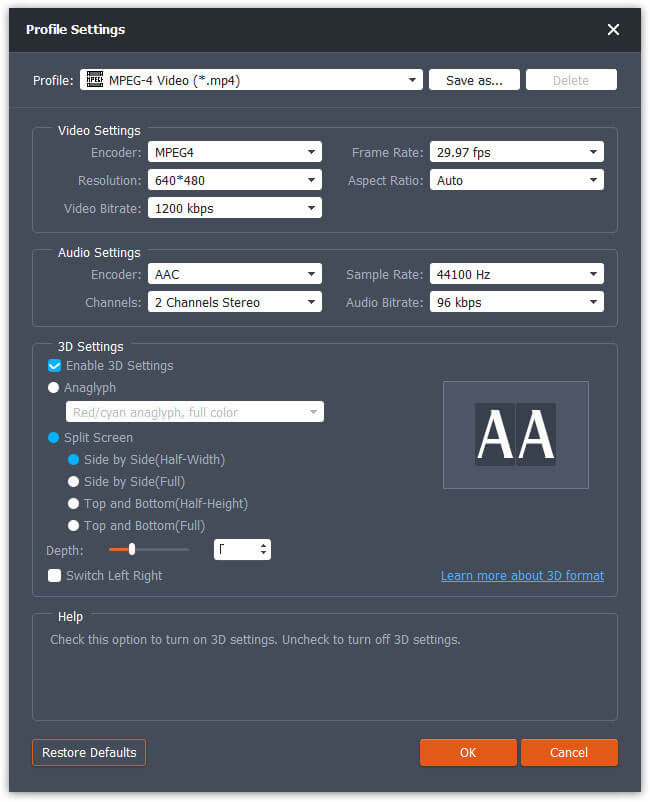
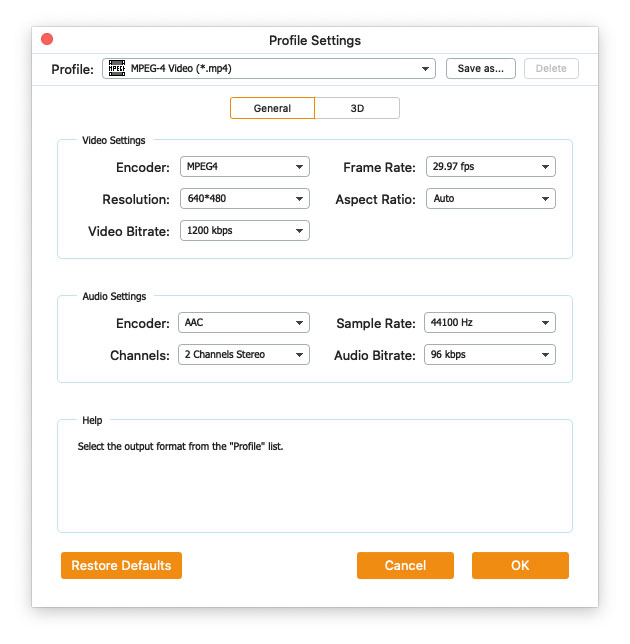
To further customize the preset, you can click the gear icon at the right side of the video. You can adjust settings like encoder, sample rate, resolution, aspect ratio, bitrate. If you want to add 3D effect to your MTS file, you can check Enable 3D Settings option, and select Anaglyph 3D, Side by Side 3D or Top and Bottom 3D.

إعدادات الملف الشخصي

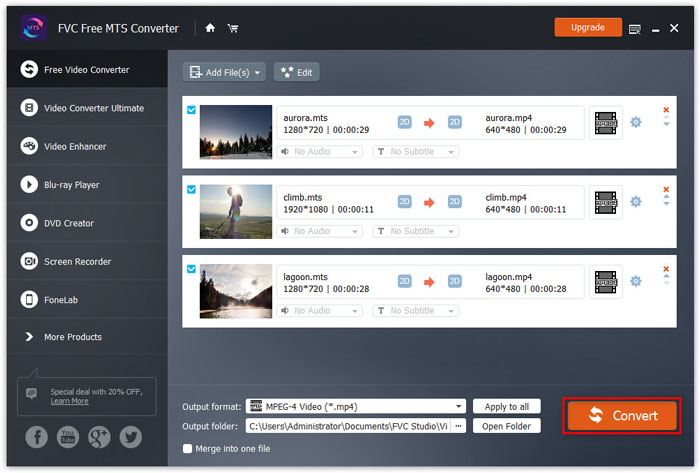
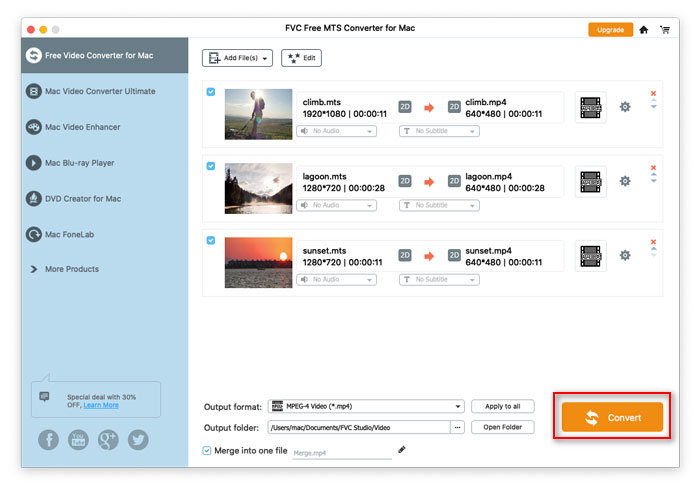
Step 4. Go to the Output folder field and choose the output destination where the converted file will be saved. Then click Convert button to start converting MTS video files.

تحويل ملفات MTS

دليل المستخدم

حلول تحويل MTS

البدء

يساعد FVC Free MTS Converter على تحويل ملفات MTS الخاصة بك بسرعة وسهولة. يمكنك تحويل تنسيق MTS بحرية الذي تنتجه كاميرات الفيديو عالية الدقة مثل Sony و Panasonic و Cannon والمزيد إلى ملفات الفيديو والصوت الشائعة ، بما في ذلك MP4 و AVI و WMV و MOV و VOB و DivX و XviD و M4V و MP3 و AAC وما إلى ذلك.
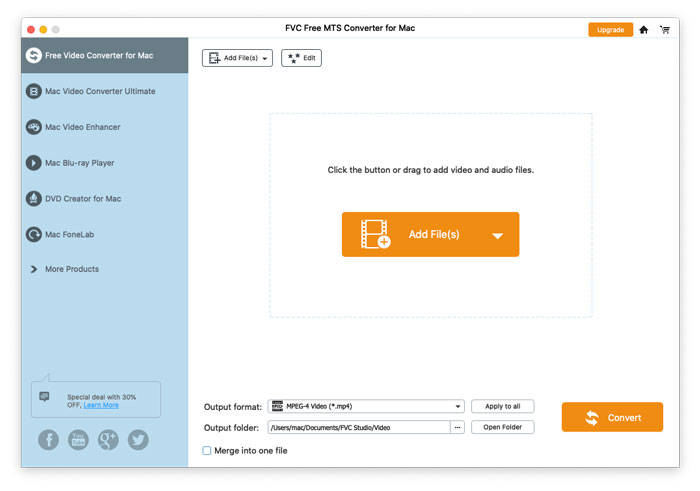
واجهه المستخدم

تحميل ملف التثبيت

Step 1. Open the Home Page on your computer and click Free Download button.

Step 2. Double-click the installation package to start installing. Follow the instructions to install FVC Free MTS Converter on your computer.

التفضيلات

You can adjust preferences on Free MTS Converter and enjoy using it at your convenience. To edit the preferences, you can launch the software, go to Menu and select Preferences... It provides 2 sections where you can choose your preferences.

تفضيلات القائمة

General Settings: You can adjust the output folder, installation settings, and update settings.

التفضيلات الإعدادات العامة

Convert: The GPU acceleration can speed up the conversion. You can select CPU affinity, and set the maximum number for the simultaneous running processes.

تفضيلات تحويل

تحويل ملفات MTS

Step 1. Launch Free MTS Converter on your computer. You can add the MTS files into the program through the 3 ways.

1. Click the Add File(s) button at the top-left side to choose Add File(s) or Add Folder option.

2. Click the Add File(s) button in the middle of the interface to import one or more MTS files.

3. اسحب ملفات الفيديو وأفلتها في منطقة المستطيل في منتصف الواجهة.

أضف ملفات MTS

Step 2. Select the MTS file you want to edit and click the Edit button at the top to enter the editing interface.

تحرير ملفات MTS

In the edit interface, you can select a theme in the Select Theme tab to customize your MTS files firstly. Click Next button to move on.

اختر نمطا

In the Edit opening and ending tab, you can adjust the info at the opening and ending, like main title, author, time, provider, etc. Click Next button to move the next step.

تحرير الافتتاح النهاية

Then you will be taken to the Preview window. Here you can preview the video effects in advance. If you are not satisfied with it, click Previous to readjust the settings.

Finally, click Save button to save the video effects adjustment. If you want to apply the same effect to all the video clips, just tick Apply the effect to all items option.

معاينة تأثيرات الفيديو

Step 3. Go to the Output format field and choose General Video category, and then select one output format you want to export.

حدد تنسيق الإخراج

To further customize the preset, you can click the gear icon at the right side of the video. You can adjust settings like encoder, sample rate, resolution, aspect ratio, bitrate. If you want to add 3D effect to your MTS file, you can check Enable 3D Settings option, and select Anaglyph 3D, Side by Side 3D or Top and Bottom 3D.

إعدادات الملف الشخصي

Step 4. Go to the Output folder field and choose the output destination where the converted file will be saved. Then click Convert button to start converting MTS video files.

تحويل ملفات MTS