


 محول الفيديو النهائي
 مسجل الشاشة
 إصلاح الفيديو
 تنزيل آمن
مراجعة Ezgif: الأداة المثالية عبر الإنترنت لتحرير وإنشاء صور GIF
في عالم المحتوى عبر الإنترنت، أصبحت صور GIF جزءًا لا يتجزأ من التواصل والترفيه والتفاعل على وسائل التواصل الاجتماعي. فمن مشاركة المقاطع المضحكة إلى التعبير عن المشاعر المعقدة، توفّر صور GIF طريقة فريدة وجذابة لنقل الرسائل. ومنصّة حظيت باهتمام كبير بفضل قدراتها في تحرير وإنشاء صور GIF هي Ezgif. في هذه المراجعة، سنستعرض مزايا، وسهولة استخدام، والأداء العام لأداة Ezgif maker.

الجزء 1. نظرة عامة على Ezgif وفائدته في تحرير صور GIF
Ezgif عبارة عن منصة عبر الإنترنت تقدم مجموعة واسعة من الأدوات للعمل مع صور GIF. سواء كنت تريد إنشاء ملف GIF من مقطع فيديو، أو تعديل ملف GIF موجود، أو تحسين حجمه، أو إضافة تأثيرات، أو تنفيذ مهام أخرى متعلقة بـ GIF، فإن Ezgif يلبي احتياجاتك. يعتمد النظام الأساسي بالكامل على الويب، مما يعني أنك لا تحتاج إلى تنزيل أو تثبيت أي برنامج لاستخدام ميزاته. وهذا يجعله خيارًا مناسبًا لكل من المستخدمين العاديين والمحترفين الذين يبحثون عن حلول سريعة لتحرير صور GIF. لذلك، إذا كنت ترغب في استخدام هذا كفيديو Ezgif لصانع GIF، فيمكن أن يساعدك في تلبية هذه الحاجة.
الجزء 2. مميزات عزجيف
إنشاء صور GIF: من أبرز مزايا Ezgif أداة إنشاء صور GIF. يمكنك بسهولة تحويل مقاطع الفيديو من صيغ مختلفة، بما في ذلك MP4 وAVI وغيرها، إلى صور GIF. إن التحويل من MP4 إلى GIF باستخدام Ezgif سهل للغاية. تتيح لك المنصّة تخصيص حجم الصورة ومعدل الإطارات وجودة صورة GIF الناتجة، مما يمنحك تحكّمًا كاملاً في المنتج النهائي.
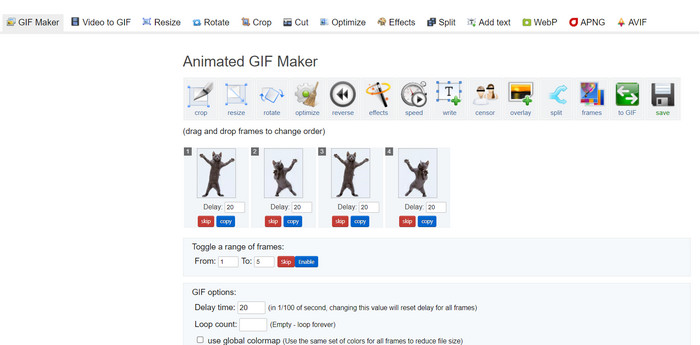
قدرات التحرير: يوفّر Ezgif عددًا كبيرًا من خيارات تحرير صور GIF. يمكنك قصّ الصور وتغيير حجمها وتحسينها لتقليل حجم الملف دون التضحية الكبيرة بالجودة. بالإضافة إلى ذلك، تتيح لك المنصّة إضافة نصوص وصور وطبقات وتأثيرات لتعزيز الجاذبية البصرية لصور GIF الخاصة بك.
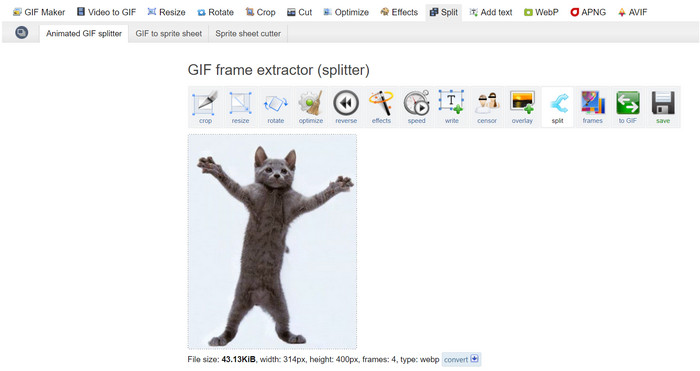
تقسيم ودمج وجمع صور GIF: إذا كنت بحاجة إلى تقسيم صورة GIF إلى إطارات منفصلة أو دمج عدّة صور GIF في واحدة، فإن Ezgif Maker يجعل العملية بسيطة. يكون هذا مفيدًا بشكل خاص عندما ترغب في إنشاء صورة GIF أطول من مقاطع أقصر، أو جمع صور GIF معًا لسرد قصة مرئية أطول. إن استخدام Ezgif لدمج صور GIF يشكّل حقًا راحة كبيرة.
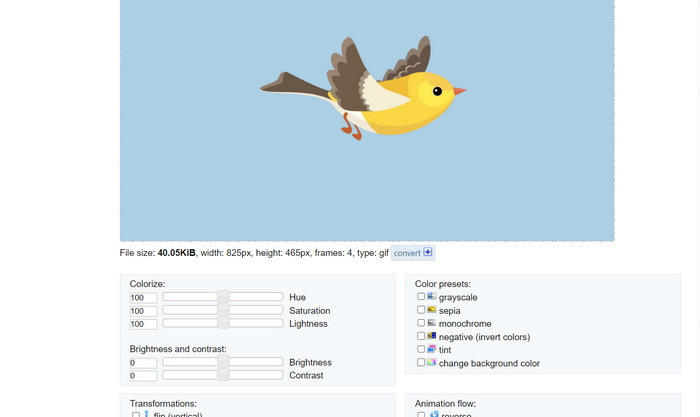
التأثيرات والفلاتر: يقدّم Ezgif مجموعة متنوعة من التأثيرات والفلاتر التي يمكن تطبيقها على صور GIF. بدءًا من ضبط الألوان وصولاً إلى التمويه، والطبقات، والمزيد، يمكن لهذه التأثيرات أن تحوّل صور GIF الخاصة بك وتضفي عليها لمسة فنية.
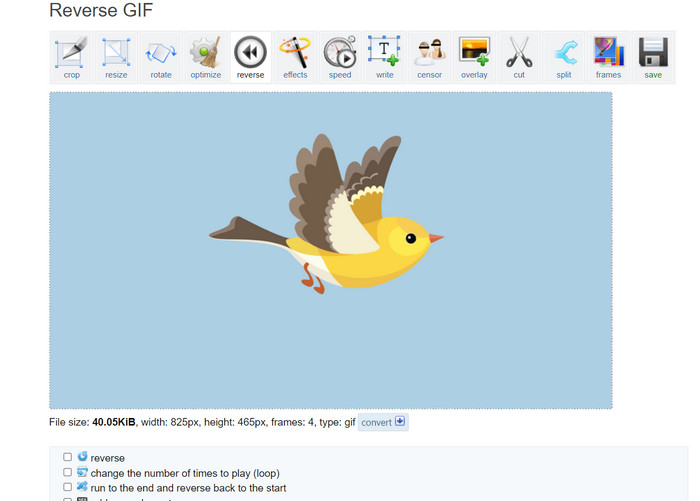
سرعة GIF وعكس الاتجاه: تسمح لك المنصّة بضبط سرعة صورة GIF، لجعلها تُعرض بشكل أسرع أو أبطأ. بالإضافة إلى ذلك، يمكنك عكس تشغيل صورة GIF، مما يخلق تأثيرات بصرية ممتعة وجذابة.
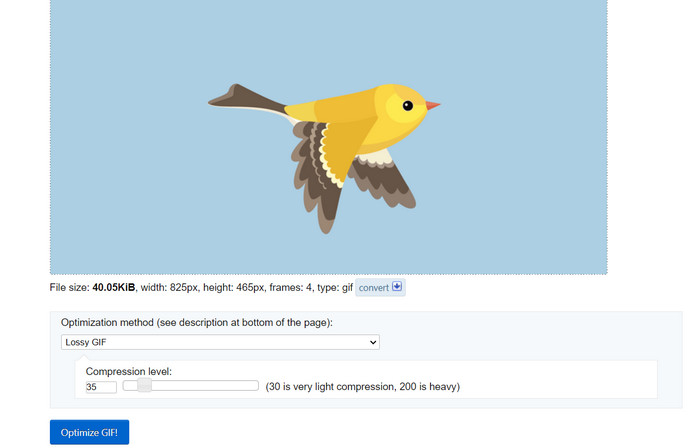
التحسين: قد يؤدي تحميل صور GIF كبيرة على المواقع الإلكترونية أو منصّات التواصل الاجتماعي أحيانًا إلى بطء في أوقات التحميل. تساعدك أدوات تحسين GIF في Ezgif على تقليل حجم ملف صور GIF مع الحفاظ على جودة صورة مقبولة، بما يضمن تجربة أكثر سلاسة لجمهورك.
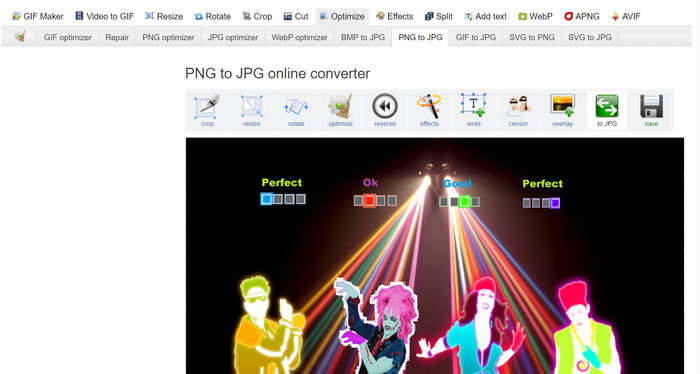
تحويل الصور: يعمل Ezgif أيضًا كمحوّل صور، حيث يتيح للمستخدمين تحويل PNG إلى GIF والعكس صحيح. وبذلك يمكنك أيضًا تحويل صور GIF الخاصة بك إلى PNG باستخدام Ezgif. ولا يقتصر الأمر على هذه الصيغ، لأن الأداة تدعم JPG أيضًا. كما يمكن إجراء تحويل GIF إلى JPG على Ezgif.
الايجابيات
- قم بتغيير حجم ملفات GIF لتناسب تفضيلاتك.
- قم بقص الجزء غير المرغوب فيه من ملف GIF.
- قم بتطبيق تأثيرات متعددة على صور GIF عالية الدقة.
سلبيات
- هناك بعض التأخير الملحوظ عند استخدام الأداة.
الجزء 3. كيفية استخدام EZGIF
يعد استخدام Ezgif أمرًا بسيطًا نسبيًا، وذلك بفضل واجهته سهلة الاستخدام وأدواته البديهية. فيما يلي دليل خطوة بخطوة حول كيفية استخدام بعض الميزات الأساسية لـ Ezgif:
إنشاء صور GIF:
الخطوة 1. انتقل إلى موقع Ezgif (https://ezgif.com/). انقر فوق علامة التبويب Video to GIF في قائمة التنقّل.
الخطوة 2. قم برفع ملف الفيديو الذي تريد تحويله إلى GIF.
الخطوة 3. اختر وقت البداية والنهاية لصورة GIF الخاصة بك، وقم بضبط حجم الإطار ومعدل الإطارات إذا لزم الأمر. بعد ذلك، انقر على زر Convert to GIF.
بمجرد اكتمال التحويل، يمكنك معاينة وتنزيل ملف GIF الذي تم إنشاؤه حديثًا.
تحرير GIF:
الخطوة 1. من الصفحة الرئيسية لـ Ezgif، اختر أداة التحرير التي تريد استخدامها من قائمة التنقّل (مثلًا: Crop GIF). ثم ارفع صورة GIF التي تريد تعديلها.
الخطوة 2. استخدم واجهة الأداة لضبط الإعدادات. في أداة القص، يمكنك تحديد المنطقة المحددة التي تريد الاحتفاظ بها وضبط الأبعاد.
الخطوة 3. بعد إجراء التعديلات، انقر زر Crop It! (أو الزر المناسب للأداة التي تستخدمها). بعد ذلك، عاين صورة GIF المعدّلة وحمّلها إذا كنت راضيًا عنها.
الجزء 4. بديل EZGIF
هناك العديد من البدائل الممتازة لـ Ezgif لكل من مستخدمي الإنترنت وسطح المكتب، ويقدم كل منها ميزات وقدرات فريدة لتحرير وإنشاء صور GIF. فيما يلي بعض أفضل الخيارات:
1. محول الفيديو النهائي
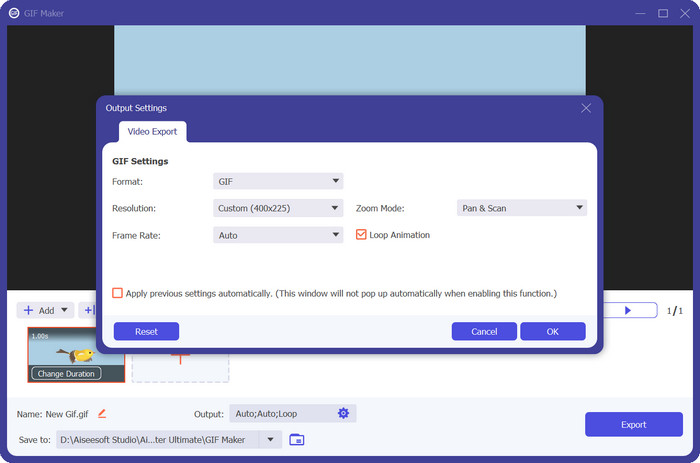
برنامج Video Converter Ultimate ليس مخصّصًا فقط لتحويل ملفات الوسائط، بل يستخدم أيضًا لإنشاء وتحرير صور GIF. تأتي الأداة بقدرات أساسية مثل تحويل الصور إلى GIF وتحويل الفيديو إلى GIF. إضافة الفلاتر والتأثيرات لا تتطلّب سوى نقرة واحدة. إذا كنت تبحث عن بديل لموقع ezgif.com، فإن Video Converter Ultimate هو الأداة المناسبة.
تنزيل مجانيلنظام Windows 7 أو أحدثتنزيل آمن
تنزيل مجانيلنظام MacOS 10.7 أو أحدثتنزيل آمن
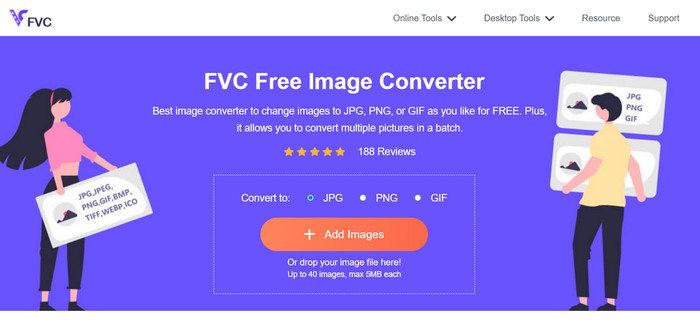
2. محول الصور المجاني FVC
يُعدّ FVC Free Image Converter محوّل صور خفيفًا يلبي احتياجاتك في تحويل JPG إلى GIF وPNG إلى GIF وGIF إلى PNG وكل ما بين ذلك. بالإضافة إلى ذلك، تتيح الأداة للمستخدمين إسقاط ما يصل إلى 40 صورة للتحويل دفعة واحدة.
قراءة إضافية:
تعرّف على 4 طرق لإنشاء صور GIF من الصور [أونلاين وغير متصل بالإنترنت]
تكرار صور GIF باستخدام أفضل أداة لتكرار الصور المتحركة على ويندوز وماك
الجزء 5. الأسئلة الشائعة حول EZGIF
كيف أحفظ صور GIF المعدلة على EZGIF؟
لحفظ صور GIF المعدلة على Ezgif، استخدم أولاً أدوات التحرير لإجراء التغييرات المطلوبة على ملف GIF. قم بمعاينة تعديلاتك، ثم ابحث عن الزر "حفظ" أو "تنزيل" على واجهة الأداة. انقر فوق الزر، واختر موقع حفظ على جهاز الكمبيوتر الخاص بك، ثم قم بتنزيل ملف GIF المعدل إلى ذلك الموقع.
هل يستطيع EZGIF التعامل مع صور GIF عالية الدقة؟
نعم، يستطيع Ezgif التعامل مع صور GIF عالية الدقة لمختلف المهام مثل التحرير وتغيير الحجم والتحسين. ومع ذلك، قد يتأثر الأداء اعتمادًا على مدى تعقيد عمليات التحرير وحجم ملف GIF. قد تختلف أوقات المعالجة، وقد يكون هناك تأخير بالنسبة لبعض العمليات كثيفة الاستخدام للموارد. يوصى بمعاينة التغييرات قبل الانتهاء منها لضمان النتيجة المرجوة.
هل يدعم EZGIF المعالجة المجمعة لملفات GIF؟
لا، Ezgif لا يدعم المعالجة المجمعة لملفات GIF؛ يجب تحميل كل ملف GIF وتحريره بشكل فردي.
هل يدعم EZGIF تحرير صور GIF فقط؟
لا، يقدم Ezgif مجموعة من الأدوات بخلاف تحرير صور GIF، بما في ذلك إنشاء صور GIF من مقاطع الفيديو، وتحسين صور GIF لتقليل أحجام الملفات، وإضافة تأثيرات، وتقسيم صور GIF ودمجها، والمزيد. إنها منصة متعددة الاستخدامات عبر الإنترنت لمختلف المهام المتعلقة بـ GIF.
هل EZGIF آمن للاستخدام؟
نعم، يعتبر عقار Ezgif آمنًا للاستخدام بشكل عام. إنها منصة على الإنترنت ذات سمعة طيبة وكانت موجودة منذ فترة وتستخدم على نطاق واسع لتحرير صور GIF والمهام ذات الصلة.
خاتمة
برز Ezgif كأداة إلكترونية متعددة الاستخدامات وقويّة لتحرير وإنشاء صور GIF. إن مجموعة مزاياه، من تحويل GIF إلى التحرير والتأثيرات والتحسين، تجعله خيارًا مفضّلًا لكل من يرغب في تحسين محتوى GIF الخاص به. ورغم أن أدائه قد يختلف تبعًا لمدى تعقيد المهمة، فإن واجهته سهلة الاستخدام ومجموعة أدواته الشاملة تجعلانه موردًا قيّمًا لكلٍّ من هواة صور GIF والمستخدمين المحترفين على حد سواء لتعلّم كيفية صنع GIF على Ezgif. إذا كنت بحاجة إلى حل إلكتروني مريح لكل ما يتعلق بصور GIF، فإن Ezgif بالتأكيد يستحق التجربة.
-
 يجب ألا تفوتك أفضل 4 مكبرات لصور GIF في وضع عدم الاتصال وعبر الإنترنت
 هذا المنشور مخصص لك إذا كنت تبحث عن أفضل برامج تكبير GIF. قمنا بإدراج أفضل برامج تكبير GIF على الإنترنت وغير المتصلة بجهاز الكمبيوتر الخاص بك.
-
 أفضل دليل حول كيفية قص صور GIF لإضفاء الإثارة على المحتوى الخاص بك
 لا تفوت هذا الدليل الذي يجب قراءته. تعرف على كيفية تقليم صور GIF وقصها لجذب انتباه جمهورك باستخدام أدوات قص GIF رائعة عبر الإنترنت وفي وضع عدم الاتصال.
-
 كيفية تحويل الفيديو إلى GIF لعمل صور GIF ملفتة للنظر
 اكتشف كيفية تحويل مقاطع الفيديو الخاصة بك بسهولة إلى صور GIF جذابة من خلال الفيديو المختار بعناية إلى محولات GIF وعملية تحويل الفيديو إلى GIF سهلة المتابعة.
