


 محول الفيديو النهائي
 مسجل الشاشة
 إصلاح الفيديو
 تنزيل آمن
كيفية تقليم صور GIF بخبرة لتحسين سرد القصص المرئية
أصبحت صور GIF ، أو الصور المتحركة ، موجودة في كل مكان في الاتصالات عبر الإنترنت وإنشاء المحتوى. سواء كنت تبحث عن إضافة بعض الذوق البصري إلى منشوراتك على وسائل التواصل الاجتماعي ، أو إنشاء مواد تسويقية لافتة للنظر ، أو ببساطة التعبير عن نفسك من خلال الرسوم المتحركة الممتعة ، فلا يمكنك إنكار جاذبية GIF جيدة الصنع. ومع ذلك ، مع شعبية هذه الصور المتحركة تأتي الحاجة إلى تعديلها وتخصيصها لتناسب احتياجاتك الخاصة.
يُعد فهم كيفية قص ملفات GIF بكفاءة من أهم جوانب العمل معها. لحسن الحظ، تتوفر مجموعة متنوعة من الأدوات للمستخدمين عبر الإنترنت وغير المتصلين، مما يجعل عملية قص صور GIF بسيطة ومباشرة. من الخيارات السهلة للمبتدئين إلى البرامج المتقدمة للمحترفين، ستجد هنا ما يناسب كل من يريد الارتقاء بمهاراته في تعديل ملفات GIF إلى مستوى أعلى. فلنبدأ الآن ونتعلّم كيفية قص ملفات GIF أونلاين وغير متصل بالإنترنت.

الجزء 1. قص GIF غير متصل
1. FVC Video Converter Ultimate
ميزة قص ملفات GIF في برنامج FVC Video Converter Ultimate تُعد نقطة تحوّل لكل من يأخذ إنشاء صور GIF احترافية على محمل الجد. هذه الأداة هي الخيار الأفضل لقص ملفات GIF، سواء كنت محرر فيديو يصنع صوراً متحركة لعميل، أو مسوّقاً عبر وسائل التواصل الاجتماعي يحاول ابتكار أفكار جديدة للمنشورات.
باستخدامه ، يمكنك تعيين نقطتي البداية والنهاية لملف GIF الخاص بك. هذه الميزة مفيدة بشكل خاص عندما يكون ملف GIF طويلاً جدًا. بالإضافة إلى ذلك ، يسمح لك بتقسيم GIF بسهولة كبيرة. علاوة على ذلك ، يمكنك تطبيق تأثيرات مثل التلاشي والتلاشي. إذا كنت ترغب في معرفة كيفية قص صور GIF في وضع عدم الاتصال أو على جهاز الكمبيوتر الخاص بك ، فاتبع خطوات المعطيات:
الخطوة 1. حمِّل البرنامج وثبِّته
أولاً، انقر على أي من أزرار التنزيل المجاني الموجودة أدناه للبدء. ثم اتبع خطوات التثبيت حتى يتم تثبيت البرنامج بالكامل على جهازك. بعد الانتهاء من التثبيت، شغّل البرنامج للوصول إلى الواجهة الرئيسية.
تنزيل مجانيلنظام Windows 7 أو أحدثتنزيل آمن
تنزيل مجانيلنظام MacOS 10.7 أو أحدثتنزيل آمن
الخطوة 2. حمِّل ملف GIF
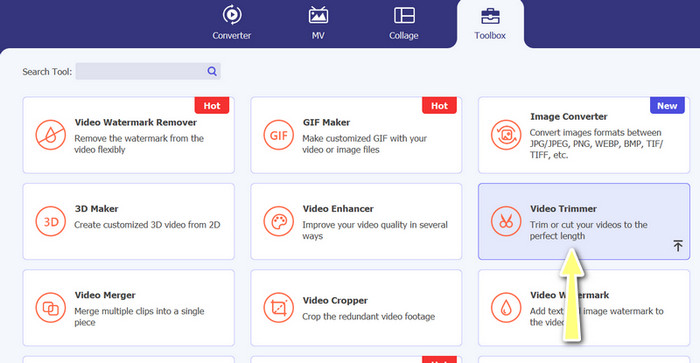
الآن، انتقل إلى علامة تبويب صندوق الأدوات وافتح خيار مُقصّ الفيديو. بعد ذلك يمكنك تحميل ملف GIF من خلال النقر على زر علامة الزائد.
الخطوة 3. قص ملف GIF
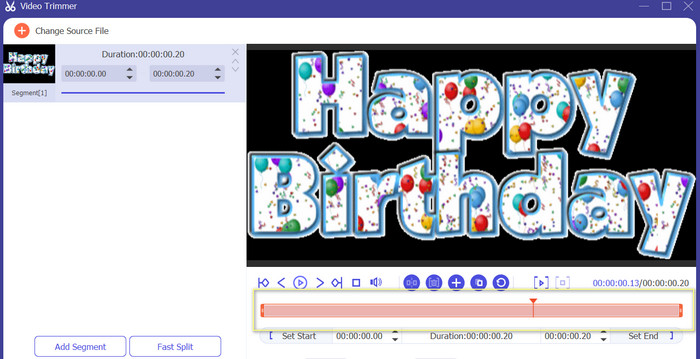
بمجرد تحميل ملف GIF ، ستراه من واجهة التحرير الخاصة بالبرنامج. باستخدام شريط التمرير ، حدد نقطة البداية والنهاية لملف GIF الذي تريد إزالته.
الخطوة 4. حفظ ملف GIF
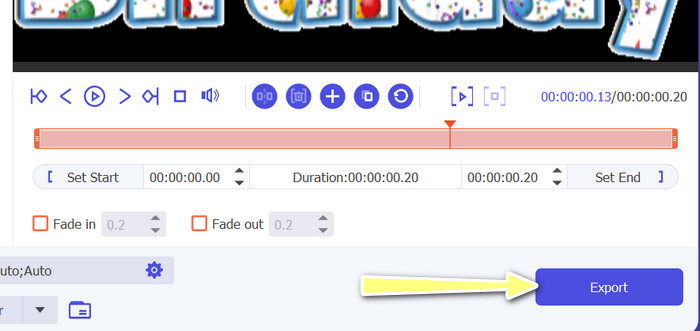
بعد الانتهاء من قص الأجزاء المطلوبة من ملف GIF، انقر على زر تصدير الموجود في أسفل الجهة اليمنى من الواجهة لبدء معالجة الملف.
2. GIF Maker
يمكن أن يمثل إنشاء GIF تحديًا لمن ليس لديهم خبرة في تحرير الفيديو أو تصميم الرسوم. هذا هو المكان الذي يأتي فيه GIF Maker ، مما يوفر طريقة سهلة وفعالة لإنشاء وتحرير ومشاركة وقص صور GIF المتحركة. أيضًا ، يسمح هذا البرنامج للمستخدمين بقص صور GIF وضبط سرعة التشغيل وإضافة نص أو تأثيرات أخرى لإنشاء صورة GIF مثالية لاحتياجاتهم. فيما يلي خطوات كيفية قص صور GIF المتحركة في وضع عدم الاتصال باستخدام هاتفك
الخطوة 1. أولاً، قم بتنزيل البرنامج من متجر Play بكتابة اسمه في شريط البحث. ثم ثبّته على جهازك المحمول.
الخطوة 2. الآن، شغّل التطبيق على جهازك. عند التشغيل، سيعرض لك البرنامج كل ما هو مخزَّن على جهازك، بما في ذلك ملفات GIF. بعد ذلك، اختر ملف GIF الذي تريد تعديله.
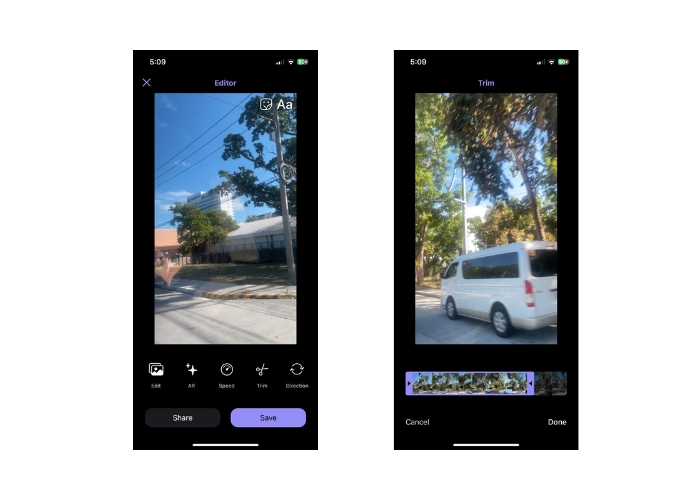
الخطوة 3. بعد ذلك، سيتم تحميل ملف GIF. ثم انقر على زر Trim وحدد نقطة البداية ونقطة النهاية في ملف GIF، وقم بضبط شريط التمرير.
الخطوة 4. أخيراً، انقر على زر Done لإنهاء عملية قص ملفات GIF.
الجزء 2. قص GIF على الإنترنت
1. EZGIF
إذا كنت ترغب في طريقة سهلة لقص وتحرير ملفات GIF عبر الإنترنت باستخدام جهاز الكمبيوتر، يمكنك استخدام موقع EZGIF. تشمل ميزاته الرئيسية إمكانية قص أو تغيير حجم ملف GIF، وضبط سرعة التشغيل، وإضافة نص أو ملصقات، وتحسين حجم الملف، وحتى تحويل ملف GIF إلى صيغ أخرى مثل MP4 أو WebM. اتبع الخطوات المبسطة التالية لمعرفة كيفية قص ملفات GIF أونلاين باستخدام EZGIF.
الخطوة 1. افتح المتصفّح المفضّل لديك على الكمبيوتر واذهب إلى الموقع الرسمي لـ EZGIF.
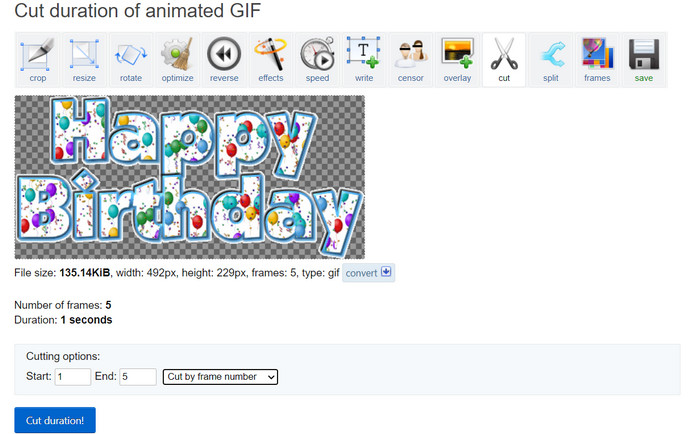
الخطوة 2. الآن، انتقل إلى خيار Cut لقص طول ملف GIF عبر الإنترنت. ثم انقر على زر Choose File متبوعاً بزر Upload.
الخطوة 3. في قسم خيارات القص، حدِّد نقطة البداية ونقطة النهاية باستخدام رقم الإطار.
الخطوة 4. بعد التحديد، انقر على زر Cut duration لبدء قص ملف GIF.
2. GIPHY
يمكنك أيضًا محاولة استخدام تطبيق جوال GIPHY لتحرير أو قص ملفات GIF عبر الإنترنت باستخدام هاتفك. باستخدام تطبيق Giphy للهاتف المحمول ، يمكن للمستخدمين الوصول بسهولة إلى صور GIF المفضلة لديهم ومشاركتها ، بالإضافة إلى إنشاء صور GIF المخصصة الخاصة بهم باستخدام كاميرا الهاتف الذكي أو ملفات الفيديو الموجودة. علاوة على ذلك ، يتميز هذا التطبيق بميزات التحرير مثل القص والتشذيب. بدون مزيد من اللغط ، إليك الخطوات التي يجب اتباعها لقص صور GIF عبر الإنترنت على جهازك المحمول:
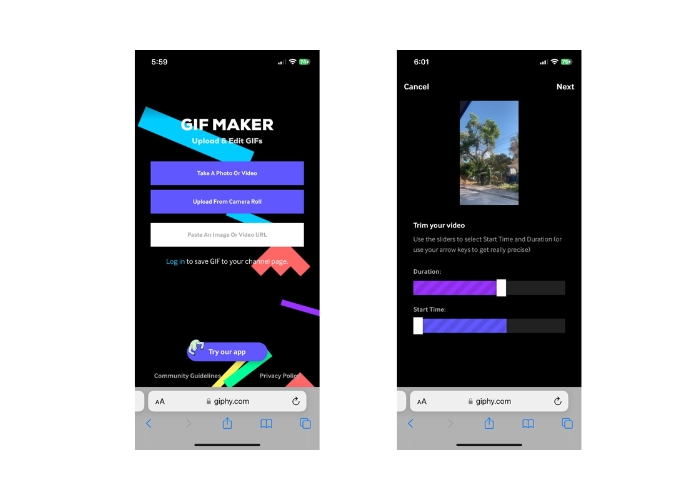
الخطوة 1. قم بتنزيل وتثبيت تطبيق Giphy من متجر التطبيقات. افتح التطبيق واختر ملف GIF الذي تريد تعديله من ألبوم الكاميرا أو المعرض في هاتفك.
الخطوة 2. استخدم شريط التمرير لتحديد نقطتي البداية والنهاية للمقطع الذي تريد الاحتفاظ به. يمكنك أيضاً إضافة نص أو ملصقات إلى ملف GIF.
الخطوة 3. بعد الانتهاء من التعديلات، انقر على زر Next وأجرِ بعض التعديلات الإضافية حسب رغبتك. بعد ذلك يمكنك مشاركة عملك مع الآخرين عبر الإنترنت.
الجزء 3. أسئلة وأجوبة حول قص صور GIF عبر الإنترنت
هل يمكنني التراجع عن التعديلات التي تم إجراؤها على GIF باستخدام أداة قص عبر الإنترنت؟
يعتمد ذلك على قاطع GIF عبر الإنترنت المحدد الذي تستخدمه ، ولكن العديد من الأشخاص يقدمون زر أو خيار تراجع لعودة التغييرات التي تم إجراؤها إلى GIF. ومع ذلك ، تجدر الإشارة إلى أنه ليس كل أدوات قطع ملفات GIF على الإنترنت قد توفر القدرة على التراجع عن التعديلات ، لذلك من الجيد دائمًا حفظ نسخة احتياطية من الملف الأصلي قبل إجراء أي تغييرات.
هل يمكنني التعاون مع الآخرين في مشروع تحرير GIF باستخدام أداة قص عبر الإنترنت؟
تم تصميم معظم أدوات قص GIF عبر الإنترنت للاستخدام الفردي وقد لا تقدم ميزات تعاون مضمنة. ومع ذلك ، تسمح لك بعض الأدوات عبر الإنترنت بتحميل ومشاركة ملفات GIF الخاصة بك مع الآخرين من خلال توفير رابط أو تضمين رمز يمكن مشاركته على منصات التواصل الاجتماعي أو مواقع الويب. بالإضافة إلى ذلك ، يمكنك استخدام أدوات تعاون تابعة لجهات خارجية مثل Google Drive أو Dropbox لمشاركة ملف GIF الأصلي وأي إصدارات تم تعديلها مع الآخرين للحصول على تعليقات أو مزيد من التحرير.
هل يمكنني تحويل ملف GIF إلى تنسيق ملف آخر باستخدام أداة قص عبر الإنترنت؟
نعم ، توفر العديد من أدوات قطع ملفات GIF عبر الإنترنت خيار تحويل GIF إلى تنسيق فيديو ، مثل MP4 أو AVI أو WebM أو MOV. يمكن أن يكون تحويل ملف GIF إلى تنسيق ملف آخر مفيدًا إذا كنت ترغب في استخدامه في مشروع تحرير فيديو أو تحميله على نظام أساسي يدعم أنواع ملفات معينة فقط.
خاتمة
يُعد قص ملفات GIF أونلاين طريقة سريعة وسهلة لتعديل وتحرير الصور المتحركة دون الحاجة إلى برامج متخصصة أو خبرة تقنية. توفّر أدوات قص GIF عبر الإنترنت مجموعة من الميزات مثل القص، وتغيير الحجم، وضبط سرعة التشغيل، وإضافة النصوص والملصقات، وتحسين حجم الملف، وتحويله إلى صيغ أخرى. من ناحية أخرى، لا تعتمد الأدوات غير المتصلة بالإنترنت على قدرة معالجة موقع أو خادم، بل تعمل محلياً على الكمبيوتر أو الجهاز. ونتيجة لذلك، يمكن للأدوات غير المتصلة أن تقدم عناصر تحكم أدق في التحرير، وجودة إخراج أعلى، وخيارات تخصيص أوسع. ولحسن الحظ، هناك الكثير من الأدوات أونلاين وأوفلاين التي تساعدك على قص ملفات GIF.
-
 5 أحدث البرامج التي يمكنك استخدامها لإنشاء صورة GIF عكسية لا تصدق
 هل تريد أن تعرف كيف تجعل صورك المتحركة GIF أفضل؟ ثم حاول عكس GIF لإضافة تأثيرات مذهلة بمساعدة هذه الأدوات.
-
 5 من أفضل أدوات إعادة تحميل ملفات GIF المتوفرة عبر جميع الأنظمة الأساسية [2023]
 هل تريد أن تعرف أدوات Resizers التي يمكنك استخدامها؟ في هذه الحالة ، ستتحدث المعلومات الواردة أدناه عن resizers التي يمكنك استخدامها على صور GIF الخاصة بك على جميع الأنظمة الأساسية.
-
 [مجاني] 4 طرق سهلة لاقتصاص صور GIF المتحركة عبر الإنترنت وغير متصل
 هل تريد اقتصاص صور GIF بسهولة؟ حسنًا ، يمكنك القيام بذلك بمساعدة أدوات قطع GIF المتوفرة في هذه المقالة ، وقراءتها جيدًا ، وتعلم كيفية القيام بذلك.
