


 محول الفيديو النهائي
 مسجل الشاشة
 إصلاح الفيديو
 تنزيل آمن
طرق مثالية حول كيفية تحويل الصور إلى PNG
لعرض صور عالية الجودة، يستخدم الناس تنسيق ملفات PNG. طُوِّر تنسيق PNG ليتفوق على ملفات GIF، فهو يوفّر ضغطًا بلا فقدان وجودة ألوان أكثر سطوعًا. يعد تحويل الصور إلى PNG أمرًا أساسيًا، خاصةً إذا كنت تريد صورًا عالية الجودة. أنت محظوظ، لأن هذه المقالة ستعرض لك طرقًا مختلفة لتحويل الملفات. يمكنك تحويل الملفات باستخدام برامج أونلاين وأوفلاين، وبذلك يمكنك تحديد أي تطبيق هو الأنسب لك. قبل أي شيء، لنقرأ هذه المقالة لنتعرّف على أفضل الإجراءات حول كيفية تحويل الصور إلى PNG.

الجزء 1: أسهل الطرق لتحويل الصور إلى PNG عبر الإنترنت
تحويل الصور إلى PNG باستخدام FVC Free Image Converter
يُعد FVC Free Image Converter واحدًا من أفضل الأدوات عبر الإنترنت لتحويل الصور إلى PNG. يحوّل هذا المحوّل أونلاين أي صيغة من صيغ ملفات الصور إلى PNG. كما يوفّر واجهة مستخدم بسيطة وخيارات واضحة. يمكن للخبراء والمبتدئين على حد سواء استخدام هذه الأداة لتحويل الصور بهذه الطريقة. تشمل صيغ الإدخال التي يمكن أن تتعامل معها هذه الأداة: JPG وPNG وJPEG وTIFF وBMP وICO وغيرها. بالإضافة إلى ذلك، استخدامها سهل. لا يتطلّب محوّل الصور إلى PNG سوى بضع خطوات لتحويل الصور. كما يضمن الحفاظ على الجودة العالية للصورة. يتيح هذا المحوّل أيضًا عملية التحويل الدفعي، مما يمكّنك من تحويل عدد كبير من الصور دفعة واحدة. اتبع الخطوات أدناه لتحويل الصورة إلى JPG.
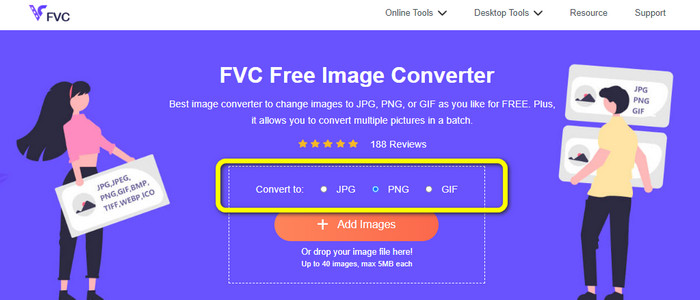
الخطوة 1: قم بزيارة الموقع الرسمي لـFVC Free Image Converter. اختر تنسيق ملف PNG كصيغة الإخراج من خيارات Convert to.
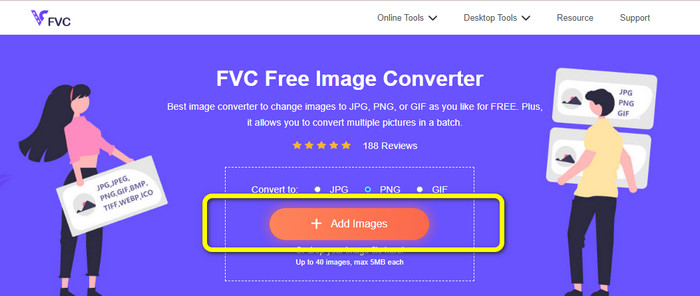
الخطوة 2: بعد ذلك، انقر على زر Add Images. ستظهر لك نافذة مجلدات الكمبيوتر على شاشتك، ثم انقر على الصورة التي تحتاج إلى تحويلها، وبعدها انقر على Open. انتظر حتى تكتمل عملية التحويل.
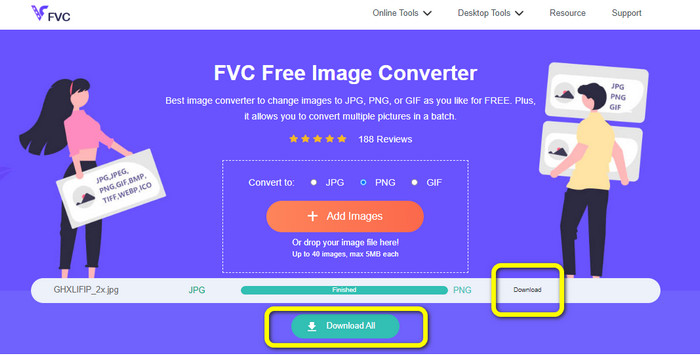
الخطوة 3: في الخطوة الأخيرة، انقر على زر Download أو Download all لحفظ الصور التي تم تحويلها. يمكنك فتح الصورة التي حمّلتها في موقع الملف الذي حددته.
تحويل الصور إلى PNG باستخدام Image Candy
يُعد Image Candy أداة أونلاين أخرى لتحويل الصور إلى PNG. فهو يدعم نطاقًا واسعًا من صيغ الصور مثل PNG وJPG وGIF وغيرها. كما يمكنه تحويل الصور حتى حجم 2 جيجابايت. استخدام هذا المحوّل بسيط للغاية، وهو متاح على جميع المتصفحات. علاوة على ذلك، يحمي هذا التطبيق خصوصيتك؛ حيث يقوم بحذف صورك بعد 24 ساعة.
ولكنه يسمح فقط بالتحميلات المستندة إلى الجهاز. لا يمكنك تحميل صورة من السحابة أو URL. أيضا ، تنسيق الإخراج المدعوم قليل.
الخطوة 1: انتقل إلى موقع Image Candy وانقر على زر Add Files لرفع الصورة.

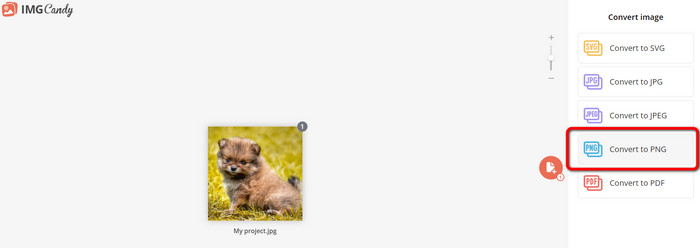
الخطوة 2: اختر خيار Convert to PNG في الجزء الأيمن من الواجهة، ثم انتظر حتى تكتمل عملية التحويل.
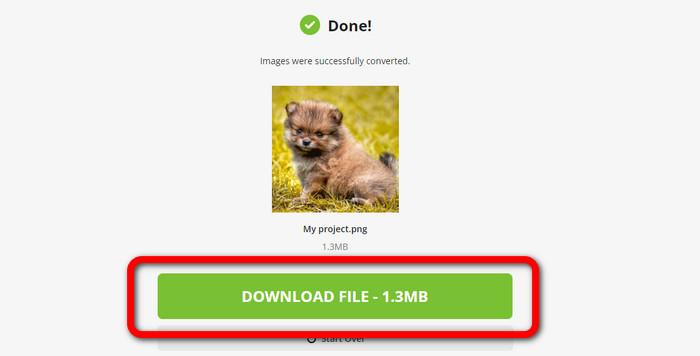
الخطوة 3: أخيرًا، انقر على زر Download File لحفظ الصورة على جهاز الكمبيوتر الخاص بك.
تحويل الصور إلى PNG باستخدام برنامج Convertio
أداة أخرى عبر الإنترنت لتحويل الصور هي Convertio. استخدام هذه الأداة سهل. يحتوي على واجهة سهلة الفهم. بالإضافة إلى ذلك ، لديها عملية تحويل بسيطة ، وهي مناسبة لجميع المستخدمين. أيضا ، عملية التحويل سريعة بما فيه الكفاية. بهذه الطريقة ، يمكنك تحويل العديد من ملفات الصور. علاوة على ذلك ، فهو يدعم جميع التنسيقات الشائعة تقريبًا ، بما في ذلك JPG و PNG و BMP و TIFF والمزيد. يحمي هذا التطبيق خصوصيتك أيضًا. يقوم بحذف صورك بعد 24 ساعة. ولكن ، عند استخدام الإصدار المجاني ، هناك بعض القيود. يمكنك فقط الرفع بحجم ملف أكبر من 100 ميغا بايت. تحتاج إلى شراء خطة اشتراك لتحميل حجم ملف غير محدود.
الخطوة 1: قم بزيارة موقع Convertio. انقر على زر Choose Files لرفع الصورة.
الخطوة 2: بعد رفع الصورة التي تريد تحويلها، انتقل إلى خيارات الصيغة واختر تنسيق PNG.
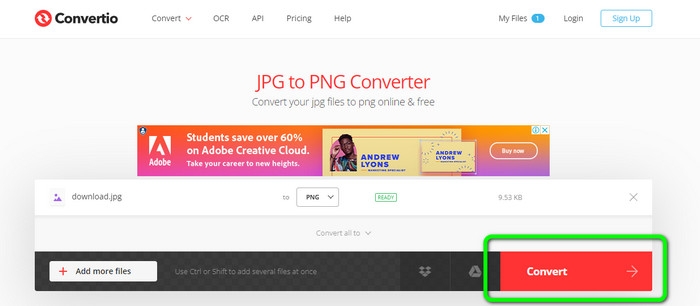
الخطوة 3: انقر على زر Convert. انتظر حتى تنتهي عملية التحويل ثم احفظ الصورة المحوّلة.
تحويل الصور إلى PNG باستخدام FreeConvert
يُعد FreeConvert محوّل صور أونلاين يمكنك الاعتماد عليه إذا كنت تريد تحويل صورتك إلى PNG. يتميز بعملية سهلة وواجهة يمكن فهمها بسهولة. يمكن للمستخدمين المحترفين وغير المحترفين استخدام هذا التطبيق. كما يمكنه تحويل أكثر من 500 صيغة صور مختلفة مثل JPG وPNG وWebP وغيرها. كما يمكن تحويل ملفات الصور الخام RAW من الكاميرات. يمكن الوصول إلى هذا المحوّل من أي متصفح ويب مثل Chrome وFirefox وEdge وSafari وغيرها. كما يوفر حماية وأمانًا للملفات. لكن توجد بعض القيود، خاصةً عند استخدام الإصدار المجاني؛ فالحجم الأقصى للملف هو 1 جيجابايت. من الأفضل شراء الأداة إذا كنت تريد رفع مزيد من الصور. كذلك، يعرض هذا المحوّل بعض الإعلانات على صفحة الويب، وهو ما يكون مزعجًا للمستخدمين.
الخطوة 1: انتقل إلى موقع FreeConvert. اختر خيار Choose Files لإرفاق الصورة التي تريد تحويلها إلى صيغة PNG.
الخطوة 2: انتقل إلى خيار Output لتحديد صيغة الإخراج المطلوبة، وهي صيغة PNG.
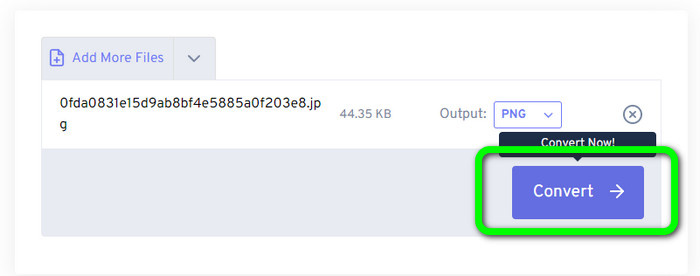
الخطوة 3: في الخطوة الأخيرة، انقر على زر Convert وانتظر حتى تكتمل عملية التحويل. بعد ذلك، احفظ الصورة كملف PNG.
الجزء 2: أفضل طريقة لتحويل الصور إلى PNG باستخدام برنامج دون اتصال
يُعد Video Converter Ultimate أفضل أداة لتحويل الصور إلى صيغة PNG. يقدّم هذا محوّل الصور واجهة مفهومة، مما يجعله مثاليًا لجميع المستخدمين. إضافةً إلى ذلك، يوفّر خطوات سهلة يمكنك اتباعها، وبالتالي يصبح تحويل الصور إلى PNG أمرًا في غاية البساطة. إلى جانب PNG، فهو يدعم أيضًا صيغ ملفات صور متعددة؛ إذ يدعم WEBP وBMP وTIF وTIFF وJPG وغيرها، وهو ما يجعله عمليًا. يمكنك كذلك استخدام هذا التطبيق على كلٍّ من نظامي Windows وMac.
علاوة على ذلك ، إلى جانب تحويل الصور ، يوفر Video Converter Ultimate المزيد من الميزات. يمكنك تحويل مقاطع الفيديو وإزالة العلامات المائية وتحسين الفيديو وإنشاء فيديو موسيقي. يمكنك أيضًا إنشاء صورة مجمعة وقص مقطع فيديو والمزيد. مع هذه الميزات ، هناك العديد من الأشياء التي يمكنك القيام بها. بهذه الطريقة ، يمكنك جعل مقاطع الفيديو والصور الخاصة بك مثالية وجذابة.
الخطوة 1: قم بتنزيل Video Converter Ultimate على جهاز Mac أو Windows الخاص بك. شغّل البرنامج بعد إتمام عملية التثبيت.
تحميل مجانيلنظام Windows 7 أو أحدثتنزيل آمن
تحميل مجانيلنظام MacOS 10.7 أو أحدثتنزيل آمن
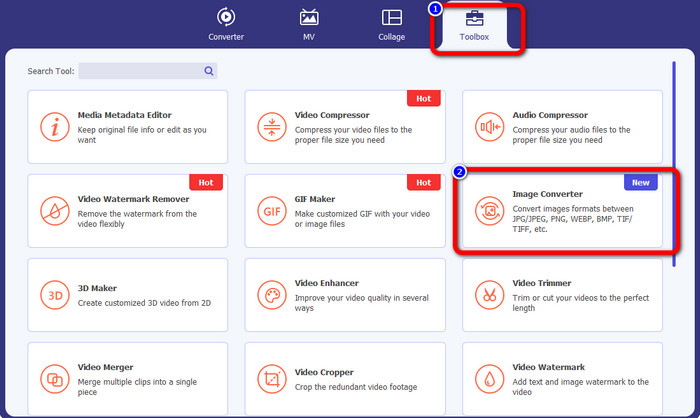
الخطوة 2: بعد فتح التطبيق، انتقل إلى قسم Toolbox. بعد ذلك اختر ميزة Image Converter.
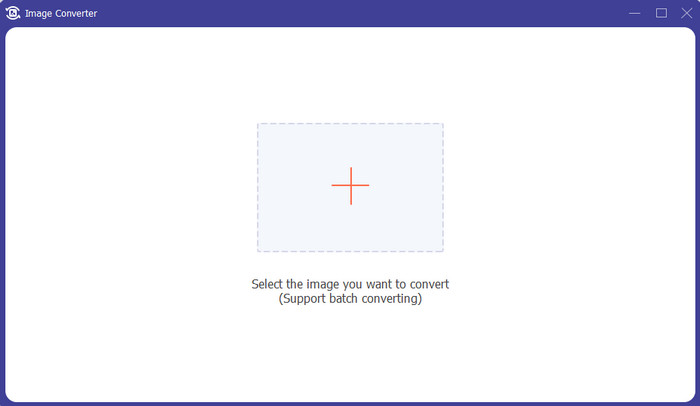
الخطوة 3: ستظهر واجهة أخرى على شاشتك. انقر على زر علامة + لإضافة الصورة.
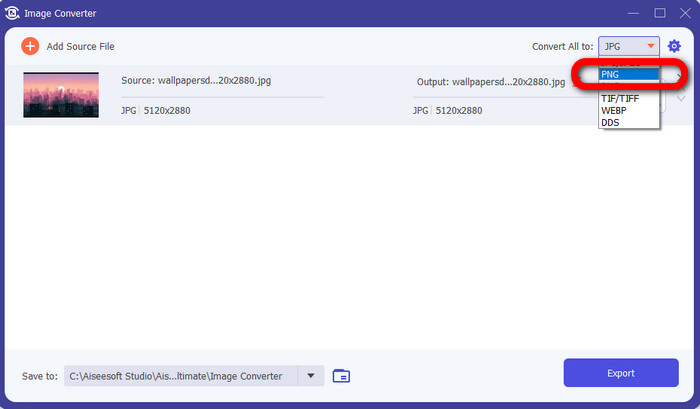
الخطوة 4: بعد إضافة الصورة، اختر خيار الصيغة ثم انقر على تنسيق الملف PNG.
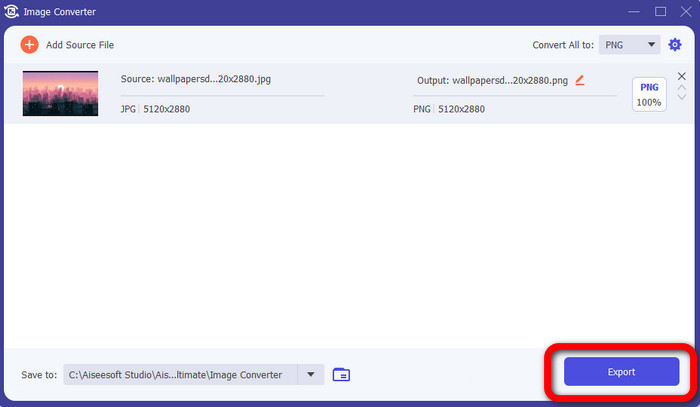
الخطوة 5: انقر على زر Export في الزاوية السفلية اليسرى من الواجهة لحفظ الصورة. يمكنك أيضًا استخدام هذا البرنامج لـتحويل الصور إلى JPG.
الجزء 3: الأسئلة الشائعة حول تحويل الصور إلى PNG
1. ما هو ملف PNG؟
نظرًا لقدرته على السماح بالشفافية في المتصفحات ، فإن PNG هو تنسيق قياسي للصور يُستخدم على الإنترنت. تعد PNG بديلاً عن GIF ، والتي استخدمت طريقة ضغط خاصة في التسعينيات. PNG هو تنسيق يمكن الوصول إليه. مثل GIF و JPG ، يدعم PNG ألوان 8 بت و 24 بت. كما أنها تعتبر ملفات غير ضائعة ، مما يعني أن الجودة ليس لها أي تأثير. بغض النظر عن عدد مرات فتح الملف وحفظه.
2. ما فائدة PNG؟
تعد حقيقة أن تنسيق PNG عبارة عن تنسيق غير ضياع مع إمكانية ألوان 24 بت إحدى المزايا الرئيسية. إذا كنت تقوم بالتحويل من JPG ، فتذكر أن هذه الملفات ضائعة. ربما أدى ضغطها الأولي إلى فقدان بعض الجودة. ومع ذلك ، فإن PNG خالية من الخسائر. وبالتالي ، لن يؤدي المزيد من الفتحات أو عمليات الحفظ للصورة إلى مزيد من فقدان الجودة.
3. لماذا يعتبر PNG أفضل؟
يتضح من الفوائد المذكورة أعلاه أن تنسيق ملف PNG هو الأفضل. إنه أفضل لتنسيقات الصور الأخرى المستخدمة المهمة. الضغط بدون فقدان هو أفضل ميزة. إذا قمت بحفظ الصور بتنسيق ملف PNG ، فلن يؤدي ذلك إلى الإضرار بتنسيق الملف سواء قمت بحفظها أو فتحها أو إعادة حفظها. هنا ، تعمل خوارزمية الضغط. يمكنك استخدام العديد من الطرق لتقليل وضوح إهدار البيانات الممتازة. تتميز ملفات PNG بضغط أعلى من ملفات JPG و GIF.
خاتمة
يوضح لك هذا الدليل العديد من الطرق الأونلاين والأوفلاين لـتحويل الصور إلى PNG. ولكن إذا كنت تريد أداة ويب عالية المستوى، فاستعمل FVC Free Image Converter.
-
 كيفية تحويل دفعة HEIC إلى PNG على أجهزة Mac و iPhone وعلى الإنترنت
 هل تبحث عن طرق كيفية تحويل HEIC إلى PNG؟ تمنحك هذه المقالة أفضل الطرق لتغيير HEIC بسهولة إلى PNG عبر الإنترنت وغير متصل
-
 أفضل 9 محولات من HEIC إلى PNG للكمبيوتر الشخصي و Mac [متصل وغير متصل]
 اكتشف أفضل المحولات عبر الإنترنت وغير المتصلة هنا. نقدم لك أفضل محولات HEIC إلى PNG المجانية لنظامي التشغيل Windows و Mac.
-
 أفضل 5 محولات PNG إلى HEIC يجب ألا تفوتها
 إذا كنت تريد معرفة محولات PNG إلى HEIC الأكثر استخدامًا ، فنحن نوفر لك أفضل محولات PNG إلى HEIC عبر الإنترنت. اقرأ هذه المقالة لمزيد من المعلومات.
