


 محول الفيديو النهائي
 مسجل الشاشة
 إصلاح الفيديو
 تنزيل آمن
كيفية تحويل JPG إلى SVG: أفضل برنامج لتحويل JPG إلى SVG
تنسيق SVG يقدّم كل ما لا يستطيع تنسيق JPG تحقيقه. الميزة الأساسية لـ SVG هي أنه قائم على الرسومات المتجهة وليس على وحدات البكسل. ونتيجة لذلك، لا تفقد الرسومات بتنسيق SVG جودتها عند تكبيرها أو تصغيرها. وله العديد من الاستخدامات في الحياة اليومية. يعمل SVG بشكل أفضل مع الصور التي تحتوي على أشكال وحدود واضحة بدون تفاصيل صغيرة كثيرة. يعد SVG مفيدًا للمخططات، والرسومات التوضيحية، وغيرها من المستندات الرسومية. بالإضافة إلى ذلك، نظرًا لأن جميع ملفات SVG عبارة عن كود وحجمها صغير، فهي ممتازة للعمل مع العناصر البصرية. ويشمل ذلك الأيقونات والشعارات وكذلك إنشاء مواقع الويب. وهذا يتيح لك تحسين محتوى الموقع وجانبه المرئي. لذلك، إذا كنت تريد تعلّم أفضل طريقة لتحويل JPG إلى SVG، فأنت في المكان المناسب. تابع قراءة هذا الدليل إذ نقدّم لك جميع التفاصيل اللازمة حول تحويل ملفات JPG الخاصة بك إلى تنسيق SVG.

الجزء 1. JPG مقابل SVG
| تنسيق الملف | JPG / JPEG | SVG |
| ملحق اسم الملف | .jpg / .jpeg | .svg |
| الاسم الكامل | مجموعة خبراء التصوير المشتركة | الرسومات المتجهات قابلة لل |
| طورت بواسطة | مجموعة خبراء التصوير المشتركة | اتحاد شبكة ويب العالمية |
| وصف | قامت مجموعة خبراء التصوير المشتركة بإنشاء تنسيق JPG في أواخر عام 1980. وتتضمن أيضًا تخزين الصور على الكاميرات الرقمية وأدوات الاستنساخ الأخرى. تستخدم ملفات JPEG الخاصة بأسلوب الضغط المفقود لما يصل إلى 24 بت من الألوان والمزيد من مساحة تخزين الصور. | غالبًا ما تكون ملفات Vector Graphics القابلة للتحجيم هي تلك الملفات التي تحتوي على امتداد ملف SVG. يستخدم هذا النوع من الملفات تنسيقًا نصيًا مستندًا إلى XML لتحديد الشكل الذي يجب أن تبدو عليه الصورة. يمكن تغيير حجم ملف SVG إلى العديد من الأحجام دون فقدان الجودة نظرًا لاستخدام النص لشرح الرسم. بمعنى آخر ، التنسيق مستقل عن الدقة. |
| ضغط | ضياع | بدون فقدان بيانات |
| البرامج / المتصفحات المرتبطة | قم برسم Adobe Photoshop GIMP قم برسم Google Chrome Internet Explorer Microsoft Edge | متصفح جوجل كروم سفاري مايكروسوفت إيدج موزيلا فايرفوكس |
الجزء 2. طريقة سهلة لتحويل JPG إلى SVG عبر الإنترنت
إذا كنت تريد استخدام موقع ويب لتحويل JPG إلى SVG عبر الإنترنت، فاستعمل أداة JPG to SVG Converter. يمكن لهذه الأداة الإلكترونية أن توفّر لك طرقًا بسيطة لتحويل ملفات الصور. بالإضافة إلى ذلك، فإن محوّل JPG إلى SVG مناسب لجميع المستخدمين، وخاصة المبتدئين. يمكنك تحويل الملفات في بضع نقرات فقط. كما يمكنك تشغيل هذا المحوّل عبر الإنترنت في معظم المتصفحات تقريبًا، بما في ذلك Google Chrome وMozilla Firefox وInternet Explorer وغيرها. إلى جانب ذلك، فهو يدعم تنسيقات مختلفة مثل PNG وEPS وPDF وغيرها. وأخيرًا، يمكنك تحويل ملفات الصور مجانًا، إذ يمكنك تشغيل الأداة دون دفع أي مبلغ. ومع ذلك، في بعض الأحيان لا تعمل الأداة عبر الإنترنت بالشكل الجيد؛ فبعد عملية التحويل قد تظهر أخطاء في النتيجة. لذا فإن أداء هذا المحوّل غير ثابت. كما لا يمكنك تحويل الملفات بدون اتصال بالإنترنت.
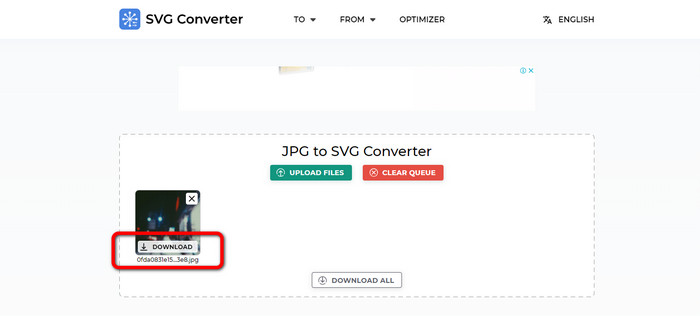
الخطوة 1. افتح المتصفح وانتقل إلى الموقع الرئيسي لأداة JPG to SVG Converter. بعد الدخول إلى الصفحة الرئيسية، انقر زر Upload Files لإضافة ملف صورة JPG. وهناك طريقة أخرى لرفع الصورة وهي إسقاط ملف الصورة مباشرة داخل المربع.
الخطوة 2. بعد رفع صورة JPG، انقر زر Download. بعدها، ستقوم الأداة بتحويل ملف الـJPG إلى SVG تلقائيًا. بعد التنزيل، يمكنك عرض صورة SVG في مجلد Download لديك.
الجزء 3. طريقة غير متصلة بالإنترنت لتحويل JPG إلى SVG على نظامي Mac و Windows
عند محاولة تحويل ملفات الصور دون اتصال بالإنترنت ، يمكنك تحويل JPG إلى SVG باستخدام Photoshop. يعد هذا البرنامج غير المتصل بالإنترنت أحد أكثر أدوات تحرير الصور شيوعًا التي يمكنك الحصول عليها. ولكن إلى جانب تحرير الصور ، فإن Photoshop قادر أيضًا على تحويل الصور. بمساعدة هذا المحول القابل للتنزيل ، يمكنك تحويل صور JPG الخاصة بك بشكل فعال. بالإضافة إلى ذلك ، يحتوي Photoshop على المزيد من الميزات التي يمكنك الاستمتاع بها إلى جانب التحويل. نظرًا لأنه برنامج لتحرير الصور ، يمكنك قص صورك واقتصاصها وإضافة عوامل تصفية وتدويرها بحرية. إنه متوفر على نظامي Mac و Windows ، مما يجعله أكثر ملاءمة للمستخدمين. ومع ذلك ، إذا كنت تخطط لتنزيل هذا البرنامج غير المتصل وتثبيته على جهاز الكمبيوتر الخاص بك ، فلا يمكنك استخدام هذا إلا في غضون أيام قليلة. يمكن أن يقدم Photoshop إصدارًا تجريبيًا مجانيًا لمدة 7 أيام فقط. بعد سبعة أيام ، سوف يفرض عليك البرنامج رسومًا مقابل خطة الاشتراك.
الخطوة 1. نزّل برنامج Photoshop على نظام ويندوز أو ماك. بعد الانتهاء من التثبيت، شغّل البرنامج. وعندما تظهر الواجهة، انقر قائمة File في الزاوية العلوية اليسرى من الواجهة، ثم اختر خيار Open لإدراج ملف بصيغة JPG.
الخطوة 2. بعد ذلك، إذا أردت تعديل صورك قبل التحويل، يمكنك فعل ذلك. ما عليك سوى استخدام أدوات التعديل من الواجهة لتحسين صورتك.
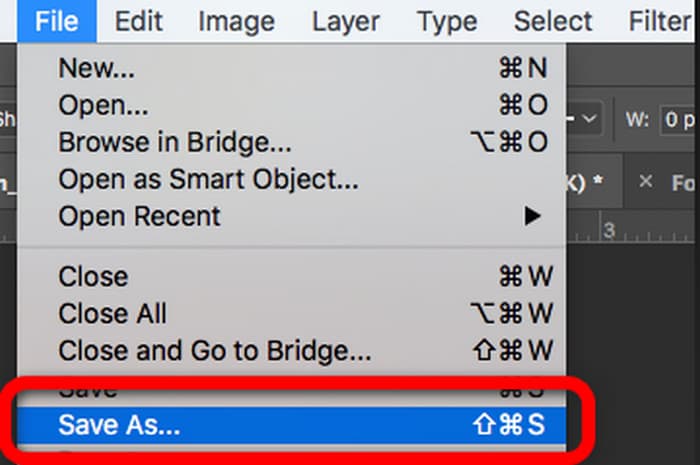
الخطوة 3. انتقل إلى قائمة File واختر خيار Save as. ثم انتقل إلى خيارات التنسيق واختر تنسيق SVG. بهذه الطريقة يمكنك حفظ وتحويل ملف صورة JPG إلى تنسيق SVG. ويمكنك أيضًا استخدام هذه الأداة لتحويل SVG إلى PNG.
الجزء 4. المكافأة: محول الصور المجاني على الإنترنت
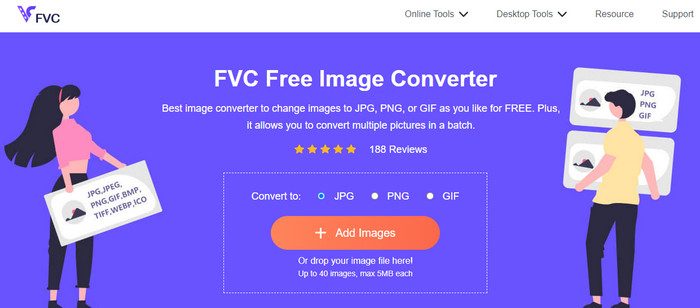
إذا كنت تبحث عن محوّل صور آخر مميز عبر الإنترنت، فاستخدم أداة FVC Free Image Converter. يمكن لمحوّل الصور هذا أن يقدّم لك طرقًا بسيطة لتحويل ملفات الصور. لديه واجهة بسيطة مما يجعل فهمه واستخدامه سهلًا. بالإضافة إلى ذلك، يمكنك إجراء عملية تحويل دفعية، وبهذه الطريقة يمكنك تحويل ملفات صور متعددة في وقت واحد. كما أن لديه عملية تحويل سريعة، بحيث يمكنك تحويل الكثير من ملفات الصور دون استهلاك وقت طويل. أداة FVC Free Image Converter متاحة في معظم المتصفحات تقريبًا، مما يجعلها مريحة للمستخدمين.
الجزء 5. أسئلة شائعة حول تحويل JPG إلى SVG
1. لماذا لا يزال المصورون يستخدمون JPG؟
يمكن أن يعرض تنسيق JPG 16.8 مليون لون مع الحفاظ على حجم صغير. إنه أحد الأسباب التي تجعل بعض المصورين والمحررين يستخدمون JPG أكثر من تنسيقات الصور الأخرى.
2. لماذا نستخدم ملف SVG؟
يعد ملف SVG تنسيق صورة مثاليًا إذا كنت تريد استخدام الشعارات. أيضًا ، يعد SVG مثاليًا إذا كنت تخطط لعمل رسوم توضيحية مثل الرسوم البيانية والمخططات والرسوم البيانية. يمكن أن يعطي أعلى جودة مع الحفاظ على حجمه.
3. كيف يتم تحويل JPG إلى SVG على إنكسكيب؟
قم بتنزيل Inkscape على جهاز الكمبيوتر الخاص بك. ثم انتقل إلى قائمة File وحدد الخيار Open لإدراج صورة JPG. بعد إدراج الصورة ، انتقل إلى قائمة "ملف" وانقر فوق الخيار "حفظ باسم". بعد ذلك ، انتقل إلى خيار حفظ كنوع. حدد SVG من خيارات التنسيق وانقر فوق Save.
4. كيف يتم تحويل JPG إلى SVG باستخدام Cricut؟
في الشريط الجانبي الأيمن ، حدد تحميل. باستخدام الأوصاف المقدمة من Cricut ، حدد تعقيد الصورة. الممحاة السحرية وفرشاة الممحاة وأداة الاقتصاص هي خيارات التحرير الثلاثة التي تظهر على شاشة التحرير التالية. قم بتعديل الصورة حسب رغبتك. يمكنك الاختيار بين صورة مطبوعة ثم مقطوعة أو صورة مقطوعة بمجرد الانتهاء من حذف الأجزاء غير المرغوب فيها من صورتك. بعد ذلك ، انتقل إلى الخيار واحفظ الصورة بتنسيق SVG.
خاتمة
الآن، أصبحت تعرف أفضل الطرق لتحويل JPG إلى SVG باستخدام برامج متصلة بالإنترنت وأخرى تعمل بدون اتصال. كما تعرّفت على محوّل آخر عبر الإنترنت كميزة إضافية لتحويل مزيد من صيغ الصور. استخدم FVC Free Image Converter لتحويل الصيغ مثل JPG وPNG وGIF وغيرها.
-
 4 طرق جديرة بالثقة لتحويل JFIF إلى JPG بسهولة
 ستخبرك هذه الإرشادات بكل شيء عن تحويل JFIF إلى JPG عبر الإنترنت وغير متصل. إذا كنت تريد أن تتعلم أكثر الطرق فاعلية ، اقرأ هذا المنشور على الفور!
-
 كيفية تحويل GIF إلى JPG دون فقدان الجودة
 اقرأ واحصل على أكثر الطرق فعالية لتحويل GIF إلى JPG باحتراف. سوف تتعلم كيفية تحويل ملفات الصور باستخدام دليل محولات الصور المثالية.
-
 خطوات لا مثيل لها لتحويل NEF إلى تنسيق JPG بشكل فعال
 هل تبحث عن طريقة رائعة لتغيير تنسيق NEF الخاص بك إلى ملف JPG؟ انقر فوق هذا الدليل الإرشادي وشاهد جميع التفاصيل الأساسية حول تحويل NEF إلى JPG.
