


 محول الفيديو النهائي
 مسجل الشاشة
 إصلاح الفيديو
 تنزيل آمن
طرق فعالة لتحويل TIFF إلى JPG و PNG
تنسيق TIFF هو نوع من ملفات الصور الشائع بين المصورين ومصممي الغرافيك. يتميّز بجودة عالية ومرونة وتوافق شبه كامل مع معظم الأنظمة. لكن حجمه كبير، مما يجعل مشاركته مع الآخرين أو عبر الويب صعبًا. في هذه الحالة، من أفضل الحلول تحويل هذا الملف إلى صيغ أخرى. تنسيقا JPG وPNG يقدّمان حجم ملفات أصغر من TIFF، لذلك يكون تحويل TIFF إلى JPG وPNG خيارًا أفضل. يمكن أن يقدّم لك هذا المقال أفضل الطرق لتحويل TIFF إلى JPG/PNG. بالإضافة إلى ذلك، ستتعرّف على كل المعلومات التي تحتاجها حول هذه الصيغ من ملفات الصور. لذلك، دون إطالة، لنقرأ هذا المقال حيث نعرض لك الحل الذي تبحث عنه.

الجزء 1. TIFF مقابل JPG مقابل PNG
| تنسيق الملف | TIF / TIFF | JPG | بي إن جي |
| ملحق اسم الملف | .tif / .tiff | .jpg | .بي إن جي |
| طورت بواسطة | Aldus (حصل عليها Adobe) | مجموعة خبراء التصوير المشتركة | مجموعة تطوير PNG |
| وصف | في عام 1992 ، تم تنسيق ملف صورة العلامة (شجار) تم تطويره. يمكن للمطورين توسيع نوع الملف المرن هذا لاستيعاب العديد من الاحتياجات. ملفات TIF و TIFF كلاهما من تنسيقات ملفات الصور المستخدمة لتخزين الصور. لكن هناك بعض الفروق بين هذه التنسيقات. يمكن لملفات صور TIFF تخزين أكثر من صورة واحدة في الملف. من ناحية أخرى ، يمكن لملفات TIF تخزين صورة واحدة فقط. أيضًا ، يمكن لملفات TIFF تخزين البيانات الأولية المتعلقة بالصورة ، لكن ملفات TIF لا يمكنها ذلك. | JPG و JPEG هي امتدادات متساوية تشير إلى نفس تنسيق الصورة الرقمية. لا توجد فروق بين تنسيقات JPEG و JPG. الاختلاف الوحيد هو عدد الأحرف المستخدمة. يتم حفظ ملفات JPG بامتداد الملف .jpg ، ويتم حفظ ملفات JPEG بالامتداد .jpeg. JPEG هو اختصار لمجموعة خبراء التصوير المشترك. | اختصار PNG يرمز إلى Portable Network Graphic. يمكنك حفظ صور عالية الجودة ومشاركتها باستخدام تنسيق PNG. يمكن لملفات PNG التعامل مع 16 مليون لون مذهل. كما يدعم الخلفيات الشفافة وشبه الشفافة. ملف صورة PNG هو تنسيق مفتوح ، مما يعني أنه يمكنك حفظ ملف PNG وفتحه من أي برنامج لتحرير الصور. |
الجزء 2. طرق ممتازة لتحويل TIF / TIFF إلى JPG / PNG عبر الإنترنت
يُعد FVC Free Image Converter أداة التحويل النهائية التي يمكنك استخدامها لتحويل ملفات TIFF إلى JPG/PNG عبر الإنترنت. كما أن عملية التحويل مباشرة وسهلة. يمكن تحويل الصور في ثلاث خطوات بسيطة، كما تتوفر أيضًا عملية التحويل الدفعي، حيث يمكن تحويل عدة صور دفعة واحدة. هذا يعني أنك تستطيع تحويل صورك في وقت أقل. الأداة سهلة الفهم وتوفّر واجهة استخدام بديهية بإعدادات واضحة. بالإضافة إلى ذلك، يدعم FVC Free Image Converter مجموعة متنوعة من صيغ الإدخال، مثل JPG وPNG وBMP وTIFF وWEBP وGIF. علاوة على ذلك، فإن أداة التحويل هذه مجانية بالكامل، كما أنها تحمي خصوصية المستخدم؛ إذ تُحذف بياناتك مباشرة بعد تحويل صورك وحفظها. وإمكانية استخدام هذا التطبيق الإلكتروني على جميع أنواع المتصفحات تزيد من سهولة الوصول بالنسبة للمستخدمين. لاستخدام محوّل TIFF إلى JPG هذا، اتبع التعليمات البسيطة الموضَّحة أدناه.
تحويل TIF / TIFF إلى JPG
الخطوة 1: زُر موقع FVC Free Image Converter من خلال متصفحك. ثم اختر تنسيق الملف JPG من خيار Convert to.
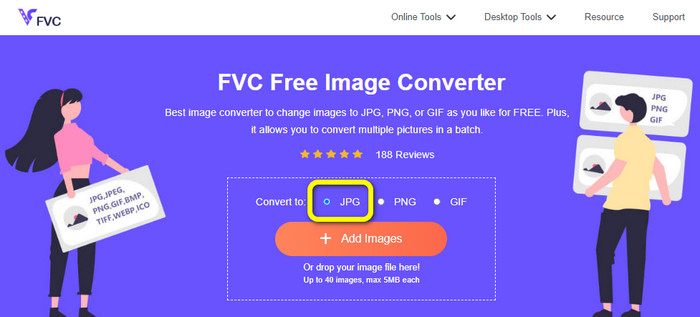
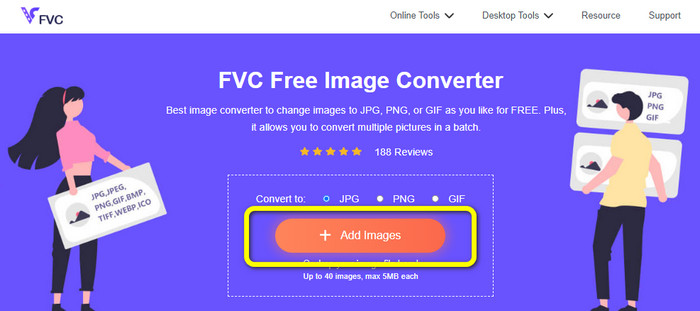
الخطوة 2: في الخطوة التالية، انقر زر Add Images. بعد النقر، ستظهر نافذة مجلد الملفات على شاشة الكمبيوتر. اختر ملف الصورة ثم انقر Open.
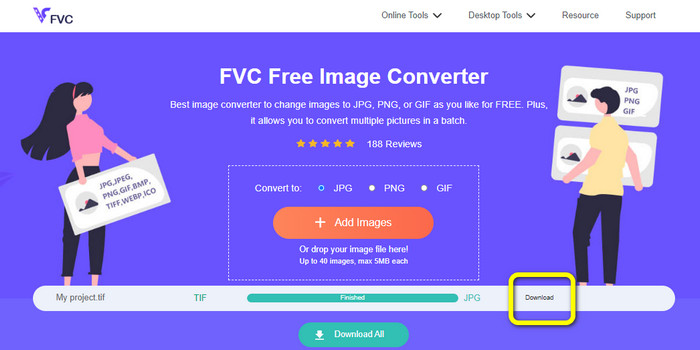
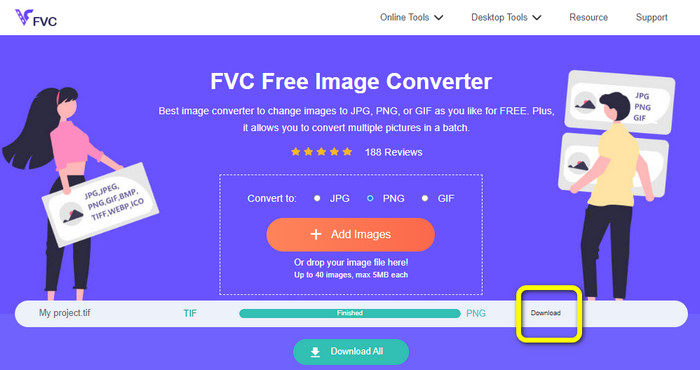
الخطوة 3: سيقوم محوّل الصور بتحويل صورتك تلقائيًا بعد رفعها. انقر زر Download لحفظ الصورة المحوَّلة وتنزيلها إلى جهاز الكمبيوتر.
تحويل TIFF / TIF إلى PNG
الخطوة 1: من صفحة الويب، اختر تنسيق الملف PNG من خيار الصيغة.
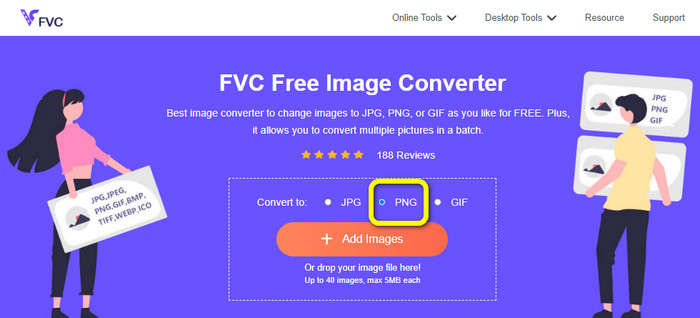
الخطوة 2: انقر زر Add Images. وعندما يظهر مجلد الملفات على الشاشة، اختر ملف PNG الذي تريد تحويله، ثم افتحه.
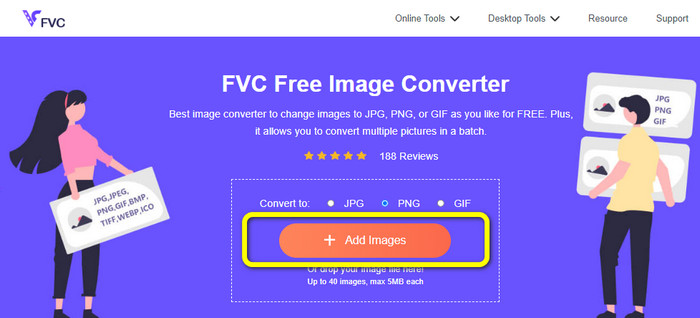
الخطوة 3: بعد انتهاء عملية التحويل، انقر زر Download. انتظر حتى تكتمل عملية الحفظ، ثم افتح صورتك من المجلد. انقر هنا لتتعرف على كيفية تحويل BMP إلى JPG أو PNG.
الجزء 3. أفضل الطرق لتحويل TIF / TIFF إلى JPG / PNG دون اتصال
يُعد Video Converter Ultimate واحدًا من أفضل الطرق غير المتصلة بالإنترنت لتحويل ملف TIF إلى JPG وPNG. يمكنك تنزيل هذا البرنامج على نظامي التشغيل Mac وWindows. يتيح لك هذا المحوّل غير المتصل بالإنترنت تحويل ملف TIF إلى JPG وPNG، كما يدعم صيغًا أخرى مثل WEBP وBMP وGIF وTIFF وJPG وPNG وغيرها. يقدّم المحوّل واجهة استخدام ودّية، مما يجعله مثاليًا للمحترفين والمبتدئين على حد سواء. بالإضافة إلى ذلك، إذا رغبت في تحويل عدة ملفات في آن واحد، يمكنك القيام بذلك؛ إذ يُعد التحويل الدفعي من أبرز مزاياه، وهو ما يوفّر الراحة لجميع المستخدمين الذين يرغبون في تحويل ملفات الصور. علاوة على ذلك، أثناء تحويل الصور، يمكنك القيام بمزيد من الأمور؛ فمن خلال أيقونة الإعدادات يمكنك تكبير الصور وتصغيرها، وكذلك تغيير جودة الصورة حسب تفضيلاتك، لتحصل على النتيجة التي ترغب بها. اتبع الإجراءات الأساسية أدناه لتحويل TIF إلى صيغة JPG وPNG.
تحويل TIFF إلى JPG
الخطوة 1: نزّل برنامج Video Converter Ultimate على جهاز الكمبيوتر. بعد ذلك، شغِّل التطبيق بعد الانتهاء من عملية التثبيت. ابحث عن زر Download أدناه وانقره للوصول إلى أداة التحويل بسهولة.
تحميل مجانيلنظام Windows 7 أو أحدثتنزيل آمن
تحميل مجانيلنظام MacOS 10.7 أو أحدثتنزيل آمن
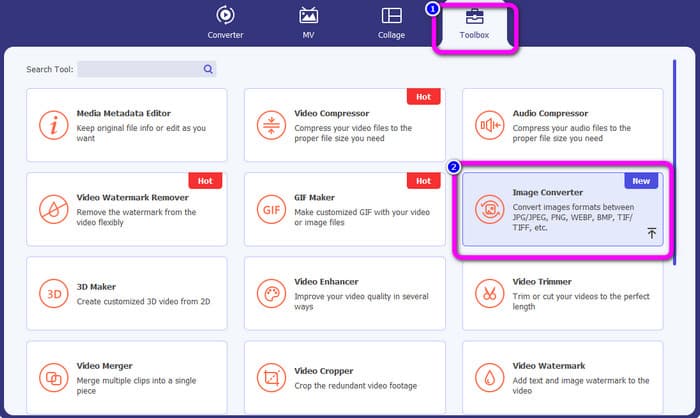
الخطوة 2: انقر لوحة Toolbox في الجزء العلوي من واجهة البرنامج. ثم اختر وظيفة Image Converter.
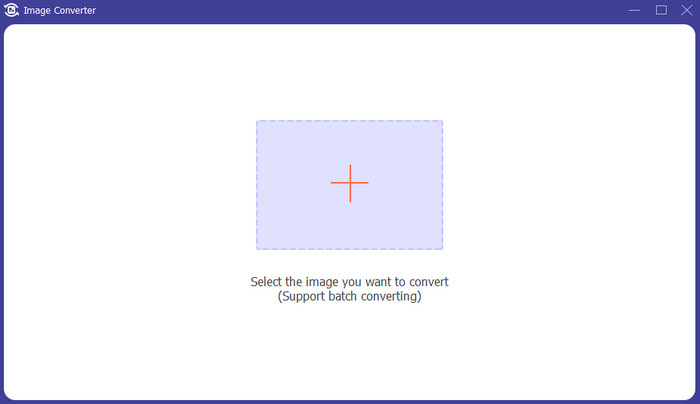
الخطوة 3: بعد ذلك، انقر زر علامة Plus في منتصف الواجهة. اختر ملف صورة TIFF من مجلد ملفاتك ثم افتحه.
الخطوة 4: إذا أردت إضافة مزيد من الصور، انقر زر Add Source file. بعد ذلك، انتقل إلى خيار Convert All to واختر تنسيق الملف JPG.
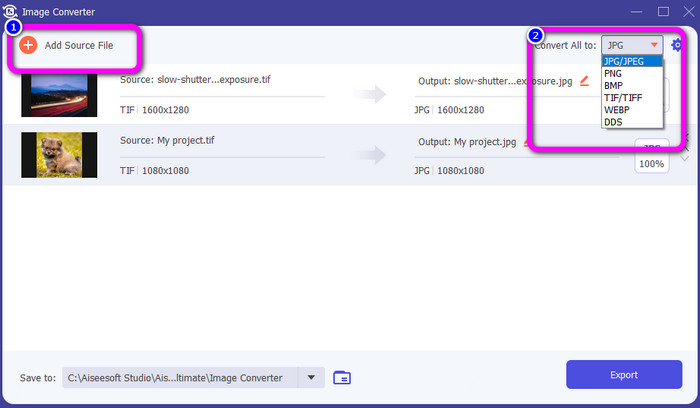
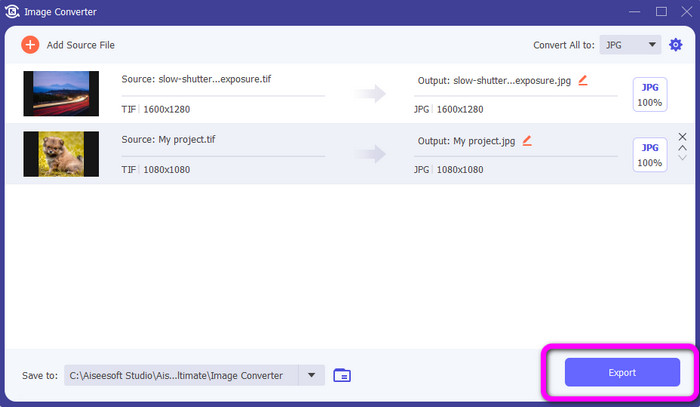
الخطوة 5: أخيرًا، انقر زر Export بعد اختيار صيغة JPG كصيغة إخراج. بعد انتهاء عملية التحويل، يمكنك فتح صورتك المحوَّلة من مجلد الملفات.
تحويل TIFF إلى PNG
الخطوة 1: يمكنك اتباع نفس العملية المذكورة أعلاه. انتقل إلى لوحة Toolbox واختر وظيفة Image Converter.
الخطوة 2: انقر أيقونة Plus لإدراج ملف TIFF الذي تريد تحويله.
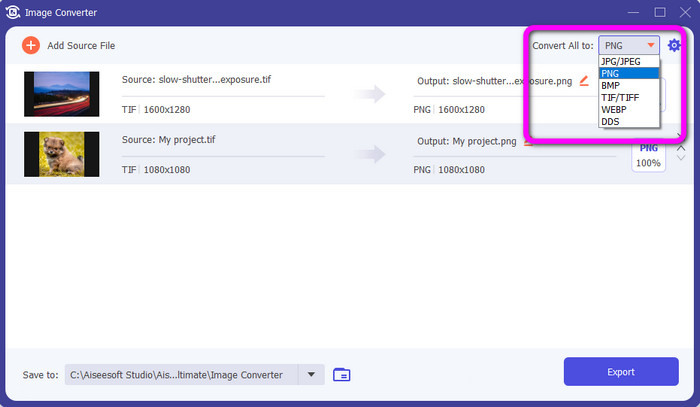
الخطوة 3: بعد إضافة صور TIFF، يمكنك الانتقال إلى خيار Convert All to. اختر تنسيق الملف PNG كصيغة الإخراج.
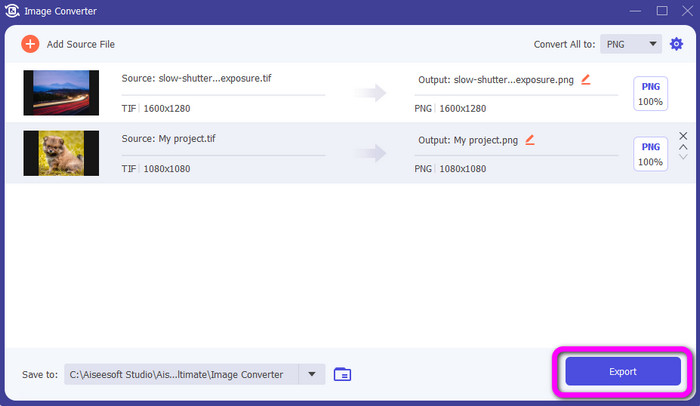
الخطوة 4: في الخطوة الأخيرة، انقر زر Export من الزاوية السفلية اليسرى للواجهة. يمكنك أيضًا استخدام هذا البرنامج في تحويل JPG إلى PNG.
الجزء 4. الأسئلة الشائعة حول تحويل TIF / TIFF إلى JPG / PNG
1. كيفية تحويل TIFF إلى PNG على نظام Mac؟
من الطرق الفعّالة لتحويل TIFF إلى PNG على نظام Mac استخدام FVC Free Image Converter. افتح متصفح Safari على جهاز Mac ثم انتقل إلى أداة تحويل الصور عبر الإنترنت هذه. من الصفحة الرئيسية، اختر تنسيق PNG من خيار الصيغة. انقر زر Add Images لإضافة ملف TIFF الذي تريد تحويله. أثناء عملية الرفع، سيتم تحويل الملف تلقائيًا. بعد ذلك، انقر زر التنزيل لحفظ الصورة المحوَّلة على جهاز Mac.
2. ما هي فوائد تحويل TIF إلى PNG؟
إذا كنت تريد تصغير حجم الملف ، فمن الضروري تغيير ملف TIF إلى تنسيقات أخرى. يعد تحويل TIF إلى ملف PNG هو الأفضل لأن PNG لها حجم ملف أصغر. سوف يمنحك حجم ملف يمكن التحكم فيه لمتصفحات الويب والأجهزة.
3. أي ملف أسهل في الإرسال ، JPG أم TIFF؟
تنسيق ملف JPG له حجم ملف أصغر. يسهل إرسال صورة عبر الإنترنت أو عبر البريد الإلكتروني. TIFF له حجم ملف أكبر ، مما يجعل إرسال الصورة بطيئًا.
خاتمة
الآن أصبحت تعلم أن ملف صورة TIFF يمتلك حجمًا أكبر. لذلك، إذا أردت إرسال صورة بسرعة عبر الإنترنت، فمن الأفضل تحويلها إلى صيغ أخرى ذات حجم ملفات أصغر. وعليه، قدّم لك هذا المقال أفضل حل لـتحويل TIFF إلى JPG وPNG. إذا كنت تريد طريقة أسهل لتحويل ملفات الصور، استخدم FVC Free Image Converter، فهو يقدّم واجهة مفهومة مع طرق بسيطة لتحويل ملفات الصور.
-
 تحويل JPEG إلى JPG بكفاءة [خمسة طرق مدرجة]
 تعال واحصل على أكثر البرامج التعليمية مباشرة حول تحويل JPEG إلى تنسيق ملف صورة JPG. انقر فوق هذا الدليل الإرشادي وابدأ في تعلم طرقك المفضلة
-
 أفضل 5 برامج تعليمية رائدة لتحويل PNG إلى JPG بسرعة
 إذا كنت بحاجة إلى تحويل ملف PNG إلى تنسيق JPG ، فيمكنك معرفة أفضل الطرق هنا. سوف تتعلم أيضًا الفرق بين تنسيقات ملفات PNG و JPG
-
 تفاصيل كاملة حول الاختلافات بين JPEG و JPG مقابل PNG
 ستمنحك هذه المشاركة معلومات كافية حول الاختلافات بين JPEG و JPG مقابل PNG. بالإضافة إلى ذلك ، ستتعلم كيفية تحويل الصور إلى هذه الملفات
