


 محول الفيديو النهائي
 مسجل الشاشة
 إصلاح الفيديو
 تنزيل آمن
7 طرق سهلة لتحويل HEIC إلى PNG بسرعة في ثوانٍ
هل تريد أن تجعل ملف HEIC الخاص بك متوافقًا على نطاق واسع مع الأجهزة الأخرى؟ لدينا ما تبحث عنه! توضح لك هذه المقالة أفضل الطرق لتحويل ملف HEIC إلى PNG دون أي عناء. لذا استعد بينما نتعمق في معرفة أفضل الطرق لتحويل HEIC إلى PNG بسهولة.

الجزء 1. لماذا يتم تحويل HEIC إلى تنسيق PNG
تنسيق ملف HEIC هو تنسيق صورة أنشأته Apple. إنه تنسيق صورة تستخدمه أجهزة Apple بشكل شائع. على الرغم من أنها تتميز بدقة عالية الجودة ، إلا أنها لا تشغل مساحة كبيرة على جهازك. ومع ذلك ، فإن ملفات HEIC غير متوافقة مع الأجهزة غير التابعة لـ Apple. في المقابل ، PNG ، التي تعني تنسيق الرسومات المحمولة ، هي تنسيق ملف صورة تم إنشاؤه لاستبدال تنسيقات GIF.
إنه تنسيق الصور الأكثر استخدامًا وهو غير مضغوط ، مما يعني أنه يحتوي على حجم ملف ضخم. ومع ذلك ، تدعم جميع الأجهزة تقريبًا تنسيق ملف الصور هذا. لذلك إذا كنت تريد فتح صورة HEIC الخاصة بك على أجهزة أخرى بخلاف Apple ، فمن الأفضل تحويلها إلى تنسيق ملف PNG.
الجزء 2. 5 طرق سهلة لتحويل ملف HEIC الخاص بك إلى ملف PNG عبر الإنترنت
يعد البحث عن أفضل الطرق لتحويل HEIC إلى PNG أمرًا صعبًا للغاية. ومع ذلك ، فقد بحثنا عن أفضل الطرق وأبسطها لتغيير HEIC إلى تنسيق ملف PNG.
استخدم FVC Free HEIC to PNG Converter
أفضل طريقة لتحويل HEIC إلى PNG هي استخدام أداة تحويل. وأفضل أداة وجدناها على الإنترنت هي FVC Free HEIC to PNG Converter. هذه الأداة محوّل عبر الإنترنت يقوم بسهولة بتحويل ملف HEIC إلى تنسيق ملف PNG. بالإضافة إلى ذلك، إذا كنت تريد تحويل ملفات HEIC متعددة دفعة واحدة إلى PNG، فهذه الأداة توفر لك هذه الميزة.
يمكن الوصول إليه أيضًا في جميع المتصفحات الشائعة تقريبًا مما يجعله أداة لا حدود للمتصفح. علاوة على ذلك ، يحتوي على واجهة برمجية مباشرة ولا يوجد حد لحجم الملف ، لذا يمكنك تحويل ملفات HEIC دون التفكير في حجم الملف. لذلك ، اتبع الدليل البسيط أدناه إذا كنت مهتمًا باستخدام محول HEIC إلى PNG عبر الإنترنت.
الخطوة 1. في المتصفح لديك، ابحث عن FVC Free HEIC to PNG Converter. يمكنك أيضًا النقر على هذا الرابط للانتقال مباشرة إلى صفحة الويب الخاصة بهم. هكذا تبدو الواجهة الأولى:

الخطوة 2. بعد ذلك، انقر على زر Add HEIC/HEIF File(s). ستظهر لك مجلدات الكمبيوتر، حيث ستقوم باختيار ملف HEIC الخاص بك.
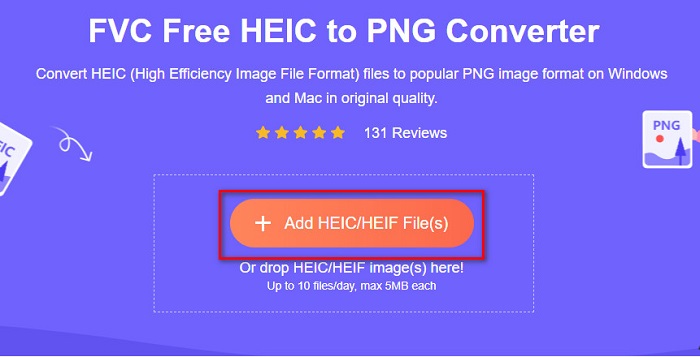
الخطوة 3. بعد ذلك ستظهر مجلدات الكمبيوتر، حيث ستختار ملف HEIC الخاص بك. اضغط على Open. عندها ستبدأ عملية تحويل HEIC إلى PNG.

الخطوة 4. أخيرًا، في واجهة البرنامج، انقر على زر Download لتنزيل ملف PNG الخاص بك.

بسيط ، أليس كذلك؟ يمكنك تحويل ملف HEIC الخاص بك إلى ملف PNG باتباع هذه الخطوات السهلة.
استخدم Xconvert.com
Xconvert هو محوّل HEIC إلى PNG مجاني عبر الإنترنت يحوّل ملفات HEIC بسهولة إلى ملفات PNG. يتميز هذا المحول عبر الإنترنت بواجهة برنامج سهلة الاستخدام ومفيدة للمستخدمين المبتدئين. علاوة على ذلك، يمكنك تغيير دقة الصورة عند استخدام هذا المحول عبر الإنترنت. ومع ذلك، لأنه يعتمد على الإنترنت، قد تواجه بطءًا في عملية التحويل عند بطء اتصالك بالإنترنت. كما يحتوي على إعلانات قد تكون مزعجة بالنسبة لك.
الخطوة 1. ابحث عن Xconvert.com في المتصفح لديك. على موقعهم، انقر زر Add Files، ثم ستظهر ملفات جهازك، وبعدها اختر ملف HEIC الخاص بك.

الخطوة 2. سيتم رفع صورتك إلى واجهة البرنامج. بعد الرفع، انقر على زر Convert الموجود في الزاوية السفلية اليمنى من واجهة البرنامج. ثم انتظر حتى يصبح ملفك جاهزًا للتنزيل، وبعدها انتقل إلى الخطوة التالية.
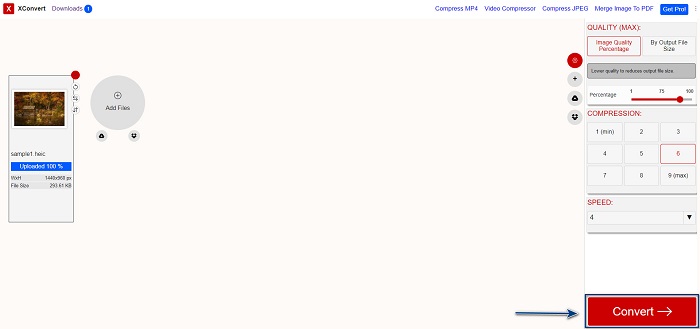
الخطوة 3. عندما يصبح ملفك جاهزًا، انقر زر Download لتنزيل ملف PNG الخاص بك؛ وسترى فوق زر التنزيل حجم الإخراج والوقت الذي استغرقه التحويل.

استخدم زمزم
طريقة أخرى لتحويل HEIC إلى PNG عبر الإنترنت هي استخدام محوّل Zamzar على الإنترنت. من المحتمل أنك صادفت هذه الأداة عند البحث عن محوّل HEIC إلى PNG. هذا المحول متاح في معظم المتصفحات تقريبًا. بالإضافة إلى ذلك، يتمتع بواجهة مستخدم بسيطة مما يجعله أداة سهلة الاستخدام. ومع ذلك، قد يتلف ملفك إذا انقطع اتصال الإنترنت أثناء عملية التحويل. ومع ذلك، لا يزال الكثير من المستخدمين يعتمدون على هذا المحول لتحويل HEIC إلى PNG.
الخطوة 1. في المتصفح الذي تستخدمه، ابحث عن Zamzar. على موقعهم، انقر زر Add Files. ستظهر ملفات جهازك، ثم قم برفع صورة HEIC الخاصة بك.

الخطوة 2. بعد رفع ملف HEIC، انقر على زر القائمة المنسدلة ثم اختر PNG كتنسيق إخراج للملف.

الخطوة 3. أخيرًا، انقر على زر Convert Now لتحويل ملف HEIC إلى تنسيق PNG. ثم قم بتنزيل ملف PNG الخاص بك. فقط انتظر لبضع ثوانٍ، وهكذا تكون قد انتهيت!

استخدم أدوات التحويل
Conversion Tool هو محوّل HEIC إلى PNG عبر الإنترنت بواجهة مستخدم بسيطة. يمكنه تحويل ملف HEIC إلى PNG بسرعة عالية. علاوة على ذلك، فهو لا يحتوي على الكثير من الإعلانات مقارنةً بالمحوّلات الأخرى عبر الإنترنت. لكن من سلبياته أنه يمكنك تحويل عشرة ملفات فقط في اليوم، كما أن هناك حدًا لحجم الملف. ولكن إذا كنت تقوم بتحويل ملف صغير، فقد تكون هذه الأداة مناسبة لك.
الخطوة 1. ابحث عن Conversion Tools.io في المتصفح لديك. ثم انقر على زر Browse في الواجهة الرئيسية للبرنامج، أو اسحب وأفلت ملف HEIC الخاص بك على زر Browse.

الخطوة 2. بعد ذلك، انقر زر Run Conversion لبدء تحويل ملف HEIC إلى ملف PNG. ثم انتظر حتى يتم تحميل ملف الصورة، وبعدها انتقل إلى الخطوة التالية.

الخطوة 3. في النهاية، انقر زر Download لتنزيل ملف PNG الخاص بك.

استخدم CDKM
آخر أداة سنعرضها لك هي CDKM. تتيح لك هذه الأداة تحويل ملفات HEIC إلى PNG ببضع نقرات فقط. ومع ذلك، قد تستغرق عملية التحويل بضع ثوانٍ حسب سرعة اتصالك بالإنترنت عند استخدام هذا المحول عبر الإنترنت. كما أنه يحتوي على إعلانات قد تكون مزعجة لك. ومع ذلك، لا يوجد به حد لحجم الملف، لذا يستحق التجربة.
الخطوة 1. في المتصفح لديك، ابحث عن محوّل CDKM عبر الإنترنت. في الواجهة الرئيسية للبرنامج، انقر زر Choose Files. ستظهر مجلدات جهازك، ثم اختر ملف HEIC لتحميله.

الخطوة 2. بعد ذلك، انقر على زر Start Conversion لبدء عملية التحويل.

الخطوة 3. أخيرًا، مرّر للأسفل قليلًا وسترى زر Download. انقر زر Download لتنزيل ملف PNG الخاص بك.

الجزء 3. تحويل HEIC إلى PNG على Mac
تدعم أجهزة Apple تنسيقات ملفات HEIC ، وباستخدام Mac ، يمكنك فتح ملف HEIC في الأصل. ولكن إذا كنت تريد تحويل ملف HEIC إلى PNG ، فيمكنك تغييره باستخدام تطبيق الصور في Mac. وفقًا لذلك ، إذا كنت من مستخدمي Mac ، فمن الأفضل قراءة هذا الجزء.
الخطوة 1. أولًا، اسحب وأفلت ملف HEIC في تطبيق Photos. ثم عاين صورة HEIC وانقر على File > Export > Export 1 Photo.

الخطوة 2. بعد ذلك، في خيار Photo Kind، انقر على تنسيق الإخراج الذي تريده. اختر تنسيق ملف PNG.

الخطوة 3. ثم انقر على زر Export، وبعدها اختر وجهة حفظ ملف الإخراج. سترى أن ملف HEIC الخاص بك قد تم تغييره إلى تنسيق PNG.

الجزء 4. تحويل ملف HEIC إلى PNG على iPhone
إذا كنت تستخدم iPhone ، فيمكنك فتح ملف HEIC على جهازك. ولكن إذا كنت تريد تحويل ملف HEIC إلى PNG باستخدام جهاز iPhone ، فلدينا طريقة لك. باتباع هذه الخطوات البسيطة والسهلة أدناه ، يمكنك تحويل HEIC إلى PNG دون عناء.
الخطوة 1. في تطبيق Photos على جهاز iPhone، اضغط على زر Select الموجود في أعلى الشاشة. ثم اختر ملف HEIC الخاص بك، واضغط على أيقونة Share.
الخطوة 2. اسحب الشاشة إلى الأعلى، وسترى خيار Copy Photo، ثم اضغط عليه.
الخطوة 3. أخيرًا، انتقل إلى تطبيق Files، واضغط على زر browse واختر موقع الإخراج الذي تريده (اضغط iCloud Drive أو On My iPhone). ثم قم بلصق ملف HEIC هناك.

بعد لصق ملفك ، سترى أنه سيتم تحويل ملفك تلقائيًا إلى ملف PNG.
الجزء 5. معرفة موسعة حول ملف HEIC وملف PNG
إذا كنت لا تزال في شك فيما إذا كنت تريد تحويل ملف HEIC إلى PNG ، فنحن نوفر لك مخطط مقارنة لمساعدتك في التمييز بين هذين الملفين. علاوة على ذلك ، يمنحك نظرة عامة واضحة على خصائص HEIC و PNG. اقرأ بعناية لمعرفة الفرق بين ملفات HEIC وملفات PNG.
| HEIC | بي إن جي | |
| التوافق | يدعم جهاز Apple فقط تنسيق الملف هذا. | تدعم جميع الأجهزة تقريبًا هذا الملف ، بما في ذلك أجهزة Apple. |
| حجم الملف | حجم ملف صغير. | يمكن أن تصل إلى حجم ملف ضخم. |
| جودة الصورة | جودة صورة عالية. | يتمتع بجودة جيدة ، لكن ليس أفضل من ملف HEIC. |
| مضغوط / غير مضغوط | مضغوط | غير مضغوط |
| التحرير | يحتفظ بجودة الصورة عند التحرير. | قد تنخفض الجودة عند التحرير. |
الجزء 6. الأسئلة الشائعة حول تحويل HEIC إلى PNG
هل سيؤثر تحويل HEIC إلى PNG على حجم الملف؟
نعم. عندما تقوم بتحويل HEIC إلى PNG ، فإنه سيزيد من حجم الملف ، على الرغم من أنه لن يكون مرتفعًا.
هل يمكنك فتح ملفات PNG على Adobe Photoshop؟
بالتأكيد. يمكنك فتح ملفات PNG على Adobe Photoshop لأن Adobe Photoshop يدعم تنسيق ملف PNG.
هل يمكنك فتح تنسيق ملف PNG على أجهزة Apple أصلاً؟
نعم. عند التقاط لقطات شاشة من جهاز iPhone الخاص بك ، سيتم حفظها تلقائيًا في Camera Roll كملف PNG.
خاتمة
أخيرًا! لقد وصلنا إلى نهاية رحلتنا. هذه المقالة قدّمت لك أفضل الحلول لتحويل ملف HEIC إلى تنسيق PNG. وكل محوّلات HEIC إلى PNG عبر الإنترنت المذكورة أعلاه يمكنها تحويل ملفك بكفاءة ودون عناء. بالإضافة إلى ذلك، هناك خيارات أخرى يمكنك استخدامها إذا كنت من مستخدمي Mac أو iPhone. ولكن إذا كنت تبحث عن أفضل محوّل HEIC إلى PNG بميزات متميزة للاستخدام، فإن محوّل FVC Free HEIC to PNG هو الخيار الأفضل لك.
-
 كيفية فتح ملف HEIC على أنظمة التشغيل Windows و Mac وعلى الإنترنت
 هل تبحث عن طريقة لفتح ملفات HEIC؟ توفر لك هذه المقالة أفضل الحلول لفتح ملفات HEIC على أنظمة Windows و Mac و Online.
-
 JPG VS GIF: 3 طرق سهلة حول كيفية تحويل JPG إلى GIF
 هل تريد معرفة الفرق بين JPG و GIF؟ أو هل تريد تبديل JPG إلى تنسيق GIF المتحرك؟ ثم اقرأ هذه المقالة للحصول على فكرة.
-
 أفضل 5 طرق لتغيير الصورة إلى صورة GIF متحركة [محدّث 2022]
 هل تحتاج إلى تحويل صورة إلى GIF؟ ستوفر هذه المقالة أفضل خمسة محولات يمكن أن نجدها في السوق. لذا ، دعنا نتعرف على هذه الأدوات من خلال قراءة هذه المقالة.
