


 محول الفيديو النهائي
 مسجل الشاشة
 إصلاح الفيديو
كيفية تغيير خلفية الصورة - دليل المبتدئين
في الوقت الحالي، لم يعد من الغريب رؤية صور تم تغيير خلفياتها عن الصورة الأصلية. فهذا أسلوب يلجأ إليه الناس لإضفاء لمسة مختلفة على إبداعهم. ورغم أن تغيير الخلفية من الأمور المسلية التي يمكننا فعلها بصورنا، فإنه قد يكون في بعض الأحيان صعبًا ويستغرق وقتًا طويلًا. لذلك، لن تعاني من هذه المتاعب بعد اليوم، لأنك في هذا المقال ستتعلم كيفية تغيير خلفية الصورة بسرعة، وستفهم أيضًا لماذا يكون اللعب بخلفيات الصور عن طريق تعديلها وتخصيصها أمرًا مهمًا لنا جميعًا. بالإضافة إلى ذلك، ستتعرف على أدوات أخرى وطرق مختلفة لتعديل خلفية الصورة بما يناسبك أكثر. هل أنت مستعد لرفع مستوى إبداعك؟ اقرأ المقال كاملًا الآن!

الجزء 1. أسهل طريقة لتغيير خلفية الصورة
يعد تعلم كيفية تغيير خلفيات الصور أمرًا مهمًا لأنه يجعل الصور تبدو أفضل وأكثر إثارة للاهتمام. سواء كنت تلتقط صورًا احترافية أو تنشئ محتوى لوسائل التواصل الاجتماعي، فإن القدرة على تخصيص الخلفيات تضيف لمسة إبداعية. فهو يساعد في الحفاظ على مظهر متسق في تصميماتك وعلاماتك التجارية، مما يجعل كل شيء متطابقًا ويبدو مصقولًا. إليك الأداة التي يمكنك استخدامها لتغيير خلفية الصورة بسرعة.
أداة FVC Free Background Remover تُسهِّل عملية تغيير خلفيات الصور. تتيح لك هذه الأداة سهلة الاستخدام إزالة الخلفية من صورك تلقائيًا أو إنشاء خلفية شفافة بكل سهولة. علاوة على ذلك، فهي لا تكتفي بإزالة الخلفية فحسب، بل تتيح لك أيضًا استبدالها بلون ثابت من اختيارك، أو استبدالها بصورة أخرى من جهازك المحلي. تدعم الأداة صيغ الصور الشائعة مثل PNG وJPG وJPEG، مما يجعلها مناسبة لاستخدامات متنوعة.
الخصائص الرئيسية
◆ الإزالة التلقائية للخلفية.
◆ تحرير الصور باستخدام الاقتصاص، والوجه، وغيرها من الميزات.
◆ يدعم تنسيقات الصور الشائعة: PNG وJPG وJPEG.
◆ يضمن خصوصية المستخدم وأمن البيانات.
◆ واجهة سهلة الاستخدام مع معاينة في الوقت الحقيقي.
◆ أداة مجانية تمامًا بدون اشتراكات أو تسجيلات.
◆ يحافظ على جودة الصورة الأصلية بعد إزالة الخلفية.
دليل خطوة بخطوة
الخطوة 1. ابدأ بزيارة موقعهم الرسمي، ثم انقر على زر Upload Image (رفع الصورة).
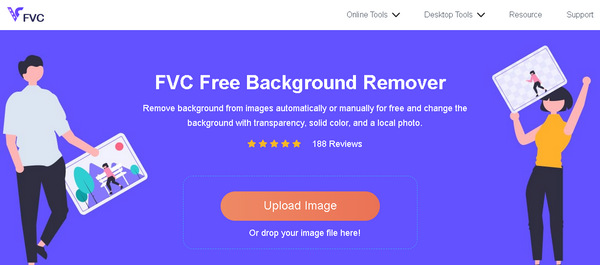
الخطوة 2. انتظر قليلًا حتى تنتهي المعالجة. بعد الانتهاء، يمكنك تخصيص صورتك عن طريق تغيير الخلفية.
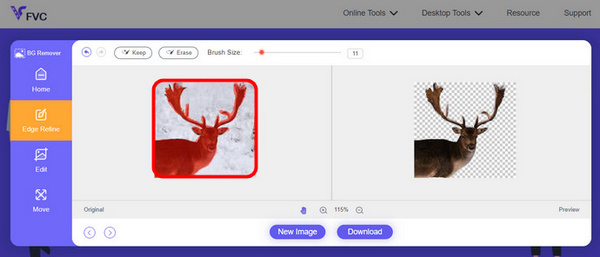
الخطوة 3. للاحتفاظ بالنتيجة المعدلة، اضغط ببساطة على زر التنزيل.
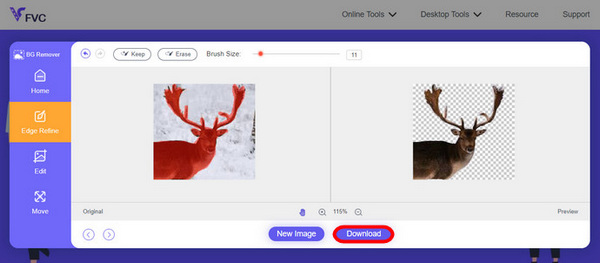
يعد FVC Online Image Screen Remover أداة متعددة الاستخدامات بالفعل. فهو لا يغير خلفية الصورة فحسب، بل يسمح للمستخدمين أيضًا بتخصيص صورهم بعد إزالة الخلفية. بفضل ميزاته سهلة الاستخدام، يمكن لأي شخص استخدام هذا بسرعة وسهولة.
الجزء 2. المزيد من الطرق لتغيير خلفية الصورة
هناك طرق مختلفة لتغيير خلفيات الصور، وإذا كنت تبحث عن خيارات تتجاوز FVC Free Background Remover، فإليك بعض الأدوات والطرق الإضافية التي يمكنك استكشافها:
محل تصوير
يمثل Adobe Photoshop مركزًا قويًا في عالم تحرير خلفية الصور. بفضل ميزاته الشاملة، يعد Photoshop الخيار المفضل للمحترفين والمتحمسين على حدٍ سواء. إن إمكانياته المتقدمة، بما في ذلك أدوات التحديد الدقيقة وتعديلات الطبقة، تجعله مثاليًا لإجراء تغييرات معقدة في الخلفية. على الرغم من أنه يأتي مزودًا بمنحنى تعليمي، إلا أن Photoshop يوفر مرونة لا مثيل لها وتحكمًا إبداعيًا.
دليل سريع:
الخطوة 1. في برنامج Photoshop لديك، انقر على تبويب File (ملف) لفتح صورتك.
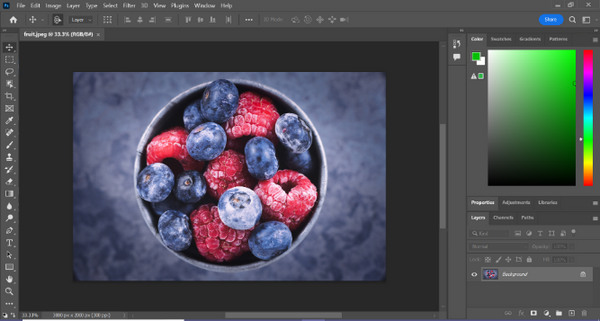
الخطوة 2. استخدم أداة Object Selection واسحب الماوس فوق العنصر الذي تريد قصَّه من الصورة.
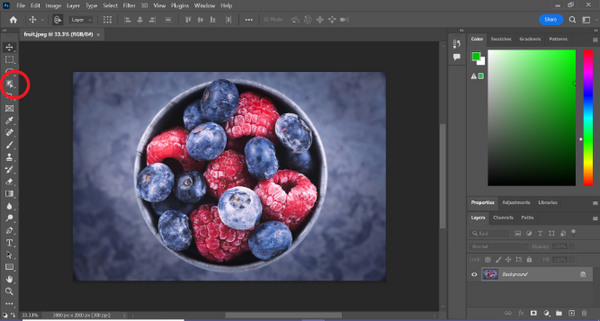
الخطوة 3. انقر على Select and Mask.
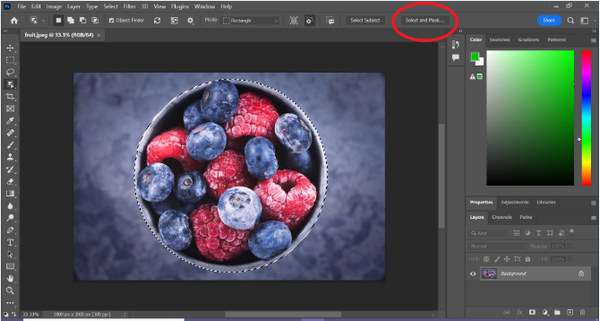
الخطوة 4. عدِّل إعدادات التحديد، مثل التنعيم (Feather)، إذا لزم الأمر.
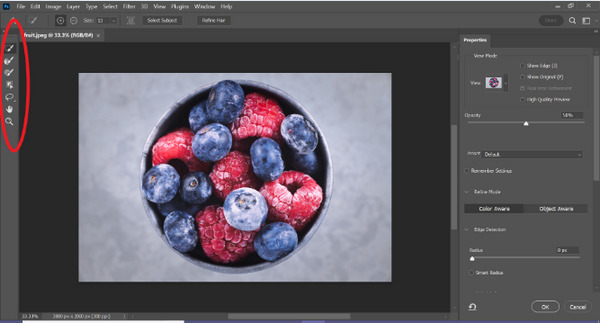
الخطوة 5. انقر على أيقونة Mask من أجل قص العنصر من الصورة ثم احفظ الصورة المعدَّلة.
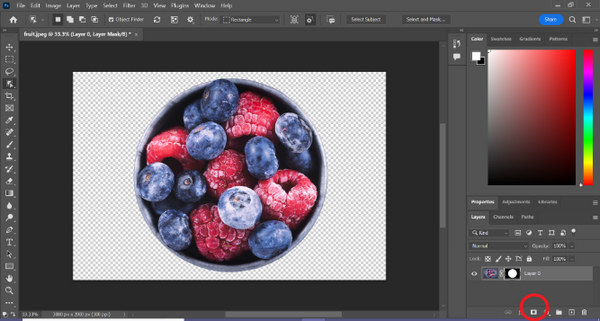
الخطوة 6. وأخيرًا، لاستبدال الخلفية، اسحب أيقونة صورة الخلفية الجديدة إلى الصورة ذات القناع (الماسك). ثم افتح لوحة Layers واسحب طبقة الخلفية الجديدة إلى أسفل الطبقة التي تحتوي على الماسك.
يعد Photoshop بالفعل طريقة جيدة أخرى لاستبدال خلفية الصورة، والشيء الوحيد في هذه الأداة هو أنها تتطلب مهارات لأن واجهة الأداة معقدة بحيث يسهل على المستخدمين الجدد التنقل فيها. ومع ذلك، يعد Photoshop أداة قوية عندما يتعلق الأمر باستبدال خلفيات الصور.
كانفا
Canva عبارة عن منصة تصميم رسومية معروفة تم تصميمها لتبسيط عملية إنشاء محتوى جذاب بصريًا. على الرغم من أنه قد لا يتطابق مع تعقيد Photoshop، إلا أن قوة Canva تكمن في بساطته وسهولة الوصول إليه. فهو يوفر واجهة سحب وإفلات سهلة، مما يجعله مثاليًا لأولئك الذين يبحثون عن تغييرات مباشرة في الخلفية، خاصة بالنسبة لرسومات الوسائط الاجتماعية. يُعد Canva خيارًا رائعًا لإجراء تعديلات سريعة وفعالة دون الحاجة إلى خبرة واسعة في التصميم.
دليل سريع:
الخطوة 1. افتح حسابك أو مشروعك في Canva.
الخطوة 2. الآن، لرفع صورتك، انقر على زر Upload (رفع).
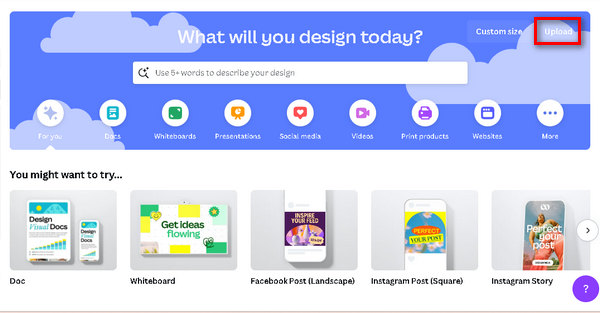
الخطوة 3. بعد رفع الصورة، انقر على Use in a New Design (استخدام في تصميم جديد)، ثم اختر مقاسًا مخصَّصًا (Customize size).
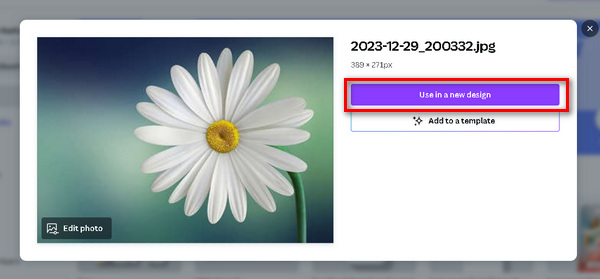
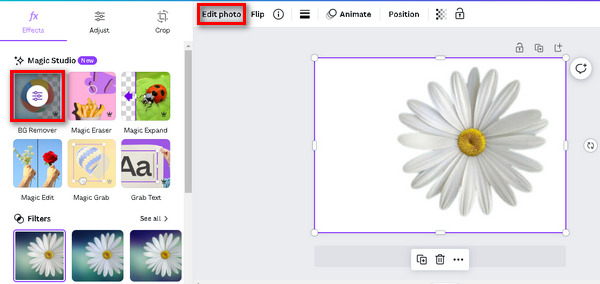
الخطوة 4. اضغط على الصورة، ثم انقر على Edit Image (تعديل الصورة)، واختر BG Remover (إزالة الخلفية).
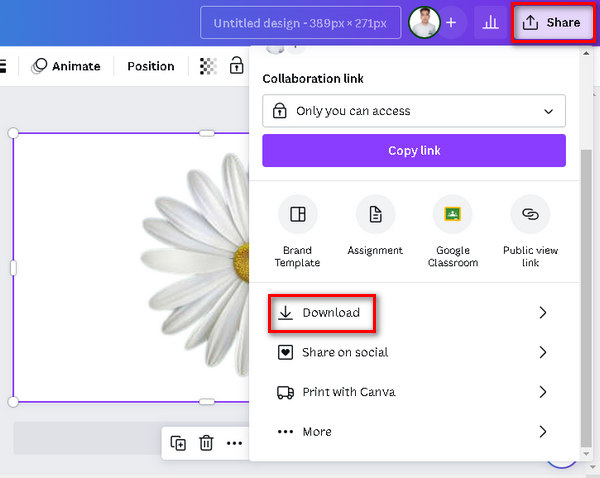
الخطوة 5. لحفظ الصورة، اضغط على زر Share (مشاركة) في أعلى يمين الشاشة، ثم انقر على Download (تنزيل).
لا تنس حفظ الملف بتنسيق PNG أو JPEG وبخلفية شفافة. وبعد ذلك، قم بلصقه في الخلفية التي تريدها.
فوتور
Fotor عبارة عن أداة متعددة الاستخدامات لتحرير الصور عبر الإنترنت حيث يمكن للمستخدمين التعامل بسهولة مع خلفيات الصور من خلال ميزات مثل إزالة الخلفية واستبدالها. فهو يوفر العديد من المرشحات والتأثيرات وأدوات التحرير الأساسية، مما يجعله الأفضل لكل من المبتدئين والمستخدمين الذين يبحثون عن تجربة تحرير مبسطة. تساهم واجهة Fotor سهلة الاستخدام ومجموعة متنوعة من الميزات في زيادة شعبيتها لإجراء تغييرات سريعة وفعالة في الخلفية.
دليل سريع:
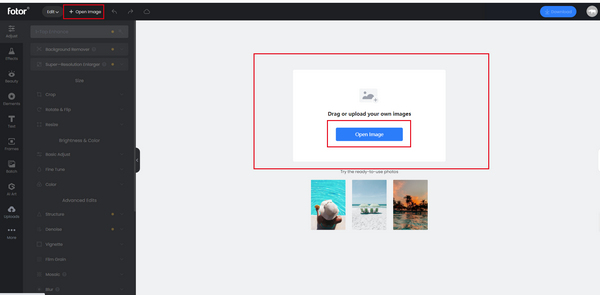
الخطوة 1. ابدأ برفع صورتك إلى مساحة العمل (الكانفاس). انقر على Open Image في منتصف مساحة العمل، ثم اختر الصورة من جهازك وقم برفعها.
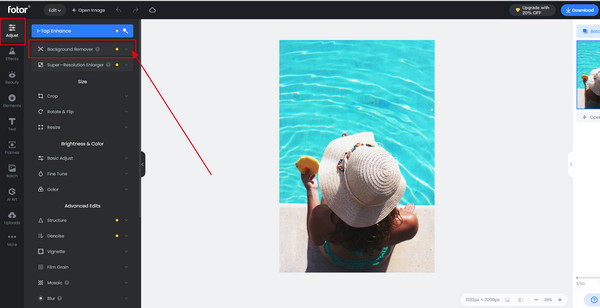
الخطوة 2. انقر على ميزة Adjust (ضبط)، ثم اختر Background Remover (مزيل الخلفية). سيقوم النظام تلقائيًا بإزالة خلفية صورتك.
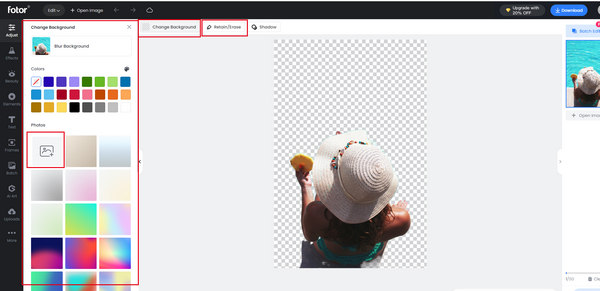
الخطوة 3. استخدم أداة Retain/Erase (استبقاء/مسح) لاستعادة الأجزاء التي أزيلت إذا لزم الأمر. يمكنك أيضًا النقر على Change Background (تغيير الخلفية) لتبديل خلفية الصورة.
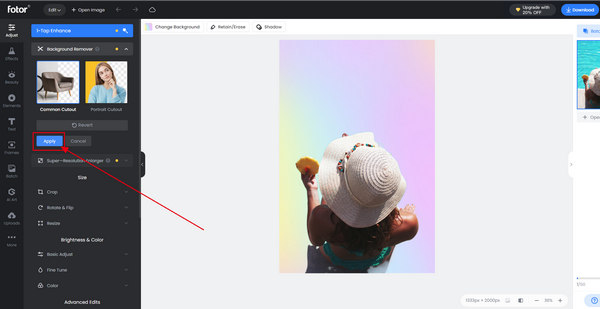
الخطوة 4. بعد الانتهاء من جميع التعديلات، انقر على زر Save (حفظ) لتطبيق التغييرات. أثناء تصدير الصورة، يمكنك تغيير مقاس الصورة من خلال ميزة التصدير.
يعد Fotor بالفعل أداة رائعة لتغيير خلفية الصورة بسرعة وسهولة. وبصرف النظر عن ذلك، فهو يحتوي على خطة مجانية يمكن للمستخدمين الاستمتاع بها.
الجزء 3. الأسئلة الشائعة حول تغيير خلفية الصورة
هل يمكن لـ ChatGPT AI تغيير خلفية الصورة من خلال المطالبات؟
على الرغم من أن ChatGPT AI يتفوق في إنشاء محتوى نصي، إلا أنه لا يمكنه التعامل مع الصور، بما في ذلك تغيير الخلفيات مباشرة. بالنسبة للمهام المتعلقة بالصور، فكر في استخدام أدوات أو برامج مخصصة لتحرير الصور.
هل يمكنك تغيير صورة الخلفية على iPhone؟
نعم، يمكنك تغيير خلفية الصورة على جهاز iPhone باستخدام العديد من التطبيقات المتوفرة على متجر التطبيقات. تسمح التطبيقات، مثل Remove.bg أو Adobe Photoshop Express للمستخدمين بإزالة الخلفيات أو استبدالها على صورهم مباشرة من أجهزة iPhone الخاصة بهم. ما عليك سوى تثبيت التطبيق المفضل، واتباع التعليمات الخاصة بالتطبيق، والاستمتاع بتغييرات الخلفية أثناء التنقل.
كيف أضع صورة خلف الخلفية في الفوتوشوب؟
لوضع صورة خلف الخلفية في Photoshop، اتبع الخطوات التالية:
الخطوة 1. افتح صورة الخلفية في Photoshop.
الخطوة 2. اسحب وافلت الصورة التي تريد وضعها خلف الخلفية إلى مساحة العمل.
الخطوة 3. عدِّل حجم وموضع الصورة الجديدة حسب الحاجة.
الخطوة 4. في لوحة الطبقات (Layers)، تأكد من أن طبقة الصورة الجديدة موجودة أسفل طبقة الخلفية.
الخطوة 5. إذا لزم الأمر، استخدم أقنعة الطبقات (Layer Masks) أو أدوات أخرى لتحسين موضع ودمج الصورتين.
الخطوة 6. احفظ الصورة بعد التعديل.
هل يمكنني استخدام FVC مزيل الخلفية عبر الإنترنت على جهاز Mac؟
نعم، مزيل الخلفية المجاني FVC متوافق مع نظام التشغيل macOS. يمكنك الوصول إلى هذه الأداة واستخدامها على جهاز Mac الخاص بك من خلال زيارة الموقع الرسمي واتباع التعليمات المقدمة.
هل تغيير خلفية الصورة يؤثر على جودة الصورة؟
عند استخدام أدوات موثوقة مثل FVC Free Background Remover أو برامج احترافية مثل Photoshop، فإن تغيير خلفية الصورة لا يؤثر بشكل ملحوظ في جودة الصورة. فهذه الأدوات مصمَّمة للحفاظ على الدقة الأصلية ووضوح الصورة، مما يضمن بقاء مستوى الجودة البصرية عاليًا.
خاتمة
أصبح تغيير خلفية الصورة اليوم أمرًا في غاية السهولة. فهناك العديد من الأدوات التي يمكنك استخدامها للقيام بذلك بالنيابة عنك. مع أداة FVC Online Background Remover، يمكنك تعديل خلفية الصورة بسرعة وبشكل مجاني، وكذلك الأمر مع الأدوات الأخرى المذكورة في هذا المقال. ما عليك سوى اختيار ما يناسبك منها أكثر.
-
 الدليل الكامل لجعل الصورة شفافة في شرائح جوجل
 تعرف على كيفية جعل الصورة في شرائح Google شفافة في بضع خطوات بسيطة. اجعل شرائح العرض التقديمي أكثر احترافية باستخدام تأثيرات الشفافية!
-
 كيف يقوم PPT بإزالة صورة الخلفية؟ الدليل الشامل
 هل أنت مستعد للارتقاء بعرضك التقديمي إلى المستوى التالي؟ في هذه المقالة، اكتشف كيفية إزالة PPT لصور الخلفية وإنشاء عروض PowerPoint التقديمية الرائعة بسهولة.
-
 أضف خلفية للصورة على iPhone و Android و Computer و Online
 هل يمكنني إضافة خلفية بيضاء للصورة؟ كيف تفعل ذلك؟ تعرف على 3 طرق لإضافة خلفية للصور عبر الإنترنت، على الكمبيوتر أو iPhone أو Android.
