


 محول الفيديو النهائي
 مسجل الشاشة
 إصلاح الفيديو
مراجعة برنامج Cutout Pro Image Enhancer: الميزات الرئيسية التي ستأسرك
لقد أصبحت أدوات تحسين الصور رائجة في مجال الصور الرقمية، وأصبح العثور على الأداة المناسبة لرفع صورك من العادية إلى الاستثنائية أمرًا بالغ الأهمية. توجد العديد من الأدوات التي تعزز صورك، لكن من الصعب إيجاد أداة موثوقة وآمنة وفعّالة في الوقت نفسه. لحسن الحظ، يتبيّن أن أداة تحسين الصور Cutout Pro هي بالضبط ما تبحث عنه. في جوهرها، صُممت أداة Cutout Pro Image Enhancer لإطلاق الإمكانات الكامنة في صورك وتعويض ما ينقصها، فهي تقدّم نتائج سلسة وعالية الجودة تلبي احتياجاتك البصرية. ومن خلال استكشاف المزايا البارزة التي تجعل هذه الأداة مثالية لك، سيقدّم لك هذا المقال نظرة معمّقة على أداة Cutout Pro Image Enhancer، بدءًا من جودة المخرجات وحتى صيغ الصور المدعومة. مواصلة قراءة هذا المقال ستزوّدك بالمعلومات اللازمة لتحسين الصور باستخدام Cutout Pro. كما سيتم التطرّق أيضًا إلى بديل مقترح جدير بالمتابعة. لا تكتفِ بالتقاط الصور وتحريرها ورفعها؛ بل اجعل تحسين الصور خطوة أساسية في عمليتك بدءًا من اليوم!

الجزء 1. مراجعة أداة تحسين الصور Cutout Pro
ينشئ برنامج Cutout Pro أداة مفيدة لمساعدة المستخدمين في التحرير السريع للصور، وفي هذه الحالة مُحسِّن الصور. تعد واجهة برنامج Cutout Pro Image Enhancer سهلة الاستخدام لكل من المبتدئين والمحترفين لتحقيق نتائج جودة الصورة بدون فقدان. يستخدم محسّن الصور هذا الذكاء الاصطناعي لتحسين أدق التفاصيل التي قد يغفلها حتى المحترفون. في لحظة، ستوفر الوقت من خلال السماح للذكاء الاصطناعي بالقيام بعمل تحديد وتحسين أجزاء من صورتك. لا تعمل هذه الأداة المدعومة بالذكاء الاصطناعي على تحسين الصورة فحسب، بل تحتوي أيضًا على ميزات مثل إزالة الخلفية وتحويل الصور، مما يجعلها أداة مرنة عند القيام بمهام متعددة. فيما يلي بعض الميزات الرئيسية التي يمكنك توقعها.
الخصائص الرئيسية
◆ تحسين الصور. تعتمد الأداة على تقنية ذكاء اصطناعي متقدمة تستخدم معالجة متطورة لتكبير الصور، وتصحيح الألوان، وزيادة الحدّة، وتقليل الضوضاء، وفقًا لاحتياجات صورتك.
◆ التوفّر على أجهزة متعددة. يمكنك استخدام ميزة تحسين الصور من خلال أي متصفّح ويب محلي لديك، مما يتيح لك الوصول إلى خصائص الأداة واستخدامها على جهازك المفضّل بكل راحة.
◆ المعالجة الدفعية. تفتخر أداة Cutout Pro Image Enhancer بفكرة إنجاز مهام متعددة وتوفير الوقت، إذ تدعم المعالجة الدفعية وتسمح لك بمعالجة عدة صور في آن واحد بسلاسة، دون الحاجة إلى الانتظار حتى تنتهي معالجة صورة واحدة للبدء في الأخرى.
◆ أدوات القصّ بالذكاء الاصطناعي. تتيح لك إزالة العناصر غير المرغوب فيها من صورك، مثل الأجسام أو الأشخاص أو الفوضى أو العيوب التي تفسد المظهر الجمالي العام للصورة. وينطبق الأمر نفسه على إزالة النصوص غير المرغوب فيها من الصور، كيف تزيل النص من الصورة؟
◆ إزالة الخلفية. تُعد هذه الميزة من أدق الأدوات في إزالة الخلفيات؛ فلا حاجة لاستخدام شاشة خضراء، إذ يتعرف الذكاء الاصطناعي تلقائيًا على العنصر الأهم في الصورة ويرسم حول الهدف بدقة لإزالة الخلفية.
◆ تلوين الصور. يمكنه إضفاء الحياة على صورك القديمة بالأبيض والأسود، من خلال إضافة الألوان التي يراها مناسبة لتجعل الصورة نابضة بالحيوية.
جودة الإخراج
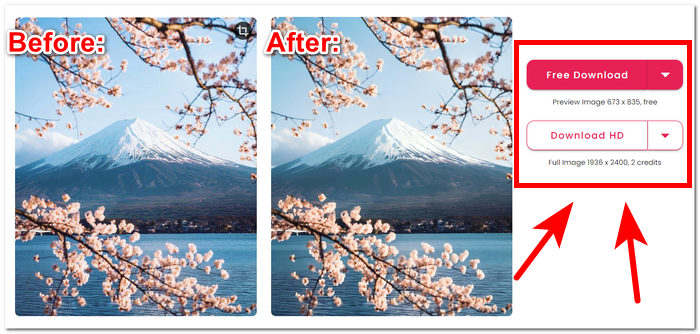
جودة الإخراج لبرنامج Cutout Pro Image Enhancer محدودة بما يصل إلى مرتين فقط، ويتم دفعها عن طريق الاعتمادات. فيما يلي قائمة بجودة الإخراج المتوفرة في برنامج Cutout Pro Image Enhancer.
تنزيل مجاني: بصيغ PNG وJPG – بجودة 673 × 835
تنزيل عالي الدقة (HD): بصيغ PNG وJPG – بجودة 1936 × 2400
تنسيقات الصور المدعومة
يدعم برنامج Cutout Pro Image Enhancer مجموعة متنوعة من تنسيقات الصور، مما يضمن المرونة في التعامل مع أنواع الملفات المختلفة. تتضمن تنسيقات الصور المدعومة PNG وJPG وJPEG وBMP وWEBP. سواء كنت تعمل مع صور شفافة، أو صور فوتوغرافية عالية الجودة، أو العديد من التنسيقات الملائمة للويب، يتيح Cutout Pro للمستخدمين تحسين الصور وتحريرها بسلاسة في مجموعة من امتدادات الملفات شائعة الاستخدام.
من المؤكد أن ميزات Cutout Pro Image Enhancer يمكنها معالجة مشكلات تحسين جودة الصورة بسهولة. ومع ذلك، من الضروري التحقق من الإصدار والتحديثات المحددة لبرنامج Cutout Pro للحصول على المعلومات الأكثر دقة وحداثة فيما يتعلق بتنسيقات الصور المدعومة وميزاتها وجودة الإخراج.
الجزء 2. بديل لبرنامج Cutout Pro لتحسين الصورة
هل تبحث عن بديل فعّال ومجاني وموثوق لأداة Cutout Pro، تحسّبًا لعدم تمكنك من الوصول إليها في بعض الأوقات؟ لا داعي للقلق؛ فـ FVC Free Image Upscaler موجود لخدمتك. يُعد واحدًا من أفضل الأدوات القائمة على الويب في فئة مُحسّنات الصور، إذ يقدّم خيارات تكبير تصل إلى 8 مرات، متفوقًا بذلك على العديد من الأدوات الأخرى المتاحة على الإنترنت، مما يجعله بجدارة البديل المناسب لأداة Cutout Pro Image Enhancer. يستخدم FVC تقنية ذكاء اصطناعي متقدمة لإنتاج نتائج متقنة وقريبة من المثالية، مع أنه أداة مجانية الاستخدام. في المقابل، قد يقدّم Cutout Pro Image Enhancer جودة محدودة للمستخدمين المجانيين، مع إعدادات تكبير تصل إلى مرتين فقط لتحسين صورتك. لمعرفة ما يميز أداة FVC Free Image Upscaler، إليك بعضًا من أبرز خصائصها المدرجة أدناه.
◆ مكبّر صور مدمج بالذكاء الاصطناعي. يستفيد من الذكاء الاصطناعي للتعرف على الأجزاء الضبابية في الصورة وتحسينها تلقائيًا، مما يجعل المهمة سريعة وسهلة دون القلق بشأن فقدان الجودة. فهو يعزّز صورتك بما يتناسب مع احتياجاتها عبر ضبط وحدات البكسل، وزيادة حدّة التفاصيل، وتحسين الألوان.
◆ تكبير حتى ثماني مرات. يتجاوز FVC حدود الأرقام المعتادة؛ فغالبية أدوات تحسين الصور تقتصر على خيارات تكبير بمعدل مرتين فقط، بينما يوفّر بعضها خيارات أعلى لكن باشتراك مدفوع. هذه الأداة تسمح للمستخدمين بتحسين صورهم حتى ثماني مرات أفضل.
◆ سهل الاستخدام. واجهته بسيطة بقدر بساطة هدفه، وهو مساعدة المستخدمين على تحسين صورهم دون إعلانات أو رسوم خفية.
◆ للطباعة وخلفيات الشاشة. يمكن استخدام النتائج في الطباعة أو كخلفية لسطح المكتب أو الهاتف المحمول دون فقدان الجودة. فالمحسّنات عالية الجودة لألوان الصور تجعل من الممكن إعادة توظيف صورك الضبابية في استخدامات أخرى مثل الطباعة وخلفيات الشاشة.
◆ توافق مرن مع الصيغ المختلفة. حوّل صورتك إلى تحفة فنية مذهلة! بغض النظر عن الصيغة، سواء كانت JPG أو JPEG أو BMP، يمكنك رفعها بسهولة إلى منصتنا. دعنا نساعدك في تحويل رؤيتك إلى واقع بصري رائع!
◆ تحسين بسرعة البرق. سرعات المعالجة عالية وتضمن نتائج واعدة، إذ تم تدريب الذكاء الاصطناعي على معالجة ملايين الصور مع الحفاظ على جودة مرتفعة ودقة مثالية في البكسل.
ولإنهاء الأمور، تنتج كلتا الأداتين نتائج بأفضل جودة بشكل احترافي. لا يترك مجالًا للصور والعيوب الباهتة، مما يجعل FVC وCutout Pro أداة موثوقة للاستخدام. من حيث الميزات، يتمتع Cutout Pro بميزة التوفر على أجهزة متعددة ومعالجة الدفعات. من ناحية أخرى، فاز برنامج FVC Free Image Upscaler بنتائج الجودة والمعالجة السريعة وتوافر الميزات مجانًا.
الجزء 3. الأسئلة الشائعة حول برنامج Cutout Pro Image Enhancer
هل برنامج Cutout Pro يحفظ الصور؟
يمكّن برنامج Cutout Pro المستخدمين من حفظ صورهم المحسنة بسهولة من خلال تقديم مجموعة متنوعة من خيارات الحفظ. ومع مرونة الاختيار من بين التنسيقات ودرجات الدقة المختلفة، يمكن للمستخدمين تخصيص صورهم المحفوظة لتتوافق مع تفضيلاتهم المحددة ومتطلبات المشروع. تضمن هذه الميزة تجربة سلسة وقابلة للتخصيص للحفاظ على النتائج المحررة بوضوح وتفاصيل مثالية.
هل يقدم Cutout Pro تطبيقات غير متصلة بالإنترنت؟
لا يوفر برنامج Cutout Pro تطبيقات غير متصلة بالإنترنت، ولا يمنح المستخدمين القدرة على تحرير صورهم وتحسينها دون الحاجة إلى اتصال مستمر بالإنترنت. لاستخدام ميزات تحسين الصور في Cutout Pro، يجب عليك الاتصال بالإنترنت نظرًا لأنها أداة تعتمد على الويب.
هل يمكنني عمل صورة بحجم 2×2 باستخدام برنامج Cutout Pro؟
Cutout Pro، يمكن للمستخدمين بسهولة إنشاء صورة مقاس 2 × 2 باستخدام أدوات التحرير المتنوعة. يدعم البرنامج الأبعاد المخصصة، مما يوفر المرونة لاقتصاص الصور وتغيير حجمها بدقة وفقًا لمتطلبات محددة، مما يجعله مثاليًا لإنشاء تخطيطات صور مخصصة 2 × 2. تعمل هذه الميزة على تمكين المستخدمين من تحقيق التكوين والتنسيق المطلوبين لصورهم دون عناء.
هل برنامج Cutout Pro جيد أم سيئ؟
تختلف فعالية Cutout Pro بناءً على التفضيلات الفردية والمتطلبات المحددة. على الرغم من الاعتراف به على نطاق واسع باعتباره مُحسِّنًا قويًا للصور بميزات متنوعة، إلا أن ملاءمته تتوقف على عوامل مثل الواجهات سهلة الاستخدام والوظائف المطلوبة وتفضيلات التحرير الشخصية. يُنصح المستخدمون المحتملون باستكشاف البرنامج للتأكد من توافقه مع توقعاتهم وسير العمل.
هل برنامج Cutout Pro مجاني؟
يوفر Cutout Pro للمستخدمين كلا من الإصدارات المجانية والمتميزة. قبل اختيار إصدار معين، من الضروري إجراء فحص شامل لتفاصيل التسعير وخيارات الترخيص المرتبطة به. ضع في اعتبارك أن الميزات أو الإمكانات المتقدمة قد تكون حصرية للإصدارات المميزة، مما يجعل من الصعب ويقل احتمال اختيارها لتكون الأداة التي تستخدمها.
خاتمة
في الختام، يبرز كل من أداة تحسين الصور Cutout Pro وFVC Free Image Upscaler كأدوات احترافية مصممة بعناية، تستند إلى قوة الذكاء الاصطناعي لرفع جودة تحسين الصور إلى مستويات غير مسبوقة. إن التزامهما بتجاوز حدود التميّز البصري يجعلهما أدوات قيّمة للجميع. وفي النهاية، يعتمد الاختيار بين هذين الخيارين المميزين على عامل الراحة والعملية بالنسبة للمستخدم. سواء اخترت المزايا المتقدمة في Cutout Pro أو السهولة والود في استخدام FVC Free Image Upscaler، يمكنك تحسين صورك بثقة عبر تقنية مدمجة بالذكاء الاصطناعي تلائم احتياجاتك الخاصة. ولا يزال عالم تعديل الصور يزداد ثراءً بفضل هذه الأدوات، التي توفّر طيفًا واسعًا من الخيارات لتحسين المظهر البصري للصور.
-
 مراجعة PicWish Photo Enhancer وأداة بديلة للتجربة
 اكتشف السحر الذي يجلبه مُحسّن الصور PicWish إلى عالم تحرير الصور. مراجعة متعمقة واستكشاف البدائل القابلة للتطبيق التي يمكنك تجربتها.
-
 مراجعة Fotor لمزيل الخلفية ومحسن الصور
 كل ما تحتاج لمعرفته حول Fotor مزيل الخلفية ومحسن الصور. ألق نظرة على بعض ميزاته واطلع على البديل المقترح الذي يناسب احتياجاتك.
-
 كيفية زيادة حجم الصورة عبر الإنترنت وغير متصل
 اكتشف أسهل طريقة لزيادة حجم الصورة دون فقدان الجودة. راجع أدواتنا وبرامجنا لتغيير الحجم لضمان الجودة المثالية لصورك.
