


 محول الفيديو النهائي
 مسجل الشاشة
 إصلاح الفيديو
أطلق العنان لإبداعك: مراجعة Luminar Neo الشاملة
هل تبحث عن حل شامل لتحسين الصور وإزالة الخلفيات؟ لا داعي للبحث أكثر، فقد يكون Luminar Neo الأداة المثالية لك. بفضل واجهته سهلة الاستخدام وميزاته القوية المعتمِدة على الذكاء الاصطناعي، يبرز كأداة تحرير صور متعددة الاستخدامات تلائم أي نوع من المستخدمين. سواء كنت تسعى إلى تعزيز حيوية الألوان، أو استبدال الخلفيات بسلاسة، أو ببساطة تحسين التفاصيل في لقطاتك، فإن هذه الأداة توفر مجموعة واسعة من الأدوات والخصائص الفعّالة لتلبية احتياجاتك الإبداعية. في هذه مراجعة Luminar Neo، سنستكشف كيف يمكن لهذه الأداة القوية أن ترتقي بسهولة بمستوى تصويرك الفوتوغرافي، وتزوّدك بالمعلومات اللازمة لإطلاق الإمكانات الكاملة لصورك. انضم إلينا بينما نتعمّق في الميزات والوظائف التي تجعل من Luminar Neo خيارًا بارزًا في عالم تحسين الصور.

الجزء 1. مراجعة لومينار نيو
يُعد Luminar Neo، وهو برنامج مبتكر لتحرير الصور طوّرته شركة Skylum، نقطة تحوّل للمصورين والفنانين البصريين الذين يبحثون عن مجموعة شاملة من الأدوات للارتقاء بصورهم. في جوهره، يعتمد هذا البرنامج على تقنية ذكاء اصطناعي متقدّمة لتبسيط عمليات التحرير المعقّدة، ما يجعله متاحًا للمستخدمين من جميع المستويات. ورغم أنه يقدّم مجموعة واسعة من أدوات التحرير الإبداعية والقوالب الجاهزة، فإن ما يميّز Luminar Neo عن غيره هو إمكاناته الاستثنائية في تكبير الصور وإزالة الخلفيات. يضمن مُكبِّر الصور الحفاظ على حدّة الصور وتفاصيلها حتى عند تكبيرها، بينما يوفّر أداة إزالة الخلفية حلًّا سلسًا لتعديل الخلفيات وتحسينها دون عناء.
الخصائص الرئيسية
◆ استخدم الذكاء الاصطناعي المتقدم لإجراء تحسينات دقيقة، بما في ذلك الأدوات المتخصصة للسماء والجلد.
◆ أدوات وإعدادات مسبقة متنوعة لإضافة لمسات فريدة لصورك.
◆ التكامل مع برامج التحرير الشائعة مثل Photoshop لسير العمل بسلاسة.
◆ معالجة سريعة للتعامل مع الملفات الكبيرة والتعديلات المعقدة دون عناء.
◆ احتفظ بصورتك الأصلية أثناء تجربة التعديلات.
◆ واجهة سهلة الاستخدام.
◆ مزيل الخلفية.
الايجابيات
- سير عمل قابل للتكيف.
- قدرات الذكاء الاصطناعي القوية.
- أسعار معقولة.
- سهل للمبتدئين.
- خصومات لمستخدمي Skylum.
- دعم العملاء 24/7.
سلبيات
- بعض الوظائف تحتاج إلى تحسين.
- لا يوجد تطبيق جوال لتحرير الصور.
الجزء 2. لومينار نيو ضد لومينار الذكاء الاصطناعي
فيما يلي جدول مقارنة بين Luminar Neo وLuminar AI.
| ميزة | لومينار نيو | لومينار الذكاء الاصطناعي |
| التحرير المدعوم بالذكاء الاصطناعي | نعم | نعم |
| واجهه المستخدم | متقدمة وقابلة للتخصيص | سهلة الاستخدام ومبسطة |
| أدوات التحرير | مجموعة واسعة من الأدوات والإعدادات المسبقة | قوالب وأدوات ذكية تعتمد على الذكاء الاصطناعي |
| اندماج | التكامل السلس مع برامج التحرير الأخرى | أداء فعال، مُحسّن لمعالجة الذكاء الاصطناعي |
| الجمهور المستهدف | المصورين المحترفين والمستخدمين المتقدمين | المبتدئين والمصورين العاديين |
من المهم أن تتذكر أن الاختيار بين Luminar Neo وLuminar AI يتلخص في تفضيلاتك الفردية ومتطلبات التحرير. سواء كنت تميل نحو الميزات المتقدمة والقابلة للتخصيص في Luminar Neo أو تفضل بساطة Luminar AI سهلة الاستخدام، فإن كلتا الأداتين تمثلان حلولاً قوية في مجال تحرير الصور.
الجزء 3. كيفية استخدام لومينار نيو؟
إليك كيفية استخدام Luminar Neo لتحسين الصور:
الخطوة 1. افتح برنامج Luminar Neo كبرنامج مستقل.
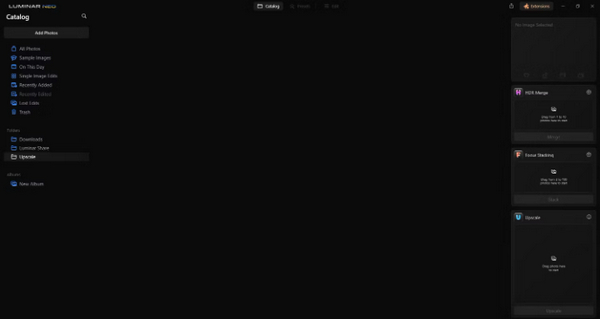
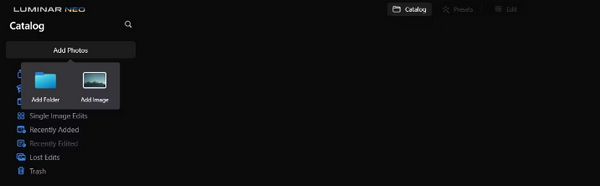
الخطوة 2. انقر على Add Photos ثم اختر بعد ذلك Add Image.
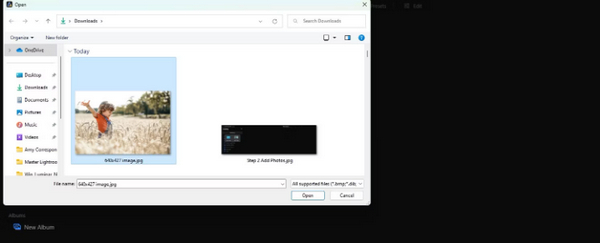
الخطوة 3. اختر الملف الذي تريده ثم انقر على Open.
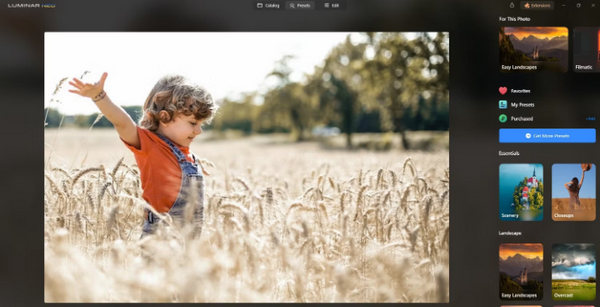
الخطوة 4. الآن، انقر على Catalog في أعلى القائمة.
الخطوة 5. اسحب الصورة إلى الأسفل نحو مربع Upscale AI الموجود في الأسفل والموسوم بعبارة Drag photo here to start.
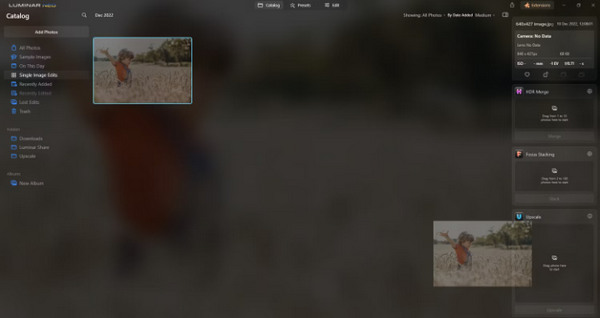
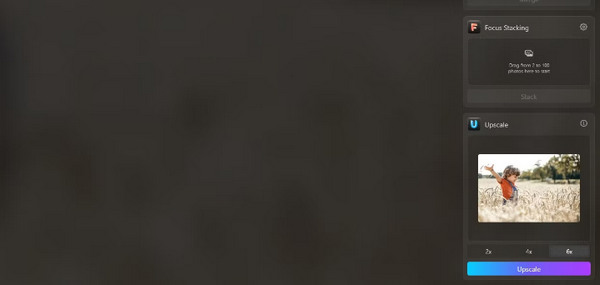
الخطوة 6. أكمِل العملية باختيار درجة التكبير التي تفضّلها؛ على سبيل المثال، في هذا العرض التوضيحي اخترنا زيادة بمقدار 6x.
الخطوة 7. أخيرًا، انقر على Upscale لتطبيق مستوى التكبير الذي اخترته على صورتك.
انقل صورتك التي تمت ترقيتها حديثًا من جهاز الكمبيوتر الخاص بك إلى هاتفك دون عناء باستخدام Luminar Share.
إليك كيفية استخدام Luminar Neo لإزالة خلفية الصورة:
الخطوة 1. ابدأ باستيراد الصورة التي ترغب في تعديلها. ابحث عن زر Add Photos في أعلى يسار الشاشة وانقر عليه. بعد اختيار صورتك، انقر على Open.
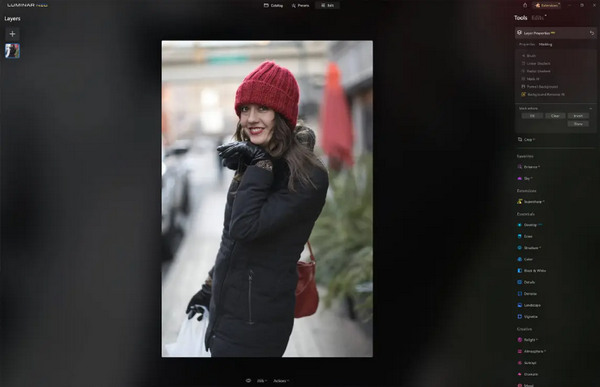
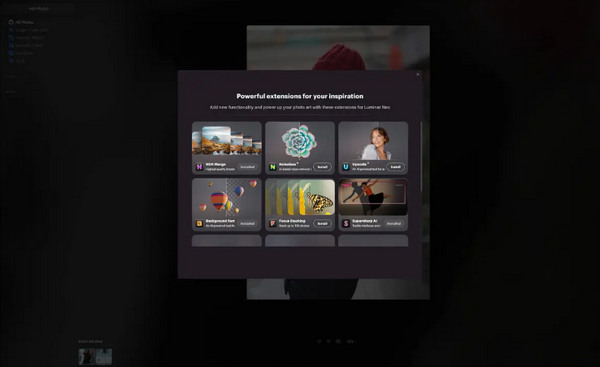
الخطوة 2. هذه الخطوة ضرورية للمستخدمين لأول مرة. تحتاج إلى تنزيل إضافة Background Removal AI من تبويب الإضافات (Extensions) في أعلى يمين الشاشة. بعد التنزيل، انقر نقرًا مزدوجًا على صورتك، ثم انقر على Edit وابدأ التحرير.
الخطوة 3. من شريط التحرير الموجود على الجانب الأيمن من الشاشة، انتقل إلى خصائص الطبقة (Layer Properties)، ثم إلى Masking، واختر Background Removal AI. يتيح لك هذا اختيار العنصر الرئيسي في الصورة. ما إن يتم تمييزه باللون الأحمر، اضغط على Remove لإزالة الخلفية بشكل سحري. استخدم فرشاة التنقيح (refinements brush) لإجراء أي تحسينات في المناطق التي قد يغفل عنها الذكاء الاصطناعي.
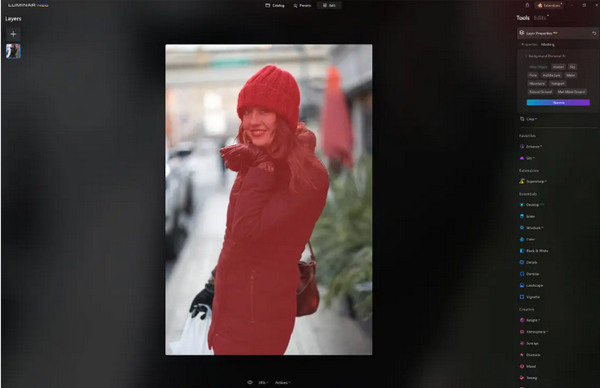
الشيء الوحيد في Luminar Neo هو أن نسخته المجانية لا تحتوي على هذه الميزة. ومع ذلك، إذا كانت ميزانيتك محدودة وترغب في تحسين صورتك إلى المستوى التالي، فهذه الأداة مناسبة لك.
الجزء 4. 2 أفضل البدائل المجانية لبرنامج Luminar Neo
قد يكون Luminar Neo مكلفًا بالنسبة للبعض ومعقدًا جدًا بحيث لا يمكن التنقل فيه بسهولة، لذا، إذا كنت تبحث عن أدوات بديلة لـ Luminar Neo، فإليك أفضل الأدوات التي يمكنك التحقق منها.
FVC لرفع مستوى الصور عبر الإنترنت
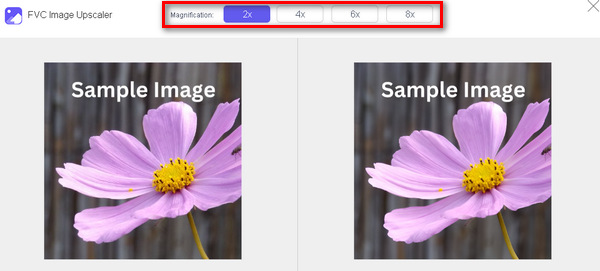
FVC Online Image Upscaler هو أداة مجانية عبر الإنترنت لتكبير الصور. نعم، لقد قرأت ذلك بشكل صحيح، إنه مجاني، لكن لا تستهِن بقدراته. هذه الأداة مدمجة بتقنية الذكاء الاصطناعي لأتمتة عملية التحسين بسلاسة. كذلك، يمكنك تكبير الصورة حتى 8x دون التأثير سلبًا في جودتها.
وإليك كيف يمكنك استخدام هذه الأداة
الخطوة 1. توجّه إلى موقعهم الرسمي.
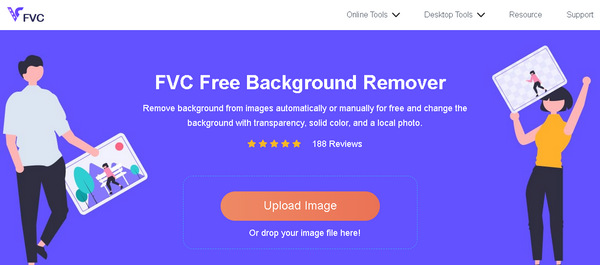
الخطوة 2. انقر على Upload Photo وحدّد الصورة التي تريد تكبيرها.

الخطوة 3. بعد ذلك، ستعرض هذه الأداة معاينة لصورتك. يمكنك استخدام خيار Magnifier للتحقّق من جودة الصورة.
الخطوة 4. انقر على Save لتنزيل صورتك.
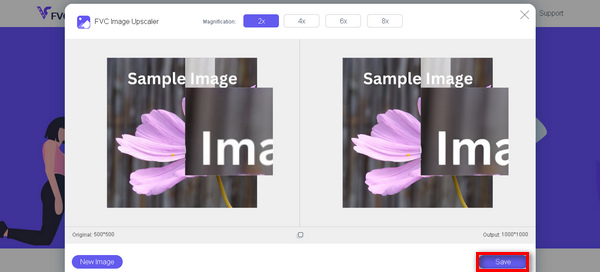
يعد FVC Free Image Upscaler أفضل بديل لـ Luminar Neo عندما يتعلق الأمر بترقية الصور. علاوة على ذلك، باستخدام هذه الأداة، يمكن للمستخدمين تحسين صورهم بسهولة. لا توجد واجهة معقدة، ما عليك سوى بضع نقرات لتحسين صورك بشكل مثالي.
مزيل الخلفية عبر الإنترنت من FVC
في الوقت نفسه، يمكنك استخدام أداة FVC Online Background Remover كخيار بديل لإزالة خلفيات الصور. هذه الأداة متعددة الاستخدامات ومصمَّمة لأتمتة عملية إزالة خلفية الصورة. وهي تدعم عدة صيغ شائعة للصور مثل PNG وJPG وJPEG. إضافة إلى ذلك، يمكنك تخصيص نتيجة صورتك؛ إذ يمكنك تغيير الخلفية إلى ألوان موحّدة، وقلب العنصر الرئيسي، وتحريكه، وقصّه.
فيما يلي الخطوات الخاصة بكيفية استخدام هذه الأداة بسهولة:
الخطوة 1. أولًا، انتقل إلى موقعهم الرسمي وانقر على Upload Image.
الخطوة 2. بعد ظهور النتيجة، يمكنك تعديل الصورة عن طريق تحسين الحواف وتحريك العنصر الرئيسي.
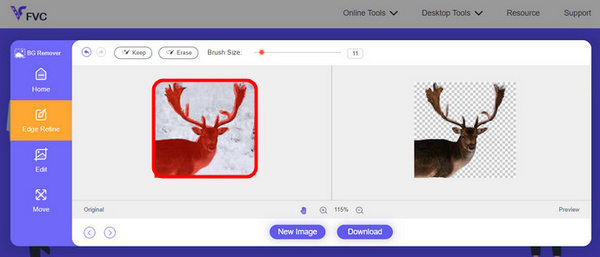
الخطوة 3. لحفظ النتيجة، انقر على زر Download (تنزيل).
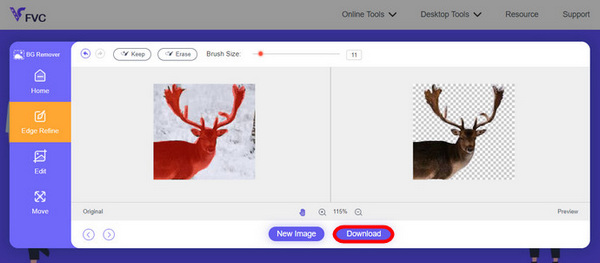
يعد FVC Image Screen Remover أداة رائعة لقص الصورة وأفضل بديل لـ Luminar Neo. وبصرف النظر عن كونها مجانية، فمن السهل التنقل في الأداة. لا متاعب، فقط نتائج الجودة.
الجزء 5. الأسئلة الشائعة حول مراجعة Luminar Neo
هل لومينار نيو أفضل من لايت روم؟
غالبًا ما تعتمد المقارنة بين Luminar Neo وLightroom على التفضيلات الفردية والاحتياجات المحددة. يشتهر Lightroom بتكامله السلس مع Adobe Creative Cloud، مما يجعله المفضل لدى المصورين المحترفين. من ناحية أخرى، يقدم Luminar Neo ميزات الذكاء الاصطناعي المتقدمة وسير العمل المرن. يعتمد الاختيار بين الاثنين في النهاية على أسلوب التحرير الخاص بالمستخدم ومتطلبات سير العمل.
هل لومينار نيو جيد مثل الفوتوشوب؟
يخدم Luminar Neo وPhotoshop أغراضًا مختلفة في مجال تحرير الصور. يعد Photoshop معيارًا صناعيًا، حيث يقدم مجموعة شاملة من الأدوات المتقدمة للتحرير المعقد وتصميم الرسوميات. Luminar Neo، على الرغم من قوته، يلبي احتياجات المصورين بشكل أكبر من خلال ميزاته المستندة إلى الذكاء الاصطناعي. تعتمد مدى ملاءمة أحدهما على الآخر على احتياجات المستخدم المحددة.
هل لومينار نيو جيد للمبتدئين؟
نعم، تم تصميم Luminar Neo ليكون سهل الاستخدام، مما يجعله خيارًا ممتازًا للمبتدئين. تتيح واجهته البديهية، إلى جانب إمكانات الذكاء الاصطناعي المتقدمة، للمستخدمين تحقيق نتائج مبهرة دون الحاجة إلى منحنى تعليمي حاد. تعمل المجموعة الواسعة من الإعدادات المسبقة والأدوات الإبداعية للبرنامج أيضًا على تمكين المبتدئين من استكشاف صورهم وتحسينها بسهولة.
هل Luminar Neo هو نموذج شراء لمرة واحدة أم نموذج اشتراك؟
يتبع Luminar Neo نموذج الشراء لمرة واحدة. يمكن للمستخدمين شراء البرنامج والوصول إلى ميزاته دون الحاجة إلى اشتراك متكرر. يوفر هيكل التسعير هذا نهجًا مباشرًا وفعالاً من حيث التكلفة للمستخدمين الذين يفضلون الدفع لمرة واحدة مقابل احتياجات تحرير الصور الخاصة بهم.
خاتمة
باختصار، قدّمت لك هذه مراجعة Luminar Neo رؤى قيّمة حول هذه الأداة القوية وسهلة الاستخدام لتحرير الصور. بفضل الميزات المتقدّمة مثل التكبير المدعوم بالذكاء الاصطناعي وإزالة الخلفية، فإنها تخدم المحترفين والمبتدئين على حدّ سواء. ورغم وجود مجال للتحسين، فإن تعدّد استخداماته، وقوة الذكاء الاصطناعي فيه، وسعره المعقول، تجعل منه خيارًا جذابًا لتعزيز مهاراتك في التصوير الفوتوغرافي. سواء كنت تبحث عن التخصيص أو البساطة، يقدّم Luminar Neo حلًّا متكاملًا لتحويل صورك.
-
 أضف خلفية للصورة على iPhone و Android و Computer و Online
 هل يمكنني إضافة خلفية بيضاء للصورة؟ كيف تفعل ذلك؟ تعرف على 3 طرق لإضافة خلفية للصور عبر الإنترنت، على الكمبيوتر أو iPhone أو Android.
-
 مُحسِّن الصور Canva: هل هو أداة جديدة لتعزيز جودة الصورة؟ [مراجعة]
 اكتشف كيف يمكن لـ Canve Image Enhancer أن ينقل صورك إلى المستوى التالي. تحقق من مراجعتنا التفصيلية التي تغطي جميع الميزات والإيجابيات والسلبيات لهذه الأداة.
-
 مُحسِّن الصور بتقنية الذكاء الاصطناعي Vance: مراجعة متعمقة [2024]
 هل تبحث عن أداة قوية وفعالة لتحسين الصورة؟ اقرأ مراجعتنا المتعمقة لبرنامج Vance AI Image Enhancer وشاهد كيف يمكنه تحويل صورك.
