


 محول الفيديو النهائي
 مسجل الشاشة
 إصلاح الفيديو
 تنزيل آمن
كيفية تحسين الصورة للويب باستخدام الحلول الأربعة [بسرعة]
يؤدي تحسين الصور دورًا حيويًا على الويب، لأنه يقلل زمن تحميل الموقع. استنادًا إلى دراسات حديثة، عندما لا يتم تحسين الصور جيدًا، يغادر ما يقرب من نصف الزوار الموقع مباشرة، مما يسبب انخفاضًا في الزيارات والإيرادات. تعلّم كيفية القيام بذلك ضروري إذا كنت ترغب في تقليل وقت الانتظار وإنشاء موقع موثوق لزيادة الزيارات والحصول على دخل أكبر بالمقابل. القيام بذلك سهل؛ فمع الاستعانة بالدليل الذي نضيفه حول كيفية تحسين الصورة للويب بأبسط طريقة ممكنة، يمكنك تنفيذ ذلك بسهولة.

الجزء 1. أفضل الطرق المجانية لتحسين الصورة عبر الإنترنت دون التضحية بجودة الصورة
1. FVC Free Image Upscaler
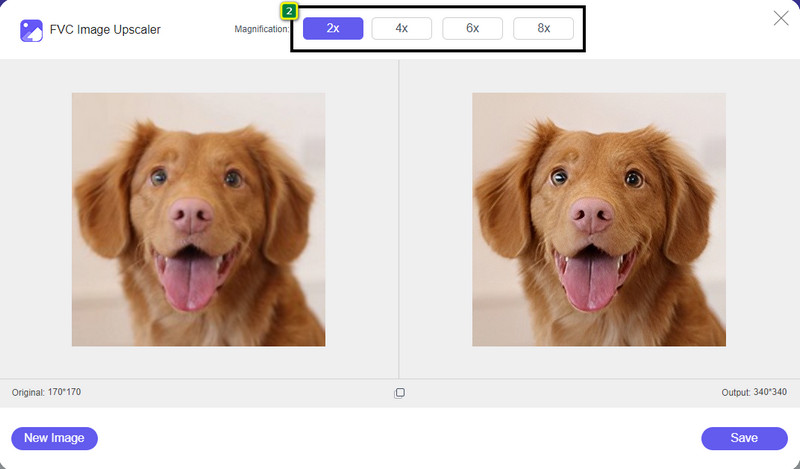
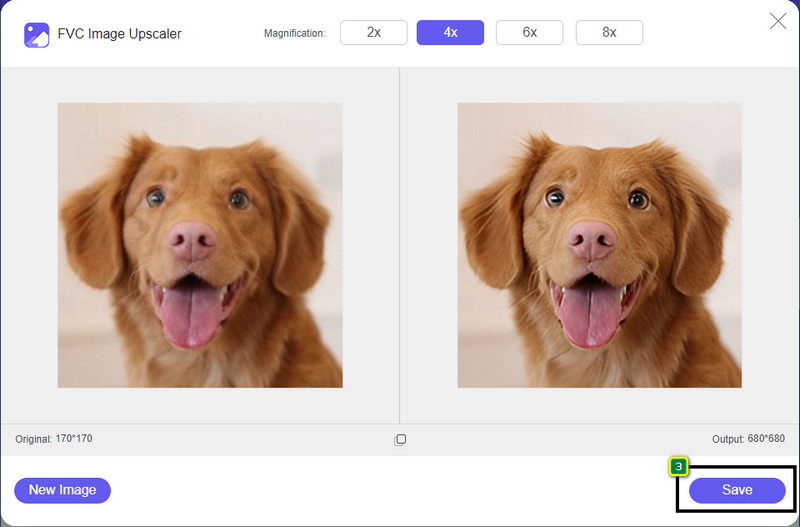
هل تبحث عن طريقة لتحسين أبعاد الصورة ونسبة العرض إلى الارتفاع للصورة التي تريد استخدامها على الويب؟ أداة FVC Free Image Upscaler قادرة على تحسين الصور بمساعدة تقنية الذكاء الاصطناعي القوية الخاصة بها. يمكن لهذه الأداة تكبير أو تغيير حجم الصورة دون التأثير في عدد نقاط البكسل في البوصة (PPI)، بحيث لا تواجه أي فقدان في الجودة. إضافة إلى ذلك، يمكن لهذه الأداة الإلكترونية إصلاح الصور الضبابية أو المتكسّرة (البكسلية) عبر تتبّع العيوب فيها. قبل تصدير الصورة، توجد نافذة معاينة لمقارنة الحالة قبل وبعد. لذلك، إذا كنت بحاجة إلى تغيير حجم الصورة التي لديك للويب، يمكنك اتباع الخطوات التي نذكرها بعد ذلك.
الخطوة 1. افتح الموقع بالنقر على هذا الرابط.
الخطوة 2. اضغط على Upload Image لإدراج الصورة التي تريد تغيير حجمها هنا.
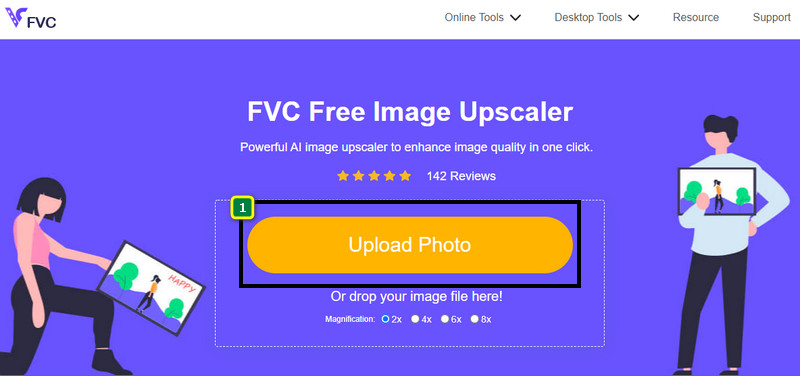
الخطوة 3. اختر الإعداد الذي تريد تطبيقه على صورتك لتغيير حجمها.
الخطوة 4. اضغط على Save لتنزيل الصورة التي غيّرت حجمها على جهازك المحلي.
2. ضاغط الصور الحرة FVC
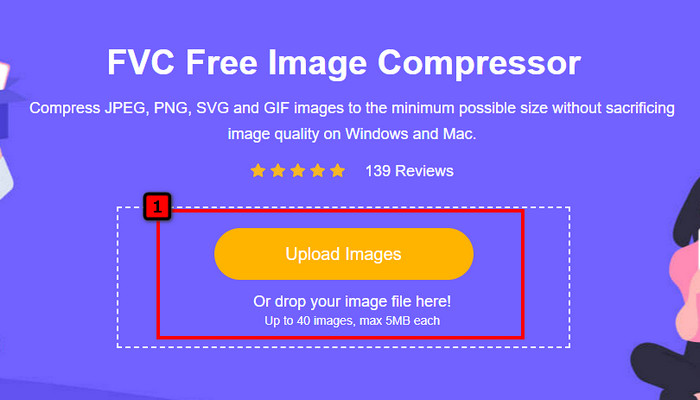
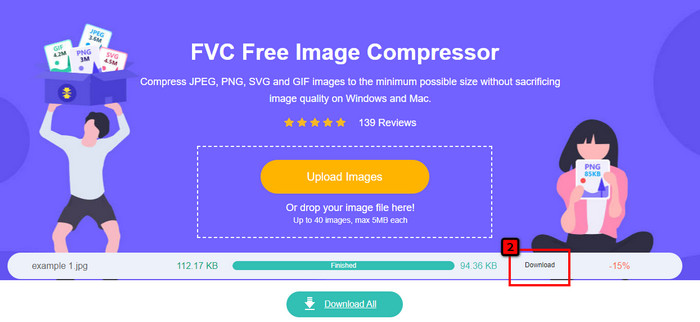
تتيح لك أداة FVC Free Image Compressor تحسين الصور للويب عبر تقليل حجم ملفها. فهي تمكّنك من ضغط الصيغ الشائعة المستخدمة في مواقع الويب المختلفة، مثل PNG وJPG وSVG وBMP وغيرها، بحيث لا يزيد حجم كل ملف عن 5 ميجابايت. من خلالها يمكنك إسقاط عدة صور دفعة واحدة ليتم تحسين حجمها بحيث تُحمَّل بشكل أفضل على الويب. إنها أداة مدعومة بالذكاء الاصطناعي توفّر أفضل نسبة ضغط قد لا تحصل عليها في أي ضاغط صور آخر على الإنترنت.
الخطوة 1. زُر الموقع الرسمي للأداة بالبحث عن اسمها، أو يمكنك النقر على هذا الرابط للوصول إليها عبر متصفحك.
الخطوة 2. اسحب وأفلِت ملف الصورة التي تريد رفعها هنا، أو يمكنك النقر على Upload Images، وستظهر لك نافذة مجلد على الشاشة، انقر على الملف الذي تريد ضغطه ثم اضغط Open. يمكن لهذا الضاغط تقليص حجم أكثر من 40 صورة في الوقت نفسه.
الخطوة 3. سيقوم البرنامج تلقائيًا بتقليل حجم ملف الصورة بالاعتماد على خوارزمية الذكاء الاصطناعي. بعد ذلك، انقر على Download لتصدير النسخة المضغوطة من الصورة.
3. TinyPNG
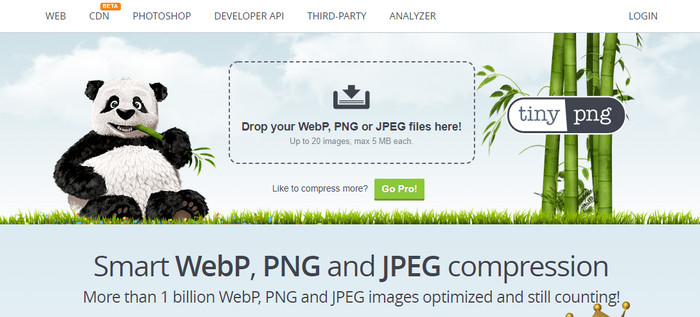
يُعد TinyPNG برنامجًا شهيرًا وموثوقًا يمكنك استخدامه لتحسين الصور عبر الإنترنت. إنه ضاغط يقوم تلقائيًا بتقليل حجم الصورة حتى 75٪ من حجمها الأصلي تقريبًا. يمكنك رفع الصور من حسابك في Dropbox إذا لم تكن موجودة على جهازك. لن تجد صعوبة في تعلّم كيفية استخدام هذا الضاغط نظرًا لبساطة تصميمه من قِبَل المطوّر.
على الرغم من سهولة استخدامه ، إلا أن التنسيق المدعوم هنا هو PNG و JPG فقط ، ولا يوجد أي شيء آخر. لذلك ، إذا كنت تريد ضغط ملفات BMP و GIF و SVG والمزيد من الملفات التي لديك ، فلا يمكنك فعل ذلك هنا لأنه لا يدعم التنسيق المذكور. ومع ذلك ، هذا سهل الاستخدام ؛ يمكنك اتباع الخطوات التي نضيفها.
الخطوة 1. افتح محرك البحث لديك، وابحث عن الموقع الرسمي لـ TinyPNG.
الخطوة 2. انقر على أيقونة الاستيراد لرفع الصورة التي تريد ضغطها؛ يمكن لهذه الأداة معالجة 20 صورة في الوقت نفسه.
الخطوة 3. انتظر حتى تنتهي عملية الضغط، ثم انقر زر التنزيل Download لحفظ النسخة المضغوطة من الصورة التي رفعتها هنا.
الجزء 2. تحسين الصورة دون اتصال بالإنترنت باستخدام البرامج الاحترافية على نظامي التشغيل Windows و Mac
يستطيع Photoshop تنفيذ كلا المهمتين اللتين ذكرناهما في الجزء الأول: تغيير حجم الصورة وتقليل حجم الملف. ورغم أن هذا البرنامج لم يُصمَّم خصيصًا لهذا الغرض، فإنه لا يزال قادرًا على القيام بهما بوصفهما من الميزات المتقدمة الإضافية. باستخدامه يمكنك البدء في إضافة الفلاتر أو تعديل الصورة وفقًا لأفكارك. القيد الوحيد هنا هو خيالك ومدى صعوبة استخدام هذا البرنامج.
على عكس الأداة عبر الإنترنت التي ذكرناها ، لن تحتاج إلى اتصال بالإنترنت لاستخدام هذا البرنامج بمجرد تنزيله على جهازك. ومع ذلك ، ستحتاج إلى شراء البرنامج لاستخدامه ، لذلك إذا كنت تريد معرفة كيفية تحسين الصورة للويب على Photoshop ، فهناك تعليمات نضيفها أدناه ، والتي تتيح لك تصغير حجم الصورة وتغيير حجمها.
الخطوة 1. قم بتنزيل البرنامج وتثبيته ثم شغِّله على جهاز الكمبيوتر لبدء استخدامه.
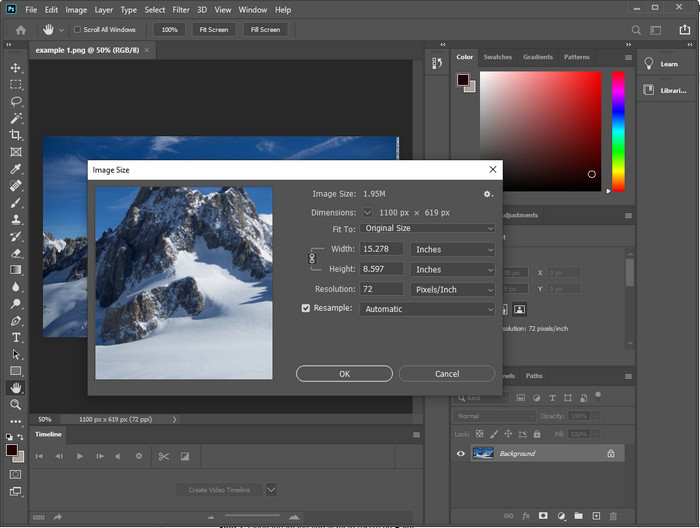
الخطوة 2. ارفع الصورة التي تريد تعديلها، ثم انتقل إلى قائمة Image وانقر على Image Size. غيّر القياسات وفقًا لمواصفاتك، ثم انقر OK لحفظ التغييرات. إذا كنت لا تريد تغيير نسبة العرض إلى الارتفاع أو أبعاد الصورة، فمن الأفضل تخطي الخطوة 2.
الخطوة 3. اضغط على قائمة File ثم اختر Save as. ستظهر نافذة حوار على الشاشة. اختر حجم الملف الذي تريد الوصول إليه، ثم اضغط OK لبدء تصدير الصورة.
الجزء 3. الأسئلة الشائعة حول كيفية تحسين الصورة للويب
ما هو أفضل تنسيق صورة للويب؟
من الأفضل استخدام صورة بامتداد PNG و JPG لأن هذه التنسيقات معروفة جيدًا على مواقع الويب المختلفة. ومع ذلك ، في بعض الأحيان ستحتاج إلى تحسينها عن طريق تقليص حجم الصورة أو تغيير حجمها ، وهذا هو المكان الذي جاءت فيه الأداة التي أضفناها هنا للمساعدة.
مما يجلب المزيد من التفاصيل على الويب ؛ PNG أو JPG؟
تعمل كلتا الصورتين النقطيتين بشكل جيد على موقع الويب ؛ يتم تحميلها بشكل أسرع وتحسين مواقع الويب. ومع ذلك ، لا تزال هناك اختلافات بين هذين التنسيقين ، على سبيل المثال عندما تريد استخدام التصوير الفوتوغرافي الخالص بدون شفافية للويب ، يجب أن يكون تنسيق الانتقال الخاص بك هو JPG أو JPEG. ولكن إذا كنت ترغب في الحصول على شفافية 1 بت على الويب بتفاصيل رائعة ، فإن PNG هنا لمساعدتك.
هل يؤدي تغيير حجم الصورة إلى جعل الجودة رديئة؟
إذا قمت بضغط الصورة بشكل مفرط، فمن المحتمل أن تصبح جودتها سيئة، ومع ذلك يمكن تجنّب ذلك إذا لم تبالغ في الضغط. عند ضغط الصورة، من الأفضل تقليل حجمها بحوالي 45٪ إلى 70٪ فقط كي نتجنّب فقدان الجودة. لكن يمكنك الاستعانة بأداة تحسين الصور من أجل زيادة جودة الصورة.
خاتمة
الآن بعد أن عرفت كيفية تحسين صورتك ، من الأفضل أن تفعل ذلك حتى تكسب المزيد من الزيارات وتجذب الكثير من الاهتمام. مع البرنامج التعليمي الذي أضفناه أعلاه ، نحن على يقين من أنه يمكنك القيام بذلك بسهولة وبسرعة دون التأثير على الجودة. إذا كنت بحاجة إلى تغيير الحجم أو الضغط ، فنحن نوصيك باستخدام منتج FVC الذي ندرجه هنا لحل المشكلة دون تنزيل أي برنامج تثبيت.
-
 اصنع صورة عالية الدقة بأفضل الطرق التي يمكنك العثور عليها في السوق
 هل تتساءل أو تريد عمل صورة عالية الدقة؟ يمكنك اتباع البرنامج التعليمي الذي نضيفه أدناه مع حلول مختلفة يمكنك استخدامها.
-
 أفضل 4 مخفضات جودة للصور يمكنك استخدامها عبر الإنترنت وغير متصل
 يمكن أن تساعدك مخفضات جودة الصورة هذه في تقليل جودة صورتك لبعض الأسباب. إذا كنت بحاجة إلى واحد ، تقرأ هذا المقال!
-
 الطرق الرسمية لترقية الصورة إلى 4K باستخدام برنامج تعليمي عملي
 لترقية الصورة إلى 4K ، ستحتاج إلى برنامج على جهازك. إذا لم يكن لديك واحد ، فستحتاج إلى تحديد الأداة التي نقوم بتضمينها هنا.
