


 محول الفيديو النهائي
 مسجل الشاشة
 إصلاح الفيديو
مراجعة PicWish: نظرة متعمقة على مُحسِّن الصور الخاص به
أصبحت الحاجة إلى تحسين الصورة ضرورة لإنشاء نتيجة جذابة بصريًا. يبحث المصورون ومنشئو المحتوى وحتى المستخدمون العاديون بنشاط عن طرق لتحسين سردهم البصري للقصص. إن البحث عن صور ذات جودة أعلى لا ينتهي بتحريرها وتصديرها. يؤدي استخدام تحسين الصور إلى جعل الصورة تبدو بأفضل جودة ممكنة. PicWish هي واحدة من تلك الأدوات التي تحتوي على ميزات تحسين الصور، مما يوفر أفضل جودة لكل صورة. مع استمرار التكنولوجيا في إعادة تعريف الإمكانيات في عالم إنشاء المحتوى المرئي، تبرز PicWish كأداة مفيدة في تشكيل مسار أدوات تحسين الصور.
تقدم هذه المراجعة لأداة Picwish Photo Enhancer استكشافًا شاملًا، إذ تتعمق في وظائف الأداة، واستخداماتها، ومزاياها وعيوبها، بالإضافة إلى أداة بديلة قد تناسب احتياجاتك. انضم إلينا وواصل قراءة هذا المقال بينما نشرع في هذه الرحلة لتحليل خبايا PicWish وتسليط الضوء على مكانته في مجال تحسين دقة الصور وتكبيرها.

الجزء 1. مُحسّن الصور PicWish
يُعد PicWish محرر صور عبر الإنترنت يركّز بشكل خاص على مُحسِّنات الصور، إلا أن قدراته تمتد إلى ما هو أبعد من هذه الوظيفة الأساسية. فإلى جانب إتقانه لتحسين الصور، يبرع PicWish في مهام مثل إزالة الخلفية وضغط الصور وتجميلها. وتتحقق جميع هذه الميزات بفضل دمج الأداة بتقنيات ذكاء اصطناعي بمستوى احترافي. ورغم أنه قد لا يضاهي تعقيد بعض البرامج المتقدمة الأخرى، إلا أنه يتعامل بكفاءة مع اللمسات الأساسية ويمكنه أن يمنحك نتائج بمظهر احترافي.
يمكن الوصول إلى PicWish ليس فقط من خلال تطبيقات الويب وسطح المكتب ولكن أيضًا على الأجهزة المحمولة التي تعمل بنظامي iOS وAndroid، ويوفر تنوعًا في استخدامه. وبتمييزه عن نظيراته، يتميز PicWish بميزات مدعومة بالذكاء الاصطناعي، مما يضيف طبقة إضافية من التطور إلى قدرات تحرير الصور الخاصة به. ومن اللافت للنظر أن ما يعزز جاذبيتها هو تكلفتها. تبين أن PicWish هي واحدة من تلك الأدوات المصممة للتميز.
الجزء 2. مراجعة PicWish
الايجابيات
- سهل الاستخدام.
- تقنية الذكاء الاصطناعي المتكاملة.
- يقدم المزيد من الميزات في إصدار الويب الخاص بهم.
- رائعة لتعزيز الصور.
- يقدم مجموعة واسعة من الأدوات والوظائف.
سلبيات
- تختلف الميزات من التطبيقات والويب.
- المزامنة السحابية للتطبيق والويب غير متاحة.
- يتم تأمين بعض الميزات بموجب اشتراك مدفوع.
- تقتصر الملفات على العمل تحت 20 ميغابايت.
- التسعير يمكن أن يكون مكلفا.
التسعير
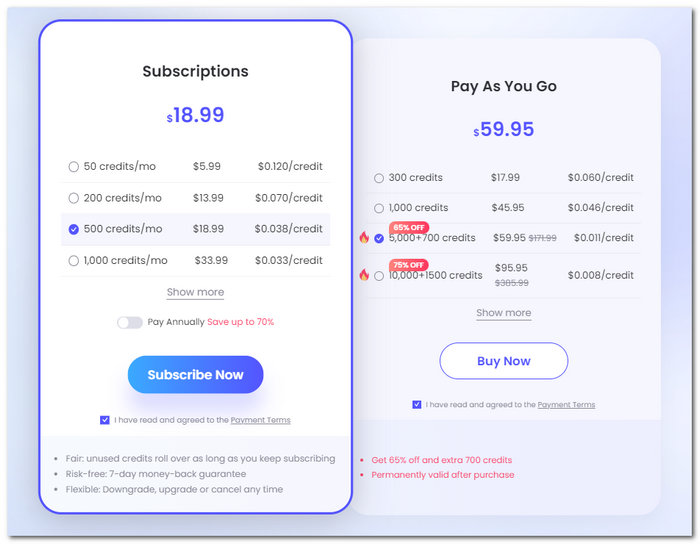
هل PicWish مجاني؟ يختلف سعر PicWish اعتمادًا على عدد الاعتمادات/الصور التي تريد الاستفادة منها شهريًا أو بشكل مباشر. لاحظ أن رصيدًا واحدًا يعادل صورة واحدة.
نموذج التسعير: مجاني وقائم على الاشتراك
يبدأ الاشتراك الشهري من $5.99 دولار/شهريًا - 50 رصيدًا أو $0.120 دولار لكل رصيد
يبدأ نظام الدفع حسب الاستخدام من $17.99 دولار - 300 رصيد أو $0.060 دولار لكل رصيد
وظائف
توسعت وظائف PicWish من تحسين الصور إلى:
◆ أداة إزالة الخلفية. توفر أداة إزالة الخلفية خلفية بيضاء مثالية لصور المنتجات وصور الهويات الرسمية، بالإضافة إلى خلفية بالذكاء الاصطناعي تقوم بتوليد خلفية لصورك.
◆ مُحسِّن الصور. يجعل كل صورة ضبابية أكثر وضوحًا في لحظات. يساعد مُحسِّن الصور بالذكاء الاصطناعي على جعل الصور أكثر حدة وحيوية، ما ينتج عنه صور أوضح وذات جودة عالية.
◆ مولِّد خلفيات بالذكاء الاصطناعي. تُعد هذه الميزة مفيدة جدًا للتجارة الإلكترونية، إذ يمكنها إنشاء خلفية استوديو بالذكاء الاصطناعي لمنتجك بشكل واقعي بسهولة.
◆ إعادة لمس الصور. إزالة العناصر غير المرغوب فيها بدقة. يمكن لذكاءه الاصطناعي التعرّف على الأشخاص غير المرغوب فيهم، والنصوص، والفوضى البصرية، والشعارات، وإزالة النص من الصور.
◆ مكبّر الصور. يقوم بتكبير صورك بجودة مضاعفة 2x إلى 4x دون مشاكل في فقدان الجودة.
حالات استخدام PicWish
يمكن للمستخدمين المحتملين استخدام PicWish في الحالات التالية:
◆ صور الهوية. يمكنه إنشاء صور هوية على الفور، مع توفير مجموعة واسعة من المقاسات وتغيير الخلفيات إلى ألوان موحّدة.
◆ استعادة الصور القديمة. يستعيد الصور القديمة بأفضل جودة ممكنة، لضمان بقاء الذكريات. تحسين التفاصيل هو أحد أهم ميزاته في استعادة الصور القديمة، بالإضافة إلى تلوين الصور بالأبيض والأسود لجعلها أكثر حيوية.
◆ مكبّر صور الأنمي. هذه الميزة مخصصة لتكبير أو تحسين جودة صور الأنمي والرسوم المتحركة. فهي تُبرز التفاصيل في الصورة عن طريق رفع جودتها دون القلق من فقدان دقة الصورة.
◆ الشعار. يقوم الذكاء الاصطناعي بإزالة الشعارات خلال ثوانٍ قليلة، مما يجعل العملية أسرع وخيارًا موثوقًا لإزالة أي خلفية حول الشعار.
◆ إنشاء المحتوى. عزّز حضورك على وسائل التواصل الاجتماعي من خلال تحسين الصور الخاصة بالمنشورات والقصص والإعلانات، بما يضمن جذب الانتباه والتفاعل مع جمهورك.
◆ معالجة المستندات. بسّط عملية معالجة المستندات عن طريق استخراج النص من الصور أو المستندات الممسوحة ضوئيًا، مما يسهل حفظها رقميًا ويُتيح معالجتها بكفاءة لاحقًا.
◆ الفن الرقمي. أطلق العنان لإبداعك في مشاريع الفن الرقمي باستخدام مولّد الفن بالذكاء الاصطناعي، لإنشاء صور مميّزة تضفي لمسة فريدة على أعمالك الرقمية أو إبداعاتك الفنية.
PicWish هي أداة تقدم نتائج واعدة ويمكنها ضمان استعادة أموالك من المخرجات التي ستنتجها عند الاستمرار في استخدام الأدوات. قد يكون الأمر مكلفًا بالفعل، ولكن نظرًا لتعدد استخداماته من حيث الميزات والاستخدامات، فإنه يعد ثمنًا بسيطًا يجب دفعه.
الجزء 3. بديل PicWish
تُذكر البدائل هنا في حال وجدت الأداة معقّدة وفضّلت استخدام أدوات مجانية بالكامل تعمل عبر المتصفح. أداة FVC Online Image Upscaler هي أداة تعمل بالذكاء الاصطناعي لتحسين جودة الصور بدقة وبدون علامة مائية. أوجه التشابه بين PicWish و FVC تتمثل في أن كليهما يستخدم تقنيات الذكاء الاصطناعي لتحقيق نتائج مثالية في تحسين الصور. من ناحية أخرى، قد تكون PicWish متعددة الاستخدامات من حيث الميزات، لكنها لا توفر سوى خيارات تكبير حتى 4 مرات، على عكس FVC Online Image Upscaler الذي يوفّر جودة تكبير تصل إلى 8 مرات. لفهم قدرات FVC بشكل أفضل، يمكنك تكبير صورتك مجانًا باتباع الخطوات أدناه.
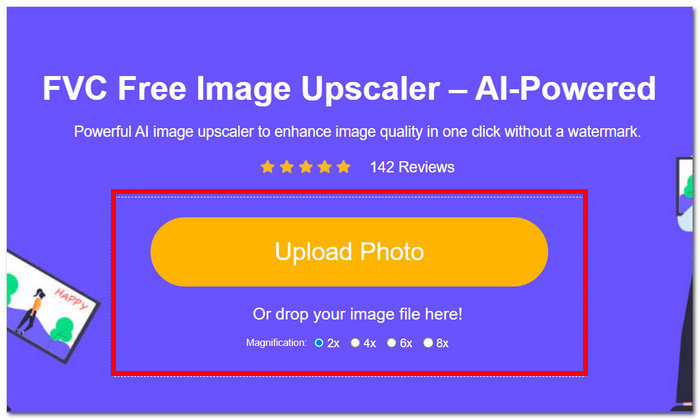
الخطوة 1. على موقع FVC Online Image Upscaler، قم برفع صورتك في خانة تحميل الصورة.
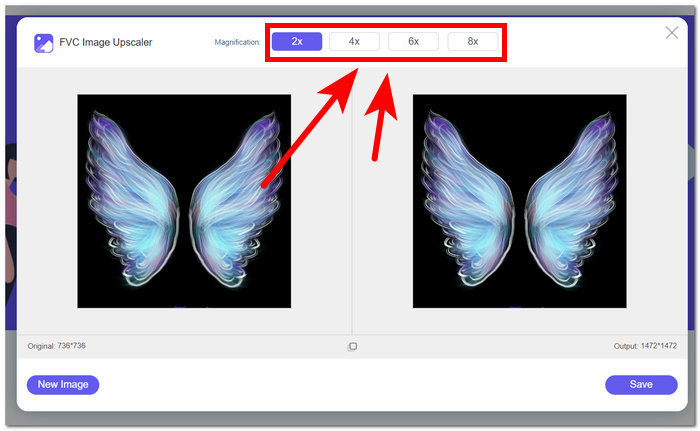
الخطوة 2. بعد انتهاء تحميل صورتك في الأداة، ستحتاج إلى تكبيرها. لتكبير الصورة، اختر قيمة التكبير من 2 إلى 8 مرات من الخيارات الموجودة في الجزء العلوي من الأداة.
الخطوة 3. ستتم معالجة صورتك تلقائيًا، وسيتم عرض مقارنة قبل وبعد المعالجة لتتمكن من التحقق من النتيجة.
الخطوة 4. عند رضاك عن النتيجة، يمكنك حفظها على جهازك المكتبي بالنقر على زر حفظ الموجود في أسفل يمين الشاشة.
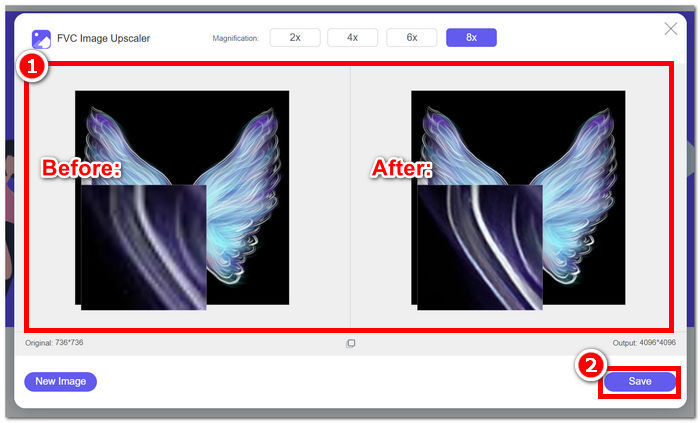
لاختتام الأمور، فإن FVC Online Image Upscaler يفي بتوقعات ما ينبغي أن يكون الأداة القياسية في تحسين الصور. ومن ثم، فهو يتعرف على الأجزاء غير الواضحة في الصور، مما يجعل الذكاء الاصطناعي الخاص به يضبط الصورة تلقائيًا دون فقدان بكسل واحد في العملية.
الجزء 4. الأسئلة الشائعة حول مُحسّن الصور PicWish
هل PicWish آمن للاستخدام؟
تعتبر PicWish بشكل عام آمنة للاستخدام، ولكن كما هو الحال مع أي خدمة عبر الإنترنت، فمن المستحسن مراجعة سياستها وشروط الاستخدام الخاصة بها لضمان الامتثال وأمن المستخدم.
هل يقوم PicWish بجمع البيانات؟
مثل العديد من المنصات عبر الإنترنت، قد تقوم PicWish بجمع البيانات على النحو المبين في سياسة الخصوصية الخاصة بها. يجب على المستخدمين مراجعة شروط الخصوصية لفهم نوع البيانات التي تم جمعها وكيفية استخدامها وما إذا كانت تتم مشاركتها مع أطراف ثالثة.
كيفية إلغاء اشتراك PicWish؟
لإلغاء اشتراك PicWish، يحتاج المستخدمون عادةً إلى الوصول إلى إعدادات حساباتهم أو الاتصال بدعم عملاء PicWish للحصول على المساعدة. قد تختلف الخطوات الدقيقة، لذا يوصى بالتحقق من وثائق دعم النظام الأساسي أو الاتصال بخدمة العملاء.
كيف يعمل PicWish؟
من المحتمل أن يعمل PicWish من خلال استخدام خوارزميات معالجة الصور المختلفة وربما الذكاء الاصطناعي لتحسين الصور وتعديلها. قد تتضمن الأعمال المحددة عمليات خلفية تقوم بتحليل وضبط جوانب الصورة لتحقيق التحسينات المطلوبة.
كيف يمكنني تحسين جودة الصورة؟
لتحسين جودة الصورة باستخدام PicWish أو أدوات مشابهة، فكر في ضبط عناصر مثل السطوع والتباين والحدة. بالإضافة إلى ذلك، يمكن أن تساهم تجربة ميزات مثل تصحيح الألوان والمرشحات وتغيير الحجم في تحسين جودة الصورة بشكل عام. يمكن أن تساعد تجربة هذه الإعدادات المستخدمين على تخصيص الصورة وفقًا لتفضيلاتهم وتحقيق نتيجة أكثر جاذبية من الناحية المرئية.
خاتمة
باختصار، يرقى PicWish Photo Enhancer إلى سمعته نظرًا للميزات التي تحصل عليها مقابل اشتراكك المدفوع. من بين أدوات تحسين الصور، يبرز في قدرته على أداء وظيفته، وإظهار إمكاناته في عدة مجالات من تحرير الصور. إن وظائفه وحالات استخدامه دليل على أن PicWish غني بالميزات التي يقدّمها، وليس مخصصًا لتحسين الصور فحسب. ومع ذلك، ينبغي على المستخدمين المحتملين أن يدرسوا بعناية تكلفة الاشتراك مقارنة بالفوائد المقدَّمة، مع العلم أن بعض الأدوات يمكنها توفير تحسين الصور مجانًا مثل FVC Online Image Upscaler. كلا الأداتين في طليعة أدوات تحسين الصور، إذ تدعوان المستخدمين لاستكشاف فرص غير محدودة للحصول على صور محسّنة بصريًا.
-
 مراجعة Fotor لمزيل الخلفية ومحسن الصور
 كل ما تحتاج لمعرفته حول Fotor مزيل الخلفية ومحسن الصور. ألق نظرة على بعض ميزاته واطلع على البديل المقترح الذي يناسب احتياجاتك.
-
 كيفية زيادة حجم الصورة عبر الإنترنت وغير متصل
 اكتشف أسهل طريقة لزيادة حجم الصورة دون فقدان الجودة. راجع أدواتنا وبرامجنا لتغيير الحجم لضمان الجودة المثالية لصورك.
-
 كيفية تغيير حجم الصورة في برنامج فوتوشوب: دليل يجب معرفته
 تعرف على العملية خطوة بخطوة لكيفية تغيير حجم الصورة في Photoshop. اتبع هذا الدليل لتغيير حجم صورك بكفاءة وبكل سهولة وجودة!
