


 محول الفيديو النهائي
 مسجل الشاشة
 إصلاح الفيديو
 تنزيل آمن
قم بإزالة العلامة المائية المقاومة لإطلاق النار بشكل احترافي باستخدام هذه الأدوات الرائعة
يُعدّ Shootproof معرض صور للعملاء وموقعًا لعرض الأعمال الفنية (بورتفوليو). إذا كنت تبحث عبر الإنترنت عن صور رائعة، فقد يساعدك Shootproof في ذلك، إذ يقدّم هذا الموقع عددًا كبيرًا من الصور الجميلة التي ينتجها البائعون. ويُعرف Shootproof بأنه خدمة لمشاركة المعارض مخصّصة للمصوّرين، كما يتيح لهم إنشاء متجر إلكتروني لبيع صورهم. لكن العديد من البائعين يضيفون علامات مائية إلى صورهم حتى لا يتمكّن الآخرون من امتلاك الصورة بسهولة. لذلك، إذا كنت من المستخدمين الذين يبحثون عن كيفية إزالة العلامة المائية من Shootproof، فواصل قراءة هذا المقال.

الجزء 1. 2 طرق حول كيفية إزالة العلامة المائية المضادة للكسر دون عناء
ليس من الصعب إزالة العلامة المائية Shootproof إذا كان لديك مزيل علامة مائية مناسب. ولمساعدتك في اختيار أفضل مزيل للعلامات المائية ، بحثنا عن أكثر مزيل العلامات المائية استخدامًا على الإنترنت. لمعرفة هذه الأداة ، اقرأ هذا الجزء بالكامل.
مزيل العلامات المائية المجاني FVC
يُعد FVC Free Watermark Remover واحدًا من أشهر مزيلات العلامات المائية على الإنترنت. هذا التطبيق الإلكتروني مجاني وآمن للاستخدام، بالإضافة إلى أنه متاح على جميع متصفحات الويب مثل Google وFirefox وSafari. وهو يدعم صيغ الصور الشائعة مثل PNG وJPEG وJPG وBMP وغيرها، كما يتيح لك، من خلال ميزة إزالة العلامة المائية، اختيار أدوات تحديد مختلفة لإزالة العلامة المائية من صورتك.
علاوة على ذلك ، يمكن للعديد من المبتدئين استخدام مزيل العلامة المائية هذا لأنه سهل الاستخدام. أيضًا ، عند تصدير صورتك ، سيكون لها تنسيق الملف الأصلي. لا تتطلب هذه الأداة أيضًا تسجيل الدخول أو التسجيل.
كيفية إزالة العلامة المائية Shootproof باستخدام FVC Free Watermark Remover:
الخطوة 1. أولًا، افتح المتصفح وابحث عن FVC Free Watermark Remover في خانة البحث.
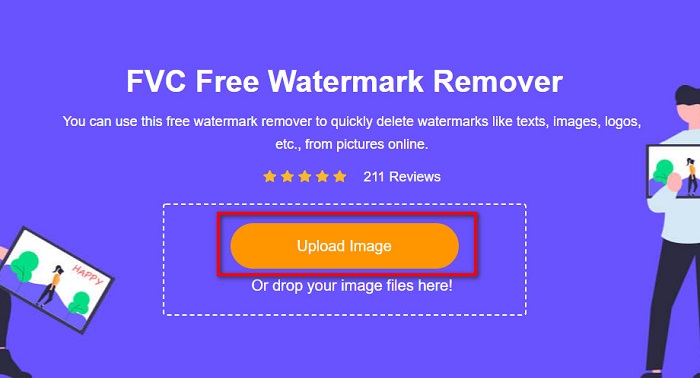
الخطوة 2. ثم انقر على زر Upload Image في الواجهة الرئيسية لتحميل الصورة التي تريد إزالة العلامة المائية منها.
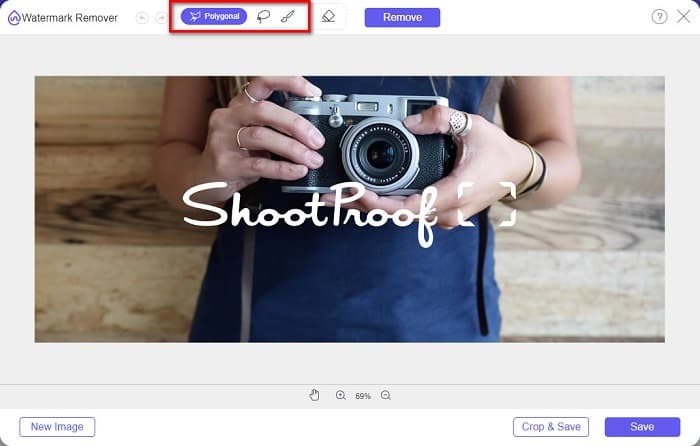
الخطوة 3. بعد ذلك، اختر أداة التحديد التي تريد استخدامها لإزالة العلامة المائية من صورتك. يمكنك الاختيار بين Polygonal وLasso وBrush.
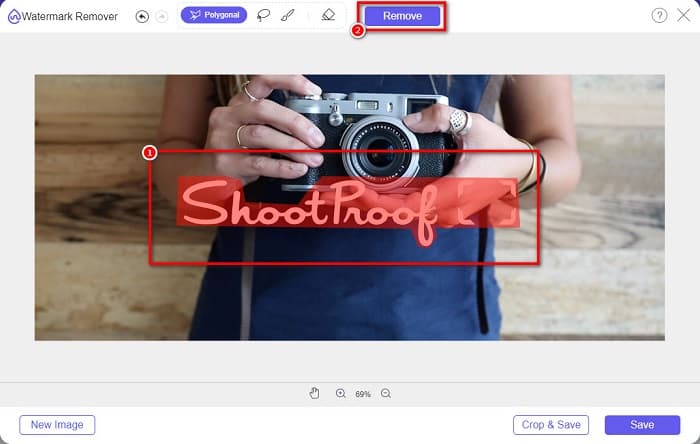
الخطوة 4. ثم قم بتتبّع المنطقة التي توجد فيها العلامة المائية على صورتك، وبعد تحديدها انقر على زر Remove. ستلاحظ أن العلامة المائية قد اختفت.
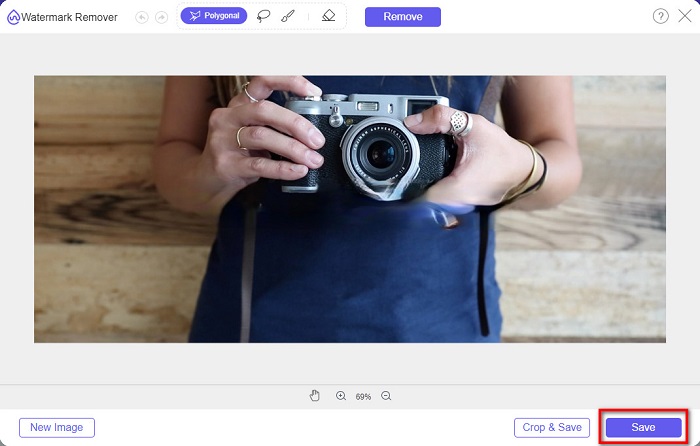
الخطوة 5. أخيرًا، انقر على زر Save لحفظ النتيجة على جهازك. وهكذا، بهذه الخطوات البسيطة يمكنك الحصول على صورة من Shootproof خالية من العلامة المائية.
مزيل العلامة المائية Apowersoft على الإنترنت
يُعد Apowersoft Online Watermark Remover من التطبيقات الإلكترونية المعروفة في إزالة أي علامات مائية من صورك. وهو أداة إلكترونية سهلة الاستخدام بفضل واجهته البديهية، كما أنه يدعم معظم صيغ الصور القياسية مثل PNG وJPG. ولا داعي للقلق بشأن أمان ملفاتك، فهذه الأداة عبر الإنترنت آمنة للاستخدام، كما أنها تتيح أيضًا إزالة العلامات المائية من مقاطع الفيديو. إلا أنه في حال كان اتصالك بالإنترنت بطيئًا، فقد تواجه بطئًا في عمليتي الرفع والتصدير.
كيفية إزالة العلامة المائية Shootproof باستخدام Apowersoft Online Watermark Remover:
الخطوة 1. ابحث عن Apowersoft Online Watermark Remover في متصفحك، ثم انتقل إلى صفحته الرئيسية، ومن الواجهة الرئيسية انقر خيار Remove Watermark From Image.
الخطوة 2. بعد ذلك، في الواجهة التالية، سترى مربع إزالة العلامة المائية، وضعه فوق منطقة العلامة المائية.
الخطوة 3. لإزالة العلامة المائية من صورتك، انقر على زر Erase.
الجزء 2. نصائح حول استخدام خاصية Shootproof Watermark Feature
باستخدام ميزة العلامة المائية في Shootproof ، يمكنك إضافة وإزالة العلامات المائية على صورتك. إذا كنت ترغب في منع المستخدمين الآخرين من امتلاك صورتك ، فيمكنك إضافة نص على صورتك يعمل كعلامة مائية.
كيفية إضافة علامة مائية على Shootproof:
الخطوة 1. انتقل إلى Photos ثم انقر على خيار Watermarks.
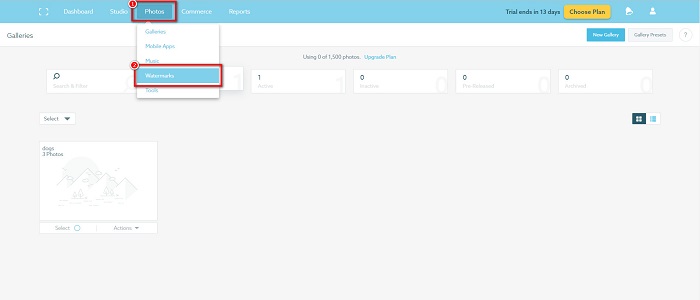
الخطوة 2. ثم اختر ما إذا كنت تريد استخدام علامة مائية نصية أو صورية.
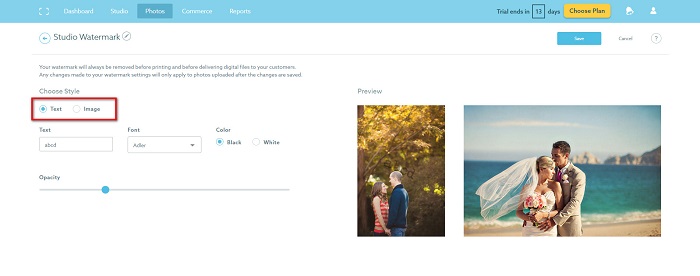
إذا كنت تريد استخدام العلامة المائية للصورة ، فمن المستحسن تحميل ملف PNG عالي الدقة بخلفية شفافة. يمكنك أيضًا استخدام ملفات JPG.
الخطوة 3. بعد ذلك، عدّل إعدادات العلامة المائية. في إعدادات العلامة المائية يمكنك اختيار موضع العلامة المائية على صورتك، كما يمكنك ضبط حجم العلامة المائية ودرجة شفافيّتها.
الخطوة 4. أخيرًا، انقر على زر Save لحفظ الإعدادات التي قمت بتغييرها.
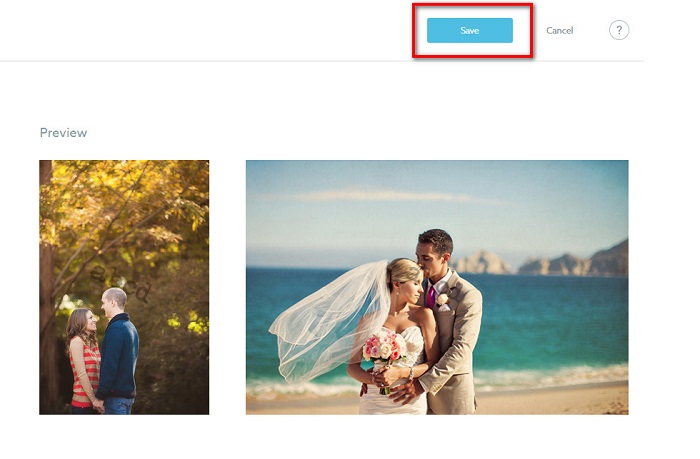
ضع علامة مائية على الصور التي تقوم بتحميلها.
في صفحة العلامة المائية ، يمكنك اختيار علامة مائية افتراضية. يمكنك أيضًا تشغيل العلامات المائية لجميع عمليات التحميل المستقبلية. يمكنك تغيير هذا قبل تحميل الصور الجديدة.
وعندما تقوم بتحميل صور جديدة إلى معرض الصور الخاص بك من خلال برنامج التحميل المستند إلى الويب أو برنامج تحميل سطح المكتب ، يمكنك تحديد العلامة المائية التي تريد استخدامها على شاشة التحميل.
كيفية إزالة العلامة المائية في Shootproof
تذكر دائمًا أن تحرير علامة مائية موجودة أو إضافتها سيؤثر فقط على عمليات التحميل المستقبلية. لن تؤثر التغييرات التي أجريتها على الصور الموجودة بالفعل في معرض الصور الخاص بك. ولكن إذا كنت تريد تغيير العلامة المائية أو إزالة العلامة المائية Shootproof ، فيمكنك تحديث العلامة المائية لتحديثها في معرض الصور الخاص بك. إليك كيفية إزالة العلامة المائية Shootproof أو تغييرها.
الخطوة 1. اذهب إلى Photos > Galleries ثم انقر على المعرض الخاص بك.
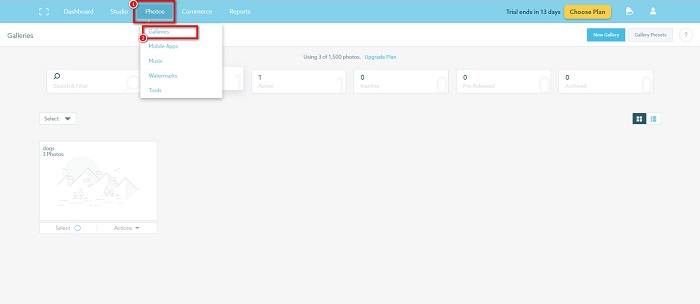
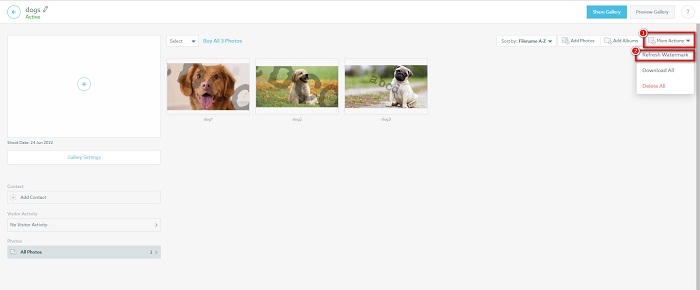
الخطوة 2. داخل المعرض، انقر على زر More Actions في الزاوية العلوية اليمنى من الواجهة.
الخطوة 3. ثم اختر Refresh Watermark لإزالة العلامات المائية من كل صورة تقوم برفعها.
الخطوة 4. لإزالة العلامة المائية، قم بإيقاف شريط التمرير (الـ Slider). وإذا كنت تريد فقط تغيير العلامة المائية، فاختر New Watermark.
الخطوة 5. أخيرًا، انقر على Apply Change لحفظ التغييرات التي أجريتها.
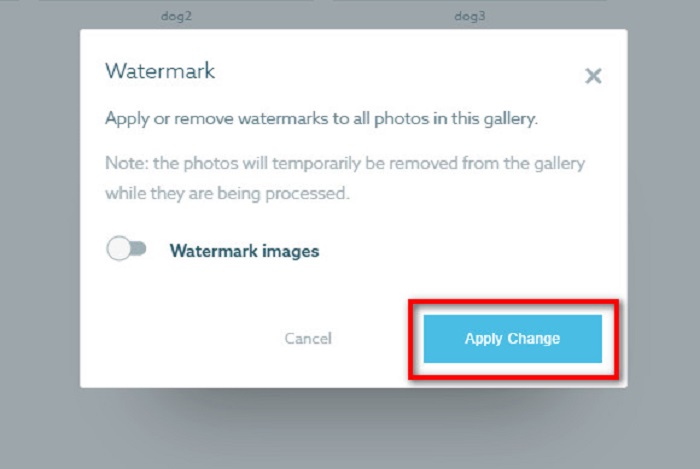
سترى أن الصور سيتم عرضها تلقائيًا كمعالجة. عندما يتم تطبيق التغييرات ، سترى أن الصور ستعود إلى معرض الصور الخاص بك.
ذو صلة بـ:
أفضل أدوات إزالة العلامة المائية Arnold Maya التي لا ينبغي تفويتها
مزيلات العلامة المائية لـ 123rf – مراجعة وافية لأفضل الأدوات
الجزء 3. أسئلة وأجوبة حول Shootproof إزالة العلامة المائية
هل يمكنك إزالة العلامات المائية الرقمية؟
من الصعب إزالة العلامات المائية الرقمية غير المرئية. على سبيل المثال ، يصعب إزالة العناصر المضمنة في المكون الإضافي Digimarc Photoshop. قد لا يعمل الاقتصاص وتغيير الحجم وإضافة الضوضاء والتشويش المعتدل مع العلامات المائية الرقمية.
هل يمكنك إزالة علامة مائية للشعار من مقطع فيديو؟
نعم. من الممكن إزالة علامة مائية للشعار على الفيديو الخاص بك. تسمح لك العديد من مزيلات العلامات المائية بإزالة الشعارات من مقاطع الفيديو الخاصة بك. إذا كنت تريد إزالة شعار من الفيديو الخاص بك ، فاستخدم Video Converter Ultimate.
هل يظهر Shootproof إذا التقطت لقطة شاشة؟
تتخذ Shootproof عدة إجراءات لحماية صور البائع. ومع ذلك ، لا يمكن لـ Shootproof منع الأشخاص من التقاط لقطات شاشة لصورتك في معرض الصور الخاص بك.
خاتمة
وهذا كل شيء! باتّباع الطرق المذكورة أعلاه يمكنك الآن إزالة العلامة المائية من Shootproof في صورتك. ورغم أن إزالة العلامة المائية من Shootproof مجانية، فإن اتباع الخطوات قد يكون صعبًا بعض الشيء. لذلك، إذا أردت إزالة العلامة المائية من Shootproof من صورتك بسهولة، فاستخدم أداة FVC Free Watermark Remover.
-
 مزيل العلامة المائية فوتوبوكت المعلقة عبر الإنترنت وغير متصل
 تعرف على كيفية إزالة العلامة المائية Photobucket من صورك باستخدام مزيل العلامات المائية Photobucket المذهل. اقرأ هذه المقالة لتتعلم الطرق.
-
 قم بإزالة العلامة المائية بسهولة من ملف PDF بخطوات بسيطة
 قم بإزالة العلامة المائية من ملف PDF باتباع هذه الخطوات البسيطة. تعرف على كيفية إزالة العلامات المائية بسهولة من ملف PDF باستخدام هذه الأدوات الرائعة.
-
 طرق سهلة لإزالة العلامة المائية من صور التخرج
 هل تريد معرفة أفضل الطرق لإزالة العلامات المائية من صور التخرج؟ من خلال قراءة هذه المقالة ، ستتمكن من معرفة كيفية إزالة العلامات المائية على صور غراد بسهولة.
