


 محول الفيديو النهائي
 مسجل الشاشة
 إصلاح الفيديو
كيفية تحويل VOB إلى MOV باستخدام أكثر الأدوات كفاءة [مجاني وسهل]
في حالة أقراص DVD، يكون ملف VOB ملف بيانات للفيديو يُحفظ عادةً في مجلد VIDEO_TS في جذر قرص الـ DVD. يحتوي هذا الملف على جزء كبير من المحتوى المسجّل على القرص، بما في ذلك ملفات الفيديو والصوت والترجمات وقوائم الـ DVD والمحتوى الملاحي الآخر. أما تنسيق ملف كويك تايم (QuickTime File Format - QTFF) فهو حاوية وسائط متعددة يمكن استخدامها لحفظ ملف بصيغة MOV. يمكن تخزين بيانات الوسائط، بما في ذلك الفيديو والصوت والنص، في مسارات متعددة (مثل مسارات الترجمة). غالبًا ما تُستخدم ملفات MOV لحفظ ملفات الفيديو. إذا راودك التساؤل حول تنسيق هذا الفيديو وتريد معرفة كل التفاصيل عنه أو كيفية تحويله إلى تنسيقات فيديو أخرى باستخدام محوّلات مختلفة، فهذه المقالة المناسبة لك، حيث تقدّم أفضل وأسهل الطرق لـتحويل VOB إلى MOV.

الجزء 1. ما المقصود بـ VOB و MOV؟
يتم تضمين غالبية البيانات الموجودة على قرص DVD في تنسيق الملف هذا ، والذي يتضمن الفيديو الرقمي والصوت ومحتوى التنقل وقوائم DVD والعناوين الفرعية. يتم تخزين ملفات VOB في مجلد VIDEO TS وهي جوهر أي فيديو DVD. هذه هي بيانات الفيلم. يتم اشتقاق تدفقات الفيديو MP2 و DTS و AC3 و MPEG-2 من هذا الموقع. ربما تم تشفير الملفات المحفوظة بتنسيق VOB. VOB هو نوع من ملفات الفيديو يمثل الكثير بالنسبة إلى WMV. يتم استخدام امتداد الملف VOB لملفات VOB. على سبيل المثال ، يعتمد تنسيق VOB على تنسيق تدفق برنامج MPEG ، ولكنه يتضمن قيودًا ومعايير إضافية في القطاع الخاص.
مع ذلك، في إطار عمل كويك تايم على أجهزة ماك، يشير امتداد الملف MOV إلى تنسيق فيديو كويك تايم الذي طوّرته شركة آبل. كما يدعم نظام ويندوز أيضًا قدرة هذه الحاوية متعددة الوسائط على تخزين عدة مسارات، يحتوي كلٌّ منها على نوع محدد من البيانات (صوت، فيديو، ترجمات). ويمكن لبرامج تحرير الفيديو أن تستفيد بشكل كبير من فصل بيانات الوسائط عن إزاحات الوسائط، ومراجع البيانات المجردة، وقوائم تعديل المسارات. وبالنسبة لمشاركة الأفلام ومقاطع الفيديو على الإنترنت، يُعد حاوي الفيديو MOV خيارًا شائعًا.
| امتداد الملف | VOB | موف |
| نوع الملف | ملف كائن فيديو DVD | فيلم Apple QuickTime |
| طورت بواسطة | غير متاح | تفاحة |
| الايجابيات | جودة عالية؛ يمكن صنع أقراص DVD منه. | جودة فيديو ممتازة مناسبة للبث على شبكة الإنترنت ؛ فصل متميز للعناصر الرئيسية |
| سلبيات | 4.7 جيجا بايت لمدة ساعتين من الفيلم وهي مساحة كبيرة | هذا التنسيق له حجم ملف أكبر من تنسيقات البث الشائعة الأخرى. |
الجزء 2. كيفية تحويل VOB إلى MOV [Mac و Windows]
بالبدء بخيار تحويل VOB إلى MOV دون اتصال بالإنترنت، يُعتبر هذا البرنامج الأفضل والأكثر موثوقية في استعادة ودعم مجموعة واسعة من الصيغ. يستطيع Video Converter Ultimate تحويل ملفات VOB إلى MOV بأسرع طريقة ممكنة. إضافة إلى ذلك، يمكنك تغيير جودة إخراج الفيديو قبل رفع الملف. يوفّر هذا المحوِّل أيضًا أدوات مختلفة يمكن أن تساعدك على الارتقاء بملف الفيديو إلى مستوى أعلى. وبما أنه يدعم عددًا ضخمًا من تنسيقات الفيديو، فلن تقلق بشأن تحويل التنسيقات غير المألوفة إلى التنسيق الذي تريده. والآن بعد أن تعرّفت إلى هذا المحوِّل المتميز، يمكنك الاطلاع على الخطوات الواردة أدناه:
الخطوة 1. للبدء، انقر زر Free Download أدناه لبدء عملية التنزيل. يمكنك اختيار تنزيل البرنامج لنظام Windows أو Mac حسب تفضيلك بعد اكتمال التنزيل. قبل تشغيل البرنامج مباشرة، يلزمك تثبيته على سطح مكتب جهازك ثم النقر على Start Now للبدء.
تحميل مجانيلنظام Windows 7 أو أحدثتنزيل آمن
تحميل مجانيلنظام MacOS 10.7 أو أحدثتنزيل آمن
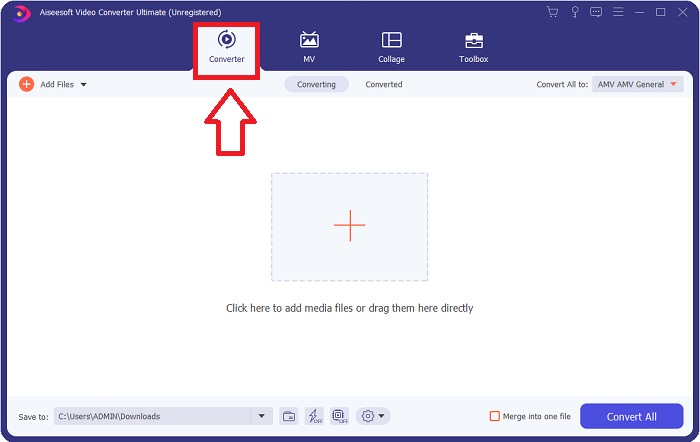
الخطوة 2. شغِّل التطبيق الذي قمت بتنزيله. عند فتح البرنامج لأول مرة، ستظهر نافذة بواجهة Converter. هنا ستُدخِل ملف الفيديو الخاص بك وتبدأ عملية التحويل.
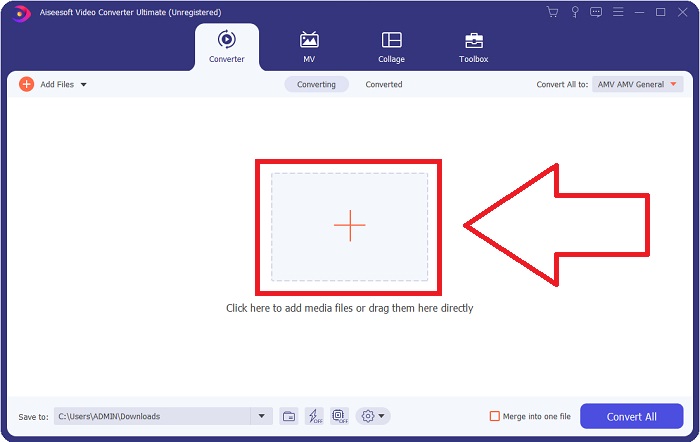
الخطوة 3. استورد ملفاتك إلى أداة التحويل لبدء عملية التحويل. اسحب ملف الفيديو الذي تريد تحويله وأفلته فوق أيقونة علامة +.
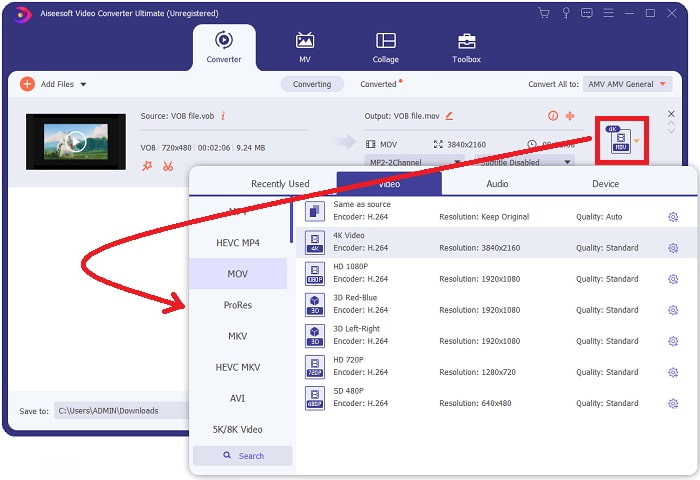
الخطوة 4. اختر تنسيق الفيديو من القائمة الموجودة في الزاوية العلوية اليمنى من الشاشة. ابحث عن نوع ملف MOV في القائمة المنسدلة وحدّده. ستظهر أمامك عدة خيارات لجودة الفيديو بمجرد اختيارك لتنسيق MOV. ولكن إذا لم تجد جودة الفيديو المفضلة لديك في القائمة، يمكنك تغيير إعدادات الجودة بما يناسب احتياجاتك. يمكنك تعديل دقة العرض، ومعدل الإطارات، وحتى جودة الصوت بالضغط على أيقونة الترس. للاحتفاظ بالتغييرات التي أجريتها، انقر على زر Create New.
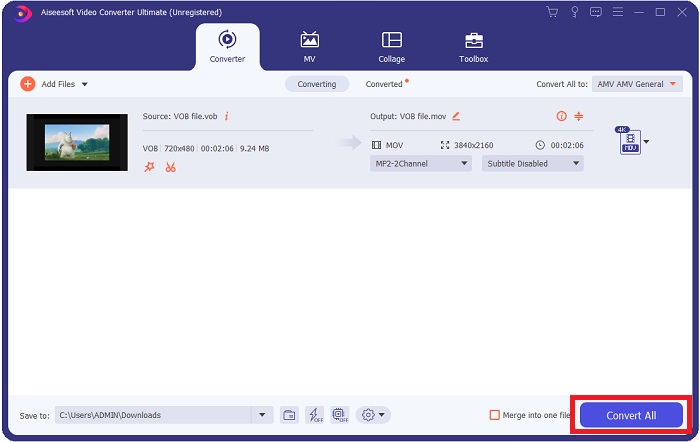
الخطوة 5. بعد الانتهاء من تعديل الفيديو وجهوزه للتحويل، انقر Convert All لبدء عملية تحويله وحفظه على جهازك.
الجزء 3. كيفية تحويل VOB إلى MOV [عبر الإنترنت]
إذا لم يكن لديك وقت لتنزيل برنامج Video Converter Ultimate، يمكنك أيضًا استخدام النسخة الإلكترونية من هذا البرنامج. يُعد Free Video Converter Online أفضل أداة ويب متاحة على الإنترنت يمكنها تحويل العديد من أنواع الصيغ بسرعة عالية. وعلى عكس بعض المحوّلات الأخرى على الإنترنت، لا يفرض هذا المحوّل قيودًا صارمة على عدد الصيغ التي يدعمها. لذلك يُنصح به للمستخدمين المبتدئين. للتعرّف أكثر إلى هذه الأداة عبر الويب، إليك الخطوات التالية:.
الخطوة 1. انتقل إلى الموقع الرئيسي لهذا المحوِّل عبر الإنترنت من خلال النقر على الرابط هنا.
الخطوة 2. إذا كانت هذه هي المرة الأولى التي تستخدمه فيها، فانقر على زر Add Files to Convert لتنزيل مُشغّل الأداة على جهازك. سيتم تشغيله تلقائيًا بعد تنزيله. بعد ذلك، اختر الملف من المجلد لديك واضغط على Open بعد اكتمال التنزيل مرة أخرى.

الخطوة 3. قبل أن تبدأ عملية التحويل، اختر تنسيق MOV من قائمة فئة Video الموجودة في الأسفل عن طريق النقر عليه.
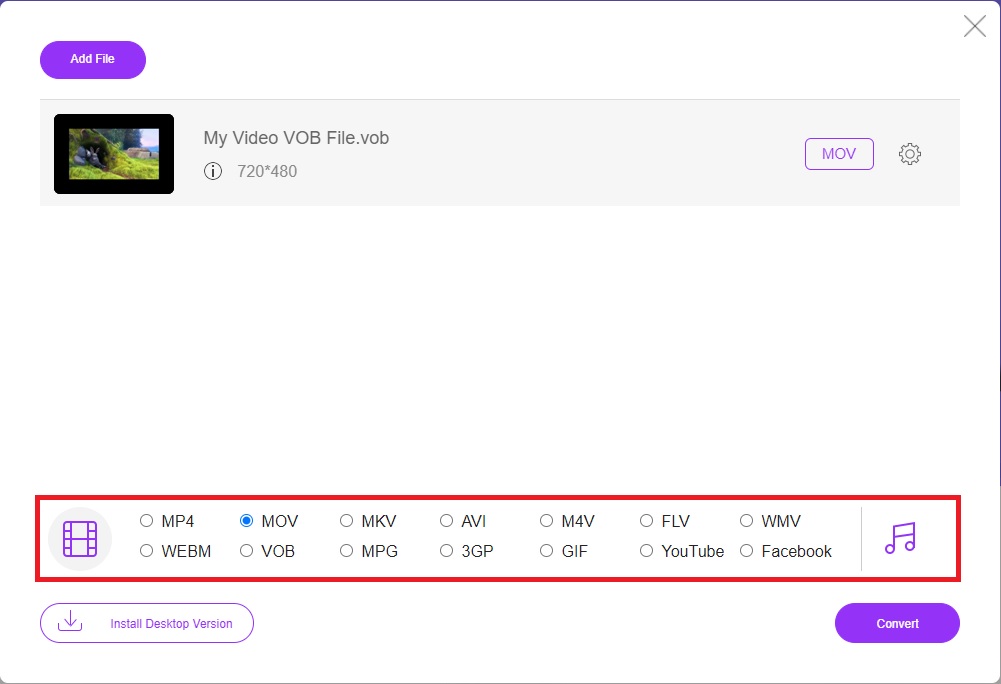
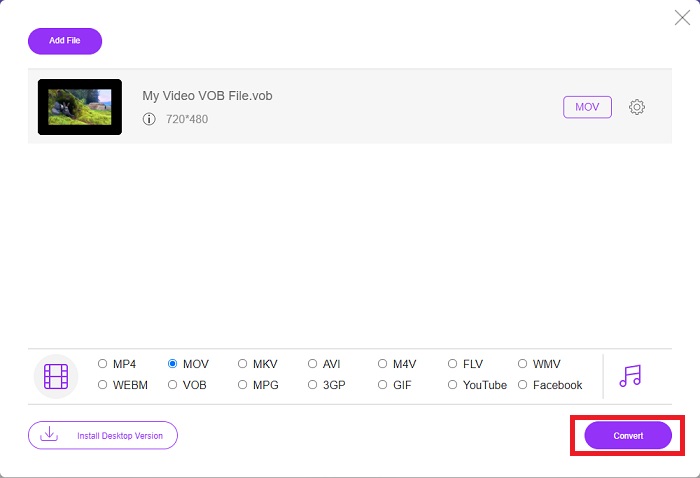
الخطوة 4. بعد تحديد التنسيق، انقر على Convert لبدء عملية تحويل الملف إلى تنسيق آخر.
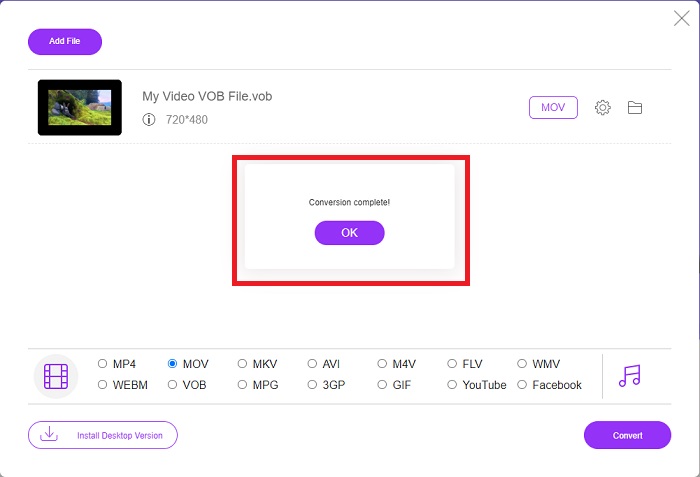
الخطوة 5. بعد بضع دقائق، سيظهر مجلد يحتوي على الملف المحوَّل؛ ما عليك سوى النقر عليه لبدء مشاهدته.
الجزء 4. أسئلة وأجوبة حول تحويل VOB إلى MOV
لماذا ملفات VOB كبيرة جدًا؟
لا يوجد سبب لحجم التنزيلات الكبير سوى الفيديوهات نفسها (بما في ذلك الصوت). نظرًا لاستخدام برامج ترميز الفيديو لأسلوب الترميز بطول البت المتغيّر، فإن أحجام الملفات تختلف. لذلك من الممكن ترميز العدد نفسه من الصور بأحجام ملفات متنوعة. انقر هنا لتتعلم كيفية ضغط ملفات VOB كبيرة.
هل VOB هو نفسه DVD؟
بالنسبة لكائنات الفيديو ، تستخدم وسائط DVD-Video VOB (اختصار لكائن الفيديو). يمكن تضمين الترجمات وقوائم DVD والمعلومات الملاحية في ملف VOB ، وهو ملف متعدد التنسيقات. التشفير ممكن لملفات VOB.
ماذا يحتوي ملف MOV؟
من الممكن استخدام ملفات MOV لتخزين ومزامنة العديد من أشكال الوسائط ، بما في ذلك الفيديو والصوت والرمز الزمني والنص. هناك مجموعة متنوعة من برامج الترميز التي يمكن استخدامها لتشفير جزء معين من المحتوى. عندما يتعلق الأمر بالضغط ، تستخدم ملفات MOV عادةً برنامج الترميز MPEG-4.
خاتمة
بشكل عام، من الواضح بيان الفروق بين البرنامج والمحوّل عبر الإنترنت المذكورين أعلاه، وكلاهما له عيوب ومزايا عند استخدامه. ولكن إذا اخترت استخدام محوِّل احترافي للغاية وسهل الاستخدام في الوقت نفسه، فإن برنامج Video Converter Ultimate هو الخيار الموصى به بشدة. وكما ورد في هذه المقالة عن هذا المحوِّل، لا يمكن لمنافسيه الوصول إلى المستوى المعياري الذي حققه هذا البرنامج. فهم لا يستطيعون بلوغ مستوى التميز الذي يقدّمه.
-
 أفضل 8 مشغلات MOV لتشغيل ملفات QuickTime MOV بجودة أصلية
 فقط تعرف على المزيد حول أفضل 8 مشغلات MOV المتاحة لكل من Windows و Mac. يمكنك اختيار الملف المرغوب والمناسب لتشغيل ملفات MOV بالجودة الأصلية.
-
 MKV to MOV - كيفية تحويل MKV إلى MOV
 كيف أقوم بتحويل MKV إلى MOV على نظام Mac؟ هل يستطيع موفي قراءة MKV؟ ماذا يعني تنسيق MOV؟ يوضح هذا المنشور طريقتين بسيطتين لمساعدتك في تحويل MKV إلى MOV باستخدام محولات الفيديو الاحترافية عبر الإنترنت مجانًا.
-
 FLV to MOV - كيفية تحويل FLV إلى MOV على Mac / PC / Online مجانًا
 كيفية تحويل FLV إلى MOV؟ كيف أقوم بتحويل FLV إلى MOV على نظام Mac؟ هل هناك أي طريقة مجانية لتحويل YouTube FLV إلى MOV عبر الإنترنت؟ يشارك هذا المنشور 3 محولات FLV إلى MOV لتغيير ملفات FLV إلى MOV.
