


 محول الفيديو النهائي
 مسجل الشاشة
 إصلاح الفيديو
أكبر محول لتحويل AIFF إلى MP3 مع دليل خطوة بخطوة
تُخزّن ملفات AIFF أعلى جودة من ملفات الصوت التي سمعت عنها من قبل. ورغم أنه يمكن حفظ هذا التنسيق في برامج سطح المكتب لأنه غير مضغوط، إلا أنه غير مثالي للتخزين أو التنزيل على هاتفك. لذلك، توجد طريقة يمكنك من خلالها تخزين ملفات AIFF على هواتفكم وحتى على أجهزة سطح المكتب مع استهلاك مساحة أقل. وأفضل طريقة لحل هذه المشكلة هي تحويل AIFF إلى MP3. ومع ذلك، قد يؤثر التحويل في ملفاتك الصوتية. لذلك جمعنا لك مجموعة من الأدوات التي يمكنك الاختيار منها لتحويل ملفات AIFF دون فقدان جودة الملف. فلنواصل استكشاف الأدوات أدناه، ولنبدأ مباشرة بالتعريف بها وشرح خطوات استخدامها.

الجزء 1. كيفية تحويل AIFF إلى MP3 على نظامي التشغيل Windows و Mac
1. محول الفيديو النهائي
يمكن أن يكون تحويل الصيغ مميزًا للغاية باستخدام Video Converter Ultimate. إذا لم تحصل على معاملة خاصة من أداة التحويل التي تستخدمها، فجرّب هذه الأداة. فالمحوّل النهائي يوفّر الكثير من الميزات المتقدمة التي لا تمتلكها برامج التحويل الأخرى من AIFF إلى MP3 على ويندوز أو ماك. كما أن هذه الأداة ليست محدودة ببرامج ويندوز فقط، إذ يمكنك أيضًا تنزيلها على جهاز الماك. لذا، إذا كنت تريد خوض تجربة تحويل نهائية، فيجب عليك اتباع الخطوات لتحصل على عملية تحويل ناجحة لملف AIFF الخاص بك.
الخطوة 1. لاستخدام أداة التحويل، يجب أولاً تنزيلها على قرص جهاز الكمبيوتر أو الماك لديك. ثم قم بتثبيتها، عدّل الإعدادات، واضغط إنهاء (Finish) لتشغيل الأداة بعد ذلك.
تحميل مجانيلنظام Windows 7 أو أحدثتنزيل آمن
تحميل مجانيلنظام MacOS 10.7 أو أحدثتنزيل آمن
الخطوة 2. بعد تثبيت أداة التحويل، انقر على Add Files لإضافة ملفات AIFF التي تريد تحويلها. إذا كانت الملفات كثيرة ويصعب تحديدها من المجلد، يمكنك سحبها وإفلاتها في واجهة البرنامج.
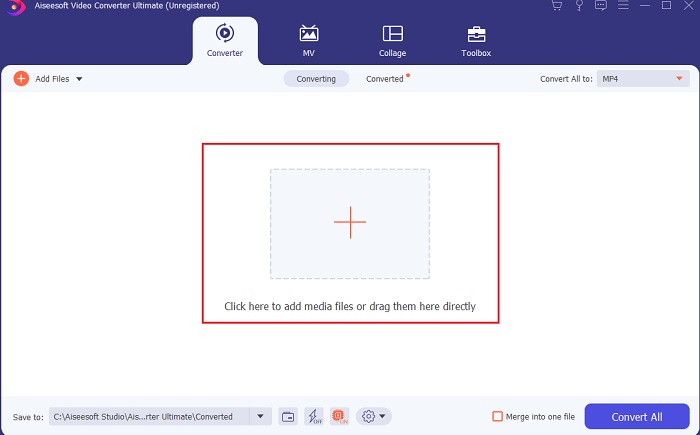
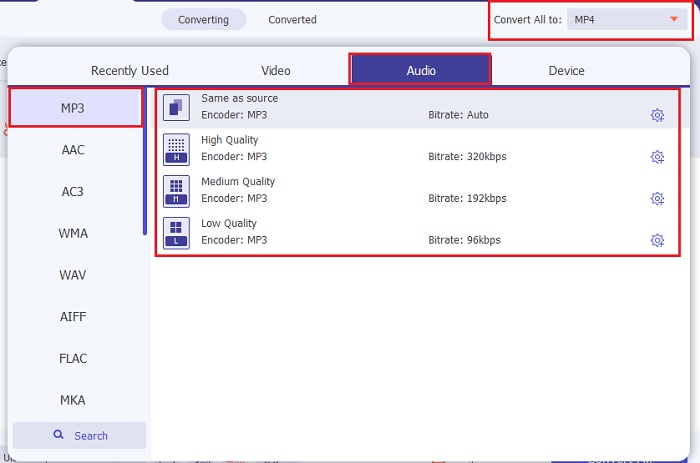
الخطوة 3. انتقل إلى الخطوة التالية بالنقر على خيار Convert All to. ثم اختر صيغة الصوت التي تريد التحويل إليها. على سبيل المثال، يمكنك اختيار MP3 كصيغة نهائية.
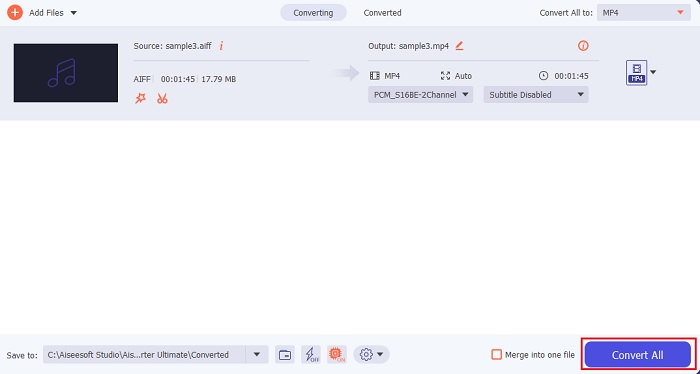
الخطوة 4. انقر على زر Convert All لبدء تحويل ملفات AIFF.
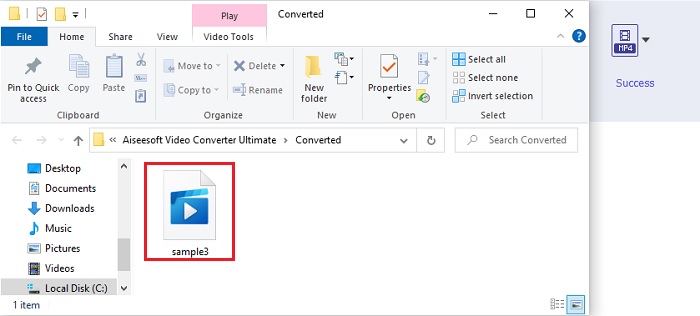
الخطوة 5. انتظر بضع ثوانٍ حتى يكتمل التحويل، ثم ستظهر نافذة لمجلد الملفات على شاشتك. انقر على ملف MP3 الذي تم تحويله حديثًا واستمع إلى أنقى صوت سمعته على الإطلاق.
2. iTunes
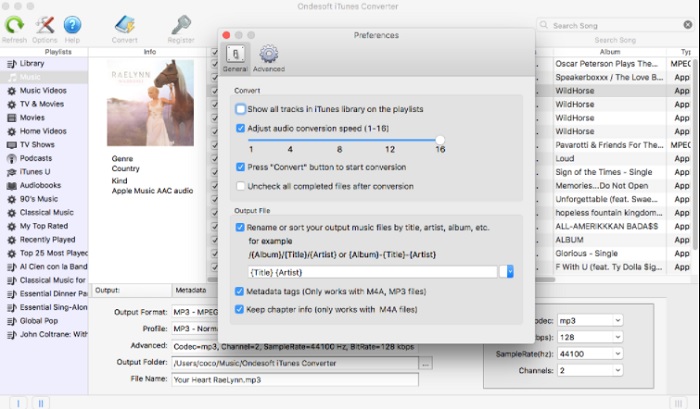
يمكن لمشغّل الوسائط المدمج هذا أيضًا تحويل ملفات AIFF إلى MP3 على الماك، وهو iTunes. طوّرت شركة آبل هذا المشغّل ليكون مكتبة الموسيقى الافتراضية ومشغّل الصوت لجميع أجهزة iOS وبرامج الماك. وإحدى الميزات التي يمكنك استخدامها هنا هي أداة التحويل. ورغم أنه يحتوي على ميزة التحويل، إلا أنه يدعم عددًا أقل من الصيغ مقارنة بأدوات التحويل عبر الإنترنت. لكنه فعّال وآمن للاستخدام في تحويل الملفات إلى صيغة جديدة يمكن تشغيلها. كما أن هذا المشغّل المدمج لا يمكن استخدامه على الأجهزة غير التابعة لآبل مثل أندرويد أو ويندوز. لذا، اتّبع الخطوات الموضحة أدناه لتتعرف أكثر على ميزة التحويل في iTunes.
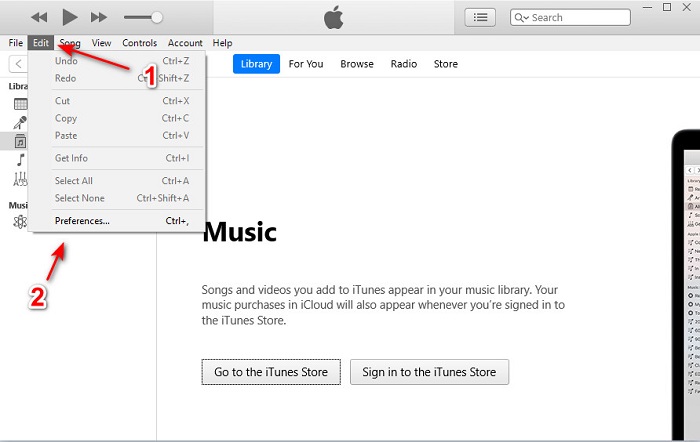
الخطوة 1. افتح iTunes على جهازك المكتبي، ثم انقر على Edit ثم Preferences.
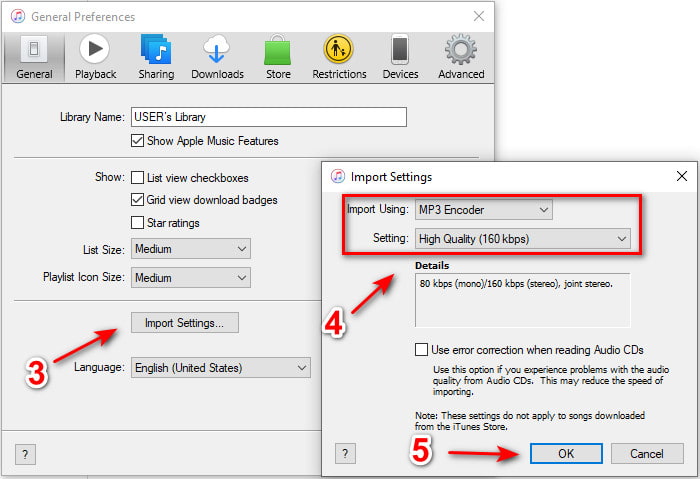
الخطوة 2. ضمن General انقر على Import Settings. ستظهر قائمة أصغر، قم بتغيير format وquality هنا ثم انقر OK للحفظ.
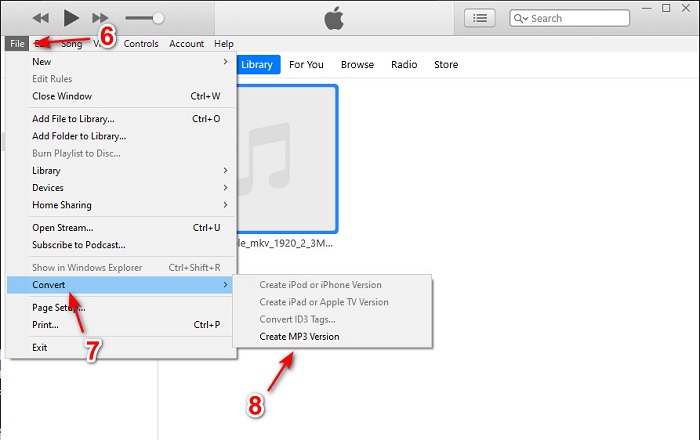
الخطوة 3. اسحب الملف إلى واجهة البرنامج ثم انقر عليه. اذهب إلى File ثم Convert وانقر على Create MP3 Version لبدء التحويل.
الجزء 2. أفضل 2 محولات مجانية على الإنترنت لتحويل AIFF إلى MP3
1. FVC Free Audio Converter
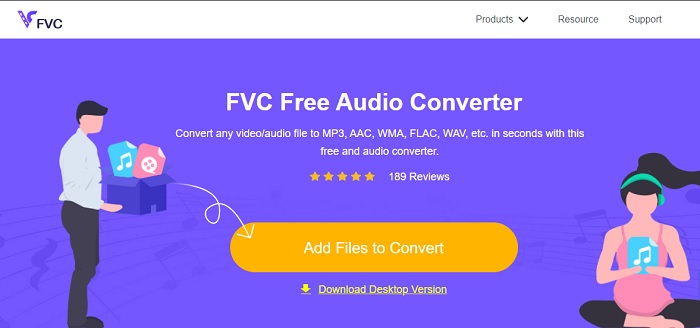
إذا قمت بتحويل AIFF إلى MP3 فستحصل على حجم ملف أقل من 320 كيلوبت/ث إذا استخدمت محوّل الويب هذا، FVC Free Audio Converters. يستخدم ملايين المستخدمين هذا الحل عبر الويب لتحويل صيغ الملفات. ومع أن هذه الأداة لا تحتوي على المزايا الكبيرة التي يوفرها الإصدار المدفوع FVC Video Converter Ultimate لأنها مجانية، إلا أنه لا يزال بإمكانك تجربة مستوى متوسط من التحويل النهائي إذا جرّبت هذه الأداة. كما أنها تدعم صيغًا صوتية أكثر من iTunes. اتبع الخطوات الموضحة أدناه لمعرفة كيفية استخدام أداة الويب هذه.
الخطوة 1. للوصول إلى الموقع الرئيسي لمحوّل الصوت، انقر على هذا الرابط.
الخطوة 2. ثم انقر على زر Add Files to Convert واسمح للأداة ببدء المشغّل (Launcher). معلومة إضافية: إذا كانت هذه أول مرة تستخدم فيها أداة الويب هذه، فيجب عليك تنزيل المشغّل وتثبيته أولًا.
قم بتنزيل إصدار سطح المكتب لتحويل الملفات دفعة واحدة.
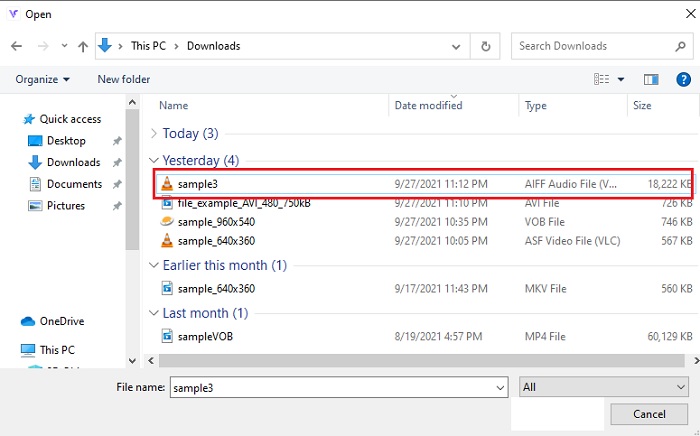
الخطوة 3. بعد تشغيل أداة الويب، يجب عليك تحديد ملفات AIFF ثم النقر على open ليتم توجيهك إلى الواجهة الرئيسية لأداة الويب.
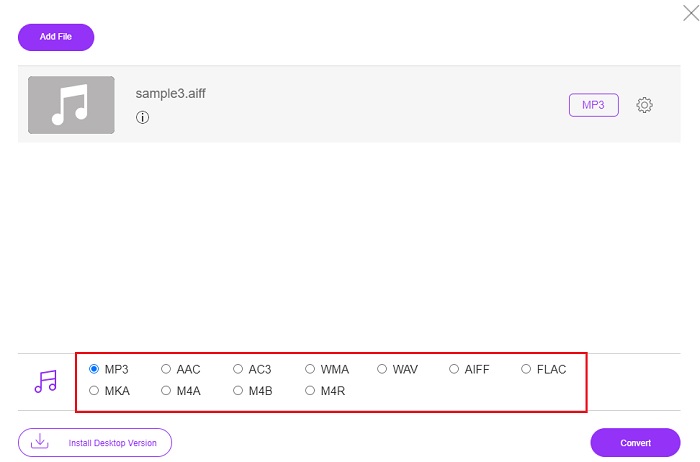
الخطوة 4. اختر صيغة الصوت التي تريد التحويل إليها في الأسفل. ثم انقر على زر Convert وحدّد مكان حفظ الملف لبدء عملية التحويل.
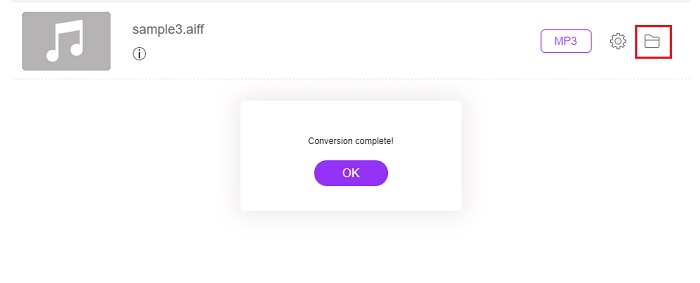
الخطوة 5. لنعثر على الملف المحوّل بعد انتهاء التحويل عن طريق النقر على أيقونة المجلد. ستظهر لك نافذة مستكشف الملفات على شاشتك، انقر على الملف المحوّل واستمع إليه.
2. زمزم
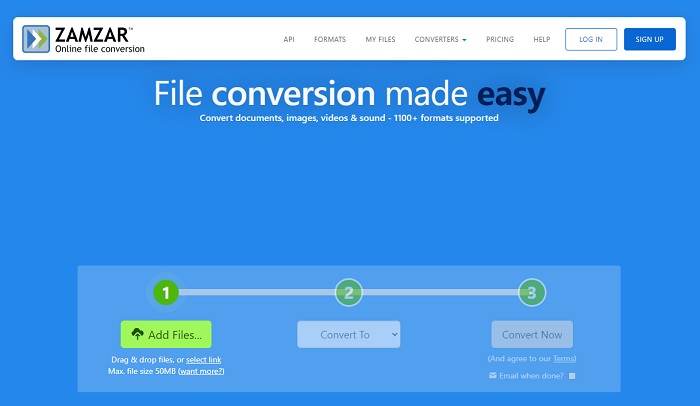
قد يكون التحويل باستخدام Zamzar أفضل خيار تتخذه لتحويل الملفات. فهذه الأداة سهلة الفهم للغاية، إذ تعرض ثلاث خطوات أو عمليات أساسية فقط لإتمام التحويل. ولكن لهذه الأداة حدّ أقصى لحجم الملف وعدد الملفات التي يمكن تحويلها. كما أن عملية التحويل هنا سيئة جدًا؛ إذ تستغرق الكثير من الوقت، وإذا بدأ التحويل فلن تتمكن من إلغائه. لذا، قبل أن تبدأ عملية تحويل أخرى من الأفضل أن تنتظر انتهاء العملية الحالية ثم تضيف الملف مرة أخرى. اقرأ الخطوات أدناه واتبعها لإجراء التحويل.
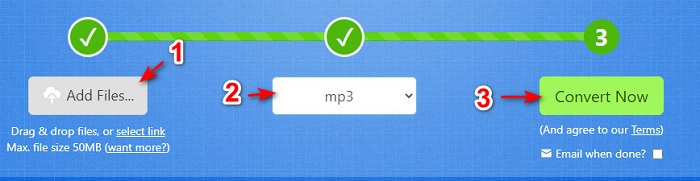
الخطوة 1. ابحث عن الصفحة الرئيسية لموقع Zamzar على متصفحك.
الخطوة 2. ثم انقر على Add File لاختيار الملف الصوتي الذي تريد تحويله. اختر الصيغة عن طريق النقر على Convert to.
الخطوة 3. إذا كنت مستعدًا لبدء التحويل، فانقر على Convert Now لبدء العملية.
قراءة إضافية
AIFF مقابل MP3
تم تطوير AIFF ، تنسيق ملف تبادل الصوت ، بواسطة Apple. وهو متغير من تنسيق IFF. ملفات AIFF غير مضغوطة ، لذا فهي تتمتع بجودة صوت أعلى من ملفات MP3 المماثلة. قد يؤدي ذلك أيضًا إلى جعل المستخدمين مشكلة مساحة القرص غير كافية.
تم إصدار تنسيق MP3 في 1993 بواسطة Moving Picture Experts Group (MPEG). كان معيارًا لتخزين الموسيقى حيث يمكنه ضغط الصوت إلى حجم أصغر بكثير من التنسيقات غير المضغوطة الأخرى. لا يزال يستخدم على نطاق واسع في الوقت الحاضر ، خاصة لتوزيع الصوت عبر الإنترنت.
الجزء 3. أسئلة وأجوبة حول AIFF إلى MP3
أيهما أفضل: AIFF أم MP3؟
على الرغم من أن التنسيق نفسه يخزن ملفًا صوتيًا عالي الجودة ، فلنقارن كل تنسيق. لجعله قصيرًا ، ينتج MP3 جودة جيدة بمساحة أقل ، لكن AIFF ينتج ملف صوتي عالي الجودة بمساحة أكبر.
ما هو أفضل استخدام لملفات AIFF؟
نظرًا لأن ملفات AIFF تخزن ملف الصوت الطبيعي والجودة ، فلا يزال حجم الملف بهذا التنسيق ضخمًا لأنه غير مضغوط. لكن تنسيق AIFF هذا هو الخيار المثالي لاستخدامه في التحرير وإضافة المؤثرات لجعل الصوت الصوتي أفضل.
ما هي الاختلافات بين AIF و AIFF و AIFC؟
تُستخدم ملفات AIF بشكل شائع لتخزين الملفات الصوتية على ملفات CD و DVD و Blu-ray و AIFF المستخدمة لتخزين البيانات الشخصية والصوتية مما يعني أنها ضخمة في حجم الملف. لكن AIFC هو الإصدار المضغوط من AIFF ، هذا التنسيق هو الأكثر استخدامًا من قبل مشغلات الوسائط لتشغيل تنسيق aiff عالي الجودة.
خاتمة
لنختتم النقاش، أصبح من الأسهل الآن أن نفهم ما هو ملف AIFF. لكن هذا التنسيق كبير جدًا من حيث الحجم كما ذكرنا، ولحل هذه المشكلة يجب تحويله إلى صيغة الصوت العالمية، MP3. والبحث عن الأداة التي تحتاج لاستخدامها قد يكون مرهقًا بعض الشيء لأنها قد تُتلف ملفات AIFF الخاصة بك. ومع استعراضنا لعدة حلول، ما زالت هناك أداة واحدة مميزة للغاية في مهمة التحويل، وهي FVC Video Converter Ultimate التي يمكن أن تكون عونك في حل هذه المشكلة البسيطة. فما الذي تنتظره؟ عليك الآن تنزيل الأداة وتجربة أفضل عملية تحويل على الإطلاق.
-
 أفضل 4 طرق لتحويل OGG إلى MP3 دون فقدان الجودة
 كيفية تحويل ملفات OGG إلى تنسيق MP3 للاستماع إليها على الكمبيوتر أو الجهاز المحمول؟ نحن هنا نشارك 5 أسهل طريقة للقيام بذلك على سطح المكتب أو عبر الإنترنت.
-
 كيفية تحويل M4A إلى MP3 باستخدام 4 محولات صوت مجانية
 لا يمكنك تشغيل M4A وتحتاج إلى تحويله إلى MP3؟ هل هناك أي طريقة مجانية لتحويل M4A إلى MP3 عبر الإنترنت؟ يشارك هذا المنشور 4 طرق مجانية لمساعدتك في تحويل M4A إلى MP3 باستخدام iTunes ومحولات الصوت عبر الإنترنت والمحترفة.
-
 كيفية تحويل WMA إلى MP3 على نظام Mac / Windows / عبر الإنترنت
 هل من الممكن تحويل WMA إلى MP3 باستخدام Windows Media Player؟ كيفية تحويل WMA إلى MP3 مجانًا؟ يشارك هذا المنشور 4 طرق بسيطة لمساعدتك في إجراء تحويل الصوت من WMA إلى MP3 على Mac و Windows PC وعلى الإنترنت.

