


 محول الفيديو النهائي
 مسجل الشاشة
 إصلاح الفيديو
 تنزيل آمن
تحويل سلس بين M4B و MP3: استمتع بالكتب الصوتية في أي مكان وفي أي وقت
اكتشف بوابة التنوع في الكتب الصوتية مع محوِّلات MP3 إلى M4B المذهلة. إذا كنت تبحث عن طريقة خالية من التعقيد لتوسيع مكتبتك من الكتب الصوتية، فإن المحوِّلات المعروضة هنا تمكِّنك من تحويل ملفات MP3 بسهولة إلى صيغة M4B أو العكس. وهي متوافقة بسلاسة مع أشهر منصات وأجهزة الكتب الصوتية للاستمتاع بقصصك المفضلة أثناء التنقل. أطلق العنان للإمكانات الحقيقية لمجموعتك من الكتب الصوتية باستخدام أدوات تحويل M4B إلى MP3 سهلة الاستخدام، والمصممة لتبسيط تجربة الاستماع لديك. ابدأ اليوم في استكشاف إمكانات غير محدودة وانطلق في انتقال سلس إلى عالم كتب صوتية بلا حدود.

الجزء 1. M4B مقابل MP3
قبل الغوص في عملية التحويل ، إليك جدول مقارنة يبرز الاختلافات الرئيسية بين تنسيقات M4B و MP3:
| M4B | MP3 | |
| DRM | يمكن أن يكون محميًا بنظام إدارة الحقوق الرقمية (DRM) ، مما يقيد الاستخدام على أجهزة معينة | يمكن أن يكون خاليًا من DRM أو محميًا بنظام DRM اعتمادًا على الملف |
| البيانات الوصفية | يدعم البيانات الوصفية الشاملة لتنظيم الكتب الصوتية | دعم محدود للبيانات الوصفية لمعلومات المسار الأساسية |
| حجم الملف | حجم الملف أكبر بشكل عام بسبب الميزات المحسنة | حجم ملف أصغر بسبب ضغط أعلى |
| التوافق | يشيع استخدامها على أجهزة iTunes و Apple | متوافق عالميًا مع مجموعة واسعة من الأجهزة |
| جودة | يوفر صوتًا عالي الجودة مع ضغط فعال | جودة متغيرة حسب معدل البت |
| ضغط | يستخدم ضغط AAC المتقدم (الترميز الصوتي المتقدم) | يستخدم خوارزمية ضغط الفقد |
الجزء 2. تحويل MP3 إلى M4B أو MP3 إلى M4B على نظامي التشغيل Windows و Mac
1. محول الفيديو النهائي
عندما يتعلق الأمر بتحويل الفيديو والموسيقى، يُعَدّ Video Converter Ultimate المعيار الذهبي. فهو يدعم مجموعة واسعة من صيغ ملفات الفيديو والصوت للتحويل، بما في ذلك M4B وMP3 وAIFF وOGG وAAC وغيرها. يمكنك أيضًا تغيير الصيغة وفقًا للجهاز الذي تستخدمه، إذ يختار البرنامج تلقائيًا أفضل الإعدادات والصيغة المناسبة لجهازك. في غضون ثوانٍ قليلة، يمكن تحويل ملفك من MP3 إلى M4B أو العكس. يتيح لك هذا المحوِّل أيضًا التحويل الدفعي، وهو ما يكون مفيدًا جدًا عند التعامل مع عدد كبير من الملفات أو عندما تريد تحويل ملفات M4B إلى MP3 مع الفصول. فيما يلي مع ذلك دليل بسيط لمساعدتك على استخدام هذا البرنامج.
الخطوة 1. الحصول على البرنامج
في البداية، قم بتنزيل مُثبِّت البرنامج عن طريق اختيار خيار Free Download. بعد ذلك، ثبِّت التطبيق على جهاز الكمبيوتر ثم شغِّله.
تنزيل مجانيلنظام Windows 7 أو أحدثتنزيل آمن
تنزيل مجانيلنظام MacOS 10.7 أو أحدثتنزيل آمن
الخطوة 2. تابع تحميل ملف MP3 أو M4B
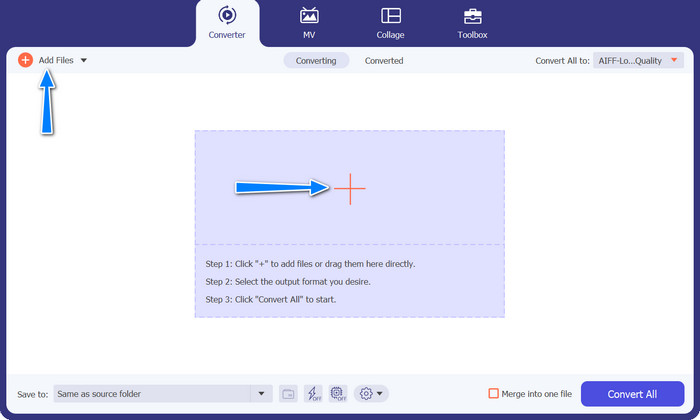
لإضافة ملفات صوتية، انقر على زر علامة Plus في الواجهة الرئيسية أو اختر زر Add Files. بعد ذلك، ينبغي أن يظهر المصغَّر الخاص بالصوت.
الخطوة 3. اختر صيغة الإخراج
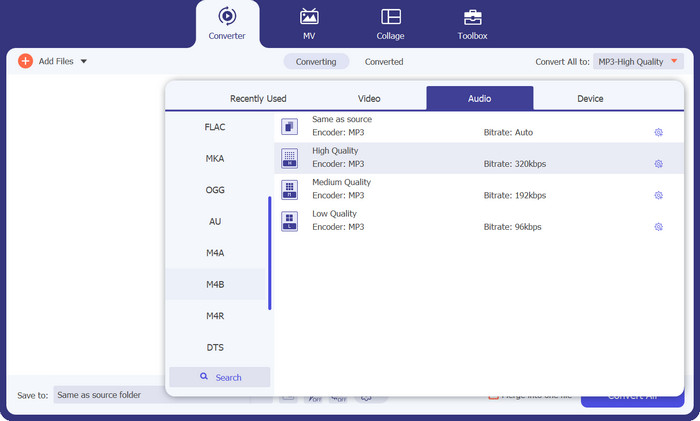
بعد ذلك، انتقل إلى علامة تبويب Profile ثم إلى علامة تبويب Audio. بعد ذلك، انتقل إلى صيغة M4B أو MP3 في القائمة الموجودة على الجهة اليسرى.
الخطوة 4. ابدأ عملية التحويل
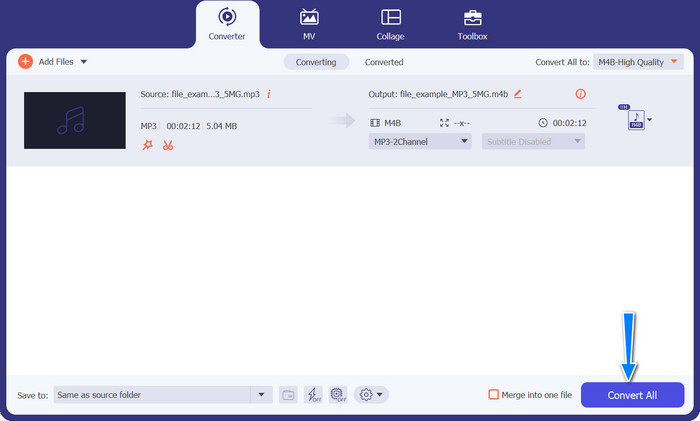
الآن بعد أن أصبح كل شيء جاهزًا، يمكنك تحويل M4B إلى MP3 والعكس. اضغط على زر Convert All في أسفل الزاوية اليمنى لبدء عملية التحويل. عندها يجب أن تبدأ العملية فورًا.
الايجابيات
- الوصول دون اتصال.
- القدرة على تحويل الدفعة.
- التخصيص والتحكم.
سلبيات
- قد يكون للأدوات الغنية بالميزات ثمن.
2. محول MP3 مجاني على الإنترنت
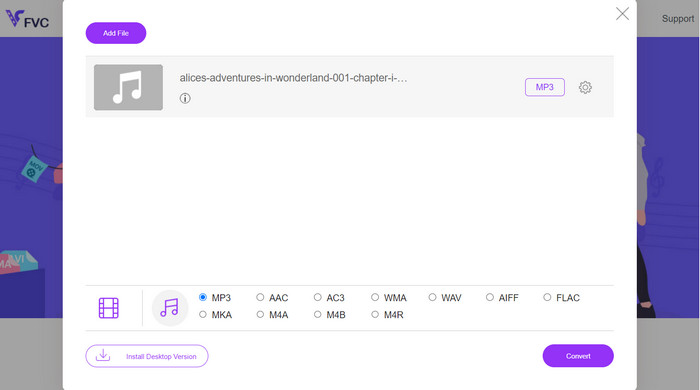
نوصي باستخدام Free MP3 Converter Online كأداة تحويل فعالة من M4B إلى MP3. لا يفرض موقع الويب أي رسوم أو يعرض إعلانات على صفحته على الويب. تحويل غير محدود لملفات الصوت والفيديو ممكن. التسجيل غير ضروري. هذا هو المحول الأكثر فعالية على الإنترنت. توفر الإرشادات التالية إرشادات لاستخدام الأداة لتحويل M4B إلى MP3 مجانًا.
الخطوة 1. في البداية، كل ما عليك فعله هو التوجه إلى الموقع الرسمي للبرنامج. يمكنك الدخول إلى الموقع باستخدام أي متصفح تفضِّله.
الخطوة 2. انقر على زر Add Files to Convert أعلى الصفحة لبدء رفع ملفاتك الصوتية. يجب تثبيت المشغِّل أولًا إذا لم يكن مُثبَّتًا من قبل.
الخطوة 3. ثالثًا، حدد نوع الملف الذي ترغب في تصديره. ضمن Audio Format، اختر زر الاختيار AIFF. أما الخطوة الأخيرة فهي النقر على زر Convert لبدء عملية التحويل.
الايجابيات
- وهو يدعم تنسيقات الملفات المختلفة.
- منصة مستقلة.
سلبيات
- برنامج معتمد على الإنترنت.
- مخاطر الأمان والخصوصية.
3. iTunes
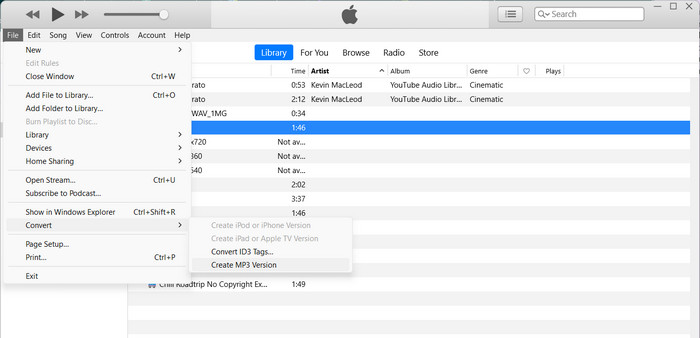
iTunes من Apple هو مشغل ملفات صوتي شهير ومنظم يدعم العديد من التنسيقات الرقمية المختلفة. إذا كنت تمتلك جهاز Mac ، فيمكنك استخدام iTunes لتحويل M4Bs إلى ملفات MP3. فيما يلي بعض الخطوات لمعرفة كيفية تحويل M4B إلى MP3 في iTunes.
الخطوة 1. شغّل iTunes على جهاز الكمبيوتر. ثم انتقل إلى قائمة Edit (في ويندوز) أو قائمة iTunes (في ماك) واختر Preferences.
الخطوة 2. في نافذة التفضيلات، انقر على علامة تبويب General ثم اضغط على زر Import Settings.
الخطوة 3. ستظهر نافذة جديدة. من قائمة Import Using المنسدلة، اختر MP3 Encoder. يمكنك أيضًا ضبط إعدادات MP3 بالضغط على زر Settings إذا رغبت بذلك. عند الانتهاء، انقر على OK لإغلاق نافذة الإعدادات.
الخطوة 4. الآن، انتقل إلى مكتبة iTunes الخاصة بك وابحث عن كتاب M4B الصوتي الذي تريد تحويله إلى MP3. إذا لم يكن مضافًا إلى iTunes بعد، يمكنك إضافته بالذهاب إلى File في ويندوز أو iTunes في ماك واختيار Add File to Library أو Add Folder to Library.
الخطوة 5. انقر بزر الفأرة الأيمن (أو مع الضغط على Control) على الملف ثم اختر Create MP3 Version. سيبدأ iTunes في تحويل ملف M4B إلى صيغة MP3. ستظهر نسخة MP3 المحوَّلة بجانب ملف M4B الأصلي في مكتبة iTunes الخاصة بك.
الجزء 3. تحويل MP3 إلى M4B أو MP3 إلى M4B على iOS و Android
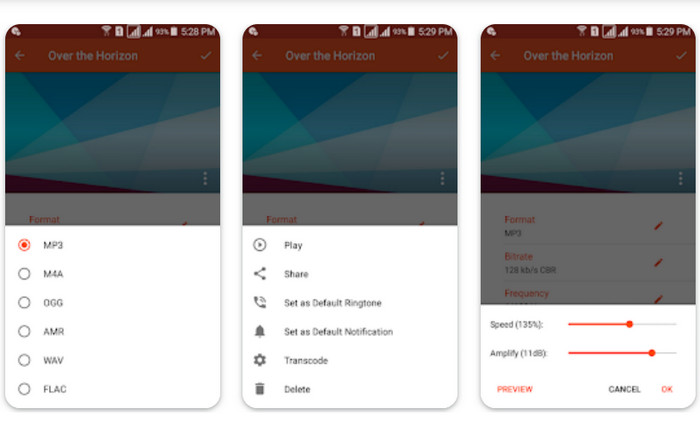
Audio Converter هو تطبيق جوال شائع متاح لكل من أجهزة iOS و Android. وهو يدعم تحويل M4B إلى MP3 إلى جانب تنسيقات الصوت الأخرى. يسمح لك التطبيق باستيراد ملفات M4B الخاصة بك ، واختيار تنسيق MP3 كإخراج ، وضبط إعدادات الصوت مثل معدل البت ومعدل العينة. كما يوفر خيارات لاقتطاع ودمج ملفات الصوت. اتبع الإجراء أدناه لإتقان كيفية استخدام تطبيق محول M4B إلى MP3 هذا على جهازك المحمول.
الخطوة 1. شغّل برنامج Audio Converter. عادةً ما يوفِّر البرنامج واجهة بسيطة لاختيار الملفات الصوتية وتحويلها.
الخطوة 2. اختر ملف M4B الذي تريد تحويله إلى MP3. قد يستورد البرنامج الملفات من جهازك أو من التخزين السحابي أو من تطبيقات أخرى.
الخطوة 3. بعد اختيار ملف M4B، ستظهر لك خيارات صيغة الإخراج. اختر MP3 كصيغة للإخراج. قد يتضمَّن التطبيق مزيدًا من خيارات التخصيص، مثل جودة الصوت/معدل البت، ومعدل العيِّنة، وإعدادات القناة، بل وحتى تشذيب الملفات الصوتية أو دمجها. خصِّص الإعدادات إذا لزم الأمر.
الخطوة 4. ابدأ عملية التحويل بعد اختيار صيغة الإخراج وتعديل أي خيارات أخرى. سيقوم البرنامج بتحويل ملف M4B إلى MP3.
الايجابيات
- ميزات إضافية مثل التشذيب أو الدمج أو إمكانيات التحرير الأساسية.
- يوفر الراحة أثناء التنقل.
سلبيات
- يمكن أن تستغرق عملية التحويل بعض الوقت.
قراءة إضافية:
أفضل 5 برامج لتسجيل ملفات M4B لأجهزة الكمبيوتر وماك [مجانية ومدفوعة]
M4A مقابل MP3: أيُّ تنسيق ملف صوتي هو الأنسب لك؟
الجزء 4. أسئلة وأجوبة حول تحويل M4B و MP3
هل يمكنني تحويل ملفات M4B إلى MP3 دون فقدان جودة الصوت؟
التحويل من تنسيق مع فقدان مثل M4B إلى MP3 سيشمل بعض فقدان جودة الصوت بسبب الضغط. ومع ذلك ، يمكنك التحكم في جودة الإخراج عن طريق ضبط الإعدادات أثناء عملية التحويل.
هل ستحتفظ ملفات MP3 المحولة بمعلومات الفصل من كتب M4B الصوتية الأصلية؟
قد يؤدي التحويل إلى MP3 إلى فقد علامات الفصل والميزات المتقدمة الأخرى الموجودة في ملفات M4B. تم تصميم MP3 بشكل أساسي للصوت أحادي المسار.
هل يمكنني تحويل ملفات M4B المحمية بواسطة DRM إلى MP3؟
قد يتم تقييد تحويل ملفات M4B المحمية بواسطة DRM إلى MP3 بسبب إجراءات حماية حقوق النشر. تأكد من أن لديك الحقوق والأذونات اللازمة لأي عملية تحويل.
خاتمة
إن تحويل M4B إلى MP3 يفتح عالَمًا من الاحتمالات أمام عشّاق الكتب الصوتية والمستمعين العاديين على حدٍّ سواء. سواء اخترت استخدام برامج سطح المكتب أو تطبيقات الهاتف للتحويل، فهناك العديد من الخيارات المتاحة لتبسيط العملية.
-
 أفضل الأدوات التي يمكنك استخدامها لتحويل دفعة MP3 إلى M4R
 هل تبحث عن محول يمكنه تحويل ملف MP3 الخاص بك إلى نغمة رنين M4R لجهاز iPhone أو iPad دفعة واحدة؟ اقرأ المقال لتكتشف بعضًا من أفضلها.
-
 MP3 لتحويل AAC: كيفية تحسين جودة الصوت الخاص بك
 تحويل AAC إلى MP3 و MP3 إلى AAC بسهولة! يغطي دليل المقالة هذا كل شيء عن تنسيقات الصوت الشائعة هذه ، بما في ذلك حجم الملف وجودته وتوافقه.
-
 FLAC مقابل MP3: أي تنسيق ملف صوتي يسيطر
 سيقارن هذا المنشور الاختلافات الرئيسية بين FLAC مقابل MP3. يتضمن ذلك جودة الصوت وحجم الملف والتوافق والمزيد.
