


 محول الفيديو النهائي
 مسجل الشاشة
 إصلاح الفيديو
 تنزيل آمن
قم بتحويل AAC إلى MP3 والعكس بالعكس باستخدام أفضل الأدوات لجميع الأنظمة الأساسية
أصبحت الملفات الصوتية مكونًا أساسيًا في المجتمع الحديث. نعتمد على أنواع مختلفة من الملفات الصوتية ، مثل الموسيقى والبودكاست والكتب الصوتية والمذكرات الصوتية ، لأغراض الترفيه والتعليم والتواصل. نظرًا لوفرة تنسيقات الصوت الموجودة ، قد يكون من الصعب تحديد موقع ملف متوافق عالميًا مع جميع أجهزتنا. AAC و MP3 هما تنسيقان شائعان لضغط الصوت.
ستُظهر هذه المقالة عملية تحويل AAC إلى MP3 وMP3 إلى AAC، بما يتيح تحسين ملفات الصوت لتناسب مختلف الأجهزة والمنصات. وستتضمن تحليلًا متعمقًا لمزايا كل تنسيق، وأفضل الأدوات المستخدمة في التحويل، وإرشادات شاملة تساعدك على تحسين ملفاتك الصوتية. إذا كنت تحتاج إلى ضغط الملفات لتوفير المساحة أو لتحسين التوافق، فتابع القراءة.

الجزء 1. مقارنة AAC مقابل MP3
للحصول على قرار مستنير بشأن التنسيق الذي يجب اتخاذه أم لا ، إليك جدول مقارنة سيساعدك.
| AAC | MP3 | |
| جودة | جودة أفضل بشكل عام من MP3 بمعدلات بت أقل | جودة أقل من AAC بمعدلات بت أقل |
| حجم الملف | حجم ملف أصغر من MP3 بنفس معدل البت | حجم ملف أكبر من AAC بنفس معدل البت |
| نطاق معدل البت | تتراوح عادة من 8-230 كيلو بت في الثانية | عادة ما يتراوح بين 8-320 كيلوبت في الثانية |
| التوافق | مدعوم على نطاق واسع على معظم الأجهزة والبرامج الحديثة | مدعوم على نطاق واسع على معظم الأجهزة والبرامج ، ولكن قد لا تدعم بعض الأجهزة القديمة |
| معدل العينة | عادة ما يتراوح بين 8-96 كيلو هرتز | عادة ما يتراوح بين 8-48 كيلو هرتز |
الجزء 2. دليل لتحويل AAC إلى MP3 أو MP3 إلى AAC على نظامي التشغيل Windows و Mac
1. FVC Video Converter Ultimate
يُعد برنامج FVC Video Converter Ultimate برنامجًا قويًا وسهل الاستخدام مخصصًا لتحويل الفيديو. يتيح لك تحويل ملفات الفيديو والصوت إلى صيغ متعددة. كما يمكنك تحويل AAC إلى MP3 وMP3 إلى AAC، إضافةً إلى العديد من صيغ الصوت والفيديو الأخرى، بكل سهولة.
علاوة على ذلك ، فإنه يوفر مجموعة متنوعة من الوظائف الإضافية ، بما في ذلك معالجة الدُفعات ، ومعدل التحويل السريع ، وواجهة سهلة الاستخدام تسهل سهولة الاستخدام. بالإضافة إلى ذلك ، يدعم البرنامج مجموعة واسعة من تنسيقات الإدخال والإخراج ، بما في ذلك تنسيقات الصوت الشائعة مثل AAC و MP3 و WAV و FLAC وغيرها الكثير. يمكنك أيضًا تخصيص إعدادات التحويل الخاصة بك ، مثل معدل البت ومعدل العينة والقنوات ، لتحقيق جودة الإخراج المطلوبة. تحقق من كيفية عمل محول AAC إلى MP3.
الخطوة 1. الحصول على البرنامج
يرجى تنزيل Video Converter Ultimate من موقعه الرسمي عن طريق تحديد المثبت من الخيارات المتوفرة. بعد ذلك ، تابع جميع المطالبات لتحقيق تثبيت ناجح. يرجى المتابعة لتنفيذ البرنامج وإجراء استكشاف لمميزاته.
تنزيل مجانيلنظام Windows 7 أو أحدثتنزيل آمن
تنزيل مجانيلنظام MacOS 10.7 أو أحدثتنزيل آمن
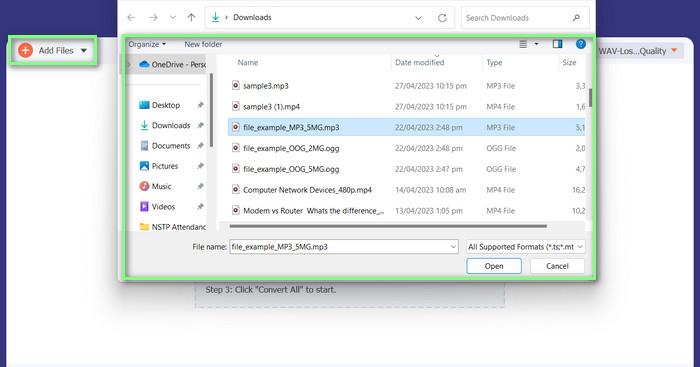
الخطوة 2. رفع ملف/ملفات الصوت
لرفع فيديو، انقر على Add Files أو على أيقونة علامة الزائد، ثم ابحث عن ملف الصوت في ملفاتك. لاستيراد الفيديو إلى البرنامج، يُرجى النقر المزدوج عليه. وهناك طريقة أخرى تتمثل في سحب الفيديو مباشرةً من ملفاتك وإفلاته داخل البرنامج.
الخطوة 3. تغيير تنسيق الصوت والبدء بالتحويل
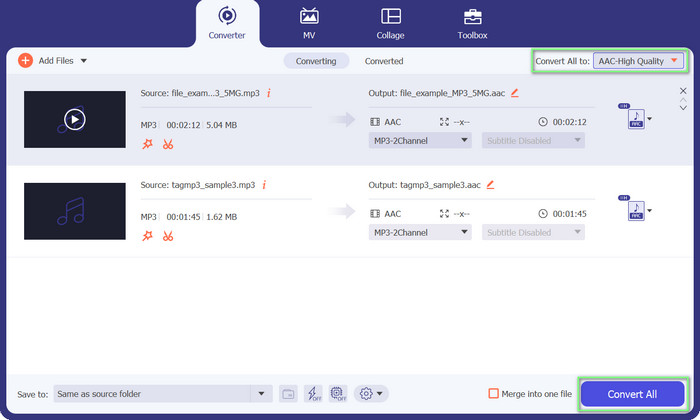
من الواضح أن تنسيق ملف الصوت هو MP3. سنحوّله الآن إلى AAC. يُرجى الوصول إلى خيار Convert All إلى الموجود في الزاوية العلوية اليمنى من واجهة الأداة. بعد ذلك، انتقل إلى علامة تبويب Audio وابحث عن تنسيق AAC. ثم ابدأ عملية التحويل باختيار خيار Convert All.
الايجابيات
- لديها تحويل دفعة من الملفات.
- يمكنه تعديل معدل البت والتردد وعدد القنوات لمسار صوتي.
- يأتي مع محرر البيانات الوصفية لملف صوتي.
سلبيات
- دعم محدود لبعض تنسيقات الملفات الأكثر غموضًا.
2. محول MP3 مجاني على الإنترنت
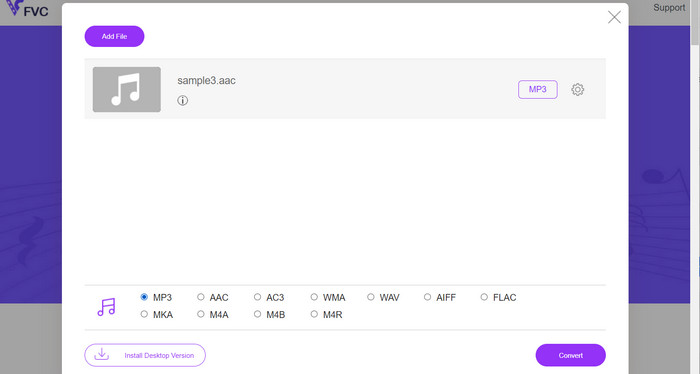
باستخدام أداة Free MP3 Converter Online يمكنك تحويل ملفاتك الصوتية إلى صيغ متنوعة، بما في ذلك الصيغ الشائعة مثل AAC وMP3. واعلم أنه يمكنك في الواقع تخصيص إعدادات التحويل؛ أي يمكنك ضبط معدل البت (bitrate) ومعدل العيّنة (sample rate) والقنوات للحصول على جودة الإخراج الدقيقة التي تريدها. رائع، أليس كذلك؟ علاوة على ذلك، يمكنك تحويل AAC إلى MP3 وMP3 إلى AAC من دون إنفاق أي مال على برامج، لأنها أداة مجانية. هل اطلعت على هذا الدليل حول كيفية استخدام محوّل AAC إلى MP3 عبر الإنترنت؟ الأمر سهل للغاية!
الخطوة 1. انتقل إلى صفحة Free MP3 Converter Online من FVC على العنوان https://www.freevideoconverter.online/audio-converter.
الخطوة 2. اختر ملف AAC الذي تريد تغييره بالنقر على زر Add Files to Convert. يمكنك أيضًا سحب الملف وإفلاته في المكان المخصص له على الصفحة.
الخطوة 3. بعد رفع الملف، اختر MP3 من قائمة الاختيار المنسدلة تحت تنسيق الصوت Audio format كصيغة تريد أن يكون الملف بها.
الخطوة 4. بدلاً من ذلك، يمكنك النقر على أيقونة Settings لتغيير إعدادات مثل معدل البت (bitrate) ومعدل العيّنة (sample rate) وخيارات القناة للإخراج. لبدء عملية التحويل، انقر على زر Convert.
الايجابيات
- وهو يدعم العديد من تنسيقات الإدخال والإخراج الصوتية.
- مجاني للاستخدام.
سلبيات
- لا توجد ميزات متقدمة لتحرير الصوت ، مثل تسوية الصوت.
3. FFmpeg
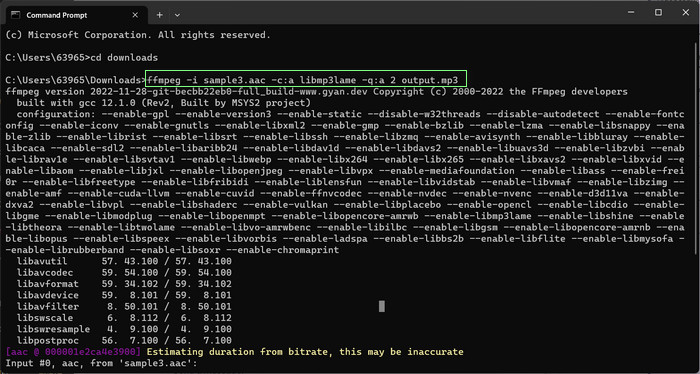
إذا كنت تستخدم برنامجًا مجانيًا لتحويل AAC إلى MP3 ، فلا يجب أن تفوتك FFmpeg. هذه الأداة رائعة حقًا لمعالجة الصوت والفيديو. يمكنك استخدامه لتحويل AAC إلى MP3 و MP3 إلى AAC بسهولة. مرحبًا يا من هناك! إذا كنت مرتاحًا لاستخدام سطر الأوامر ، فستحب مقدار المرونة والتخصيص الذي يمكنك الحصول عليه من خلال تحويل الصوت باستخدام هذه الأداة. ومع ذلك ، تحقق من البرنامج التعليمي لتحويل AAC إلى MP3 FFmpeg أدناه:
الخطوة 1. افتح الطرفية (Terminal) على جهاز الكمبيوتر لديك. انتقل إلى المجلد الذي يوجد به ملف الصوت المراد إدخاله باستخدام أمر cd.
الخطوة 2. استخدم الأمر التالي لتحويل AAC إلى MP3: ffmpeg -i input.aac -c:a libmp3lame -q:a 2 output.mp3
سيأخذ هذا الأمر ملف input.aac ويحوله إلى ملف output.mp3 باستخدام برنامج ترميز libmp3lame ، مع إعداد جودة 2. يمكنك ضبط إعداد الجودة حسب الحاجة لتحقيق جودة الإخراج المطلوبة.
استخدم الأمر التالي لتحويل MP3 إلى AAC: ffmpeg -i input.mp3 -c: a aac -b: a 128k output.aac
سيأخذ هذا الأمر ملف المدخلات. mp3 ويحوله إلى ملف output.aac باستخدام برنامج الترميز AAC ، بمعدل بت 128 كيلو. يمكنك ضبط معدل البت حسب الحاجة لتحقيق جودة الإخراج المطلوبة.
الايجابيات
- في متناول الجميع.
- درجة عالية من المرونة والتخصيص.
سلبيات
- يتطلب بعض المعرفة التقنية لاستخدامها بشكل فعال.
4. اي تيونز
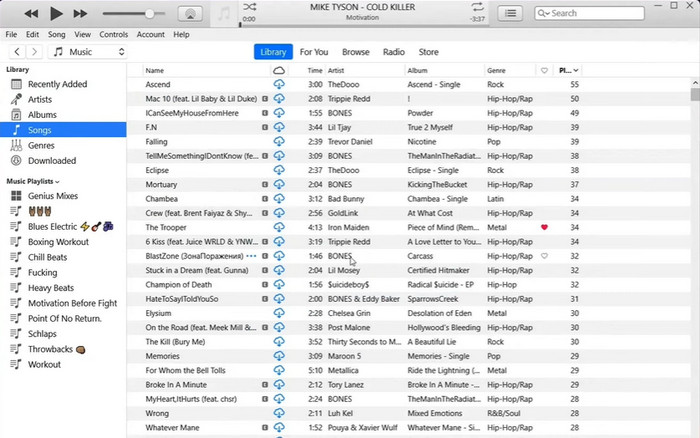
يعد تحويل الملفات الصوتية من تنسيق إلى آخر ، مثل MP3 إلى AAC و AAC إلى MP3 ، قدرة مضمنة في iTunes. وظيفتها الأساسية هي إدارة الموسيقى وتشغيلها ، ولكن يمكن استخدامها أيضًا لمشاهدة مقاطع الفيديو والاستماع إلى البودكاست والكتب الصوتية.
الخطوة 1. شغّل برنامج iTunes على جهاز الكمبيوتر الشخصي. ثم اختر خيار Preferences من قائمة Edit.
الخطوة 2. للوصول إلى Import Settings في نافذة Preferences، انتقل إلى علامة التبويب General واختر زر Import Settings.
الخطوة 3. داخل واجهة Import Settings، يمكن اختيار إما خيار AAC Encoder أو MP3 Encoder من قائمة Import Using المنسدلة، وذلك تبعًا للتنسيق المرغوب للتحويل.
الخطوة 4. اختر خيار OK لإغلاق نافذة Import Settings. ثم اختر ملفات MP3 أو AAC المطلوبة للتحويل من مكتبة iTunes الخاصة بك.
الخطوة 5. لإنشاء نسخة AAC/MP3 من الملف، ينبغي على المستخدمين الذهاب إلى قائمة File واختيار خيار Convert، ثم تحديد Create AAC/MP3 version وفقًا لإعدادات الاستيراد الخاصة بهم. هكذا ببساطة يمكن تحويل AAC إلى MP3 في iTunes.
الايجابيات
- يعمل بشكل أفضل كمحول AAC إلى MP3 على Mac.
- واجهة سهلة الاستخدام.
سلبيات
- إنه برنامج كثيف الموارد.
الجزء 3. كيفية تحويل AAC إلى MP3 أو MP3 إلى AAC على iOS و Android
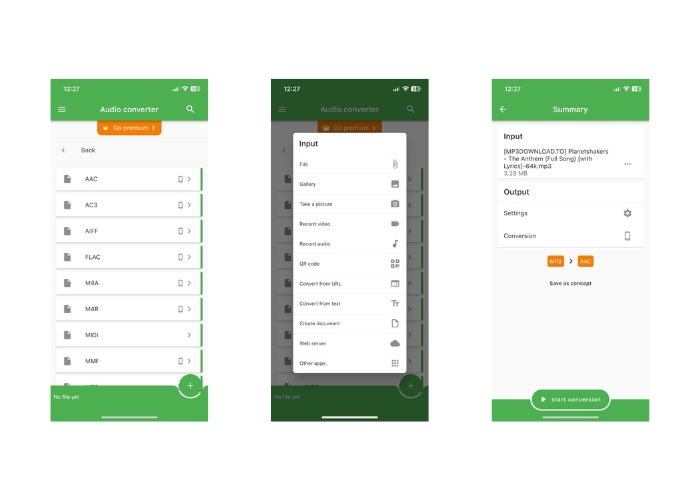
يمكن الوصول إلى File Converter على كل من أنظمة التشغيل iOS و Android ويسهل تحويل تنسيقات الملفات الصوتية المتنوعة ، مثل AAC و MP3. وبالتالي ، إذا كنت تبحث عن محول AAC إلى MP3 Android أو iOS ، فلا تبحث بعد ذلك. يوفر البرنامج تجربة سهلة الاستخدام ويقدم واجهة مبسطة لتسهيل التحويل الفوري والفعال للملفات.
الخطوة 1. ثبّت تطبيق File Converter على جهاز iOS أو Android الخاص بك.
الخطوة 2. شغّل التطبيق واختر خيار Audio converter من قائمة أنواع التحويل. بعد ذلك، اختر تنسيق الإخراج AAC من قائمة الخيارات المتاحة.
الخطوة 3. إذا كنت ترغب في ضبط معدل البت أو إعدادات التحويل الأخرى، يمكنك فعل ذلك من خلال النقر على زر Settings.
Start 4. بعد اختيار تنسيق الإخراج والإعدادات، انقر على زر start conversion لبدء عملية التحويل.
قراءة إضافية:
تحويل FLAC إلى MP3 مع الحفاظ على جودة الصوت
5 أدوات لقص ملفات MP3 لقص أي صوت بسهولة [تحديث 2023]
الجزء 4. أسئلة وأجوبة حول تحويل MP3 و AAC
هل من القانوني تحويل الملفات الصوتية المحمية بحقوق النشر؟
ليس قانونيًا بشكل عام تحويل الملفات الصوتية المحمية بحقوق الطبع والنشر دون إذن من صاحب حقوق النشر.
هل هناك قيود على استخدام أدوات التحويل المجانية؟
قد يكون لبعض أدوات التحويل المجانية قيود على حجم أو عدد الملفات التي يمكنك تحويلها وقد يكون لها أيضًا خيارات تخصيص محدودة.
هل يمكنني تحويل ملفات الصوت إلى تنسيقات أخرى إلى جانب AAC و MP3؟
نعم ، هناك العديد من تنسيقات الملفات الصوتية الأخرى التي يمكنك التحويل إليها ، بما في ذلك WAV و FLAC و OGG والمزيد.
خاتمة
قد يكون امتلاك القدرة على التحويل بين صيغتي AAC وMP3 أمرًا بالغ الأهمية في المواقف التي تتضمن مشغلات وسائط وأجهزة متنوعة. توجد عدة أدوات يمكن استخدامها لتحويل AAC إلى MP3 أو MP3 إلى AAC، ولكل منها مزاياها وعيوبها الخاصة.
-
 5 محرري البيانات الوصفية المخصصين لـ AAC يجب أن تعرفهم [2023]
 تعرف على محرر البيانات الوصفية AAC الأكثر شيوعًا والذي يمكنك استخدامه والمتوفر في هذه المقالة. تم اختيار جميع الأدوات ومراجعتها بعمق لتزويدك بالحقائق.
-
 كيفية تحويل MP3 إلى M4A لتحسين جودة الصوت
 قم بتحسين جودة ملفات الموسيقى الخاصة بك عن طريق تحويل MP3 إلى M4A من خلال النصائح والحيل الخبيرة لدينا. يقدم دليلنا إرشادات خطوة بخطوة والبرامج الموصى بها.
-
 محولات استثنائية من MP3 إلى AIFF لنظامي التشغيل Windows و Mac
 سيرشدك هذا البرنامج التعليمي خلال كل مرحلة من مراحل تحويل MP3 إلى AIFF باستخدام أدوات موثوقة. قم بزيارتهم لمعرفة المزيد.
